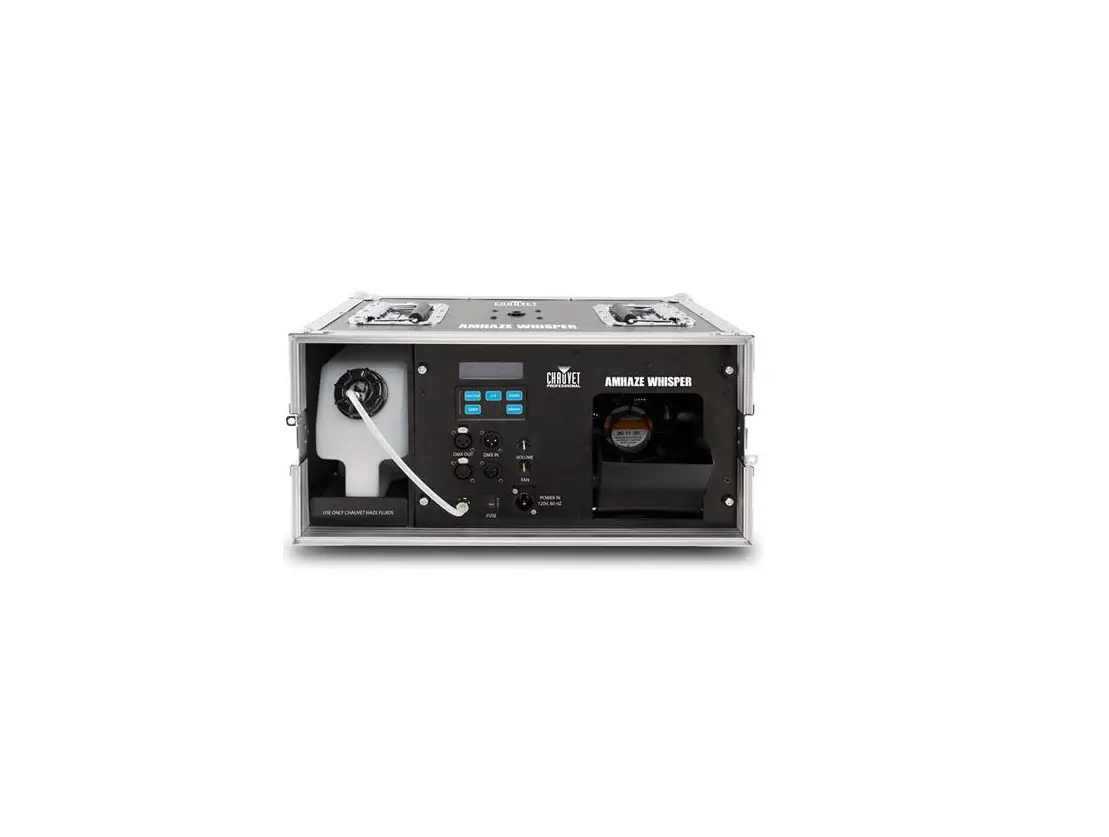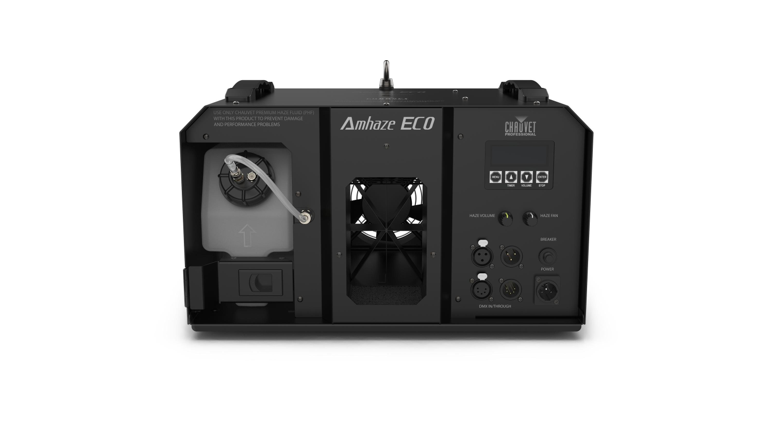

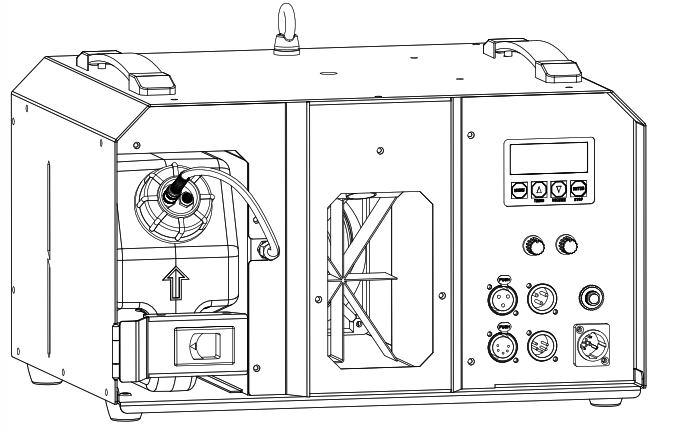
Model ID: AMHAZEECO
220AMHAZEECO

Edition Notes
The AmHaze ECO User Manual includes a description, safety precautions, installation, programming, operation and maintenance instructions for the AmHaze ECO as of the release date of this edition.
Trademarks
CHAUVET, the Chauvet logo and AmHaze ECO are registered trademarks or trademarks of Chauvet & Sons, LLC (d/b/a Chauvet and Chauvet Lighting) in the United States and other countries. Other company and product names and logos referred to herein may be trademarks of their respective companies.
Copyright Notice
The works of authorship contained in this manual, including, but not limited to, all design, text and images are owned by Chauvet. 0 Copyright 2021 Chauvet & Sons, LLC. All rights reserved. Electronically published by Chauvet in the United States of America.
Manual Use
Chauvet authorizes its customers to download and print this manual for professional information purposes only. Chauvet expressly prohibits the usage, copy, storage, distribution, modification, or printing of this manual or its content for any other purpose without written consent from Chauvet.
Document Printing
For best results, print this document in color, on letter size paper (8.5 x 11 in), double-sided. If using A4 paper (210 x 297 mm), configure the printer to scale the content accordingly.
Intended Audience
Any person installing, operating, and/or maintaining this product should completely read through the guide that shipped with the product, as well as this manual, before installing, operating, or maintaining this product.
Disclaimer
Chauvet believes that the information contained in this manual is accurate in all respects. However, Chauvet assumes no responsibility and specifically disclaims any and all liability to any party for any loss, damage or disruption caused by any errors or omissions in this document, whether such errors or omissions result from negligence, accident or any other cause. Chauvet reserves the right to revise the content of this document without any obligation to notify any person or company of such revision, however, Chauvet has no obligation to make, and does not commit to making, any such revisions. Download the latest version from www.chauvetprofessional.com.
Document Revision
This AmHaze ECO User Manual is the 1st edition of this document. Go to www.chauvetprofessional.com for the latest version.
1. Before You Begin
What Is Included
• AmHaze ECO
• Quick Reference Guide
• Seetronic Powerkon IP65 power cord
Claims
Carefully unpack the product immediately and check the container to make sure all the parts are in the package and are in good condition. If the box or the contents (the product and included accessories) appear damaged from shipping, or show signs of mishandling, notify the carrier immediately, not Chauvet. Failure to report damage to the carrier immediately may invalidate your claim. In addition, keep the box and contents for inspection. For other issues, such as missing components or parts, damage not related to shipping, or concealed damage, file a claim with Chauvet within 7 days of delivery.
Text Conventions
Convention | Meaning |
| 1-512 | A range of values |
| 50/60 | A set of values of which only one can be chosen |
| Settings | A menu option not to be modified |
| <ENTER> | A key to be pressed on the product’s control panel |
Symbols
Symbol | Meaning |
 | Critical installation, configuration, or operation information. Not following these instructions may make the product not work, cause damage to the product, or cause harm to the operator. |
 | Important installation or configuration information. The product may not function correctly if this information is not used. |
 | Useful information. |
The term “DMX” used throughout this manual refers to the USITT DMX512-A digital data transmission protocol.
Safety Notes
Read all the following safety notes before working with this product. These notes contain important information about the installation, usage, and maintenance of this product.This product contains no user-serviceable parts. Any reference to servicing In this User I Manual will only apply to properly trained, certified technicians. Do not open the housing or attempt any repairs.All applicable local codes and regulations apply to proper installation of this product.
Personal Safety
- Always disconnect the product from the power source before cleaning.
- Always connect the product to a grounded circuit to avoid the risk of electrocution.
- Do not touch the product’s housing when operating because it may be very hot.
- Do not drink the fluid.
- Do not allow the fluid to touch your skin or eyes.
- Do not use for space heating purposes.
- Do not touch the output nozzle on this product. It is very hot during operation and it may remain hot for several hours after turning the product off.
Mounting and Rigging
- This product is for indoor use only! To prevent risk of fire or shock, do not expose this product to rain or moisture. (IP20)
- CAUTION: When transferring product from extreme temperature environments, (e.g., cold truck to warm, humid ballroom) condensation may form on the internal electronics of the product. To avoid causing a failure, allow product to fully acclimate to the surrounding environment before connecting it to power.
- Mount this product in a location with adequate ventilation, at least 20 in (50 cm) from adjacent surfaces.
- Make sure there are no flammable materials close to the product when operating.
- When hanging this product, always secure to a fastening device using a safety cable.
- Only use the handles to carry this product.
Power and Wiring
- Make sure the power cord is not crimped or damaged.
- Always make sure you are connecting this product to the proper voltage in accordance with the specifications in this manual or on the product’s specification label.
- To eliminate unnecessary wear and improve its lifespan, during periods of non-use completely disconnect the product from power via breaker or by unplugging it.
- Never connect this product to a dimmer pack or rheostat.
- Never disconnect this product by pulling or tugging on the power cable.
Operation
- Drain the tank before transporting the product.
- Only use Chauvet (PHF) haze fluid or Grignard Pure.
- Do not add anything to the fluid.
- Do not operate this product if there is damage on the housing, hose, or cables. Have the damaged parts replaced by an authorized technician at once.
- Do not cover the ventilation slots when operating to avoid internal overheating.
- The maximum ambient temperature is 113 T (45 °C). Do not operate the product at higher temperatures.
- The minimum startup temperature is -4°F (-20°C). Do not start the product at lower temperatures.
- The minimum ambient temperature is -22°F (-30°C). Do not operate the product at lower temperatures.
- In the event of a serious operation problem, stop using this product immediately!
If your Chauvet product requires service, contact Chauvet Technical Support.
2. Introduction
Description
The AmHaze ECO is a professional water-based haze machine that delivers high output while utilizing economic fluid consumption. With a 30-second heat-up time and continuous output that doesn’t require reheating, a single fluid container at the maximum output of 120 cfm will last over 8 hours. Easily control the output and fan speed via DMX or on the onboard control knobs. The AmHaze ECO comes ready to rest on the floor and is also equipped with M12 threaded inserts for truss clamps, an easy way to mount the 251b machine. The AmHaze ECO combines high output with efficient operation for a complete atmosphere solution for medium to large venues.
Features
- Professional water-based haze machine
- 30-sec heat up time nearly eliminates wait time for operation
- Continuous output with no reheating required
- Tour-ready with a rugged road case and M12 threaded insert for truss clamps
- Efficient fluid consumption lasts more than 8 hours on a single fluid container
- Achieve continuous variable haze output and blower speed, adjusted via DMX or manual knobs
Product Overview
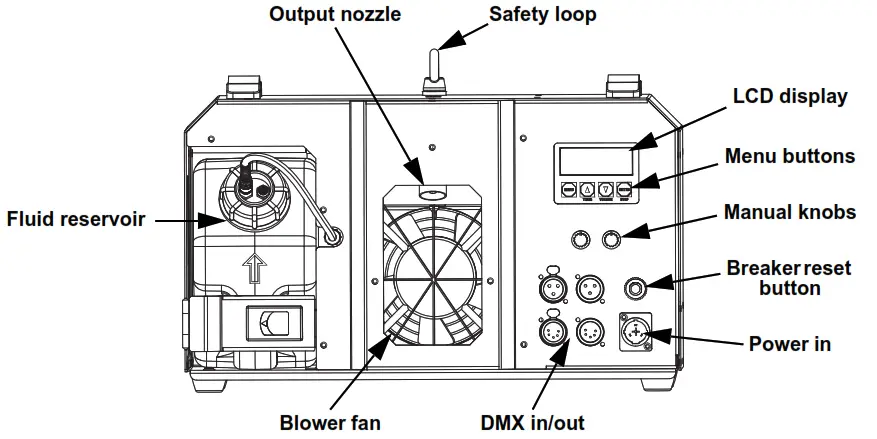
Product Dimension
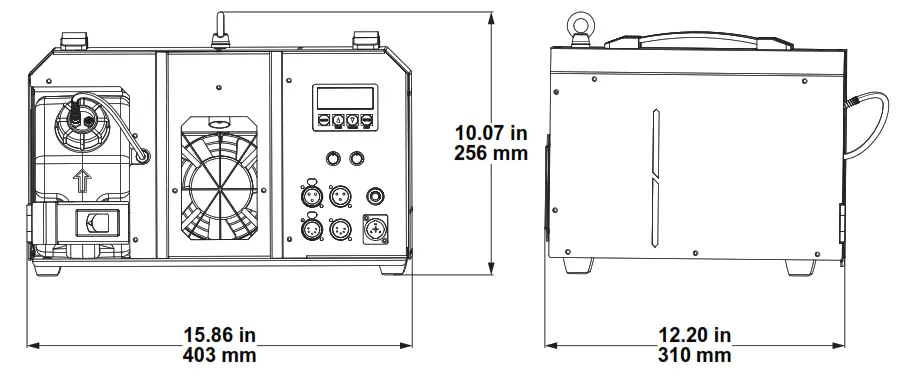
3. Setup
AC Power
The AmHaze ECO has a fixed power supply that works with an input voltage of either 120 VAC, 60 Hz or 230 VAC, 50 Hz, depending on the specific model. To determine the product’s power requirements (circuit breaker, power outlet, and wiring), use the current value listed on the label affixed to the product’s back panel, or refer to the product’s specifications chart. The listed current rating indicates the product’s average current draw under normal conditions.
• Always connect the product to a protected circuit (a circuit breaker or fuse). Make sure the product has an appropriate electrical ground to avoid the risk of electrocution or fire. To eliminate unnecessary wear and improve its lifespan, during periods of non-use completely disconnect the product from power via a breaker or by unplugging it. Never connect the product to a rheostat (variable resistor) or dimmer circuit, even if the rheostat or dimmer channel serves only as a 0 to 100% switch.
AC Plug
The AmHaze ECO comes with a power input cord terminated with a Seetronic Powerkon A connector on one end and an Edison plug on the other end (U.S. market). If the power input cord that came with your product has no plug, or if you need to change the plug, use the table below to wire the new plug.
| Connection | Wire (U.S.) | Wire (Europe) | Screw Color |
| AC Live | Black | Brown | Yellow or Brass |
| AC Neutral | White | Blue | Silver |
| AC Ground | Green/Yellow | Green/Yellow | Green |
Resetting the Breaker
This product is equipped with a resettable circuit breaker. If the breaker trips, all sections of this product will lose power.
- Remove the power cord from mains power.
- Allow unit to cool for 15 minutes.
- After 15 minutes, you may attempt to reset the breaker by pressing the button with your finger.
- Plug the product’s power cord into the power outlet and continue using as recommended.
DMX Linking
You can link the AmHaze ECO to a DMX controller using a 3- or 5-pin DMX connection. If using other DMX-compatible products with this product, you can control each individually with a single DMX controller.
DMX Personalities
The AmHaze ECO uses a 3- or 5-pin DMX data connection for the 3-channel DMX personality. If you are not familiar with or need more information about DMX standards, Master/Slave connectivity, or the DMX cables needed to link this product to a DMX controller, download the DMX Primer from the Chauvet website: www.chauvetprofessional.com.
Remote Device Management (RDM)
Remote Device Management, or RDM, is a standard for allowing DMX-enabled devices to communicate bi-directionally along existing DMX cabling. Check the DMX controller’s User Manual or with the manufacturer as not all DMX controllers have this capability. The AmHaze ECO supports RDM protocol that allows feedback to make changes to menu map options.
Mounting
Before mounting the product, read and follow the safety recommendations indicated in the Safety Notes. For our CHAUVET Professional line of mounting clamps, go to http://trusst.com/products/.
Orientation
Always mount this product in a safe position, making sure there is adequate room for ventilation, configuration, and maintenance.
Rigging
Chauvet recommends using the following general guidelines when mounting this product.
• Before deciding on a location for the product, make sure there is easy access to the product for maintenance and programming purposes.
• Make sure that the structure onto which you are mounting the product can support the product’s weight. See the Technical Specifications for weight information.
• When mounting the product overhead, always use a safety cable. Mount the product securely to a rigging point, whether an elevated platform or a truss.
• When rigging the product onto a truss, use a mounting clamp of appropriate weight capacity.
Procedure
The AmHaze ECO comes with a bracket to which you can attach a mounting clamp directly. Mounting clamps are sold separately. Make sure the clamps are capable of supporting the weight of this product. Use at least two mounting points per product. For the CHAUVET Professional line of mounting clamps, go to http://www.trusst.com/products.
Mounting Diagram
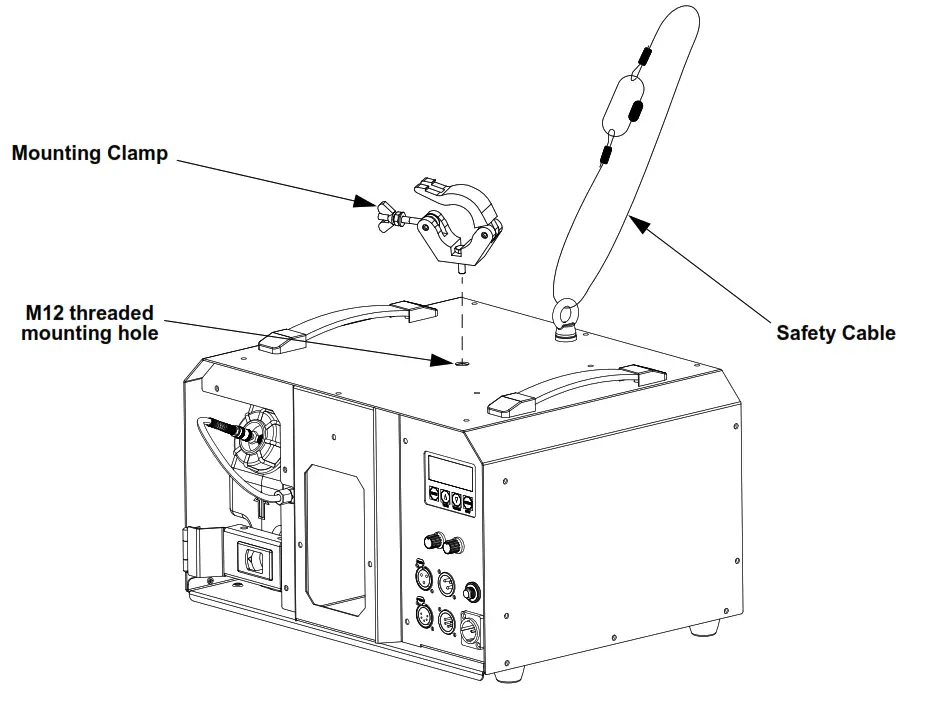
4. Operation
Control Panel Description
Button | Function |
| <MENU> | Exits from the current menu or function |
| <UP/TIMER> | UP navigates upwards through the menu list and increases the numeric value when in a function. TIMER starts the timer controlled operation. |
| <DOWNNOLUME> | DOWN navigates downwards through the menu list and decreases the numeric value when in a function. VOLUME triggers the pump to modify the output volume. |
| <ENTER/STOP> | ENTER enables the currently displayed menu or sets the currently selected value into the selected function. STOP turns the fog output off. |
| HAZE FAN knob | Manually controls the fan speed, 0-100% |
| HAZE VOLUME knob | Manually controls the haze volume, 0-100% |
Control Options
Set the AmHaze ECO starting address in the 001-510 DMX range. This enables control of up to 170 products.
Programming
Refer to the Menu Map to understand the menu options. The menu map shows the main level and a variable number of programming levels for each option.
• To go to the desired main level, press <MENU> repeatedly until the option shows on the display. Press <ENTER> to select. This will take you to the first programming level for that option.
• To select an option or value within the current programming level, press <UP> or <DOWN> until the option shows on the display. Press <ENTER> to select. In this case, if there is another programming level, you will see that first option, or you will see the selected value.
• Press <MENU> repeatedly to exit to the previous main level.
Refer to the AmHaze ECO product page on www.chauvetorofessional.com for the latest menu map.
Main Level | Programming Levels | Description |
| Haze Output | 1-100% | Haze volume 1-100% |
| Fan Speed | 1-100% | Fan speed (slow to fast) |
| Timer Interval | 5-6005 | Sets the interval of haze outputs |
| Timer Duration | 5-300S | Sets the duration of the haze output |
| DMX Address | 1-512 | Selects the DMX starting address |
| RDM-UID | —————- | Unique identification number |
| Fluid Sensor | ON | Turns the fluid sensor ON or OFF |
| OFF | ||
| AutoRun Last Setting | YES | YES Automatically set the values to previous selections |
| NO | ||
| Self-Clean & Shutdown | YES | The self-clean mode will begin counting down from 180 seconds to 4 seconds, then shut down after 3 seconds |
| NO | ||
| Auto Shutdown | ON | Turns off all function |
| OFF |
RDM chart
refer to the Amhaze ECO product page on www.chauvetprofessional.com for the latest RDM chart
| Category | RDM Parameter ID’s (Slots 21-22) | Value | Required | GET Allowed | SET Allowed | Chauvet | Detail |
| Network Management | DISC_UNIQUE_BRANCH | Ox0001 |  | | |||
| DISC_MU1 E | 0x0002 | | | ||||
| DISC_UN_MU f E | 0x0003 | | | ||||
| PROXIED_DEVICES | Ox0010 | | |||||
| PROXIED_DEVICE_COUNT | Ox0011 | | |||||
| COMMS_STATUS | 0x0015 | | | ||||
| Status Collection | QUEUED MESSAGE | 0x0020 | | | Fluid level Low, Fail to Heat | ||
| STATUS_MESSAGES | 0x0030 | | | Temperature | |||
| STATUS_ID_DESCRIPTION | 0x0031 | | | ||||
| CLEAR_STATUS _ID | 0x0032 | | | ||||
| SUB DEVICE STATUS REPORT TH_RESHOLD | 0x0033 | | | ||||
| RDM Information | SUPPOR1 ED_PARAMETERS | 0x0050 | | | | ||
| PARAME I ER_DESCRIPA ION | 0x0051 | | | | |||
| Product Information | DEVICE_INFO | 0x0060 | | | | ||
| PRODUCT DE TAIL ID LIST | 0x0070 | | |||||
| DEVICE_MODEL_DESCRIPTION | 0xow | | Amhaze ECo | ||||
| MANUFACTURER_LABEL | Ox0081 | | Chauvet Professional | ||||
| DEVICE_LABEL | 0x0082 | | | Am haze ECO | |||
| FACTORY_DEFAULTS | 0x0090 | | | ||||
| LANGUAGE_CAPABILITIES | Ox00A0 | | |||||
| LANGUAGE | Ox00B0 | | | ||||
| SOFIWARE_VERSION_LABEL | Ox00C0 | v | | ||||
| BOOT_SOF I WARE_VERSION_ID | Ox00C1 | | |||||
| BOOT SOF I WARE VERSION LAVEL | Ox00C2 | | |||||
| DMX512 Setup | DMX_PERSONALITY | Ox00E0 | | | | ||
| DMX PERSONAL! I Y DESCRIPI IONOx00E1 | | | |||||
| DMX START ADDRESS | Ox00F0 | v | | | | ||
| SLOT_INFO | 0x0120 | | | ||||
| SLOT_DESCRIPTION | 0x0121 | | | ||||
| DEFAULT_SLOT_VALUE | 0x0122 | | | ||||
| DMX BLOCK ADDRESS | 0x0140 | | | ||||
| DMX FAIL MODE | 0x0141 | | | | Retain last DMX values Reset all values to DMX-000 | ||
| DMX_STARTUP_MODE | 0x0142 | | | | No function Prime pump | ||
| Sensors | SENSOR _DEFINITION | 0x0200 | | | Min Value(C) Max Value (C) | ||
| SENSOR_VALUE | 0x0201 | | | | Display sensor value in C | ||
| RECORD SENSORS | 0x0202 | |
| Dimmer Settings | DIMMER_INFO | 0x040 | | ||||
| MINIMUM_LEVEL | 0x0341 | | |||||
| Maximum_level | 0x0342 | | |||||
| Curve | 0x0343 | | |||||
| CURVE_DESCRIPTION | 0x0344 | | |||||
| OUTPUT_RESPONSE_TIME | 0x0345 | | |||||
| OUTPUT_RESPONSE_TIME_DESCRIPTION | 0x0346 | | |||||
| MODULATION_FREQUENCY | 0x0347 | | |||||
| MODULATION FREQUENCY_DESCRIPTION | 0x0348 | | |||||
| Power Settings | DEVICE_HOURS | 0x0400 | | | Total Runtime for life of product | ||
| LAMP_HOURS | Ox0401 | | | Shows the runtime since last cleaning cycle was performed. Resets once Cleaning | |||
| LAMP_ STRIKES | 0x0402 | | |||||
| LAMP _STATE | 0x0403 | | |||||
| LAMP 0N MODE | 0x0404 | | |||||
| DEVICE_POWER_CYCLES | 0x0405 | | |||||
| BURN IN | 0x0440 | | |||||
| Display Settings | DISPLAY_ INVERT | 0x0500 | | | Normal/Inverted 180 | ||
| DISPLAY_ LEVEL | 0x0501 | ||||||
| Configuration | PAN_INVERT | 0x0600 | | | |||
| TILT INVERT | 0x0601 | | | ||||
| PAN TILT SWAP | 0x0602 | | | ||||
| REAL_TIME_CLOCK | 0x0603 | | | ||||
| PIN COCK | 0x0640 | | | ||||
| LOCK_STATE | 0x0641 | | | ||||
| LOCK STATE DESCRIPTION | 0x0642 | | | ||||
| Network Configuration | LIST_ INTERFACES | 0x0700 | | ||||
| INTERFACE_LABEL | 0x0701 | | |||||
| INTERFACE_HARDWARE_ADDRESS_TYPE1 | 0x0702 | ||||||
| IPV4_DHCP_MODE | 0x0703 | | | ||||
| IPV4_ZEROCONF MODE | 0x0704 | | | ||||
| IPV4_CURRENT ADDRESS | 0x0705 | | |||||
| IPV4 STATIC_ADDRESS | 0x0706 | | | ||||
| INTERFACE_RENEW DHCP | 0x0707 | | |||||
| INTERFACE_RELEASE_DHCP | 0x0708 | | |||||
| INTERFACE_APPLY_CONFIGURATI ON | 0)(0709 | | |||||
| IPV4 DEFAULT ROWE | Ox070A | | | ||||
| DNS IPV4 NAME SERVER | Ox07013 | | | ||||
| DNS HOSINAME | OX070C | | | ||||
| DNS DOMAIN NAME | OX010D | |
| IDENTIFY DEVICE | 0x1000 | | | | |||
| RESET DEVICE | 0x1001 | | | Yes/No | |||
| POWER STATE | 0x1010 | | | ||||
| Control | PERFORM SELFIEST | 0x1020 | | | | Primes Unit | |
| SELF TEST DESCRIPTION | 0x1021 | | Primes Unit | ||||
| CAP1 URE PRESET | 0x1030 | | |||||
| PRESET PLAYBACK | 0x1031 | | | ||||
| IDENTIFY MODE | 0x1040 | | | ||||
| PRESET INFO | 0x1041 | | |||||
| PRESET STATUS | 0x1042 | | | ||||
| PRESET MERGEMODE | 0x1043 | | | ||||
| POWER ON SELF TEST | 0x1044 | | |
Configuration (DMX)
Use control configurations to operate the product with a DMX controller.
Starting Address
Each product will respond to a unique starting address from the controller. All products with the same starting address will respond in unison. To set the starting address:
1. Go to the DMX Address main level.
2. Select the starting address (1-512).
• The highest recommended starting address is 510.
Control Channel Assignments and Values
3-Channel
| Channel | Function | Value | Percent/Setting |
| 1 | Fan speed | 000 ⇔ 010 | No function |
| 011 ⇔ 255 | 1-100% | ||
| 2 | Haze output | 000 ⇔ 010 | No function |
| 011 ⇔ 255 | 1-100% | ||
| 3 | Remote clean function | 000 ⇔ 151 | No function |
| 152 ⇔ 159 | Remote clean function | ||
| 160 ⇔ 255 | Standby mode |
Configuration (Standalone)
Haze Output
To adjust the haze output through the display menu:
1. Go to the Haze Output level.
2. Increase or decrease the value from 1-100%.
Fan Speed
To adjust the fan speed through the display menu:
1. Go to the Fan Speed level.
2. Increase or decrease the value from 1-100%.
Timer Interval
To adjust the interval of timed haze outputs through the display menu:
1. Go to the Timer Interval level.
2. Increase or decrease the value from 5-600S.
Timer Duration
To adjust the duration of timed haze outputs through the display menu:
1. Go to the Timer Duration level.
2. Increase or decrease the value from 5-300S.
Configuration (Settings)
RDM-UID
To view the RDM-UID of the product, go to the RDM-UID level.
Fluid Sensor
To enable or disable the fluid sensor function:
1. Go to the Fluid Sensor level.
2. Select from ON or OFF.
Auto Run Last Setting
To set the control values to the last ones used:
1. Go to the Auto Run Last Setting level.
2. Select from YES or NO.
Auto Shutdown
To shut all functions down:
1. Go to the Auto Shutdown level.
2. Select from ON or OFF.
5. Maintenance
Product Maintenance
Do not allow the haze machine to become clogged. After every 40 hours of continuous operation, use CHAUVET Fog Cleaner Quart (FCQ) through the system to prevent the accumulation of particulate matter in the heating element.
The recommended cleaning procedure is as follows.
1. Unplug the product from power.
2. Empty all fluid from the machine.
3. Add cleaning solution to the tank.
4. Connect the product to power and allow it to warm up.
5. Run the unit in a well-ventilated area until the tank is empty.
6. Refill with fluid to continue using the hazer. Run the machine briefly to clear any cleaning solution from the pump and heater.
• FCQ (Fog Cleaner Quart) was specifically developed by CHAUVET to clean your AmHaze ECO. Make sure you use FCQ regularly to increase the life of your hazer.
• Do not spin the fans using compressed air because you could damage the hazer.
• Test-run your AmHaze ECO on a monthly basis to achieve the best performance.
Storage
Before storing the hazer, run FCQ through the system as described in the cleaning procedure above; however, only follow steps 1 through 5. Do not refill the tank with fluid if storing the hazer. Cleaning the system prior to storage will help prevent any particles from condensing inside the pump or heater while not in use.
6. Technical Specifications
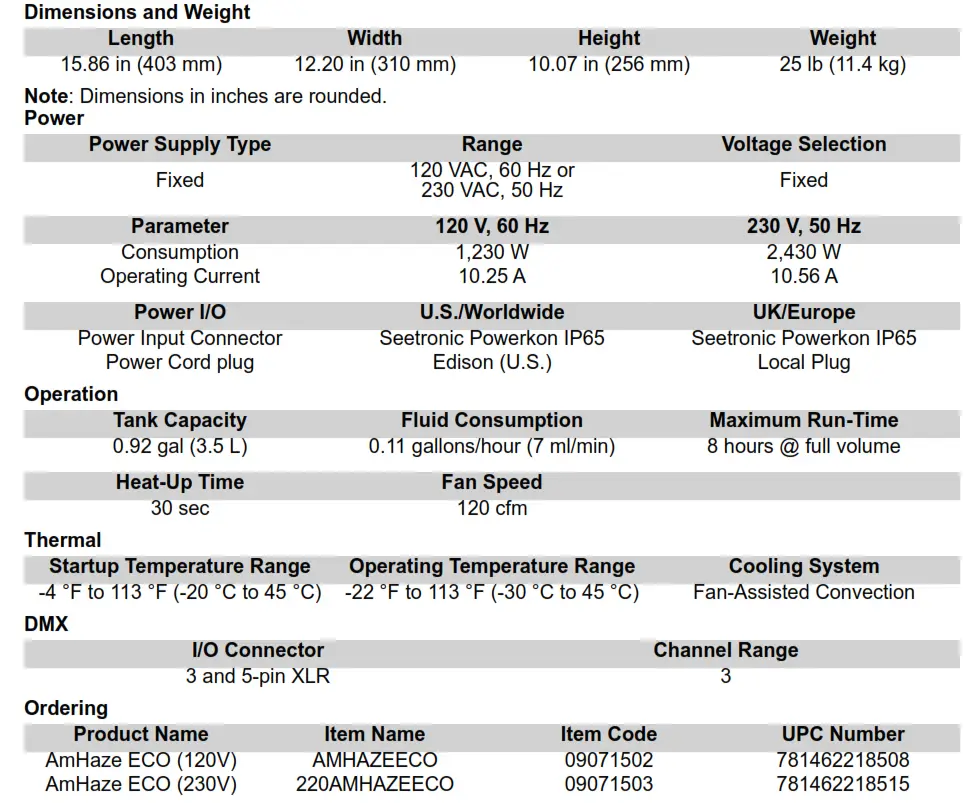

Returns
Send the product prepaid, in the original box, and with the original packing and accessories. Chauvet will not issue call tags.
Call Chauvet and request a Return Merchandise Authorization (RMA) number before shipping the product. Be prepared to provide the model number, serial number, and a brief description of the cause(s) for the return.
To submit a service request online, go to www.chauvetorofessional.com/service-reauest. Clearly label the package with an RMA number. Chauvet will refuse any product returned without an RMA number.
Write the RMA number on a properly affixed label. DO NOT write the RMA number directly on the box.
Before sending the product, clearly write the following information on a piece of paper and place it inside the box:
• Your name
• Your address
• Your phone number
• RMA number
• A brief description of the problem
Be sure to pack the product properly. Any shipping damage resulting from inadequate packaging will be your responsibility. FedEx packing or double-boxing are recommended.
Chauvet reserves the right to use its own discretion to repair or replace returned product(s).
Contact US
| General Information | Technical Support |
| Thauvet World Headquarters | |
| Address: 5200 NW 108th Ave. Sunrise, FL 33351 Voice: (954) 577-4455 Fax: (954) 929-5560 Toll Free: (800) 762-1084 | Voice: (844) 393-7575 Fax: (954) 756-8015 Email: chauvetcsechauvetlighting.com Website: www.chauvetprofessional.com |
| Chauvet Europe Ltd | |
| Address: Unit 1C Brookhill Road Industrial Estate Pinxton, Nottingham, UK NG16 6NT Voice: +44 (0) 1773 511115 Fax: +44 (0) 1773 511110 | Email: UKtechechauvetlighting.eu Website: www.chauvetprofessional.eu |
| Chauvet Europe BVBA | |
| Address: Stokstraat 18 9770 Kruishoutem Belgium Voice: +32 9 388 93 97 | Email: BNLtechechauvetlighting.eu Website: www.chauvetprofessional.eu |
| Chauvet France | |
| Address: 3, Rue Ampere 91380 Chilly-Mazarin France Voice: +33 1 78 85 33 59 | Email: FRtechechauvetlighting.fr Website: www.chauvetprofessional.eu |
| Chauvet Germany | |
| Address: Bruno-Biirgel-Str. 11 28759 Bremen Germany Voice: +49 421 62 60 20 | Email: DEtechechauvetlightinq.de Website: www.chauvetprofessional.eu |
| Chauvet Mexico | |
| Address: Av. de las Partidas 34 – 3B (Entrance by Calle 2) Zona Industrial Lerma Lerma, Edo. de Mexico, CP 52000 Voice: +52 (728) 690-2010 | Email: servicioechauvetcom.mx Website: www.chauvetprofessional.mx |
Visit the applicable website above to verify our contact information and instructions to request support. Outside the U.S., U.K., Ireland, Benelux, France, Germany, or Mexico, contact the dealer of record.