StarTech Com DK30C2DPEP DisplayLink Drivers Installation Guide
Installation
- Start the installer with administrative privileges: sudo ./displaylink-driver-x.x.x.xx.run
- If apt update has already been called, a prompt to update the package list is possible.


–or–
Proceed to package installation by pressing ENTER.
Note: The text presented may vary, based upon previously installed packages.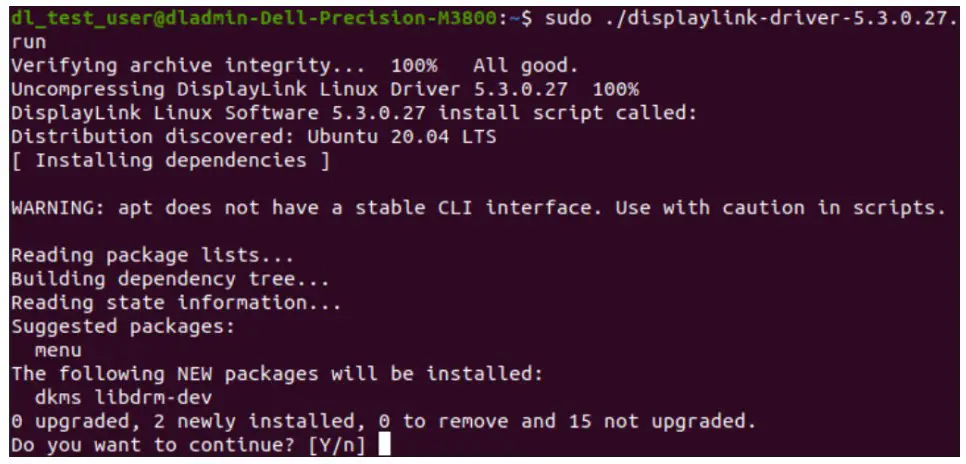
Packages required for the DisplayLink Driver:
- dkms
- Enable loading of EVDI module
- libdrm-dev
- Required due to libevdi being shipped as source code and build during the installation
Warnings
- The file permission may need to be changed before the driver installation. To change the file permission, enter the following:
Chmod +x displaylink-driver-x.x.x.xx.run
Note: X = driver file version.
- The installation process will stop if permissions to install dkms and libdrm-dev are not granted. Should this occur, restart the installation process and wait for dkms and libdrm-dev to install before proceeding to the next step.
–or–
Install dkms and libdrm-dev manually by entering the following:
sudo apt update
sudo apt install dkms
sudo apt install libdrm-dev
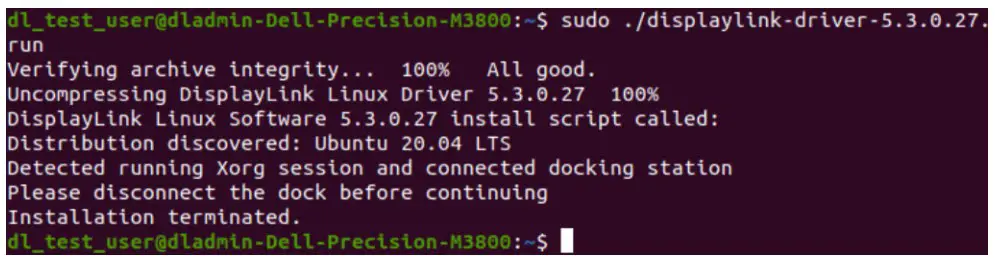
- If Xorg session is currently active, disconnect the Docking Station before proceeding with the installation. Failure to do so will result in an incomplete installation accompanied by the following messages:

- If Xorg session is currently active, a restart is required to complete the installation. Restart when prompted by the following message:

Notes: Press ENTER after entering Y.
Do not connect the Docking Station until the reboot has completed. Failure to do so may cause a failure/freeze of Xserver.

To view manuals, FAQs, videos, drivers, downloads, technical drawings, and more, visit www.startech.com/support.
 StarTech.com Support