
Important Notices
The LXNAV FlarmLed display is designed for VFR use only as an aid to prudent navigation. All information is presented for reference only. Information in this document is subject to change without notice. LXNAV reserves the right to change or improve their products and to make changes in the content of this material without obligation to notify any person or organization of such changes or improvements.
- A Yellow triangle is shown for parts of the manual which should be read carefully and are important for operating the LXNAV FlarmLed display
- Notes with a red triangle describe procedures that are critical and may result in loss of data or any other critical situation.
- A bulb icon is shown when a useful hint is provided to the reader.
Limited Warranty
This LXNAV FlarmLed display product is warranted to be free from defects in materials or workmanship for two years from the date of purchase. Within this period, LXNAV will, at its sole option, repair or replace any components that fail in normal use. Such repairs or replacement will be made at no charge to the customer for parts and labour, the customer shall be responsible for any transportation cost. This warranty does not cover failures due to abuse, misuse, accident, or unauthorized alterations or repairs.
THE WARRANTIES AND REMEDIES CONTAINED HEREIN ARE EXCLUSIVE AND IN LIEU OF ALL OTHER WARRANTIES EXPRESSED OR IMPLIED OR STATUTORY, INCLUDING ANY LIABILITY ARISING UNDER ANY WARRANTY OF MERCHANTABILITY OR FITNESS FOR A PARTICULAR PURPOSE, STATUTORY OR OTHERWISE. THIS WARRANTY GIVES YOU SPECIFIC LEGAL RIGHTS, WHICH MAY VARY FROM STATE TO STATE. IN NO EVENT SHALL LXNAV BE LIABLE FOR ANY INCIDENTAL, SPECIAL, INDIRECT OR CONSEQUENTIAL DAMAGES, WHETHER RESULTING FROM THE USE, MISUSE, OR INABILITY TO USE THIS PRODUCT OR FROM DEFECTS IN THE PRODUCT. Some states do not allow the exclusion of incidental or consequential damages, so the above limitations may not apply to you. LXNAV retains the exclusive right to repair or replace the unit or software, or to offer a full refund of the purchase price, at its sole discretion. SUCH REMEDY SHALL BE YOUR SOLE AND EXCLUSIVE REMEDY FOR ANY BREACH OF WARRANTY.
To obtain warranty service, contact your local LXNAV dealer or contact LXNAV directly.
Packing Lists
- FlarmLed display
- cable
Basics
LXNAV FlarmLed display at a Glance
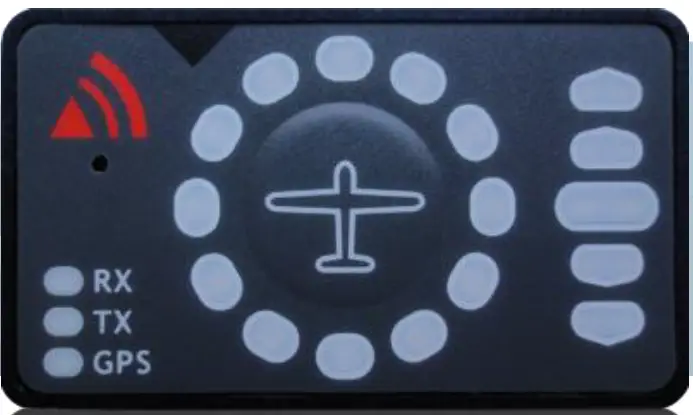
FlarmLed display is a Flarm® compatible device, able to indicate horizontal and vertical direction of a threat. Nearby traffic is displayed visually and acoustically. It’s extremely small size, low power consumption, and has very bright bicolor LED’s.
LXNAV FlarmLed display features
- extremely bright bicolor LEDs
- pushbutton, to adjust beep volume
- near mode function
- adjustable baud rate
- slave mode
- Low current consumption
Interfaces
- Serial RS232 input/output
- pushbutton
- 12 bicolor LEDs for direction
- 5 LEDs for vertical angle
- 3 LEDs for GPS, Rx and Tx indication
Technical Data
- Power input 3.3V DC
- Consumption 10mA@12V (120mW)
- Weight 10 g
- 42mm x 25mm x 5mm
System Description
Description of Flarm Led Display
Flarm led consist of 5 main parts:
- Status LEDs
- Horizontal direction LEDs
- Vertical direction LEDs
- Push button
- Beeper
Status LEDs
Status LEDs indicates if Flarm receiver receives any data, transmits data and GPS status. RX status led indicates that Flarm is receiving something from other Flarm units. TX status led indicates that Flarm is transmitting data. GPS status led has 3 different modes:
- Fast blinking mode, means, that FlarmLed does not receive anything over serial bus (probably needs to set correct baud rate)
- Slow blinking means, that GPS status is BAD
- Solid light means, that GPS status is OK.
Horizontal direction LEDs
12 horizontal LEDs are indicating the direction of threat.
Vertical direction LEDs
5 LEDs are describing vertical angle of threat divided by 14°
Push Button
With push button we can adjust volume of beep, turning on/off near mode or adjust initial settings of FlarmLed display.
Normal operation
In normal operation with short press, we can cycle between three different volumes (Low, Medium and High). With long press, is enabled or disabled near mode. Switching of mode is also visually supported with moving light around circle. Red moving light means, that near mode is enabled, yellow moving light means, that near mode is disabled.
WARNING Modus:
WARNING Mode will activate a red blinking diode, if another glider equipped with Flarm will be close and a prediction for a collision risk is calculated. An audio warning will be also executed. Higher collision risk will increase blinking frequency and audio beep rate. The warnings are classified into three levels (See Flarm manual for details on www.flarm.com)
- First level approximately 18 seconds before predicted collision
- Second level approximately 13 seconds before predicted collision
- Third level approximately 8 seconds before predicted collision
NEAREST Modus:
Will show the direction to the nearest glider, which´s position is inside of radio range. One yellow LED will light permanently and there will be no audio. The unit will change over to Warning Mode automatically, if warning criteria will be fulfilled and will continue in NEAREST after collision risk will disappear.
Obstacle warning
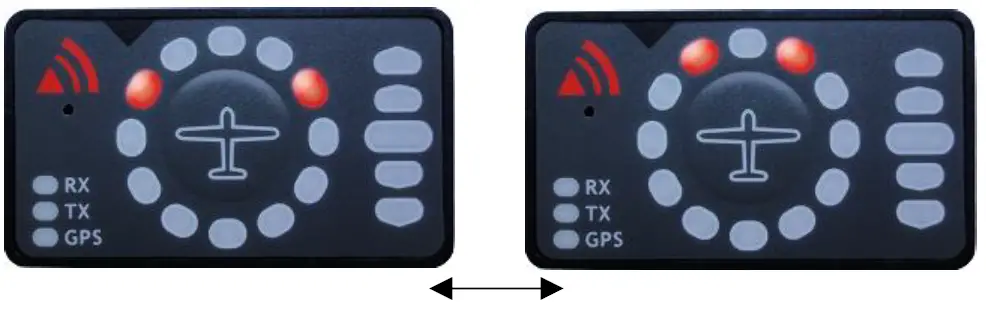
An obstacle warning will be activated, if an obstacle is to be found in the front of the glider and a collision risk is predicted. The warning is shown with two red LEDs, symmetrical around the 12 o´ clock LED at 10 and 2, they alternate with those at 11 and 1. As we approach to the obstacle the frequency of the alternation increases.
Undirected PCAS warning
Is the FlarmLED connected to a device, which also translates transponder signals with ADS-B data into Flarm warnings, you will receive them in the same logic as above. Transponder signals without ADS-B data contain no direction for the thread therefore you will get an undirected warning with the following alternating signals:
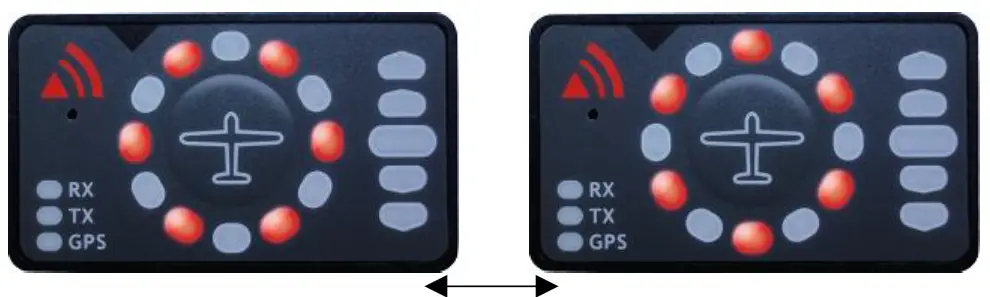
Powering up FlarmLed display
LXNAV FlarmLed is powered directly from flarm device with 3.3Volts. When gets power it passes boot up sequence with test of all LEDs and short beep, shows version of FlarmLed display firmware (yellow led indicated major version, red indicates minor version).
Setting up FlarmLed display
If we hold push button, during power on, LXNAV FlarmLed will go in setup mode, where is possible to adjust following settings:
- Communication speed
- Master/Slave mode
- Enable/disable PCAS warnings
Yellow led indicates mode that we are setting, Red LEDs indicates setting of each mode.
| Red 12 | Red 1 | Red 2 | Red 3 | Red 4 | Red 5 | ||
| Yellow 12 | Baud rate | 4800bps | 9600bps | 19200bps | 38400bps | 57600bps | 115200bps |
| Yellow 1 | Master/Slave | Master | Slave | / | / | / | / |
| Yellow 2 | PCAS | Enabled | Disabled | / | / | / | / |
This setup is prepared because some FLARMs are set to different baud rates, so it’s necessary also to set FlarmLed to same baud rate. Normally Flarm default baud rate is 19200bps, on that setting is also set FlarmLed display.
Master/Slave option is usable only if we have connected to flarm more than one Flarm led display. In that case display can interfere each other. Only one can be set to Master, all other must be set to slaves. Last setting enables or disables PCAS warnings, which might be sometimes very annoying. At the end, simply power down the system and settings will be stored into flarmled.
Other indications
The FlarmLED Display can indicate some further statuses:
Copying the IGC-file onto SD-card:
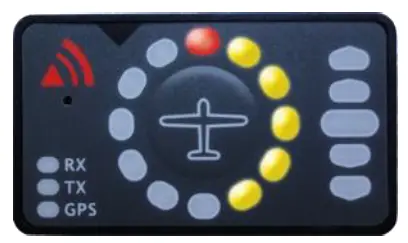
Running Flarm firmware update from SD-card
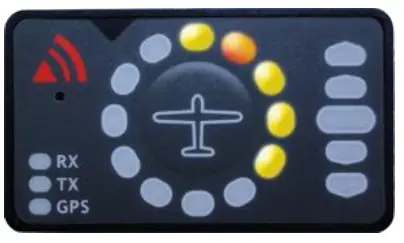
Copying the obstacle database from SD-card
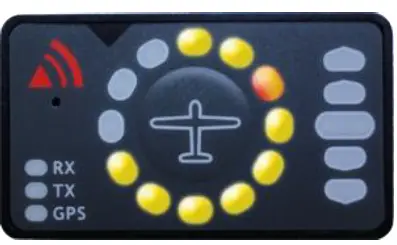
Error codes from flarm
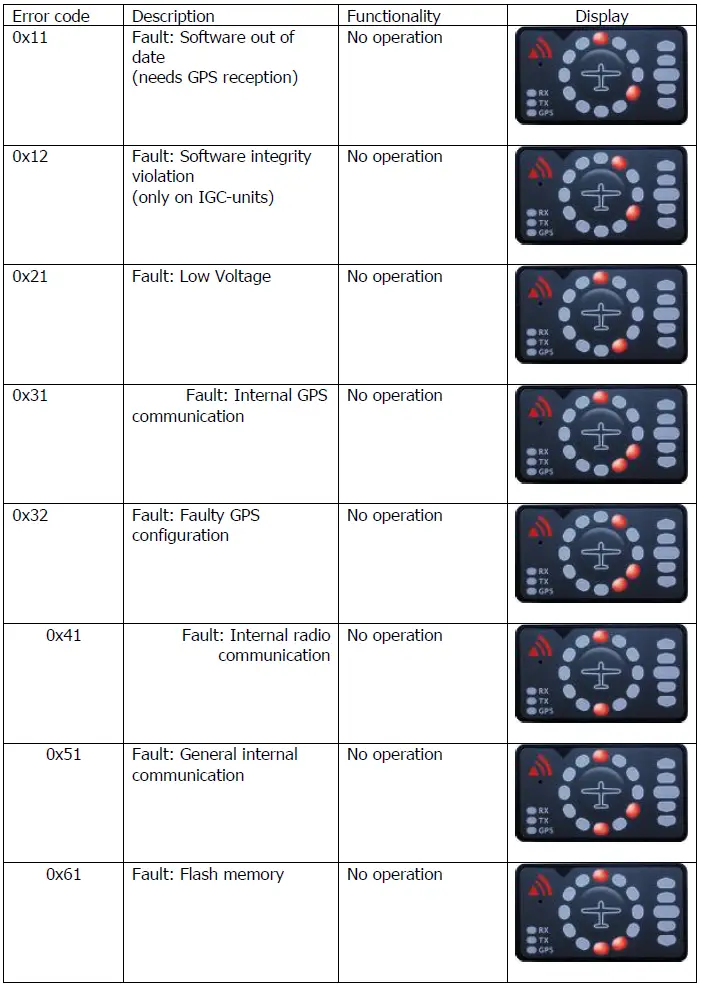
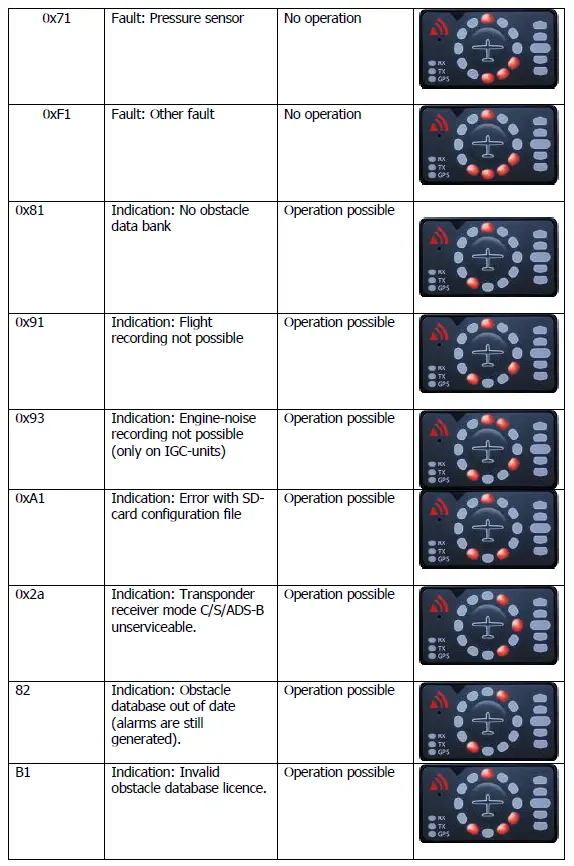
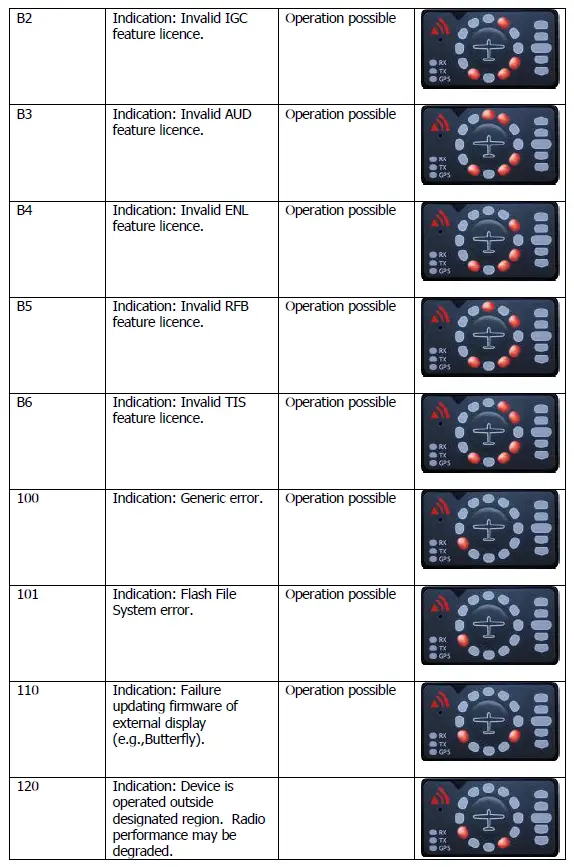
Wiring
FlarmLed pinout
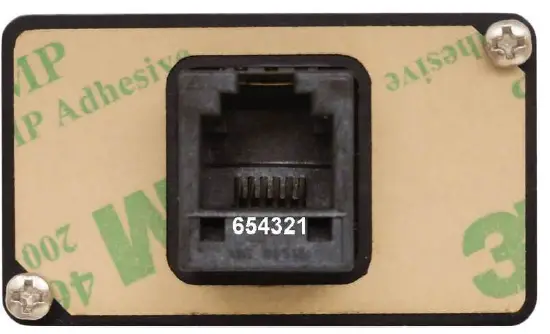
| Pin number | Description |
| 1 | N.C. |
| 2 | (output) Transmit from LXNAV FLARM LED RS232 Level |
| 3 | (input) Receive to LXNAV FLARM LED RS232 Level |
| 4 | Ground |
| 5 | 3.3V power supply (input) |
| 6 | N.C. |
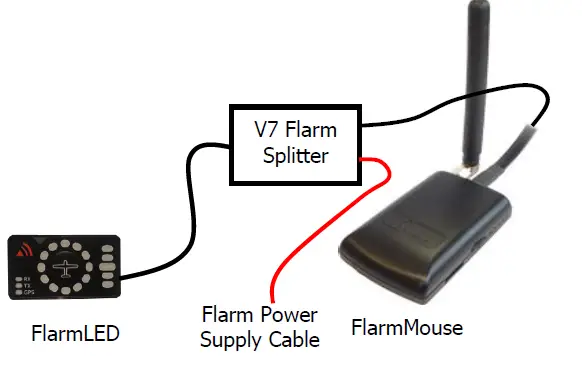
FlarmMouse – FlarmLED
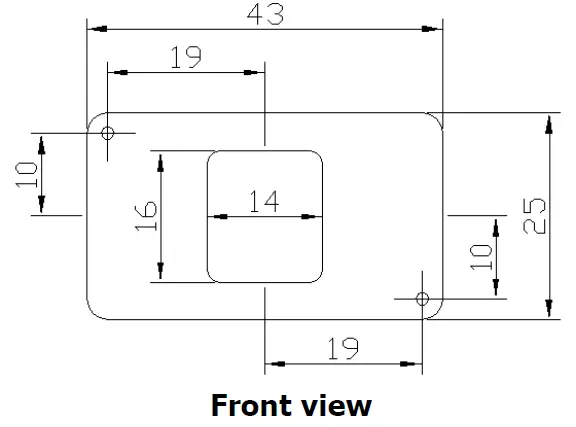
Cutout
Revision History
| Rev | Date | Comment |
| 1 | May 2013 | Initial release of owner manual |
| 2 | October 2013 | Added chapters 4.2 and 4. |
| 3 | March 2014 | Modified chapter 4.4 |
| 4 | May 2014 | Added error codes |
| 5 | May 2018 | Modified chapter 4.1.1 |
| 6 | January 2019 | Updated chapter 4.4 |
| 7 | January 2021 | Style update |
 FLARM Technology | Traffic awareness, collision avoidance, identification and tracking for General Aviation and UAVs
 LXNAV Gliding