
Bluetooth Infrared Thermometer
 MODEL: TET-351
User Manual
Rev.02
TGA Class IIa ARTG 338311
Thank you for purchasing FEVERTEL infrared forehead and ear thermometer. Please read through this manual before using the product.
Indication for use
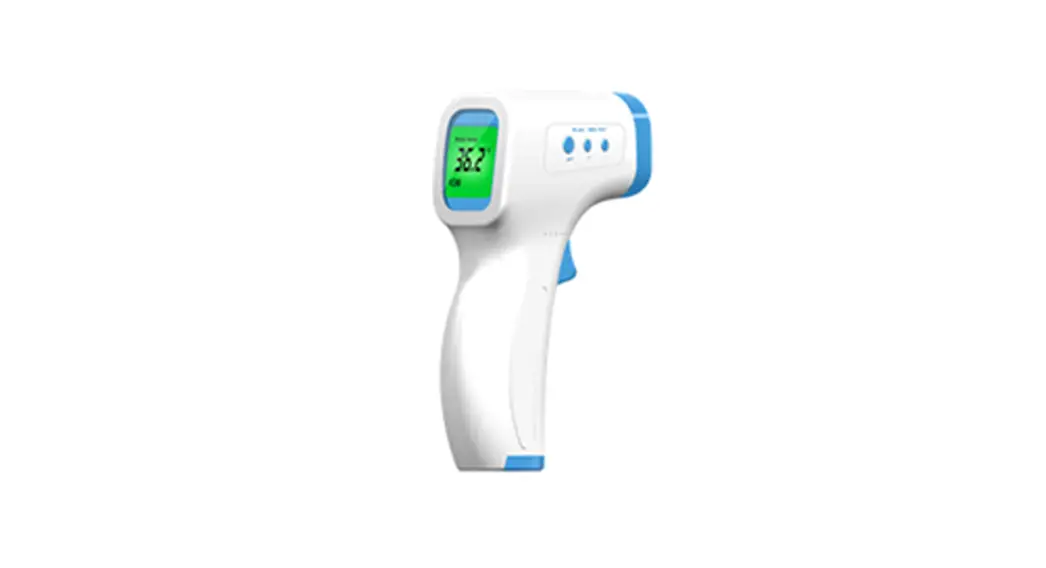
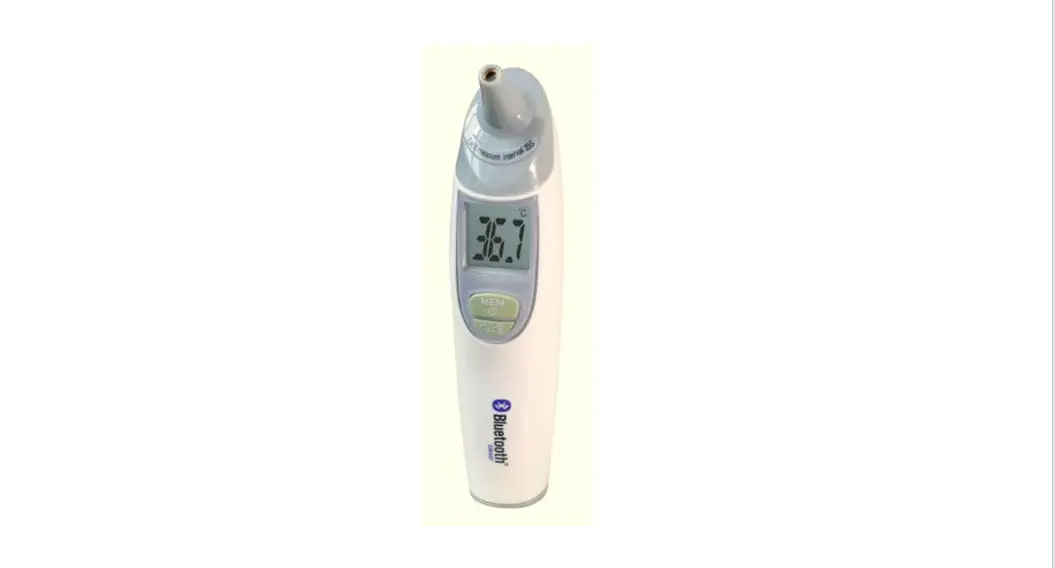
The several Bluetooth infrared Thermometer TET-351 is an electronic clinical thermometer using an infrared sensor to detect human body temperature from the auditory canal and from the forehead in the neonatal, pediatric, and adult population used in the home setting. The two thermometers include Bluetooth function, The measurement temperature can be transmitted out via Bluetooth signal
Cautions
- TET-351 is exclusively dedicated to taking ear or forehead temperature, We would like to reiterate that this appliance does not replace the device of a doctor. In case of doubt or fever, contact your doctor. The simple take of temperature cannot be considered as medical advice, DO NOT modify the proportion of any drugs prescribed by your doctor without seeking medical advice first.
- To ensure the reading is accurate, the probe must be absolutely clean.
- Do not use the thermometer if it has been dropped or shows any signs of damage or error.
- In cases of movement from one room to another, wait for half an hour minimum before using the appliance.
- Wait for half an hour after physical training, bathing, or eating before measuring temperature.
- Keep the thermometer out of reach of children.
- Do not expose the thermometer: * To any warm sources(radiator, sun rays), to dust or humidity.
- Never immerse the thermometer in liquid.
- Do not touch the lens with your fingers.
Normal body temperature range according to World HealthBODY TEMPERATURE:
| ear | 35.8oC – 38oC |
| Axillary | 34.7oC – 37.3oC |
| Oral | 35.5 C- 37.5C |
| Rectal | 36.6C – 38C |
Product Description
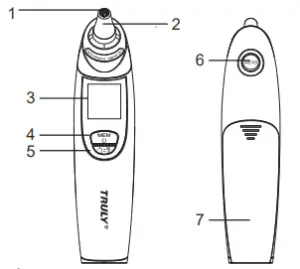
- Lens
- Probe
- LCD display
- Power/memory button
- Temperature mode button: ear or forehead
- Measurement button
- Battery cover
Ear Measurement
- Press Power/Memory button Ready signal beep + All display + last measurement result
 + Ready display
  The ” C” symbol is blinking.
 - Start measuring Pull ear smoothly to flatten ear canal and place the probe facing eardrum in a straight line. Press the measurement button until you hear the beep signal.
 + Ready display
  The ” C” symbol is blinking.
How to pull the ear
● For babies below 12 months: Pull ear smoothly backward.
● For children above 12 months old and adults: Pull ear smoothly upward.
3. Measurement result When the measurement is complete, the temperature will be displayed with a backlight.
4. Interval Between Measurements If you need to take another measurement, allow an interval of 15 seconds until the signal “ C ( F)” flashes. If you press the Measurement button within 15 seconds, the beep signal will be sounded.
5. The temperature is automatically recorded.
Connect iOS or Android device via Bluetooth
- Installation – Prior to first use, download and install the FeverTel application on your iOS or Android device with Bluetooth 4.0 capabilities
- Open the application and register your user name and password.
- You can add as many as 9 family members.
- To record temperature, first select member name in the drop-down box.
- To connect the device make sure the thermometer is switched on.
- Touch the scan tab and your device label GSH BH will show as connected.
- Take the temperature in the forehead or ear mode.
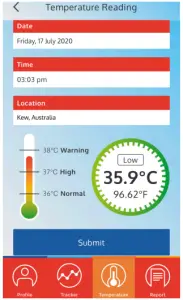
- You will be taken to the temperature reading page on the APP where your results are shown.
- Press submit to record the temperature of the selected member.
Correct Measurement Method
1. Ensure the probe is facing the eardrum in a straight line. Otherwise, the measured temperature will be lower than the actual body temperature. 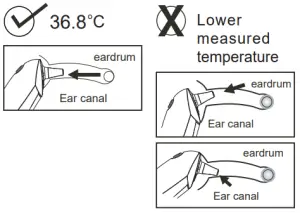
2. For accurate results, clean the probe with a cotton bud before measuring.
When the Measurement Result is Abnormal
1. Possible causes for high temperature:
- After exercise, meal, or crying.
- Staying in a high-temperature environment.
- Thermometer is taken out from a low-temperature environment.
Keep the thermometer at room temperature for at least 30 minutes before using it.
2. Possible causes for low temperature: - The probe is dirty.
- Just exposed in cold temperature environment before taking measurement.
- Forehead: The probe is not facing the forehead directly.
- The thermometer is pulled out from the ear before the measurement is complete.
- The probe is not fit snugly into the ear canal.
- The probe is not facing the eardrum or is not placed in a corrective position in the canal. See “Correct Measurement Method”.
- Excess ear wax build-up.
3. Temperatures measured from left and right ears are different: There could be a slight difference in temperatures when taken from both ears. Therefore, always take the temperature from the same ear.
Forehead measurement
- Turn on the thermometer.
- Press the button to select the forehead mode.
- Place the probe directly to the middle of the forehead, press the measurement button.
While taking the temperature, the - screen indicates an audible beeps sound.
Release the measurement button , - wait for the validation sound beep before removing the thermometer.
- Read the temperature on the screen.
- The temperature is automatically recorded.
- Interval time is the same as the ear mode.
Note: This temperature reading must be considered as an estimation. The temperature reading of the forehead can be influenced by environmental conditions because the probe is more sensitive to perspiration, sebum, physical activity, and environmental temperature. It is recommended that you wipe the forehead before taking a reading, In case of important differences or in any doubt, the ear measurement must be pointed out, we remind you that there is a significant difference between an ear temperature reading and a forehead temperature reading.
Contraindication
Do not place the probe on scarred tissue or tissue compromised by skin disorders; patients in trauma; patients treated with certain drug therapies; and do not place to probe skin exposed to direct sunlight heat, cold compress therapies, air conditioner flow, etc.
Memory function
This thermometer stores the last 30 temperature readings.
- When power is on, press the power/memory button to recall the first reading.
- Repeat pressing the power/memory button to recall the next reading.
- Delete memory: Press both power/memory and measurement buttons and hold for 3 seconds. The signal “Clr” is displayed and the memory will be deleted.
Unit ( o C/oF) Switch
When the product is in an off state, press and hold the “power/memory” button for 10 seconds until the display shows ” o C” or ” oF” alternately. Release the button when the display is showing your desired unit.
Replacing the Batteries
This thermometer is powered by 2 AAA batteries. When the power is low, a low battery signal is displayed. To replace batteries: 1. Press and push the battery cover to open it.
2. Remove the old batteries and replace them with new ones. Make sure the batteries are in the right polarity direction.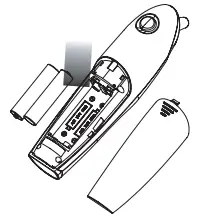
3. Close the battery cover.
Note: To protect the environment, dispose of empty batteries at your retail store or at appropriate collection sites according to national or local regulations.
Cleaning and care
- Use a soft, dry cloth to clean the exterior of the thermometer.
- Keep the thermometer away from direct sunlight, dust, and contamination environment.
- Store the thermometer at normal room temperature or within 10-40 oC.
FCC Statement
This equipment has been tested and found to comply with the limits for a Class B digital device, pursuant to part 15 of FCC Rules. These limits are designed to provide reasonable protection against harmful interference in a residential installation. This equipment generates and can radiate radio frequency energy and, if not installed and used in accordance with the instructions, may cause harmful interference to radio communications. However, there is no guarantee that interference will not occur in a particular installation. If this equipment does cause harmful interference to radio or television reception, which can be determined by turning the equipment off and on, the user is encouraged to try to correct the interference by one or more of the following measures:
Reorient or relocate the receiving antenna.
Increase the separation between the equipment and receiver. Connect the equipment into an outlet on a circuit different from that to which the receiver is connected. Consult the dealer or an experienced radio/TV technician for help.
This device complies with Part 15 of FCC Rules. Operation is subject to the following two conditions: (1)This device may not cause harmful interference, and (2)This device must accept any interference received, including interference that may cause undesired operation.
Note: The manufacturer is not responsible for any radio or TV interference caused by unauthorized modifications to this equipment. such modifications could void the user’s authority to operate this equipment.
Product Specifications
| Measurement method | Infrared measurement |
| Measurement range | 34-42.2°C |
| Accuracy | +/-0.2°C (ambient temp.16-35 °C) +/-0.3°C (ambient temp. 10-16°C, 35-40°C) |
| Measuring time | 1 second |
| Display | LCD display |
| Memory | Stores last 30 readings |
| Auto power off | 1 minute after not being used |
| Batteries | 2 x AAA batteries |
| Operation Environment: | 10-40’C, 15%-90%RH |
| Storage Environment: | -20- 50 C, 10%-95%RH |
| The pressure of the running | 70KPa-106KPa |
| Dimensions | 152 x 52 x 36 mm |
| Weight | 66g (not including batteries) |
Installing the APP
1) Download and install the Truly Healthcare App onto your Bluetooth 4.0 supported smart devices. The free Truly Healthcare App is available on the App Store for Apple devices and Google Play for Android-based devices.
2) Open the App on your smart device and follow the on-screen instructions to set up the user prole.
Display Message
| Display message | Situation | Solution |
 | Ambient temperature is out of operating range (10-40 o C) | Allow the thermometer remains at room temperature (10-40 C) for 30 minutes. o |
 | Sensor error | Contact the dealer. |
 | Memory error | Contact the dealer. |
 | Temperature measured is higher than normal human temperature range (above 42.2 )oC | Check the measured object and take a new measure. |
 | Temperature measured is lower than normal human temperature range (below 34 )oC | Check the measured object and take a new measure. |
 | Low battery | Replace batteries. |
 | The Ambient temperature is instability | Allow the thermometer remains at room temperature (10-40 C) for 30 minutes. |
Setting to permanent forehead mode
- Remove one battery.
- While pressing and holding the MEAS button and MEM button reinsert the battery.
- Continue holding buttons until the “Gold” is in the display.
- Release button.
- The Thermometer will remain in forehead mode.
- Repeat steps 1 – 5 to reset to dual mode.
This appliance conforms to the following standards:
EN60601-1: Medical electrical equipment
Part 1: General requirements for safety
EN12470-5: Clinical thermometers
Part 5: Performance of infrared ear thermometers (with maximum device)
93/42/EEC: Medical Device Directive
ASTM E 1965-98: Standard Specification for Infrared Thermometers for Intermittent Determination of Patient Temperature
 | Refer to the instructions |
 | Keep dry |
 | Type BF applied part |
 | The European Union flag FCC ID:2ABG7-TET351 |
 | General warning (not protect against the ingress of water) |
 | DISPOSAL: Do not dispose of this product as unsorted municipal waste. Collection of such waste separately for special treatment is necessary. |
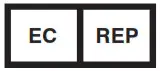 | The representatives of the European Union |
IP is short for Ingress Protection which means that Protection’s level.
Manufacturer: Truly Instrument Ltd.2/F, Chung Shun Knitting Centre,1-3 Wing Yip St., Kwai Chung, N.T., Hong Kong
Importer: Life spot Health Ltd Suite 103, Level 1, 2 Queen St, Melbourne 3000. Australia