PASONOMI X9 Plus Earbuds User Manual

Pasonomi Brand Pasonomi Earbuds be popular all over the world ,more and more customer get the earbuds they want! With large sales of the Pasonomi Wireless Earbuds,though the Pasonomi Earbuds come with the package,there are many people contact pasonomi customer service to resolve their problem when using Pasonomi Bluetooth Earbuds

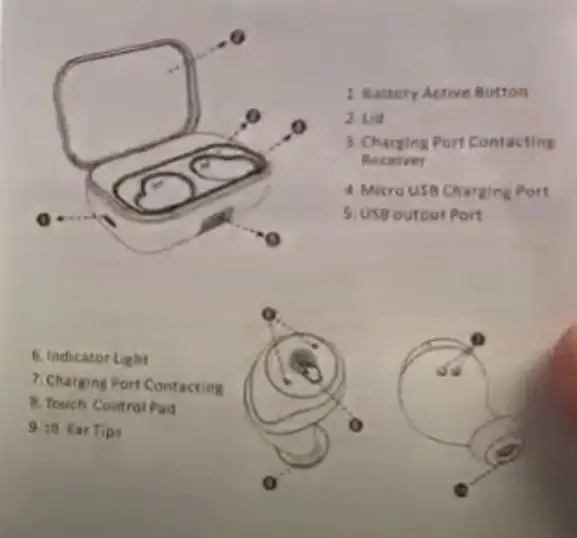
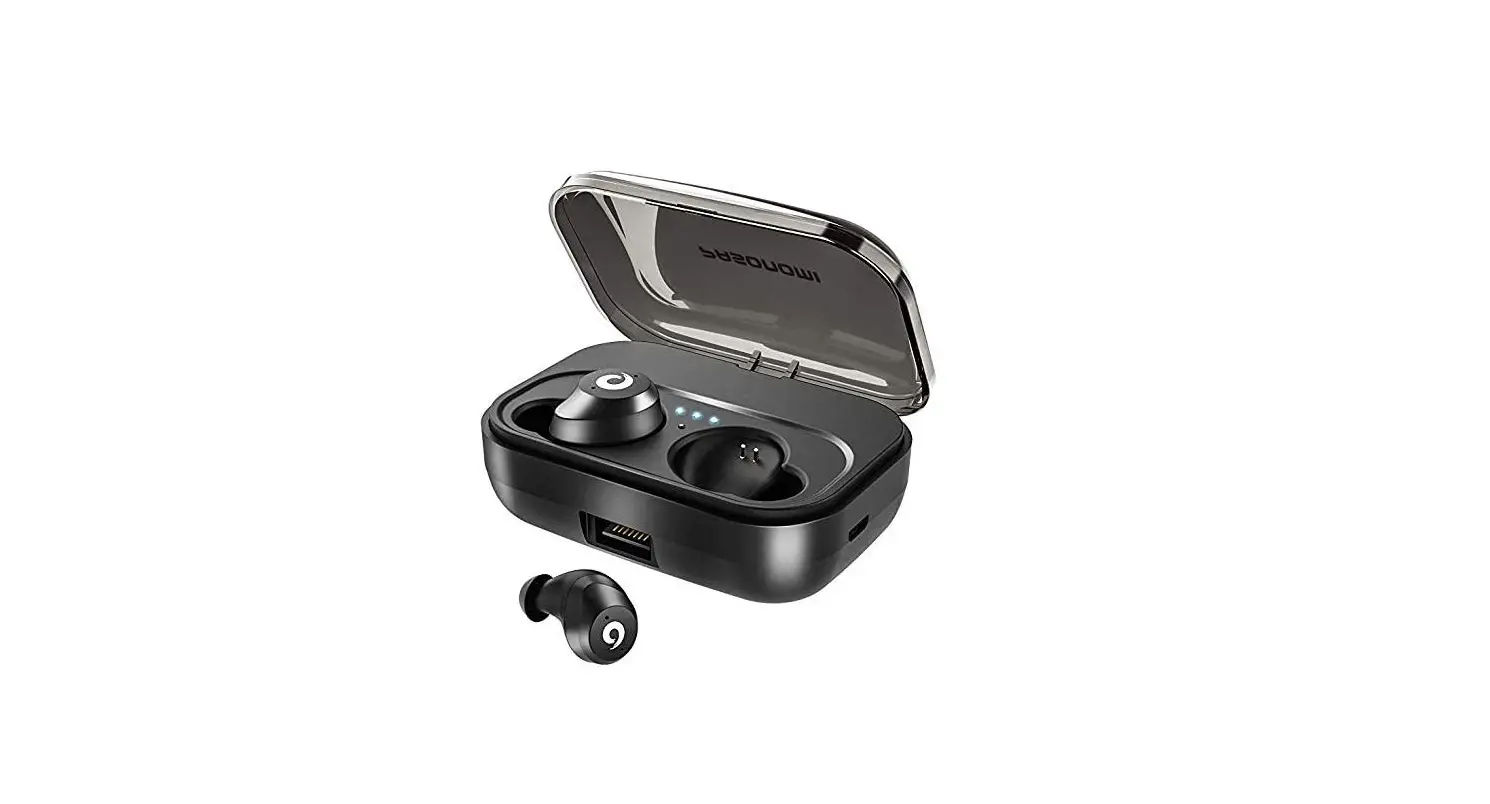
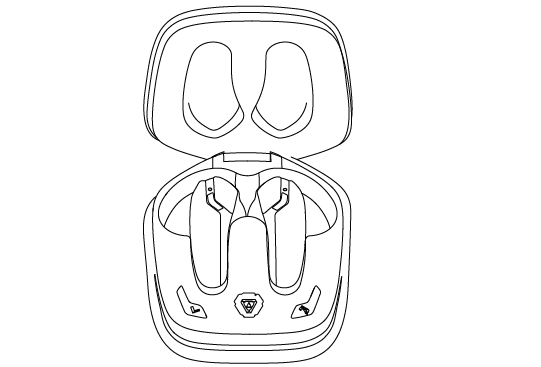
- Battery Active button
- LED
- Charging Port Contacting Receiver
- Micro USB Charging Port
- USB output port
- Indicator light
- Charging Port Contacting
- Touch Control Pad
- Ear Tips
Basic Operations
X9 Plus Touch Controls
Music:
- Play / Pause Music: Tap the Touch Control
- Previous : Double-tap the left one (Muti-Function Bud)
- Next: Double Tap the right one.
- Calling : Phone ring and sound can be heard from both earbphones
Calling Mode:
- Answer / End Phone Calling : Tap the touch pad.
- Reject a Call: Double – Tap the touch pad
Do Pasonomi Earbuds Have a Microphone
- Yes , it have a microphone, it could be used for phone calling
Power on & Power off
Power on:
- Take both out of the charging case and they will automatically power on and pair to each other.
- Remove two earphones from charging case unit and long press them until left on flash red and blue light,another one flash blue light slowly
Power off:
- Put in charging case,put earphones in charging ase and they will automatically power off.
Charging Pasonomi x9 Plus
Possible issue: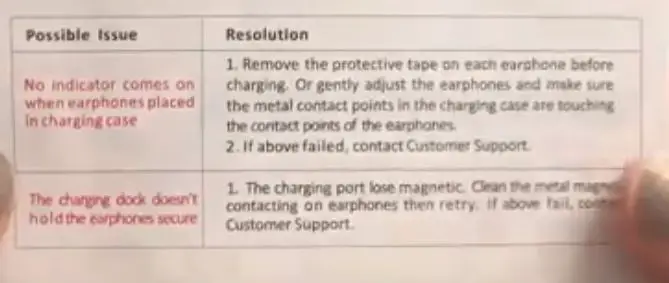
1. Pasonomi earbuds NO indicator comes on when placed in charging case
Resolution:
- Remove the protective tape on each earphone before charging.Or gently adjust the earbuds and make sure the metal contact points in the charging case are touching the contact points of the earbuds
- if above failed,contact customer support.
2. The charging dock doesn’t hold the earbuds secure
- The charging port lose magnetic ,clean the metal magnetic contacting on earbuds then retry.
- if above fail contact customer support
Indicator light status:
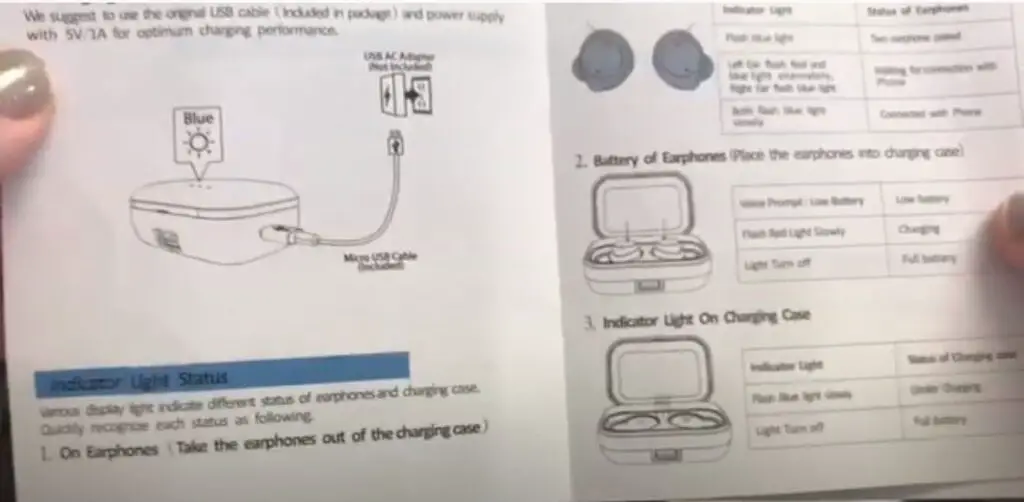
Light indicate different status of earphones and charging case.Quickly recognize each status as following.
1. On Earphones (Take the earphones out of the charging case)
- Indicator light status of earphones
- flash blue light two earbuds paired
- Left ear flash red and blue light alternately,right ear flash blue light
- Waiting for connection with phone
- Both flash blue light slowly Connected with phone
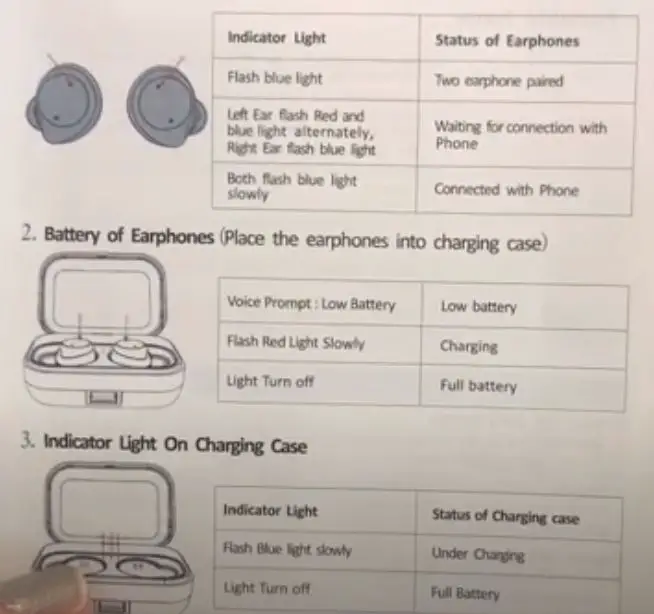
2. Battery of earphones (Place the earphones into charging case)
- Voice prompt: low battery Low battery
- Flash red light slowly charging
- Light Turn off Full Battery
3. Indicator light on charging case
- Indicator light Status of charging Case
- Flash blue light slowly under charging
- Light Turn off Full Battery
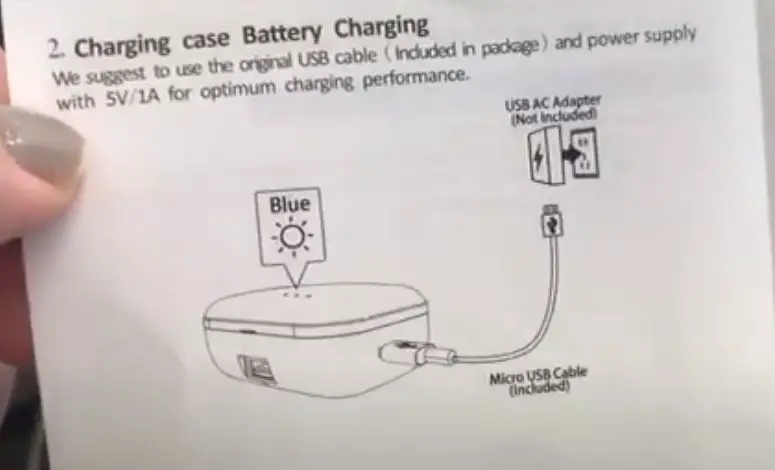
Charging Case / Battery Charging
- We suggest to use the original USB Cable (included in package) and power supply with 5V/1A for optimum charging performance
- USB AC Adapter (not include)
- Micro USB Cable (include)
Pasonomi Earbuds not Charging
- please watch this video carefully to resolve your problem
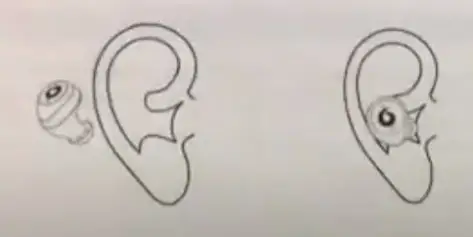
Wearing style
Our Special design offers six sizing options for great fit and wearing.Comfort. Choose use what ever size option is most comfortable to you (S,M,L) and follow the steps below.
- 1 Make sure the (R)(L) symbol is facing down (indicator light is facing down when place earbuds into ear)
- 2 Rotate the earphones until it fits snugly and is comfortable
Connecting and Pairing
1. Earphones Pairing
Place the two earphones into charging case to register them.
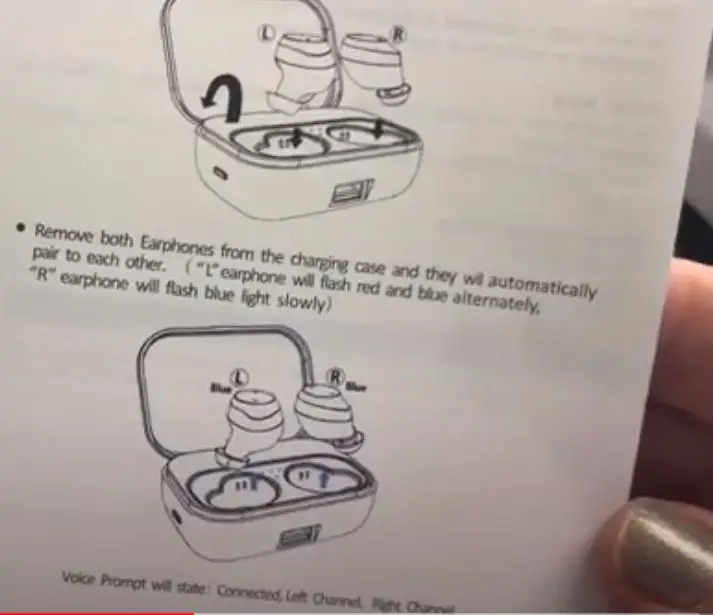
One Step Pairing:
Super fast and simple pairing process,you don’t need to press any buttons:
- Place the 2 Pasonomi earbuds into charging case to register Pasonomi X9 for a few seconds.
- Take out the two Pasonomi earbuds from the charging case and wait a few seconds,they will automatically pair to each other.(“L” earbuds will flash red and blue alternately, “R” earbuds will flash blue light slowly )
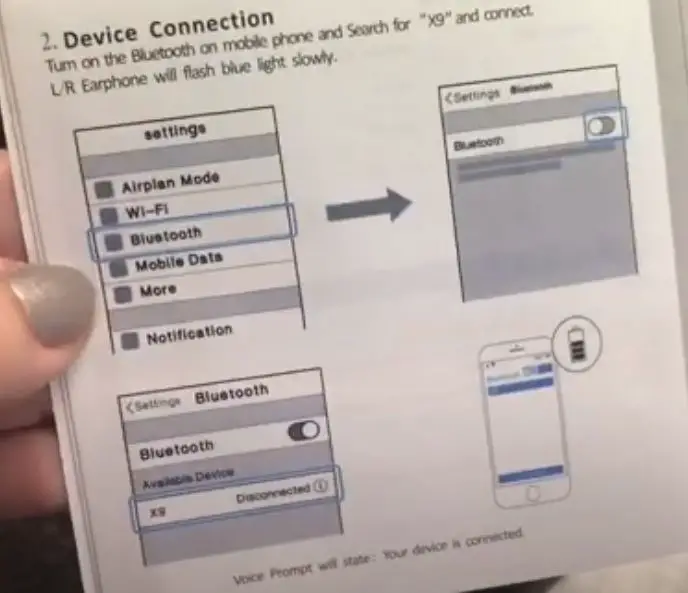
- Turn on the Bluetooth on mobile phone and search for ” X9 ” and connect. L/R earbuds will flash blue light slowly
- Pasonomi Earbuds Pairing complete!
Please remove the protective film for first use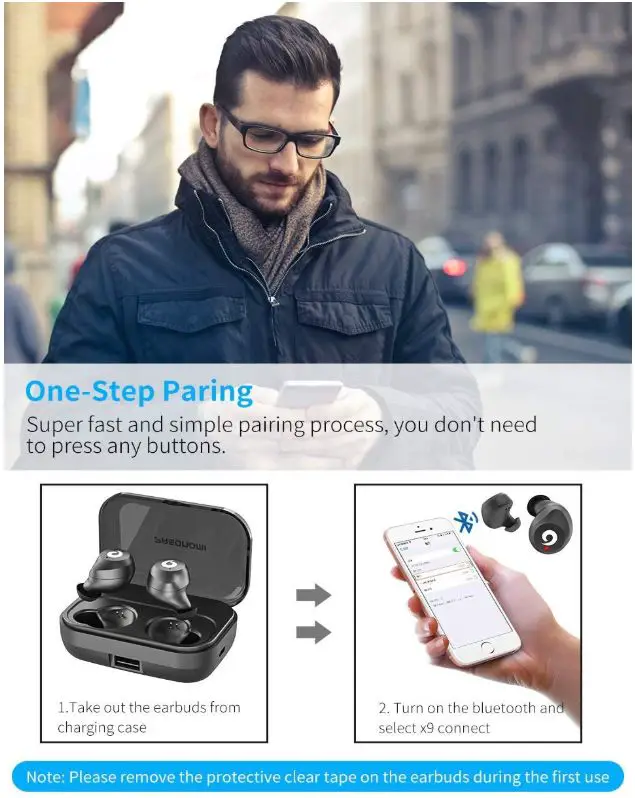
2. Device Connection
Pasonomi Earbuds Reset
Pasonomi Earbuds Reset Steps:
- Adjust the Pasonomi earbuds Position well in charging case and let them enter into charging mode,both flash red light;
- Continuous tap each Pasonomi X9 earbuds 3 times until flash blue light;
- Turn on Bluetooth on phone and forget the connected record “X9”,then turn off the Bluetooth on phone;
- Take the two Pasonomi earbuds out from charging case,then long press the earbuds until the indicator flash blue and red light alternative.
- Pasonomi X9 Reset complete!
- Waiting few seconds,the earbuds pair with each other automatically.
- Turn on bluetooh on phone,search for bluetooth name “X9” and connected.
Pasonomi X9 Repairing
Volume Control
Turn up Volume
- Long press the right one for volume up (only compatible with dual ear mode,individual mode doesn’t work).
- Long press the left one for volume down (only compatible with dual ear mode,individual mode doesn’t work).
Single Mode / Mono Mode
- Take an earphone out of the charging box
- Long press 5s until red and blue lights flash alternately
- Turn on the bluetooh in your phone and select device named X9 to pair
Please watching the video:
Music mode:
- Start / Pause: Single click on the earphone
- Next :Quick double click on the earbud
Pasonomi Earbuds Dual Ear Mode Switc
Watching more on youtube:
https://www.youtube.com/watch?v=EkQ3IXL8WYQ
- First,turn on the Bluetooth in your phone,find the device X9 that was connected before
- Then click on “forget this device” and turn off the Bluetooth
- When the red light of both sides are always on,quick click the earbuds continuously for 3 times until the red light flashes twice
- Repeat the operation on the other one
- Take out the earphone from the charging case,first long press one earbuds for 5s,until the red and blue light alternately
- Repeat the operation on the other one,Turn on the Bluetooth again and select the X9 pairing. Not it’s in the double
What is a MFB button?
- MFB button is stand for Multi-Function Button ,the touch pad on earbuds
How do I know when my earbuds are fully charged?
- When the 3 LED lights all lightning ,it will be full charged.
How do I turn off Pasonomi x9?
- Please put the Pasonomi earbuds into the Charging box,it will turn off automatically.
Pasonomi Customer Service
If you Pasonomi earbuds buy from Amazon US you could contact amazon
They will gives you a satisfied solution Please click