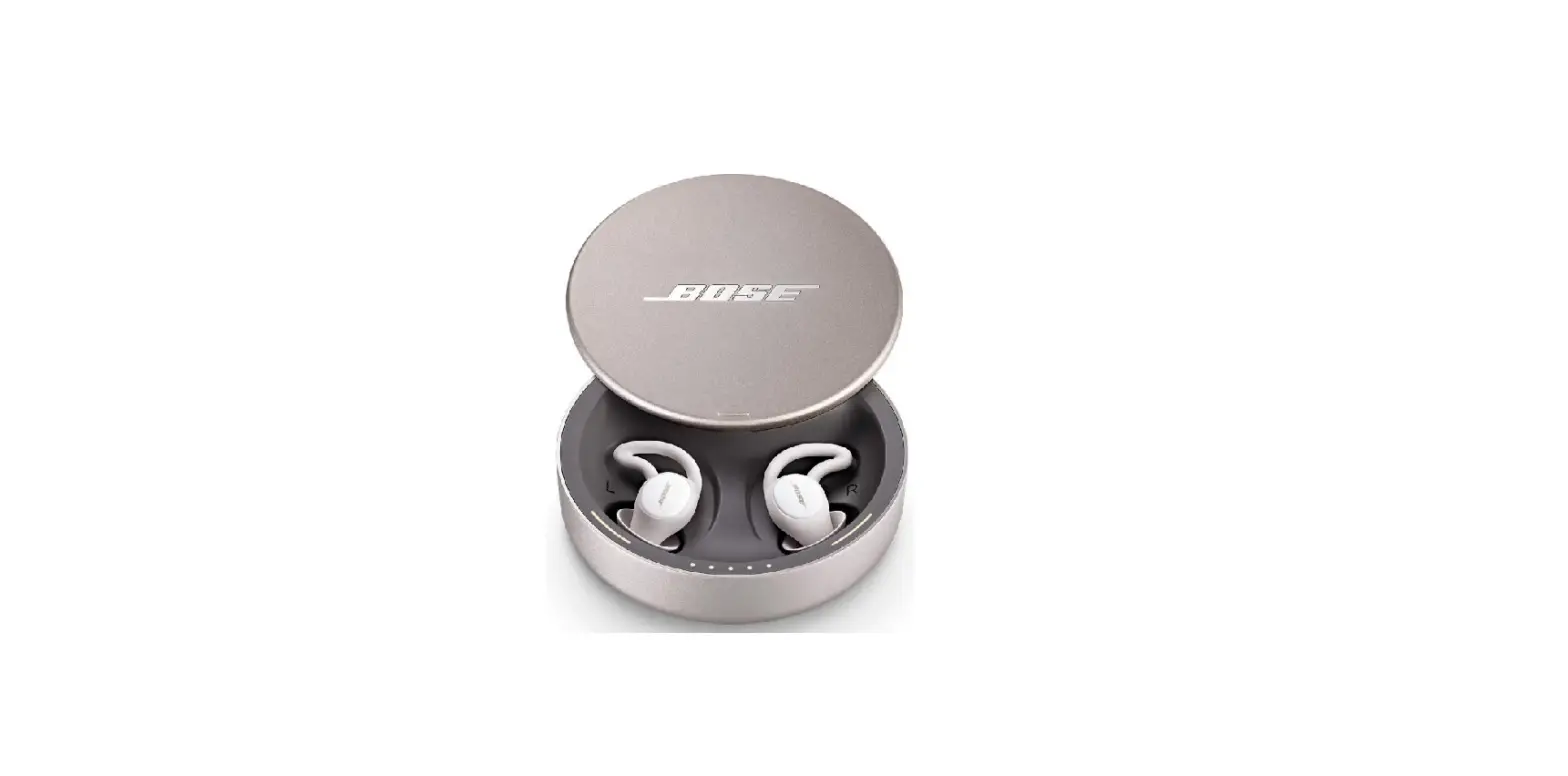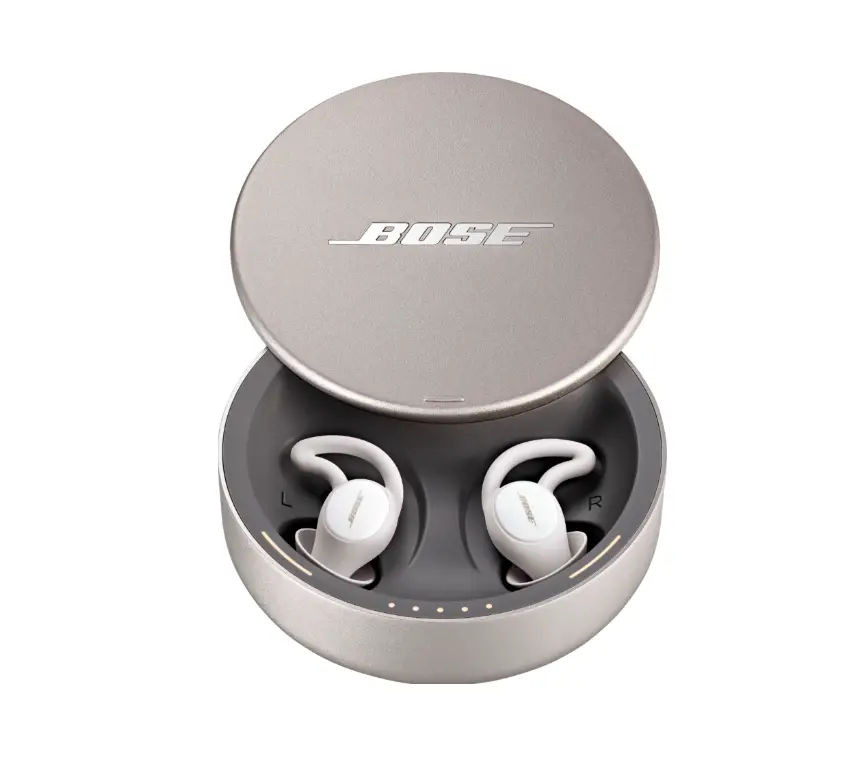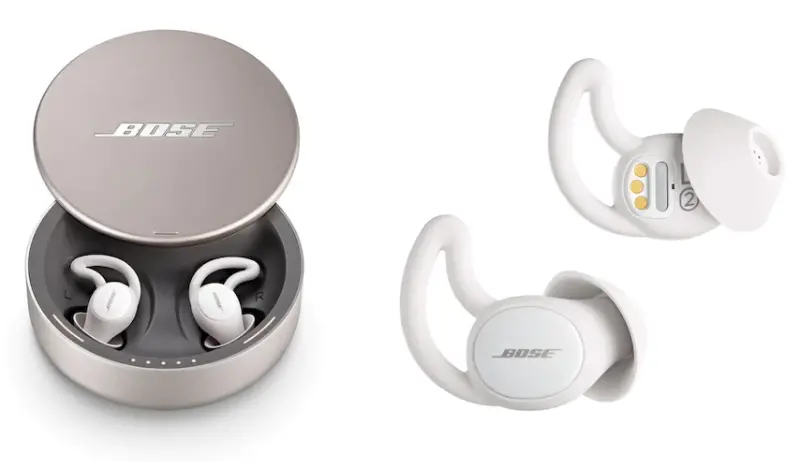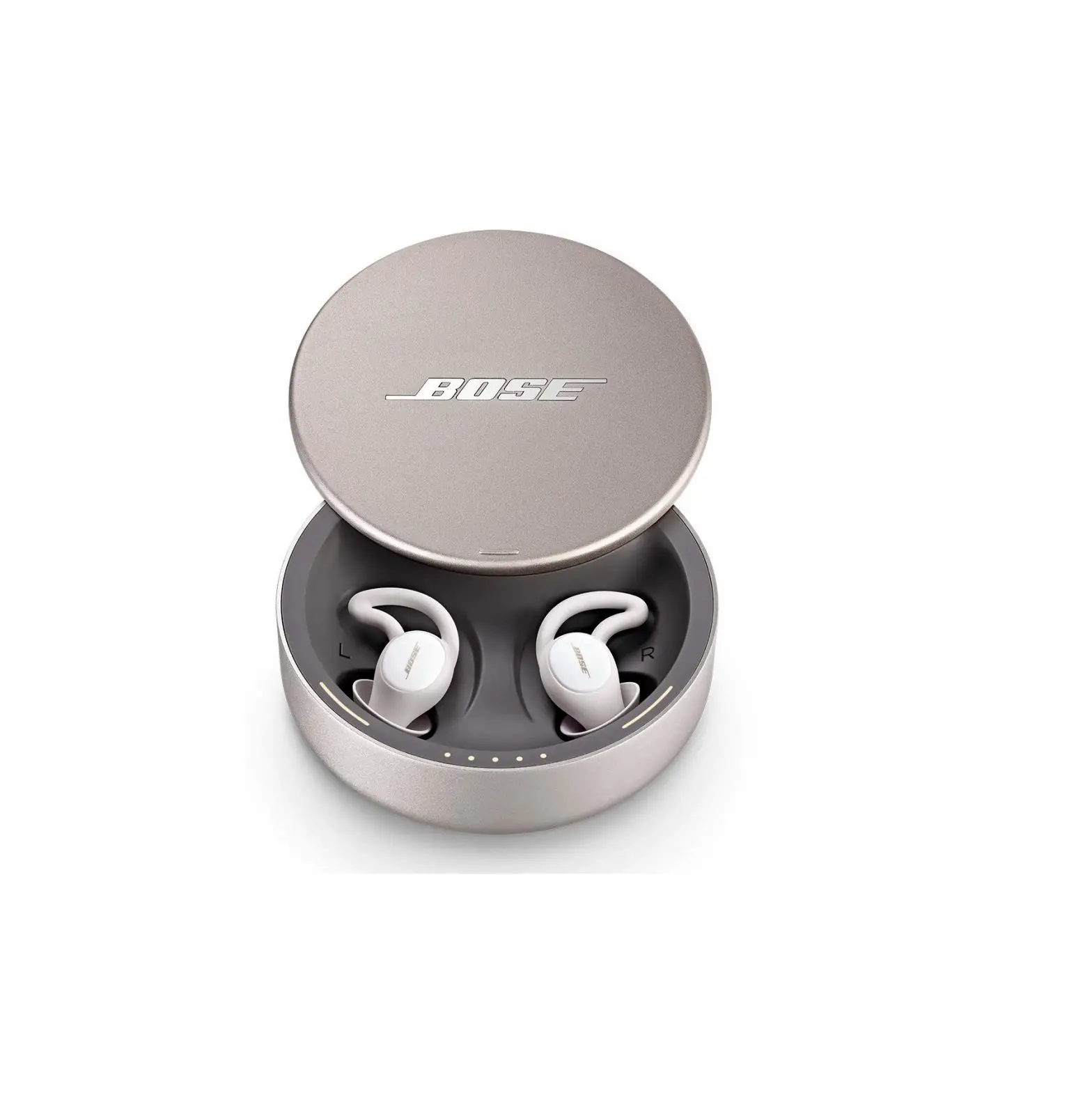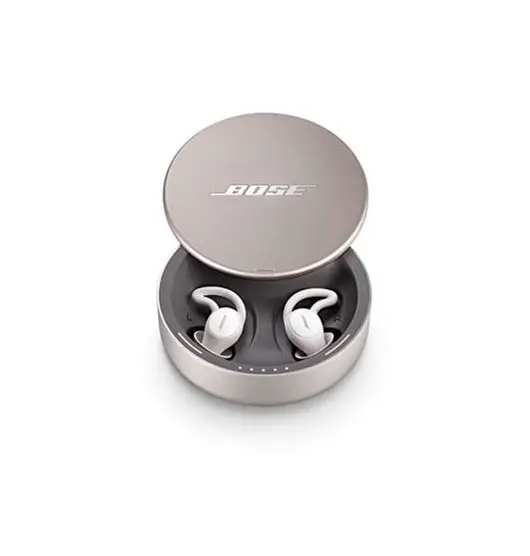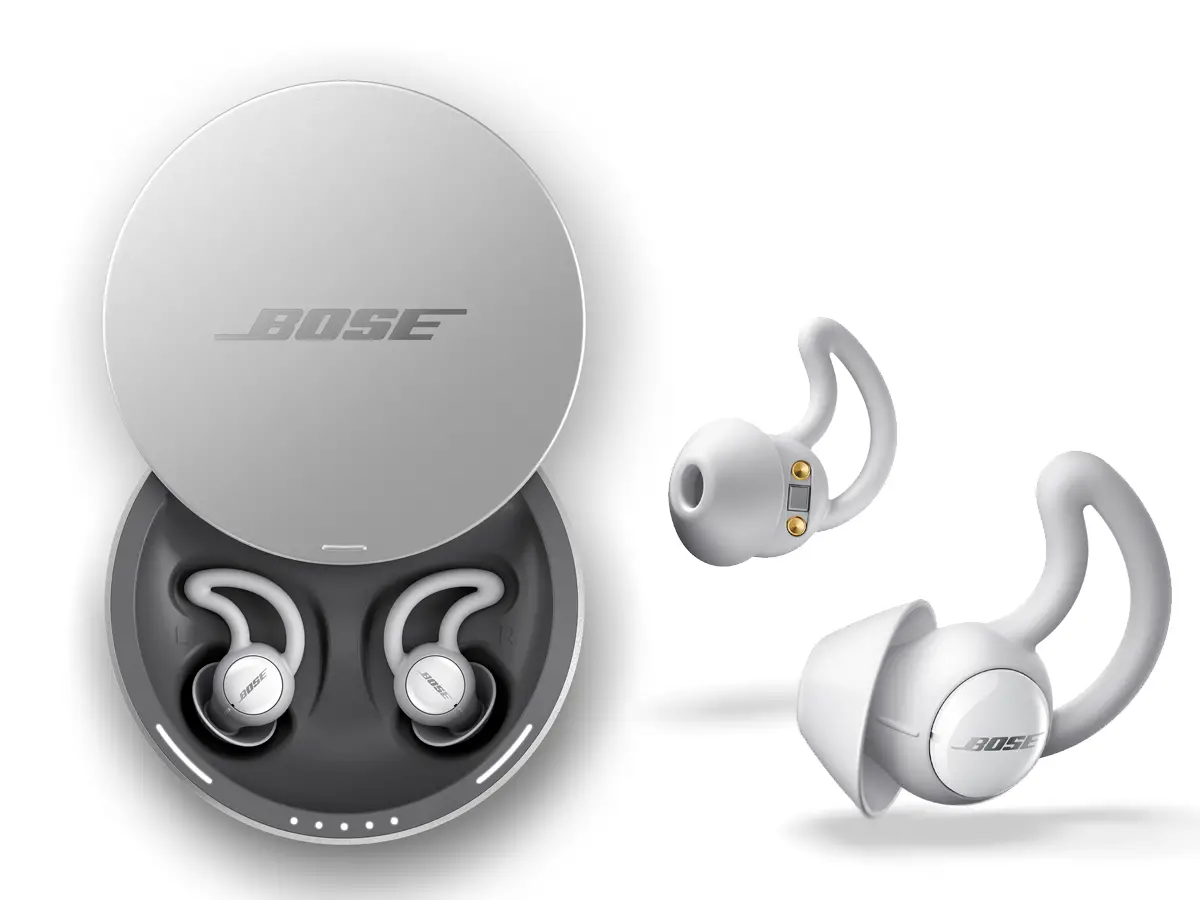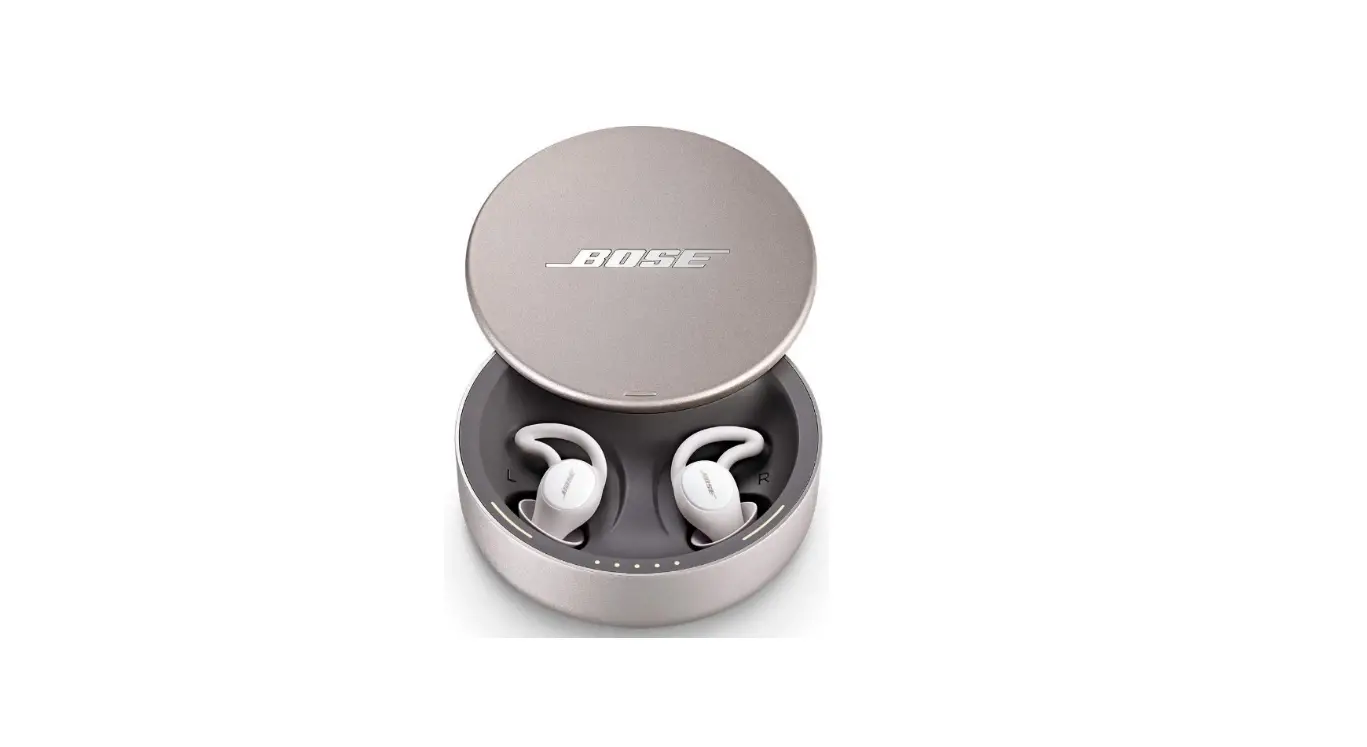

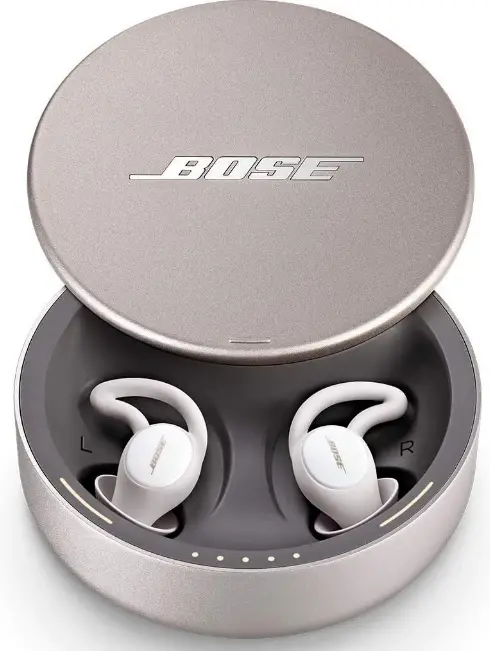
Bose Sleepbuds II TWS Earphones
IMPORTANT SAFETY INSTRUCTIONS
Please read and keep all safety, security, and use instructions.
Bose Corporation hereby declares that this product is in compliance with the essential requirements and other relevant provisions of Directive 2014/53/EU and all other applicable EU directive requirements. The complete declaration of conformity can be found at: www.Bose.com/compliance
This product conforms to all applicable Electromagnetic Compatibility Regulations 2016 and all other applicable UK regulations. The complete declaration of conformity can be found at: www.Bose.com/compliance
Bose Corporation hereby declares that this product is in compliance with the essential requirements per Radio Equipment Regulations 2017 and all other applicable UK regulations. The complete declaration of conformity can be found at: www.Bose.com/compliance
- To avoid accidental ingestion, keep Sleepbuds™ away from children and pets. Sleepbuds™ contain a nickel-metal hydride (NiHM) battery and may be hazardous if swallowed. If ingested, seek immediate medical attention. When not in use, store Sleepbuds™ in the charging case with the charging lid closed, and keep it out of the reach of children and pets.
- Do NOT allow children to use Sleepbuds™.
- Clean Sleepbuds™ and charging case only with a dry cloth. For additional cleaning instructions, see page 27.
- Only use attachments/accessories specified by the manufacturer.
WARNINGS/CAUTIONS
- When using this product, basic precautions should always be followed, including the following:
- Read all the instructions before using the charging case.
- To reduce the risk of injury, close supervision is necessary when the charging case is used near children.
- Do not expose charging case to water, rain, liquids or snow.
- Do not use the charging case in excess of its output rating. Overload outputs above rating may result in a risk of fire or injury to persons.
- Do not use a charging case that is damaged or modified. Damaged or modified batteries may exhibit unpredictable behavior resulting in fire, explosion or risk of injury.
- Do not disassemble the charging case. Take it to a qualified service person when service or repair is required. Incorrect re-assembly may result in risk of fire or injury to persons.
- Do not open, crush or expose a charging case to fire or excessive temperature. Exposure to fire or temperature above 212° F, 100° C may cause explosion.
- Have servicing performed by a qualified repair person using only identical replacement parts. This will ensure that the safety of the product is maintained.
- Sleepbuds™ are designed to mask sounds. Do NOT use Sleepbuds™ in a way that may interfere with sounds you need to hear for your safety or the safety of others.
- Use this product only with an agency-approved power supply that meets local regulatory requirements (e.g., UL, CSA, VDE, CCC).
- Remove Sleepbuds™ immediately if you experience a warming sensation or loss of audio.
- Do NOT submerge Sleepbuds™ in water. Do NOT expose Sleepbuds™ to moving water (e.g., from a faucet, etc.).
- Do NOT wear Sleepbuds™ while showering or bathing, or when participating in water sports, e.g., swimming, waterskiing, surfing, etc.
- Contains small parts which may be a choking hazard. Not suitable for children.
- This product contains magnetic material. Consult your physician on whether this might affect your implantable medical device.
- Do NOT expose this product to dripping or splashing, and do not place objects filled with liquids, such as vases, on or near the product.
- Keep the product away from fire and heat sources. Do NOT place naked flame sources, such as lighted candles, on or near the product.
- Do NOT make unauthorized alterations to this product.
- If the battery leaks, do not allow the liquid to come in contact with the skin or eyes. If contact is made, seek medical advice.
- Do not expose products containing batteries to excessive heat (e.g. from storage in direct sunlight, fire or the like).
REGULATORY AND LEGAL INFORMATION
NOTE: This equipment has been tested and found to comply with the limits for a Class B digital device, pursuant to Part 15 of the FCC Rules. These limits are designed to provide reasonable protection against harmful interference in a residential installation. This equipment generates, uses, and can radiate radio frequency energy and, if not installed and used in accordance with the instructions, may cause harmful interference to radio communications. However, there is no guarantee that interference will not occur in a particular installation. If this equipment does cause harmful interference to radio or television reception, which can be determined by turning the equipment off and on, the user is encouraged to try to correct the interference by one or more of the following measures:
- Reorient or relocate the receiving antenna.
- Increase the separation between the equipment and the receiver.
- Connect the equipment to an outlet on a circuit different from that to which the receiver is connected.
- Consult the dealer or an experienced radio/TV technician for help.
Changes or modifications not expressly approved by Bose Corporation could void the user’s authority to operate this equipment.
This device complies with part 15 of the FCC Rules and with ISED Canada license-exempt RSS standard(s). Operation is subject to the following two conditions:
- This device may not cause harmful interference.
- This device must accept any interference received, including interference that may cause undesired operation.
This device complies with FCC and ISED Canada radiation exposure limits set forth for the general population. This transmitter must not be co-located or operating in conjunction with any other antenna or transmitter.
- Right Bud; FCC ID: A94432893R
- Left Bud; FCC ID: A94432893L
- Right Bud; IC ID: 3232A-432893R
- Left Bud; IC ID: 3232A-432893L
- Case Model: 432893
- Right Earbud Model: 432893R
- Left Earbud Model: 432893L
CAN ICES-3(B)/NMB-3(B)
For Europe
- Frequency bands of operation 2400 to 2483.5 MHz.
- Maximum transmit power less than 20 dBm EIRP.
- Maximum transmit power is below regulatory limits such that SAR testing is not necessary and exempt per applicable regulations.
This symbol means the product must not be discarded as household waste and should be delivered to an appropriate collection facility for recycling. Proper disposal and recycling help protect natural resources, human health, and the environment. For more information on the disposal and recycling of this product, contact your local municipality, disposal service, or the shop where you bought this product.
Management Regulation for Low-power Radio-frequency Devices
Article XII
According to “Management Regulation for Low-power Radio-frequency Devices” without permission granted by the NCC, any company, enterprise, or user is not allowed to change frequency, enhance transmitting power or alter original characteristics as well as performance to approved low-power radio-frequency devices.
Article XIV
The low-power radio-frequency devices shall not influence aircraft security and interfere with legal communications; If found, the user shall cease operating immediately until no interference is achieved. The said legal communications mean radio communications operated in compliance with the Telecommunications Act.
The low-power radio-frequency devices must be susceptible to interference from legal communications or ISM radio wave-radiated devices.
Don’t attempt to remove the rechargeable nickel-metal hydride (NiMH) battery from this product. Contact your local Bose retailer or other qualified professional for removal.
 Please dispose of used batteries properly, following local regulations. Do not incinerate.

China Restriction of Hazardous Substances Table
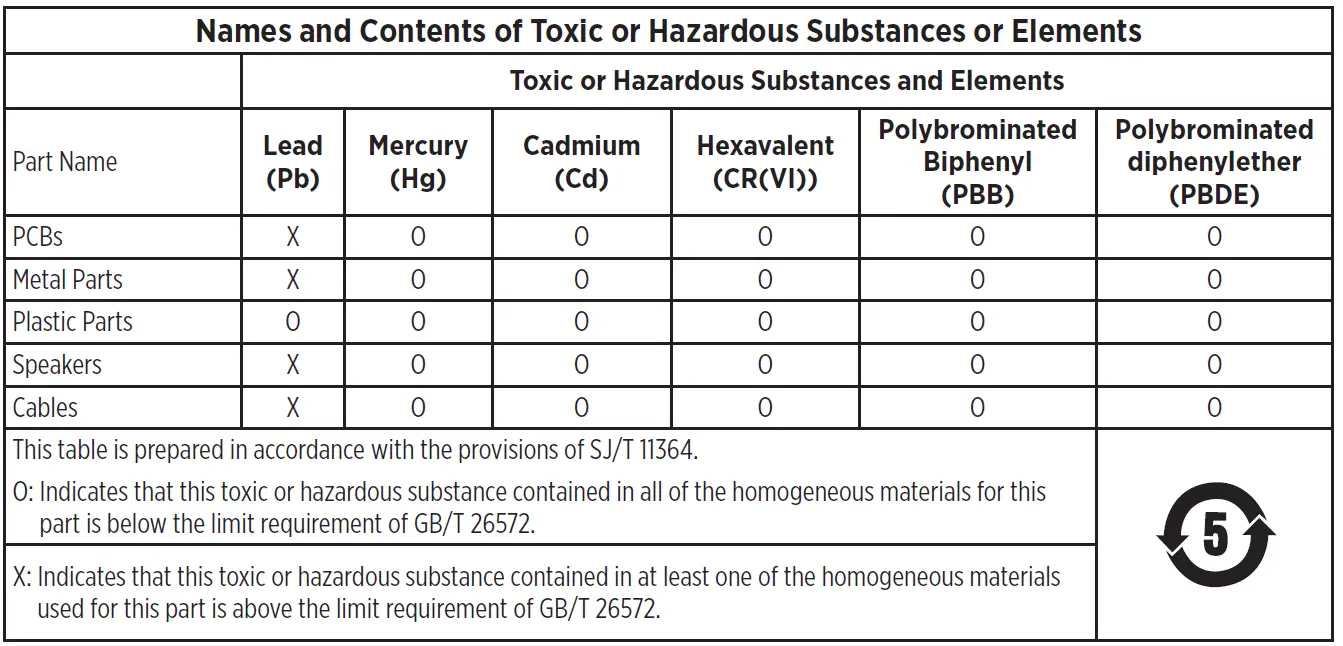
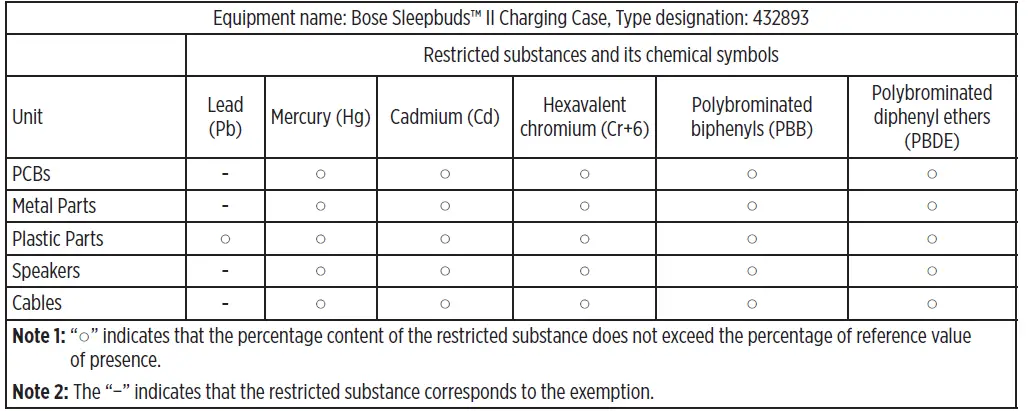
Taiwan Restriction of Hazardous Substances Table
- Date of Manufacture: The eighth digit in the serial number indicates the year of manufacture; “1” is 2011 or 2021.
- China Importer: Bose Electronics (Shanghai) Company Limited, Part C, Plant 9, No. 353 North Rising Road, China (Shanghai) Pilot Free Trade Zone
- EU Importer: Bose Products B.V., Gorslaan 60, 1441 RG Purmerend, The Netherlands
- Taiwan Importer: Bose Taiwan Branch, 9F-A1, No. 10, Section 3, Minsheng East Road, Taipei City 104, Taiwan
- Phone Number: +886-2-2514 7676
- Mexico Importer: Bose de México, S. de R.L. de C.V., Paseo de las Palmas 405-204, Lomas de Chapultepec,
- 11000 México, D.F. Phone Number: +5255 (5202) 3545
- UK Importer: Bose Limited, Bose House, Quayside Chatham Maritime, Chatham, Kent, ME4 4QZ, United Kingdom
- Output Rating: 2V, 10mA x 2
- Input Rating: 5V p 150mA
- Charging Temperature Range: 50° F – 104° F (10° C – 40° C)
- Discharging Temperature Range: 41° F – 113° F (5° C – 45° C)
- The CMIIT ID is located under the charging case lid.
- The Bose Privacy Policy is available at: worldwide.bose.com/privacypolicy
Please complete and retain it for your records
The serial and model numbers are located under the charging case lid.
- Serial number: _____________________________________________________________________
- Model number: 432893
Security Information
This product is capable of receiving security updates from Bose when connected to the Bose Sleep app. In order to receive security updates via the mobile application, you must complete the product setup process in the Bose Sleep app.
Apple and the Apple logo are trademarks of Apple Inc., registered in the U.S. and other countries. App Store is a service mark of Apple Inc.
The Bluetooth® word mark and logos are registered trademarks owned by Bluetooth SIG, Inc. and any use of such marks by Bose Corporation is under license.
Android and Google Play are trademarks of Google LLC.
USB Type-C® and USB-C® are registered trademarks of USB Implementers Forum.
Bose, Bose Sleep, and Sleepbuds are trademarks of Bose Corporation.
Bose Corporation Headquarters: 1-877-230-5639
©2021 Bose Corporation. No part of this work may be reproduced, modified, distributed, or otherwise used without prior written permission.
Please keep your receipt with your owner’s guide. Now is a good time to register your Bose product. You can easily do this by going to global.Bose.com/register
WHAT’S IN THE BOX
Confirm the following parts are included:
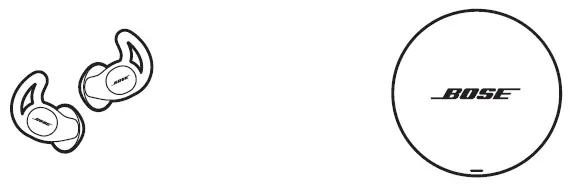
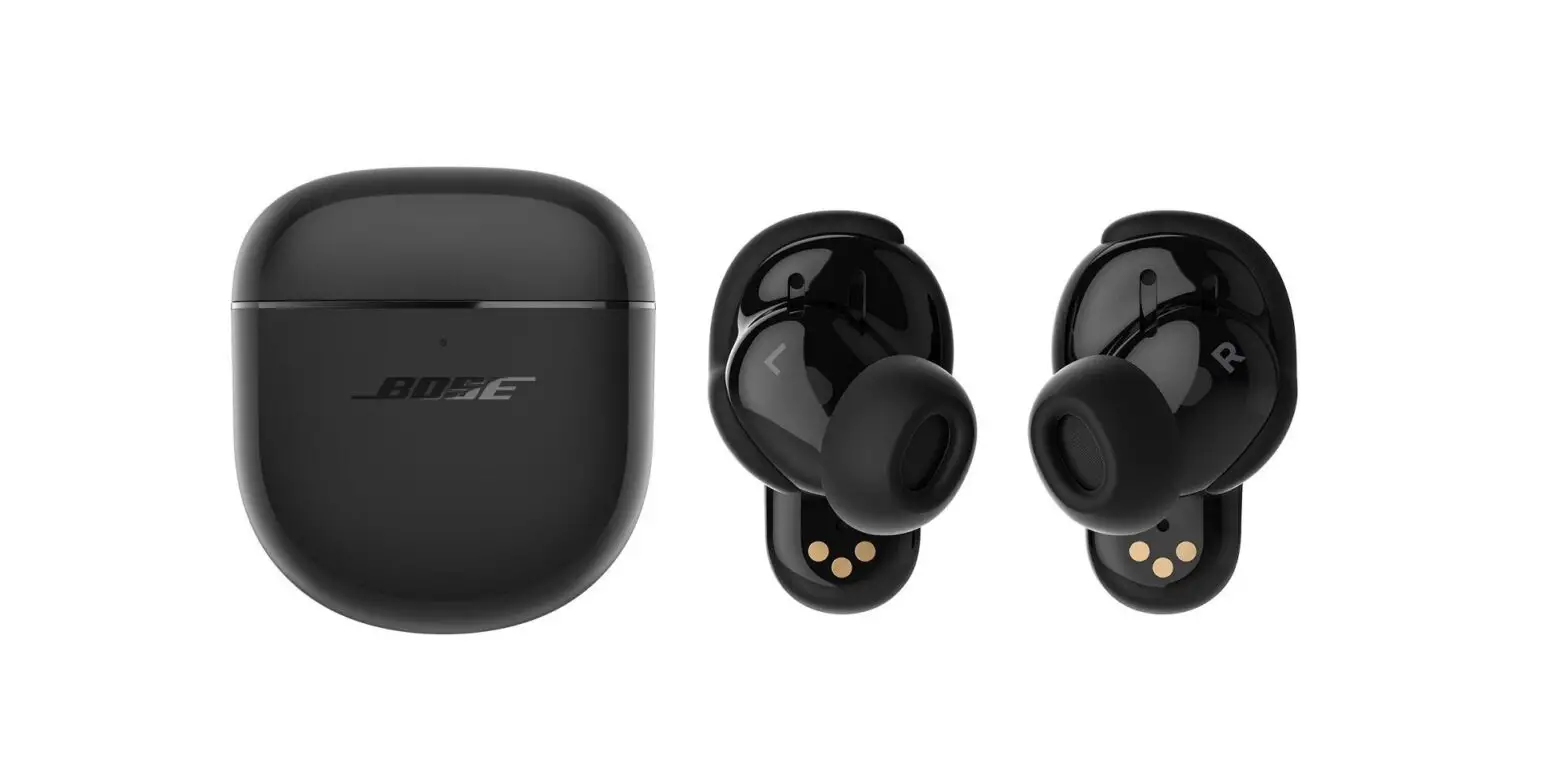
- Bose Sleepbuds™ II
- Charging case

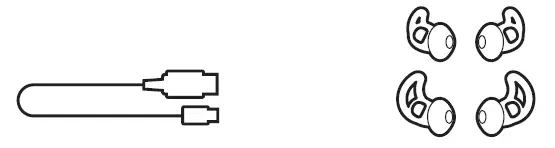
- USB Type-C® to USB-A cable
- Eartips (sizes 1 and 3)
NOTE
- Size 2 eartips are attached to your Sleepbuds ™. For help identifying the eartip sizes, see “Locate the eartip size”.
- If any part of your product is damaged, don’t use it. Contact your authorized Bose dealer or Bose customer service.
- Visit: worldwide.Bose.com/Support/Sleepbuds2
STAY AWARE OF YOUR SURROUNDINGS
Sleepbuds™ are designed to mask noise and disturbances while you sleep. Because of this, they can affect your ability to hear other sounds, such as alarms, warning systems, people, and pets.
SET AN APPROPRIATE VOLUME
To balance the levels of noise masking and awareness you want, set an appropriate volume level for your needs. The volume should be high enough to mask noises that are disturbing your sleep, but not so high that you can’t hear the sounds you want to hear. In the Bose Sleep app, set the volume to the lowest level, then increase it gradually until you reach an appropriate level. The lower the volume, the more likely it is that you’ll be able to hear the sounds you want or need to hear.
TIPS FOR MAINTAINING AWARENESS
If you sleep with a partner, consider relying on your partner to help you stay aware of your surroundings while wearing Sleepbuds™. If you sleep alone and are concerned about your ability to hear sounds while wearing Sleepbuds ™, try the following tips:
- Wear only one of your Sleepbuds™.
- Set your current masking sound so that it stops after a certain amount of time instead of playing all night. You can do this by setting a sleep timer for your current masking sound in the Bose Sleep app.
NOTE: These tips make Sleepbuds™ less effective at masking noise, but further increase your awareness of your surroundings.
BOSE SLEEP APP
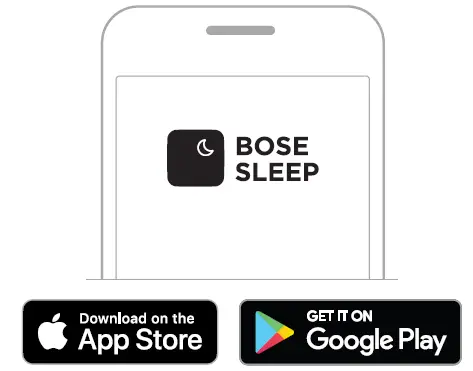
The Bose Sleep app lets you set up and control Sleepbuds™ from your mobile device. Using the app, you can select masking sounds, set wake-up alarms, and manage Sleepbuds™ settings.
DOWNLOAD THE BOSE SLEEP APP
- On your mobile device, get the Bose Sleep app at app.Bose.com/Sleep or download from your device app store.

- Follow the app instructions.
POWER
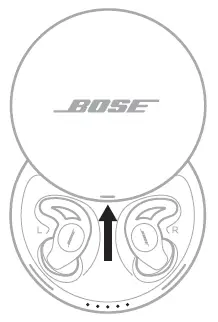
OPEN THE CHARGING CASE
- With the Bose logo facing you, slide the lid of the charging case away from you to open.

- The lights on the inside rim of the case glow to show the current battery level and charging status of the case and Sleepbuds™.
POWER ON
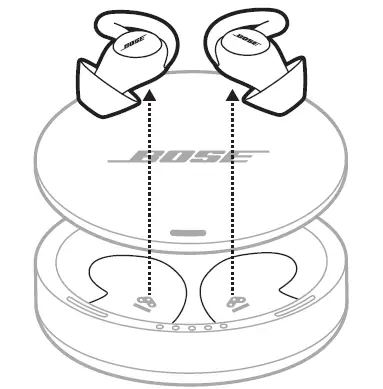
- Remove Sleepbuds™ from the charging case to power on.
NOTE: We highly recommend that you fully charge Sleepbuds™ before using them for the first time. For more information about charging Sleepbuds™ see “Charge Sleepbuds™”.
POWER OFF
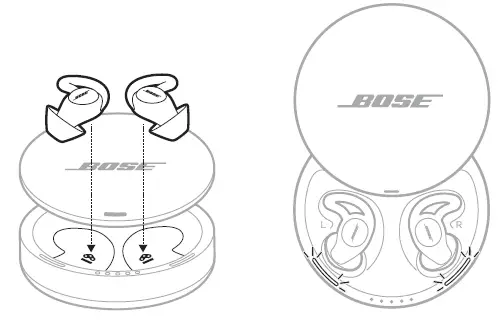
- Place Sleepbuds™ in the charging case to power off.
- The charging lights for your Sleepbuds™ blink.
HOW TO WEAR
INSERT SLEEPBUDS™
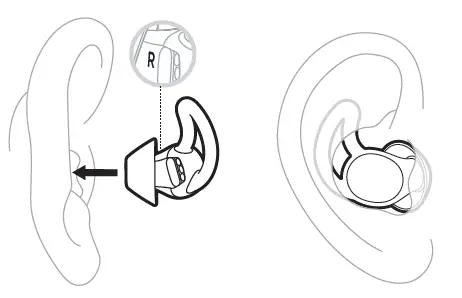
- Insert Sleepbuds™ so the ear tips gently rest at the openings of your ear canals.
- NOTE: Each ear tip is marked with either an L (left) or an R (right).

- NOTE: Each ear tip is marked with either an L (left) or an R (right).
- Slightly rotate Sleepbuds™ back until the ear tips create a comfortable seal at your ear canals.
- NOTE: Rotating Sleepbuds™ too far back may impact comfort and sound quality.
- Tuck the ear tip wings under your ear ridges.
- Check the fit.

CHECK THE FIT
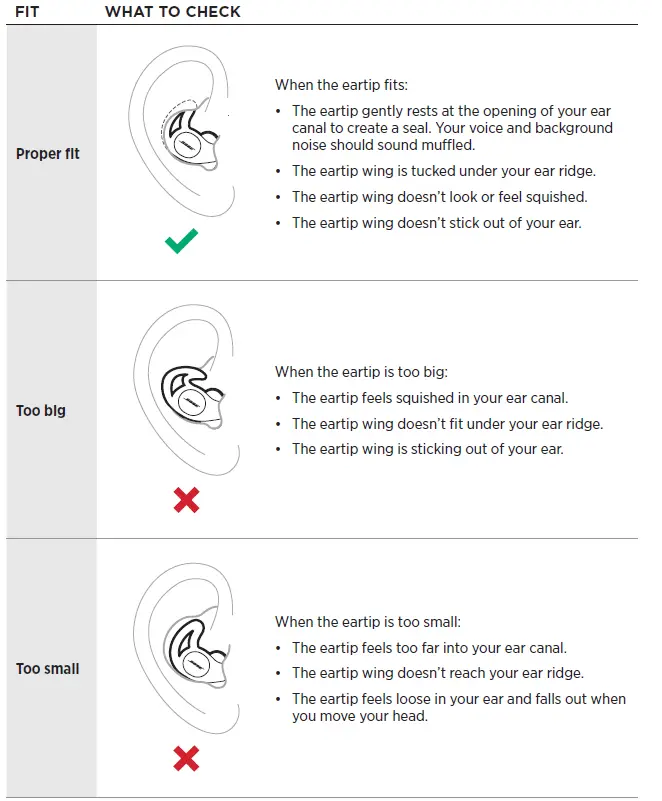
Use a mirror to make sure you have successfully rotated Sleepbuds™ back, tucked the eartip wings, and that you’re using the best eartip size for each ear.
Make adjustments
Wear Sleepbuds™ for an extended period of time. If you start to feel any discomfort or pressure in your ear, make some adjustments.
- Rotate Sleepbuds™ back farther so they create a tighter seal at your ear canals.
- Make sure the Bose logo is visible and right-side up.
- Tuck the ear tip wing under your ear ridge.
- Try another ear tip size.
LOCATE THE EAR TIP SIZE
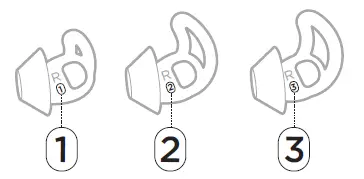
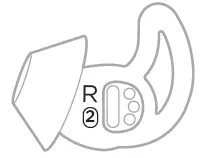
- The size is marked on the side of each eartip with a 1 (small), 2 (medium), or 3 (large).
- The size 2 (medium) eartips come attached to Sleepbuds™. If size 2 feels too loose, try size 3 (large). If it feels too tight, try size 1 (small).
NOTE: You may need to try all three eartip sizes or use a different size eartip for each ear.
CHANGE THE EAR TIPS
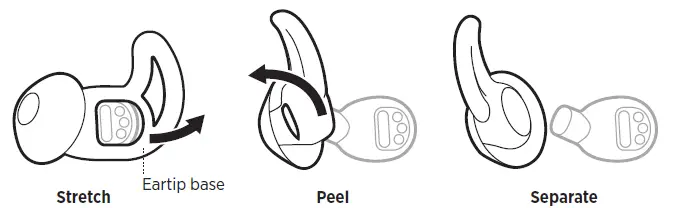
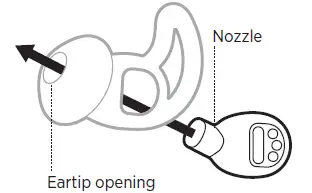
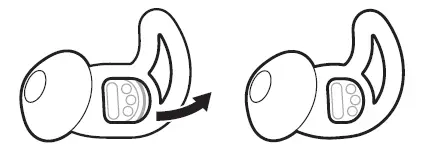
- Holding one of your Sleepbuds™, gently stretch the ear tip base and peel it away.

- CAUTION: To prevent tearing, do NOT pull on the ear tip wing.
- Choose a new ear tip size.
- Align the opening of the ear tip with your Sleepbuds™ nozzle, and slide the nozzle into the ear tip opening.

- Gently stretch the base of the ear tip around your Sleepbuds™.

- Insert Sleepbuds™ into your ears.
- Check the fit.
BATTERY
CHARGE SLEEPBUDS™
We highly recommend that you fully charge Sleepbuds™ before using them for the first time.
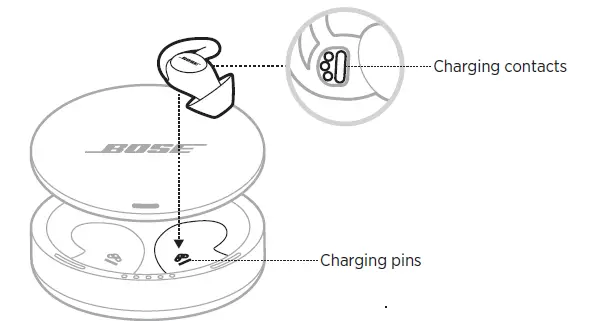
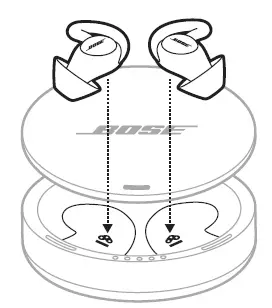
- Align the charging contacts on Sleepbuds™ with the charging pins on the case.

- Place Sleepbuds™ in the case until they magnetically snap into place.

- The charging lights for your Sleepbuds™ blink.
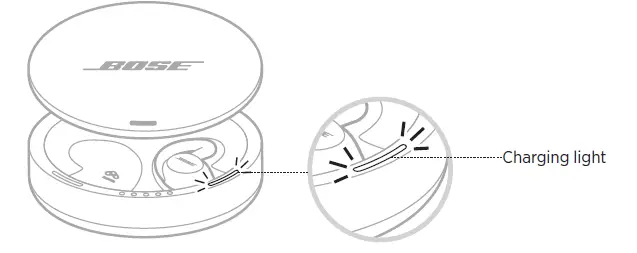
NOTE: If the charging lights don’t blink when you place Sleepbuds™ in the case, you may have placed Sleepbuds™ in the case incorrectly or your case battery may be depleted. Place Sleepbuds™ in the case again, then charge the case (see page 21). If the issue persists, see “Sleepbuds™ don’t charge”.
Charging time
- Allow up to 6 hours to fully charge Sleepbuds™.
NOTE: A full charge powers Sleepbuds™ for up to 10 hours.
CHECK SLEEPBUDS™ BATTERY LEVEL
While using Sleepbuds™
- In the Bose Sleep app, check the center of the home screen to see Sleepbuds™ current battery level.
NOTE: If each of your Sleepbuds™ has a different battery level, the home screen shows the lowest level.
While charging Sleepbuds™
- When you place Sleepbuds™ in the charging case, the corresponding charging lights blink according to the charging status.
CHARGE THE CASE
- The charging case stores and charges you are Sleepbuds™ when you’re not using them.
NOTES
- Keep the case connected to AC (mains) power when possible to make sure that Sleepbuds™ are always fully charged. You can also use the case battery to charge Sleepbuds™ while traveling.
- Before charging, make sure Sleepbuds™ are at room temperature, between 50° F (10° C) and 104° F (40° C).
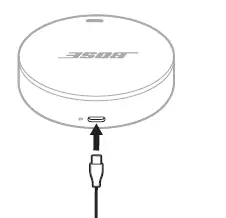
- Connect the small end of the USB cable to the USB-C® port on the back of the case.

- Connect the other end to a USB-A power supply.
- Plug the power supply into an AC (mains) outlet.
Charging time
- When Sleepbuds™ is outside the case, allow up to 3 hours to fully charge the case.
- When Sleepbuds ™ are inside the case, charging time varies.
NOTE: When the case is fully charged and operating on battery power, you can fully charge Sleepbuds™ 3 times. A single charge powers Sleepbuds™ for up to 10 hours.
Check the case battery level
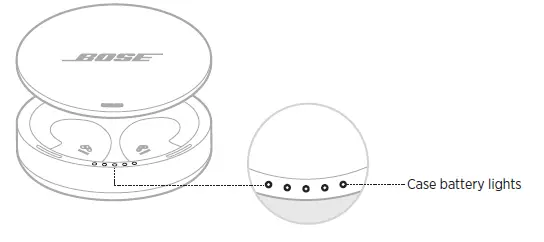
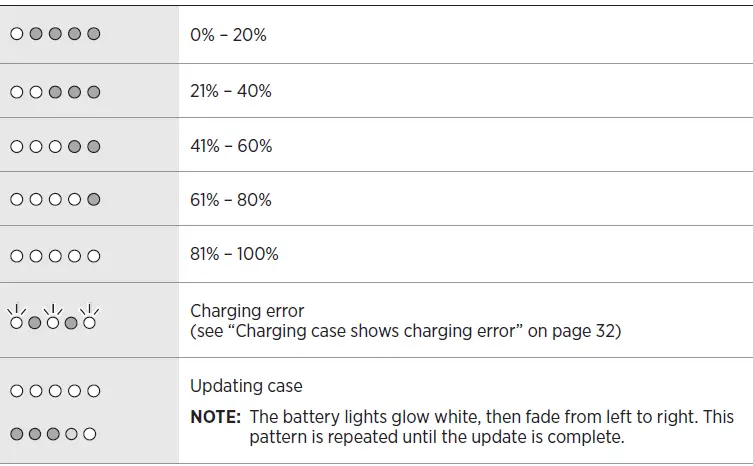
- The charging case battery lights are located under the lid and show the charge status and battery level of the case.

- For more information, see “Charging case battery lights”.
BATTERY PROTECTION
The battery protection feature conserves the batteries of Sleepbuds ™ during long-term storage. Sleepbuds ™ enter battery protection mode when they have been left in the case for a week. To wake Sleepbuds™, connect the case to power, then remove Sleepbuds™ from the case.
SLEEPBUDS™ AND CHARGING CASE STATUS
SLEEPBUDS™ CHARGING LIGHTS
The lights on the rim of the charging case next to Sleepbuds™ show the charging status of each of your Sleepbuds™.
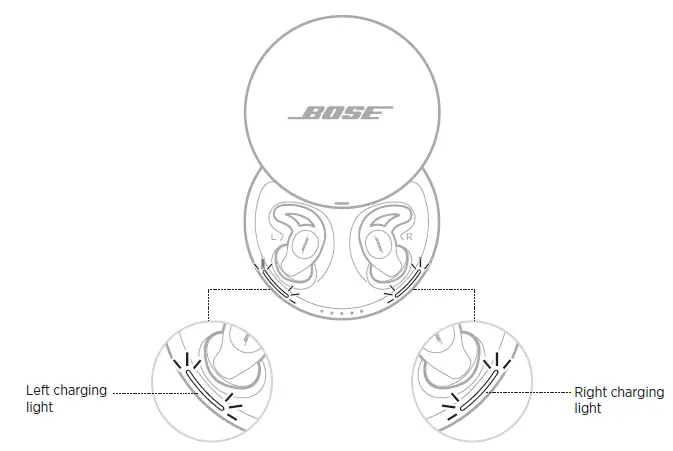

NOTE: If the case isn’t connected to power, the lights turn off after 2 minutes of inactivity.
CHARGING CASE BATTERY LIGHTS
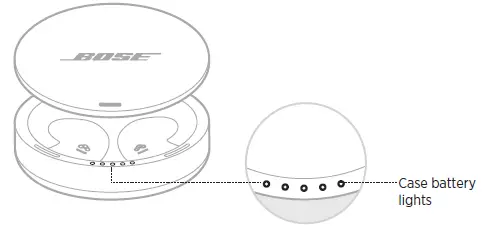
- The five battery lights on the inside front rim of the case show the battery level and charging status of the charging case.
BLUETOOTH CONNECTIONS
Bluetooth Low Energy wireless technology lets you control Sleepbuds™ using the Bose Sleep app on your mobile device. Before you can control Sleepbuds™, you must download the app and connect your device with Sleepbuds™.
CONNECT YOUR MOBILE DEVICE
- Download the Bose Sleep app and follow the app instructions.
DISCONNECT A MOBILE DEVICE
- Use the Bose Sleep app to disconnect a device.
TIP: You can also disable the Bluetooth feature on your device to disconnect.
- Disabling the Bluetooth feature on your device disconnects all other devices.
RECONNECT A MOBILE DEVICE
- When Sleepbuds™ power on, the most recently-connected device automatically reconnects with Sleepbuds™.
NOTE: The device must be within range (6 ft or 2 m) and powered on.
ADVANCED FEATURES
PHONE CALL ALERTS
- Phone Call Alerts notify you of incoming calls while using Sleepbuds™. You can enable
- Phone Call Alerts in the Bose Sleep app.
NOTE: Use your mobile device to answer calls. You can’t answer phone calls with your Sleepbuds™.
PHONE-FREE MODE
- Enabling Phone-Free Mode in the Bose Sleep app lets you use Sleepbuds™ with a limited set of features without having to interact with the app.
You may want to enable this feature if
- You prefer sleeping without electronics nearby.
- You don’t need to set a wake-up alarm or hear notifications.
NOTE: Because Sleepbuds™ are disconnected from your device, they can’t play alarms or receive notifications when Phone-Free Mode is enabled.
When you enable Phone-Free Mode, your Sleepbuds™ begin playing a selected masking sound as soon as you remove them from the charging case. They continue to play that sound for a set amount of time or until you return them to the case, depending on your settings.
CARE AND MAINTENANCE
STORE SLEEPBUDS™
- To store Sleepbuds™, place them in the charging case.

- The status lights for your Sleepbuds™ glow according to the charging status.
CLEAN SLEEPBUDS™ AND CHARGING CASE
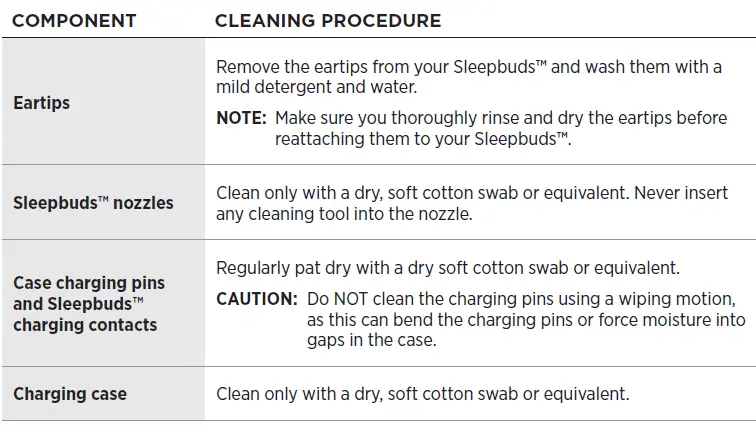
- Your Sleepbuds™ and charging case may require periodic cleaning.
REPLACEMENT PARTS
Replacement parts can be ordered through Bose customer service.
Visit: worldwide.Bose.com/Support/Sleepbuds2
LIMITED WARRANTY
Sleepbuds™ are covered by a limited warranty. Visit our website at global.Bose.com/warranty for details of the limited warranty. To register your product, visit global.Bose.com/register for instructions. Failure to register will not affect your limited warranty rights.
RESET THE CHARGING CASE
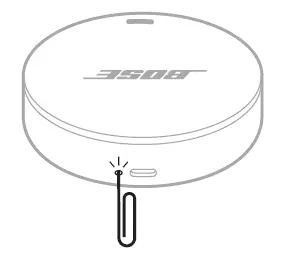
Resetting the charging case powers the case off and then on. This can help resolve charging issues. To reset the charging case, insert a thin paper clip into the hole on the back of the case near the USB-C port and press until you feel a click.
UPDATE SLEEPBUDS™
- Your Sleepbuds™ and charging case update when connected to the Bose Sleep app. Follow the app instructions.
TROUBLESHOOTING
TRY THESE SOLUTIONS FIRST
If you experience problems with Sleepbuds™, try these solutions first:
- Place Sleepbuds™ in the charging case and remove them.
- Close and open the charging case, then check the charging case and Sleepbuds™ status.
- Charge the charging case and Sleepbuds™.
- Move your mobile device closer to Sleepbuds™ (within 6 ft or 2 m) and away from any interference or obstructions.
- Make sure that your device supports Bluetooth Low Energy ( also called Bluetooth Smart). All devices that are compatible with iOS 10 and newer and most devices that are compatible with Android 5.0 and newer support Bluetooth Low Energy.
- Check the Bose Sleep app to make sure that the software for Sleepbuds™ is up to date.
- Make sure that you are using the Bose Sleep app, not a different app, to control Sleepbuds™ (see page 12). Sleepbuds™ don’t work with any other Bose app.
- Try connecting to another device.
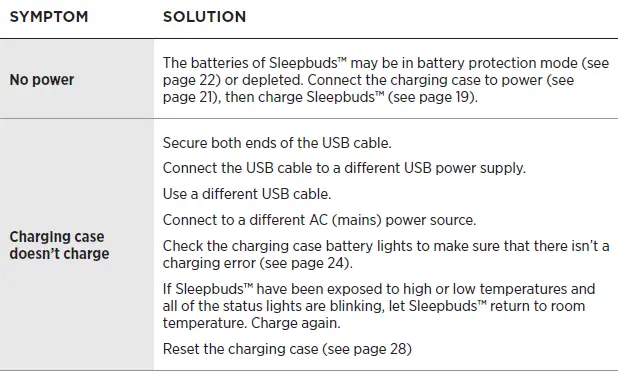
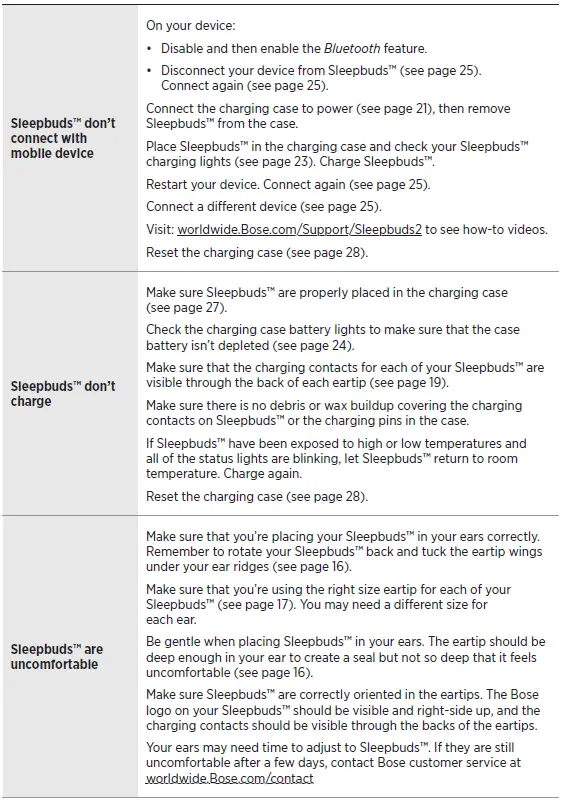
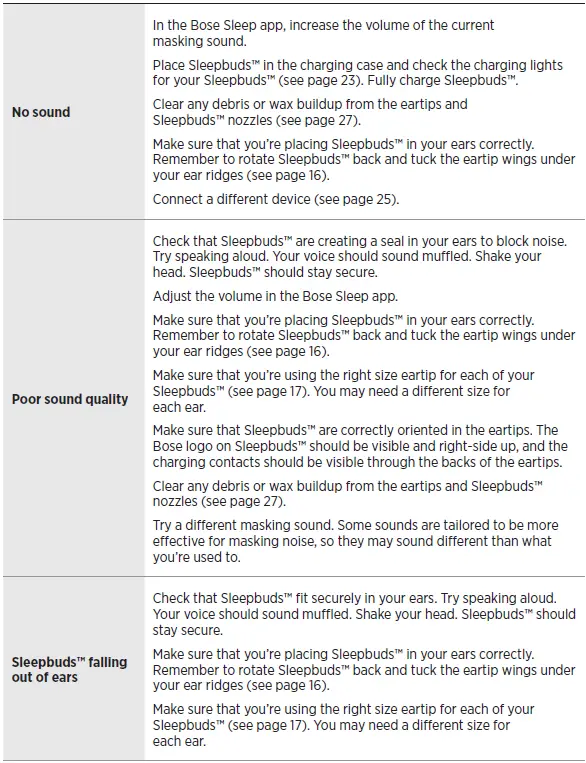
OTHER SOLUTIONS
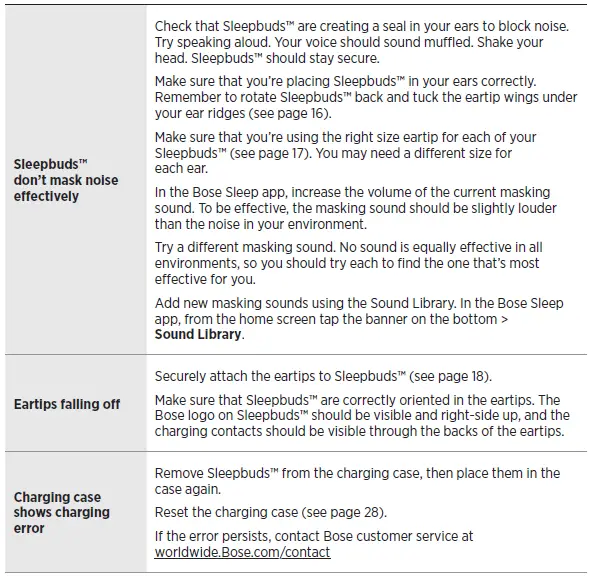
If you could not resolve your issue, see the table below to identify symptoms and solutions to common problems. If you are unable to resolve your issue, contact Bose customer service.
Visit: worldwide.Bose.com/contact

©2021 Bose Corporation, 100 The Mountain Road, Framingham, MA 01701-9168 USA AM842815-0010 Rev. 05