
For your safety
DANGER
HAZARD OF ELECTRIC SHOCK, EXPLOSION, OR ARC FLASH
- It is illegal for persons other than appropriately licensed electrical contractors or other persons authorised by legislation to work on the fixed wiring of any electrical installation.
- To comply with all safety standards, the device must be used only for the purpose described in this instruction and must be installed in accordance with the wiring rules and regulation in the location where it is installed.
- Lockout and tag the input circuit before accessing the wiring connections.
- The Locking Bar on the grids must be set to the Closed position to ensure that the device cannot be removed during normal operation.
- There are no user-serviceable parts inside the device.
- Failure to follow these instructions will result in death or serious injury.
CAUTION
EQUIPMENT DAMAGE HAZARD
- Install the device according to the instructions in this document.
- Pay attention to the specifications and wiring diagrams related to the installation.
- Do not use the device for any other purpose than specified in this instruction.
- Dropping the device may damage the internal components. Check that the device operates after being dropped or if physical damage is shown.
- Failure to follow these instructions can result in injury or equipment damage.
NOTICE
EQUIPMENT DAMAGE HAZARD (LOAD AND OPERATION)
- Operation of the device at elevated temperatures or voltages outside of specification (240 V a.c. and 25 °C)may cause the over-temperature protection circuitry to operate.
- Reduce the size of the connected load or use a different brand of the lamp to prevent a recurrence.
- Do not operate the product for prolonged periods in extreme conditions.
- Failure to follow these instructions can result in equipment damage.
Installation
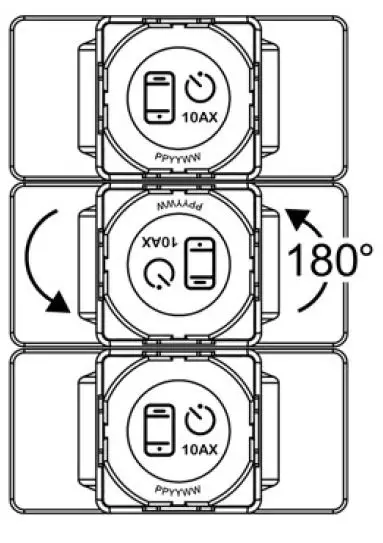
- Multi-gang orientation When installing in a 3-gang plate, the middle module must face the 10AK opposite way to the other 2 modules. 180
- The maximum load rating of each module must be derated (see the Derating section). 10AX
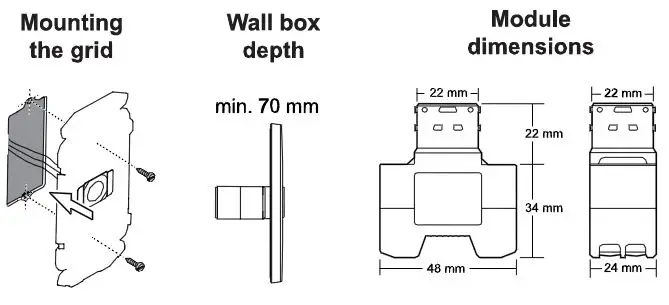
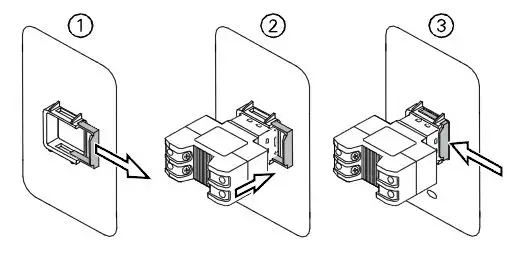
Fitting the module to the grid
Cabling and connections
(Typical 3-way installation using iconic Connected Module)
Note: Set the controlling Module to Switch mode – see ControlLink Module instructions
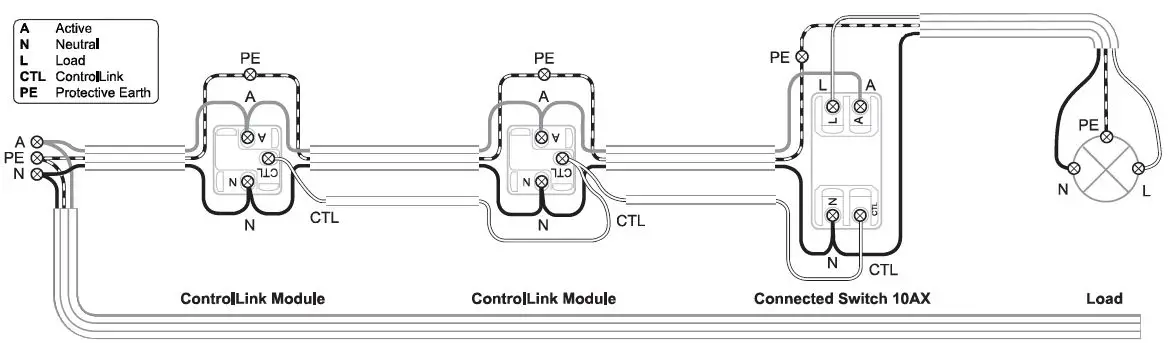
Retrofit (2-way installation shown)
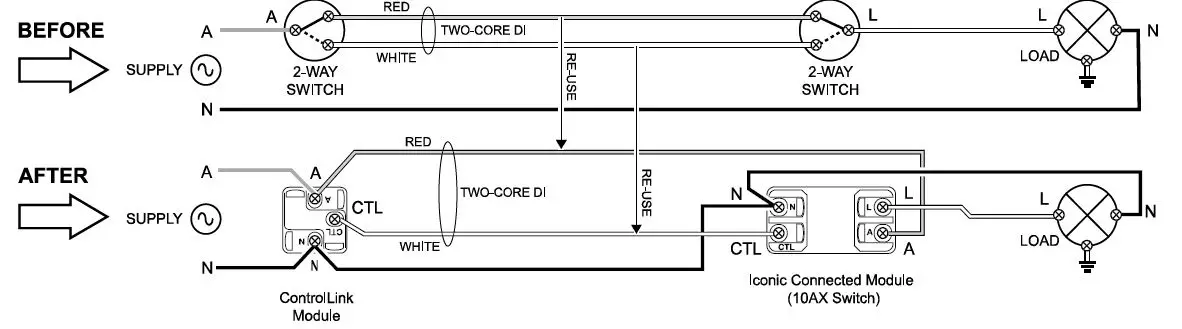
Configuring the module (optional)
General information
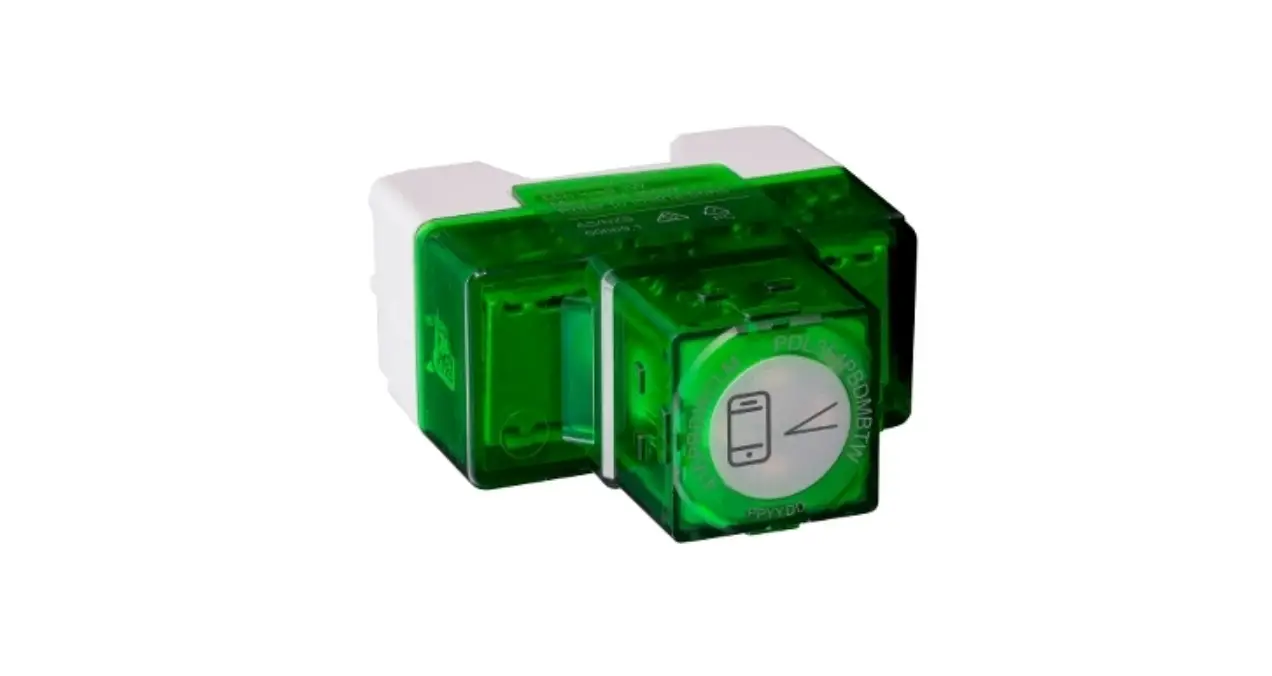
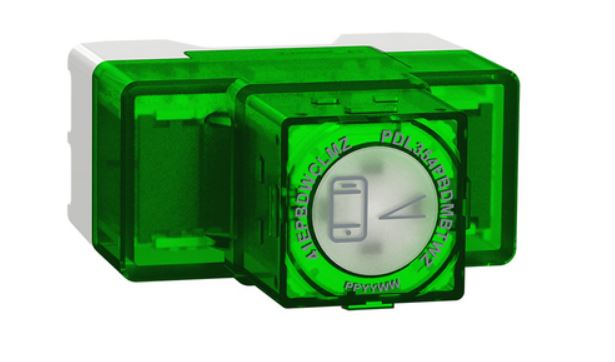
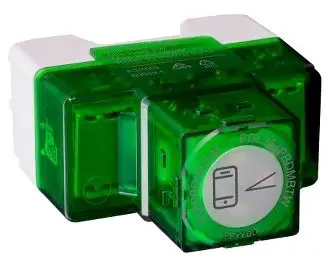
This product operates as a switch ‘out-of-the-box’, with no configuration needed.
The module can optionally be configured as a delay timer/run-on timer and features a scheduler function. The module LED indicator behavior can also be configured if desired.
Note: The module must be paired with a mobile phone and the Wiser by SE App in order to perform these tasks.
Pairing
Note: When pairing the module with the Wiser by SE App, be in the same room and within a range of 8 to 10 m of the module. Range can be affected by walls and other structures 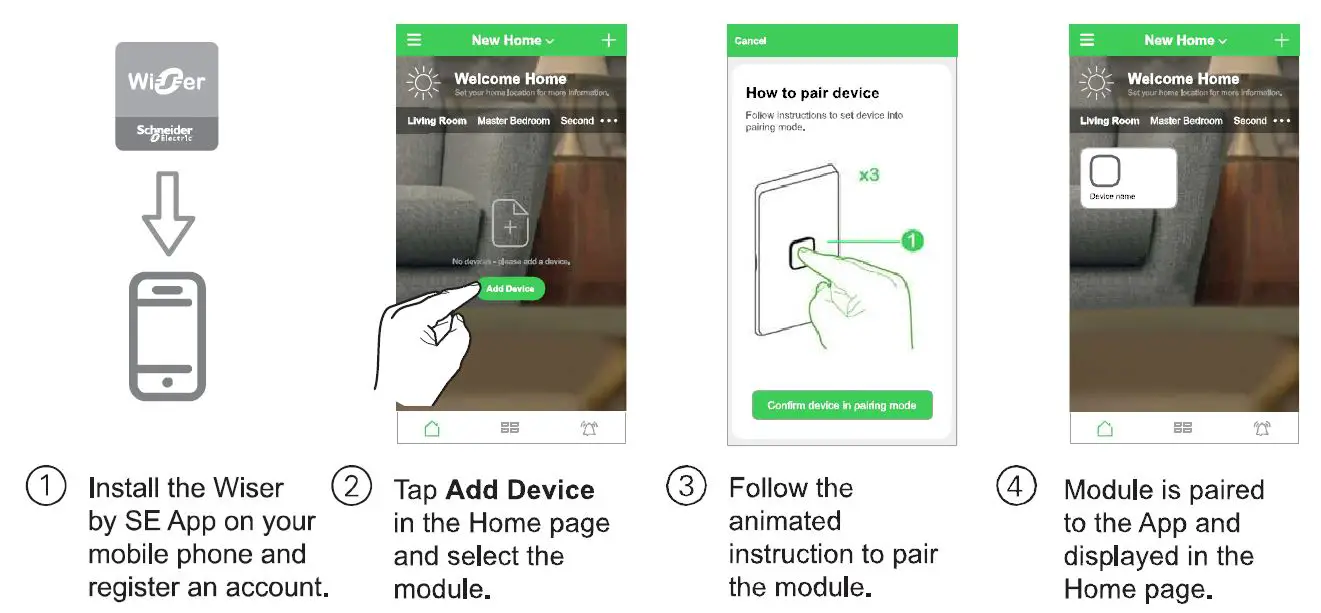
Setting the LED indicator behavior
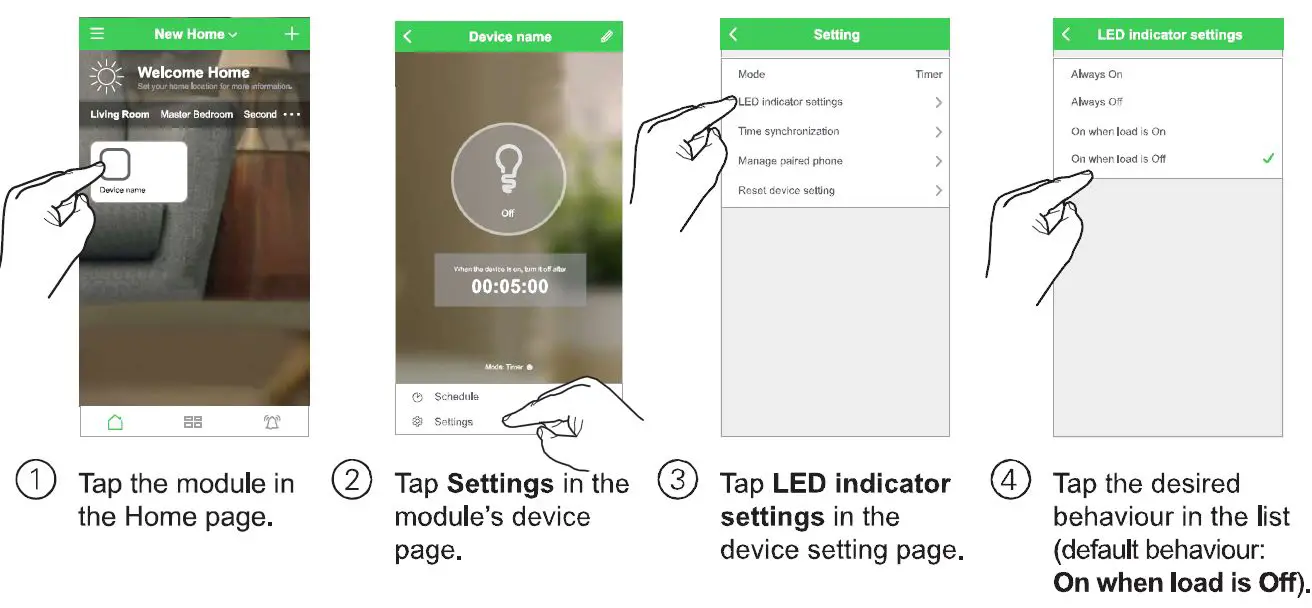
Setting the mode and timer type 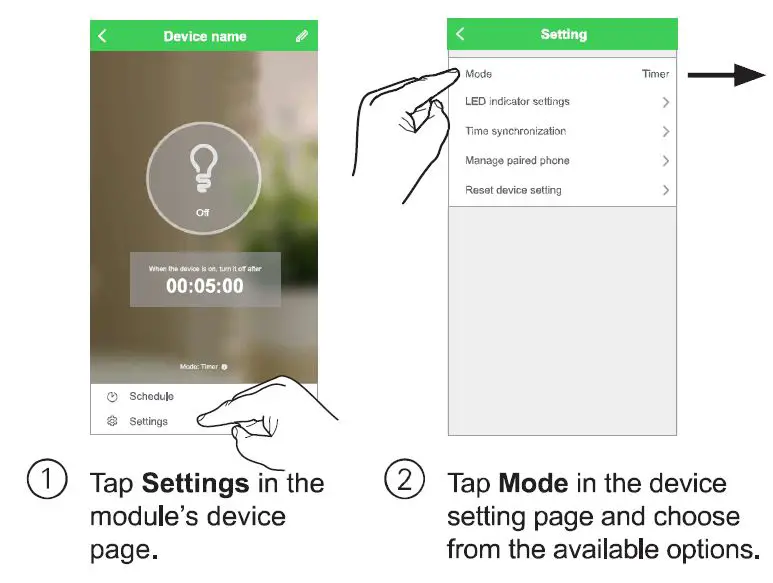
Switch:
The timer feature is disabled.
Delay timer:
When the load is switched On, the load is automatically switched Off when the timer interval expires. (Example application: pantry light)
(Run-on timer option):
When the load is switched On and then Off, power is maintained to the load for the duration of the timer interval and then (Example application: bathroom exhaust fan)
Note: If a delay timer is running when a scheduler event (switch On or switch Off) is actioned, the delay timer is canceled.
Setting the timer interval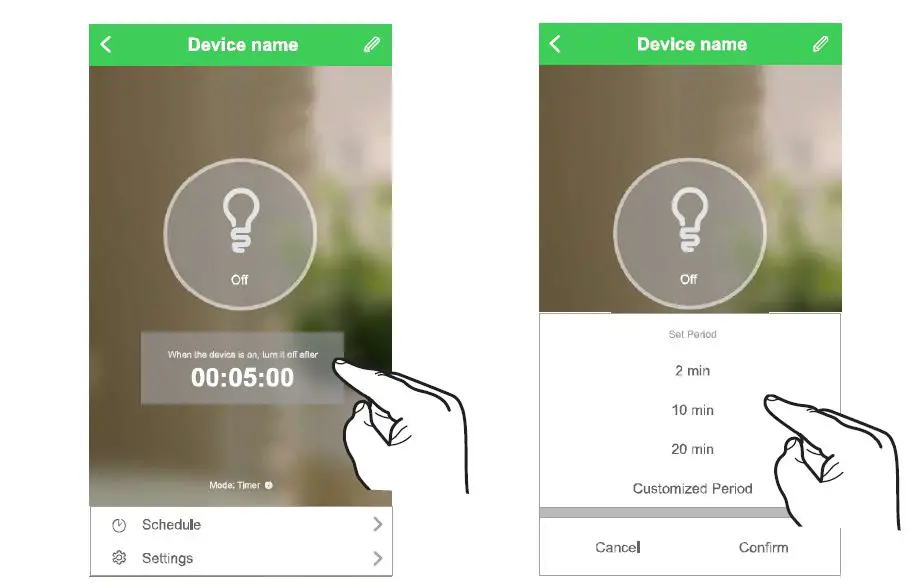
Setting the scheduler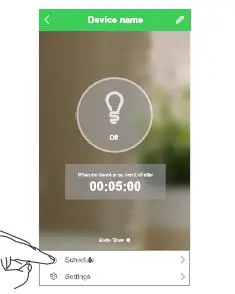
Restoring the device to factory defaults
Note: All customized settings and Bluetooth pairing information will be lost. Before restoring, remove the skin in order to see the module LED indicator. 
Preparing the device for use with Wiser Hub
This module can be used as a device in a Wiser Hub network. The module must first be changed from BLE mode to Zigbee mode.
IMPORTANT: This operation will result in some data loss and the device needs to bere-configured after the mode has been changed successfully. For further details, please contact Customer support. 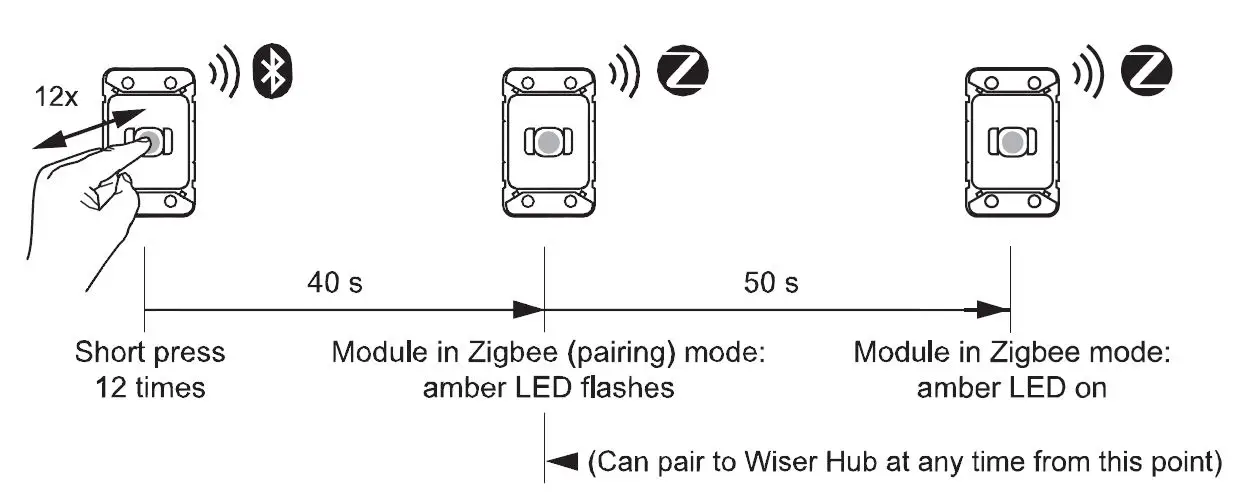
Technical data
| Operating voltage | 220-240 V a.c., 50 Hz |
| Max load rating | 10 A. Refer to the Load Compatibility table |
| Switching technique | Relay |
| Protection | Over-temperature: Yes Short circuit: No Over-current fuse: No Thermal protection: Yes |
| Design | 3-wire |
| Multiway control | Yes, via controlling |
| Multiway limits | Max. 5-way switching |
| Controlling/Active cable limit | The total length of CTL and Active Loop: max. 50 m |
| LED indicator | Yes |
| Supported protocols | BLE (default), Zigbee |
| Compatible plate ranges | Iconic, Iconic Styl, Iconic Essence, Pro Series |
| Mounting centers | 84 mm Australian pattern plate |
| Safety compliance | AS/NZS 60669.2.1 |
| EMC emission compliance | |
| Power failure data retention | Internal date/time retained for at least 6 hrs. Settings are preserved indefinitely. |
| Environmental rating | IP20 (designed for indoor use only) |
| Operating humidity | 5%- 90% RH, non-condensing |
Load compatibility
| Resistive load (e.g. incandescent lighting) | 15A |
| MV halogen load |
10A |
| Electronic LV lighting transformers | |
| LED lighting drivers | |
| Linear fluorescent ballasts | |
| Inductive load (e.g. exhaust fan) | [email protected] PF |
| M-rating | M.40 |
Disclaimer
Schneider Electric reserves the right to change specifications, modify designs and discontinue items without incurring obligation, and whilst every effort is made to ensure that descriptions, specifications, and other information in these instructions are correct, no warranty is given in respect thereof and the Company shall not be liable for any error therein.
Schneider Electric 2020 This material is copyrighted under Australian, New Zealand, and international laws. Except as permitted under the relevant law, no part of this work may be reproduced by any process without prior written permission of and acknowledgment to Schneider Electric. Android is a trademark of Google Inc. Apple is a trademark of Apple Inc., registered in the U.S. and other countries. Wiser M is a trademark and the property of Schneider Electric SE, its subsidiaries, and affiliated companies. Zigbee is a registered trademark of the Zigbee Alliance.