A D AD-8552EIP EtherNet-IP Converter Instruction
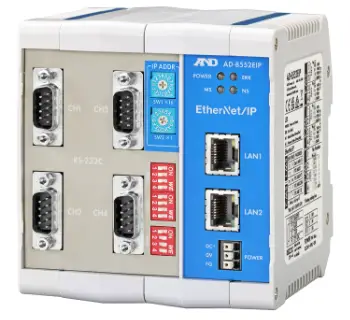
AD-8552EIP AD-8552EIP
EtherNet/IP Convertor
Simplified Instruction Manual
Refer to the instruction manual on the A&D home page.
URL: https://www.aandd.jp/
Caution
- No part of this publication may be reproduced, transmitted, transcribed, or translated into any language in any form by any means without the written permission of A&D.
- This manual is subject to change without notice at any time to improve the product.
- The contents of this manual and the specifications of the instrument covered by this manual are subject to change for improvement without notice.
- A&D bears no responsibility for claims of losses and benefits due to the operation of this device, regardless of the reason.
Introduction
This manual is an outline of the AD-8552EIP and the instructions for setting up and installing the equipment. Refer to the A&D website for more information on the compatible weighing devices and communication protocols.(https://www.aandd.jp/)
Features
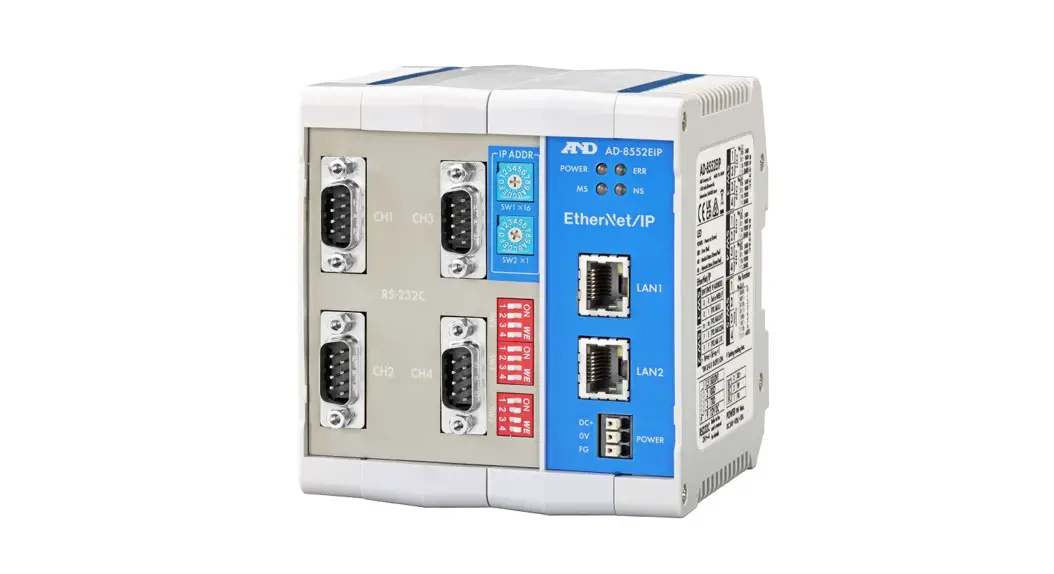
The AD-8552EIP converts RS-232C communications of the weighing device into EtherNet/IP communications (EtherNet/IP converter).
- By using EtherNet / IP, the balance can be controlled directly from the network. In principle, the AD-8552EIP can connect up to 253 units to one PLC. (In actually, the maximum number of connected devices varies depending on the PLC performance and communication frequency.)
- The weighing value can be reset to zero (re-zero) by operating from the PLC.
- The hook on the back of this device allows one-touch DIN rail mounting.
- When connected to a AD-4212C, etc., response speed can be changed, Sensitivity adjustment can be done with an external weights, and power can be supplied to the measuring instrument. Please check A&D website for compatible measuring instruments.
Cautions
Before use, confirm the following items for safe operation.
- This device is a precision instrument. Please handle with care.
- Avoid vibration, shock, extremely high temperature and humidity, direct sunlight, dust, splashing water, air containing salt or corrosive gases, and places where flammable gases are present.
- The operating temperature is 0°C to +50°C (32°F to 122°F).
- Please ground the module.
- The power supply is DC24V. If it contains a momentary power failure or noise components, that may cause a malfunction. Use a stable power supply. Please avoid sharing with the power line.
- Do not share the earth ground line and power line with other electrical power equipment.
- Do not turn on the converter until installation is complete. The convertor is not equipped with a switch to turn it off.
- To prevent foreign matter from entering this device, do not remove the prevent overheating, be sure to remove the protective cover before turning on the power after installation and wiring.
Specification
| 4.Specification | |
| 4.1.Specification | |
| Voltage requirement | DC 24 V +10%、-15% |
| Power requirement | 9W Max. (When power is supplied to 4 units such as an AD-4212C) |
| Communication interface | EtherNet/IP ×2 (For connection to control equipment) RS-232C× 4 (For connection with a weighing instrument) |
| Operating conditions | 0℃ to +50℃, Max 85 %RH (no condensation) |
| External dimensions | 105 (W)×112 (H)×103 (D) mm |
| Accessory | Simplified instruction manual |
| Mass | Approximately 440 g |
| 4.2.Communication specification (EtherNet/IP) | |
| Communication standard | EtherNet/IP (CT18 compliant) |
| Vender ID | 188 |
| Device type | 43(0x2B):Generic Device |
| Transmission speed | 10/100Mbps (automatic negotiation) |
| Communication method | Full duplex / half duplex (automatic negotiation) |
| 4.3.Communication specification (RS-232C) | |
| Baud rate | 2400, 9600, 19.2k, 38.4k (Set by SW-3, 4.) |
| Data bit length | 7 bit fixed |
| Parity | EVEN fixed |
| Terminator | <CR><LF> fixed |
Front and Rear Panel

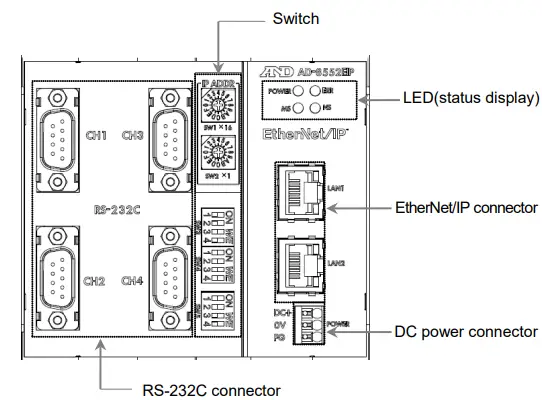
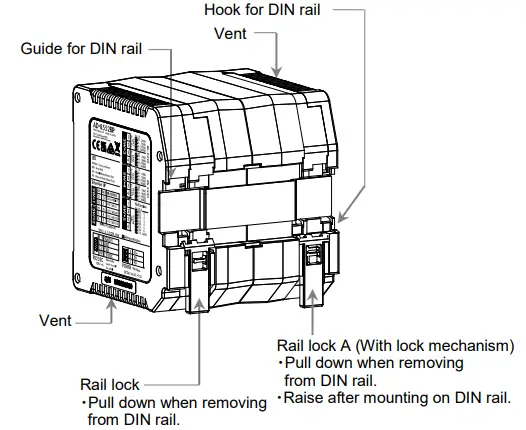
Connections
Power supply
Connections example
- When connecting and removing the cables, push the buttons with a driver etc.
- We recommend use of rod type crimp terminals for the tips of cables.
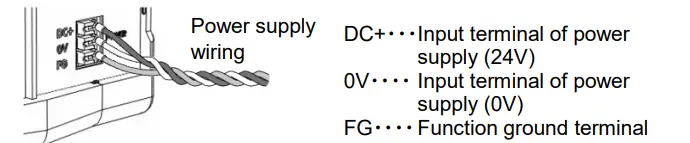
Shields of the RS-232C connector are connected internally to the FG of the power connector.
C AUTION
- Do not use the product at a voltage exceeding the rated voltage (DC24V +10%-15%).
- Ground the FG terminal of the switching power supply used for the power supply.
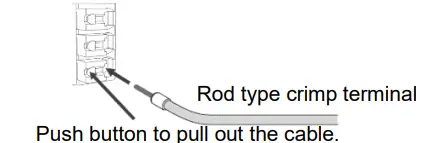
| Clamp range (rated) | 0.20 mm2 ~ 1.5mm2 | |
|
Applicable wire | AWG | AWG24 ~ AWG16 |
| Solder plated wire | 0.2 mm2 ~ 1.5mm2 | |
| Strand | 0.2 mm2 ~ 1.5mm2 | |
| Bar crimp terminal DIN46228 Part1 | 0.25 mm2 ~ 1.5mm2 | |
| Bar crimp terminal (With color) DIN46228 Part4 | 0.25 mm2 ~ 0.75mm2 | |
| Length | 8mm | |
Ethernet/IP 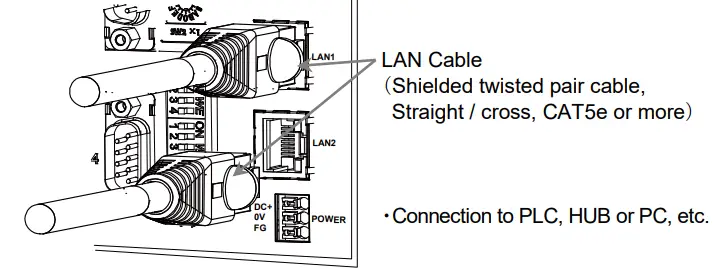 RS-232C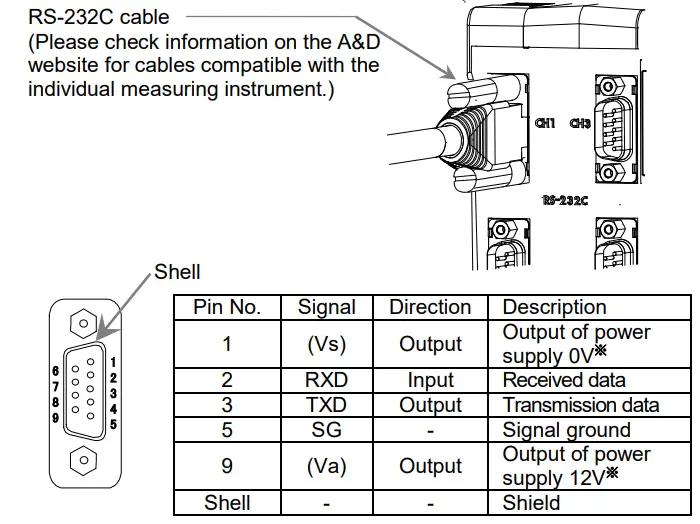
- When using some weighing devices, such as AD-4212C, the power from this device can be used to operate the weghing device, and wiring of the power supply is not required. Please check the A&D website for the compatible models.
Switch
Change the switch settings according to your operating environment. Be sure to turn off the AD-8552EIP after changing the setting. When the power is turned on, the switch setting change is reflected.
Communication setting for EtherNet/IP
| SW-1 | SW-2 | IP address |
| 0 | 0 | It will be the address set in the web interface. |
| 0 | 1 | [ 192.168.0.1 ] |
| n1 | n2 | [ 192.168.0. (n1×16 + n2×1) ] |
| F | E | [ 192.168.0.254 ] |
| F | F | [ 192.168.1.10 ] |
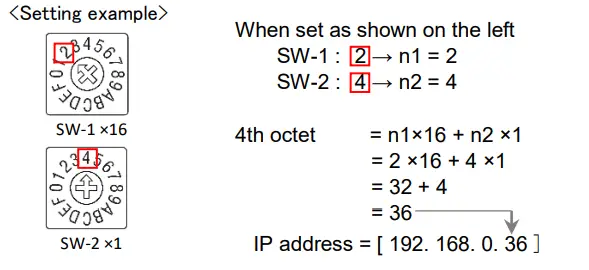
Set the IP address so that it does not duplicate that of other devices.
Communication setting for RS-232C
| 7.2. Communication setting for RS-232C | |||
|
SW-3 | No.1 | No.2 | CH1:RS-232C baud rate |
| OFF (0) | OFF (0) | 2400 | |
| OFF (0) | ON (1) | 9600 | |
| ON (1) | OFF (0) | 19200 | |
| ON (1) | ON (1) | 38400 | |
| No.3 | No.4 | CH2:RS-232C baud rate | |
| OFF (0) | OFF (0) | 2400 | |
| OFF (0) | ON (1) | 9600 | |
| ON (1) | OFF (0) | 19200 | |
| ON (1) | ON (1) | 38400 | |
|
SW-4 | No.1 | No.2 | CH3:RS-232C baud rate |
| OFF (0) | OFF (0) | 2400 | |
| OFF (0) | ON (1) | 9600 | |
| ON (1) | OFF (0) | 19200 | |
| ON (1) | ON (1) | 38400 | |
| No.3 | No.4 | CH4:RS-232C baud rate | |
| OFF (0) | OFF (0) | 2400 | |
| OFF (0) | ON (1) | 9600 | |
| ON (1) | OFF (0) | 19200 | |
| ON (1) | ON (1) | 38400 | |
| 7.3. Other settings | |||
Other settings
Setting of decimal point position
| SW-5 | Value stored in AD-8552EIP (Eg. Weighing output is123.456 g) | |||
| No.2 | No.3 | No.4 | Decimal position | Weighing value |
| OFF (0) | OFF (0) | OFF (0) | 0 | 123 |
| OFF (0) | OFF (0) | ON (1) | 1 | 1234 |
| OFF (0) | ON (1) | OFF (0) | 2 | 12345 |
| OFF (0) | ON (1) | ON (1) | 3 | 123456 |
| ON (1) | OFF (0) | OFF (0) | 4 | 1234560 |
| ON (1) | OFF (0) | ON (1) | 5 | 12345600 |
| ON (1) | ON (1) | OFF (0) | 6 | 123456000 |
| ON (1) | ON (1) | ON (1) | 3 (AUTO※) | 123456 |
The decimal point value is automatically set according to the weighing value input.
Confirmation
Supply power to the AD-8552EIP to start communication.
It is possible to confirm that the wiring of each cable is connected by the LEDs of the AD-8552EIP
POWER 〇〇 ERR
MS 〇〇 NS 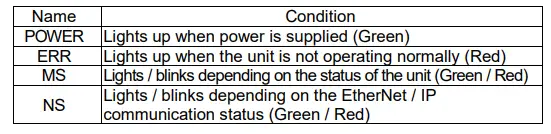
Communication protocol
Please check the A&D website for details on the communication protocol.
 A&D Company, Limited