 SN-1 PLUS Inverter Supply
User Manual
1. Introduction
1-1. Main features
- SNMP : SN-1 PLUS’s version is V2C. It can be connected to system with NMS, to set up and monitor SR-Host parameters.
- Web-Server : Using the browser to set up and monitor SR-Host parameters.
1-2. Hardware introduction 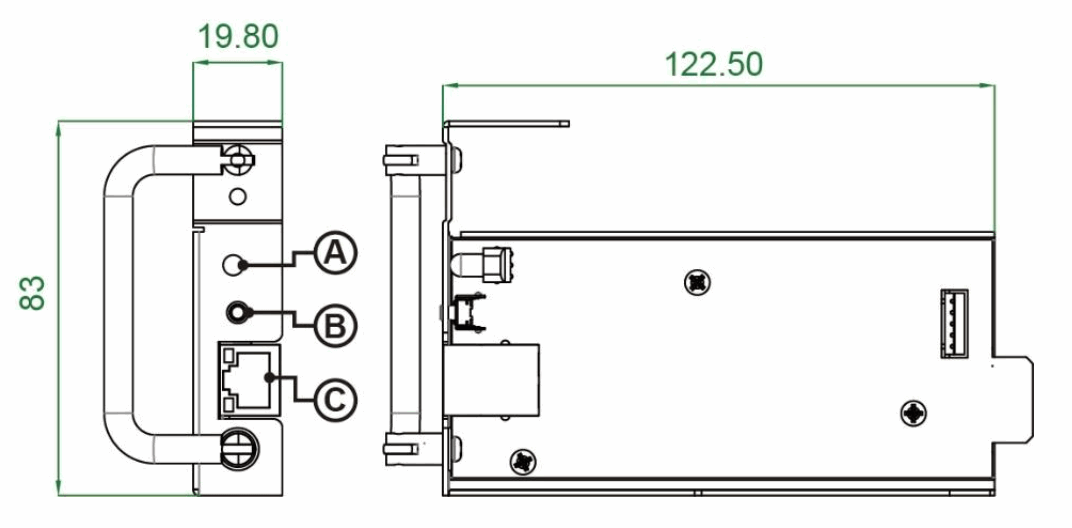
| Description | Function | |
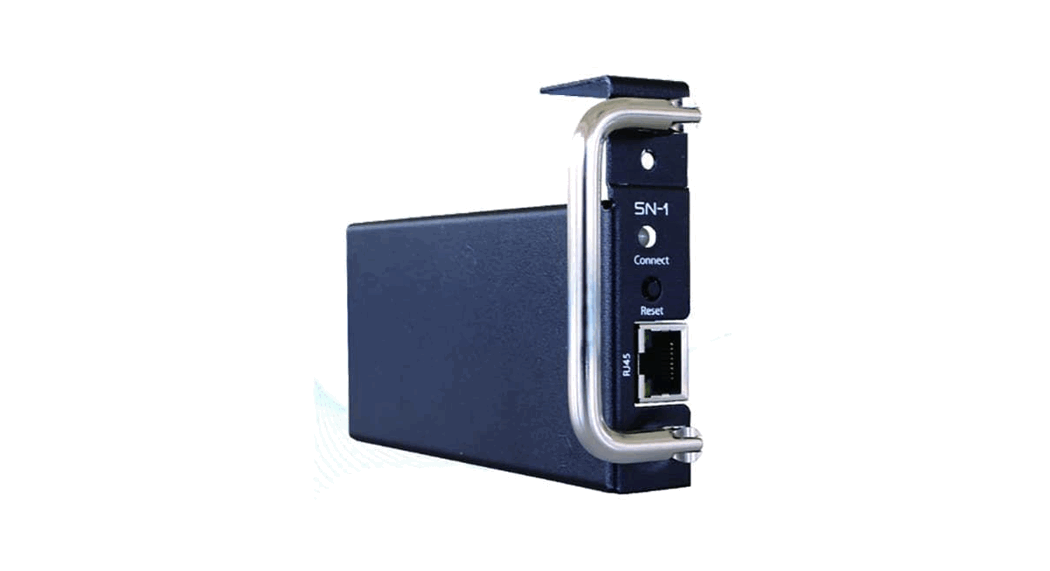
| A | LED light | To display below operation status: Green : Communicate with SR-Host successfully Red : Fail to communicate with SR-Host |
| B | Reset Button | Go back to SN-1 PLUS default settings |
| C | RJ45 | Connect to PC locally |
1-3. How to use Web-Server
1-3-1 Web-Server introduction
Main menu item description:
| Status | Status: To display SR-Host status |
| Event Log | Event Log: To display inverter historical events |
| Event Log Time | Event Log Time: To set time |
| System Control | System Control: system output control |
| UI Config | UI Configuration: RS232/ Interface language/ Login password |
| Inverter Config | Inverter Configuration: Inverter parameter (settings ex.OVP/UVP…) |
| Network Config | Network Configuration: SNMP network settings (DHCP/IP…) |
| SNMP Config | SNMP Configuration: Community Name setup for SNMP V2C |
 Note! Default login name: admin Default login password: 000000 ( According to the RS-485 password setting)
1-3-2 Status Page
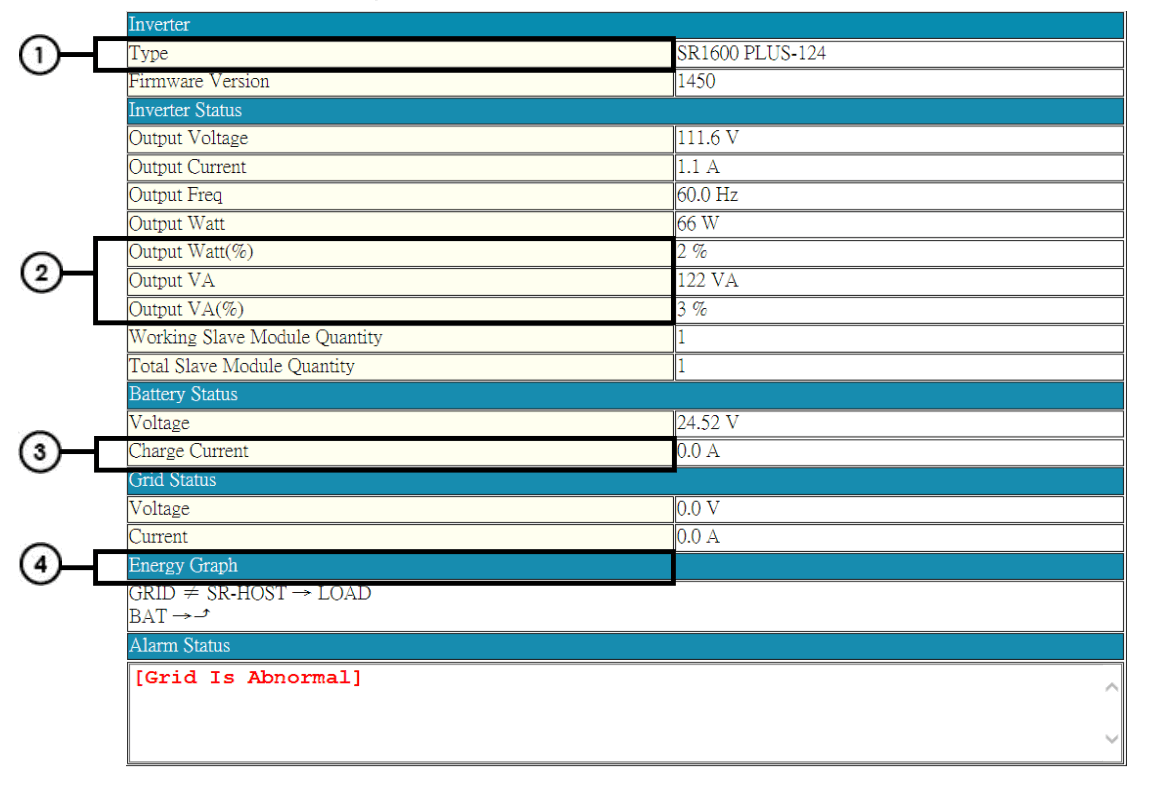
| 1 | Description | Function |
| 2 | Type | Model name |
| 3 | Loading | Inverter loading Capacity |
| 4 | Charge Current | SRC Inverter series only |
| 5 | Energy Graph | It displays the energy stream direction |
1-3-3 Event Log Page
Event Log
update
| Date | Event Code | Description |
| – | – | – |
- The first index information is the latest event .
 To set Year/Date/Time
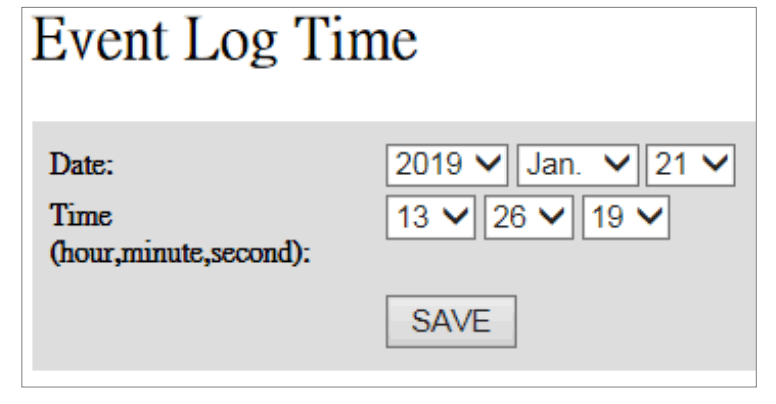 To set Year/Date/Time
1-3-4 System Control Page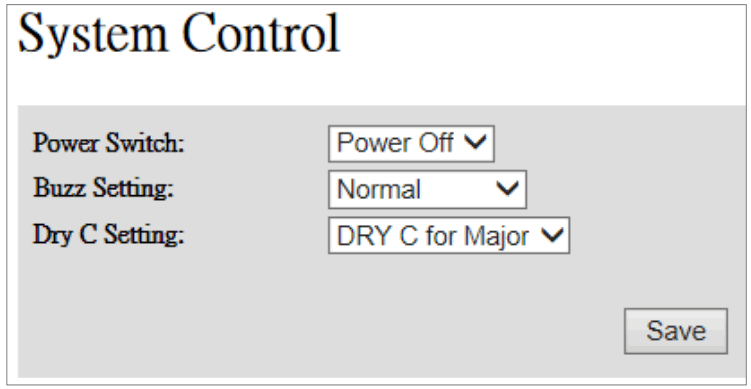
- Power Switch: To control the power on/off of the Inverter.
- Buzz Setting: To set module buzzer normal/mute/one time
- Dry C Setting: To set rs485 dry contactor relay definition for major/minor
1-3-5 UI Config Page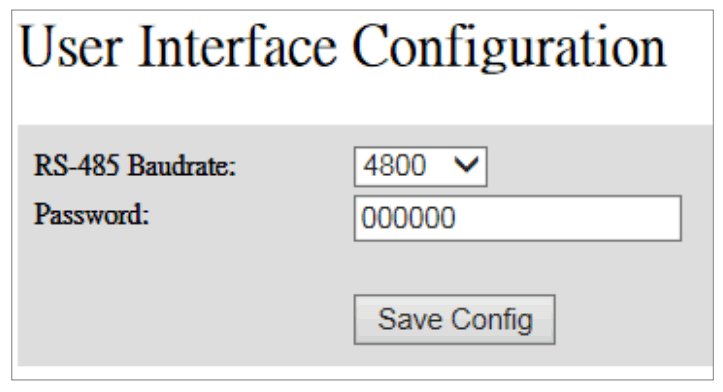
- RS-485 Baud rate: To set RS-485 baud rate.
- Password: To set RS-485 6 digits password. (Default: 000000)
1-3-5 Inverter Config Page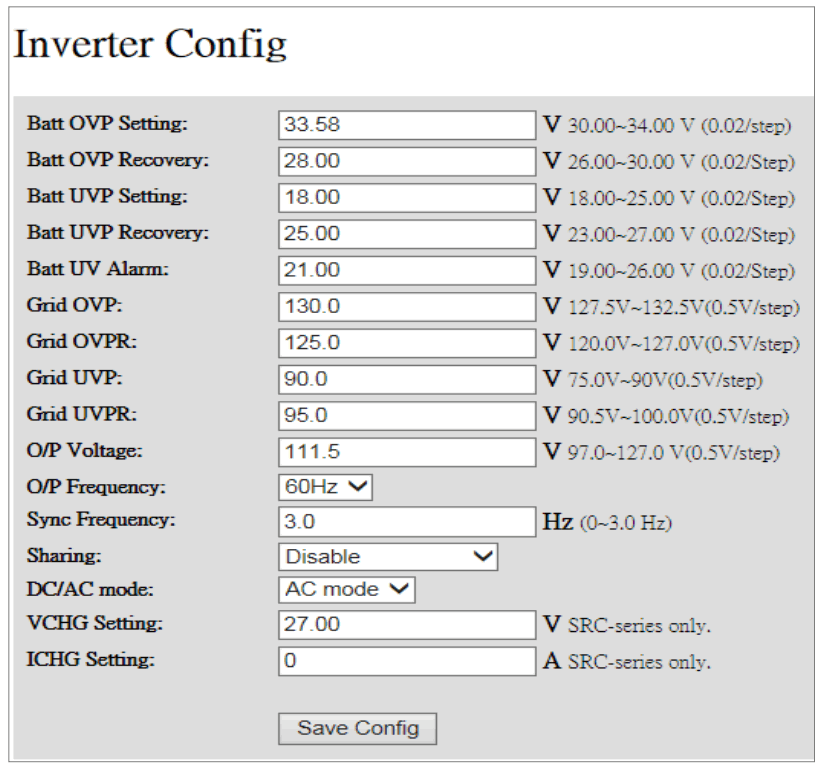 1-3-6 Network Config Page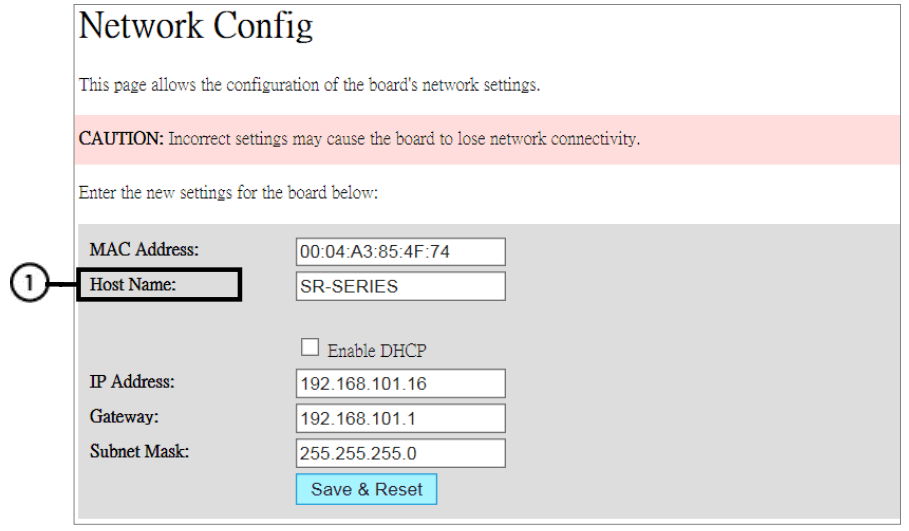
| Description | Function |
| Host Name | SN-1 PLUS Network Name |
Note! Incorrect network setting may cause SN-1 PLUS connection issue. Please set the values back to default whenever issue arises ( Refer to 2-3 )
1-3-7 SNMP Config Page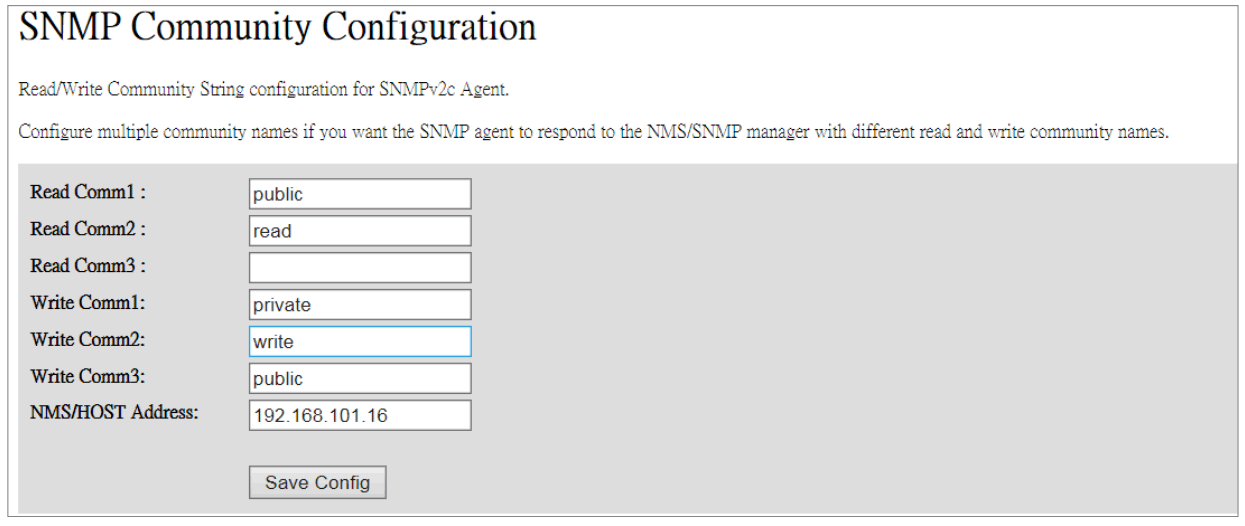
Set SN-1 PLUS Community Name :
Note! After AC restart, Community Name will go back to default.
1-4. SNMP V2C Description
SNMP Agent Trap
| Item | Description |
| trap Receiver IP Address trap Community | Network Management Station trap IP |
| trap Community | NMS trap community name. |
| trap Enable | If=0, Disable SN-1 trap , If =1, Enable SN-1 trap |
| trap Time Interval | Setting the interval at which traps occur each time. MAX = 65535 / per100ms, MIN = 1 / per100ms |
Note! Please contact your COTEK local distributor for MIB file.
Note! After AC restart, trap will go back to default
Installation and Operation
2-1 Installation of SN-1 PLUS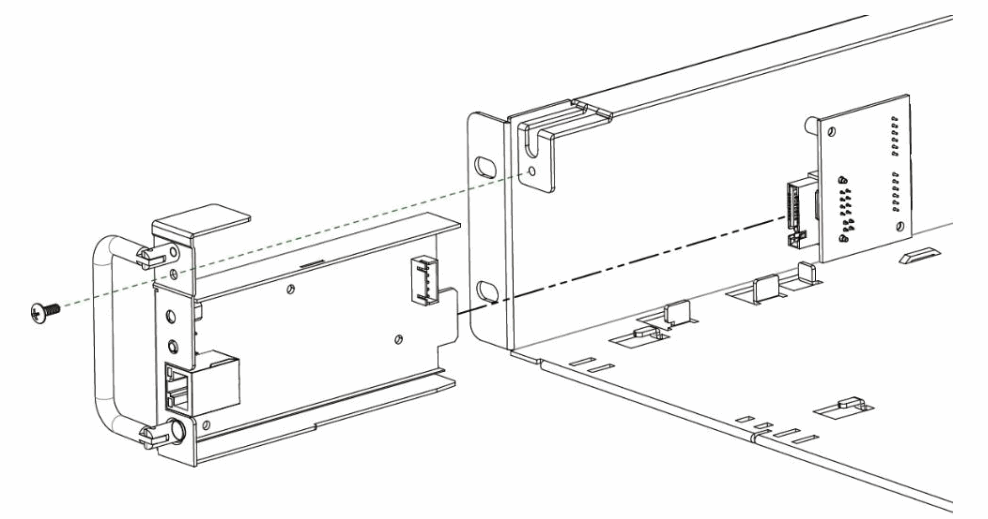 Step 1 : Hold the button on the panel and slot in the SN-1 PLUS card for 1 second
Step 2 : Fix the screw
2-2 Connection from SN-1 PLUS to PC
2-2-1 Connection via the router
- Connect SN-1 PLUS to the router
- Find the IP address of SN-1 PLUS from the router
- Type IP address of SN-1 PLUS in the web browser/NMS and then connect to web-server/SNMP agent
2-2-2 Connection via PC
- Connect from SN-1 PLUS to PC
- The default static IP of SN-1 is 192.168.1.250. Please change the setting value of network interface card in PC. The static IP address of PC is 192.168.1.X (The value X cannot be the same value of SN-1 PLUS IP’s 250)
- Type IP address of SN-1 PLUS in the web browser/NMS and then connect to web-server/SNMP agent
2-3 Reset SN-1 PLUS to Default
Hold the button on the front panel for 1 second then and slot in the card of SN-1 PLUS. 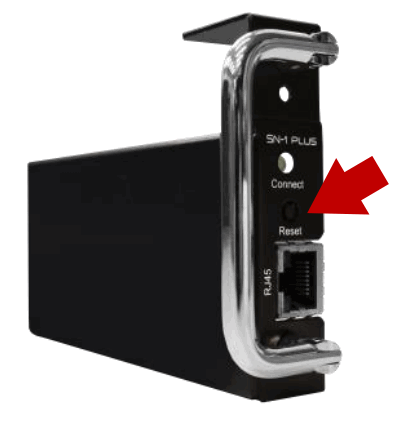
Troubleshooting
| LED Status | Signal Description | Suggestion actions |
| LED Red | SN-1 PLUS fails to communicate with SR-Host. | 1.Check LED of SR-1600 PLUS module 2.Unplug and plug in SN-1 PLUS module again. 3.Check the LED status on SN-1 PLUS. |
| LED Green | SN-1 PLUS communicates with SR-Host correctly, but the data transmission is still abnormal | 1.Press Reset button and go back to default value. 2.Check if router or PC network setting is correct. 3.Check firewall setting and PORT 80,161,162 for SN-1 PLUS 4.Change another Ethernet cable. |
Table 6. Troubleshooting guide
Warranty
We guarantee this product against defects in materials and workmanship for a period of 24 months from the date of purchase. In case you need to repair or replace any defective power inverters, please contact COTEK local distributor.
This warranty will be considered void if the unit has been misused, altered, or accidentally damaged. COTEK is not liable for anything that occurs as a result of the user’s fault.
No.33, Sec. 2, Rene Rd., Dadaist., Taoyuan City 33548, Taiwan
Phone +886-3-3891999
FAX:+886-3-3802333
http://www.cotek.com.tw
2022.06._A1
 COTEK - Inverter Power Supply, Electronic Inverter Manufacturer