
CC&C Technologies, Inc.
BA-300M
BT5 Aptx Audio Mixer
HIGHGAZE
Quick Start
- Power on and Enable Bluetooth of BT5 Audio Mixer
- Connect 3.5mm Audio Cable with Game Set
- Connect 3.5mm Headphone Cable with Headphone
- Paring with Mobile Phone
Contents
- Bluetooth 5 Audio Mixer
- USB 2.0 (Type A Type C) Cable
- 3.5mm Headphone Cable
Overview
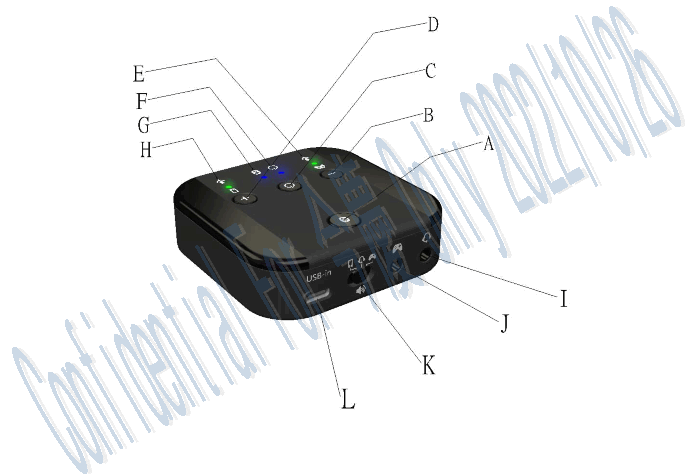
| Button | Description | Action – Click | Action – Hold and Release |
| A | Paring Peer Device | Start Pairing Mode | N/A |
| B | Game Set Mic. / Mixer Vol. Multi Function Button | Enable/Disable Game Set Mic. | Mixer Vol. Down |
| C | System Ready / System Off / Multi Function Button | •Enable Bluetooth and System Ready •Disable Bluetooth and | N/A |
| System Off | |||
| D | Bluetooth Mic. / Mixer Vol. Multi Function Button | Enable/Disable Bluetooth Mic. | Mixer Vol. Up |
| C | Restore Defaults | 1. Disable Game Set and Bluetooth Mic | 2. Restore Defaults (Hold 8 sec and Release) |
※ Button Behavior – Click: Single Press then Release
Hold and Release: Press a couple of seconds then Release
| LED | Description |
| E | Game Set Mic. (On/Off) Status |
| F | Enable/Disable Bluetooth and System On/Off Status |
| G | Bluetooth Status ■ Discoverable: Flashing Steady ■ Connected Phone: Flashing 3 times at a time ■ Disconnected Phone: Flashing 2 times at a time |
| H | Bluetooth Mic. (On/Off) Status |
| Intfs | Description |
| I | 3.5mm Headphone Jack |
| J | 3.5mm Game Set Audio Jack |
| K | Set Phone (BT) / Phone(BT) + Game /Game Volume Mode Switch |
| L | USB ( Type C) DC-IN Power Supply |
Mixer Default Power On/Off State, System (Bluetooth) Ready/Off State
Power On – Only Type A Type C Cable + Power Adapter
| Audio/Mic (I) | Audio/Mic (J) | LED (E) | LED (F) | LED (G) | LED (H) |
| On/On | On/On | Off | Off | Off | Off |
Turn On Bluetooth and System Ready State – Type A ⇔Type C Cable + Power Adapter + Button (C)
| Audio/Mic (I) | Audio/Mic (J) | LED (E) | LED (F) | LED (G) | LED (H) |
| On/On | On/On | On | On | Flashing Steady | On |
Turn Off Bluetooth and System Off State – Type A ⇔Type C Cable + Power Adapter + Button (C)
| Audio/Mic (I) | Audio/Mic (J) | LED (E) | LED (F) | LED (G) | LED (H) |
| On/On | On/On | Off | Off | Off | Off |
Power Off State – No Type A ⇔Type C Cable + Power Adapter
| Audio/Mic (I) | Audio/Mic (J) | LED (E) | LED (F) | LED (G) | LED (H) |
| Off | Off | Off | Off | Off | Off |
Setup and Default Status Table
| Scenarios | Button Switch | Button Action | LED | Description |
| Power On | N/A | N/A | (E),(F),(G),(H) Off | Power On via Type C cable |
| Tum On Bluetooth and System Ready | (C) | Click | (0) Flashing Steady | Enable Bluetooth and Enter Paring Mode (Pairing List is empty) |
| Connected Phone | N/A | N/A | (0) Flashing 3 times at a time | Establish Bluetooth Connection Successfully |
| Disconnected Phone | N/A | N/A | (0) Flashing 2 filmes at a time | Failed to Establish Bluetooth Connection |
| Incoming Call or Music On | N/A | N/A | (0) On | Incoming call or Music On |
| Bluetooth Re-Enter Paring Mode | (A) | Press 3 seconds and release | (G) Flashing steady | Enter Connectable and Paring Mode |
| Thm Off Bluetooth and system | (C) | Click | (00),(G),(H) Off | Mixer’s Bluetooth system is off |
| Restore Defaults And System Off | (C) | Click and Press over 8 seconds and release | (0) I. On 2. Off | Mixer is restored to factory defaults. (Pairing List will be erased) |
| Phone Mic On/Off | (D) | Click | (I-) On (H) Off | Mute Off Mute On |
| Game Set Mic On/Off | (B) | Click | (E) On (E) Off | Mute Off Mute On |
| Volume Mode | (K) | Slide Switch | (L) (C) (R) | Phone Volume Mixer Volume Game Set Volume |
This device complies with Part 15 of the FCC Rules. Operation is subject to the following two conditions: (1) This device may not cause harmful interference, and (2) This device must accept any interference received, including interference that may cause undesired operation
This equipment has been tested and found to comply with the limits for a Class B digital device, pursuant to part 15 of the FCC Rules. These limits are designed to provide reasonable protection against harmful interference in a residential installation. This equipment generates, uses and can radiate radio frequencyenergy and, if not installed and used in accordance with the instructions, may cause harmful interference to radio communications. However, there is no guarantee that interference will not occur in a particular installation. If this equipment does cause harmful interference to radio or television reception, which can be determined by turning the equipment off and on, the user is encouraged to try to correct the interference by one or more of the following measures:
- Reorient or relocate the receiving antenna.
- Increase the separation between the equipment and receiver.
- Connect the equipment into an outlet on a circuit different from that to which the receiver is connected.
- Consult the dealer or an experienced radio/TV technician for help.
To assure continued compliance, any changes or modifications not expressly approved by the party responsible for compliance could void the user’s authority to operate this equipment. (Example- use only shielded interface cables when connecting to computer or peripheral devices).
FCC Radiation Exposure Statement
This equipment complies with FCC RF radiation exposure limits set forth for an uncontrolled environment. This equipment should be installed and operated with a minimum distance of 20 centimeters between the radiator and your body.
This transmitter must not be co-located or operating in conjunction with any other antenna or transmitter. The antennas used for this transmitter must be installed to provide a separation distance of at least 20 cm from all persons and must not be co-located or operating in conjunction with any other antenna or transmitter.