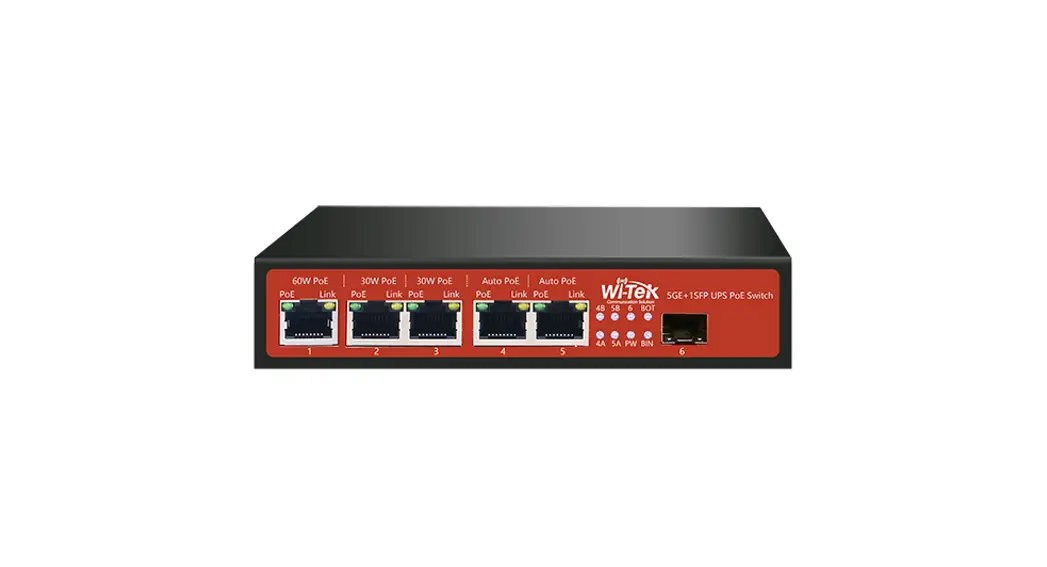
 Installation Guide
Unmanaged Solar PoE Switch
WI-PS306GF-UPS/WI-PS306GF-UPS-15A
Package Contents
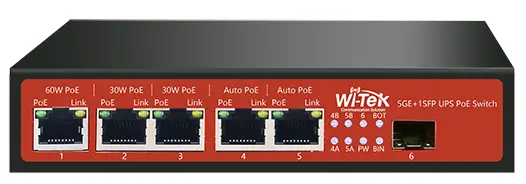
1×Solar PoE Switch
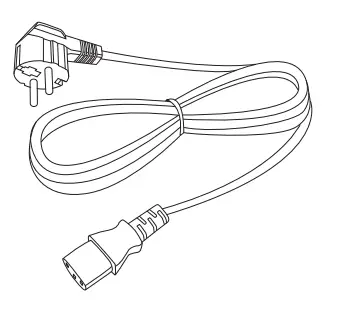
1×AC Power Cord (Except Australia)
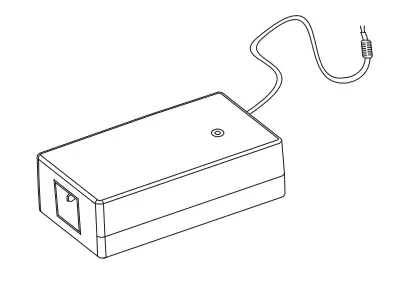
1×AC Power (Except Australia)
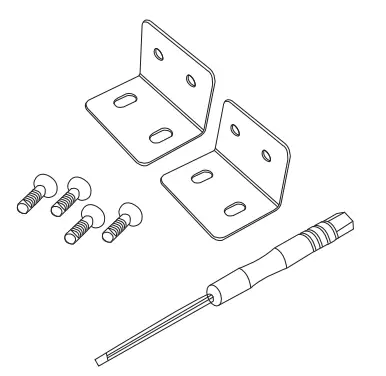
Mounting Accessories (Hook*2; Screw Driver*1; Screw*4)
1×Installation Guide
Hardware Introduction
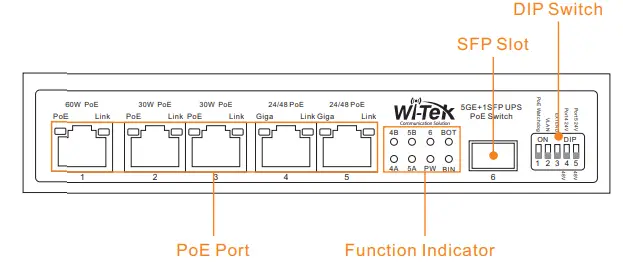
| DIP Switch Status Description | ||
| 1-PoE Watchdog | Up | All PoE ports enable PoE watchdog function, which can detect and reboot the offline compliant PoE powered devices automatically. |
| Down | Turn off PoE watchdog function | |
| 2-VLAN | Up | All downlink ports are isolated from each other, but can communicate with uplink ports. |
| Down | Turn off VLAN function | |
| 3-EXTEND | Up | The data and PoE power’s transmission distance of port 1~5 can be up to 250m. |
| Down | The data and PoE power’s transmission distance of port 1~5 can be up to 100m. | |
| 4-Port 4 | Up | Port 4 can be compatible with 24V forced PoE powered devices |
| Down | Port 4 can auto-detect 24V passive or 802.3af/at PoE powered device | |
| 5-Port 5 | Up | Port 5 can be compatible with 24V forced PoE powered devices |
| Down | Port 4 can auto-detect 24V passive or 802.3af/at PoE powered device | |
| Port LED Indicators Status Description | |||
| PoE | Amber | On | Power on |
| Off | No power | ||
| Link | Green | On | Power on |
| Off | No power | ||
|
Giga-Gigabit | Amber | 1000Mbps link established | |
| Green | 100Mbps link established | ||
| Off | No link | ||
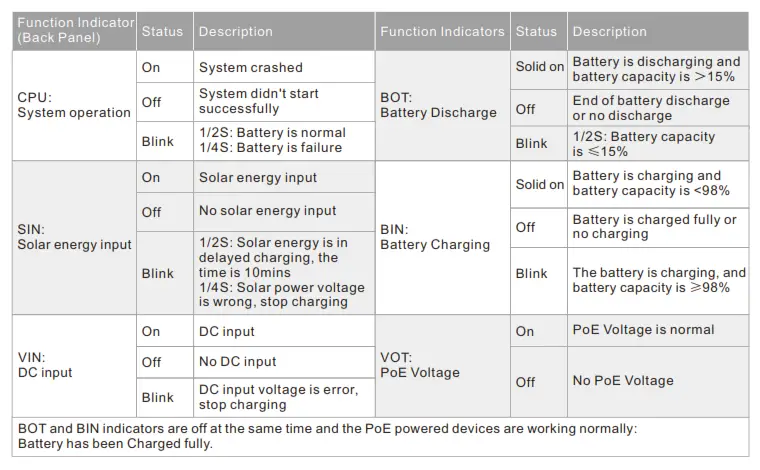
| Function Indicators (Front Panel) | Status | Description | Function Indicators | Status | Description |
| 4B: Port 4-24V PoE | On | 24V PoE on | 4B: Port 5-24V PoE | On | 24V PoE on |
| Off | No 24V PoE | Off | No 24V PoE | ||
| 4A: Port 4-48V PoE | On | 48V PoE on | 4A: Port 5-48V PoE | On | 48V PoE on |
| Off | No 48V PoE | Off | No 48V PoE | ||
| 6: Port 6-SFP slot | On | Link established | PW: Power | On | Power on |
| Off | No link | Off | No power | ||
|
BOT: Battery Discharge | Solid on | Battery is discharging and battery capacity is >15% |
BIN: Battery Charging | Solid on | Battery is charging and battery capacity is <98% |
| Off | End of battery discharge or no discharge | Off | Battery is charged fully or no charging | ||
| Blink | 1/2S: Battery capacity is ≤15% | Blink | The battery is charging, and battery capacity is ≥98% |
2.2 Back Panel
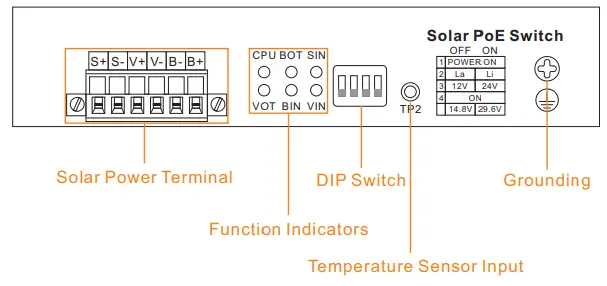
Solar Power Terminal
S+ : Solar positive electrode V+ : DC positive electrode B+ : Battery positive electrode
S- : Solar negative electrode V- : DC negative electrode B- : Battery negative electrode
DIP Switch
- Switch power system
- Battery type option
- Battery voltage option
- Lithium battery voltage option
Battery Type Option
| Switch 2 | Switch 3 | Switch 4 | Battery Type |
| Off | Off | – | 12V lead acid battery |
| Off | On | – | 24V lead acid battery |
| On | Off | Off | 12V lithium battery |
| On | On | Off | 24V lithium battery |
| On | Off | On | 14.8V lithium battery |
| On | On | On | 29.6V lithium battery |
| Power on device after completing all setting. | |||
Hardware Installation
Step 1: How to get 12V or 24V battery?
| Product | Battery type | Battery Voltage | Battery Max Charge Current |
| WI-PS306GF-UPS | Lead-acid Lithium | 12V or 24V | 5A |
| WI-PS306GF-UPS-15A | 15A |
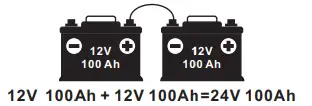
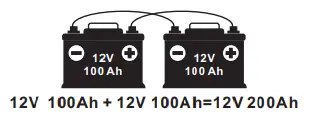
| In series for 24V battery In parallel for 12V battery | |
 |  |
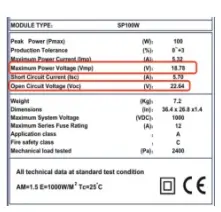
Step 2: How to select a suitable solar panel?
| Model Solar Panel Type | ||||
|
WI-PS306GF-UPS | 12V Solar Panel | Maximum power voltage(Vmp) | 26V |
|
| Open circuit voltage(Voc) | <32V | |||
| 24V Solar Panel | Maximum power voltage(Vmp) | 36V | ||
| Open circuit voltage(Voc) | <45V | |||
| S+ S- Input Voltage For 12V Battery: DC 15-26V For 24V Battery: DC 30-36V | ||||
|
WI-PS306GF-UPS-15A | 12V Solar Panel | Maximum power voltage(Vmp) | 26V | |
| Open circuit voltage(Voc) | <30V | |||
| 24V Solar Panel | Maximum power voltage(Vmp) | 30V | ||
| Open circuit voltage(Voc) | ≤40V | |||
| S+ S- Input Voltage For 12V Battery: DC 15-32V For 24V Battery: DC 30-57V | ||||
Step 3: Calculate solar panel and battery capacity
Example: Load=15W (1 pc UPS PoE switch, 2 pcs IP camera, 1 pc wireless CPE) Sun: 8h/day. Solar Panel: 100W. Battery: 12V/40Ah = 480Wh (100%)
DAY TIME:
Battery capacity at sunrise: 0%
Charge: 100W x 8h x 70% efficiency = 560Wh
Consumption: 15W x 8h = 120Wh
Battery capacity at sunset: 560-120 = 440Wh = 93%
NIGHT TIME
Battery capacity at sunset: 440Wh (93%)
Consumption: 15W x 16h = 240Wh
Battery capacity at sunrise: 440-240Wh = 42% = OK
So you can use 12V/100W solar panel with 12V/40Ah battery.
Note: UPS max. solar power
WI-PS306GF-UPS = 5A x 24V = 120W
WI-PS306GF-UPS-15A = 15A x 24V = 360W
Step 4: Power off the WI-PS306GF-UPS device, connect the solar panel, battery and temperature sensor(not included).
Note: The switch must be grounded.
Note: For model WI-PS306G F-U PS-15A, S+S- and V+V- can’t be connected at the same time to avoid the burning device.
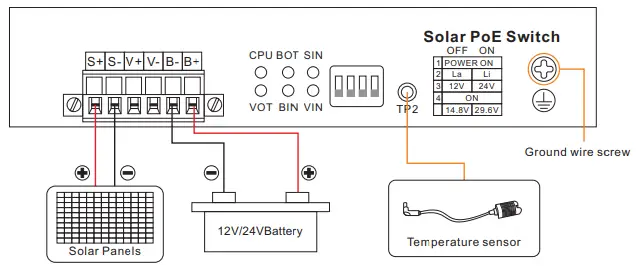
Power Priority: Solar Panel, DC IN, Battery
Step 5: Connect the 24V passive or 802.3af/at PoE Powered Devices.
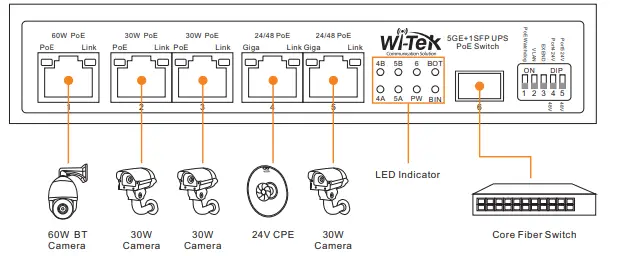
| Port | Max Power | PoE Standard | Application | PIN |
| Port 1 | 60W | 802.3af/at/bt | High speed dome camera | 1,2,4,5 + 3,6,7,8 – |
| Port 2-3 | 30W | 802.3af/at | Bullet camera | 1,2 + 3,6 – |
| Port 4-5 | 30W | Passive 24V /802.3af/at | 24V and 48V optional | 1,2 + 3,6 – or 4,5 + 7,8 – |
Warranty Card
| Username | |
| Address | |
| Telephone No. | |
| Purchase Shop | |
| Purchase Address | |
| Product Model No. | |
| Purchase Time | |
| Serial No. | |
| Dealer Signature |
- If the product defects within three months after purchase, we will provide you a new product of the same model.
- If the product defects within the three-year warranty period, we will provide the professional maintenance service.
- Proof of purchase and a complete product serial number are required to receive any services guaranteed as part of the limited warranty.
- Any other defects that are not caused by workmanship or product quality, such as natural disaster, water damage, extreme thermal or environmental conditions. sticker
damaged, warranty card losing will disqualify the product from limited warranty.

 | http://support.wireless-tek.com/ |
 | http://cloud2.wireless-tek.com |
 | http://www.wireless-tek.com/ |
Wireless-Tek Technology Limited
Address: Biaofang Technology Building 402, Bao’an street,
Baoan District,Shenzhen City, Guangdong, China
Website: www.wireless-tek.com
Tel:86-0755-32811290
Email: [email protected]
Technical Support: [email protected]
 Test and Measurement Equipment | Tektronix
 Wireless-Tek Technology Limited.