
SMALO LX2 Stem Integrated HMI for Electric Bike
Introduction
Manufacturer Information
Darad Innovation Corporation is a company located in Taiwan. We are committed to developing products that feature innovative ideas and structures.
Product Description
- Product Description: Stem Integrated HMI
- Trademark: SMALO
- Type Designation: 60.Y2XHM.001 / 60.Y3BHM.001
Support Information
Whenever you need professional support, please don’t hesitate to contact us!
- E mail [email protected]
- Headquarter’s Telephone No.: +886 3 2508800
- Headquarter’s Address: 1 F., No. 167, Shanying Rd., Guishan Dist., Taoyuan City 333426, Taiwan (R.O.C.)
Copyright Information
Copyright
© 202 3 Darad Innovation Corp. All rights reserved. No part or all of the content of this user manual may be used, modified, reproduced, transformed, distributed, published, translated, publicly displayed or distributed in any way to any other computer, server, website, media related to publication or any third party without the company’s prior written consent.
SMALO’s HMI
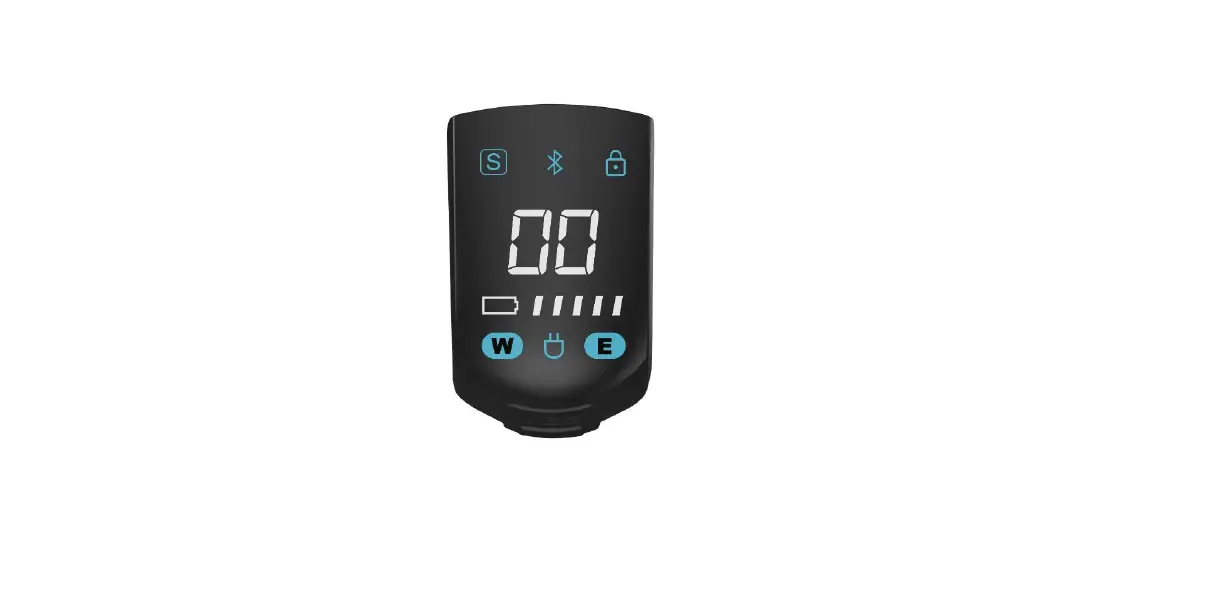
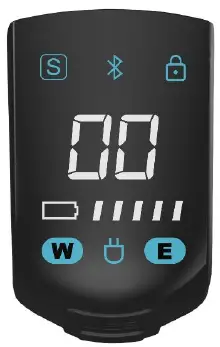
HMI Guide
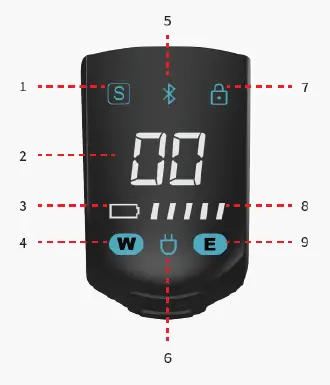
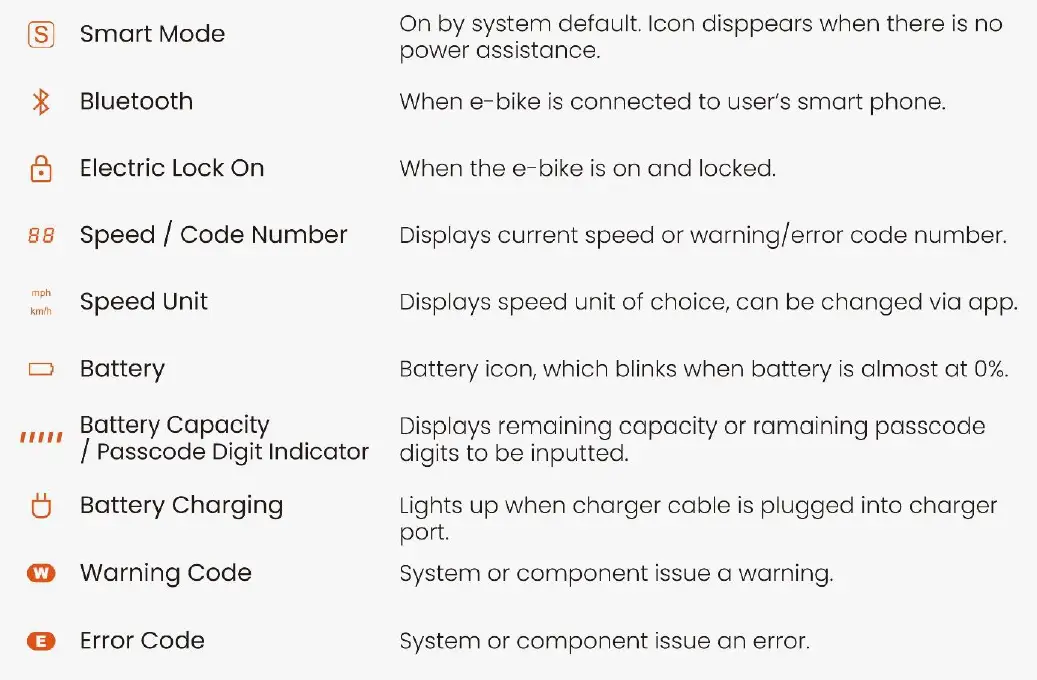
- Smart mode
- Speed/Code Number
- Battery indicator
- Warning code
- Bluetooth
- Battery charging
- Electric lock on
- Battery level
- Error code
How to Power ON/OFF
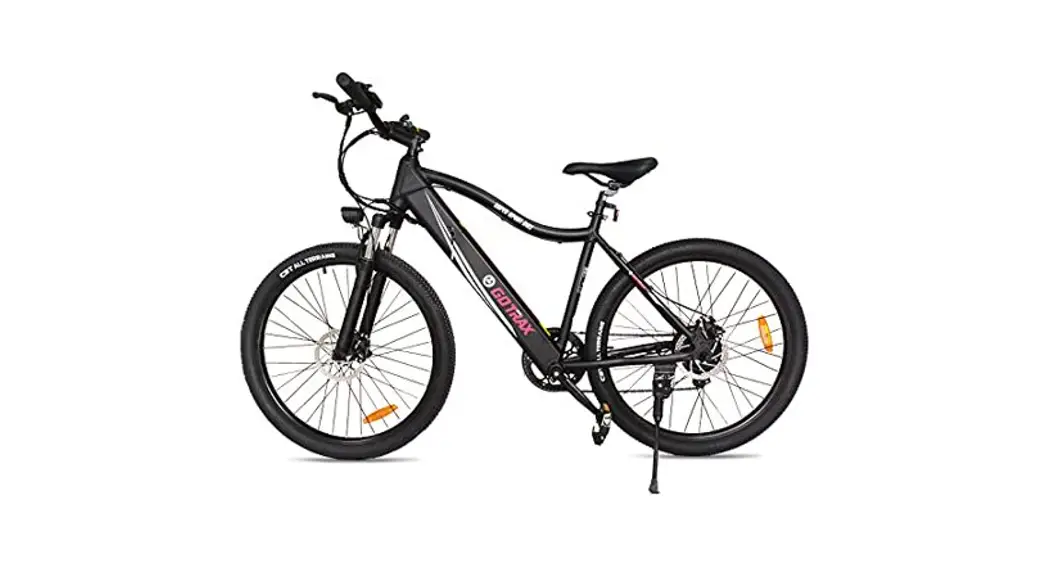
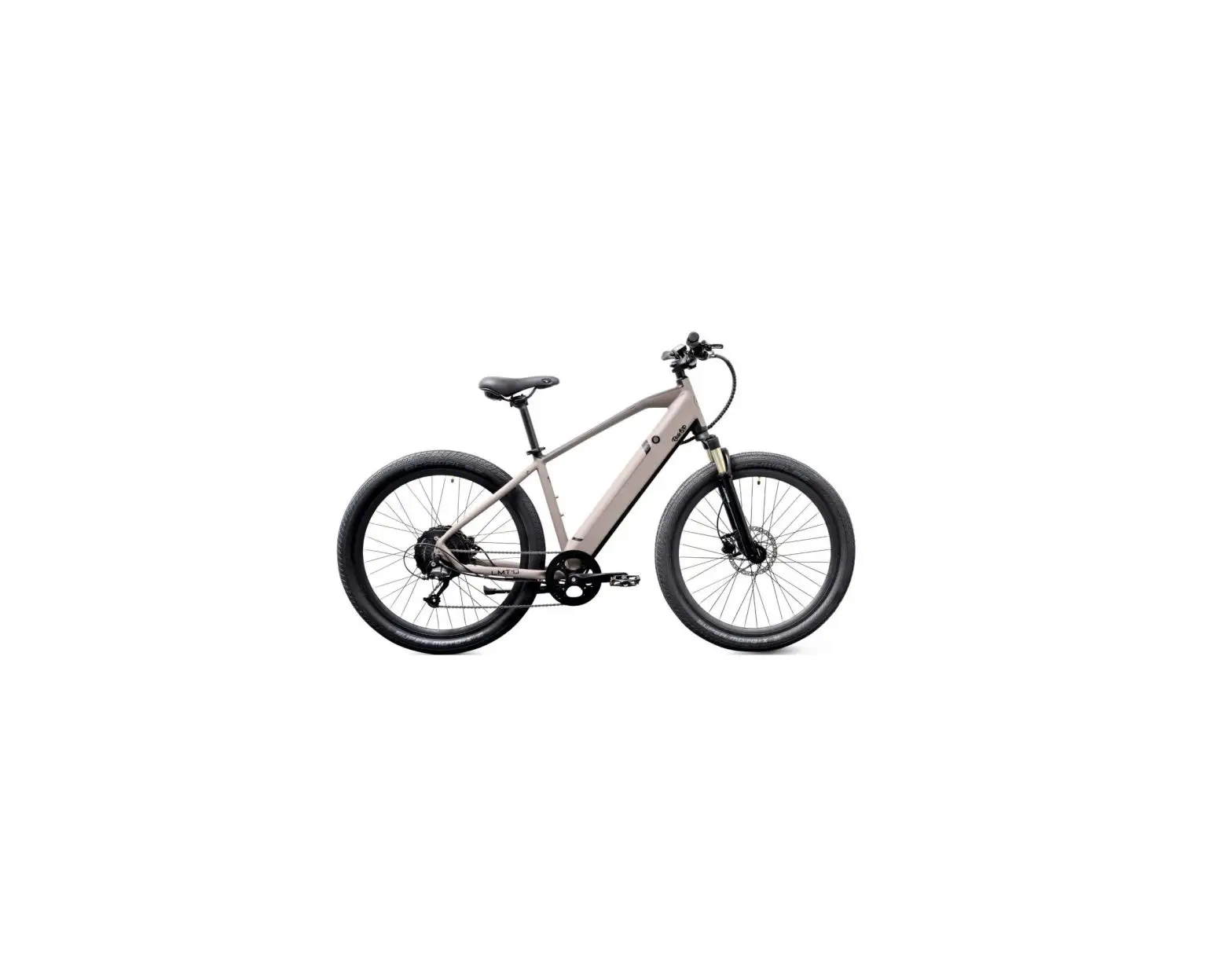
Typically, the HMI turns on when you turn on the e-bike’s power. (The figure below shows how to turn on SMALO LX2’s power. SMALO PX2 can be powered on the same way, with the power button at a similar location—top tube.)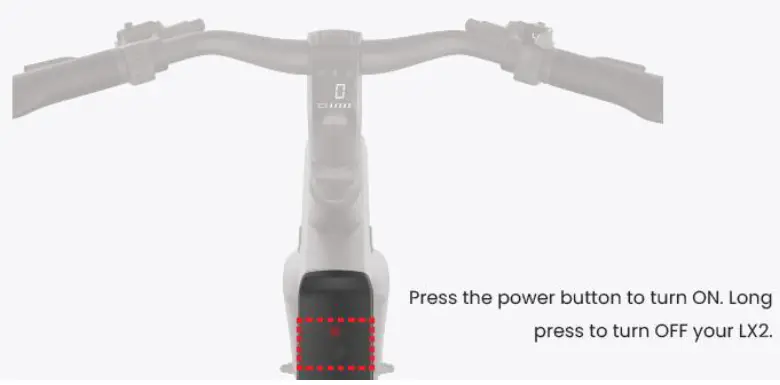
Detailed Icon Explanations
Battery Capacity
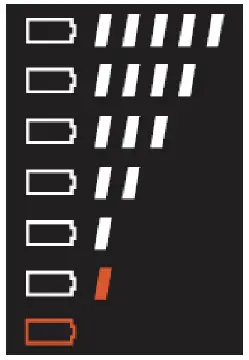
- 81%-100%
- 61%-80%
- 41%-60%
- 21%-40%
- 11%-20%
- <10%
Indicates that the battery level is almost at 0% and will be turning OFF power shortly.
Note]Orange color indicates blinking.
USB Type-C Charger Port
The USB Type-C Charger Port is water-resistant.
Caution
To avoid electric shock and damage to the e-bike, HMI, or your device, do not plug in any device while the charger port and/or the charging cable plug is wet.
You should still ensure that the charger port on the HMI and charger plug for your rechargeable device are dry and clean before use.
Additional Useful Information
Disposal and recycling Information
In the future, when this product reaches its end of life or when you need to dispose of it for any reason, please take note of the following:
Important Information
- E-Bike electronic components shall be disposed of separately from household waste. Please recycle according to local laws and regulations.
Environmental laws and guidelines vary across the globe. Please always check your local laws and guidelines before recycling.
Troubleshooting
Warning Codes
| Component | Code | Description | User Action |
| Controller (1~16) | W01 | Unstable communication between the controller and the battery | If the battery is removable, please turn off the power, reinstall the battery, then turn on the system again.
If the warning persists, please contact our service center. |
| W02 | Abnormalities in motion sensor communication | Please restart the system; if the warning persists, please contact our service center. | |
| W03 | Limited assistance due to overheated controller | The system still functions, but the power assistance output may be limited.
You may continue to use the system; but if possible, turn off the asstance and allow the system to cool down for at least 30 minutes. If this warning persists after 2 hours, please contact our service center. | |
| W04 | Limited assistance due to overheated motor | The system still functions, but the power assistance output may be limited.
You may continue to use the system; but if possible, turn off the asstance and allow the system to cool down for at least 30 minutes. If this warning persists after 2 hours, please contact our service center. | |
| HMI (9~16) | W09 | USB short circuit | Please replace the USB cable, and then restart the system. If the problem persists, please contact our service center. |
| VCU (17~32) | W17 | Unable to turn on the IOT module | If the warning persists, please contact our service center. |
| W18 | IOT module cannot retrieve SIM card information | If the warning persists, please contact our service center. | |
| W19 | IOT authentication error | If the warning persists, please contact our service center. |
| W25 | Abnormal USB power supply | Turn off the power and remove cable and rechargeable device. After turning on the power again, please try changing the USB cable and the rechargeable device. Cross check to verify which has failed. If the problem persists, please contact our service center. (The device to be recharged is suggested to be Bluetooth BC 1.2 compliant or above in order to be operate successfully.) | |
| HMI (33~48) | W33 | Abnormal reading in light sensor | Please restart the system. If the warning persists, please contact our service center. |
| W34 | Controller Bike ID authentication failed | Please restart the system. If the warning persists, please contact our service center. | |
| W35 | VCU Bike ID authentication failed | Please restart the system. If the warning persists, please contact our service center. | |
| W36 | Electric lock Bike ID authentication failed | Please restart the system. If the warning persists, please contact our service center. | |
| W37 | Electric shifter Bike ID authentication failed | Please restart the system. If the warning persists, please contact our service center. | |
| W41 | The controller is stuck in bootloader mode | Please update controller’s firmware, if the warning persists, please contact our service center. | |
| W42 | The HMI is stuck in bootloader mode | Please update HMI’s firmware, if the warning persists, please contact our service center. | |
| W43 | The VCU is stuck in bootloader mode | Please update VCU’s firmware, if the warning persists, please contact our service center. | |
| W44 | The electric lock is stuck in bootloader mode | Please update electric lock’s firmware, if the warning persists, please contact our service center. | |
| W45 | The electric shifter is stuck in bootloader mode | Please update electric shifter’s firmware, if the warning persists, please contact our service center. | |
| E-Lock (49~56) | W49 | Abnormal Hall sensor signal in the electric lock | Please first ignore W49 and unlock the bike. After successfully unlocking, please check if the warning has been resolved. If the problem persists, please contact our service center. |
Error Codes
| Components | Code | Description | User Action |
| Controller (1~31) | E01 | Motor stall is detected | Please restart the system. If the error persists, please contact our service center. |
| E02 | Speed sensor error | Please restart the system. If the error persists, please contact our service center. | |
| E03 | MCU exception | If the battery is removable, please turn off the power, reinstall the battery, then turn on the system again.
If the error persists, please contact our service center. | |
| E04 | Communication fails between controller and battery while turning on power | If the battery is removable, please turn off the power, reinstall the battery, then turn on the system again.
If the error persists, please contact our service center. | |
| E05 | Motor is not running smoothly | If it happens while the bike is travelling on more challenging roads, it should be the bike’s protective measure; if not, and it happens frequently, please contact our service center. | |
| E06 | Battery reports error | Please restart the system. If the error persists, please contact our service center. | |
| E07 | Torque value error | Please restart the system. If the error persists, please contact our service center. | |
| E08 | Abnormal starting torque value | Please recall if anyone was stepping on the pedals during the process of turning on the power. If so, this is a protective measure of the e-bike to provent unintended acceleration. The e-bike resumes to normal operation after error code disappears. (Please remember not to step on pedals when turning on the power.) If the error persists, please contact our service center. |
| E09 | Controller is overheating | It is the bike’s protective measure due to challenging riding/environmental conditions. Please turn off the system and wait for at least 60 minutes to allow system to cool down. Afterwards, turn on the system; if the error persists, please contact our service center. | |
| E10 | Overvoltage in the controller | Please restart the system. If the error persists, please contact our service center. | |
| E11 | Undervoltage in the controller | Please restart the system. If the error persists, please contact our service center. | |
| E12 | Overcurrent in the controller | Please restart the system. If the error persists, please contact our service center. | |
| E13 | Battery fails to discharge | Please restart the system. If the error persists, please contact our service center. | |
| E14 | Motor is overheating | It is the bike’s protective measure due to challenging riding/environmental conditions. Please turn off the system and wait for at least 60 minutes to allow system to cool down. Afterwards, turn on the system; if the error persists, please contact our service center. | |
| E15 | Power button signal error | Please restart the system. If the error persists, please contact our service center. | |
| E16 | Motor hall sensor signal error | Please restart the system. If the error persists, please contact our service center. | |
| E17 | Driver IC communication error | Please restart the system. If the error persists, please contact our service center. | |
| E18 | Driver IC function error | Please restart the system. If the error persists, please contact our service center. | |
| E19 | Driver IC signal error | Please restart the system. If the error persists, please contact our service center. |
| E-Lock (32~39) | E32 | Undervoltage in the electric lock | Use the correct charger to charge to full capacity, and check if the error is resolved. If not, please contact our service center. |
| E33 | Electric lock motor operation timed out | If the error persists, please contact our service center. | |
| E-Shift (40~48) | E40 | Overcurrent in the electric shifter | Please restart the system. If the error persists, please contact our service center. |
| E41 | Electric shifter motor is overheating | Please restart the system. If the error persists, please contact our service center. | |
| E42 | Undervoltage in the electric shifter Driver IC | Please restart the system. If the error persists, please contact our service center. | |
| E43 | Electric shifter operation timed out | Please restart the system. If the error persists, please contact our service center. | |
| E44 | Electric shifter motor stalled | Please restart the system. If the error persists, please contact our service center. | |
| VCU (49~55) | E49 | VCU battery not detected | If the error persists, please contact our service center. |
| E50 | E-bike battery cannot be turned on | Use the correct charger to charge to full capacity, and check if the error is resolved. If not, please contact our service center. | |
| E51 | VCU motion sensor communication error | Please restart the system. If the error persists, please contact our service center. | |
| E52 | Power button signal error | Please restart the system. If the error persists, please contact our service center. | |
| E53 | VCU cannot detect main e-bike battery | Please turn off the system and turn it on again. If the problem still occurs, please contact with service center. | |
| HMI (56~64) | E56 | Initial HMI connection failed | Please restart the system. If the error persists, please contact our service center. |
| E57 | Communication error between controller and HMI | Please restart the system. If the error persists, please contact our service center. | |
| E58 | “Check-value” error between controller and HMI | Please contact our service center. | |
| E59 | Bluetooth initialization failed | If the error persists, please contact our service center. |
| E60 | HMI button signal error (Analog type) | If the error persists, please contact our service center. | |
| E61 | HMI button signal error (Digital type) | If the error persists, please contact our service center. | |
| E64 | Passcode error | Please enter the passcode again. If you have forgotten it, you can use the app to change the passcode. | |
| Communi- cation (65~80) | E65 | Communication error between controller and electric shifter | Please restart the system. If the error persists, please contact our service center. |
| E66 | Communication error between controller and electric lock | Please restart the system. If the error persists, please contact our service center. | |
| E67 | Communication error between controller and VCU | Please restart the system. If the error persists, please contact our service center. | |
| E68 | Communication error between HMI and battery | Please restart the system. If the error persists, please contact our service center. | |
| E69 | Communication error between HMI and electric shifter | Please restart the system. If the error persists, please contact our service center. | |
| E70 | Communication error between HMI and electric lock | Please restart the system. If the error persists, please contact our service center. | |
| E71 | Communication error between HMI and VCU | Please restart the system. If the error persists, please contact our service center. | |
| E72 | Communication error between VCU and battery | Please restart the system. If the error persists, please contact our service center. | |
| E73 | Communication error between VCU and electric shifter | Please restart the system. If the error persists, please contact our service center. | |
| E74 | Communication error between VCU and electric lock | Please restart the system. If the error persists, please contact our service center. | |
| Battery (81~98) | E81 | Undervoltage (UV) | Please restart the system. If the error persists, please contact our service center. |
| E82 | Open Wire Protection Error for Battery Circuit (Open Wire) | Please restart the system. If the error persists, please contact our service center. | |
| E83 | Battery Cell Unbalance (CU) Protection Error | Please restart the system. If the error persists, please contact our service center. |
| E84 | Battery Over Current Charge (OCC) Protection | Please restart the system. If the error persists, please contact our service center. | |
| E85 | AFE Fault Protection Error for Battery | Please restart the system. If the error persists, please contact our service center. | |
| E86 | Permanent failure (PF) | Please restart the system. If the error persists, please contact our service center. | |
| E87 | Short current (SC) | Please restart the system. If the error persists, please contact our service center. | |
| E88 | SW Over discharge current 1 (ODC1) | Please restart the system. If the error persists, please contact our service center. | |
| E89 | SW Over discharge current 2 (ODC2) | Please restart the system. If the error persists, please contact our service center. | |
| E90 | SW Over charge current 2 (OCC2) | Please restart the system. If the error persists, please contact our service center. | |
| E91 | Pre-charge timeout (PCTO) | Please restart the system. If the error persists, please contact our service center. | |
| E92 | Over voltage (OV) | Please restart the system. If the error persists, please contact our service center. | |
| E93 | Discharge overheat (DOH) | Please restart the system. If the error persists, please contact our service center. | |
| E94 | 2nd thermistor overheat (FOH) | Please restart the system. If the error persists, please contact our service center. | |
| E95 | Charge continue overheat (COH) | Please restart the system. If the error persists, please contact our service center. |
Safety Information
FCC compliance statement
Warning: Changes or modifications to this unit not expressly approved by the party responsible for compliance could void the user’s authority to operate the equipment.
- To comply with FCC RF exposure compliance requirements, a separation distance of at least 20 cm must be maintained between the antenna of this device and all persons.
- This Transmitter must not be co-located or operating in conjunction with any other antenna or transmitter
This device complies with part 15 of the FCC Rules.
Operation is subject to the following two conditions: (1) this device may not cause harmful interference, and (2) this device must accept any interference received, including interference that may cause undesired operation.
Note: This equipment has been tested and found to comply with the limits for a Class B digital device, pursuant to part 15 of the FCC Rules. These limits are designed to provide reasonable protection against harmful interference in a residential installation.
FCC STATEMENT
This equipment generates, uses, and can radiate radio frequency energy and, if not installed and used in accordance with the instructions, may cause harmful interference to radio communications. However, there is no guarantee that interference will not occur in a particular installation. If this equipment does cause harmful interference to radio or television reception, which can be determined by turning the equipment off and on, the user is encouraged to try to correct the interference by one or more of the following measures:
- Reorient or relocate the receiving antenna.
- Increase the separation between the equipment and the receiver.
- Connect the equipment to an outlet on a circuit different from that to which the receiver is connected.
- Consult the dealer or an experienced radio/TV technician for help.
Changes or modifications to this product not authorized by SMALO by BESV could void the electromagnetic compatibility (EMC) and wireless compliance and negate your authority to operate the product. This product has demonstrated EMC compliance under conditions that included the use of compliant peripheral devices and shielded cables between system components. It is important that you use compliant peripheral devices and shielded cables between system components to reduce the possibility of causing interference to radios, televisions, and other electronic devices.
Specifications
| Item | Spec. |
| Model | HMI |
| Operating voltage | 5 ± 0.1V |
| Rating power consumption | a. with right switch:0.35W b. without right switch: 0.25W |
| Max power consumption | a. with right switch: 0.8W c. without right switch: 0.5W |
| Weight | a. with right switch: 115g b. without right switch: 86.6g |
| Display type | LED Display |
| Output Information | Speed, Charge, SOC, Lock status, Error, Warning, BLE |
| Assistant Level | Smart Mode |
| Lighting sensor | Yes |
| BLE version | 4.2 (2402~2480 MHz) |
| System communication | CAN-BUS (Baud rate 500kb) |
| USB Port | Type C, powered by VCU |
| ROHS | Conforms the ROHS of PTC |