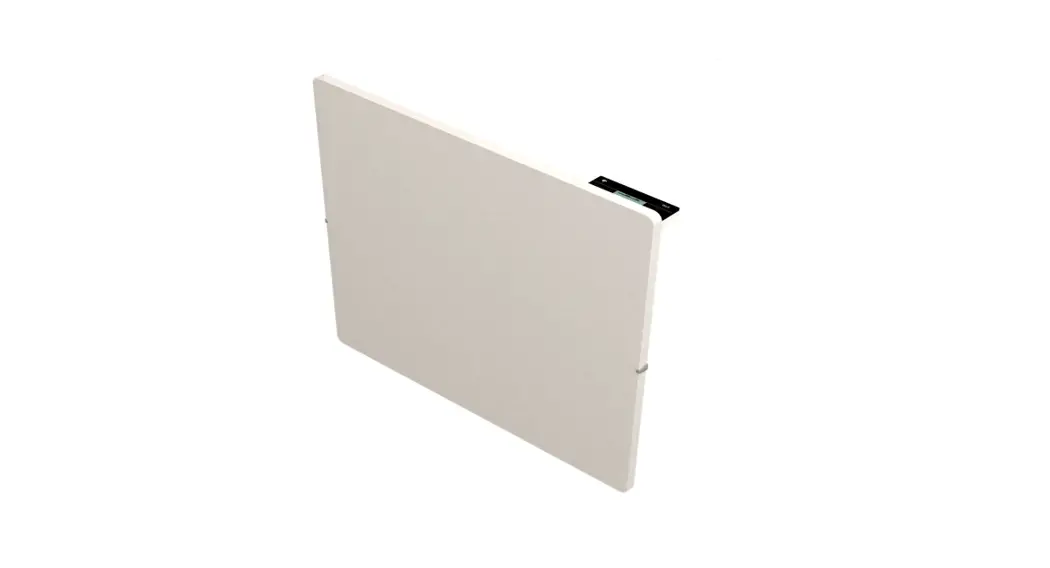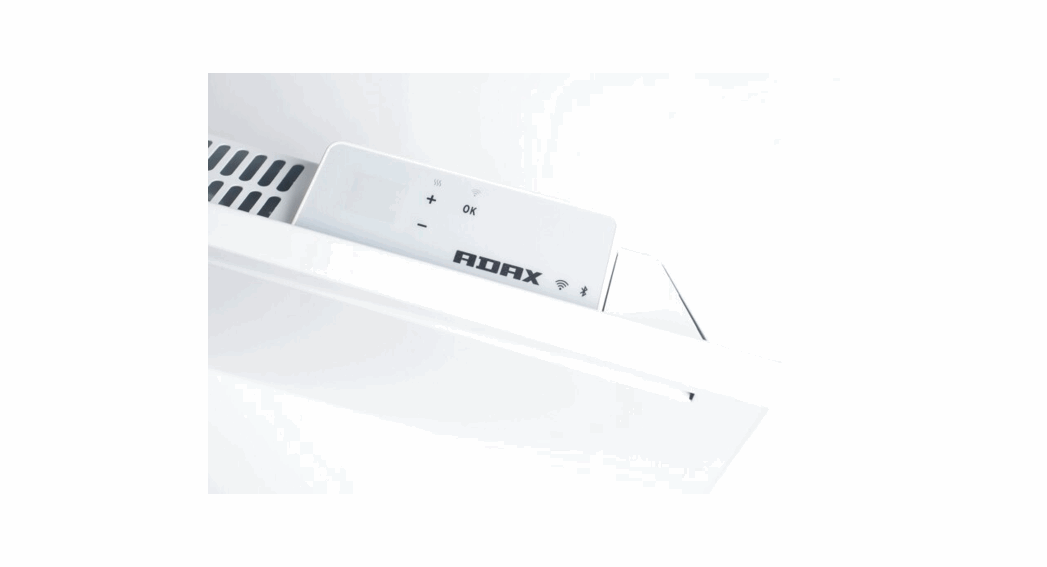
 ADAX NEO H/L WIFI (WT2)
User Guide
WT2 NEO H/L WiFi
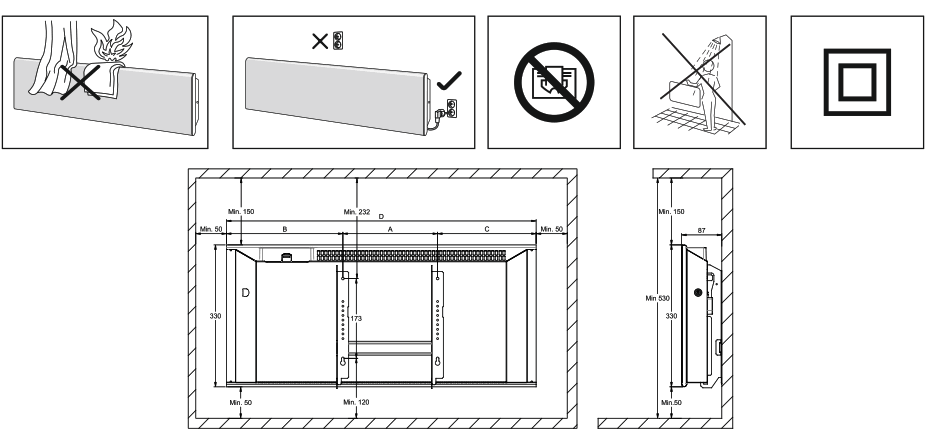
| N EO H | Watt | B | A | C | D |
| NEO H 02 | 250 | 227 | 201 | 92 | 520 |
| NE0 H 04 | 400 | 227 | 201 | 137 | 565 |
| NEO H 06 | 600 | 227 | 201 | 207 | 635 |
| NEO H 08 | 800 | 236 | 302 | 212 | 750 |
| NEO H 10 | 1000 | 268 | 302 | 239 | 809 |
| NE0 H 12 | 1200 | 356 | 302 | 326 | 984 |
| NEO H 14 | 1400 | 263 | 604 | 227 | 1094 |
| NEO H 20 | 2000 | 414 | 604 | 385 | 1403 |
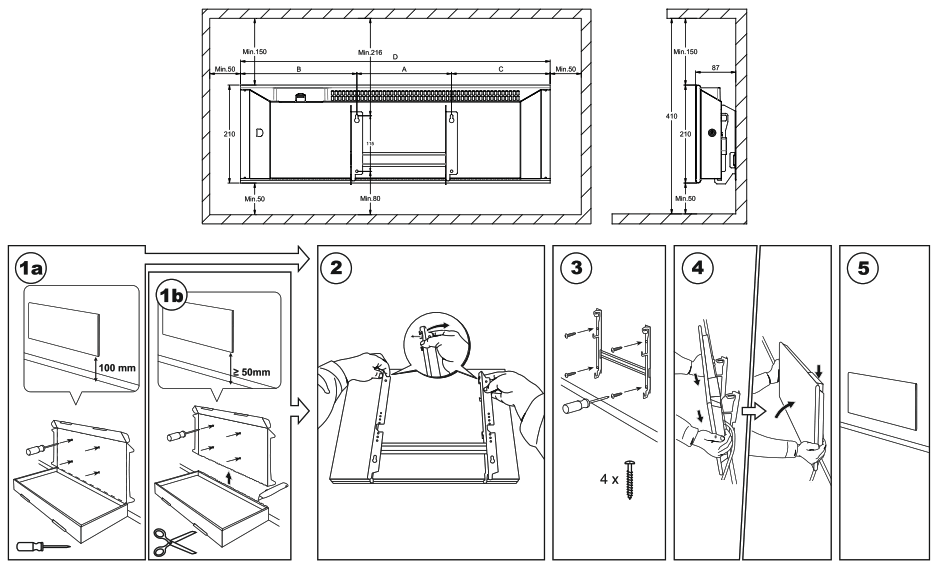
| NEO L | Watt | B | A | C | D |
| NEO L 02 | 250 | 237 | 201 | 217 | 655 |
| NEO L 04 | 400 | 253 | 302 | 228 | 783 |
| NEO L 06 | 600 | 364 | 302 | 339 | 1005 |
| NEO L 08 | 800 | 303 | 604 | 279 | 1186 |
| NEO L 10 | 1000 | 386 | 604 | 390 | 1380 |
| NEO L 12 | 1200 | 484 | 604 | 460 | 1548 |
| NEO L 14 | 1400 | 293 | 1198 | 269 | 1760 |
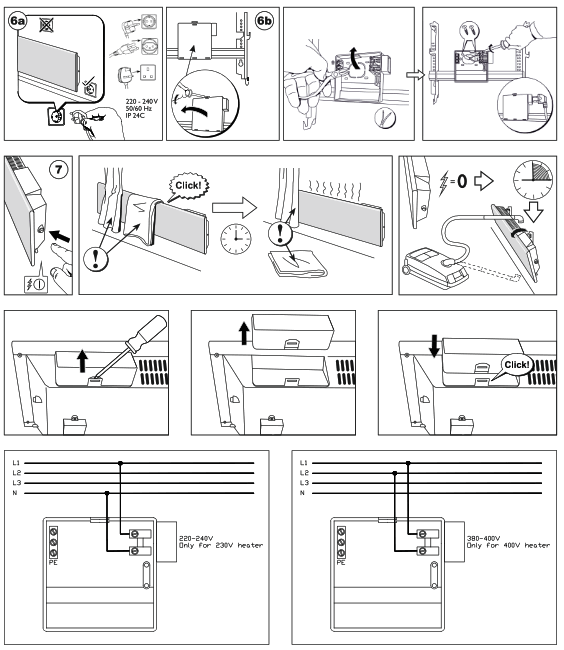
If the supply cord is damaged, it must be replaced by the manufacturer, its service agent or similarly qualified persons in order to avoid hazard.
Thermostat layout
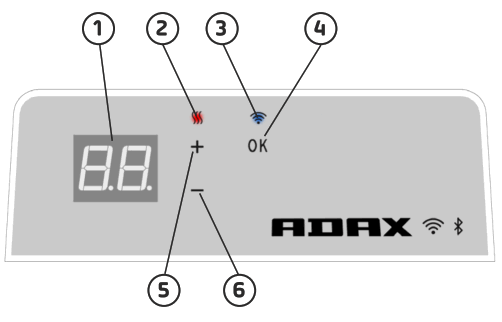
- Display – shows the desired temperature
- Red light – Lights when the heater is warming
- Blue light – Wi-Fi indicator – lights up when the heater is installed and connected
- “ok” for activating different functions (see explanation in the manual)
- Increases the desired temperature
- Decrease the desired temperature
Switch the heater on / off with the button on the right side of the heater.
This Adax WiFi thermostat is intended for remote control via the Adax WiFi App.
The product can also be used without App connection as follow (manual use):
Main features for manual use
- Set the desired temperature with the 5 (+) or 6 (-) buttons on the thermostat.
- Key lock / child lock. The thermostat can be protected from unwanted use that children and others cannot change settings. This function is turned on / off by holding the 5 (+) and 6 (-) button for 5 seconds until CC flashes in the display, repeat the process to turn key lock off.
- Turn display light on / off. This function is turned on / off by holding the 6 (-) and 4 (ok) buttons for 5 seconds til display flashes 3 times. The display will turn off 30 seconds after adjustmentand will be lit again by pressing any button (+, – or ok).
- To enable programs (schedule program, anti frost, etc.), the heaters must be installed and controlled via the Adax WiFi app.
Control the heater with Adax WiFi App on your mobile.
- Download “Adax WiFi” for Apple in App Store or for Android in Google Play.
- Follow the instructions in the App for installation.
- When the heater is installed, all the heater functions are controlled via the App.
To learn more about features and options for the app, please visit www.adax.no/wi-fi
Tips and additional features.
- Reset to factory settings – Hold “+” and “ok” inside until the display quickly flashes “rESET” and then goes to 20 degrees.
- In case of power outage, the heater will start to heat at the last recorded temperature when power is back.
- When the heater is connected to the app, child protection is activated via the App and not manually on the thermostat.
- Turn on / off display light. This function is turned on / off by holding the 6 (-) and 4 (ok) buttons for 5 seconds. The light (s) will turn off after 30 seconds and will be lit again by pressing any button (+, – or ok).
Great Britain
DECLARATION OF CONFORMITY
Adax AS, P.o.Box 38, 3061 Svelvik, Norway (Manufacturer)
We hereby declare that the convector heaters series Adax NEO H and L:
NAME, TYPE AND MODEL:
NEO H, 330mm high, steel front
Colour: White, Black or Grey
Range: Input 220-240 V, 400V, 250-2000W, 50/60Hz AC, IP24, CL H Double insulated
Control units for all models: DT-Digital thermostat, WT-WIFI thermostat, WT(2)/BLE — WIFI with Bluetooth or SLX-Slave module V
ariants: NEO H 02.., NEO H 04…, NEO II 06…, NEO H 08…, NEO H 10…, NEO H 12…, NEO H 14… and NEO II 20…
NEO L, 210mm high, steel front Colour: White, Black or Grey
Range: Input 220-240 V, 400V, 250-1400W, 50/60Hz AC, IP24, CL II Double insulated
Control units for all models: DT-Digital thermostat, WT-WIFI thermostat, WT(2)/BLE — WIFI with Bluetooth or SLX-Slave module
Variants: NEO L 02.., NEO L 04…, NEO L 06…, NEO L 08…, NEO L 10…, NEO L 12… and NEO L 14…
comply with the following Directives/Standards together with UK Conformity Assessment:
| LVD (2014/35/EU) | EN 60335-1:2012;AII,A13 EN 60335-2-30:2009;A11 |
| EMF | EN 62233:2008 |
| EMC (2014/30/EU) | EN 55014-1:2017 EN 55014-2:2015 EN 60730-1:2016 EN 60730-2-9:2019 EN 61000-3-2:2019 EN 61000-3-3:2013 |
| RED direktive (2014/53/EU) | EN 300 328: V2.1.1(2016-11), V2.2.0(2017-11) EN 301 489-1 V2.1.I EN 301 489-17 V3.1.1 |
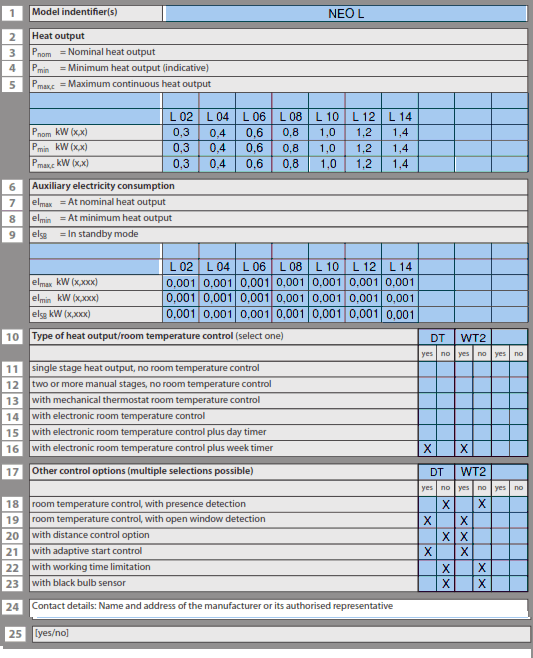
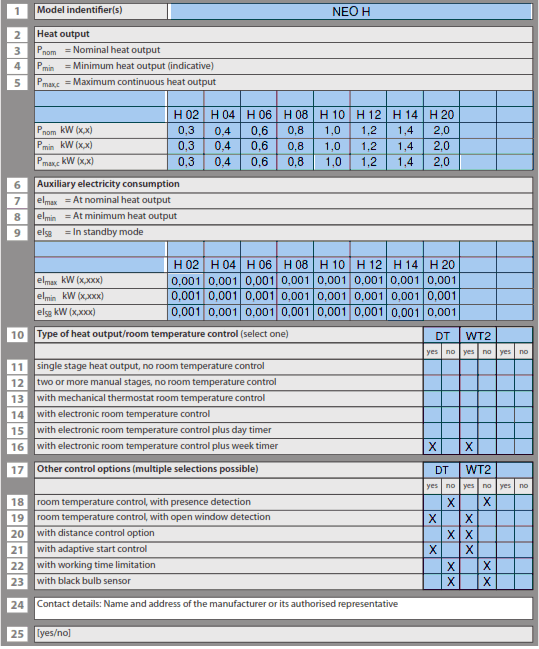
| ECO design directive (2009/125/EC) | 2015/1188/EU |
RoHS 2 (2011/65/EU)

This declaration of conformity is issued under the responsibility of:
Svelvik, October 10 2022
 Wi-Fi - Adax