 Quick Start Guide
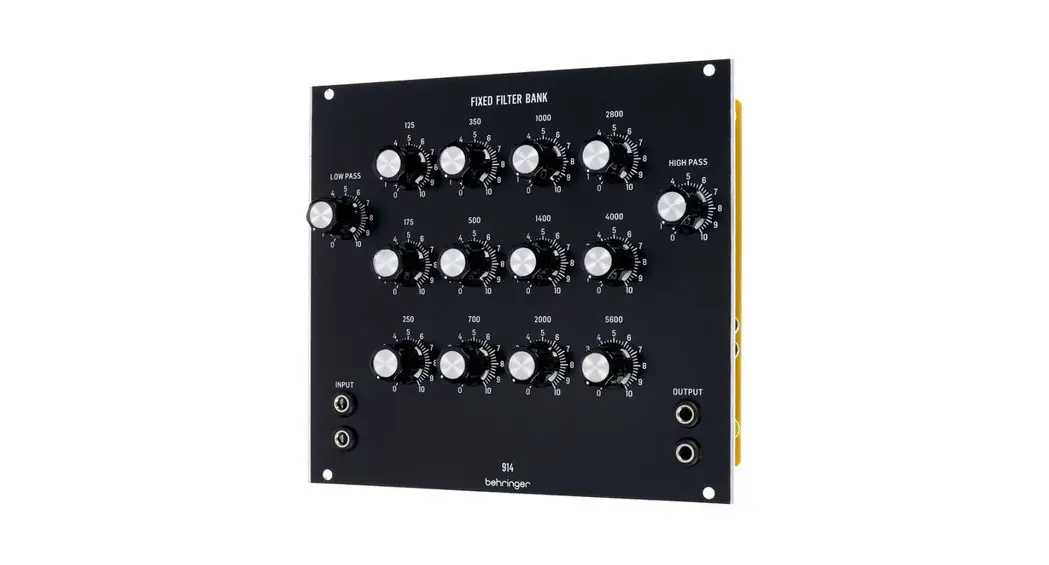
914 FIXED FILTER BANK
Legendary Analog Fixed Filter Bank Module for Eurorack
Controls
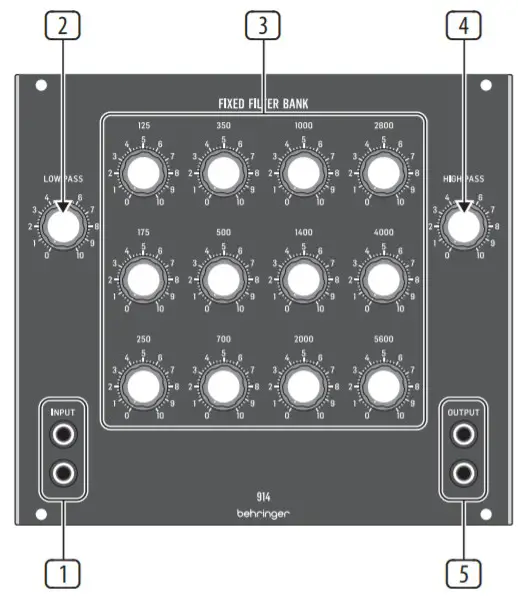
- INPUT – Route the incoming signal into the filter bank via the dual parallel INPUT jacks by using cables with 3.5 mm TS connectors.
- LOW PASS – This knob controls the level of the fixed-frequency low pass filter. The low pass filter will interact with the lower-frequency bandpass filters.
- BANDPASS FILTERS – These 12 knobs control the output level of the fixed-frequency, high-Q bandpass filters. The level controls can reduce the level of frequencies centered around the marked frequency. All 14 filters, including the low and high pass filters, are in parallel and will interact with each other to allow control of musical timbre and resonance.
- HIGH PASS – This knob controls the level of the fixed-frequency high pass filter. The high pass filter will interact with the higher-frequency bandpass filters.
- OUTPUT – Route the filtered signal back out of the module via the dual OUTPUT jacks by using cables with 3.5 mm TS connectors.
Power Connection
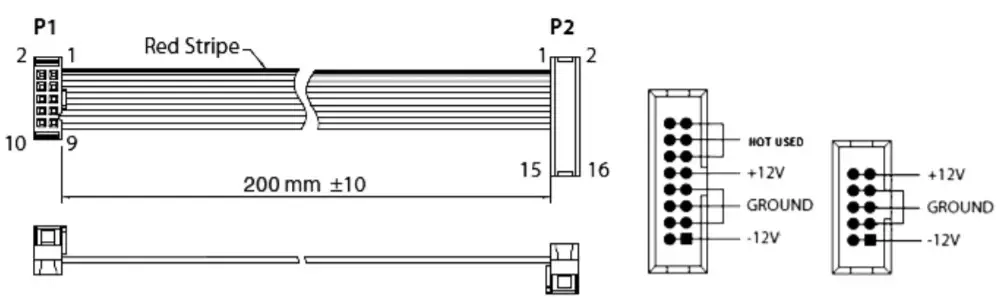
The 914 FIXED FILTER BANK module comes with the required power cable for connecting to a standard Eurorack power supply system.
Follow these steps to connect power to the module. It is easier to make these connections before the module has been mounted into a rack case.
- Turn the power supply or rack case power off and disconnect the power cable.
- Insert the 16-pin connector on the power cable into the socket on the power supply or rack case. The connector has a tab that will align with the gap in the socket, so it cannot be inserted incorrectly. If the power supply does not have a keyed socket, be sure to orient pin 1 (-12 V) with the red stripe on the cable.
- Insert the 10-pin connector into the socket on the back of the module. The connector has a tab that will align with the socket for correct orientation.
installation
The necessary screws are included with the module for mounting in a Eurorack case. Connect the power cable before mounting.
Depending on the rack case, there may be a series of fixed holes spaced 2 HP apart along the length of the case, or a track that allows individual threaded plates to slide along the length of the case.
The free-moving threaded plates allow precise positioning of the module, but each plate should be positioned in approximate relation to the mounting holes in your module before attaching the screws.
Hold the module against the Eurorack rails so that each of the mounting holes is aligned with a threaded rail or threaded plate. Attach the screws partway to start, which will allow small adjustments to the positioning while you get them all aligned. After the final position has been established, tighten the screws down.
Specifications
Signal Connections | |
| Input | 2 x 3.5 mm parallel jacks, AC coupled |
| Impedance | 30 kΩ, unbalanced |
| Maximum input level | +20 dBu @ 1 kHz |
| Output | 2 x 3.5 mm parallel jacks, AC coupled |
| Impedance | < 600 Ω, unbalanced |
| Maximum output level | +10 dBu |
Controls | |
| Low pass filter | 1 x rotary knob |
| Peak frequency | 100 Hz |
| Slope | 24 dB/oct. |
| Filter bank | 12 x rotary knob |
| Type | Bandpass filter |
| Frequency bands | 125, 175, 250, 350, 500, 700, 1000, 1400, 2000, 2800, 4000, 5600 Hz |
| Level reduction | -3 to -80 dB, adjustable |
| Q | 7 |
| High pass filter | 1 x rotary knob |
| Peak frequency | 7.5 k Hz |
| Slope | 24 dB/oct. |
System | |
| Distortion | < 0.1% @ 1 kHz, 0 dBu |
| Noise | < -80 dBu, 22 Hz to 22 kHz |
Power | |
| Power supply | Eurorack |
| Current draw | 60 mA (+12 V), 70 mA (-12 V) |
Physical | |
| Dimensions (H x W x D) | 42 x 142 x 129 mm (1.7 x 5.6 x 5.1″) |
| Rack units | 28 HP |
| Weight | 0.26 kg (0.57 lbs) |
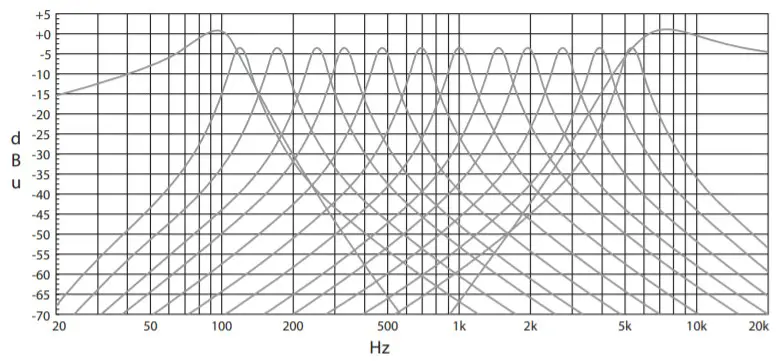
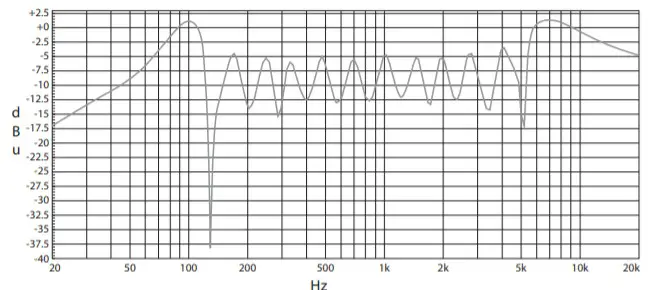
Equalization Graphs
| Equalization curves measured with each filter knob set to maximum, one at a time: | Equalization curve measured with all filters knobs set to maximum: |
 |  |
LEGAL DISCLAIMER
Music Tribe accepts no liability for any loss which may be suffered by any person who relies either wholly on or in part upon any description, photograph, or statement contained herein.
Technical specifications, appearances, and other information are subject to change without notice.
All trademarks are the property of their respective owners.
Midas, Klark Teknik, Lab Gruppen, Lake, Tannoy, Turbosound, TC Electronic, TC Helicon, Behringer, Bugera, Oberheim, Auratone, Aston Microphones, and Coolaudio are trademarks or registered trademarks of Music Tribe Global Brands Ltd. © Music Tribe
Global Brands Ltd. 2021 All rights reserved.
LIMITED WARRANTY
For the applicable warranty terms and conditions and additional information regarding Music Tribe’s Limited Warranty, please see complete details online at musictribe.com/warranty.

Hereby, Music Tribe declares that this product is in compliance with Directive 2014/30/EU, Directive 2011/65/EU and Amendment 2015/863/EU, Directive 2012/19/EU, Regulation 519/2012 REACH SVHC and Directive 1907/2006/EC.
Full text of EU DoC is available at https://community.musictribe.com/
EU Representative: Music Tribe Brands DK A/S
Address: Ib Spang Olsens Gade 17, DK – 8200 Aarhus N,
Denmark
We Hear You
 Support - Music Tribe Community
 Music Tribe