
lifelines neuro During Daylight Savings Time Changes
Avoid Syncing Interruptions
If you are running a study overnight during a Daylight Savings Time change, the “Adjust for daylight saving time” option in your date and time settings on your laptop or tablet MUST be turned off. Make this change BEFORE you begin your study!
IMPORTANT
If there is a time difference between the recording and the video, the EEG software will not recognize the video being associated with the EEG.
Access The Date/Time Settings
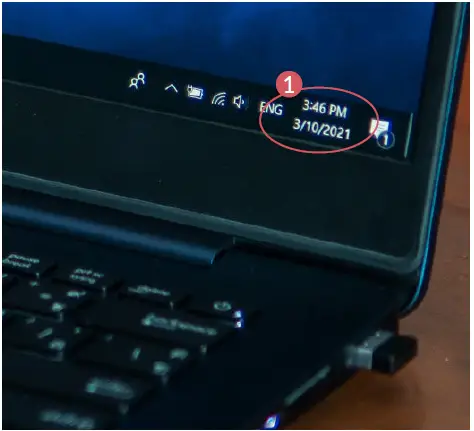
- Right click on the time or date in the task bar
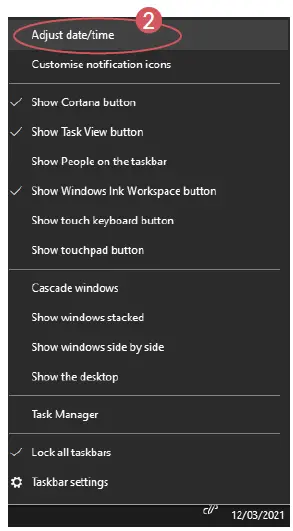
- Select Adjust date/time
Change The Following Settings
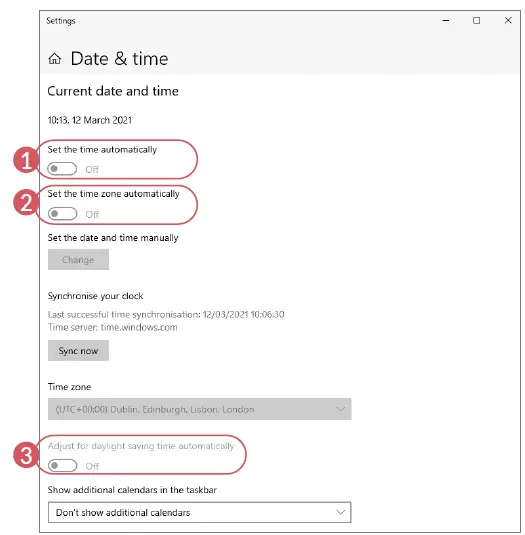
- Turn off the option
“Set the time automatically” - Turn off the option
“Set the time zone automatically” - Turn off the option
“Adjust for daylight saving time automatically
Now you are ready to record
When Your Study Is Complete
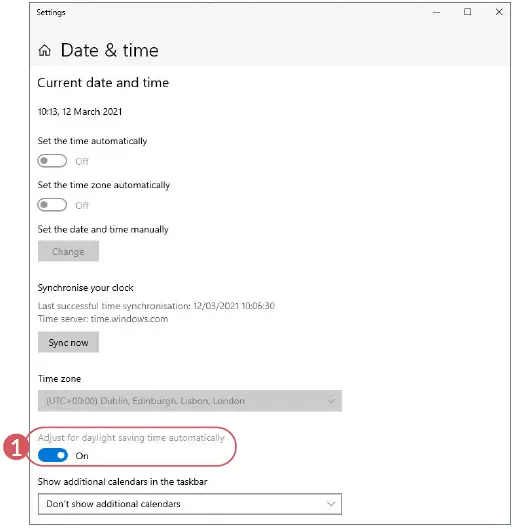
Don’t forget to correct your tablet or laptop’s time, once your weekend EEG recording is complete. To do this:
Turn on
“Adjust for daylight saving time automatically
Avoid Syncing Interruptions Access The Date/Time Settings Change The Following Settings When Your Study Is Complete For additional assistance
For additional assistance
- Tel: 866-889-6505
- Email: [email protected]