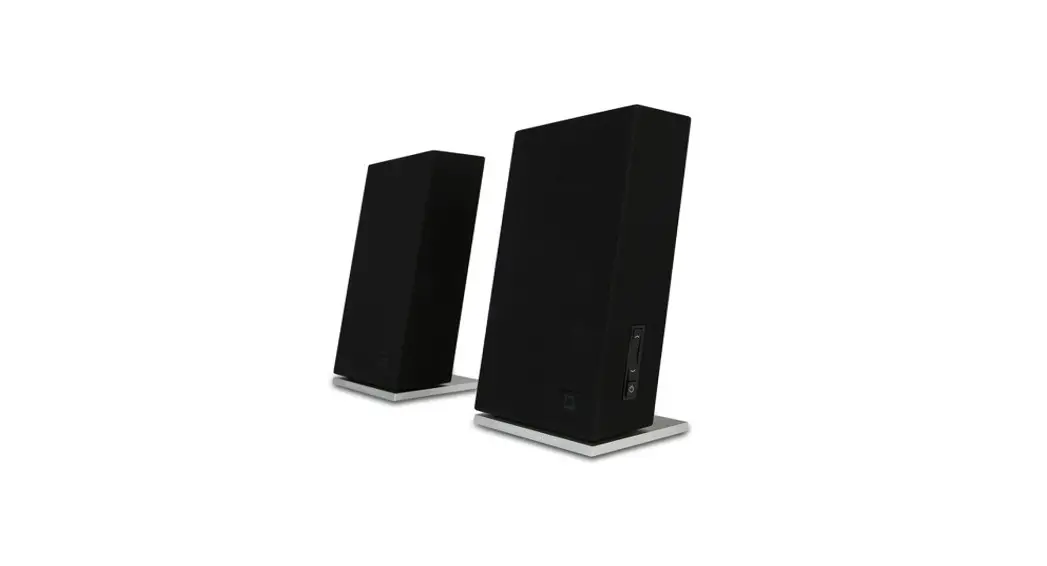

Fostex PX-5 5.2-2-way Professional Active Monitor Speaker

IMPORTANT SAFETY INSTRUCTIONS
- Read these instructions.
- Keep these instructions.
- Heed all warnings.
- Follow all instructions.
- Do not use this apparatus near water.
- Clean only with dry cloth.
- Do not block any ventilation openings. Install in accordance with the manufacturer’s instructions.
- Do not install near any heat sources such as radiators, heat registers, stoves, or other apparatus (including amplifiers) that produce heat.
- Do not defeat the safety purpose of the polarized or grounding-type plug. A polarized plug has two blades with one wider than the other. A grounding type plug has two blades and a third grounding prong. The wide blade or the third prong are provided for your safety. If the provided plug does not fit into your outlet, consult an electrician for replacement of the obsolete outlet.
- Protect the power cord from being walked on or pinched particularly at plugs, convenience receptacles, and the point where they exit from the apparatus.
- Only use attachments/accessories specified by the manufacturer.
- Use only with the cart, stand, tripod, bracket, or table specified by the manufacturer, or sold with the apparatus. When a cart is used, use caution when moving the cart/apparatus combination to avoid injury from tip-over.
- Unplug this apparatus during lightning storms or when unused for long periods of time.
- Refer all servicing to qualified service personnel. Servicing is required when the apparatus has been damaged in any way, such as power-supply cord or plug is damaged, liquid has been spilled or objects have fallen into the apparatus, the apparatus has been exposed to rain or moisture, does not operate normally, or has been dropped.
- The apparatus shall be used in an open area.
- Apparatus shall not be exposed to dripping or splashing and that no objects filled with liquids, such as vases, shall be placed on apparatus.
- The mains plug is used as a disconnect device. It shall remain readily operable and should not be obstructed during intended use. To completely disconnect the apparatus from supply mains, the main plug of the apparatus shall be disconnected from the mains socket outlet completely.
- An apparatus with CLASS I construction shall be connected to a MAINS socket outlet with a protective earthing connection.
Introduction
The PX-5HS is HiFi audio speaker system that inherits the concept of professional reference monitor Fostex PX-5. It offers natural and clear sound and you can enjoy listening to music with superb quality in lighthearted manner. A rotary encoder is used for adjusting the audio volume level as well as tone (bass and treble) controls, achieving quality sound and durability.
- A rotary encoder is used for adjusting the audio volume level as well as tone (bass and treble) controls, achieving quality sound and durability.
- When you turn on the power, the fade-in function is automatically activated and the volume level gradually increases to the previously stored level.
- The parameter lock function prevents the settings from being changed inadvertently.
- High power 5.2-inch woofer featuring the diaphragm that contains aramid fiber for reinforcement.
- 1-inch soft dome tweeter featuring UFLC diaphragm for stable high-mid range sound.
- A rigid cabinet design eliminates unwanted vibration.
- Standby mode saves electricity.
- Three types of input connectors are provided for input; XLR, Φ6.3mm(1/4″)TS phone, and RCA.
- Equipped with tone control adjustment
- A 24dB/Oct Linkwitz–Riley filter is used for the network filter, achieving natural frequency transition and precise stereo image positioning.
WARNINGS and PRECAUTIONS
- CAUTION: TO PREVENT ELECTRIC SHOCK, MATCH THE WIDE BLADE OF THE PLUG TO THE WIDE SLOT, AND FULLY INSERT.
- WARNING: To reduce the risk of fire or electric shock, do not expose this apparatus to rain or moisture
- CAUTION: Use of any controls or adjustments or performance of procedures other than those herein specified may result in hazardous radiation exposure.
- WARNING: Changes or modifications to this unit not expressly approved by the party responsible for compliance could void the user’s authority to operate the equipment.
- WARNING: Do not place the unit on top of any soft, porous, or sensitive surfaces to avoid damaging the surface. Use a protective barrier between the unit and surface to protect the surface.
- WARNING: Use of this unit near fluorescent lighting may cause interference regarding use of the remote. If the unit is displaying erratic behavior move away from any fluorescent lighting, as it may be the cause.
- CAUTION: Danger of explosion if battery is incorrectly replaced. Replace only with the same or equivalent type.
- WARNING: Do not install this equipment in a confined space such as a book case or similar unit.
- WARNING: Mains plug is used as disconnect device and it should remain readily operable during intended use. In order to disconnect the apparatus from the mains completely, the mains plug should be disconnected from the mains socket outlet completely
- WARNING: TO REDUCE THE RISK OF ELECTRIC SHOCK, DO NOT REMOVE COVER (OR BACK). NO USER-SERVICEABLE PARTS INSIDE. REFER SERVICING TO QUALIFIED SERVICE PERSONNEL.
The lightning flash with arrowhead symbol, within an equilateral triangle, is intended to alert the user to the presence of uninsulated “dangerous voltage” within the product’s enclosure that may be of sufficient magnitude to constitute a risk of electric shock to persons.
The exclamation point within an equilateral triangle is intended to alert the user to the presence of important operating and maintenance (servicing) instructions in the literature accompanying the appliance.
Supplied accessories
The following accessories are supplied with the 5HS.
- Power cord x 1
- Owner’s manual (this manual) x 1
After purchasing the PX-5HS, check that all the above items are included in the package.
Features and functions
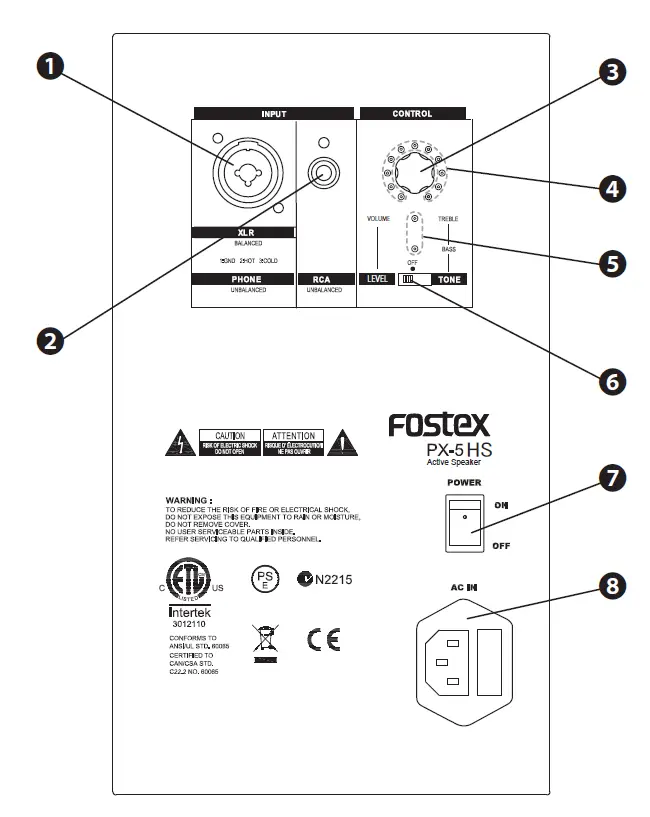
- [INPUT] jack (XLR-1/4” combo jack)
You can connect an XLR male connector or Φ6.3mm(1/4″)TS phone plug to this combo jack.
The XLR input accepts a balanced line signal, while the phone input accepts an unbalanced line signal. The pin assignment of the XLR connector is as followings:- pin 1: ground,
- pin 2: hot,
- pin 3: cold.
- <Note>: You cannot use both the RCA and combo
[INPUT] jacks simultaneously. When a plug is plugged into the RCA jack, the phone jack is disabled.
When an RCA plug and an XLR connector are simultaneously inserted into the RCA and XLR jacks respectively, both the input signals are mixed. - [INPUT] jack (RCA jack)
You can connect an RCA plug to this unbalanced line input jack.
<Note>: You cannot use both the RCA and combo [INPUT] jacks simultaneously.
When a plug is plugged into the RCA jack, the phone jack is disabled.
When an RCA plug and an XLR connector are simultaneously inserted to the RCA and XLR jacks respectively, both the input signals are mixed. - [CONTROL] knob
Used to adjust the audio volume level and tone control. When the mode switch is at TONE position, pushing the knob will switch between TREBLE and BASS.
See “Level and tone controls” on page E-5 for details. - Level indicators
The LED indicator corresponding to the current value of the controlling item is lit. When two adjacent indicators are lit, the value that is in the middle of the two is selected. - Status indicators
When choosing TREBLE under TONE mode, the upper indicator will light up. When choosing BASS under TONE mode, the lower indicator will light up.
See “Level and tone controls” on page E-5 for details. - Mode select switch
You can select the control mode: LEVEL or TONE. When the switch is set to LEVEL, you can control the volume level using the [CONTROL] knob. When the switch is set to TONE, you can control the bass and treble using the [CONTROL] knob. When the switch is set to the center position (OFF), you cannot change any value using the [CON-TROL] knob. See “Level and tone controls” on page E-5 for details. - [POWER] button
Turns on or off the power.
<Memo>: When you turn on the power, the auto fade-in function is activated and the volume level gradually increases to the level you previously saved. - [AC IN] connector
Connects to the supplied power cord.
Volume level and tone controls
You can adjust the volume level as well as tone using the [CONTROL] knob.
Adjusting volume level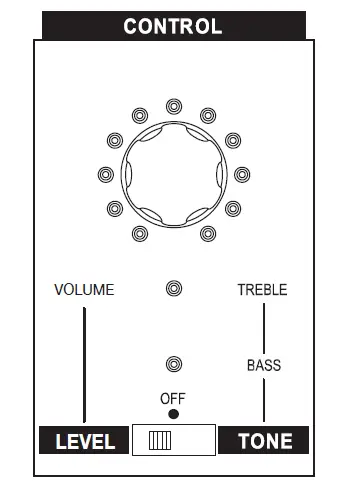
In the LEVEL mode, you can adjust the volume level using the [CONTROL] knob.
- Set the mode select switch to the LEVEL position.

The VOLUME status indicator lights steadily.
In this condition, you can coarsely adjust the volume level. - Adjust the volume level by rotating the [CONTROL] knob.
<Memo>: If you turn the power OFF during the indicator is flashing, the adjusted value will not be saved.

Adjusting the tone controls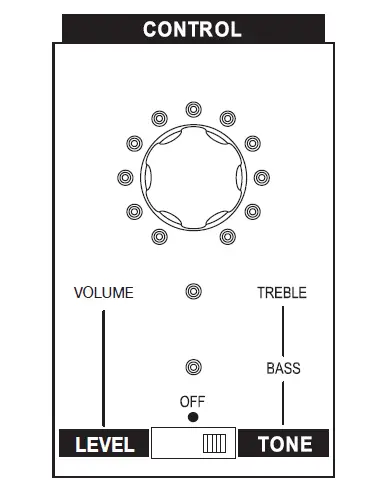
In the TONE mode, you can adjust the tone controls using the [CONTROL] knob.
The tone control function includes TREBLE and BASS.
- Set the mode select switch to the TONE position.

The upper-status indicator (beside TREBLE) lights steadily.
In this condition, you can adjust the treble setting. - Adjust the treble by rotating the [CONTROL] knob.
- Press the [CONTROL] knob.
The lower status indicator (beside BASS) lights steadily.
In this condition, you can adjust the bass setting. - Adjust the bass by rotating the [CONTROL] knob.
TREBLE- FREQ: 10KHz
- GAIN : +5dB(0.5dB/step) ~ -6dB(0.6dB/step)
BASS - FREQ: 100Hz
- GAIN : +6dB(0.6dB/step) ~ -6dB(0.6dB/step)
<Memo>: If you turn the power OFF during the indicator is flashing, the adjusted value will not be saved.

Standby function
Auto standby function
When the mode select switch is set to VOLUME or TONE, the auto standby function is enabled. When the auto standby function is enabled, if there is no input signal for 4 hours, the unit automatically enters the standby mode.
When the unit receives a signal, the standby mode is released.
<Memo>: Depending on the source noise level or the connection condition, the auto standby function may not correctly work.
When the unit is in standby mode, the “FOSTEX” logo on the front panel flashes.
<Memo>: When the mode select switch is set to OFF, the auto standby function is disabled. Standby function
Entering the standby mode manually
By long-pressing the [CONTROL] knob when the mode select switch is set to OFF, you can turn the unit to standby mode.
This feature would be useful when you go outside the listening room for a while.
Releasing the standby mode manually
When the unit is in standby mode, pressing the [CONTROL] knob releases the standby mode and returns to normal condition.
Parameter lock function
When the mode select switch is set to OFF, the parameter lock function is enabled and the unit is in the following conditions.
- You cannot change the setting values.
- The auto standby function is disabled.
Specifications
Speaker section
- Enclosure type: 2 way bass reflex Units:
- Tweeter: 1-inch soft dome tweeter
- Woofer: 5.2-inch, Aramid fiber diaphragm
Amplifier section
Rated output power
- Low: 35 W
- High: 18 W
- Inputs
- XLR-3-31 connector (balanced)
- Maximum input level: +24 dBu
- Input impedance: 20 kohms or more
- Φ6.3mm(1/4″)TS phone jack (unbalanced)
- Maximum input level: +10 dBV
- Input impedance: 10 ohms or more
- RCA jack (unbalanced)
- Maximum input level: +10 dBV
- Input impedance: 10 kohms or more
*The XLR-3-31 connector and the Φ6.3mm(1/4″)TS phone jack are combined in the combo connector housing. - Frequency response: 50 Hz ~ 40 kHz
- Distortion (THD): 0.1 %
- Crossover frequency: 2.5 kHz
- Subsonic filter: 50 Hz
- S/N ratio: 86 dB
General
- Dimensions: 280 (H) x 180 (W) x 210 (D) mm
- Weight: 5 kg
- Power requirement: US: 120 VAC, 60 Hz
- EUR/UK : 230 VAC, 50/60 Hz
- Power consumption: 50 W (0.5 W or less in standby mode)
* Specifications and appearance are subject to change without notice for product improvement.
Declaration of EC Directive
This equipment is compatible with the EMC Directive (2004/108/EC) – Directive on the approximation of member nation’s ordinance concerning electromagnetic compatibility and with the Low Voltage Directive (73/23/EEC) – Directive on the approximation of member nation’s ordinance concerning electric equipment designed to be used within the specified voltage range.
The Affect of Immunity on This Equipment
The effect of the European Specification EN61000-6-1 (coexistence of electromagnetic waves – common immunity specification) on this equipment are as shown below.
In the electrical fast transient/burst requirements, surge, conducted disturbances by radio-frequency fields, power frequency magnetic field, radiate electromagnetic field requirements and static electricity discharging environment, this could be affected by the generation of noise in some cases.
FOSTEX DISTRIBUTORS LIST IN EUROPE
Including non-EU countries (as of Jan. 2014)
FOSTEX CO. 1-1-109, Tsutsujigaoka, Akishima City, Tokyo, 196-8550, Japan Including non-EU countries (as of Jan. 2014)
The Netherlands
NAME: Iemke Roos Audio B.V.
ADD: Kuiperbergweg 20, 1101 AG Amsterdam, The Netherlands TEL: (+31) 20-697-2121, FAX: (+31) 20-697-4201
Email: [email protected]
Web Site: http://www.iemkeroos.nl
UK
NAME: SCV London
ADD Unit C1 Belcon Industrial Estate, Geddings Road, Hoddesdon, Hertfordshire, EN11 0NT, UK
TEL: (+44) 03 301 222500, FAX: (+44) 20-8418-0624
Email: [email protected]
Web Site: http://www.scvlondon.co.uk
France
NAME: Hamy Sound (Headphones and USB DAC Only)
ADD: 28 Rue Edith Cavell, 92400 Courvevoie, France
TEL: (+33) 1 4788 4702, FAX: (+33) 1 4789 4872
Email: [email protected]
Web Site: http://www.hamysound.com
Germany
NAME: Mega Audio GmbH
ADD: Stromberger Str. 32, 55411 Bingen, Germany
TEL: (+49) 6721-94330, FAX: (+49) 6721-32046
Email: [email protected]
Web Site: http://www.megaaudio.de
FCC USA
IMPORTANT
This product, when installed as indicated in the instructions contained in this manual, meets FCC and ICES-003 requirements. Changes or modifications not expressly approved by Fostex Company for compliance could void the user’s authority to operate the equipment. DO NOT MODIFY THIS PRODUCT.
In order to comply with FCC and ICES-003 requirements, use high-quality shielded cables for connection to accessories and / or another product. If any cables are supplied with this product, they MUST be used. Follow all installation instructions. Failure to do so could void your FCC / ICES-003 authorization to use this product in the USA / Canada.
NOTE
This equipment has been tested and found to comply with the limits for a Class B digital device, pursuant to Part 15 of the FCC Rules. These limits are designed to provide reasonable protection against harmful interference in a residential installation. This equipment generates, uses and can radiate radio frequency energy and, if not installed and used in accordance with instructions, may cause harmful interference to radio communications. However, there is no guarantee that interference will not occur in a particular installation. If this equipment does cause harmful interference to radio or television reception, which can be determined by turning the equipment off and on, the user is encouraged to correct the interference by one or more of the following measures:
- Reorient or relocate the receiving antenna.
- Increase the separation between the equipment and receiver.
- Connect the equipment into an outlet on a circuit different from that to which the receiver is connected.
- onsult the dealer or an experienced radio/TV technician for help.
Compliance with Part 15 of FCC Rules and Canadian ICES-003.
This device complies with Part 15 of the FCC Rules. Operation is subject to the following two conditions:
- This device may not cause harmful interference, and
- this device must accept any interference received, including interference that many cause undesired operation.
This Class B digital apparatus complies with Canadian ICES-003.
FAQS
Yes, you can add one.
LCD and LED screens don’t require shielding. That’s from the CRT days
It is not as low as the KRK’s.
If it was for a pair previously, maybe back in 2014, then no it’s not anymore.
This item is for one monitor.
it comes with: 5′ Stereo 3.5mm TRS to Dual RCA Cable, 5′ Stereo 3.5mm TRS Cable, 6.6′ Speaker Cable and the Power Cable
No, you will need to supply a connection cable to run from the speaker to your Focusrite 2i2. Double check to verify that you have a TRS input on your 2i2 if that’s the case you should be able to use a 1/4 to 1/4 Stereo cable or an RCA to 1/4 Stereo cable. Note that the 1/4 input to the speaker is TRS (Balanced) and the RCA output is unbalanced. An example of a 1/4 to RCA cable would be a Hosa CPR-201 or CPR-202.
Ideally they should, unless you’re using the Presonus Audiobox (or any other audio interface) and you connect headphones to that. In which case, they won’t mute.
Take a piece of t-shirt and bring it back and forth between your face and the monitors.. you will hear that even something like a tshirt of pantyhose, has a considerable effect on the sound projection. Also, having grills on the speaker looks cheap imo..
It depends on which speakers you order. The 3.5 and 4.5 come with everything necessary, but the 5 and higher definitely do not come with everything you need. Just the speaker and AC adapter.