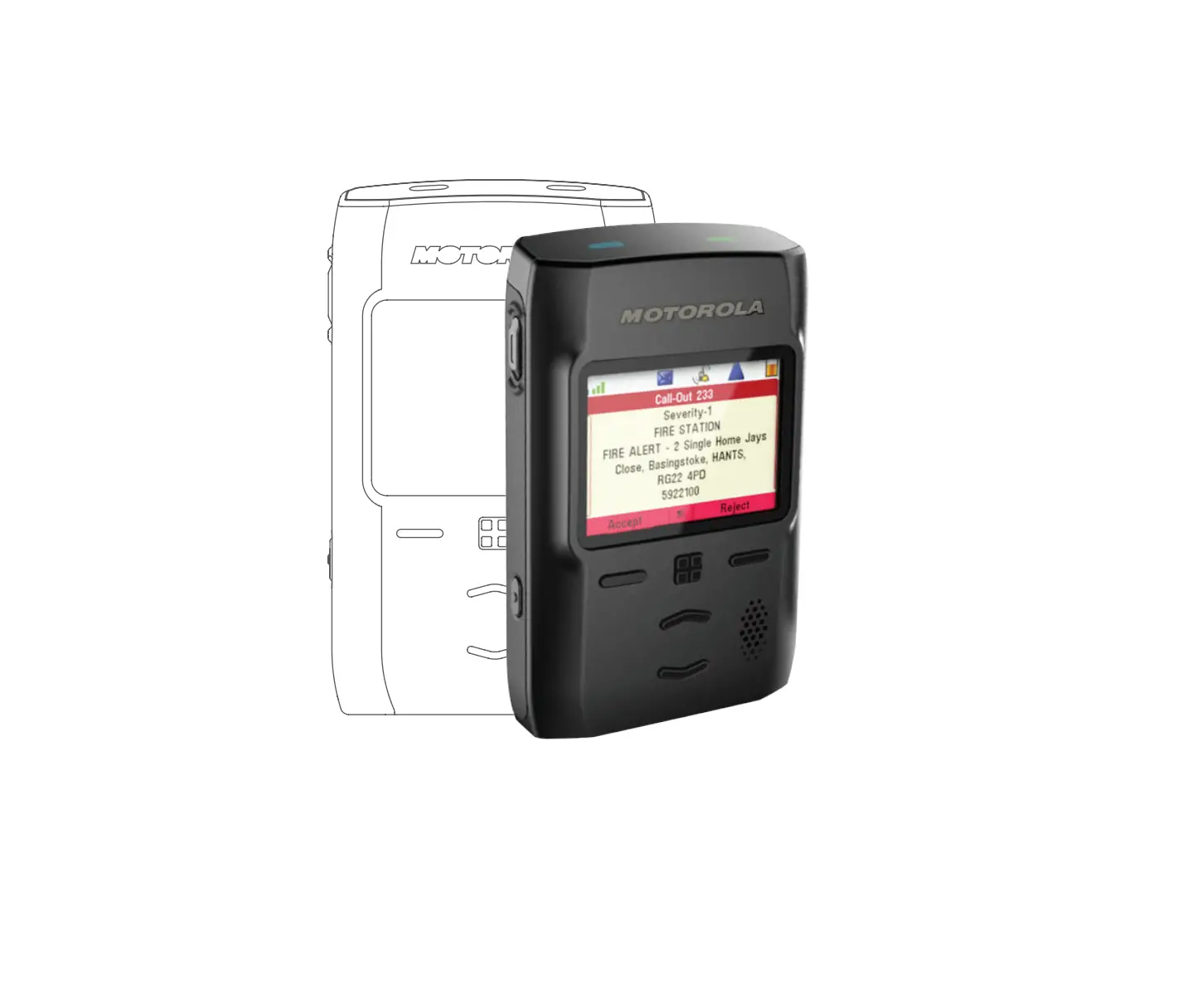

advisor™ TPG2200
QUICK START GUIDE
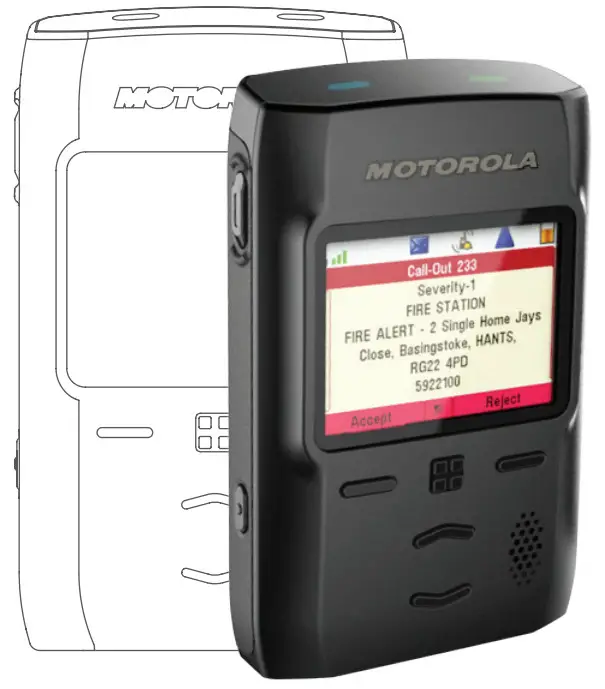
Controls and Indicators
- Lanyard Holes
- Lock Key
- Battery Cover

- LED Message Indicator
- Power/Sleep/Wake Button
- Soft Keys
- Mute/Shortcut Button
- Speaker
- LED Status Indicator
- Display
- Menu Key
- Up Navigation Key
- Down Navigation Key

- USB-C Connector
- Home Station Connector
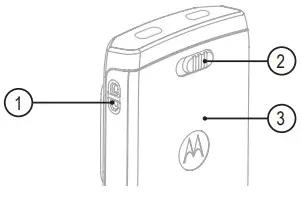
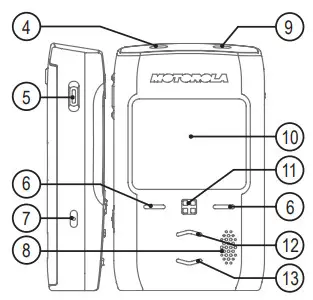
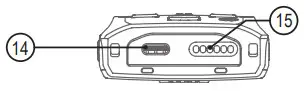
* The LED indication and flashing pattern can be configured in the Customer Programming Software (CPS).
LED Message and Status Indicators
| Indication | Message LED | Status LED | Charging Status |
| Solid green | Not applicable | In use | Fully Charged |
| Blinking green | Not applicable | In service | 90% Charged |
| Solid red | Not applicable | Out of service* | Rapid Charge |
| Blinking red | Not applicable | Connecting to a network Entering DM0 | Faulty or Invalid Battery |
| Solid orange | Not applicable | Transmit Inhibit in service Channel busy in DMO | Not applicable |
| Blinking orange | Not applicable | Not applicable | Battery waiting to charge |
| Blinking blue | MessagelCall Out received or missing* | Not applicable | Not applicable |
| No indication | Not applicable | Pager powered off | Not applicable |
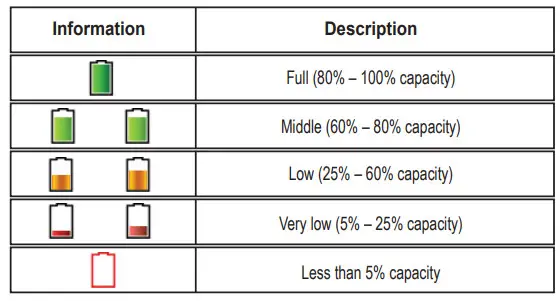
Battery Capacity Information
Getting Started
Removing the Battery Cover
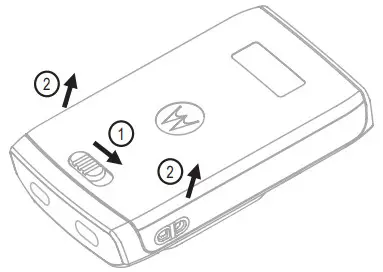
- Slide the Lock key to the left to unlock the battery cover.
- Lift up the battery cover.
Attaching the Battery Cover
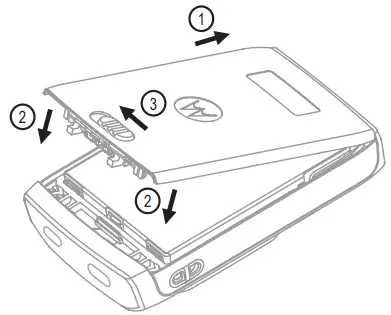
- Insert the bottom part of the battery cover into the slot.
- Press down the top part of the battery cover.
- Slide the Lock key to the right to lock the battery cover.
Installing the Battery
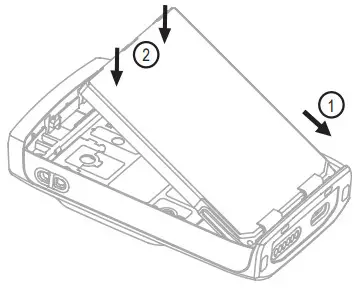
- Insert the bottom part of the battery into the compartment.
- Press down the top part of the battery into the compartment until it clicks.
Looking After the Pager
Never leave the pager or battery in extreme temperatures (over +85 °C), for example, behind a windscreen in direct sunlight.
The pager is not submersible (compliant with the IP54 standard, only when the battery cover is attached).
To clean the pager, use a moistened or antistatic cloth.
Icons
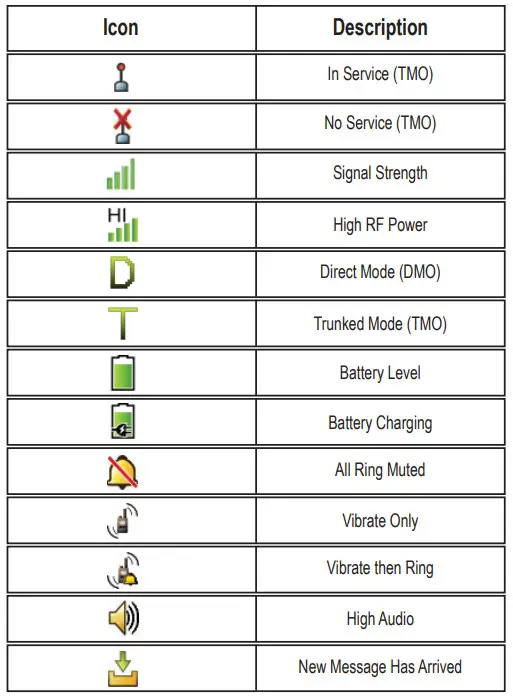

Using the Terminal
Turning the Pager On/Off
To turn the pager on/off, press and hold the Power button.
Changing to Sleep or Wake Mode
To change the pager to sleep/wake mode, press the Power button.
When the pager is in sleep mode, the display is turned off and the keypad is locked.
Using the Pager Menu
To enter the menu, press the Menu key.
To scroll through the menu, press the Up or Down Navigation key.
To select a menu item, press Select or the Left soft key.
To return to the previous level, press Back or the Right soft key.
To exit the menu, press and hold the Menu key.
Adjusting the Volume in Idle Mode
When the Pager displays the idle screen, press the Up or Down Navigation key to adjust the volume.
Using the Programmable Buttons
The Up and Down Navigation keys also function as programmable buttons.
When the Pager displays the idle screen, press and holds the Up or Down
Navigation key to apply the function of the programmable button (if configured).
Selecting Trunked/Direct Mode Operation
From the Home Screen, enter the Menu. Scroll to and select
Networks → Trunked Mode or Direct Mode.
Receiving Call Out Messages
To accept, press the Left soft key.
To reject, press the Right soft key.
To temporarily mute the Call Out alert indication, press the Mute button.
To see more options, press the Menu key.
More Information on the Radio
Visit the Motorola Solutions Web site at:
http://www.motorolasolutions.com/
Learning Experience Portal
User documentation is available at:
https://learning.motorolasolutions.com/
Open Source Software Legal Notices
Available in Customer Programming Software Plus (CPS Plus) DVD.
This document is copyright protected. Duplications for the purpose of the use of Motorola Solutions products are permitted to an appropriate extent. Duplications for other purposes, changes, additions, or other processing of this document are not permitted. Only this electronically-saved document is considered to be the original. Duplications are considered merely copies. Motorola Solutions, Inc., and its subsidiaries and affiliates do not vouch for the correctness of such kinds of copies.
MOTOROLA, MOTO, MOTOROLA SOLUTIONS, and the Stylized M Logo are trademarks or registered trademarks of Motorola Trademark Holdings, LLC and are used under license. All other trademarks are the property of their respective owners.
© 2017 and 2021 Motorola Solutions, Inc. All rights reserved.

 Mission Critical Communications - Motorola Solutions
 Motorola Solutions