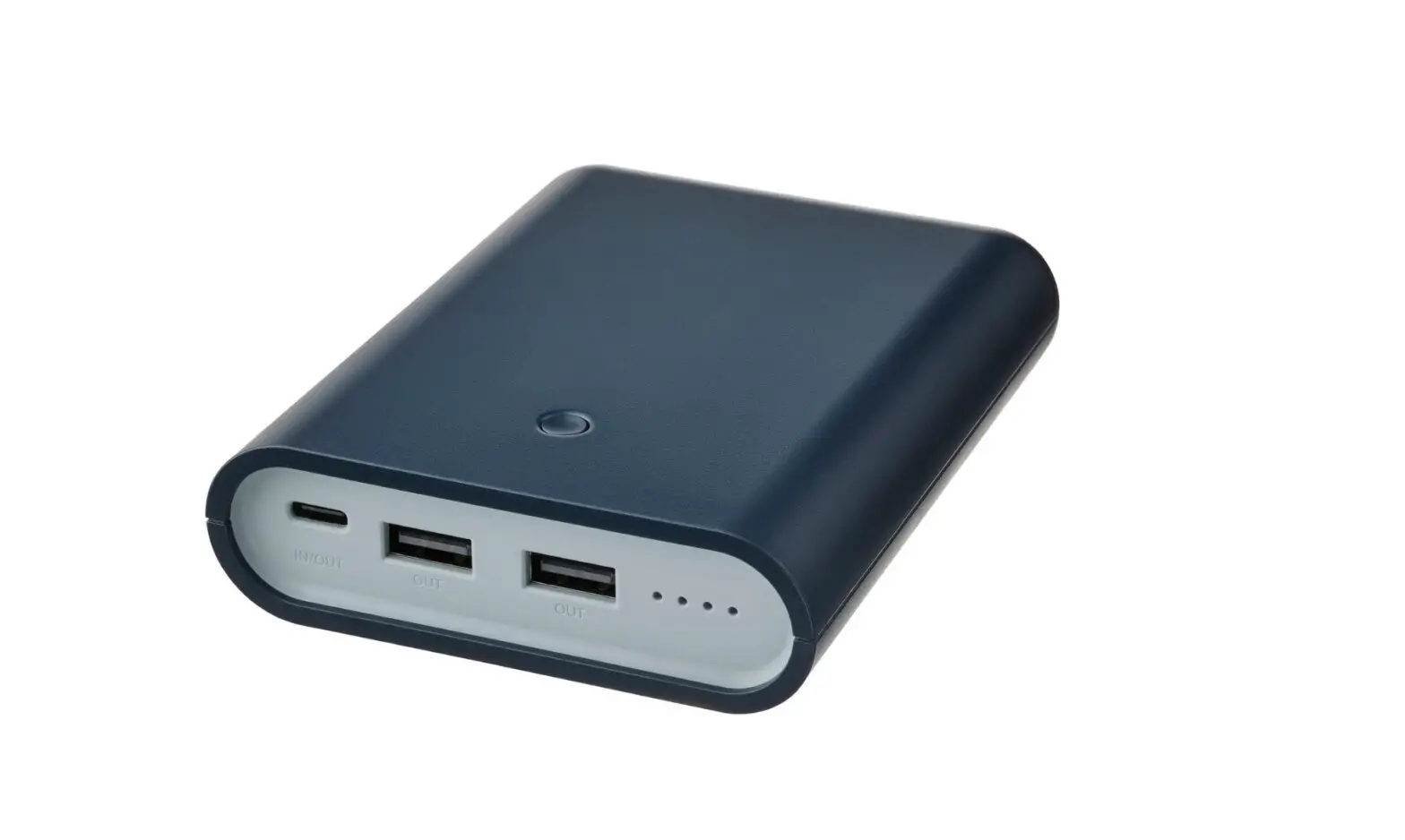
VARMFRONT Portable Bank
Product Information:
- VARMFRONT
- Functions:
- POWER button
- LED indicators
- USB-C (charging and supply power)
- USB-A (only supply power)
- Power Bank Type: E2038
- Capacity: 10400mAh/37.44Wh
- Input:
- 5.0Vdc, 3.0A/ 9.0Vdc, 2.0A/ 12.0Vdc, 1.5A (USB-C
QC&PD)
- 5.0Vdc, 3.0A/ 9.0Vdc, 2.0A/ 12.0Vdc, 1.5A (USB-C
- Output:
- 5.0Vdc, 3.0A, 15.0W/ 9.0Vdc, 2.0A, 18.0W/ 12.0Vdc, 1.5A, 18.0W
(USB-C QC&PD, USB-A QC)
- 5.0Vdc, 3.0A, 15.0W/ 9.0Vdc, 2.0A, 18.0W/ 12.0Vdc, 1.5A, 18.0W
- Manufacturer: IKEA of Sweden AB
Product Usage Instructions:
- To charge the power bank, connect the USB cable to the USB-C
port of the power bank and then connect the other end of the cable
to a USB-charger or USB-outlet that can provide sufficient power.
The LED indicators will display the charging status. - When charging a device that requires a charging current less
than 100mA via the USB-A port, activate the small current supply
mode by pressing the button for 3 seconds. To exit this mode, press
the button again or it will automatically close after 2 hours. - The POWER button has multiple functions:
- Single press: Shows the remaining charge and indicates that
USB-A is ready to use. - Double press: Indicates that USB-A is ready to use.
- Long press: Turns off the power bank after restart.
- Single press: Shows the remaining charge and indicates that
- For product servicing, do not attempt to repair the power bank
yourself as it may expose you to dangerous voltage points or other
risks. - To clean the unit, wipe it with a soft cloth moistened with a
little mild detergent. Use another soft dry cloth to wipe it
dry. - This power bank is for indoor use only.
- The rechargeable Li-Ion battery cell is inside the power
bank. - Dispose of the power bank separately from household waste. Hand
it in for recycling in accordance with local environmental
regulations for waste disposal.
VARMFRONT
1 2
4 3
Max 300 mm (max 1′)
English
6
Français
16
Español
28
English
Functions 1. POWER button 2. LED indicators 3. USB-C (charging and supply power) 4. USB-A (only supply power)
Charging power bank · Connect the USB-C cable to the USB-C port
of the power bank first and then connect the USB cable to a USB-charger or USB-outlet that can provide sufficient power to charge the power bank. The LED indicators will display the charging status.
Supply power to devices · Connect the USB cable to USB-C or USB-A
port of the power bank first and then connect the USB-cable to your device that you want to charge. · The power bank will detect a connected device and start charging automatically.
6
· The LED indicators will display the remaining charge in the power bank during discharging.
Check power status · Click once on the POWER button and the
LED indicators will light up and indicate the remaining power status. · If the USB cable is not disconnected while the charging process finishes, push the POWER button first to restart the charging.
Small current supply mode · Press the POWER button for 8 seconds when
your device is being charged. · The function is mainly used to charge
certain wearable electronic devices. When charging a device that needs a charging current less than 100mA via a USB-A port, this mode should be activated. You can press the button for 3 seconds to exit this mode, it also automatically closes after 2 hours.
7
Power button function (E2038) 8
Current Sleeping mode Charging Supply power
mode
mode
mode
Single press
Double press
Shows via LED the remaining charge and that USB-A is ready to use.
USB-A is ready to use.
No action
No action
No action Stop supplying power
Long press
Turn off after restart
No action
Switch to the small current supply mode or back to normal supply power mode
Good to know · You can charge up to 3 devices at the same
time since the charger has 2 USB-A ports and 1 USB-C port. (Power Delivery and Quick Charge) · The USB-C port is compatible with the Power Delivery (PD) 3.0 standard and Quick Charge (QC) 3.0 standard. · The USB-A ports are compatible with the Quick Charge (QC) 3.0 standard. · USB cable length and quality influences charging speed and performance. · Devices may get warm during charging; this is completely normal and they will gradually cool down again after they are fully charged. · Charging time may vary based on the device’s battery capacity, charge level, the age of the battery and the temperature in the surrounding area. · Storage temperature: -10°C to 25°C (14 °F to 77 °F ). · Power bank operating temperature: 0°C to 40°C (32 °F to 104 °F ).
9
· Unplug the power bank from the power source before cleaning and when it is not in use.
· Power bank should not be left discharged for a longer period.
· Power bank should not be charged while in contact with flammable materials like textiles.
WARNING
· Do not modify, disassemble, open, drop, crush, puncture or shred product.
· Only use in dry locations. · Risk of fires and burns. Do not open, crush,
heat above 60°C (140°F) or incinerate. · Do not subject the product to wet, moist or
excessively dusty environments since this can cause damage to the unit. · Keep the product away from open flames or sunlight to prevent heat buildup. · Keep the product away from high voltage devices.
10
· Children should be supervised to ensure they do not play with the product.
· Do not short-circuit the product or its cells. · In the event of a cell leaking, do not allow
the liquid to come in contact with the skin or eyes.
Product servicing Do not attempt to repair this product yourself. If you open or remove parts, you may expose yourself to dangerous voltage points or other risks.
Care instruction To clean the unit, wipe with a soft cloth moistened with a little mild detergent. Use another soft dry cloth to wipe dry.
11
Technical data Type: E2038 Capacity: 10400mAh/37.44Wh Input:
5.0Vdc, 3.0A/ 9.0Vdc, 2.0A/ 12.0Vdc, 1.5A (USB-C QC&PD) Output: 5.0Vdc, 3.0A, 15.0W/ 9.0Vdc, 2.0A, 18.0W/ 12.0Vdc, 1.5A, 18.0W (USB-C QC&PD, USB-A QC)
When two or three ports output at the same time, they share 5.0V/3.0A.
For indoor use only
Rechargeable Li-Ion battery cell inside.
Manufacturer: IKEA of Sweden AB
Address: Box 702 SE-343 81 Älmhult SWEDEN
12
This device complies with Part 15 of the FCC Rules/Innovation Science and Economic Development Canada’s licence-exempt RSS standard(s). Operation is subject to the following two conditions:
(1) this device may not cause harmful interference, and
(2) this device must accept any interference received, including interference that may cause undesired operation of the device.
WARNING:
Any changes or modifications to this unit not expressly approved by the party responsible for compliance could void the user’s authority to operate the equipment.
NOTE: This equipment has been tested and found to comply with the limits for a Class B digital device, pursuant to part 15 of the FCC
13
Rules. These limits are designed to provide reasonable protection against harmful interference in a residential installation.
This equipment generates, uses and can radiate radio frequency energy and, if not installed and used in accordance with the instructions, may cause harmful interference to radio communications. However, there is no guarantee that interference will not occur in a particular installation. If this equipment does cause harmful interference to radio or television reception, which can be determined by turning the quipment off and on, the user is encouraged to try to correct the interference by one or more of the following measures:
· Reorient or relocate the receiving antenna. · Increase the separation between the
equipment and receiver. · Connect the equipment into an outlet on
a circuit different from that to which the receiver is connected.
14
· Consult the dealer or an experienced radio/ TV technician for help.
The crossed-out wheeled bin symbol indicates that the item should be disposed of separately from household waste. The item should be handed in for recycling in accordance with local environmental regulations for waste disposal. By separating a marked item from household waste, you will help reduce the volume of waste sent to incinerators or land-fill and minimize any potential negative impact on human health and the environment. For more information, please contact your IKEA store.
15
Français
Fonctions 1. Bouton de marche 2. Voyants LED 3. Port USB-C (chargement et alimentation
électrique) 4. Port USB-A (alimentation électrique
uniquement)
Chargeur universel · Connecter d’abord le câble USB-C au
chargeur USB-C du chargeur universel puis connecter le câble USB à un chargeur USB ou à une prise USB disposant de suffisamment d’énergie pour recharger le chargeur universel. Le voyant LED indique le niveau de charge.
16
Alimentation des appareils · Connecter le câble USB au port USB-C ou
USB-A du chargeur universel puis connecter le câble USB à l’appareil à recharger. · Le chargeur détecte les nouveaux appareils branchés et se met automatiquement en charge. · Les voyants LED affichent alors le niveau d’autonomie du chargeur.
État de charge du chargeur · Appuyer une fois le bouton POWER et les
LED s’allument et indiquent le niveau de charge restant. · Si le câble USB n’est pas débranché en fin de chargement, appuyer d’abord sur le bouton POWER pour relancer le chargement.
17
Mode d’alimentation en courant faible intensité · Appuyez sur le bouton POWER pendant 8
secondes lorsque votre appareil est en cours de chargement. · Cette fonction est principalement utilisée pour charger certains appareils électroniques portables. Lorsque vous chargez un appareil qui nécessite un courant de charge inférieur à 100mA via un port USB-A, ce mode doit être activé. Pour quitter ce mode, appuyez sur le bouton pendant 3 secondes; il se désactive également automatiquement au bout de 2 heures.
18
Fonction du bouton d’alimentation (E2038) 19
Mode actuel
Mode veille
Mode charge
Mode alimentation
Une seule pression
La LED indique la charge restante et l’USB-A est prêt à être utilisé.
USB-A est prêt à être utilisé.
Aucune action
Double Aucune action Aucune
pression
action
Arrêter l’alimentation
Appui long
Éteindre après Aucune le redémarrage action
Passe au mode d’alimentation en courant faible intensité ou repasse au mode d’alimentation normal
Bon à savoir · Vous pouvez charger 3 appareils en même
temps car le chargeur est doté de 2 ports USB-A et d’un port USB-C. (Power Delivery et Quick Charge) · Le port USB-C est compatible avec la norme Power Delivery (PD) 3.0 et la norme Quick Charge (QC) 3.0. · Ports USB-A compatibles avec la norme Quick Charge (QC) 3.0 · La longueur et la qualité du câble USB influent sur la vitesse et la performance du chargement. · Les appareils peuvent chauffer au cours de leur chargement. Ceci est tout à fait normal: ils refroidiront graduellement une fois entièrement chargés. · La durée du chargement peut varier en fonction de la capacité de la batterie, de son niveau de charge, de son âge et de la température ambiante. · Température de stockage du chargeur: -20°C à 25°C (14 °F à 77 °F ).
20
· Température de fonctionnement du chargeur: 0°C à 40°C (32 °F à 104 °F ).
· Débrancher le chargeur de la source d’alimentation avant de le nettoyer et lorsqu’il n’est pas utilisé.
· La batterie ne doit pas être laissée déchargée trop longtemps.
· La batterie ne doit pas être rechargée lorsqu’elle est en contact avec un matériau inflammable comme du textile par exemple.
AVERTISSEMENT
· Ne pas altérer, démonter, ouvrir, laisser tomber, écraser, percer ou découper le produit.
· Utiliser uniquement dans des locaux secs. · Risque d’incendie et de brûlures. Ne pas
ouvrir, écraser, exposer à une chaleur supérieure à 60°C (140°F) ou mettre au feu. · Ne pas soumettre le produit à des environnements humides ou excessivement poussiéreux car ceci peut endommager l’unité.
21
· Tenir à l’écart des flammes et des rayons du soleil pour éviter toute surchauffe.
· Tenir à l’écart d’appareils à haute tension. · Les enfants doivent être surveillés afin
de veiller à ce qu’ils ne jouent pas avec le produit. · Ne pas court-circuiter le produit ou ses composants. · En cas de fuite, ne pas laisser le liquide entrer en contact avec la peau ou les yeux.
Réparation du produit Ne pas réparer ce produit vous-même. Ouvrir ou retirer des éléments risque notamment de provoquer des chocs électriques.
Entretien Pour nettoyer l’unité, utiliser un chiffon doux imprégné d’un détergent léger. Essuyer à l’aide d’un autre chiffon sec.
22
Caractéristiques techniques Type: E2038 Capacité: 10400mAh/37.44Wh Entrée:
5.0 Vdc, 3.0A/ 9.0 Vdc, 2.0A/ 12.0 Vdc, 1.5A (USB-C QC&PD) Sortie: 5.0 Vdc, 3.0A, 15.0W/ 9.0 Vdc, 2.0A, 18.0W/ 12.0 Vdc, 1.5A, 18.0W (USB-C QC&PD, USB-A QC)
Lorsque deux ou trois ports sont utilisés en sortie en même temps, ils partagent 5.0V/3.0A.
Pour un usage intérieur uniquement
Batterie rechargeable Li-ion incluse.
Fabricant: IKEA of Sweden AB
Adresse: Box 702, SE-343 81 Älmhult, SUÈDE
23
Cet appareil est conforme à l’article 15 du règlement de la FCC, ainsi qu’aux normes d’Innovation, Sciences et Développement économique Canada applicables aux appareils radio exempts de licence. Son fonctionnement est autorisé aux deux conditions suivantes :
(1) L’appareil ne doit pas produire de brouillage,
(2) l’appareil doit accepter tout brouillage radioélectrique subi, même si cela est susceptible de compromettre son fonctionnement.
ATTENTION:
Tout changement ou modification apportés à cet appareil sans approbation expresse de la partie responsable de la conformité peut rendre nulle la capacité de l’utilisateur à utiliser cet appareil.
24
REMARQUE: Cet appareil a été testé et il est conforme aux exigences relatives aux appareils électroniques de classe B, selon la section 15 des règles de la FCC (Commission fédérale des communications). Ces exigences sont prévues pour fournir une protection raisonnable contre les interférences nuisibles dans le cas d’une installation domestique.
Cet appareil génère, utilise et peut émettre de l’énergie sous forme de fréquences radio. Si l’appareil n’est pas installé ou utilisé conformément aux instructions, il peut provoquer des interférences perturbant les communications radio. Il est cependant impossible de garantir l’absence totale d’interférences d’une installation donnée. Si cet appareil produit des interférences nuisibles à la réception radio/télévision, ce qui peut-être déterminé en mettant successivement l’appareil sous tension et hors tension, nous conseillons à l’utilisateur
25
d’essayer de remédier à ce problème en suivant l’une des procédures suivantes: · Réorienter ou déplacer l’antenne de
réception. · Augmenter la distance entre l’appareil et le
récepteur. · Brancher l’appareil à une prise placée sur un
circuit différent de celui auquel le récepteur est raccordé. · Contacter votre revendeur ou tout technicien radio/TV qualifié pour obtenir de l’aide.
26
Le pictogramme de la poubelle barrée indique que le produit doit faire l’objet d’un tri. Il doit être recyclé conformément à la réglementation environnementale locale en matière de déchets. En triant les produits portant ce pictogramme, vous contribuez à réduire le volume des déchets incinérés ou enfouis, et à diminuer tout impact négatif sur la santé humaine et l’environnement. Pour plus d’information, merci de contacter votre magasin IKEA.
27
Español
Funciones 1. Botón de encendido 2. Indicadores LED. 3. USB-C (carga y alimentación) 4. USB-A (solo alimentación)
Carga del cargador portátil · Conecta en primer lugar el cable USB-C
al puerto USB-C del cargador portátil y después conecta el cable USB a una toma USB con suficiente potencia para cargar el cargador portátil. Los indicadores LED mostrarán el estado de la carga.
Carga de los dispositivos · Conecta el cable USB al puerto USB-C o
USB-A del cargador portátil y después conecta el cable USB al dispositivo que quieras cargar. · El cargador portátil detecta los nuevos dispositivos que se enchufen y automáticamente inicia la carga.
28
· Los indicadores LED mostrarán el nivel de autonomía del cargador portátil.
Comprobación del nivel de carga · Haz clic en el botón de encendido y se
iluminarán los indicadores LED e indicarán el nivel de carga restante. · Si el cable USB no se desconecta al finalizar el proceso de carga, pulsa el botón de encendido primero para reiniciar la carga.
Modo de suministro de corriente baja · Pulsa el botón de encendido durante 8
segundos cuando el dispositivo se esté cargando. · La función se utiliza principalmente para cargar determinados dispositivos electrónicos portátiles. Al cargar un dispositivo que requiere una corriente inferior a 100 mA a través de un puerto USB-A, se debe activar este modo. Puedes pulsar el botón durante 3 segundos para salir de este modo. Además, se desactiva automáticamente tras 2 horas.
29
Funcionamiento del botón de encendido (E2038)
30
Modo de Modo de Modo de carga Modo de
corriente reposo
suministro
Una sola A través pulsación del
LED se muestra el nivel de autonomía restante y la disponibilidad del USB-A USB-A listo para usar
Ninguna acción
Doble
Ninguna Ninguna acción Detener la
pulsación acción
alimentación
Pulsación larga
Apagar después de reiniciar
Ninguna acción
Cambiar al modo de suministro de corriente baja o volver al modo de suministro normal
Información útil · Puedes cargar hasta tres dispositivos a la
vez, ya que el cargador cuenta con 2 puertos USB-A y otro puerto USB-C. (Power Delivery y Quick Charge) · El puerto USB-C es compatible con la norma Power Delivery (PD) 3.0 y la norma Quick Charge (QC) 3.0. · Los puertos USB-A son compatibles con la norma Quick Charge (QC) 3.0. · La longitud y la calidad del cable USB afectan a la velocidad y el rendimiento de carga. · Durante la carga, los dispositivos pueden recalentarse, lo cual es totalmente normal. En cuanto estén cargados, se irán enfriando poco a poco. · El tiempo de carga puede variar en función de la capacidad de la batería del dispositivo, el nivel de carga, la antigüedad de la batería y la temperatura ambiental. · Temperatura de almacenamiento: de -10 °C a 25 °C (14 °F a 77 °F ).
31
· Temperatura de funcionamiento del cargador portátil: de 0 °C a 40 °C (32 °F a 104 °F ).
· Desenchufa el cargador portátil de la fuente de alimentación antes de limpiarlo y cuando no se utilice.
· El cargador portátil no debe dejarse descargado durante mucho tiempo.
· El cargador portátil no debe cargarse mientras esté en contacto con materiales inflamables como artículos textiles.
ADVERTENCIA
· No modifiques, abras, desmontes, abras, dejes caer al suelo, pinches ni rompas el producto.
· Solo se debe utilizar en lugares secos. · Riesgo de incendios y quemaduras. No
abras, rompas, calientes a más de 60°C (140°F) ni quemes el producto. · Para no dañar el producto, evita el contacto con el agua y no lo expongas a ambientes
32
con demasiada humedad o con una cantidad excesiva de polvo. · Mantén el producto alejado de llamas o de la luz directa del sol para evitar que se recaliente. · Mantén el producto alejado de aparatos de alta tensión. · Es necesario que un adulto supervise y se asegure de que los niños no juegan con el producto. · No cortocircuites el producto o sus celdas. · En caso de fuga de las celdas, evita que el líquido entre en contacto con la piel o los ojos.
Reparación del producto No intentes reparar el producto por tu cuenta, porque abrir o quitar piezas puede exponerte a una descarga eléctrica, entre otros peligros.
Instrucciones de mantenimiento Para limpiar la unidad, utiliza un paño suave humedecido en una suave solución jabonosa. Seca con un paño seco.
33
Características técnicas Tipo: E2038 Capacidad: 10 400 mAh/37.44 Wh Entrada:
5.0 V CC, 3.0 A/9.0 V CC, 2.0 A/12.0 V CC, 1.5 A (USB-C QC&PD) Salida: 5.0 V CC, 3.0 A, 15.0 W/ 9.0 V CC, 2.0 A, 18.0 W/12.0 V CC, 1.5 A, 18.0 W (USB-C QC&PD, USB-A QC)
Cuando se utilizan dos o tres puertos al mismo tiempo, comparten 5.0 V/3.0 A.
Solo para uso en interiores
Batería recargable de iones de litio incluida.
Fabricante: IKEA of Sweden AB
Dirección: Box 702 SE-343 81 Älmhult SUECIA
34
Este aparato es conforme al artículo 15 del reglamento de la FCC, así como a las normas de Innovación, Ciencia y Desarrollo económico de Canadá aplicables a los aparatos de radio exentos de licencia. Su funcionamiento está sujeto a las dos condiciones siguientes:
(1) El aparato no debe producir interferencias dañinas y
(2) el aparato debe aceptar cualquier interferencia que reciba, incluidas las que puedan determinar el funcionamiento no deseado del mismo.
ATENCIÓN:
Cualquier cambio o modificación que se realice en este aparato sin la aprobación expresa de la parte responsable de la conformidad puede anular la capacidad del usuario para utilizar el aparato.
35
NOTA: Este equipo ha sido probado para comprobar que cumple los límites establecidos en los dispositivos digitales de Clase B, según el apartado 15 del reglamento FCC. Estos límites se han establecido para proporcionar una protección razonable contra las interferencias perjudiciales en una instalación doméstica.
Este equipo genera, usa e irradia energía de radiofrecuencia, y si no se instala y se usa de acuerdo con las instrucciones, puede causar interferencias perjudiciales en las comunicaciones por radio. Sin embargo no existe garantía de que no se produzcan interferencias en una instalación en concreto. Si el equipo produjera interferencias perjudiciales en la recepción de radio o TV, lo que se puede comprobar encendiendo y apagando el equipo, recomendamos al usuario que intente corregir dichas interferencias adoptando una o más de las siguientes medidas:
36
· Reorientar o recolocar la antena receptora. · Aumentar la distancia entre el equipo y el
receptor. · Conectar el equipo a un enchufe o circuito
distinto al que esté conectado el receptor. · Solicitar ayuda al vendedor o a un técnico
cualificado de radio/TV.
La imagen del cubo de basura tachado indica que el producto no debe formar parte de los residuos habituales del hogar. Se debe reciclar según la normativa local medioambiental de eliminación de residuos. Cuando separas los productos que llevan esta imagen, contribuyes a reducir el volumen de residuos que se incineran o se envían a vertederos y minimizas el impacto negativo sobre la salud y el medio ambiente. Para más información, ponte en contacto con tu tienda IKEA.
37
38
39
MX Importador/Distribuidor: IKEA Supply Mexico,S.A. de C.V., Calle Oriente 158, número 440, Piso 3, Local JD-01, Colonia Moctezuma, Segunda Sección, Alcaldía Venustiano Carranza, C.P. 15530, Ciudad de México. Tel. 55-8310-8310. Lea y siga todas las instrucciones de seguridad y operación antes de usar este producto/Para uso Interior/Consulte Especificaciones eléctricas en el etiquetado del producto.
40
© Inter IKEA Systems B.V. 2022
AA-2383323-2