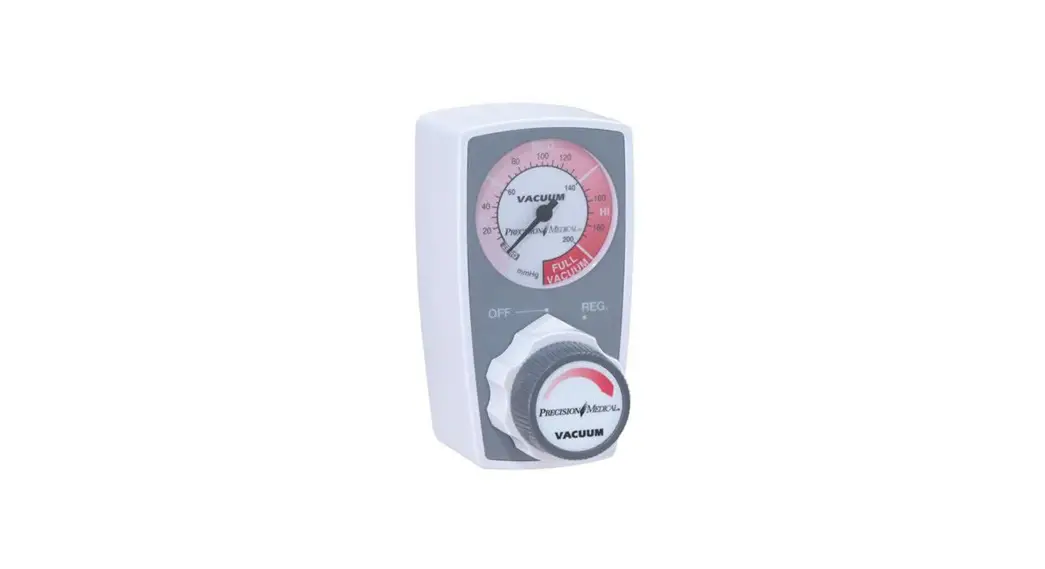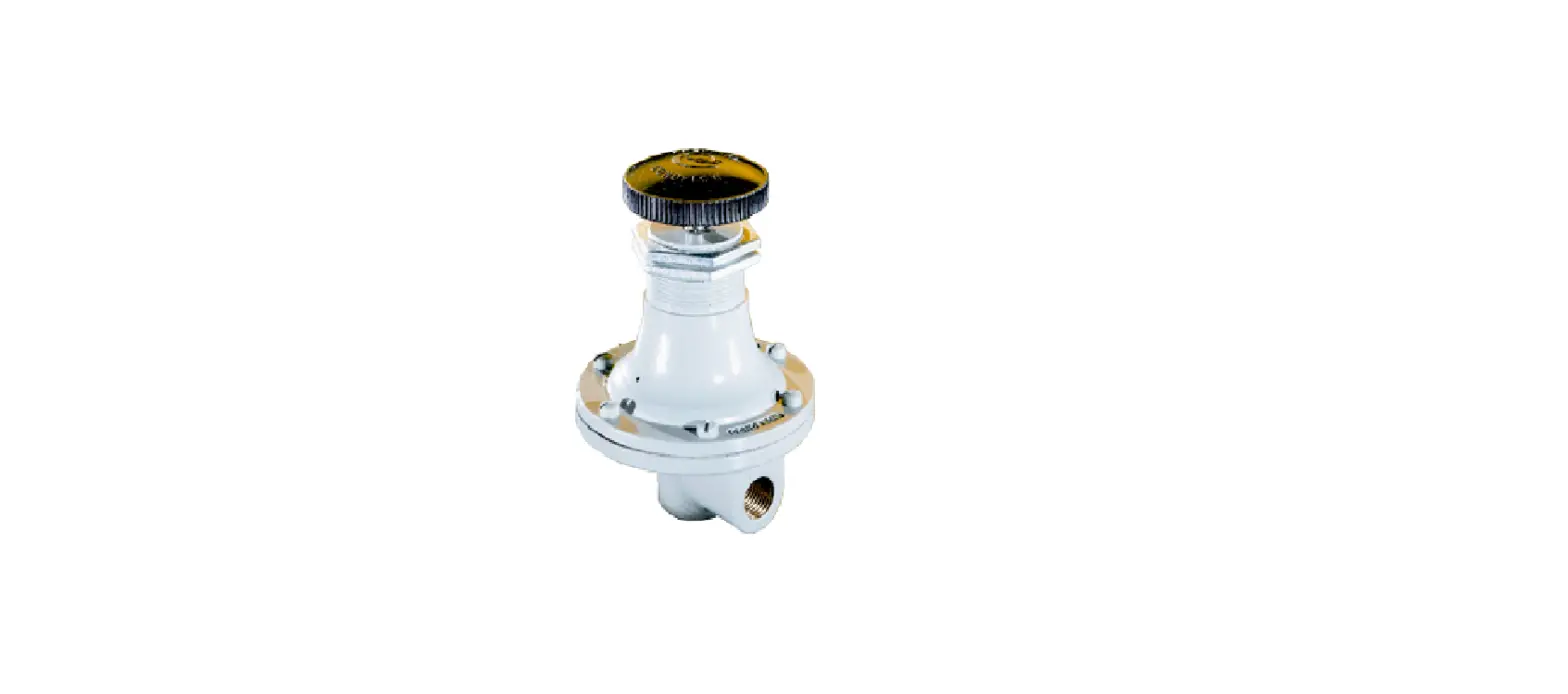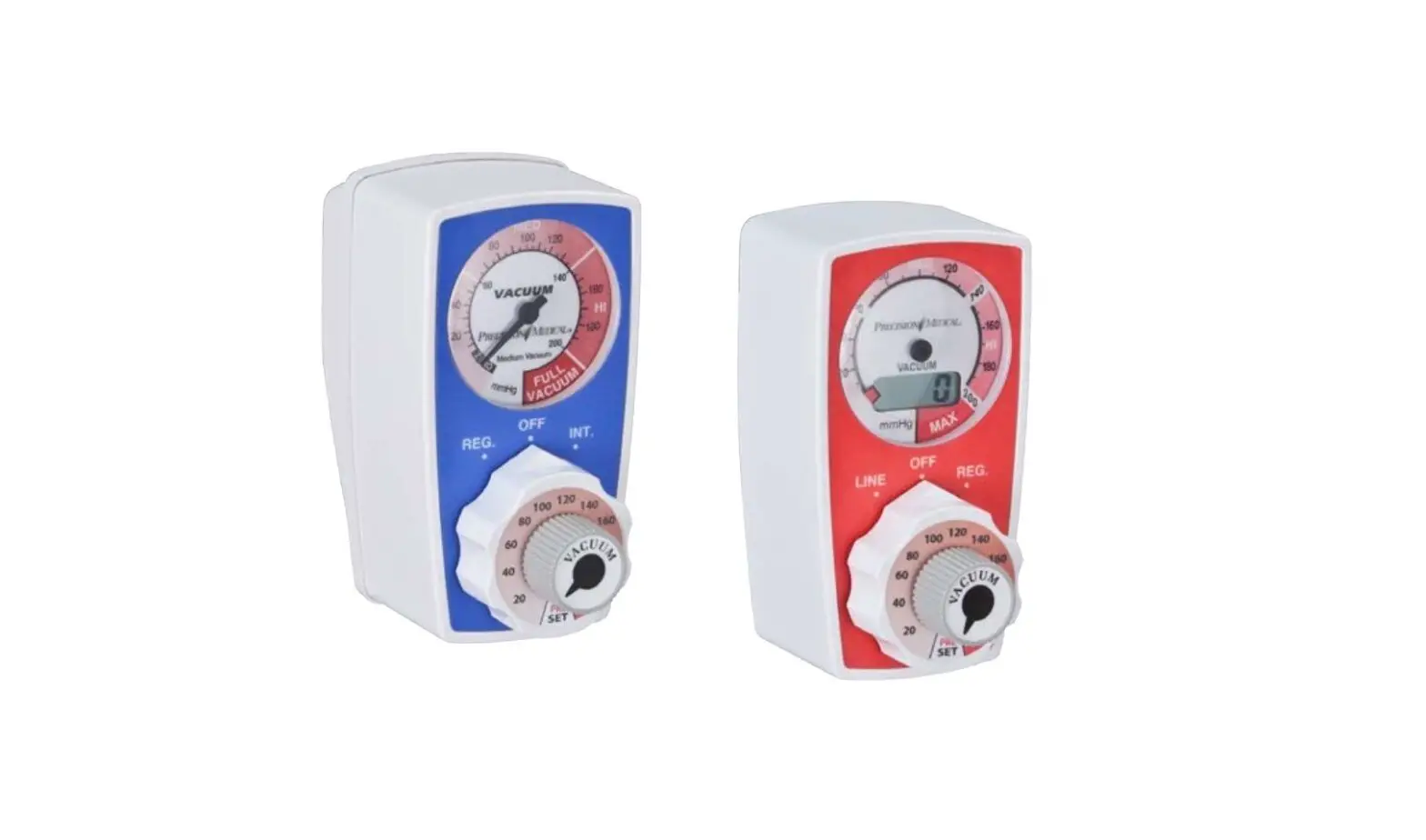
PRECISION MEDICAL PS3000 Continuous Preset Vacuum Regulator User Manual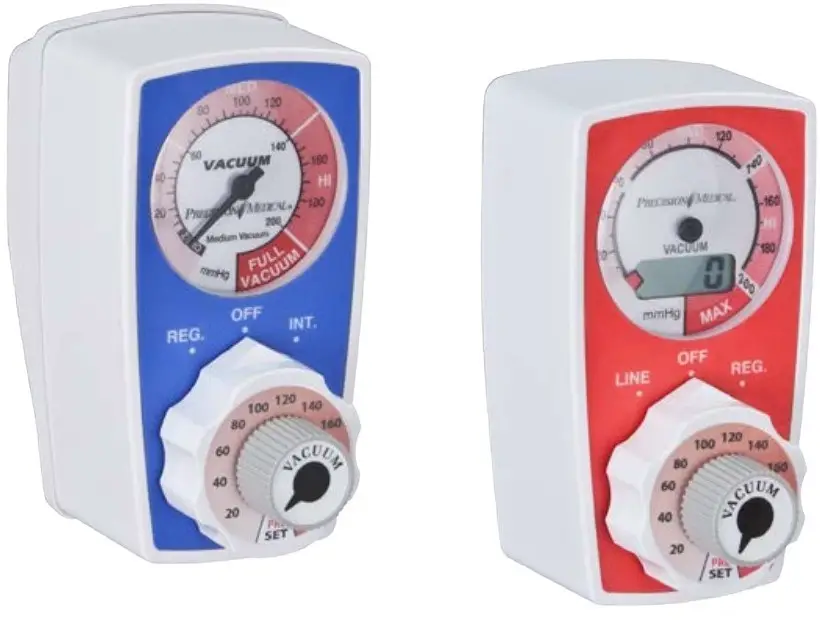
RECEIVING / INSPECTION
Remove the Precision Medical, Inc. Preset Vacuum Regulator from the packaging and inspect for damage. If there is any damage, DO NOT USE and contact your Provider.
INTENDED USE
The Preset Vacuum Regulator is intended to regulate and display the amount of vacuum from a central vacuum system used in various medical suctioning procedures.
READ ALL INSTRUCTIONS BEFORE USING
This manual instructs a Professional how to install and operate the Preset Vacuum Regulator. This is provided for your safety and to prevent damage to the Preset Vacuum Regulator. If you do not understand how to use the Preset Vacuum Regulator, please contact your Provider.
EXPLANATION OF ABBREVIATIONS
| l/min | Liters Per Minute Liters Per Minute |
| mmHg | Millimeters of Mercury |
| inHg | Inches of Mercury (1 inHg = 25.4 mmHg) |
SAFETY INFORMATION – WARNINGS AND CAUTIONS
 WARNING Indicates a potentially hazardous situation which, if not avoided, could result in death or serious injury.
CAUTION Indicates a potentially hazardous situation which, if not avoided, may result in minor or moderate injury.
CAUTION Used without the safety alert symbol indicates a potentially hazardous situation which, if not avoided, may result in property damage.
 CONSULT ACCOMPANYING DOCUMENTS
 There are no components in this product made with natural rubber latex.
WARNING
- DO NOT use the Preset Vacuum Regulator for anything other than its Intended Use. Personal injury and/or damage to Regulator may result from misuse.
- Only personnel instructed and trained in its use should operate the Preset Vacuum Regulator.
SPECIFICATIONS
CALIBRATED RANGE
- PS3000: 0 – 200 mmHg
- PS3000HV: 0 – 300 mmHg
- PS3100: 0 – 200 mmHg
- PS3100HV: 0 – 300 mmHg
- PS3300: 0 – 200 mmHg
- PS3300HV: 0 – 300 mmHg
- PS3400: 0 – 150 mmHg
- PS3500: 0 – 150 mmHg
- PS3600: 0 – 760 mmHg
| GAUGE ACCURACY | ||
| Analog Gauge | ± 5% of MAX calibrated range | |
| Dual Analog/Digital Gauge | ||
| Digital Display | ± 1% of Full Scale | |
| Analog Gauge | ± 5% of MAX calibrated range within ref. Indicator | |
| INLET/OUTLET CONNECTIONS | 1/8 NPT Female |
MODES OF OPERATION
| PS3000 Series PS3500 Series | OFF – No Vacuum REG. – (Regulated) Provides an adjustable, continuous vacuum level |
| PS3100 Series PS3600Series | OFF – No Vacuum REG. – (Regulated) Provides an adjustable, continuous vacuum level LINE – Provides maximum, continuous vacuum from the vacuum source |
| PS3300 Series PS3400 series | OFF – No Vacuum REG. – (Regulated) Provides an adjustable, continuous vacuum level INT. – Intermittent) Provides an adjustable vacuum level that cycles between ON and OFF |
FLOW RATES
| PS3000, PS3100 & PS3300 | REG MODE @ 200 mmHg | 48 l/min |
| LINE MODE | 55 l/min | |
| INT. MODE (PS3300 Only) | 10 l/min | |
| PS3000HV, PS3100HV & PS3300HV | REG MODE @ 300 mmHg | 50 l/min |
| LINE MODE | 55 l/min | |
| INT. MODE (PS3300HV Only) | 10 l/min | |
| PS3300 & PS3400 | REG MODE @ 150 mmHg | 50 l/min |
| INT. Mode (PS3300 only) | 10 l/min | |
| INT. MODE (PS3400 only) | 3 l/min | |
| PS3600 | REG MODE @ 635 mmHg | 71 l/min |
| LINE MODE | 82 l/min |
FLOW RATES ARE OBTAINED WITH A VACUUM SOURCE OF 21” Hg
| INTERMITTENT CYCLE TIME: | Factory set at sixteen (16) seconds ON and eight (8) seconds OFF (Reference only) |
| Operating Environmental Limits: | 0°F to 122°F (-18°C to 50°C) |
| Recommended Environmental Operating Limits: | 55°F to 85°F (13°C to 29°C) |
| Storage Environmental Limits | |
| Temperature Range: | -4°F to 140°F (-20°C to 60°C) |
| Humidity: | Max 95% Noncondensing |
| Battery: | 3 Volt Lithium, 1 /2 AA (Digital Vacuum Gauge Models ONLY) |
Specifications are subject to change without prior notice.
OPERATING INSTRUCTIONS
CAUTION
Inspect the Preset Vacuum Regulator for visual damage before use, DO NOT USE ifM damaged.
- NOTE: Overflow protection should be used with the Vacuum Regulator. (i.e. Filter, Vac Trap, Canister equipped with float shutoff).
- The Digital / Analog Dual Gauges operate independently; if the digital gauge fails, the analog gauge will still function and vice versa.
- Turn the Selector Knob to the “OFF” position.
- Connect the Preset Vacuum Regulator to a vacuum source.
A. REG. MODE (Regulated Mode) ALL MODELS
aB. Turn the gray Preset Knob to desired vacuum range.
b. Block the bottom port of the Vacuum Regulator with your finger and turn the white Selector Knob to the “REG.” position.
c. The preset vacuum range should correspond with the gauge readings along with the increase and decrease in suction felt with the finger on blocked off bottom port.
d. Adjust vacuum as required. To INCREASE vacuum – Turn gray Knob CLOCKWISE To DECREASE vacuum – Turn gray Knob COUNTERCLOCKWISE
B. LINE MODE (Full, unregulated vacuum) PS3100 & PS3600 Series ONLY
a. Block off bottom port of the Vacuum Regulator with your finger and turn the Selector Knob to the “LINE” position. The gauge will indicate Max. vacuum and suction should be felt with finger on blocked off bottom port. In this mode the vacuum level cannot be set and will be full unregulated vacuum.
C. INT. MODE (Vacuum cycles ON and OFF.) PS3300 Series ONLY
a. Turn the gray Preset Knob to desired vacuum range.
b. Block the bottom port of the Vacuum Regulator with your finger and turn the Selector Knob to the “REG.” position.
c. The preset vacuum range should correspond with the gauge readings along with the suction felt with the finger on blocked off bottom port.
d. Adjust vacuum as required. To INCREASE vacuum – Turn gray Knob CLOCKWISE To DECREASE vacuum – Turn gray Knob COUNTERCLOCKWISE
e. Turn the Selector Knob to the “INT.” position.
f. The intermittent cycle starts in the “OFF” phase. There will be approximately an 8 second delay before the device cycles to the “ON” phase for approximately 16 seconds. During the “ON” phase the gauge vacuum level should correspond with the preset vacuum level. - Turn the Selector Knob to the “OFF” position to turn the Vacuum off.
WARNING
- When turning the Preset Vacuum Regulator to “REG.” from “LINE” or “OFF”, the vacuum level will return to its previously regulated setting. Vacuum may be set at improper level for procedure.
- PS3300 & PS3400 Series ONLY: When turning the Preset Vacuum Regulator to “REG.” or “INT.” from any position, the vacuum level will return to its previously regulated setting. Vacuum levels will remain the same when switching from one mode to the other.
- ALWAYS confirm vacuum setting prior to performing procedure.
- The vacuum CANNOT be regulated when the Selector Knob is set to the “LINE” position.
- Full Line Vacuum is present between settings.
- The desired vacuum mode (“REG”, “LINE”, “INT.”) and vacuum level should always be set and confirmed before interface with patient to perform suctioning procedure.
CAUTION
DO NOT operate the Preset Vacuum Regulator when the collection canister is “full”. This may cause loss of vacuum and damage to the Preset Vacuum Regulator. This will void the warranty.
PARTS DESCRIPTION
CAUTION
Missing or illegible labels must be replaced, contact Precision Medical, Inc.
PS3000, PS3100, PS3500 & PS3600 Series
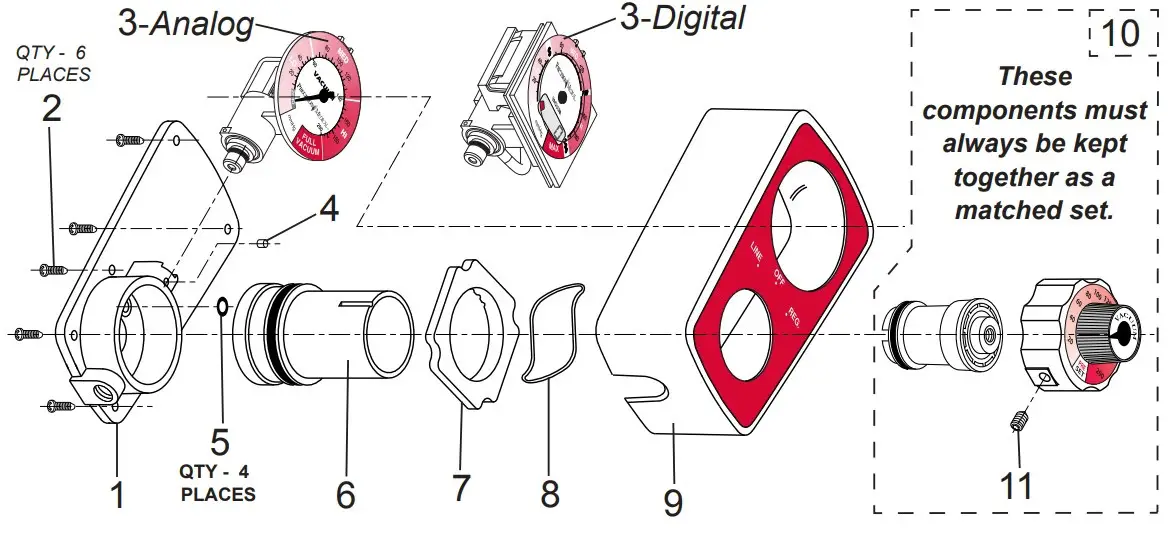
PARTS LIST
| No. | Description | PS3000 | PS3100 | PS3500 | PS3600 |
| 1 | Housing Assembly | 1561 | |||
| 2 | Screw | 503956 | |||
| 3 | Analog Gauge (0-150 mmHg) | – | – | 503826 | – |
| Analog Gauge (0-200 mmHg) | 503694 | – | – | ||
| Analog Gauge (HV) (0-300 mmHg) | 504309 | – | – | ||
| Analog Gauge (0-760 mmHg) | – | – | – | 505937 | |
| Dual Analog /Digital Gauge (0-150 mmHg) | – | – | 505391 | – | |
| Dual Analog /Digital Gauge (0-200 mmHg) | 505244 | – | – | ||
| Dual Analog /Digital Gauge (HV) (0-300 mmHg) | 505392 | – | – | ||
| Dual Analog /Digital Gauge (0-760 mmHg) | – | – | – | 505938 | |
| 4 | Snubber | 1396 | |||
| 5 | O-ring | 1016 | |||
| 6 | Selector Assembly | 1563 | 1564 | 1563 | 505935 |
| 7 | Selector Ring | 502685 | |||
| 8 | Wave Spring Washer | 1614 | |||
| 9 | Case Assembly | 1565 | 1566 | 1565 | 1566 |
| 10 | Regulator Module/Control Knob Assembly | 507480(0-200 mmHg) | 507730(0-150mmHg) | 507731(0-760mmHg) | |
| *507481(0-300 mmHg) | |||||
| 11 | Set Screw | 1391 | |||
| — | Battery for Dual Analog/Digital Gauge | 8066 | |||
- HV Models ONLY (PS3000HV, PS3100HV & PS3300HV)
PS3300 SERIES
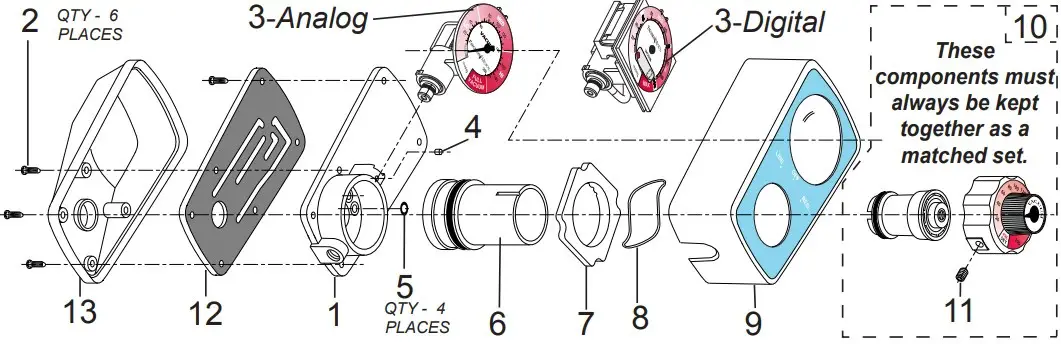
PARTS LIST
| No. | Description | PS3300 | PS3400 |
| 1 | Housing Assembly | 502102 | |
| 2 | Screw | 503956 | |
| 3 | Analog Gauge (0-150 mmHg) | – | 503826 |
| Analog Gauge (0-200 mmHg) | 503694 | – | |
| Analog Gauge (HV) (0-300 mmHg) | 504309 | – | |
| Dual Analog /Digital Gauge (0-150 mmHg) | – | 505391 | |
| Dual Analog /Digital Gauge (0-200 mmHg) | 505244 | – | |
| Dual Analog /Digital Gauge (HV) (0-300 mmHg) | 505392 | – | |
| 4 | Snubber | 1396 | |
| 5 | O-ring | 502231 | |
| 6 | Selector Assembly | 1805 | |
| 7 | Index Ring | 502685 | |
| 8 | Wave Spring Washer | 1614 | |
| 9 | Case Assembly | 1827 | |
| 10 | Regulator Module/ Control Knob Assembly | 507480(0 – 200 mmHg) | 507730(0-150 mmHg) |
| *507481(0 – 300 mmHg) | |||
| 11 | Set Screw | 1391 | |
| 12 | Timing Module | 502103 | |
| 13 | Back Case | 1831 | |
| — | Battery for Dual Analog/Digital Gauge | 8066 | |
- HV Models ONLY (PS3300HV)
| REPAIR KITS | Analog Part# | Digital Part# |
| PS3000 / PS3000D Vac Reg | RKPS6000 | RKPS6000D |
| PS3000HV / PS3000DHV Vac Reg | RKPS6000HV | RKPS6000DHV |
| PS3100 / PS3100D Vac Reg | RKPS6100 | RKPS6100D |
| PS3100HV / PS3100DHV Vac Reg | RKPS6100HV | RKPS6100DHV |
| PS3300/PS3300D Vac Reg | RKPS6300 | RKPS6300D |
| PS3300HV / PS3300DHV Vac Reg | RKPS6300HV | RK6300DHV |
| PS3400 / PS3400D Vac Reg | RKPS6400 | RKPS6400D |
| PS3500 / PS3500D Vac Reg | RKPS6500 | RKPS6500D |
| PS3600 / PS3600D Vac Reg | RKPS6600 | RKPS6600D |
DISASSEMBLY INSTRUCTIONS for PS3000, PS3100, PS3500 & PS3600 Series
(Reference “PARTS DESCRIPTION”)
- Loosen the Set Screw (Item# 11) in Selector Knob.
- Pull the Regulator Module/Control Knob Assembly (Item # 12) away from case. (The Regulator Module (Item # 10) is threaded onto the Control Knob Assembly.
Note: These components must always be kept together as a matched set.) - Remove the screws (Item# 2) from the back of the Regulator.
- Separate the Case Assembly (Item# 9) by pulling it away from the Housing Assembly (Item# 1).
- Remove the Selector Assembly (Item# 6) by pulling it away from the Housing Assembly (Item# 1).
- Remove Gauge by pulling vertically out of socket (Item# 3)
DISASSEMBLY INSTRUCTIONS for PS3300 & PS3400 Series
(Reference “PARTS DESCRIPTION”)
- Loosen the Set Screw (Item # 11) in Selector Knob.
- Pull the Regulator Module/Control Knob Assembly (Item # 12) away from case. (The Regulator Module (Item # 10) is threaded onto the Control Knob Assembly. Note: These components must always be kept together as a matched set.)
- Remove the screws (Item # 2) from the back of the product.
- Remove the Rear Case (Item # 14) by pulling away from product.
- Remove screws (Item# 2) from the top of the Timing Module.
- Remove the Timing Module (Item# 13) by pulling away from the Housing Assembly (Item# 1).
- Separate the Case Assembly (Item# 9) by pulling it away from the Housing Assembly (Item# 1).
- Remove the Selector Assembly (Item# 6) by pulling it away from the Housing Assembly (Item# 1).
- Remove Gauge by pulling vertically out of socket (Item# 3).
ASSEMBLY INSTRUCTIONS
- To assemble, perform the “DISASSEMBLY INSTRUCTIONS” in reverse order.
- Note: Ensure the tab on the Regulator Module is inserted into the internal slot on the Selector Module at the 9 o’clock position.
- Ensure the tab on the Control Knob Assembly at the 12 o’clock position is aligned with the outer circumference slot on the Selector Module at the 12 o’clock position.
- Lubricate all O-rings and cavities with Vacuum grease (part# 1775) supplied in the Preset Vacuum Regulator Repair Kit.
- Repeat steps 1 through 3 of “OPERATING INSTRUCTIONS”.
- Prior to returning Preset Vacuum Regulator to service verify preset vacuum level with gauge reading.
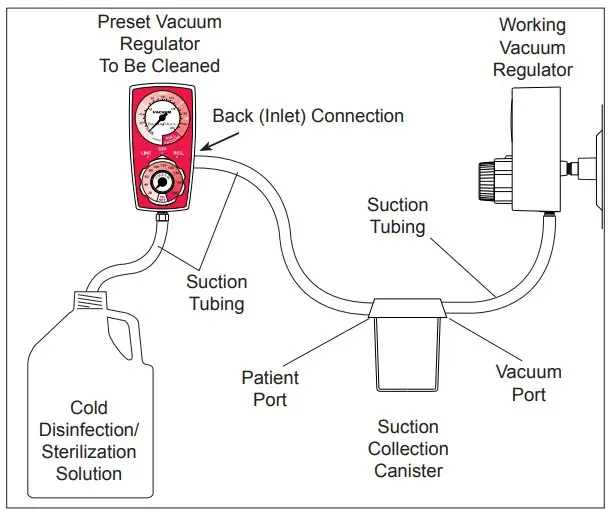
PRESET VACUUM REGULATOR CLEANING ILLUSTRATION
(Cleaning/Decontamination Instructions on page 9)
CAUTION
- DO NOT autoclave or immerse in liquid. This will cause damage to the Preset Vacuum Regulator and will void the warranty.
- If Preset Vacuum Regulator becomes internally contaminated, warranty is voided, DO NOT send back to Precision Medical, Inc. for repair. Follow the contaminated equipment protocol at your facility.
- Ensure all connections are tight and leak free.
- The Preset Vacuum Regulator contains magnetic, ferrous material that may affect the results of an MRI.
Tell us how we are doing! Visit us at www.precisionmedical.com
CLEANING / DECONTAMINATION (As needed)
- Attach a working Vacuum Regulator with a continuous regulated mode to a minimum vacuum source of 15 inHg.
- Mix cold disinfection/sterilization solution according to its manufacturer’s directions.
- Connect tubing as shown in Cleaning Illustration on previous page.
- Turn the working Vacuum Regulator on to a continuous regulated mode.
- Adjust the vacuum to a minimum of 120 mmHg.
- Set the “Preset” Vacuum Regulator to be cleaned to the “REG.” mode, and set at 100 mmHg.
- Allow cold disinfection/sterilization solution to pass through Preset Vacuum Regulator and collect in Suction Canister. Procedure should continue for time recommended by the manufacturer of the cold disinfection/sterilization solution for the desired level of disinfection or sterilization.
- Turn the Preset Vacuum Regulator to be cleaned to the “LINE” mode (if applicable).
- Allow remaining cold disinfection/sterilization solution to pass through and collect in Suction Canister.
- Set working Vacuum Regulator to its maximum vacuum setting.
- Thoroughly dry the internal components by drawing maximum vacuum through the cleaned Regulator for at least 30 seconds in both “REG.” and “LINE” modes (if applicable).
NOTE: If it is not possible to pass cold disinfection/sterilization solution through the Regulator, then the passageways are totally blocked and DISASSEMBLY of the Regulator is required. Ensure to follow the Biohazard protocol at your facility.
MAINTENANCE
Before each use, visually inspect Preset Vacuum Regulator for any sign of damage. DO NOT USE if damaged.
RETURNS
Returned products require a Returned Goods Authorization (RGA) number,
contact Precision Medical, Inc. All returns must be packaged in sealed containers to prevent damage. Precision Medical, Inc. will not be responsible for goods damaged in transit. Refer to Precision Medical, Inc. Return Policy available on the Internet, www.precisionmedical.com.
Note: Federal Law prohibits shipping of BioHazard materials Via U.S. mail.
Manuals available on our Website; www.precisionmedical.com
DISPOSAL INSTRUCTIONS
Dispose of the Preset Vacuum Regulator in accordance with local regulations.
 Please Recycle
WARNING
Biohazardous devices should be disposed of properly
TROUBLESHOOTING
If the Preset Vacuum Regulator fails to function, consult the Troubleshooting Table below. If problem cannot be solved, consult your Provider
| Problem | Probable Cause | Remedy |
| No vacuum at bottom port (gauge at zero) |
|
|
| No vacuum at bottom port (gauge showing vacuum) | Clogged Regulator | Disassemble and clean |
| Vacuum at bottom port (No reading on gauge when port is blocked) | Defective Gauge | Replace Gauge |
| Gauge will not return to zero |
|
|
| Vacuum Regulation erratic |
|
|
| Stiff movement of white Selector Knob | Dirty Selector Module cavity or O-rings | Disassemble, clean casting cavity and lubricate cavity and O-rings |
| No digital display | Dead battery | Replace battery |
| PS3300/PS3400 Series ONLY:No Intermittent (INT.) cycle |
|
|
LIMITED WARRANTY
AND LIMITATION OF LIABILITY
Precision Medical, Inc. warrants that the Medical Preset Vacuum Regulator (the Product) will be free of defects in workmanship and/or material for the following period:
Ten (10) years from date of shipment
Should any failure to conform to this warranty appear within the applicable period, Precision Medical, Inc. shall, upon written notification thereof and substantiation that the goods have been stored, installed, maintained and operated in accordance with Precision Medical, Inc.’s instructions and standard industry practice, and that no modifications, substitutions, or alterations have been made to the goods, correct such defect by suitable repair or replacement at its own expense.
ORAL STATEMENTS DO NOT CONSTITUTE WARRANTIES.
Representative of Precision Medical, Inc. or any retailers are not authorized to make oral warranties about the merchandise described in this contract, and any such statements shall not be relied upon and are not part of the contract for sale. Thus, this writing is a final, complete and exclusive statement of the terms of that contract.
THIS WARRANTY IS EXCLUSIVE AND IS IN LIEU OF ANY WARRANTY OF MERCHANTABILITY, FITNESS FOR A PARTICULAR PURPOSE OR OTHER WARRANTY OF QUALITY, WHETHER EXPRESSED OR IMPLIED.
Precision Medical, Inc. shall not under any circumstances be liable for special, incidental or consequential damages including but not limited to lost profits, lost sales, or injury to person or property. Correction of non-conformities as provided above shall constitute fulfillment of all liabilities of Precision Medical, Inc. whether based on contract, negligence, strict tort or otherwise. Precision Medical, Inc. reserves the right to discontinue manufacture of any product or change product materials, designs, or specifications without notice.
Precision Medical, Inc. reserves the right to correct clerical or typographical errors without penalty
 Home - Precision Medical, Inc.