
PUBLIC ADDRESS SYSTEM
OPERATION MANUAL
T-6212(A)
PAGING SELECTOR
Please follow the instructions in this manual to obtain the optimum results from this unit.
We also recommend that you keep this manual handy for future reference.
SAFETY PRECAUTIONS
- Be sure to read the instructions in this section carefully before use.
- Make sure to observe the instructions in this manual as the conventions of safety symbols and messages regarded as very important precautions are included.
- We also recommend you keep this instruction manual handy for future reference.
Safety Symbol and Message Conventions
Safety symbols and messages described below are used in this manual to prevent bodily injury and property damage which could result from mishandling. Before operating your product, read this manual first and understand the safety symbols and messages so you are thoroughly aware of the potential safety
 WARNING Indicates a potentially hazardous situation which, if mishandled, could result in death or serious personal injury. CAUTION Indicates a potentially hazardous situation which, if mishandled, could result in moderate or minor personal injury, and/or property damage.
WARNING
When Installing the Unit
- Do not expose the unit to rain or an environment where it may be splashed by water or other liquids, as doing so may result in fire or electric shock.
- Use the unit only with the voltage specified on the unit. Using a voltage higher than that which is specified may result in fire or electric shock.
- Do not cut, kink, otherwise damage nor modify the power supply cord. In addition, avoid using the power cord in close proximity to heaters, and never place heavy objects — including the unit itself — on the power cord, as doing so may result in fire or electric shock.
Be sure to replace the unit’s terminal cover after connection completion. Because high voltage is applied to the speaker terminals, never touch these terminals to avoid electric shock. - Be sure to ground to the safety ground (earth) terminal to avoid electric shock. Never ground to a gas pipe as a catastrophic disaster may result.
- Avoid installing or mounting the unit in unstable locations, such as on a rickety table or a slanted surface. Doing so may result in the unit falling down, causing personal injury and/or property damage.
When the Unit is in Use
- Should the following irregularity be found during use, immediately switch off the power, disconnect the power supply plug from the AC outlet and contact your nearest ITC dealer. Make no further attempt to operate the unit in this condition as this may cause fire or electric shock.
- If you detect smoke or a strange smell coming from the unit.
- If water or any metallic object gets into the unit
- If the unit falls, or the unit case breaks
- If the power supply cord is damaged(exposure of the core, disconnection, etc.)
- If it is malfunctioning (no tone sounds.)
- To prevent a fire or electric shock, never open nor remove the unit case as there are high voltage components inside the unit. Refer all servicing to your nearest ITC dealer.
- Do not place cups, bowls, or other containers of liquid or metallic objects on top of the unit. If they accidentally spill into the unit, this may cause a fire or electric shock.
- Do not insert nor drop metallic objects or flammable materials in the ventilation slots of the unit’s cover, as this may result in fire or electric shock.
CAUTION
When Installing the Unit
- Never plug in nor remove the power supply plug with wet hands, as doing so may cause electric shock.
- When unplugging the power supply cord, be sure to grasp the power supply plug; never pull on the cord itself. Operating the unit with a damaged power supply cord may cause a fire or electric shock.
- When moving the unit, be sure to remove its power supply cord from the wall outlet. Moving the unit with the power cord connected to the outlet may cause damage to the power cord, resulting in fire or electric shock. When removing the power cord, be sure to hold its plug to pull.
- Do not block the ventilation slots in the unit’s cover.
Doing so may cause heat to build up inside the unit and result in fire. - Avoid installing the unit in humid or dusty locations, in locations exposed to the direct sunlight, near the heaters, or in locations generating sooty smoke or steam as doing otherwise may result in fire or electric shock.
When the Unit is in Use
- Do not place heavy objects on the unit as this may cause it to fall or break which may result in personal injury and/or property damage. In addition, the object itself may fall off and cause injury and/or damage.
- Make sure that the volume control is set to minimum position before power is switched on. Loud noise produced at high volume when power is switched on can impair hearing.
- Do not operate the unit for an extended period of time with the sound distorting. This is an indication of a malfunction, which in turn can cause heat to generate and result in a fire.
- Contact your ITC dealer as to the cleaning. If dust is allowed to accumulate in the unit over a long period of time, a fire or damage to the unit may result.
- If dust accumulates on the power supply plug or in the wall AC outlet, a fire may result. Clean it periodically. In addition, insert the plug in the wall outlet securely.
- Switch off the power, and unplug the power supply plug from the AC outlet for safety purposes when cleaning or leaving the unit unused for 10 days or more. Doing otherwise may cause a fire or electric shock.
An all-pole mains switch with a contact separation of at least 3 mm in each pole shall be incorporated in the electrical installation of the building.
GENERAL DESCRIPTION
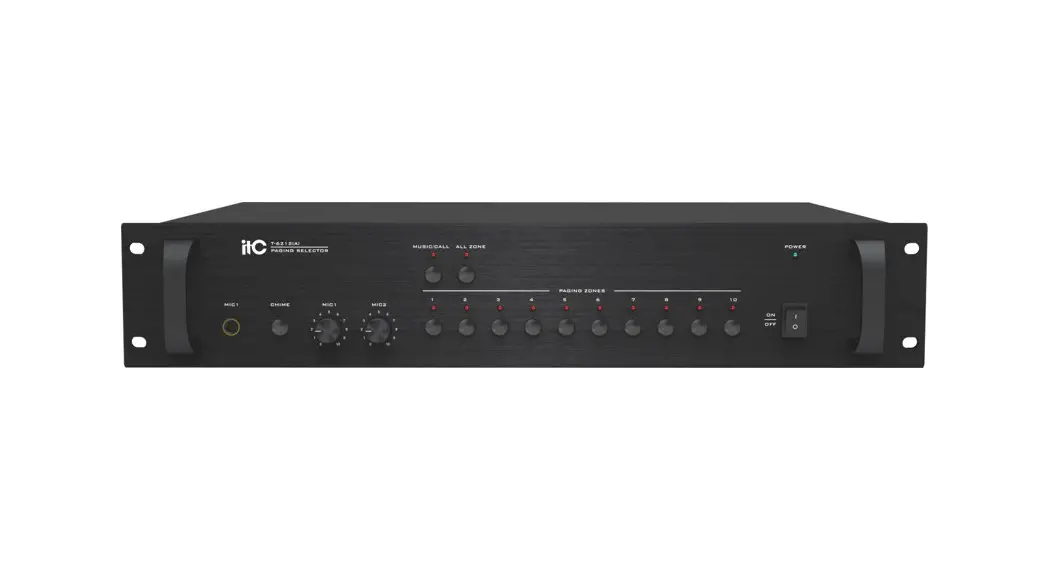
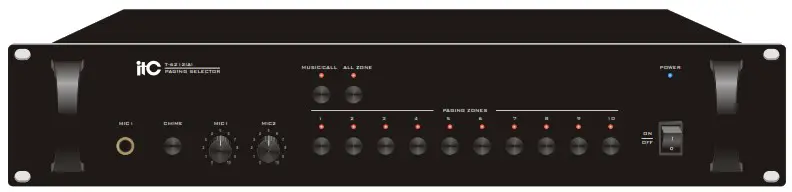
The T-6212(A) is a high performance 10-zone Paging Selector that works with Emergency Panel T-6223(A) , Paging microphone console T-218(A) for emergency notification and zone paging . The applications can be carride out with an amplifier stepping up the EMC input, MIC input and remote paging and then to rigger the speaker selector and Emergency Panel. Features include 10 zones paging and EMC(priority) input, two MIC inputs and two line inputs. Mute function, EMC priority, remote paging and built-in chime.
FEATURES
- 10 zone background music, 10 zone Paging selector and 10 zone alarm input, which can be expanded to 300 zones.
- With memory function on the music mode, can regain the information of former play channel. Memory function only valid with music play mode.
- Each zone power capacity is 500W ,and totally power capacity of ten zones is 5000W.
- Bi-color light indicator of zones status can accurately indicate music, paging or alarm status.
- Local paging function and remote paging function (Max distance 1KM)
- Built-in two priority amplifier, Mic 1-2 inputs and line 1-2 inputs.
- Built-in chime.
- Mute function
NOMENCLATURE AND FUNCTIONS
FRONT PANEL
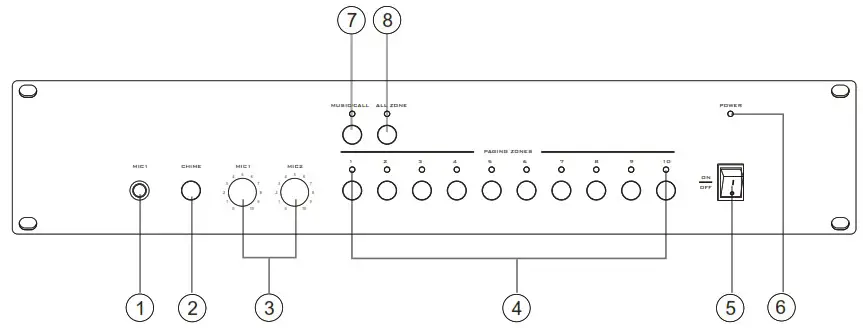
| 1. MIC 1 MIC1 input 6.3 Microphone jack input 2. CHIME CHIME Microphone 3. MIC (1~2) MIC (1~2) volume control 4. PAGING ZONES (1~10)Paging zones indicator (1~10)Paging zones button | 5. POWER SWITCH On top of the opening Power Press the end, power shut down 6. POWER Power indicator 7. MUSIC/CALL Music/call button Music/call button indicator 8. ALL ZONE All zone button All zone indicator |
REAR PANEL
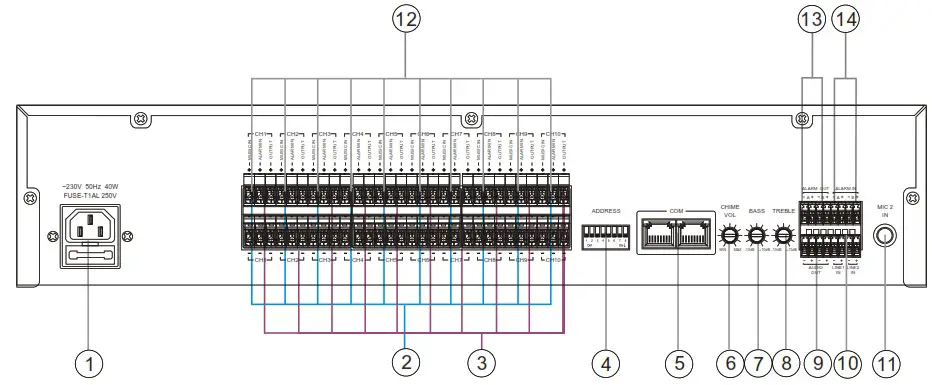
REAR PANEL(+24V)
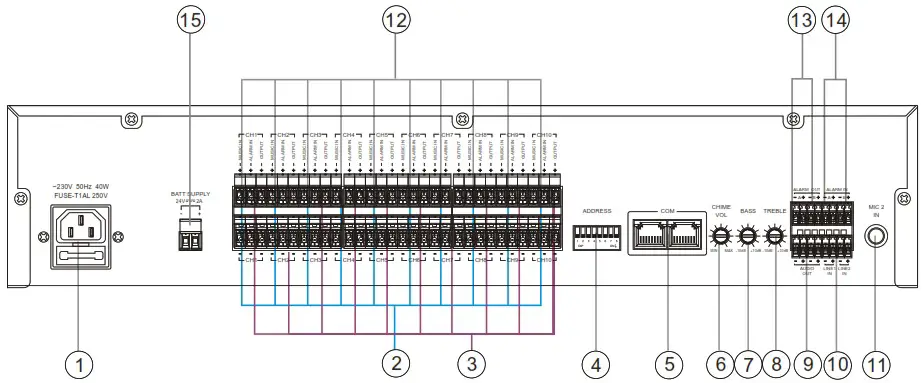
| 1. AC POWER INPUT 2. MUSIC IN(CH1~CH10) Background music input 3. ALARM IN (CH1~CH10) Zoning alarm signal 4. ADDRESS Address code switch, 1-5 is machine address code setting, the 6 code control of alarm zone cancellation function. th 5. COM Network Communication Port 6. CHIME VOL CHIME volume control 7. BASS Adjust bass response. Rotate clockwise to increase bass output and anticlockwise to reduce it | 8. TREBLE Adjust treble response. Rotate clockwise to increase treble output and anticlockwise to reduce it 9. AUDIO OUT MIC1/MIC2/LINE1/LINE2/CHIME/TEL signal output 10.LINE 1/LINE 2 IN Line 1 Access alarm signal 11.MIC2 IN MIC2 input 6.3 Microphone jack input 12.OUT(CH1~CH10) 13.ALARM OUT A / B Short-circuit the signal region output 14.ALARM IN A / B Short-circuit the signal region input 15.DC 24V INPUT |
MACHINE OPERATION
MUTING FUNCTION
Line 1, microphone input 1 has priority, the signal input of these ports will automatically inhibited by other input signals.
In which the line 1 has the highest priority, all other input port can be suppressed, and thus has the verride feature. We suggest that paging microphone connect to “microphone 1” and alarming device connect to “Line 1”.
OPERATION
- When you press the MUSIC / CALL button, if the corresponding indicator light is green, That means MUSIC mode, CH1 to CH10 buttons control the ten corresponding partition music output. Press ALL ZONE button, play music and off switch for the region. If the corresponding indicator is shown in red, then select the CALL mode, CH1 to CH10 buttons control the output of ten branch of a local call. Press ALL ZONE button, switch on and off a native of the region call.
- When power on, the system has a memory function on music mode, restore the previous state of music playback channels, memory function is only available for music playback mode.
- When working on the current mode, if an external signal is cut, the machine will make a priority of judgment, then decide whether to switch modes or not. At the same time as the operating mode indicator also make the appropriate changes, switching prioritization from low to high: MUSIC mode Remote call station CALL mode Native CALL Mode Alarm mode.
- music local paging, remote paging are independent signals.
- MIC1 and MIC2 output the sane signal; LINE1 has priority over MIC1 on receiving alarm signal.
- Press CHIME switch for chime output: the knob on rear panel could adjust chime volume.
- Short any one zone of ALARM IN manually, ALARM OUT output Short circuit alarm. The indicated light turned red and flash, at the same time also automatically clear all remote paging, manual paging data. When the sixth DIP switch on the rear panel is OFF, press “ALL ZONES” button on the front panel to clear the alarm, then turn on the sixth DIP switch, the alarm would be cleared automatically .
- mute priority : LINE1 MIC1 MIC2, LINE2, CHIME.
- the zone indicator Description:
- All Off: audio source is turned off, no alarm no paging.
- Green indicator: only audio signals received.
- red indicator Flashing slowly: no audio signal, the remote paging microphone is paging, audio is turned off, alarm signal is working.
- Red indicator: no audio signal, to paging manually.
- Red indicator Flashing fast : no audio signal, stay alarm status.
- Orange indicator (mixture of green and red output): audio output normally, meanwhile execute 3/4/5 steps.
ADDRESS SETTING
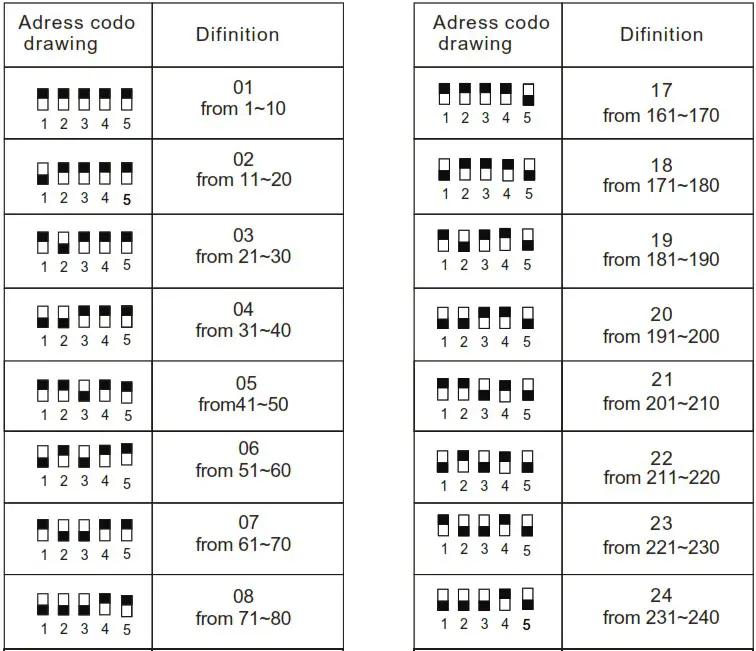
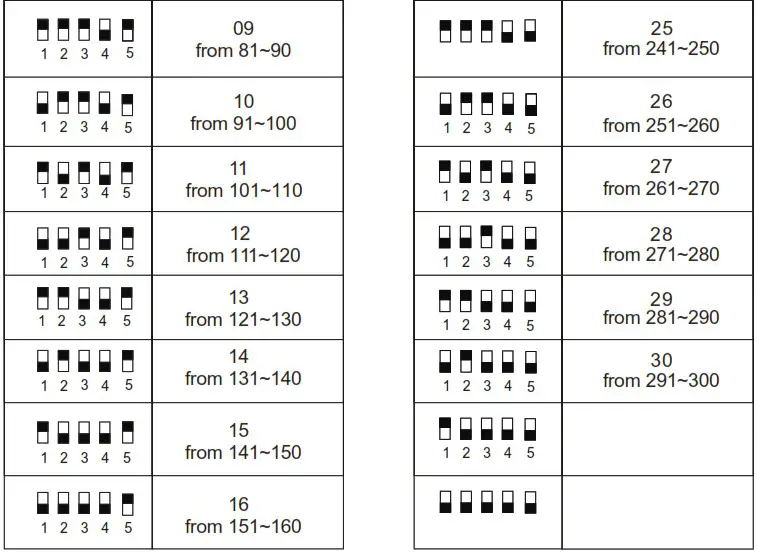
Note: white said code pull direction.
APPLICATIONS
REAR PANEL CONNECTIONS

SPECIFICATIONS
| PAGING SELECTOR | |
| MODEL | T-6212(A) |
| INPUT | MIC 1,2: 600 ,1.8mV,Unbalanced LINE 1,2: 10K , 200mV,Unbalanced |
| OUTPUT | 80dB |
| FREQUENCY RESPONSE | MIC:100Hz~15KHz; LINE: 30Hz~18KHz |
| CROSSTALK | MIC input: 80dB; Line input: 90dB |
| CONTROLS | MIC1,2 gain controls,10 channel selectors, chime button, power switch |
| INDICATORS | Power LED,10 paging channel LEDs |
| PROTECTION | AC fuse, 1A |
| POWER CONSUMPTION | 40W |
| POWER REQUIREMENTS | ~220-240V 50/60Hz |
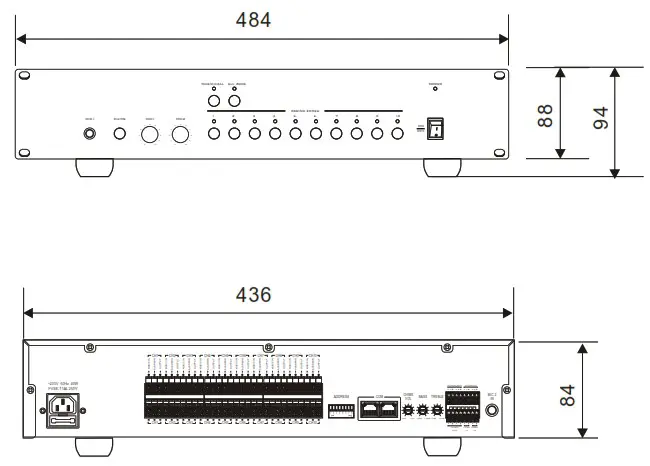
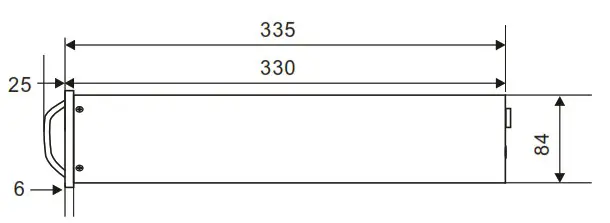
| DIMENSION(mm) | 484X350X88 |
| WEIGHT | 4.6Kg |
DIMENSIONAL DIAGRAM
UNIT :mm
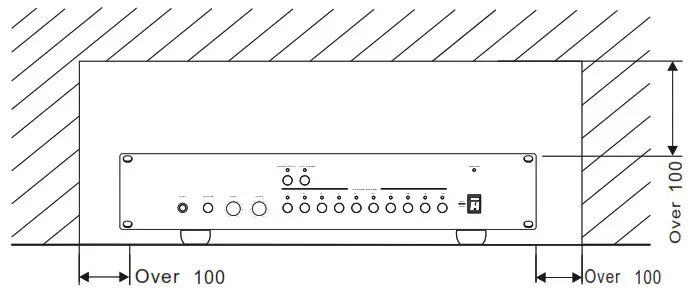
Keep the unit’s all sides over 10 cm away from objects that may obstruct air flow to prevent the unit’s internal temperature rise.
UNIT :mm
PUBLIC ADDRESS SYSTEM
VersionV0.1