KLS-890 MagBlaster Pro Wireless Speaker
Product Information
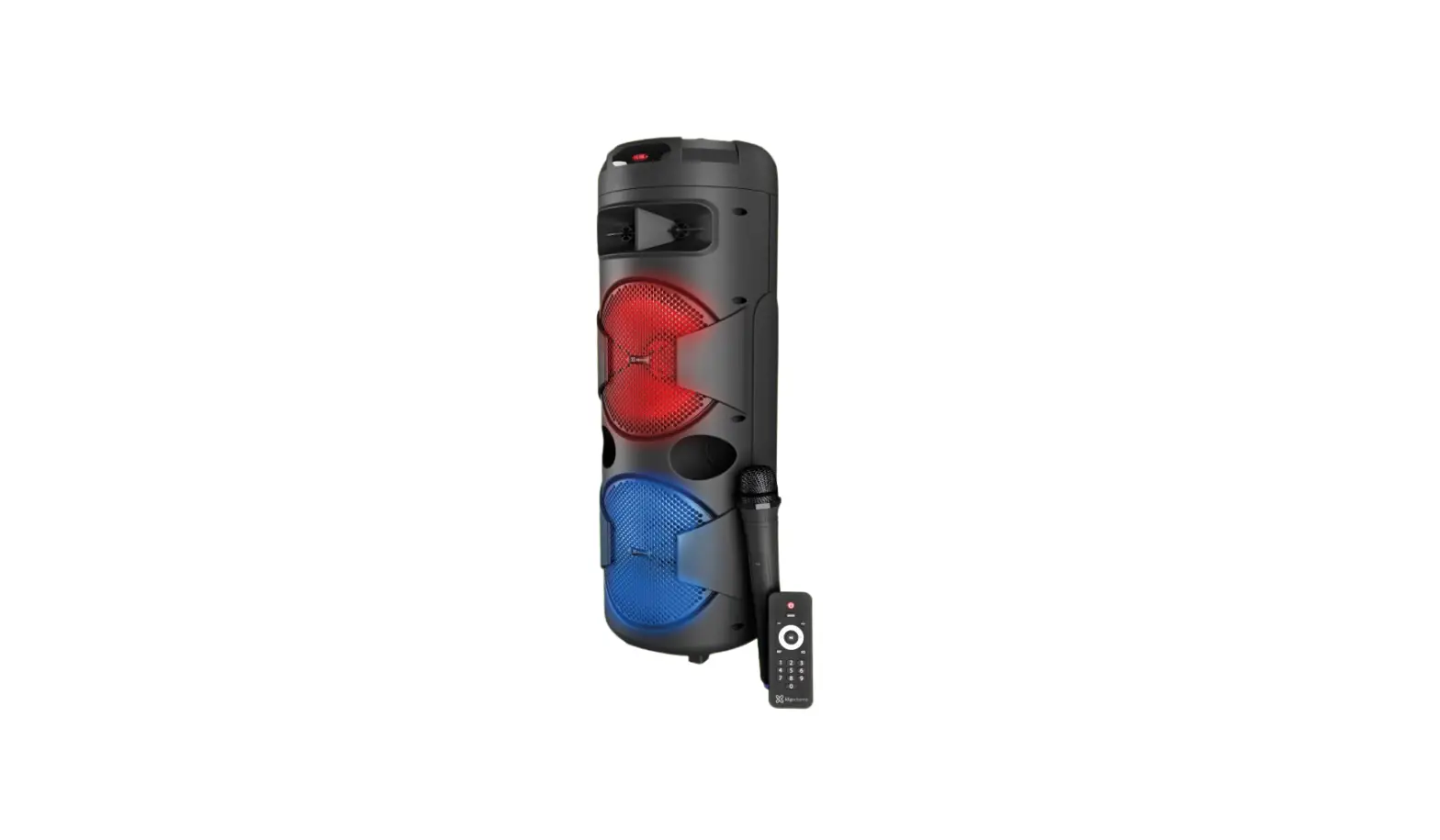
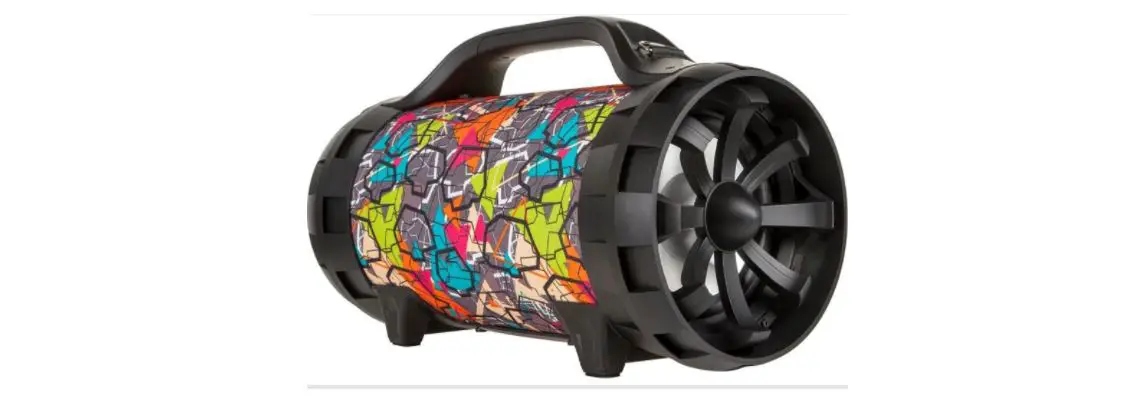
The MagBlaster Pro KLS-890 is a loudspeaker system with wireless
technology manufactured by KlipXtreme. It is a versatile audio
system that offers various features for an enhanced listening
experience. The system includes subwoofers, LED display, metallic
grid, handle, rubber feet and wheels, LED lights, and a control
panel with multiple buttons and knobs for convenient control.
Main Features
- Loudspeaker system with wireless technology
- Subwoofers for powerful bass
- LED display for visual feedback
- Metallic grid for protection
- Handle for easy portability
- Rubber feet and wheels for stability and mobility
- LED lights for added visual appeal
Package Content
| Item | Quantity |
|---|---|
| MagBlaster Pro KLS-890 loudspeaker system | 1 |
| Remote control | 1 |
| AC cable | 1 |
| Microphone | 1 |
| Product manual | 1 |
| Original packing materials | 1 |
Product Overview
Front and Side View

- LED display
- Subwoofers x2
- Metallic grid
- Handle (on back panel)
- Rubber feet and wheels
- LED lights
Top Panel

- DC12V input
- LED lights switch
- Mode button
- Prev. button
- Play/pause/TWS button
- Next button
- Microphone priority button
- Record button
- Power (On/Off) switch
- GT volume knob
- GT input jack
- MIC input
- MIC volume knob
- MIC ECHO knob
- Treble knob
- Bass knob
- Aux input
- Volume knob
- MicroSDTM card slot/USB port
- AC 110-240V charging input
Note: The unit has a built-in antenna to pick up the signal for
the FM mode.
Remote Control

- Power button
- Mode button
- Stop button
- Volume + button
- Previous button
- Volume – button
- Repeat button
- EQ button
- Number buttons (0-9)
- Mute button
- Next button
- CH+ button
- CH- button
Product Usage Instructions
Initial Setup
For your safety, read the manual and follow all safety
instructions before using the product.
Charging the Battery
- Plug the AC cable into a wall outlet.
- When the unit is not in use or switched off, it will
automatically recharge the internal battery as long as it remains
connected to utility power. - The charge LED indicator lights up in red when the unit is
charging. When the battery is fully charged, the charging LED
indicator turns blue.
Using the Wireless Microphone
- Insert AA batteries into the handheld microphone by carefully
unscrewing the base and aligning the + and – terminals of the
batteries with the corresponding contacts inside the
compartment. - Turn on the microphone. The speaker will detect the device
automatically. - When not in use, switch the wireless microphone off to save
battery power.
MagBlaster Pro KLS-890
English
I. Introduction
Congratulations on the purchase of your new KlipXtreme KLS-890 loudspeaker system with wireless technology. We invite you to visit www.klipxtreme.com to find out more about this audio system and other new and exciting products
Main features
· 3000-watt PMPO of distortion free, and powerful stage quality sound · Two powerful 12in subwoofers deliver incredible sound · Built-in 4.5A rechargeable battery which makes the speaker autonomous for up to 13 hours2 · Convenient 12V external DC input for external battery charge and additional playback time · Works with your favorite Bluetooth® v5.0-enabled devices1 · TWS (True Wireless Stereo) capability, designed to connect and stream audio through two
identical units simultaneously · LED illumination with on/off capability · Equalizer enables to select different sound effects (normal, rock, pop, jazz, and classical) · Includes a high-quality wireless microphone and a remote control · Includes two microphone and guitar wired inputs for additional entertainment · Integrated audio playback with USB and microSDTM memory card slots · Built-in heavy-duty handle and wheels for easy transport · Slot for placing tablets or smartphones · Convenient LED display · Built-in radio tuner to listen to your favorite stations · One-year warranty
II. Package content
· Loudspeaker system
(1)
· Wireless microphone with batteries
(1)
· Power cord
(1)
· Auxiliary cable
(1)
· Remote control with batteries
(1)
· User manual
(1)
Unpack your unit carefully. We recommend that you keep the box and all original packing materials, in case you wish to store the unit, or if you ever need to return it for service.
III. Product overview
Front and side view
1. LED display 2. Subwoofers x2 3. Metallic grid 4. Handle (on back panel) 5. Rubber feet and wheels 6. LED lights
4 1
6
3 2
5
Top panel
2
345 6 78
9
10
1
11
20 12
19
18 17 16 15 14 13
Control
Description
1. DC12V input 2. LED lights switch 3. Mode button
4. Prev. button
5. Play/pause/TWS button
Charging input for wired charging with a 12V cable (not included).
Turns LED lights on or off. Press this button briefly to toggle through the different audio sources available: Bluetooth®, USB, microSDTM, Aux, and FM. The corresponding mode symbol will be showcased on the display when the selected source is playing. As there is no default mode assigned, the system starts playing automatically the last media source inserted.
In Bluetooth®, USB, and microSDTM mode, briefly press this button to select the previous track. In FM mode, briefly press this button to go to the previous radio station. This feature is not available in auxiliary mode.
Press it to play and pause audio in the Bluetooth®, USB, or microSDTM modes. In FM mode it scans all the stations. Enables to pair two speakers of the same model through TWS.
Control 6. Next button
7. Microphone priority button
8. Record button
9. Power (On/Off) switch 10. GT volume knob 11. GT input jack 12. MIC input 13. MIC volume knob
14. MIC ECHO knob 15. Treble knob 16. Bass knob 17. Aux input
18. Volume knob
19. MicroSDTM card slot/USB port
20. AC 110-240V charging input
Description In Bluetooth®, USB, and microSDTM mode briefly press this button to select the next track. In FM mode briefly press this button to go to the next radio station. This feature is not available in auxiliary mode. Press this button once to make the microphone sound louder than the music. Press it once again to make the music sound at the same volume level than the microphone. Press and hold this button to record voice from the microphone. To stop it press this button once. It will automatically play the recording. Only the microSDTM and USB modes can record. Press this switch to turn the unit on/off. Once a guitar is connected to the guitar input jack, the user can adjust the volume level coming from the speaker. This jack accepts the input from a guitar. This jack accepts the input from a wired microphone. Controls the audio level of the wireless and wired microphones actively connected to the speaker. When adjusting the microphone volume, the indication appears on the LED display. Adjust this knob to control how much of an echo effect is applied to the signal from the microphone actively connected to the speaker. Adjusts the treble (high) frequencies of the speaker. Adjusts the bass (low) frequencies of the speaker. This jack accepts an auxiliary cable. Once the cable is plugged, it starts playing right away. You can’t skip or pause music from the speaker only through the connected device. Controls the overall audio level from all inputs. Turn it counterclockwise to lower the volume, or clockwise to increase the audio coming from the speaker. The volume can also be controlled directly from each of the sources connected to the speaker. Enables audio playback from music files stored in a USB memory stick or in a microSDTM card. Plug the power cord to charge the speaker. When the speaker is charging the LED indicator glows red. Once it is fully charged, the LED indicator glows blue.
Note: The unit has a built-in antenna to pick up the signal for the FM mode.
Remote control
In addition to the panel controls, a remote control is included which provides additional functions to allow greater control over the media player.
· Install the batteries in the remote control following the correct polarity as indicated inside the compartment. (Requires two AAA batteries).
· In order for the remote to operate properly, ensure that it is pointed toward the front of the speaker.
1
2
MODE
3
STOP
MUTE
9
4
VOL+
10
5
CH-
CH+
11
6
VOL-
7
REP
EQ
12
123
8
456
789 0
Control 1. Power button: 2. Mode button:
3. Stop button:
4.Volume + button: 5. Previous button:
6. Volume button: 7. Repeat button: 8. Numbered keypad:
Description Press this button briefly to turn the speaker on/standby
Press this button briefly to toggle through the different audio sources available: Bluetooth®, USB, microSDTM, Aux, and FM.
Stops audio playing. It only works on USB and microSDTM mode. After pressing stop and turn on the speaker again. Audio playback begins in the first song of the playlist.
Increases the volume level of the speaker.
In Bluetooth®, USB/microSDTM, press this button briefly to play the previous track. Press and hold this button to fast backward tracks on your playlist. In FM mode press it briefly to go to the previous radio station. Decreases the volume level of the speaker.
It is used in USB and microSDTM modes to repeat a single track or repeat all tracks. In USB and microSDTM modes, press any key from 0 to 9 on the remote to choose directly the tracks you want to play. In FM mode it allows the manual input of radio stations.
9. Mute button:
Cancels the audio coming from the speaker. Press it again to unmute the speaker in all modes.
10.Play/pause/TWS button: Press to play and pause media during Bluetooth®, microSDTM, or USB playback. Press and hold this button until you hear a beep, then it’s ready for TWS pairing.
11.Next button
In Bluetooth®, USB, and microSDTM mode, press this button briefly to play the next track. Press and hold this button to fast forward tracks on your playlist. In FM mode, press it briefly to go to the next radio station.
12. EQ button:
Use it to scroll through the different sound effects (normal, rock, pop, jazz, and classical).
IV. Initial setup
Note: For your safety, read this manual and follow all safety instructions before using the product.
Charging the battery
1. Plug the AC cable to a wall outlet. 2. When the unit is not in use or switched off, it will automatically recharge the internal battery as long as it
remains connected to utility power. 3. The charge LED indicator lights up in red when the unit is charging. When the battery is fully charged, the charging LED indicator turns blue.
Powering on the unit 1. Press the power switch to the on position. 2. Connect audio input devices first. Make sure that all input sources such as microphones or digital media players are turned off and volume settings are set to their lowest settings (zero). 3. Connect one end of the AC cable to the loudspeaker and the other end to the wall outlet. 4. Press the power switch to turn on the speaker. 5. Turn the volume clockwise slowly until the sound reaches the desired level. If there is no sound, check to make sure the source device is providing audio output.
Using the wireless microphone 1. Insert AA batteries into the handheld microphone by carefully unscrewing the base and aligning the “+” and “-” terminals of the batteries with the corresponding contacts inside the compartment. 2. Turn on the microphone. The speaker will detect the device automatically. 3. When not in use, switch the wireless microphone off to save battery power.
Using a wired microphone 1. Connect the wired microphone to the 6.35mm microphone input jack. Please do not plug the microphone when the unit is charging. 2. While connected, you can control the microphone volume and echo effect by rotating the corresponding knobs on the top panel of the speaker.
V. Operating modes
1. Auxiliary playback
a. Use the supplied audio cable to connect the speaker to external audio devices through the Auxiliary input located on the top panel.
b. If the speaker is not set to the AUX IN mode, press the Mode button until the corresponding input mode is found.
c. When the AUX mode is displayed on the screen, you can start streaming audio directly from compatible multimedia sources.
d. Please take into account that the previous and next track buttons don’t work on this mode.
2. USB/microSDTM playback
a. Insert a microSDTM card or USB memory stick into the corresponding slot. b. Press the Mode button to select the USB or microSDTM mode c. When playing, you can press the play/pause/TWS button to pause the playback. d. You can press the previous and next buttons to go to the previous and next track. Rotate the volume
knob to adjust the volume. Note: Press the EQ button to switch between the different sound effects. EQ only works in the Bluetooth®, USB, and microSDTM modes.
3. FM radio mode 1. Press the MODE button briefly to toggle through the available audio sources and select FM mode. 2. Press once the PLAY/PAUSE/TWS button and the speaker starts scanning all the stations available. This process may take several minutes and cannot be interrupted. 3. Once the search is complete, the unit will save active stations automatically. 4. Use the and to select the desired radio station. It can also be set manually using the numbered keypad in the remote control
VI. Advanced operation 1. Pairing the speaker with wireless devices
Note: Before installing this product, please make sure your device is compatible with Bluetooth® v5.0.
1. Enable the Bluetooth® feature on the selected source and set it to discover the wireless speaker. 2. Place your wireless device and the speaker not more than three feet away from each other. 3. Next, press the Mode button and select the Bluetooth® mode on the main unit or with the remote
control. The LED screen will display Blue to indicate that the speaker has entered into the pairing mode. 4. Once the speaker appears listed (KLS-890) under the newly found Bluetooth® devices of your wireless
device, it will ask if you want to pair with it. Accept by pressing Yes or OK. 5. The LED indicator blinks when searching for a Bluetooth® device and turns solid when the devices are paired. 6. You can now start streaming audio through the speaker wirelessly from your favorite Bluetooth®- enabled devices. 7. The speaker will pair again automatically to the memorized device when the Blue mode is selected on
the unit after being turned off and on again.
2. TWS pairing
Note: Both speakers must be the same model in order to enable TWS.
1. Press the Mode button and select Bluetooth®. 2. Press and hold the play/pause/TWS button on the unit until you hear a beep. Then it is ready for pairing. 3. The main speaker (left channel) automatically searches and pairs with the other speaker (right channel).
After both units are paired, you hear a beep. 4. Connect the smartphone or Bluetooth® player to the speaker through Bluetooth®. Once the device is
connected to the speakers you can play music with the TWS stereo speaker system. 5. TWS operates in TWS mode, changes made to the main speaker simultaneously affect the other
speaker. For example, volume adjustment, previous or next song selection, play and pause. 6. If both loudspeakers are not paired, switch off both units and repeat steps 1 through 4.
VII. Troubleshooting
1. The display fails to turn on: Verify is the speaker is properly connected. Check the connection and plug in the AC adapter.
2. There is no sound: Verify the volume level and adjust it to a comfortable listening level. Also, check the mode selected and choose the playback mode according to the external source being used.
3. Sound is distorted: Decrease the master volume. You can also try lowering the volume of the source device or musical instrument. Adjust the EQ settings.
4. There is too much bass: Adjust the EQ control in the speaker or the source device. 5. High-pitched whistling noise when using the microphone: Point the microphone away from the speaker. 6. Microphone is not heard over the music volume: Turn down the music volume coming from the source device.
Technical specifications
MPN
Device Type Peak Maximum Power Output (PMPO) Power output (Rated RMS) Maximum AC input (current/voltage) Maximum DC input (current/voltage) Command console details
Speaker Driver unit Reference RMS power Frequency
Impedance
Sensitivity Signal to noise ratio Total Harmonic Distortion (THD) Microphone Connectivity Directivity Frequency Impedance Sensitivity Connectivity Connection type TWS function Memory card slot USB slot Wireless RF frequency Wireless range Audio input Additional inputs
KLS-890
Portable Party Speaker 3000W 200W 110-240V / 0.8A 15V 4A DC12V input, LED lights, mode, previous, play/pause/TWS, next, mic priority, record, power, GT volume, GT input, mic input, mic volume, mic echo, treble, bass, aux, volume, microSDTM card/USB, AC charging
Two 12in + 1.5in 140W + 60W Subwoofer: 20Hz-100Hz Speakers: 120Hz-20KHz 12in: 4 1in: 8
110dB 65dB 1kHz, 0dB (±10%)
Wireless (included) and wired compatible Single 208.8MHz 600±15% -77dB
Compatible with Bluetooth® v5.0 Yes, compatible MicroSDTM card (32GB max.) Yes 2.4GHz Up to 33ft1 AUX 3.5mm stereo Two ¼in (6.5mm) mic/guitar inputs
Battery
Type
Charging time
Run time Standby time
Speaker
Battery charging method
Additional charging method
Additional information
Dimensions (LxWxH)
Weight
Cable length
Package contents
Highlighted features True Wireless Stereo Equalizer Lighting effect Microphone Wired mic and guitar inputs Handle and wheels Display Microphone effects Rec mode Slots Remote control
12V 4.5A lead-acid storage battery 5 hours Up to 13 hours (50% volume)2 Remote standby about 27 hours Built-in AC input power board to charge battery 12V DC input connector
14x14x36.6in 23.8lb Charging cable: 5ft Loudspeaker, power cable, AUX cable, remote control with batteries, wireless MIC with batteries, user manual
Yes, connect two speakers at the same time Bass and treble Multicolor Wireless microphone included Yes, two inputs Yes LED display Echo adjustment Yes, voice only Yes, for tablet/smartphones Yes, with batteries (included)
1 Range estimate is based on an area free and clear of obstacles and interference, and within the line of sight between devices. 2 Depending on the volume level and type of music file being played.
FCC statement
This equipment has been tested and found to comply with the limits for a Class B digital device, pursuant to part 15 of the FCC Rules. These limits are designed to provide reasonable protection against harmful interference in a residential installation. This equipment generates, uses, and can radiate radio frequency energy and, if not installed and used in accordance with the instructions, may cause harmful interference to radio communications. However, there is no guarantee that interference will not occur in a particular installation. If this equipment does cause harmful interference to radio or television reception, which can be determined by turning the equipment off and on, the user is encouraged to try to correct the interference by one or more of the following measures:
· Reorient or relocate the receiving antenna. · Increase the separation between the equipment and receiver. · Connect the equipment into an outlet on a circuit different from that to which the receiver is connected. · Consult the dealer or an experienced radio/TV technician for help.
Español
I. Introducción
Felicitaciones por la compra de su nuevo sistema de altoparlantes KLS-890 de KlipXtreme con tecnología inalámbrica Bluetooth®. Lo invitamos a visitar nuestra página web www.klipxtreme.com si desea conocer más acerca de este sistema de audio y otros productos.
Características
· Potencia de salida de 3000 watts para la fiel y potente reproducción de audio sin distorsión · Dos potentes parlantes de graves de 12 pulgadas ofrecen sonido increíble · Batería recargable integrada de 4.5A con un tiempo de funcionamiento de hasta 13 horas2 · Conveniente entrada de CC externa de 12V para carga externa de la batería y tiempo de reproducción adicional · Funciona con tus dispositivos favoritos dotados con tecnología Bluetooth® v5.01 · Capacidad TWS (Verdadera Conexión Inalámbrica) diseñada para emparejarse y transmitir audio simultáneamente mediante dos unidades iguales · Iluminación LED con capacidad de encendido y apagado · Ecualizador permite seleccionar diversos efectos de sonido (normal, rock, pop, jazz y clásica) · Incluye un micrófono inalámbrico de alta calidad y un control remoto · Entradas para micrófono y guitarra para una experiencia más divertida · Reproducción de audio integrado mediante ranuras para memoria USB y tarjeta microSDTM · Resistente asa y ruedas para fácil transporte · Ranura para ubicar tabletas o celulares · Práctica pantalla LED · Sintonizador de radio integrado para escuchar tus emisoras preferidas · Un año de garantía
II. Contenido del empaque
Para aprovechar al máximo este sistema de parlantes, por favor tome unos minutos para leer las siguientes instrucciones y familiarizarse con el funcionamiento de la unidad. Antes de conectar el dispositivo, verifique que los objetos a continuación hayan sido incluidos en el empaque.
· Sistema de altoparlantes
(1)
· Micrófono inalámbrico con pilas
(1)
· Cable de alimentación
(1)
· Cable auxiliar
(1)
· Control remoto con pilas
(1)
· Guía de instalación rápida
(1)
Saque cuidadosamente el contenido de la caja. Es recomendable que conserve la caja y todo el empaque original si pretende almacenar la unidad o en caso de necesitar enviarla para recibir servicio técnico.
III. Descripción del producto
4 1
1. Pantalla LED 2. Parlante de graves 3. Cubierta metálica 4. Asa (en el panel posterior) 5. Ruedas y patas de goma 6. Luces LED
6
3 2
5
Panel superior
2
345 6 78
9
10
1
11
20 12
19
18 17 16 15 14 13
Control
Descripción
1. Entrada DC12V 2. Interruptor de luces LED 3. Botón de modo
Entrada de carga alámbrica con un cable 12V (no incluido).
Enciende o apaga las luces LED.
Presione brevemente este botón para alternar entre las distintas fuentes de audio disponibles: Bluetooth®, USB, microSDTM, Aux, y FM. La indicación con el modo correspondiente se iluminará en la pantalla cuando esté reproduciendo audio de la fuente seleccionada. Debido a que no existe un modo predeterminado asignado, el sistema comenzará a reproducir audio automáticamente de la última fuente conectada.
4. Botón de pista anterior
5. Botón de reproducir/pausa/TWS
En los modos Bluetooth®, USB, y microSDTM presione brevemente este botón para seleccionar la pista anterior. Manténgalo presionado para atrasar la canción. En el modo FM presione brevemente este botón para seleccionar la emisora anterior. Esta función no está disponible en modo auxiliar.
Presiónelo para reproducir y pausar el audio en los modos Bluetooth®, USB o microSDTM. En el modo FM escanea todas las emisoras de radio.
Control
Descripción
6. Botón de siguiente pista
En los modos Bluetooth®, USB, y microSDTM presione brevemente este botón para seleccionar la siguiente pista. En el modo FM presione brevemente este botón para ir a la siguiente emisora. Esta función no está disponible en el modo auxiliar.
7. Botón de prioridad del micrófono
Presione este botón una vez para hacer que el micrófono suene más fuerte que la música. Presiónelo nuevamente para que la música suene al mismo volumen que el micrófono.
8. Botón de grabación
Mantenga presionado este botón para grabar la voz desde el micrófono. Para detener la grabación presione el botón nuevamente. Automáticamente reproducirá la grabación. Solo puede grabar en los modos microSDTM y USB.
9. Interruptor de encendido/apagado
10. Perilla para el volumen de la guitarra
Oprima el interruptor para encender o apagar la unidad.
Una vez que la guitarra está conectada en esta entrada puede ajustar el nivel del volumen proveniente del parlante.
11. Entrada para guitarra Esta entrada es apta para conectar una guitarra.
12. Entrada para micrófono Esta entrada es apta para conectar un micrófono alámbrico.
13. Perilla para el volumen del micrófono
14. Perilla de ecualizador del micrófono
15. Perilla de control de agudos
Controla la intensidad del audio de los micrófonos inalámbricos y alámbricos que se encuentran conectados al parlante. Cuando se ajusta el volumen del micrófono, la indicación aparece en la pantalla LED.
Ajuste esta perilla para controlar cuanto eco se aplica a la señal desde el micrófono conectado al parlante.
Incrementa o disminuye la gama de frecuencias altas (agudas) en el parlante.
16. Perilla de control de bajos
Incrementa o disminuye la gama de frecuencias bajas (graves) en el parlante.
17. Entrada auxiliar
Esta entrada acepta un cable auxiliar. Una vez se conecta el cable el sonido comienza inmediatamente. No puede saltar o poner en pausa la música del parlante solo desde el dispositivo conectado.
18. Perilla de volumen
Controla el nivel del audio desde todas las entradas. Gírelo contra las manecillas del reloj para bajar el volumen o en dirección de las manecillas del reloj para aumentar el volumen del parlante. También se puede controlar el volumen directamente desde cada fuente conectada al parlante.
19. Ranura para tarjeta
Habilita la reproducción de audio de archivos de música almacenados en un
microSDTM/ puerto USB dispositivo de memoria USB o tarjeta microSDTM.
20. Entrada de carga AC 110-240V
Conecte el cable de carga al parlante. Cuando el parlante se está cargando, el indicador LED se ilumina de color rojo. Cuando alcanza carga plena, el indicador LED se ilumina en azul.
Nota: La unidad está provista de una antena integrada que capta la señal de radio FM.
Control remoto
Además de los botones del panel, el sistema incluye un control remoto que integra funciones destinadas a ejercer mayor control sobre el sistema de audio.
· Coloque las pilas suministradas en el control remoto de acuerdo con la polaridad correcta según se indica en el compartimento. (Se necesitan dos pilas AAA).
· Para que el control funcione adecuadamente asegúrese de posicionarlo en línea directa hacia la sección frontal del parlante.
1
2
MODE
3
STOP
MUTE
9
4
VOL+
10
5
CH-
CH+
11
6
VOL-
7
REP
EQ
12
123
8
456
789 0
Control 1. Botón de encendido:
Descripción Oprima este botón brevemente para encender o pausar el parlante.
2. Botón de modo:
Presiónelo brevemente para pasar por las diferentes fuentes de audio disponibles: Bluetooth®, USB, microSDTM, Aux y FM.
3. Botón de detener:
4.Botón de subir volumen: 5. Botón de pista previa:
6. Botón de bajar volumen: 7. Botón de repetir: 8. Teclado numérico:
Detiene la reproducción de audio solamente en los modos de USB y microSDTM. Luego de presionar detener y encender el parlante nuevamente la reproducción inicia en la primera canción de la lista.
Aumenta el nivel del volumen del parlante. En los modos Bluetooth®, USB/microSDTM, oprima brevemente este botón para reproducir la pista anterior. Mantenga presionado este botón para retroceder la canción en la lista de música. En el modo FM presione brevemente para ir a la emisora anterior. Reduce el nivel del volumen del parlante.
En los modos USB y microSDTM repite una sola pista o todas las pistas.
En los modos USB y microSDTM presione cualquiera de las teclas del 0 al 9 en el control remoto para seleccionar directamente las pistas o los canales que desee escuchar. En el modo FM puede ingresar emisoras de forma manual.
9. Botón de silenciamiento:
10. Botón de reproducir/pausar /TWS:
Cancela el audio proveniente del parlante. Oprímalo una vez más para restituir el audio en todos los modos.
Oprima este botón para iniciar y poner la música en pausa vía Bluetooth®, microSDTM, o USB. Mantenga presionado este botón hasta escuchar un bip, eso indica que el parlante está listo para emparejamiento en TWS.
11. Botón de siguiente pista:
En los modos Bluetooth®, USB y microSDTM oprima brevemente este botón para reproducir la siguiente pista. Mantenga presionado este botón para avanzar la canción en la lista de música. En el modo FM oprímalo brevemente para ir a la siguiente emisora.
12. Botón del ecualizador:
Presiónelo para seleccionar entre diversos efectos de sonido (normal, rock, pop, jazz y clásica).
IV. Configuración inicial
Nota: por su seguridad lea este manual y siga las instrucciones correspondientes antes de usar el producto.
Carga de la batería
1. Conecte el cable de CA en el tomacorriente de pared. 2. Cuando la unidad no está en uso o está apagada la batería interna se recarga automáticamente siempre
y cuando permanezca conectada a la fuente de energía. 3. El indicador LED de carga se ilumina en rojo cuando la unidad se está cargando. Cuando alcanza carga
plena el indicador LED de carga se torna azul.
Cómo conectar la unidad 1. Gire los controles del volumen principal ubicados en el panel superior contra las manecillas del reloj. 2. Primero conecte los dispositivos de entrada de audio. Verifique que todas las fuentes de entrada tales como micrófonos o reproductores de medios digitales están apagados y la configuración del volumen se encuentra en el nivel más bajo (cero). 3. Enchufe un extremo del cable de CA al altoparlante y el otro extremo al tomacorriente de la pared. 4. Oprima el interruptor de encendido para prender el altoparlante. 5. Gire el control del volumen hacia la derecha hasta que alcance el nivel deseado. Si la unidad no emite sonido verifique si el dispositivo fuente transmite audio.
Utilización del micrófono inalámbrico 1. Coloque las baterías AA en el micrófono de mano desenroscando la base y alineando las terminales “+” y “-” de las pilas con los contactos correspondientes dentro del compartimento. 2. Encienda el micrófono. El parlante detecta el dispositivo de forma automática. 3. Apague el micrófono mientras no lo utilice para conservar la energía de la batería.
Uso del micrófono alámbrico 1. Conecte el micrófono alámbrico a la entrada de 6,35mm. No desconecte el micrófono cuando esté cargando la unidad. 2. Cuando el micrófono está conectado puede controlar el volumen y el efecto de eco rotando las perillas correspondientes en el panel superior del parlante.
V. Modos de funcionamiento
1. Reproducción mediante entrada auxiliar
a. Use el cable de audio suministrado para conectar el parlante a dispositivos de audio externos a través de la entrada auxiliar ubicada en el panel superior.
b. Si el parlante no está conectado para reproducir audio en el modo Aux presione el botón de modo hasta encontrar el modo de entrada correspondiente
c. Cuando el modo Aux aparece en la pantalla puede comenzar a reproducir el audio directamente de fuentes multimedia compatibles.
d. Tenga en cuenta que los controles para avanzar y retroceder pistas no funcionan en este modo.
2. Reproducción USB/microSDTM
a. Inserte una tarjeta microSDTM o memoria USB en la ranura correspondiente. b. Oprima el botón modo para seleccionar el modo USB o microSDTM. c. Al reproducir audio puede presionar el botón reproducir/pausar/TWS para poner la música en pausa. d. Puede oprimir los botones de pista anterior o siguiente. Gire la perilla de volumen para ajustar el volumen.
Nota: presione el botón de ecualizador para cambiar entre los diferentes efectos de sonido. El ecualizador solo funciona en los modos Bluetooth®, USB, y microSDTM.
3. Modo FM
a. Presione brevemente el botón de MODO brevemente para alternar las diversas fuentes de audio y escoger el modo FM.
b. Presione el botón reproducir/pausar/TWS y el parlante comienza a escanear todas las emisoras disponibles. Este proceso puede tomar varios minutos y no se puede interrumpir.
c. Una vez concluye la búsqueda la unidad graba automáticamente las emisoras. d. Utilice los botones de y para seleccionar la emisora deseada. También lo puede hacer manualmente
usando el teclado numérico en el control remoto.
VI. Funcionamiento avanzado 1. Cómo emparejar el parlante con dispositivos inalámbricos
Nota: Antes de instalar este producto, debe asegurarse de que su dispositivo sea compatible con Bluetooth® v5.0.
1. Habilite la función Bluetooth® en su dispositivo de audio y prográmelo para detectar el parlante inalámbrico. 2. Coloque el dispositivo inalámbrico y el parlante a no más de un metro de distancia entre sí. 3. Luego presione el botón de modo y escoja el modo Bluetooth® en la unidad principal o con el control
remoto. La pantalla LED muestra Blue para indicar que el parlante está listo para emparejarse. 4. Una vez que el parlante (KLS-890) aparece en la lista de dispositivos Bluetooth® descubiertos de su
dispositivo inalámbrico le va a preguntar si quiere emparejarlo con el parlante. Acepte presionando Sí u OK. 5. El indicador LED parpadea buscando el dispositivo Bluetooth® y deja de parpadear cuando los dispositivos
se emparejan. 6. Ahora puede comenzar a reproducir audio a través del parlante desde su dispositivo compatible con
Bluetooth® 7. El parlante se empareja de nuevo automáticamente con el dispositivo memorizado cuando selecciona el
modo Blue en la unidad después de apagarlo y encenderlo otra vez.
2. Cómo emparejar el parlante en TWS
Nota: Ambos parlantes deben ser del mismo modelo con el fin de poder emparejarse en TWS.
1. Presione el botón de modo y elija Bluetooth® 2. Mantenga oprimido el botón de reproducir/pausa/TWS en la unidad hasta que escuche un bip. Eso indica
que el parlante está listo para emparejarse. 3. El parlante principal (canal izquierdo) busca automáticamente y se empareja con el otro parlante (canal
derecho). Después que se emparejan las dos unidades escucha un bip. 4. Conecte el teléfono inteligente o reproductor Bluetooth® al parlante a través de Bluetooth®. Una vez que el
dispositivo se conecta a los dispositivos puede reproducir música con TWS. 5. TWS funciona en el modo TWS. Los cambios realizados al parlante principal afectan simultáneamente al
otro parlante. Por ejemplo, ajuste del volumen, selección de pista previa o siguiente, reproducir y pausa. 6. Si ambos parlantes no se emparejan apague las dos unidades y repita los pasos 1 al 4.
VII. Solución de problemas
1. La pantalla no enciende: revise si el parlante está conectado correctamente. Verifique la conexión y conecte el adaptador de CA.
2. No hay sonido: ajuste el volumen a un nivel de audio agradable. También revise el modo seleccionado y escoja el modo de reproducción de acuerdo con la fuente externa usada.
3. El sonido está distorsionado: reduzca el volumen. También intente disminuir el volumen del dispositivo fuente o del instrumento musical. Ajuste las configuraciones del ecualizador.
4. Las frecuencias graves se escuchan muy fuerte: ajuste el control del ecualizador del parlante o del dispositivo fuente.
5. Se escucha un silbido agudo cuando se usa el micrófono: no apunte el micrófono directamente hacia el parlante.
6. El micrófono no se escucha cuando el parlante reproduce audio: baje el volumen de la música proveniente del dispositivo fuente.
Especificaciones técnicas
MPN
Dispositivo Tipo Máxima potencia de salida seleccionable (PMPO) Potencia RMS de referencia Entrada de CA Entrada de CC Detalles de la consola de comando
Parlante Unidad del parlante Potencia RMS de referencia Frecuencia
Impedancia
Sensibilidad Relación de señal a ruido Distorsión armónica total (DAT) Micrófono Conectividad Directividad Frecuencia Impedancia Sensibilidad
KLS-890
Sistema de altoparlantes portátil 3000W 200W 110-240V/0.8A 15V 4A Entrada DC12V, luces LED, pista previa, reproducción/pausa/TWS, siguiente pista, prioridad del mic, grabar, encender/apagar, volumen GT, entrada GT, entrada del Mic, volumen del mic, eco del mic, agudos, bajos, aux, volumen, tarjeta microSDTM/puerto USB, carga CA
Dos de 12 pulgadas + 1 de 1,5 pulgadas 140W + 60W Parlante de graves: 20Hz-100Hz Parlante de agudos: 120Hz-20kHz 12in: 4 1in: 8 110dB 65dB 1kHz, 0dB (±10%)
Inalámbrica (incluida) y alámbrica Unidireccional 208.8MHz 600±15% -77dB
Conectividad Tipo de conexión Funcionalidad TWS Ranura para tarjeta de memoria Puerto USB Frecuencia de RF inalámbrica Alcance inalámbrico Entrada de audio Entradas adicionales Batería Tipo Tiempo de carga Tiempo de funcionamiento
Tiempo en modo deSppaeuasaker
Tipo de carga de la batería
Método adicional de carga Información adicional Dimensiones (LaxAnxAl) Peso Longitud del cable Contenido del empaque
Características destacadas Verdadera Conexión Inalámbrica (TWS) Ecualizador Efectos de iluminación Micrófono Entradas para micrófono alámbrico y guitarra Asa y ruedas Pantalla Efectos del micrófono Modo de grabación Ranuras Control remoto
Compatible con Bluetooth® v5.0 Sí, compatible Tarjeta microSDTM (32GB máx.) Sí 2.4GHz Hasta 10m1 AUX de 3,5mm estéreo Dos entradas de ¼ de pulgada (6,5mm) para mic. y guitarra
Batería de almacenamiento de plomo-ácido de 12V 4,5A 5 horas Hasta 13 horas al 50% del volumen2 Pausa remota alrededor de 27 horas Placa de alimentación de entrada de CA incorporada para cargar la batería Entrada para conector 12V CC
35,5×35,5×93cm 10,85kg Cable de carga de 1,5m Altoparlante, cable de alimentación, cable auxiliar, control remoto con baterías, micrófono inalámbrico con baterías, manual del usuario
Sí, conecte dos parlantes al mismo tiempo Graves y agudos Multicolor Micrófono inalámbrico incluido Sí, dos entradas Sí Pantalla LED Ajuste del eco Sí, solo voz Sí, para tableta/teléfono inteligente Sí, con baterías (incluidas)
1 El cálculo de alcance se basa en un área libre de obstáculos e interferencias y dentro de la línea de visión entre los dispositivos. 2 Depende del nivel de volumen y del tipo de archivo de audio que se reproduce.
Declaración relativa a interferencias de la Comisión Federal de Comunicaciones
Tras haber sido sometido a todas las pruebas pertinentes, se ha comprobado que este equipo cumple con los límites establecidos para dispositivos digitales Clase B, conforme a la Sección 15 del Reglamento de la Comisión Federal de Comunicaciones (FCC). Tales límites definen los niveles máximos permisibles a las interferencias nocivas de la energía radioeléctrica en instalaciones residenciales. Puesto que el actual equipo genera, utiliza y puede radiar energía radioeléctrica, si no observa las instrucciones relativas a la instalación y operación del dispositivo, puede provocar interferencias nocivas a las comunicaciones por radio. Sin embargo, no es posible garantizar que no se producirá interferencia alguna en una instalación determinada. Dado el caso de que el equipo interfiriera en la recepción de aparatos de radio o televisión, lo cual se puede determinar al apagar y volver a encender el dispositivo, le recomendamos al usuario que intente una o más de las siguientes medidas con el objeto de corregir la situación:
· Vuelva a orientar o cambie la ubicación de la antena receptora. · Aumente la distancia que separa el equipo y el aparato receptor. · Conecte el equipo en una toma de corriente situada en un circuito distinto al cual está conectado el
receptor. · Solicite asistencia al distribuidor o a un técnico experimentado en radio o aparatos de TV.
NOTES
NOTAS
KlipXtreme® is a registered trademark. All rights reserved. The Bluetooth® word mark is owned by Bluetooth SIG, Inc. SDTM and microSDTM logos are trademarks owned by SD-3C, LLC. All other brand names and trademarks are the property of their respective owners. Any mention of such is only intended for identification purposes, and therefore shall not be construed as a claim to any or all rights pertaining to those brands. Made in China.
KlipXtreme® es marca registrada. Todos los derechos reservados. El logograma Bluetooth® es propiedad de Bluetooth SIG. Inc. MicroSDTM y SDTM son marcas registradas propiedad de SD-3C, LLC. Todas las demás marcas y nombres comerciales son propiedad de sus respectivos dueños. Cualquier mención de los mismos es por motivo de identificación solamente y por ende, no constituye reclamo alguno a uno o a todos los derechos pertenecientes a tales marcas. Fabricado en China.
www.klipXtreme.com
 Home - Klip Xtreme