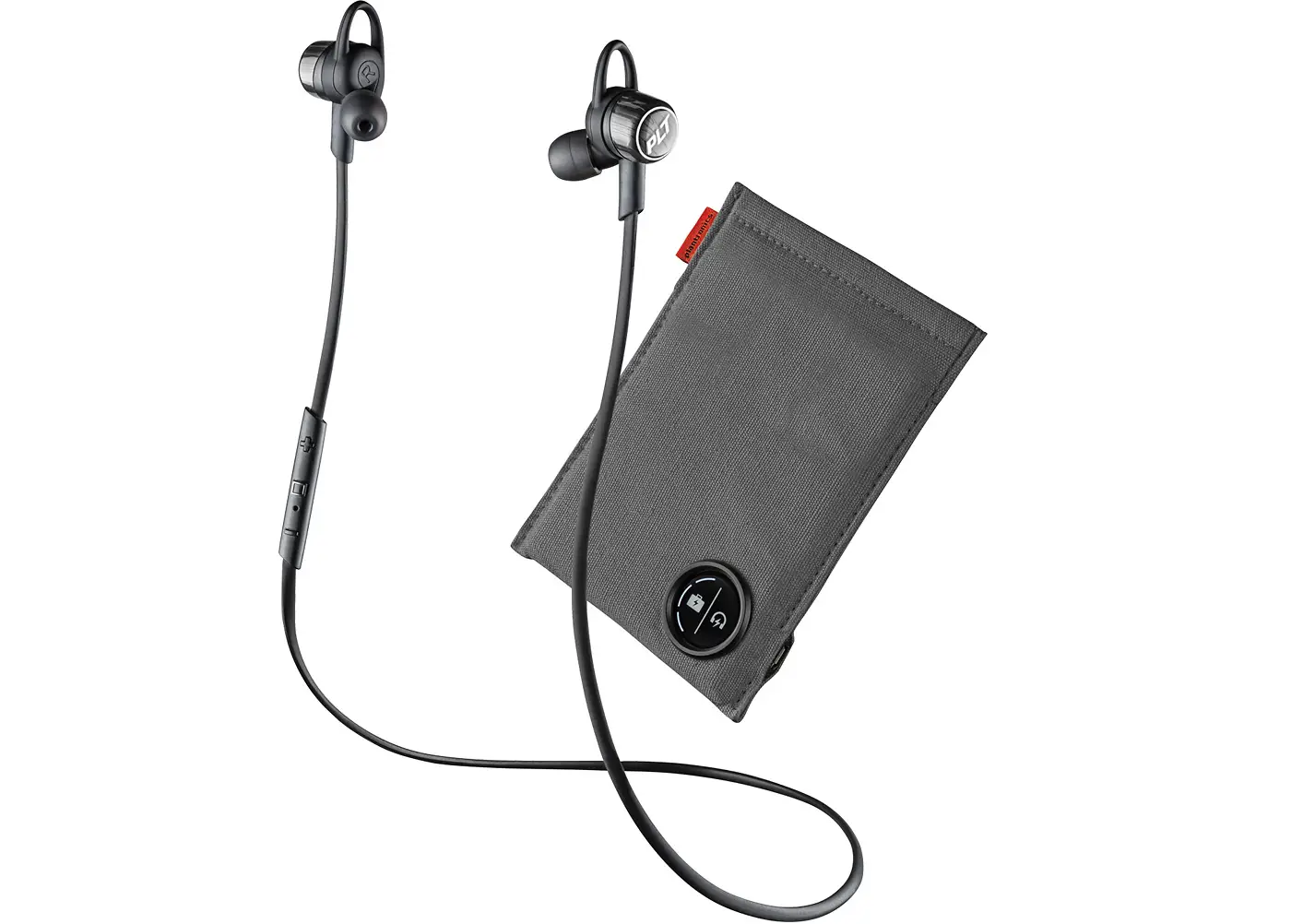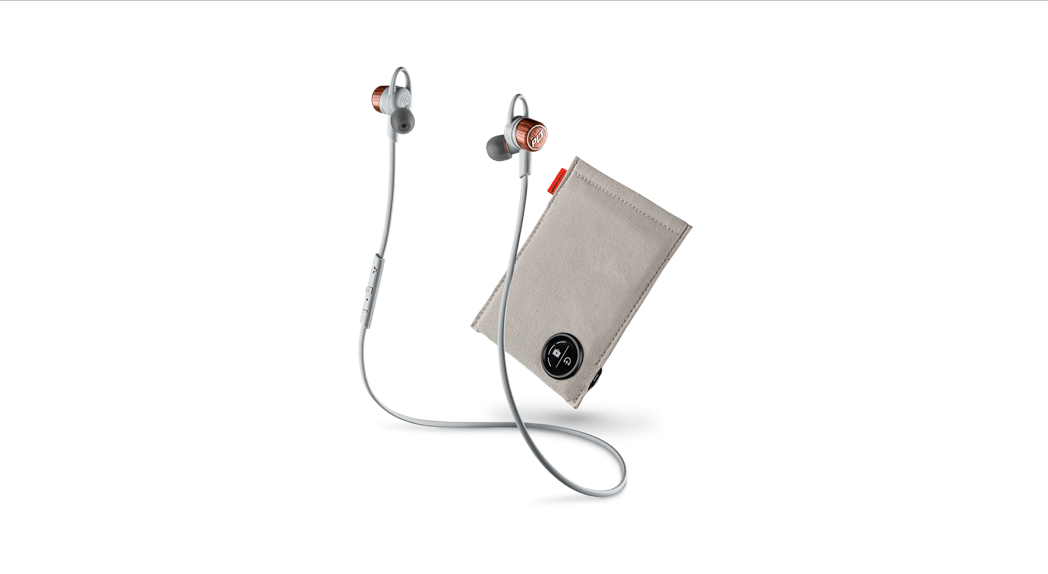

BackBeat FIT 3200 Series
User Guide
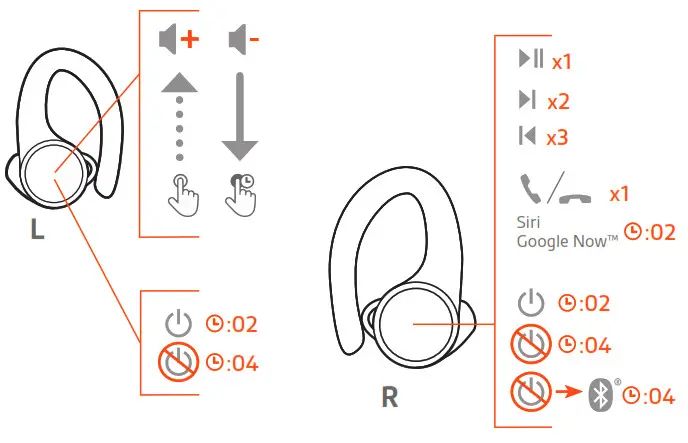
Controls overview
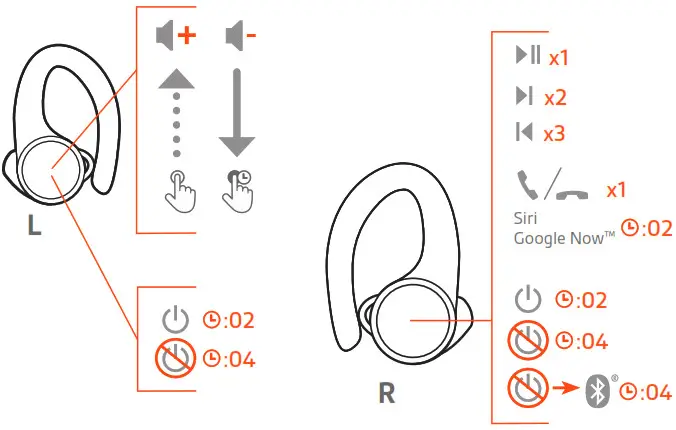
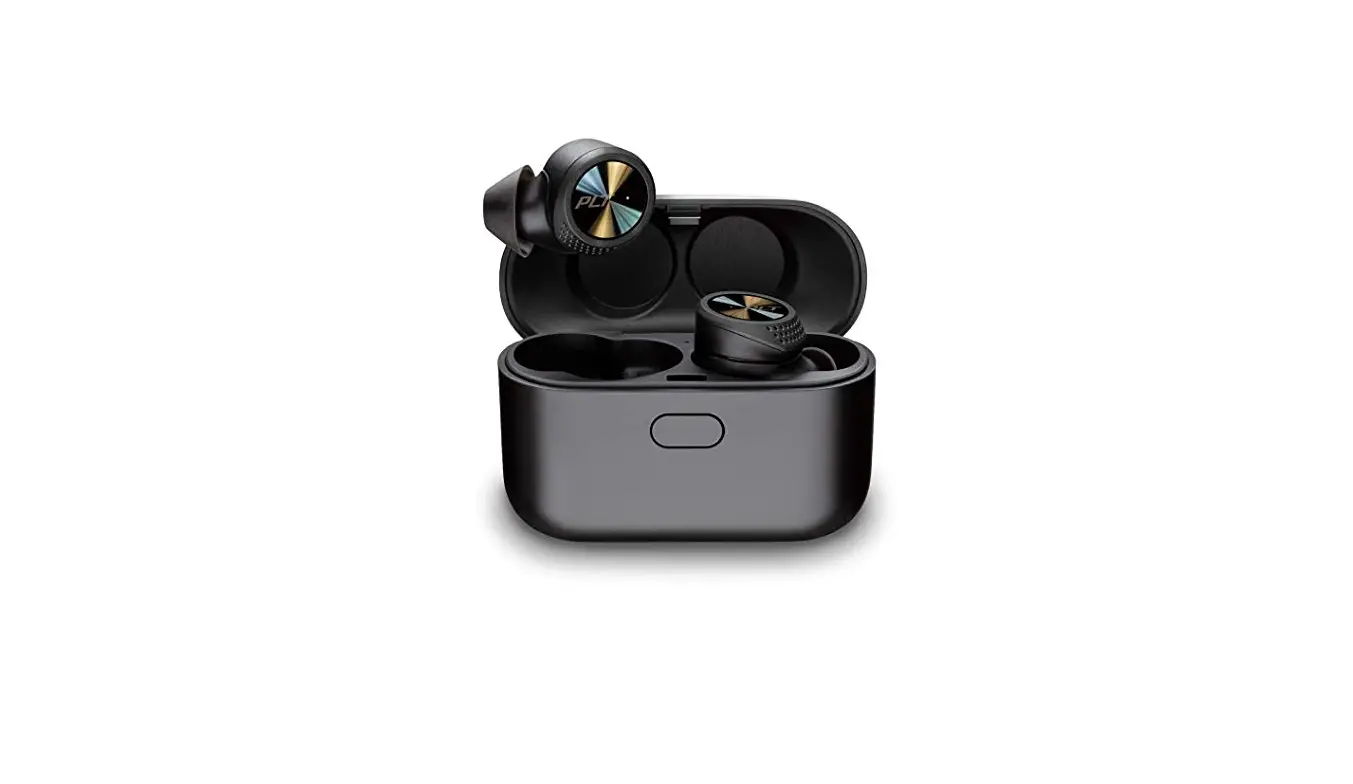
| Right | Primary earbud (pairs to phone) |
 | Play/pause * Click 1 time |
 | Next track * Click 2 times |
 | Previous track * Click 3 times |
 | Call answer/end Click 1 time |
| Siri/ Now | Click and hold 2 seconds |
 | Power on Click and hold 2 seconds |
 | Power off Click and hold 4 seconds |
 | Pair With the earbud powered off, click and hold 4 seconds |
| Reconnect to left earbud Tap each earbud 3 times | |
| Left | Secondary earbud (connects to right earbud) |
 | Volume up Tap to increase levels (touch sensor) |
 | Volume down Touch and hold |
| Power on Click and hold 2 seconds |
| Power off Click and hold 4 seconds |
| Reconnect to right earbud Tap each earbud 3 times |
NOTE *Functionality varies by application. May not function with web-based apps.
Power, pair and charge
Power on the case
Your charge case is shipped from the factory in a Deepsleep mode to conserve battery. Power on your charge case to power your earbuds for first use.
Click and hold the charge case button for two seconds to power it on.
The charge case LEDs light up.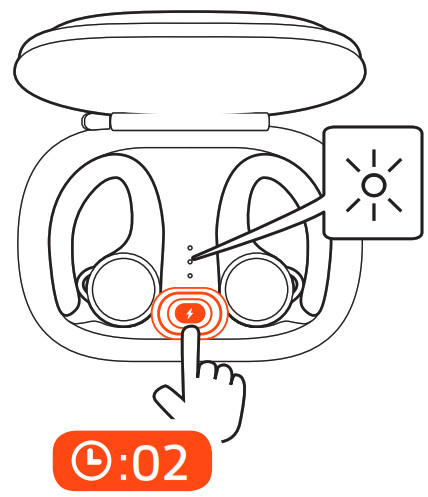
Pair first time
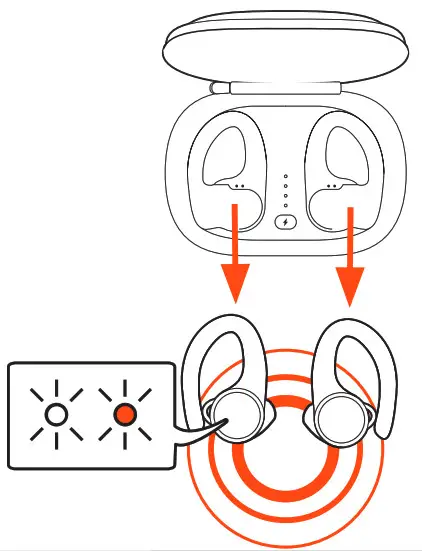
The first time you take your earbuds out of the charging case, the pairing process begins.
- Take the earbuds out of the case. The LED, located on the right earbud, flashes red and white to indicate pairing mode.

- Activate Bluetooth® on your phone and set it to search for new devices.
• iPhone Settings > Bluetooth > On*
• Android™ Settings > Bluetooth: On > Scan for devices*
NOTE * Menus may vary by device. - Select “PLT BBFIT31XX Series.”
Once successfully paired, you hear “pairing successful” and the earbud LED stops flashing.
Pair mode
With the headset powered off, click and hold the right earbud until you hear “pairing.”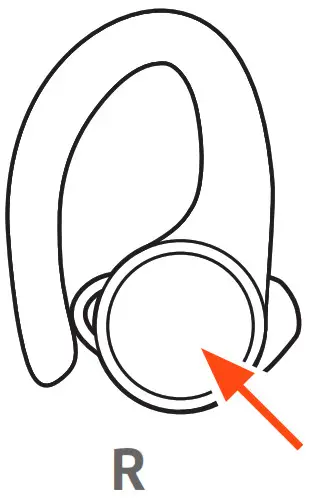 Charge
To charge your earbuds, place them in the charging case. Charge the case by plugging it into a computer or USB charging device. For the fastest charging, plug them into a wall charger.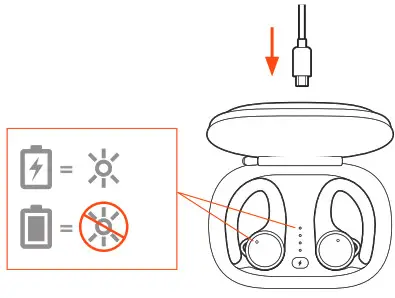 NOTE If the charging case has no charge, first charge the case separately, then charge the earbuds.
| LEDs on earbuds/case | |
| Earbuds charging | On |
| Case charging | Flashing |
| earbuds fully charged | Off |
| Case fully charged | Off |
Fit and audio quality
For the best audio, a good seal with your ear canal is essential. Try on the three different-sized ear tips to find which one fits you best. You may end up with a different size eartip in each ear for the best fit.
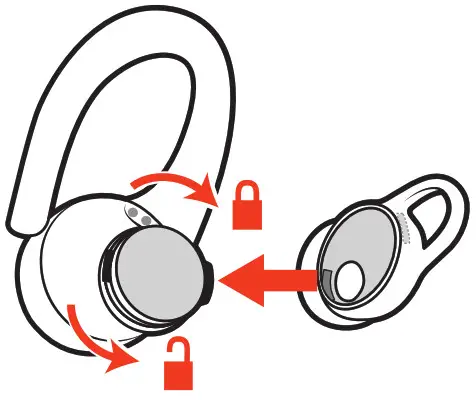
- Remove the eartip Push in the eartip and rotate it to the left to unlock.

- Replace the eartip Align the new eartip and rotate it to the right to lock.
- Try it out Put the earbuds in your ears and make sure the stabilizing loop is tucked securely in your ear for stability.
Listen to your favorite song while trying out each eartip and select the one that gives you the best fit and sound.
Install the app
Get the most from your earbuds by downloading our free app, BackBeat for iOS/Android.
With this app, you can:
- Stream a playlist, use a stopwatch, customize volume settings and more on your earbuds (My Tap)
- Change earbud language
- Turn settings on/off
- Switch earbud controls from the right earbud to the left earbud
- Find MyHeadset
- View the user guide


The Basics
Power on/off your You can automatically or manually power on/off your earbuds.
earbuds
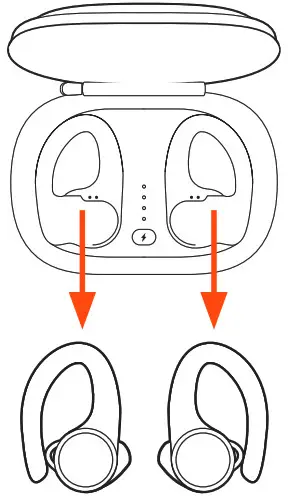
- Automatic Taking the earbuds out of the case automatically powers your earbuds on. Conversely, putting them back in the case automatically powers them off and starts charging them.
 Manual Click and hold the earbud button for 2 seconds to manually power it on. To manually power them off, click and hold for four seconds.
NOTE Turning off the right earbud, turns off the left earbud. To power on, power the earbuds on individually.
 Manual Click and hold the earbud button for 2 seconds to manually power it on. To manually power them off, click and hold for four seconds.
Power transfer
If your right earbud loses power, all functions and audio transfer to the left earbud.
Adjust the volume
The left earbud has a touch sensor button. Only a light touch is required.
- To increase volume, tap the left earbud.
- To decrease volume, touch and hold the left earbud.
Play or pause audio
Click the right earbud.
NOTE Functionality varies by application.
Track selection
Double-click the right earbud to skip to the next track or triple-click the right earbud to play the previous track.
NOTE Functionality varies by application. May not function with web-based apps.
Make/Take/End Calls
Answer or end a call
Click the right earbud.
Answer a second call
First, click the right earbud to end the current call, then click the right earbud again to answer the new call.
Use Siri, Google Now
Your earbuds support Virtual Personal Assistants (VPA) such as Siri and Google Now.
Click and hold the right earbud for two seconds to use your device’s VPA.
DeepSleep mode
If you leave your earbuds powered on but out of range of your paired device, they conserve power by entering DeepSleep mode after 120 minutes and power-off mode after 7 days.
To exit DeepSleep mode, choose:
- After 120 minutes, power on each earbud.
- After 7 days, reset by powering off and on.
Switch controls for better audio
For best Bluetooth performance, keep your phone/audio device on the same side of your body as the primary earbud.
Your right earbud is the primary earbud by default. It pairs with your phone/audio device and the left earbud automatically connects to the right.
If you prefer having your phone/audio device on the left side of your body, use the Switch Primary Earbud feature in the BackBeat app to make the left earbud the primary earbud. This moves the Bluetooth connection as well as primary controls to the left earbud and moves the volume and My Tap controls to the right earbud.
Support
NEED MORE HELP?
plantronics.com/support
Plantronics, Inc.
345 Encinal Street
Santa Cruz, CA 95060
United States
Plantronics B.V.
Scorpius 171
2132 LR Hoofddorp
Netherlands
©2019 Plantronics, Inc. BackBeat and Plantronics are trademarks of Plantronics, Inc. registered in the US and other countries, and Plantronics Hub is a trademark of Plantronics, Inc. Bluetooth is a registered trademark of Bluetooth SIG, Inc. and any use by Plantronics, Inc. is under license. All other trademarks are the property of their respective owners.
Patents pending.
215737-06 (08.19)