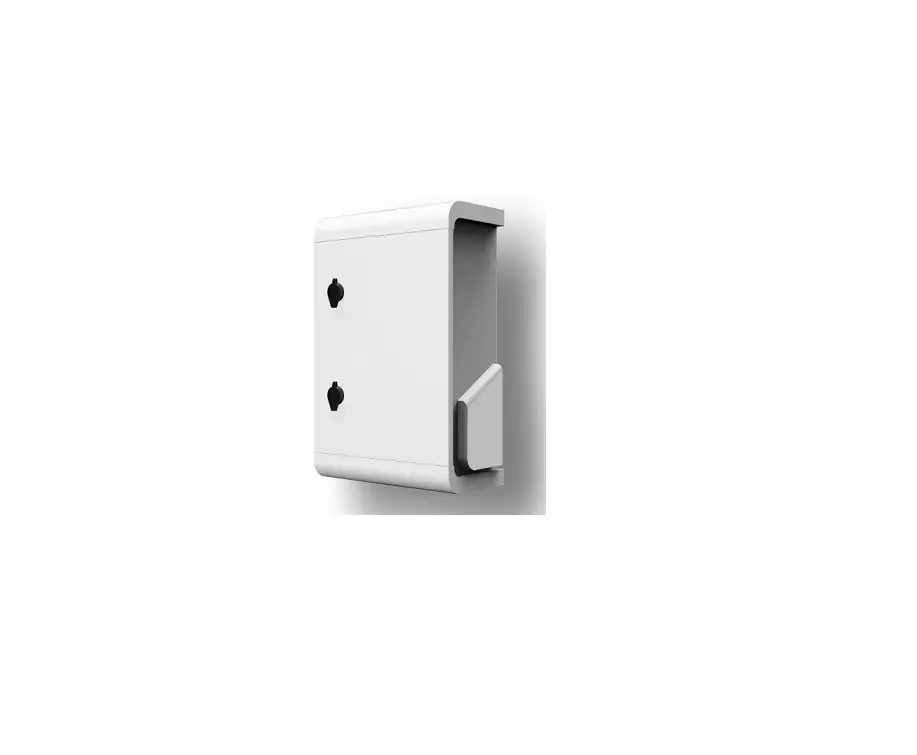
374-DMBOX EasyDALi Multi Purpose Box
Product Information: Elkay easyDALi Multi-Purpose Box
The Elkay easyDALi Multi-Purpose Box is a flexible solution that
allows installers to build a DALI system using their own cables
without the need for expensive connectors. It provides maximum
flexibility and true freedom in building a DALI system. The box has
12 entry points, with 6 connections for DALI lighting, and the
remaining 6 entry points can be used for other purposes. The box
allows the installer to either use it as a junction box or as a
through-box, and it is suitable for both emergency lighting and
non-DALI lighting applications. The Elkay easyDALi Multi-Purpose
Box is recommended for use with the Elkay easyDALi Power Supply
Unit.
Product Specifications:
- Model: 374-DMBOX
- Number of Entry Points: 12
- Number of Connections for DALI Lighting: 6
- Recommended Usage: Junction box or through-box
- Suitable for: Emergency lighting and non-DALI lighting
applications
Product Usage Instructions: Elkay easyDALi Multi-Purpose
Box
Before commencing installation, read all the instructions and
product advice sheets. All wiring should be carried out by a
competent person or qualified electrician and be fitted to current
IEE Edition wiring regulations.
Fitting Instructions:
- Decide whether to use the box as a junction box or
through-box. - If using as a through-box, connect the cables through the box
using the appropriate cable glands. - If using as a junction box, strip the cables and connect them
using the appropriate connectors. - The remaining 6 entry points have 6 connections which, if all
are used for DALI lighting only, will only utilise the 5 cores;
Permanent Live, Earth, Neutral and the DALI bus line pair. - The Switch Live is only used when there is a need to connect
some non-DALI lighting, thereby increasing the flexibility of the
multi-purpose box for the installer. - When using Emergency Lighting, it gives flexibility to wire the
permanent and switch lives as appropriate. - As with any DALI network, we recommend that all parts of the
system are accessible for maintenance.
Product Information: Elkay easyDALi Power Supply Unit
The Elkay easyDALi Power Supply Unit is an essential component
that powers the network of easyDALi PIR sensors and DALI luminaire
ballasts connected into the system. It provides low DC power used
to power the network and has in-built thermal and overload
protection. The power supply unit needs just a standard 5-core
cable to connect it to the Multi-Purpose Box with connections to
the Live, Neutral, Earth, and DALI BUS line terminals. It is
recommended that one power supply is needed for each separate
network.
Product Specifications:
- Model: 374-PSU
- Recommended Usage: To power the network of easyDALi PIR sensors
and DALI luminaire ballasts connected into the system - Number of Power Supplies needed: One for each separate
network
Product Usage Instructions: Elkay easyDALi Power Supply
Unit
Before commencing installation, read all the instructions and
product advice sheets. All wiring should be carried out by a
competent person or qualified electrician and be fitted to current
IEE Edition wiring regulations.
Fitting Instructions:
- Decide whether to use a new power supply for each network or
one power supply for a larger network with the DALI PIR sensors
dividing the lighting ballasts into groups. - Connect the Elkay easyDALi Power Supply Unit to the
Multi-Purpose Box using a standard 5-core cable with connections to
the Live, Neutral, Earth, and DALI BUS line terminals. - At least one entry point will be used to bring in mains AC
power, and the other for the Elkay easyDALi Power Supply Unit. The
power supply unit runs the network power for the Elkay easyDALi
PIRs and the lighting ballasts.
Examples of Wiring Connections using the Elkay easyDALi
Multi-Purpose Box:
- Two networks each shown with their power supply
- Each new power supply starts a new network
- Each box connects to easyDALi Power Supply Unit and routes bus
lines and lighting cabling - Allows full connectivity of the lighting system and the DALI
network
How to Connect the Elkay easyDALi Power Supply Unit to the
Multi-Purpose Box:

The Elkay easyDALi Power Supply Unit is connected to the
Multi-Purpose Box using a standard 5-core cable with connections to
the Live, Neutral, Earth, and DALI BUS line terminals.
Instruction Data | 374-DMBOX
Elkay easyDALi Multi-Purpose Box
Features DALI Multi-Purpose Box for maximum connection
flexibility Connects up multiple strings of DALI PIRS and lighting Maximum 10A rating per box 8 Multiple connections per box Connects power supply for Elkay easyDALi network Can control LED and fluorescent DALI luminaires
This Elkay easyDALi multi-purpose box gives installers maximum flexibility and true freedom in building a DALI system by allowing them to use their own cable without the need for expensive connectors.
Fitting and operation instructions 1. The multi-purpose box allows the installer to either use it
to connect DALI PIRS OR allows them to connect to 10A of lighting loads or both. 2. There are 8 connections per box but one must be used for POWER IN and another for the DALI POWER SUPPLY unit to power the PIRs. This leave 6 connections for either lighting, DALI bus lines or both via either 5 core or 6 core cable of the appropriately sized CSA for your installation. 3. At least one entry point will be used to bring in mains a.c. power and the other for the Elkay easyDALi Power Supply Unit. The unit runs the network power for the Elkay easyDALi PIRs and the lighting ballasts.
4. The remaining 6 entry points have 6 connections which if all are used for DALI lighting only will only utilise the 5 cores; Permanent Live, Earth, Neutral and the DALI bus line pair.
5. The Switch Live is only used when there is a need to connect some non-DALI lighting thereby increasing the flexibility of the multi-purpose box for the installer.
6. When using Emergency Lighting it gives flexibility to wire the permanent and switch lives as appropriate.
7. As with any DALI network we recommend that all parts of system are accessible for maintenance.
Instruction Data | 374-PSU
Elkay easyDALi Power Supply Unit
Features For use with Elkay easyDALi system Powers DALI network of PIRS and lighting ballasts Thermal and overload protection Connected to multi-purpose connection box
(374-DMBOX)
Fitting and operation instructions This is essential to power the network of easyDALi PIR sensors and DALI luminaire ballasts connected into the system.
1. One power supply is needed for each separate network. You can either utilise a new power supply for each network or ONE power supply for a larger network with the DALI PIR sensors dividing the lighting ballasts into groups.
2. The Elkay easyDALi power supply provides the low d.c. power used to power the network. The power supply has in-built thermal and overload protection.
3. The power supply unit needs just a standard 5 core cable to connect it to the Multi-Purpose Box with connections to the Live, Neutral, Earth and Dali BUS line terminals
4. At least one entry point will be used to bring in mains a.c. power and the other for the Elkay easyDALi Power Supply Unit. The power supply unit runs the network power for the Elkay easyDALi PIRs and the lighting ballasts.
Examples of wiring connections using the Elkay easyDALi multi-purpose box
1. Two networks each shown with their own power supply. 2. Each new power supply starts a new network. 3. Each box connects to easyDALi Power Supply Unit and routes bus lines and lighting cabling. 4. Allows full connectivity of the lighting system and the DALI network.
How to connect in the Elkay easyDALi Power Supply Unit to the Multi-Purpose box
D
DALI BUS LINE
D
DALI BUS LINE
PL
Permanent Live for DALI
SL
Switch Live for NON DALI Applications
E
Earth or Ground connection
N
Neutral Connection
D D E N BLANK L
DALI BUS LINE DALI BUS LINE Earth or Ground connection Neutral Connection No terminal Permanent Live for DALI
IMPORTANT NOTICE We recommend that you READ all the instructions before commencing installation. Once you have read the instructions and product advice sheets then you will be prepared for every DALI installation in the future. All wiring should be carried out by a competent person or qualified electrician and be fitted to current IEE Edition wiring regulations.
Elkay easyDALi Network Solution Overview
The Elkay easyDALi system has been designed to make installation and set-up of a DALI system quicker and easier for installers. With the increasing energy saving requirements to cut emissions and energy bills from consumers and businesses alike, Elkay’s easyDALi system is here to meet these demands. Elkay have achieved this by making the first range of sensors that can automatically configure DALI lighting ballasts, as well as the more commonly used broadcast mode. The system provides presence and absence detection and deliver daylight harvesting to ensure maximum energy efficiency. The Elkay easyDALi PIR is a presence, absence and daylight harvesting sensor all rolled into one. In a brand new `out of the box’ installation of new DALI luminaires and with a new Elkay easyDALI PIR, you can simply wire the lighting, the power supply and the PIR together with the multi-purpose box and simply accept the default settings of….. Broadcast mode Timing Daylight Harvesting …and the PIR with just a few pushes of the remote control will find and address all luminaires control gear on the network and the installation is complete. With just a few more button selections on the PIR and the remote controller, the product can easily set up groups and scenes as well as corridor modes, additional timing modes and the PIR will also automatically daylight harvest to maximise energy savings. Unlike some manufacturers systems Elkay’s easyDALi PIR sensors can be wired to control their own set of luminaires using in built DALI group functions to give control by group and not just by broadcast alone.
The complete Elkay easyDALi PIR is provided with just four elements.
Image
Elkay easyDALi PIR
Elkay easyDALi Dual Purpose Remote Control
Elkay easyDALi Power Supply
Elkay easyDALi multipurpose box
Part No.
374-CMPIRDALI
374-DREM
374-PSU
374-DMBOX
GID Codes
7TCA299030R0032
7TCA299030R0034
7TCA299030R0035
7TCA299030R0033
Features
RPM-488
Brook House, Dunmurry Industrial Estate, City Business Park, Dunmurry, Belfast BT17 9HU, GB T: +44 (0)28 9061 6505 F: +44 (0)28 9061 6518 E: [email protected]
– Presence and Absence VDetection – Automatic Daylight VHarvesting – Default Timing Modes – Broadcast and Group VFunctions – Room & Corridor Mode – Manual Lux Level and VSensitivity Control – Coloured Feedback LEDs – Walk Test
– Dual Purpose control Voptions for End user and VInstallers – Sets all non-default Vfunctions – Sets Timing Room Modes Vand Corridor Modes – Sets Min Arc Levels – 25%, 50% and 100% Vbrightness pre sets – Override Functions – Remote Lux Control – Remote Feedback LEDs – 3 x AAA Batteries VSupplied
– 18V d.c. 250mA – Connects to MultiVPurpose Box – Essential to supply power Vto DALI network
– 10A Max for Lighting Vloads – Connects Lighting (ALL VTYPES) and DALI network – Connects Power Supply
All wiring should be carried out by a competent person or a qualified electrician and should be fitted to IEE Wiring regulations BS7671. The circuit should be isolated before carrying out any work. Failure to adhere to the instructions will invalidate the warranty.
The Company`s policy is one of continuous improvement and reserves the right to change specifications at any time without prior notice.
elkay.co.uk
Elkay (Europe), Milicka 51c, 55-100 Trzebnica, Poland
 Energy Saving Switches and Controls, Light Switch UK | Elkay