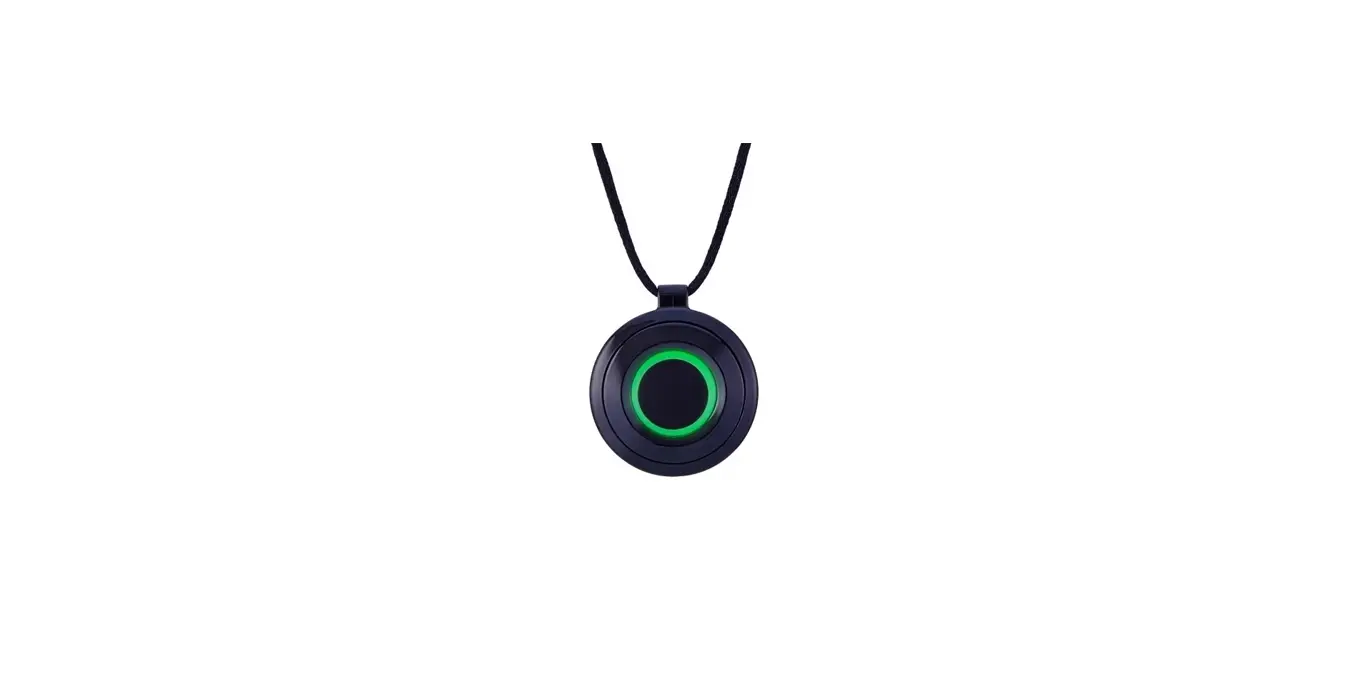
Halo Capsule
Product Information: Illuminated Marker Poles
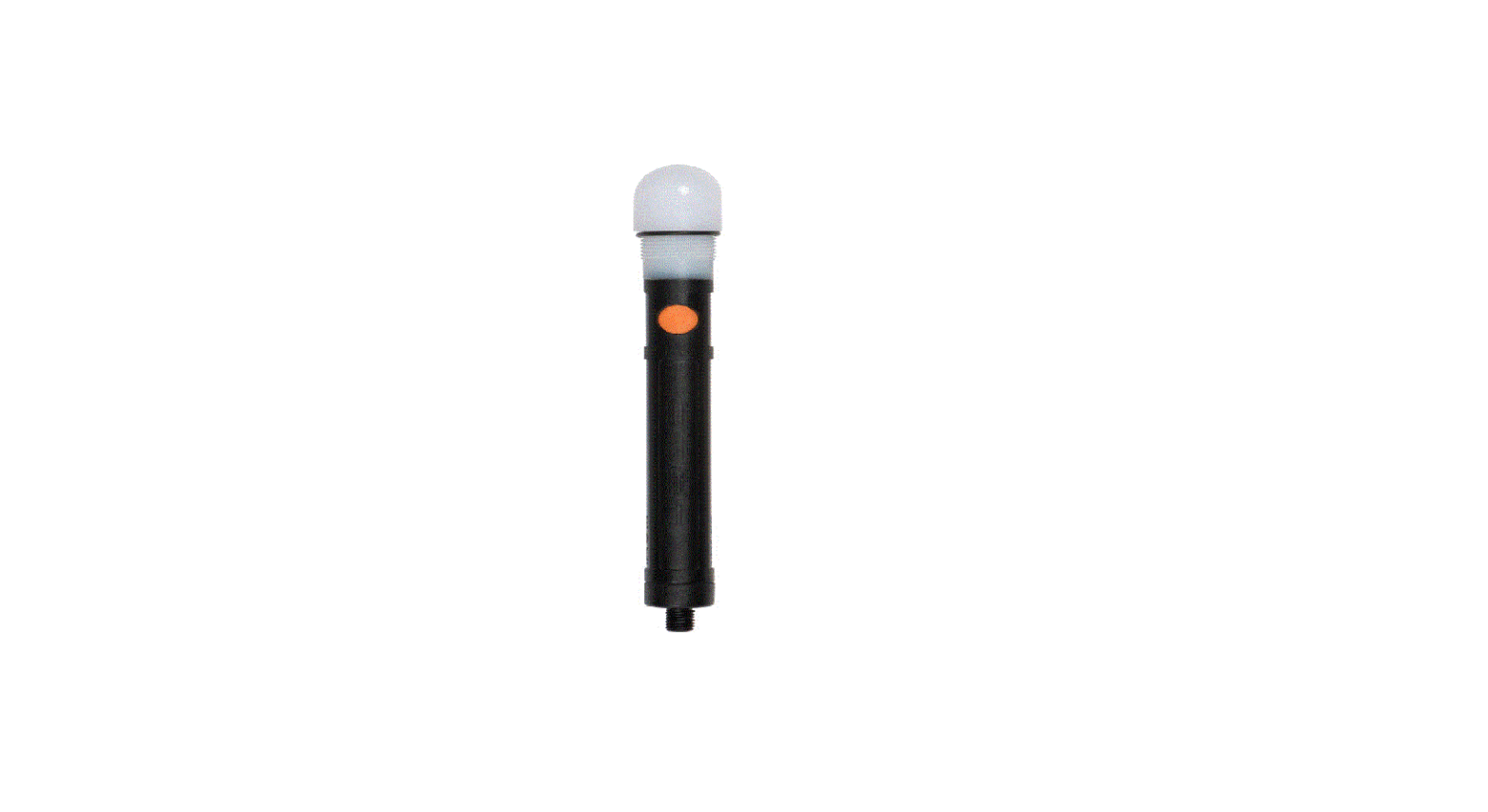
Features
- Multi Coloured LED
- Sealing O-Ring
- Operation Button: LED Colour Registration
The Halo Capsule is a low power radio system that is designed to
be used with a remote or without a remote. It has an operating
range that depends on terrain, atmospheric conditions, and the
presence of any interfering signals. The Capsule is waterproof and
has an IPX7 rating.
Operation
The Capsule has an operation button that controls the LED colour
registration. The LED colours can be set for 2 seconds, 4 seconds
or 6 seconds. The Capsule has a working life of approximately 552
hours/23 days when new batteries are used. The low battery warning
will activate when the batteries are approaching depletion and will
give you approximately 20 minutes of warning before the Capsule
stops working. Always replace the batteries immediately after the
low battery warning has been activated.
Battery Requirements
The Halo Capsule requires 2 x LR6 AA 1.5V alkaline batteries for
optimal performance. Always use good quality batteries and ensure
that they are removed from the Capsule during long periods without
use. Never place batteries in a hot environment (e.g. on a
radiator).
Fitting and Replacing Batteries
- Unscrew the battery cap by hand.
- Take care removing the batteries as they will freely slide out
of the Capsule. - Insert new batteries and ensure correct polarity.
- Screw the battery cap back onto the Capsule, compressing the
O-Ring seal.
Drying Out After Use in Heavy Rain
If the Capsule has been exposed to prolonged heavy rain or
frequent submersion, it is important to allow the unit to dry out
properly by bringing it indoors and allowing it to dry fully after
use.
Warnings
- FOX, I-Com, and Halo are Registered Trade Marks.
- We reserve the right to alter or modify the contents of this
manual.
Please refer to the full text of the UK declaration of
conformity available at the following internet address:
www.foxint.com/home/support/declarations-of-conformity/. Registered
Designs and Patents Pending.
ENGLISH
ILLUMINATED MARKER POLES
Features
· Weatherproof Sealed Unit · Easy Registration
Multi Coloured LED Sealing O-Ring
Operation Button: LED Colour Registration
www.foxint.com
CAPSULE INSTRUCTION MANUAL
· Very Low Battery Drain · I-Com® Technology
· Digital Circuitry · Multi Coloured LED
Illuminating Top Cap Thread for Sealed Attachment
Sealing O-Ring
Battery Cap 3/8″ BSF Thread
Operation
2 Sec 4 Sec 6 Sec
This is intentional so the Capsule can be usable with or without the use of a Remote.
· LED Colour Selection: · The LED will quickly cycle through all colour options, then stay on
· The Capsule returns to the ON state (LED illuminating in the selected colour). Please Note: If there is no button press for over 40 seconds whilst in the `Colour Selection Mode’, the Capsule will automatically exit the `Colour Selection Mode’, programming the colour visible at that time. Registration with Remote: ·
· The preferred button on the remote is pressed, registering the Capsule to that button on the Remote.
Fitting the Batteries
replacing batteries.
3. Take care removing the batteries. They will freely slide out of the Capsule.
5. Screw the battery cap back onto the Capsule.
2. Unscrew the battery cap by hand.
4. Insert new batteries and ensure correct polarity.
tightening onto the Capsule, compressing the O-Ring seal.
Working Life of your Halo Capsule
You can expect your Halo Capsule to have the following approximate “Working Life” duration
when new batteries are used:
· Standby Life
= 552 hours/23 days
· Operational Life (Capsule is ON, and the LED is on) = 130 hours – red, green & blue LED colours
= 75 hours – amber, purple & white LED colours
Low Battery Warning
As the batteries approach a depleted state and replacement is required, the Capsule will
Once the `Low Battery Warning’ has begun, your Capsule will continue to work for approximately 20 minutes. Once the `Low Battery Warning’ has been activated, batteries should be replaced immediately.
Obtaining Best Performance from your Halo Capsule
The operating range of the Halo Marker Pole System, like all low power radio systems, is
of both transmitter and receiver, the terrain over which it is being used, the prevailing atmospheric conditions and the presence of any interfering signals.
To obtain best performance, it is recommended that you · Operate the Remote as high above ground as possible If worn on the body, it should be worn as high as possible and on the outside of your clothing. · Try to keep a direct “line-of-sight” between the receiver and transmitter when in use obstruction such as trees etc. may cause loss/reduction of signal. · Do not keep the Remote in the same pocket as a mobile phone, or other electronic devices. · Ensure both the Capsule and the Remote have good batteries.
All the above hints become progressively less important, as the working range is reduced.
Drying Out After Use in Heavy Rain
Your Halo Capsule has been designed to be waterproof. However, if exposed to prolonged heavy rain or frequent submersion, it is important to allow the unit to dry out properly by bringing the unit indoors and allowing to dry fully after use.
NEVER place batteries in a hot environment (e.g. on a radiator).
Battery Requirements
Your Halo Capsule requires 2 x LR6 AA 1.5V alkaline batteries. The use of good quality batteries is essential for maximum battery life.
To reduce the risk of battery leakage: · DO NOT mix old and new batteries · DO NOT · The use of rechargeable batteries is NOT recommended
Please ensure the batteries are removed from the Capsule during long periods without use.
Warnings
· Avoid using powerful radio transmitting equipment in close proximity to the
· Store this equipment out of reach of children and infants. · Avoid dropping or subjecting the Capsule to severe impacts.
Product Information
FOX, I-Com, and Halo are Registered Trade Marks. We reserve the right to alter or modify the contents of this manual.
Hereby, Fox International Group Ltd, declares this Halo Capsule is in compliance with the essential requirements and other relevant provisions of the UK Radio Equipment Regulations 2017. The full text of the UK declaration of conformity is available at the following internet address: www.foxint.com/home/support/declarations-of-conformity/
Registered Designs and Patents Pending.
Operating frequency = 434MHz IP Rating: IPX7
CESKY
ILLUMINATED MARKER POLES
www.foxint.com
INSTRUKTÁZNÍ MANUÁL KE SVTLU BÓJKY
Vlastnosti:
· Vododolné · Snadné párování s dálkovým ovládacem
· Velmi nízké vybíjení baterie · Technologie I-Com
· Digitální obvody · Vícebarevné LED diody
Vícebarevné LED diody Tsnící ,,O” krouzek
Ovládací tlacítko: Zapnuto / Vypnuto LED barva Párování
Svítící horní krytka Závit pro tsné pipevnní
Tsnící ,,O” krouzek
Kryt baterie 3/8″ BSF závit
Funkce
2 Sec 4 Sec 6 Sec
Vypnutí/Zapnutí svtla: · Po podrzení tlacítka Vypnutí / Zapnutí po dobu 2 sekund se zaízení Vypne/ Zapne – LED dioda se rozsvítí, po zapnutí.
(V první barv v poadí, pokud nebyla pedtím vybrána jiná barva). Upozornní: LED dioda se vzdy rozsvítí a zstane svítit, kdyz zapnete zaízení (,,do provozního rezimu”). Chcete-li LED vypnout, je teba provést bu dálkovým ovládáním (,,v pohotovostním rezimu”) nebo jedním stisknutím tlacítka Zapnutí/Vypnutí (,,pohotovostní rezim”) nebo optovným vypnutím svtla tlacítkem OFF. To je zámrné, aby zaízení mohlo být ízené dálkovým ovládáním nebo i bez nj.
LED Vypnout/Zapnout: · Jakmile je zaízení zapnuté, jednoduchým stisknutím tlacítka Zapnut/Vypnout LED zapnete/vypnete.
(V první barv v poadí, pokud nebyla pedtím vybrána jiná barva).
Volba barvy LED diody: · Jakmile je svtlo zapnuto, dlouhým stisknutím tlacítka Zapnutí/Vypnutí po dobu 4 vtein uvedete zaízení do ,,rezimu výbru barev”.
(LED se po dvou sekundách vypne a znovu zapne po ctyech sekundách). · LED dioda rychle prochází vsemi barvami a pak zstane zapnutá (vzdy na první barv v sekvenci). · Jednotlivé barvy (6) se potom cyklicky pepínají jedním stisknutím tlacítka Zapnout/Vypnout. Jedno stisknutí Vás pesune na dalsí barvu.
Po výbru LED dioda zaízení rychle zhasne a znovu zapne, coz indikuje, ze barva byla zvolena a naprogramována. · Zaízení se vrátí do zapnutého ON stavu (LED svítí ve zvolené barv). Upozornní: Pokud v rezimu ,,Výbr barvy” nezmácknete zádné tlacítko více nez 40 sekund, zaízení automaticky opustí tento rezim a naprogramuje barvu viditelnou v té dob.
Registrace s dálkovým ovládáním: · Jakmile je zaízení zapnuté, podrzením tlacítka Zapnutí / Vypnutí po dobu 6 vtein uvedete zaízení do ,,registracního rezimu”.
(LED se po dvou vteinách vypne a znovu zapne po ctyech sekundách). · Vsechny barevné LED diody se postupn rozsvítí a poté zstane svítit zvolená barva, coz znamená, ze je v registracním rezimu (pokud nebyla díve vybrána jiná
barva, bude v sekvenci vzdy blikat první barva). · Stisknte tlacítko preferované na dálkovém ovladaci a zaregistrujete zaízení na toto tlacítko na dálkovém ovladaci. · LED dioda na svtle pestane blikat, zstane zapnutá a svítí (ve vybrané barv nebo v první barv v sekvenci, pokud nebyla vybrána barva).
Výmna baterií
1. Ped montází nebo výmnou baterií musí být pístroj vypnutý.
3. Opatrn vyjmte baterie. Pjdou voln vysunout ze svtla.
5. Pisroubujte kryt baterií.
2. Rucn odsroubujte kryt baterie.
4. Vlozte nové baterie a zajistte správnou polaritu.
6. Pro zajistní nejlepsí odolnosti proti povtrnostním vlivm zajistte, aby víko akumulátoru bylo dobe utsnno pevným utazením na kapsli a tlacilo dokonale na ,,O” krouzek.
Pracovní zivotnost Halo svtla
Pi pouzití nových baterií mzete ocekávat, ze Vase Halo svtlo bude mít piblizn následující zivotnost: · Pohotovostní zivotnost (svtlo je zapnuto a LED zhasnuto) = 552 hodin/23 dní · Provozní zivotnost (svtlo je zapnuto a LED svítí) = 130 hodin – cervené, zelené, a modré barvy LED diod
va LED diod
Upozornní na slabou baterii
Jakmile se baterie piblízí vybitému stavu a je zapotebí výmna, zaízení bude ,,dvakrát problikne” v cervené barv kazdých 60 sekund. Jakmile zacne upozornní na nízký stav baterie, vase zaízení bude pracovat piblizn dalsích 20 minut. Jakmile Vás svtlo upozorní na nízký stav baterií, baterie by mly být okamzit vymnny.
Získejte nejlepsí výkon z vaseho Halo svtla
Provozní rozsah Halo systému tycových bojek, stejn jako vsech rádiových systém s nízkým výkonem, je vysoce závislý na podmínkách pouzití a mze být nepízniv ovlivnn polohou jak vysílace, tak i pijímace, terénem, na kterém jsou pouzívány, pevazujícími atmosférickými podmínkami a pítomností rusivých signál.
Pro dosazení nejlepsího výkonu doporucujeme, abyste · Pouzívali dálkový ovladac co nejvýse nad zemí Pokud jej máte upevnn na tle, ml by
se nosit co nejvýse a na vnjsí stran odvu. · Pi pouzití se snazte zachovat pímou viditelnost mezi pijímacem a vysílacem pekázky
jako napíklad stromy, mohou zpsobit ztrátu/snízení signálu. · Nenechávejte dálkový ovladac ve stejné kapse jako mobilní telefon nebo jiné elektronické
pístroje. · Ujistte se, ze svtlo i dálkový ovladac mají dobré baterie .
Vsechny výse uvedené rady se postupn stávají mén dlezitými, kdyz jsou výrobky pouzívány na malou vzdálenost.
Vysousení po pouzití v silném desti
Halo svtlo bylo navrzeno jako vodotsné. Nicmén po pouzití v silném desti je vsak dlezité nechat zaízení ádn vysusit a to tak, ze zaízení pineseme do místnosti a po pouzití je zcela necháme vyschnout pirozenou cestou.
NIKDY nepokládejte baterie do horkého prostedí (nap. na radiátor).
Pozadavky na baterie
Halo svtlo vyzaduje 2 alkalické baterie LR6 AA 1.5V. Pouzívání kvalitních baterií je nezbytné pro maximální zivotnost baterie. Chcete-li snízit riziko vytecení baterií:
· NEMIXUJTE staré a nové baterie · NEPOUZÍVEJTE MIX rzných typ baterií · Pouzívání nabíjecích baterií se NEDOPORUCUJE Pi nepouzívání zaízení po delsí casový úsek, prosím vyjmte baterie. Pedejdete tím poskození zaízení.
Upozornní
· Vyhýbejte se pouzívaní výkonných vysílac v blízkosti dálkového ovladace, protoze to mze mít vliv na jeho výkon.
· Uchovávejte toto zaízení mimo dosah dtí a kojenc. · Vyhnte se pádu nebo vystavení dálkového ovladace silným nárazm.
Informace o Produktu
Fox, I-Com a Halo jsou registrované ochranné známky. Vyhrazujeme si právo mnit nebo upravovat obsah této pírucky.
Spolecnost Fox International Group tímto prohlasuje, ze tento produkt je v souladu se základními pozadavky a dalsími píslusnými ustanoveními smrnice 2014/53/EU. Dokumenty R&TTE mzete nalézt zde: www.foxint.com/cz/podpora/support/zákonné-dokumenty/
Registrovaný design a patenty.
Provozní frekvence 434MHz Hodnocení IP: IPX7
NEDERLANDS
ILLUMINATED MARKER POLES
Kenmerken · Waterdicht gesealde unit
· Easy Registration
Meerkleurige LED Sealende O-Ring
Schakelaar: Aan/Uit LED Kleur Registratie
www.foxint.com
CAPSULE HANDLEIDING
· Zeer Laag Batterijverbruik · I-Com® Technologie
· Digitale Circuits · Meerkleurige LED
Oplichtende Bovenzijde Schroefdraad voor Gesealde Bevestiging
Sealende O-Ring
Batterij Kapje 3/8″ BSF Schroefdraad
Bediening
2 Sec 4 Sec 6 Sec
Capsule Aan/Uit: · Het gedurende 2 seconden indrukken van de aan/uit knop zal de Capsule In/Uitschakelen de LED zal bij het eerste inschakelen oplichten.
(In de eerste kleur van de kleurenserie indien nog niet eerder een andere kleur is gekozen). Let Op: De LED zal altijd oplichten en aanblijven wanneer eerst de Capsule AAN wordt gezet (“operational mode”). Als je de LED wilt uitschakelen, moet dit middels de Afstandsbediening worden gedaan (“standby mode”) of met een enkele druk op de aan/uit knop (“standby mode”), of door de capsule weer UIT te schakelen. Dit is bewust gedaan zodat de Capsule zowel met als zonder de Afstandsbediening kan worden gebruikt.
LED Aan/Uit: · Wanneer de Capsule AAN staat, zal een enkele druk op de aan/uit knop de LED in- of uitschakelen.
(In de eerste kleur van de kleurenserie indien nog niet eerder een andere kleur is gekozen).
LED Kleur Selectie: · Staat de Capsule AAN, zal het gedurende 4 seconden indrukken van de aan/uit knop de Capsule in “kleur selectie mode” brengen.
(De LED zal uitgaan na 2 seconden en weer aangaan na 4 seconden). · De LED zal snel alle kleuropties tonen, en daarna aanblijven (en hierbij altijd beginnen bij de eerste kleur in de reeks). · De 6 kleur opties kun je afgaan door steeds op de aan/uit knop te drukken Met elke keer drukken ga je naar de volgende kleur. · Heb je eenmaal de gewenste kleur gekozen, bevestig deze dan door de aan/uitknop weer 2 seconden ingedrukt te houden.
Na selectie zal de Capsule LED snel aan en uitgaan, hierbij aangevend dat de kleur is geselecteerd en geprogrammeerd. · De Capsule gaat weer naar de AAN stand (De LED knippert in de gekozen kleur). Let op: Indien er in “kleur selectie mode” gedurende 40 seconden niet op de knop wordt gedrukt, zal de Capsule automatisch deze mode verlaten en de op dat moment zichtbare kleur programmeren.
Registratie met de Afstandsbediening: · Staat de Capsule AAN, zal het gedurende 6 seconden indrukken van de aan/uit knop de Capsule in “registratie mode” brengen.
(De LED zal uitgaan na 2 seconden en weer aangaan na 4 seconden). · De LED zal snel alle kleuropties tonen, en daarna in de gekozen LED kleur knipperen, aangevend dat hij in de “registratie mode” staat (is geen kleur gekozen dan zal
hij altijd beginnen bij de eerste kleur in de reeks). · De gewenste knop op de afstandsbediening wordt ingedrukt zodat de Capsule onder die knop wordt opgeslagen. · De LED op de Capsule stopt met knipperen en blijft branden (in de gekozen kleur, of de eerste kleur als geen kleur gekozen is).
Plaatsen van de Batterijen
1. Schakel de unit uit voor het plaatsen of vervangen van de batterijen.
3. Verwijder de batterijen voorzichtig. Ze zullen vlot uit de Capsule moeten glijden.
5. Schroef het batterijklepje weer vast op de Capsule.
2. Schroef het batterijklepje met de hand los.
4. Plaats de nieuwe batterijen, let op het juist plaatsen van de polen.
6. Voor optimale bescherming tegen water, zorg dat het batterijklepje goed dicht zit door deze stevig tegen de Capsule te duwen, waardoor de O-Ring verzegeling goed wordt vastgedrukt.
Levensduur van je Halo Capsule
Je kunt bij benadering de volgende “levensduren” verwachten van je Halo Capsule bij gebruik
van nieuwe batterijen:
· Standby Levensduur (Capsule is AAN, LED is uit)
= 552 uur/23 dagen
· Operationele Levensduur (Capsule is AAN, LED is aan) = 130 uur – rood, groen & blauwe LED kleuren
= 75 uur – amber, paars & witte LED kleuren
Lage Batterij Waarschuwing
Als de batterij leeg dreigt te raken en vervangen moet gaan worden, zal de Capsule iedere 60
Is de `Lage Batterij Waarschuwing’ eenmaal gestart, dan zal je Capsule nog ongeveer 20 minuten werken. Is de `Lage Batterij Waarschuwing’ eenmaal gestart, dan moeten batterijen zo spoedig mogelijk worden vervangen.
Haal de Beste Prestaties uit je Halo Capsule
Het bereik van het Halo Marker Pole Systeem is, net als alle laagvermogen zendsystemen, erg afhankelijk van de omstandigheden waarin het wordt gebruikt. De positie van zowel zender als ontvanger, het terrein waarop het wordt gebruikt, de atmosferische condities en aanwezigheid van storende signalen kunnen de prestaties sterk beïnvloeden.
Om de beste prestaties te behalen is het aan te bevelen dat je · De afstandsbediening zo hoog mogelijk boven de grond bedient Indien gedragen op
de kleding bij voorkeur zo hoog mogelijk en aan de buitenzijde van de kleding. · Probeer te zorgen dat de zender en ontvanger elkaar altijd kunnen `zien’ obstakels zoals
bomen e.d. kunnen voor vermindering of verlies van signaal zorgen. · Houd de afstandsbediening niet samen met een mobiele telefoon of andere elektrische
apparaten in één zak. · Zorg dat zowel de Capsule als de afstandsbediening over goede batterijen beschikken.
Alle bovenstaande adviezen worden minder relevant naarmate de afstand tussen zender en ontvanger wordt verkleind.
Drogen Na Gebruik in Hevige Regen
Je Halo Capsule is ontworpen om waterdicht te zijn. Echter wanneer deze lang in de regen staat of meermaals onder water raakt, is het van belang de unit goed te laten drogen. Dat kan door deze een tijdje binnenshuis te halen.
Plaats batterijen NOOIT in een hete omgeving, zoals op een radiator.
Batterij Eisen
Je Halo Capsule heeft 2 x LR6 AA 1,5V alkaline batterijen nodig. Het gebruik van kwalitatieve batterijen is belangrijk voor maximale levensduur. Om het risico op lekken van batterijen te voorkomen:
· Gebruik GEEN oude en nieuwe batterijen tegelijk · Gebruik GEEN verschillende typen batterijen tegelijk · Het gebruik van oplaadbare batterijen wordt NIET aangeraden Zorg dat de batterijen worden verwijderd als de Capsule gedurende lange periode niet wordt gebruikt.
Waarschuwingen
· Voorkom het gebruik van krachtige radio apparatuur in de buurt van de unit, omdat dit de prestaties kan beïnvloeden.
· Berg deze apparatuur op buiten bereik van kinderen. · Voorkom het laten vallen van de Capsule of andere vormen van hard stoten.
Productinformatie
FOX, I-COM en Halo zijn Geregistreerde Handelsmerken We behouden ons het recht voor om de inhoud van deze handleiding te wijzigen.
Hierbij verklaart Fox International Group Ltd dat de Halo Capsule voldoet aan de essentiële eisen en andere relevante voorzieningen van Directive 2014/53/EU. De R&TTE documenten kunnen worden geraadpleegd op: www.foxint.com/nl/ondersteuning/keurmerken/
Geregistreerde Ontwerpen en Patenten Aangevraagd.
Werk frequentie = 434MHz IP waarde: IPX7
FRANÇAIS
ILLUMINATED MARKER POLES
www.foxint.com
MODE D’EMPLOI DE LA CAPSULE
Caractéristiques · Boitier scellé résistant aux intempéries
· Initialisation aisée
· Très faible consommation d’énergie · Technologie I-Com®
· Circuits digitaux · DEL multicolore
DEL multicolore Joint d’étanchéité
Bouton de commandes: Marche/Arrêt Couleur de diode Initialisation
Capot illuminé
Joint d’étanchéité
Compartiment à piles Pas de vis 3/8” BSF
Mode opératoire
2 Sec
Mise en marche/extinction: · Une pression maintenue Durant 2 secondes du bouton marche /arrêt mettra en marche ou éteindra la capsule. La Diode s’allume au démarrage.
(Dans le coloris choisi lors de la dernière utilisation, ou dans la première couleur de la séquence si pas encore programmé) Note importante: La diode s’allumera toujours et restera allumée lors de la mise en marche (“mode opérationnel). Si vous souhaitez éteindre la diode, il faudra le faire à l’aide de la télécommande (« mode standby »), ou en pressant rapidement le bouton marche/arrêt (« mode standby »), ou encore en éteignant la capsule. Ceci est intentionnel, car ce mode permet d’utiliser la capsule avec ou sans télécommande.
LED allumée/éteinte: · Une fois la capsule allumée, une simple pression du bouton marche/arrêt éteindra la diode.
(La diode s’allume dans la première couleur de séquence ou dans la couleur sélectionnée à la dernière utilisation).
4 Sec
Sélection de la couleur de diode: · Une fois la capsule en marche, une pression constante de 4 secondes du bouton marche/arrêt la fera passer en mode sélection de couleurs.
(La diode s’éteint alors au bout de 2 secondes et se rallume après 4 secondes). · La diode passera ensuite en revue les couleurs disponibles dans une séquence rapide puis restera allumée (en commençant toujours par la première couleur de la séquence). · Les options de couleurs (6), peuvent ensuite être passées en revue par simple pression du bouton marche/arrêt chaque pression permet de passer à la couleur suivante.
6 Sec
· La capsule se remet ensuite en mode marche, avec la diode allumée dans le coloris programmé. Note importante: Si aucune pression n’est appliquée au bouton marche/arrêt durant 40 secondes en mode `sélection de couleur’, la capsule quittera automatiquement ce mode, en programmant la couleur visible à ce moment précis.
Initialisation avec la télécommande: · Une fois la capsule en marche, maintenir une pression constante pour 6 secondes sur le bouton marche/arrêt permettra d’enclencher le mode “initialisation”.
(La diode s’éteindra après 2 secondes et se rallumera après 4 secondes). · La diode parcourra une fois la séquence des couleurs, puis clignotera sur la couleur programmée, indiquant ainsi qu’elle est passée en mode “registration”.
(Si aucune couleur n’a été programmée, elle clignotera sur la première couleur de la séquence).
· La diode cesse alors de clignoter, et s’allume de manière continue (dans la couleur sélectionnée, ou à défaut dans la première couleur de la séquence).
Placer les piles
un changement de piles.
3. Ôtez les piles avec précaution. Elles glissent en-dehors de la capsule.
5. Revisser le capuchon sur la capsule.
2. Dévisser le capuchon du compartiment à piles à la main.
4. Insérer les nouvelles piles en respectant la polarité.
6. Pour assurer une bonne étanchéité, serrer fermement le capuchon pour
bien mettre le joint en pression.
Autonomie de votre capsule Halo
Voici les temps d’autonomie que vous donnera la capsule avec des piles neuves: · En mode standby (capsule allumée, DEL éteinte) = 552 heures/23 jours · En mode opérationnel (Capsule allumée, DEL allumée) = 130 heures avec coloris rouge, vert et bleu
= 75 heures avec coloris ambre, violet et blanc
Alerte piles faibles
devient nécessaire, la capsule émettra un clignotement double sur coloris rouge toutes les 60 secondes. Lorsque le mode batterie faible est enclenché, la capsule fonctionnera encore pour environ 20 minutes. Une fois ce mode enclenché, les piles devraient être remplacées au plus vite.
Obtenir les meilleures performances de votre capsule Halo
La portée du système Halo Marker Pole, comme tout dispositif radio, dépend fortement des conditions climatiques et de terrain (topologie). Il sera également sensible aux
Pour obtenir les meilleures performances, nous recommandons · D’utiliser la télécommande le plus haut possible par rapport au sol, et si portée sur soi, la
porter le plus haut possible et à l’extérieur des vêtements. · Essayer de garder une ligne directe entre la télécommande et la capsule, en évitant les
· Ne pas garder la télécommande dans la même poche que votre téléphone ou autre accessoire électronique.
· De s’assurer que la télécommande et la capsule sont équipées de piles avec un taux de charge satisfaisant.
Toutes ces recommandations deviennent moins importante à mesure que la distance d’opération se réduit.
Séchage après utilisation par forte pluie
Votre capsule Halo a été conçue pour être étanche. Toutefois, après une exposition prolongée aux fortes pluies et/ou des immersions fréquentes, il est important de permettre à l’unité de sécher correctement en la rentrant chez soi et en la laissant sécher.
NE JAMAIS placer les piles à proximité d’une source de chaleur (radiateur par exemple).
Type de piles requises
Votre capsule Halo nécessite 2 piles LR6 AA 1,5V alcalines. L’utilisation de piles de qualité garantit une bonne autonomie.
· NE PAS mélanger batteries neuves et plus anciennes · NE PAS · L’utilisation de piles rechargeables n’est PAS recommandée Assurez-vous que les piles sont ôtées de la capsule en cas de longues périodes de non utilisation.
Mises en garde
· Evitez d’utiliser des équipements radio puissants à proximité des capsules et · Stocker ce matériel hors de portée des enfants. · Evitez de faire subir de violents impacts ou de faire tomber la capsule.
Information Produit
FOX, I-COM et Halo sont des marques déposées.
Fox International Group Ltd déclare par la présente que la capsule Halo est en conformité avec les exigences et recommandations de la directive 2014/53/EU. Les documents R&TTE sont consultables sur: www.foxint.com/fr/services/documents-contractuels/ Concepts déposés et brevets en cours. Fréquence de fonctionnement = 434MHz Classement IP: IPX7
DEUTSCH
ILLUMINATED MARKER POLES
www.foxint.com
BEDIENUNGSANLEITUNG MARKERKAPSEL
Eigenschaften · Wetterfeste versiegelte Einheit
· Einfache Registrierung
· Sehr niedriger Batterieverbrauch · I-Com® Technologie
· Digitaler Schaltkreis · Mehrfarbige LED
Mehrfarbige LED Dichtungs – O-Ring
Bedienungstaste: An Aus LED-Farbe Registrierung
Beleuchtete Spitze Gewinde für versiegelten Aufsatz
Dichtungs – O-Ring
Batteriedeckel 3/8 “BSF Gewinde
Betrieb
2 Sec 4 Sec
6 Sec
Markerkopf Ein/Aus: · Ein für 2 Sekunden gehaltenes Drücken der Ein / Aus-Taste schaltet die Kapsel ein/aus Die LED leuchtet beim ersten Einschalten.
(In der ersten Farbe der Sequenz, sofern vorher noch keine Farbe ausgewählt wurde). Bitte beachten Sie: Die LED leuchtet immer auf und bleibt an, wenn Sie erstmals die Kapsel auf EIN stellen (“Betriebsmodus”). Wenn Sie die LED ausschalten möchten, muss dies entweder mit der Fernbedienung (“Standby-Modus”) oder mit einem einzelnen Drücken der Ein- / Aus-Taste (“Standby-Modus”) oder durch erneutes Ausschalten der Kapsel auf OFF durchgeführt werden. Dies ist so beabsichtigt, um die Kapsel mit oder ohne den Einsatz einer Fernbedienung verwendbar zu machen.
LED Ein/Aus: · Sobald die Kapsel eingeschaltet ist, schaltet ein einziges Drücken der Ein- / Aus-Taste die LED ein / aus.
(In der ersten Farbe in der Sequenz, wenn noch keine Farbe ausgewählt wurde).
LED-Farbauswahl: · Sobald die Kapsel auf On steht, bringt ein für 4 Sekunden gehaltenes Drücken der Ein/Aus-Taste die Kapsel in den “Farbauswahlmodus”.
(die LED geht nach zwei Sekunden aus und nach vier Sekunden wieder ein). · Die LED wechselt schnell durch alle Farboptionen und bleibt dann an (sie startet immer bei der ersten Farboption in der Reihenfolge). · Die Farboptionen (6) werden dann mit einem einzigen Tastendruck der Ein/Aus-Taste durchlaufen (Ein Tastendruck wechselt zur nächsten Farboption). · Sobald die bevorzugte Farbe sichtbar ist, wird diese durch ein für 2 Sekunden gehaltenes Drücken der Ein/Aus-Taste ausgewählt und auf die Kapsel programmiert. Nach der Auswahl geht die Kapsel-LED schnell aus und wieder an, was bedeutet, dass die Farbe ausgewählt und programmiert wurde. · Die Kapsel kehrt in den ON-Zustand zurück (die LED leuchtet in der gewählten Farbe). Bitte beachten Sie: Wenn im “Farbauswahlmodus” mehr als 40 Sekunden lang kein Knopf gedrückt wird, beendet die Kapsel automatisch den ‘Farbauswahlmodus’, und programmiert die zu diesem Zeitpunkt sichtbare Farbe.
Registrierung mit Fernbedienung: · Sobald die Kapsel eingeschaltet ist, wechselt die für 6 Sekunden gedrückte Ein / Aus Taste die Kapsel in den “Registrierungsmodus”.
(Die LED geht nach zwei Sekunden aus und nach vier Sekunden wieder an).
(wenn keine Farbe ausgewählt wurde, blinkt immer die erste Farboption in der Reihenfolge). · Der gewünschte Knopf auf der Fernbedienung wird gedrückt und registriert die Kapsel damit auf diesen Knopf auf der Fernbedienung.
(in der gewählten Farbe oder der ersten Farboption in der Sequenz, wenn keine Farbe ausgewählt wurde).
Einsetzen der Batterien
1. Gerät vor dem Einsetzen oder Austauschen der Batterien ausschalten.
3. Entfernen Sie vorsichtig die Batterien. Diese werden frei aus der Kapsel herausrutschen.
5. Schrauben Sie den Batteriefachdeckel wieder auf die Kapsel.
2. Schrauben Sie die Batteriekappe von Hand ab.
4. Neue Batterien einsetzen und auf korrekte Polarität achten.
6. Für eine optimale Witterungsbeständigkeit ist darauf zu achten, dass die Batteriekappe eine gute Abdichtung aufweist, indem durch festes Anziehen auf der Kapsel die O-Ring-Dichtung zusammengedrückt wird.
Die Lebensdauer der Halo-Kapsel
Ihre Halo Kapsel hat mit neuen Batterien die folgende ungefähre Lebensdauer: · Standby-Dauer (Kapsel ist eingeschaltet und die LED ist aus) = 552 Stunden / 23 Tage · Betriebsdauer (Kapsel ist eingeschaltet und die LED leuchtet) = 130 Stunden – rote, grüne und blaue
LED-Farben = 75 Stunden – bernsteinfarbene, lila &
weiße LED-Farben
Batteriestandswarnung
Wenn die Batterien sich einem erschöpften Zustand nähern und ein Ersatz erforderlich ist, wird die Kapsel alle 60 Sekunden in der roten Farbe doppelt blinken. Sobald die ‘Low Battery Warning’ begonnen hat, wird Ihre Kapsel weiter für ca. 20 Minuten arbeiten. Sobald die Batteriestandswarnung aktiviert ist, sollten die Batterien sofort ersetzt werden.
Ausnutzen der bestmöglichen Leistung der Halo-Kapsel
Der Betriebsbereich des Halo Marker Pole Systems ist wie bei allen Funksystemen niedriger Sendeleistung in hohem Maße abhängig von den Einsatzbedingungen und kann durch die Position von Sender und Empfänger, dem Gelände über dem es eingesetzt wird, atmosphärischen Bedingungen und dem Vorhandensein von Störsignalen nachteilig
Batterieanforderungen
Ihre Halo Capsule benötigt 2 x LR6 AA 1,5 V Alkaline Batterien. Die Verwendung von hochwertigen Batterien ist für eine maximale Batterielebensdauer unerlässlich.
Um das Risiko eines Auslaufens zu reduzieren: · Mischen Sie keine alten und neuen Batterien · Mischen Sie keine verschiedene Batterietypen
NICHT empfohlen
Bitte stellen Sie sicher, dass die Batterien bei längerer Zeit ohne Gebrauch aus der Kapsel entfernt werden.
Warnungen
· Vermeiden Sie die Verwendung von leistungsstarken Funkübertragungsgeräten in unmittelbarer Nähe des Gerätes, da dies die Leistung der Produkte beeinträchtigen kann.
· Lagern Sie dieses Gerät außerhalb der Reichweite von Kindern und Kleinkindern. · Vermeiden Sie das Fallenlassen der Kapsel oder starke Stöße.
· Nutzen Sie die Fernbedienung so hoch über dem Boden wie möglich – Wenn sie am Körper getragen wird, sollte sie so hoch wie möglich und auf der Außenseite Ihrer Kleidung getragen werden.
· Versuchen Sie, während des Gebrauchs eine direkte “Sichtverbindung” zwischen dem Empfänger und dem Sender zu halten – Hindernisse wie Bäume usw. können zu Verlust / Reduzierung des Signals führen.
· Bewahren Sie die Fernbedienung nicht in der gleichen Tasche wie ein Mobiltelefon oder andere elektronische Geräte auf.
· Stellen Sie sicher, dass sowohl die Kapsel als auch die Fernbedienung gute Batterien haben.
Alle obigen Hinweise werden zunehmend weniger wichtig bei kürzeren Entfernungen.
Trocknen nach starkem Regen
Ihre Halo Capsule wurde so konzipiert, dass sie wasserdicht ist. Bei längerem starkem Regen oder
indem es in Innenräume gebracht wird und dort nach Gebrauch vollständig trocknen kann.
NIEMALS Batterien in eine heiße Umgebung legen (z. B. auf einem Heizkörper).
Produktinformation
FOX, I-Com und Halo sind eingetragene Warenzeichen. Wir behalten uns das Recht vor, den Inhalt dieser Bedienungsanleitung zu verändern oder zu verändern.
Hiermit erklärt die Fox International Group AG, dass die Halo Capsule den grundlegenden Anforderungen und anderen relevanten Bestimmungen der
www.foxint.com/de/unterstuetzen/declarations-of-conformity/ Gebrauchsmusterschutz und Patente angemeldet.
Arbeitsfrequenz = 434MHz IP-Bewertung: IPX7
MAGYAR
ILLUMINATED MARKER POLES
Jellemzk
· Idjárásálló, zárt egység · Könnyen párosítható
Többszín LED Tömít O-gyr
Mködtet gomb: Be/Ki LED szín Párosítás
www.foxint.com
CAPSULE HASZNÁLATI ÚTMUTATÓ
· Rendkívül alacsony áramfelvétel · I-Com® Technológia
· Digitális áramkör · Többszín LED
Világító burkolat Menet a vízhatlan rögzítéshez
Tömít O-gyr
Akkumulátor fedél 3/8″ BSF menet
Mködtetés
2 Sec 4 Sec
A Capsule ki és bekapcsolása:
(Az els színben fog világítani, amennyiben elzleg nem lett másik kiválasztva).
Így a capsule használható a távirányítóval és a nélkül is egyaránt.
LED ki/bekapcsolása: ·
(Az els színben fog világítani, amennyiben elzleg nem lett másik kiválasztva). LED színváltás:
(A LED ki fog kapcsolni 2mp múlva, majd vissza 4mp után). · A LED gyorsan körbemegy az összes színlehetségen, majd égve marad (mindig az els választható színrl indul).
6 Sec
Miután kiválasztottuk, a Capsule LED gyorsan ki és be fog kapcsolni, jelezve, hogy a színt sikeresen kiválasztottuk és eltároltuk. · A Capsule visszatér a bekapcsolt állapotba (a LED már a kiválasztott színben világít).
A távirányító párosítása: ·
(A LED ki fog kapcsolni 2mp múlva, majd vissza 4mp után). · A LED gyorsan körbemegy az összes színlehetségen, majd villogni kezd a kiválasztott színben, ezzel jelezve, hogy a “párosító menü” aktív (ha nem választottunk színt, akkor a sorban az els szín fog villogni). · A távirányítón az általunk kiválasztott gomb megnyomásával párosíthatjuk a Capsule-t a kiválasztott gombhoz. · A LED a Capsule-on ezután nem villog tovább, bekapcsolva marad és immár rögzítve az adott gombhoz (a választott színnel világítva, vagy a sorban els színnel,
amennyiben nem történt színválasztás).
Az elemek behelyezése
1. Az elemek behelyezéséhez és cseréjéhez elször is kapcsoljuk ki az egységet.
3. Óvatosan vegyük ki az elemeket. Könnyedén kicsúsznak majd a Capsule-ból.
5. Tekerjük vissza az elemtakarót a Capsule-ba.
2. Kézzel tekerjük ki az elemtakarót.
4. Helyezzük be az új elemeket, ügyelve a polaritásra.
6. A legjobb idjárás állóság érdekében gyzdjön meg róla, hogy az elemtakarót megfelelen meghúzta és a tömítgyr
megfelelen illeszkedik-e.
A Halo Capsule mködési ideje
A Halo Capsule mködési idejét tekintve várhatóan a következ idtartamokra számíthatunk, új elemek esetén: · Készenléti üzemmód (Capsule bekapcsolva, és a LED ki) = 552 óra/23 nap · Mködés közben (Capsule és a LED is bekapcsolva) = 130 óra – piros, zöld és kék LED esetén
= 75 óra – sárga, lila és fehér LED esetén
Alacsony feszültség riasztás
Ahogy az elemek kezdenek lemerülni, a Capsule pirosan duplákat fog villogni piros színben 60mp-enként, jelezvén, hogy az elemcsere esedékes. Az “alacsony feszültség riasztás” kezdetétl a Capsule még körülbelül 20 percig képes folyamatosan világítani. A riasztás aktiválása után az elemeket a lehet leghamarabb cserélje ki.
A legjobb teljesítmény elérése a Halo Capsule-al
A Halo jelölrendszer mködési távolsága ersen függ a használati körülményektl, hátrányosan befolyásolhatja az adó és a vev minél nagyobb távolsága, a különböz tereptárgyak, a légköri viszonyok valamint a zavaró jelek, hasonlóan minden kisteljesítmény rádiós rendszerhez.
A legjobb teljesítmény eléréséhez a következket ajánljuk · A távirányítót olyan magasan használjuk a földtl, amennyire csak lehet Ha a testén
viseli, akkor a ruhán kívül legyen, amilyen magasan csak lehet. · Használat közben a jeladó és a vev legyen a lehet legközvetlenebb kapcsolatban a
tereptárgyak, mint a fák, stb. jelgyengülést, jelvesztést okozhatnak. · Ne tartsa a távirányítót a mobiltelefonja vagy más elektromos eszköz mellett. · Gyzdjön meg róla, hogy a Capsule és a távirányító egyaránt jó elemekkel rendelkezik.
A fenti pontok fontossága folyamatosan egyre kisebb a mködtetési távolság rövidülésével.
Nagy eszés utáni kiszárítás
A Halo Capsule vízállóra lett tervezve, azonban, ha nagy eszésnek vagy gyakori víz alá merülésnek van kitéve, akkor fontos, hogy az egységet fedett helyre vigyük használat után, így az megfelelen ki tud száradni.
SOHA ne helyezze az elemeket meleg környezetbe (pl.: radiátor)
Használható elemek
A Halo Capsule 2 x LR6 AA 1.5V-os alkáli elemel mködtethet. A jó minség elemek használata alapvet fontosságú a maximális üzemid elérésének érdekében.
Az elemmerülés csökkentése érdekében: · NE keverje a régi és az új elemeket · NE keverje a különböz elemeket · Az akkumulátorok használata NEM ajánlott
Kérjük, amennyiben hosszabb ideig nem használja a Capsule-t, akkor távolítsa el az elemeket.
Figyelmeztetések
· Kerülje az ers rádiófrekvenciás készülékek használatát a készülék közvetlen közelében, mert az hatással lehet az egység teljesítményére.
· A készüléket tartsa távol a gyermekektl és csecsemktl. · Kerülje a Capsule leesését, ütdését a káros hatások elkerülése érdekében.
Termék Információ
FOX, I-Com, és a Halo bejegyzett védjegyek. Fenntartjuk a jogot a felhasználói útmutató tartalmának megváltoztatására vagy módosítására. A Fox International Group Ltd. ezúton kijelenti, hogy a Halo Capsule megfelel a 2014/53/EU. irányelv alapvet követelményeinek és egyéb vonatkozó rendelkezéseinek. Az R&TTE dokumentumok megtalálhatóak a : www.foxint.com/hu/támogatás/declarations-of-conformity/
Bejegyzett tervek és függben lév szabadalmak.
Muködési frekvencia = 434MHz IP besorolás: IPX7
ITALIANO
ILLUMINATED MARKER POLES
www.foxint.com
MANUALE ISTRUZIONI CAPSULA
Caratteristiche · Unità sigillata resistente all’acqua
· Registrazione agevole
· Consumo di corrente estremamente ridotto · Tecnologia I-Com®
· Circuiteria digitale · LED multi-colore
LED multi-colore O-ring di sigillatura
Pulsante di funzionamento: Accensione/Spegnimento Colore LED Registrazione
Parte superiore luminosa Filettatura per elemento sigillante
O-ring di sigillatura
Tappo per batterie Filettatura 3/8″ BSF
Funzionamento
2 Sec
Capsula Accesa/Spenta: ·
(del primo colore della sequenza disponibile nel caso non ne sia ancora stato selezionato uno). Si prega di notare: il LED si illuminerà sempre e rimarrà in questa condizione quando attivate in ON la capsula (“modalità operativa”).
Questo comportamento è intenzionale, in modo da potere utilizzare la Capsula con o senza il Radiocomando Remoto.
LED Acceso/Spento: · (del primo colore della sequenza disponibile nel caso non ne sia ancora stato selezionato uno).
4 Sec
Selezione colore del LED: ·
(il LED si spegnerà dopo 2 secondi e si riaccenderà ancora dopo 4 secondi).
successivo dell’intera sequenza.
(sempre partendo dalla prima opzione della sequenza).
Terminata l’operazione di selezione del colore, il LED della capsula verrà rapidamente spento e riacceso, indicando che il colore è stato scelto e memorizzato. · La Capsula ritorna nello stato di ACCESO (il LED sarà illuminato del colore selezionato).
adottando il colore visualizzato in quel preciso momento.
6 Sec
Registrazione tramite Radiocomando Remoto: ·
(il LED si spegnerà dopo 2 secondi e si riaccenderà dopo 4 secondi). · Il LED lampeggerà velocemente mostrando tutte le opzioni in termini di colore, poi lampeggerà del colore selezionato, indicando che è stata attivata la “modalità registrazione” (se non è stato selezionato un colore, il LED lampeggerà sempre mostrando la prima opzione di colore della sequenza disponibile). · Quando il pulsante prescelto del Radiocomando Remoto viene premuto, la Capsula accesa verrà associata automaticamente a quel determinato pulsante.
(mostrando il colore selezionato oppure la prima opzione disponibile dell’intera sequenza
nel caso nessuna colorazione sia stata settata).
Inserimento delle batterie
1. Spegnete l’unità prima di rimpiazzare le batterie.
3. Fate attenzione durante la rimozionedelle batterie, tenderanno infatti a scivolare fuori dalla Capsula.
5. Avvitate il tappo del vano batterie alla Capsula.
2. Svitate il tappo del vano batterie a mano.
4. Inserite nuove batterie assicurandovi che la polarità sia corretta.
6. Per garantire la tenuta all’acqua, assicuratevi che il tappo sia ben stretto
sulla Capsula, comprimendo l’O-ring di sigillatura.
Durata della vostra Capsula Halo
Potete aspettarvi la seguente “durata di lavoro” approssimativa della vostra Capsula Halo quando vengono impiegate batterie nuove: · Durata in modalità Standby (Capsula accesa, LED spento) = 552 ore/23 giorni · Durata in modalità Operativa (Capsula accesa, LED acceso) = 130 ore – LED rosso, verde e blu
= 75 ore – LED ambra, viola e bianco
Avviso di batteria scarica
Quando le batterie sono scariche e necessitano di sostituzione, la Capsula farà lampeggiare il LED per due volte di colore rosso ogni 60 secondi. Una volta che la segnalazione di “batterie scariche” è stata attivata, la vostra Capsula continuerà ad operare approssimativamente per 20 minuti. E’ bene rimpiazzare le batterie immediatamente quando si verica questa circostanza.
Come ottenere le migliori prestazioni dalla vostra Capsula Halo
Il range operativo del sistema Halo Marker Pole System, come tutti i sistemi radio a bassa
posizione del trasmettitore e del ricevitore, dal terreno sul quale vengono impiegati, dalle condizioni meteo e dalla presenza di segnali che interferiscono.
Per ottenere le migliori prestazioni, vi raccomandiamo di: · Tenere il Radiocomando Remoto il più in alto possibile rispetto al suolo; se portato
all’interno di un vostro indumento, dovrà trovarsi il più possibile verso l’esterno dello stesso. · Cercate di tenere una “linea di vista” diretta tra il trasmettitore e la ricevente; ostacoli quali
alberi, costruzioni, avvallamenti del terreno, ecc… possono causare una perdita del
· Non tenete il Radiocomando Remoto nella stessa tasca assieme allo smartphone oppure ad altri dispositivi elettronici.
· Assicuratevi sempre che la Capsula e il Radiocomando Remoto abbiano batterie in buono stato.
Tutte le raccomandazioni elencate sopra diventano progressivamente meno importanti quanto più la distanza di trasmissione viene ridotta.
Asciugatura dopo un utilizzo con pioggia battente
La vostra Capsula Halo è stata disegnata per resistere agli agenti atmosferici. Ad ogni modo, dopo un utilizzo sotto pioggia battente, è importante consentire all’unità di asciugarsi completamente, tenendola in un ambiente chiuso.
MAI posizionare le batterie in un ambiente caldo (ad esempio su un termosifone).
Requisiti Batterie
La vostra Capsula Halo necessita di 2 batterie alcaline LR6 tipo AA da 1,5V. L’utilizzo di batterie di buona qualità è essenziale per una lunga autonomia della Capsula. Per ridurre il rischio di perdita di liquidi dalle batterie:
· NON mescolate batterie vecchie con batterie nuove · NON · L’utilizzo di batterie ricaricabili NON è raccomandato Se la Capsula Halo non viene utilizzata per un lungo periodo, assicuratevi di rimuovere le batterie.
Avvertenze
· Evitate di utilizzare trasmettitori radio di una certa potenza in prossimità della Capsula, in quanto potrebbero penalizzarne le prestazioni.
· Conservate questo dispositivo lontano da bambini. · Evitate cadute o impatti violenti alla vostra Capsula Halo.
Informazioni sul Prodotto
Fox, I-Com e Halo sono Marchi Registrati.
Con il presente, Fox International Group Ltd dichiara che il prodotto Halo Capsule è conforme ai requisiti essenziali e alle altre disposizioni pertinenti la direttiva 2014/53/EU. I documenti R&TTE possono essere consultati/scaricati utilizzando il link : www.foxint.com/it/supporto/documenti-regolamento/
Design registrato e in attesa di brevetto.
Frequenza operativa = 434MHz
POLSKI
ILLUMINATED MARKER POLES
Cechy
· Uszczelniona obudowa chronica przed warunkami atmosferycznymi
· Latwa synchronizacja
Wielokolorowa dioda LED Piercie uszczelniajcy
Przycisk funkcyjny: Wlczanie / Wylczanie Kolor LED Synchronizacja
www.foxint.com
INSTRUKCJA OBSLUGI KAPSULY
· Bardzo maly pobór prdu · Technologia I-Com®
· Uklady scalone · Wielokolorowa dioda LED
wieccy górny kapturek Gwint do uszczelnionego mocowania
Piercie uszczelniajcy
Kapturek baterii Gwint BSF 3/8″
Obsluga
2 Sec 4 Sec 6 Sec
Wlczanie/Wylczanie kapsuly: · Przytrzymanie przez 2 sekundy wcinitego przycisku wlcza lub wylcza kapsul – podczas pierwszego wlczenia zawieci si dioda LED.
(Jeli nie zostal wczeniej wybrany aden kolor, zapali si pierwszy kolor z cyklu). Pamitaj: Podczas pierwszego wlczenia kapsuly dioda LED zawieci si i pozostanie zapalona (“tryb pracy”). Jeli chcesz wylczy diod LED, naley to zrobi za pomoc pilota (,,tryb czuwania”) lub raz wcisn wlcznik (“tryb czuwania”), bd te ponownie wylczy kapsul. Taka procedura zostala zaprojektowana celowo, aby mona bylo uywa kapsuly take bez korzystania z pilota.
Wlczanie/Wylczanie diody LED: · Kiedy kapsula jest wlczona, pojedyncze wcinicie przycisku wlcza lub wylcza diod LED.
(Jeli nie zostal wczeniej wybrany aden kolor, zapali si pierwszy kolor z cyklu).
Wybór koloru diody LED: · Po wlczeniu kapsuly wcinij i przytrzymaj wlcznik przez 4 sekundy, aby wprowadzi kapsul w “tryb wyboru koloru”.
(Dioda LED wylczy si po dwóch sekundach i wlczy si znowu po kolejnych czterech sekundach). · Dioda LED szybko przejdzie przez sekwencj wyboru kolorów, a nastpnie zapali si (zawsze rozpoczyna si zapaleniem pierwszego wybranego koloru w cyklu). · Wyboru kolorów (6) mona dokona przez pojedyncze wciskanie wlcznika – Jedno wcinicie powoduje przejcie do nastpnego koloru. · Kiedy pojawi si podany kolor, naley go zaprogramowa w kapsule poprzez wcinicie i przytrzymanie przycisku przez 2 sekundy.
Po wyborze dioda kapsuly szybko wylczy si i wlczy z powrotem, wiecc wybranym i zaprogramowanym kolorem. · Kapsula powróci do pierwotnego stanu (Dioda LED bdzie wieci si w wybranym kolorze). Pamitaj: Jeli aden przycisk nie zostanie wcinity przez ponad 40 sekund w “Trybie wyboru koloru”, kapsula automatycznie wyjdzie z “Trybu wyboru koloru” i zostanie zaprogramowany kolor, który byl wlczony w tym czasie.
Synchronizacja pilota: · Aby wprowadzi kapsul w ,,tryb synchronizacji”, po wlczeniu kapsuly wcinij i przytrzymaj przycisk przez 6 sekund.
(Dioda LED wylczy si po dwóch sekundach i wlczy si znowu po czterech sekundach). · Dioda LED przejdzie szybko przez sekwencj wszystkich kolorów, a nastpnie zacznie miga wybrany kolor diody LED. Bdzie to wskazywa, e kapsula jest w “trybie synchronizacji” (jeli aden kolor nie zostal jeszcze wybrany, zawsze bdzie miga pierwszy kolor z cyklu). · Po wciniciu wybranego przycisku na pilocie, nastpi synchronizacja kapsuly z tym przyciskiem w pilocie. · Dioda LED w kapsule przestanie miga i pozostanie zapalona (w wybranym kolorze, lub pierwszym z dostpnych kolorów w cyklu, jeli aden kolor nie zostal jeszcze
wybrany).
Wkladanie baterii
1. Przed wloeniem lub wymian baterii, naley wylczy urzdzenie.
3. Podczas wyjmowania baterii naley zachowa ostrono. Baterie wysun sie swobodnie z kapsuly.
5. Przykr kapturek baterii z powrotem do kapsuly.
2. Odkr rk kapturek baterii.
4. Naley wklada baterie zwracajc uwag na wlaciwe bieguny.
6. Aby uzyska najlepsz ochron przed warunkami atmosferycznymi, naley si upewni, e kapturek baterii jest dobrze uszczelniony i pewnie dociska kapsul poprzez nacisk na piercie uszczelniajcy.
ywotno kapsuly Halo
Po wloeniu nowych baterii moesz oczekiwa, e Twoja kapsula Halo bdzie dziala orientacyjnie przez nastpujcy czas: · Tryb czuwania (Kapsula wlczona, dioda LED wylczona) = 552 godzin/23 dni · Tryb pracy (Kapsula wlczona, dioda LED wlczona) = 130 godzin – czerwony, zielony i niebieski
= 75 godzin – bursztynowy, purpurowy i bialy
Ostrzeenie o niskim poziomie baterii
Kiedy baterie bd si wyczerpywa i potrzebna bdzie ich wymiana, kapsula bdzie dwukrotnie mruga w kolorze czerwonym co 60 sekund. Kiedy rozpocznie si ,,ostrzeenie o niskim poziomie baterii”, Twoja kapsula bdzie wci pracowa jeszcze przez okolo 20 minut. Z chwil wlczenia ,,ostrzeenia o niskim poziomie baterii”, naley natychmiast wymieni baterie.
Najlepsze wykorzystanie moliwoci Twojej kapsuly Halo
Zasig dzialania Systemu Markera Tubowego Halo, podobnie jak wszystkich systemów radiowych o niskiej mocy, jest w wysokim stopniu zaleny od warunków uytkowania (otaczajcego terenu, warunków atmosferycznych oraz wystpowania sygnalów zaklócajcych).
Aby uzyska najlepsz prac urzdzenia, zalecamy · Utrzymywa pilota powyej ziemi tak wysoko, jak to moliwe. Jeli zakladamy pilota na
siebie, to naley go mie tak wysoko, jak to tylko moliwe i na wierzchniej warstwie ubra. · Stara si podczas obslugi urzdzenia zachowa bezporedni lini midzy odbiornikiem
a nadajnikiem – wszelkie przeszkody, jak drzewa itp. mog spowodowa redukcj lub utrat sygnalu. · Nie naley trzyma pilota w tej samej kieszeni, co telefon komórkowy lub inne urzdzenie elektroniczne. · Naley upewni si, aby zarówno w kapsule, jak i w pilocie znajdowaly si dobre baterie.
Wszystkie powysze porady s stopniowalnie mniej wane, gdy zmniejszony jest zasig dzialania urzdze.
Suszenie po uywaniu w mocnym deszczu
Kapsula Halo zostala zaprojektowana jako wodoodporna. Jednake w przypadku wystawienia urzdzenia na dluszy deszcz lub czstego zanurzenia w wodzie, wane jest wlaciwe jego wysuszenie. Po uyciu naley pozostawi urzdzenie do calkowitego wyschnicia w zamknitym pomieszczeniu.
NIE WOLNO kla baterii przy ródle ciepla (np. na grzejniku).
Wymagane baterie
Kapsula Halo pracuje na 2 alkalicznych bateriach LR6 AA 1.5V. Istotn rzecz wydluajc ywotno baterii jest ich dobra jako. Aby zmniejszy ryzyko wycieku baterii:
· NIE WOLNO miesza starych baterii z nowymi · NIE WOLNO miesza baterii rónych typów · NIE zalecamy stosowania akumulatorów W przypadku nieuywania Kapsuly przez dluszy czas, naley wyj z niej baterie.
Ostrzeenia
· Naley unika pozostawiania urzdzenia w pobliu silnych ródel fal radiowych, gdy moe to wplyn na dzialanie produktu.
· Naley przechowywa urzdzenie z dala od dzieci. · Nie wolno rzuca urzdzeniem oraz naraa Kapsuly na uderzenia.
Informacje o Produkcie
FOX, I-Com i Halo to zarejestrowane znaki handlowe
Firma Fox International Group Ltd zapewnia, e kapsula Halo spelnia istotne wymagania oraz inne wane wytyczne dyrektywy 2014/53/EU. Dokumenty zgodnoci z dyrektyw R&TTE mona znale na stronie: www.foxint.com/pl/wsparcie/dokumenty-regulaminowe/ Wzory zastrzeone i zgloszone do opatentowania. Czstotliwo robocza = 434MHz Klasa IP: IPX7
ROMÂN
ILLUMINATED MARKER POLES
www.foxint.com
MANUAL INSTRUCIUNI CAPSUL BALIZ
Caracteristici · Unitate principal impermeabilizat
· Consum de baterie redus
· Sistem rapid de înregistrare pe telecomand · Tehnologie I-Com®
· Circuite digitale · LED multicolor
LED multicolor Garnitur rotund pentru etaneizare
Funciile butonului: Pornit / Oprit Control culoare LED Înregistrare telecomand
Capac de vârf iluminat Filet pentru închidere etan
Garnitur rotund pentru etaneizare
Capac pentru baterii Filet 3/8 inci BSF
Modalitate de folosire
2 Sec
Aprindere / închidere capsul:
· inei apsat butonul de pornire / oprire pentru 2 secunde pentru a opri / porni capsula LEDul va lumina la prima pornire.
(LED-ul va lumina iniial în prima culoare programat în cazul în care nu ai selectat anterior în mod explicit o culoare anume)
Atenie: LED-ul se va aprinde i va rmâne aprins la prima pornire a capsulei (“Mod de operare”). În cazul în care dorii s oprii LED-ul, putei folosi Telecomanda (“Mod Standby”), putei apsa o singur dat butonul oprire / pornire sau putei opri capsula. Aceast facilitate a fost introdus în mod intenionat pentru a permite folosirea capsulei chiar i fr telecomand.
4 Sec 6 Sec
Aprindere / închidere LED: · Dup pornirea capsulei, apsai o singur dat pe butonul de pornire / oprire pentru a porni / opri LED-ul.
(LED-ul va lumina iniial în prima culoare programat în cazul în care nu ai selectat anterior în mod explicit o culoare anume)
Selectarea culorii LEDului : · Dup pornirea capsulei, inei butonul de oprire / pornire apsat pentru 4 secunde pentru a iniia modul “Selectare Culoare”
(LED-ul se va închide dup 2 secunde i se va reaprinde dup 4 secunde). · LED-ul va parcurge rapid toate opiunile de culoare, apoi va rmâne aprins (începând întotdeauna cu prima opiune de culoare din secven). · TPentru a parcurge manual cele 6 opiuni de culoare, apsai o singur dat pe butonul oprire / pornire (o singur apsare va trece la culoarea urmtoare) · În momentul în care ai gsit culoarea dorit, inei apsat butonul de oprire / pornire timp de 2 secunde pentru a permite capsulei s înregistreze.
Dup aceast apsare, LED-ul se va opri i reporni rapid, indicând înregistrarea culorii dorite. · Capsula se va întoarce în modul Pornit (LED-ul luminând acum în culoarea programat de Dvs.)
Atenie: În cazul în care nu apsai butonul oprire / pornire timp de peste 40 secunde dup intrarea în modul “Selectare Culoare”, capsula va iei automat din modul “Selectare Culoare”, înregistrând culoarea pe care o parcurgea automat în acel moment.
Înregistrarea pe Telecomand: · Dup pornirea capsulei, inei butonul de oprire / pornire apsat pentru 6 secunde pentru a iniia modul “Înregistrare”
(LED-ul se va închide dup 2 secunde i se va reaprinde dup 4 secunde) · LED-ul va parcurge rapid toate opiunile de culoare, apoi va licri în culoarea selectat anterior de Dvs., indicând intrarea în modul “Înregistrare” (în cazul în care nu ai selectat anterior o culoare, LED-ul va licri în prima culoare din secven) · Apsai butonul dorit de pe telecomand pentru a înregistra capsula pe el.
(cea selectat anterior de Dvs. sau prima din secven, în cazul în care nu ai selectat anterior).
Montarea bateriilor
1. Oprii capsula înaintea montrii iniiale sau a schimbrii bateriilor.
3. Scoatei bateriile cu grij. Bateriile alunec liber din interiorul capsulei.
pentru baterii.
4. Introducei baterii noi, asigurandu-v
6. Pentru protecie perfect împotriva intemperiilor, asigurai-v c ai etanat
prin comprimarea garniturii rotunde.
Durata de funcionare a capsulei Dvs. Halo
V putei atepta la urmtoarea durat de funcionare a capsulei Dvs. Halo, în condiii de folosire
rezonabil cu baterii noi:
· Durat în mod “Standby” (Capsul PORNIT, LED OPRIT) = 600 ore / 25 zile
· Durat în folosire (Capsul PORNIT, LED PORNIT)
= 140 ORE LED-uri Rou, Verde, Albastru
= 85 ore LED-uri Portocaliu, Mov, Alb
Avertizare baterie descrcat
În momentul în care bateriile sunt aproape descrcate i înlocuirea devine necesar, capsula va licri dublu în culoarea roie la interval de 60 de secunde. Din momentul în care “Avertizarea baterie descrcat” s-a declanat, capsula va continua s funcioneze pentru aproximativ 20 minute. Din momentul în care “Avertizarea baterie descrcat” s-a declanat trebuie s înlocuii cât mai repede bateriile.
Obinerea celei mai bune funcionaliti a capsulei Dvs. Halo
Asemeni tuturor sistemelor radio de putere mic, funcionalitatea balizelor cu telecomand
zonei, de condiiile atmosferice i de prezena oricror semnale interferente.
Pentru a obine cea mai bun funcionalitate, v recomandm s: · Folosii telecomanda de la o înlime cât mai mare deasupra solului în cazul în care inei telecomanda pe corp, v recomandm s o inei cât mai sus posibil i pe exteriorul hainelor. · Încercai întotdeauna s avei o linie cât mai direct între telecomand i baliz în timpul folosirii orice obstrucie (copaci etc.). poate reduce sau chiar bloca total semnalul. · Nu inei telecomanda în acelai buzunar cu telefonul mobil sau alte dispozitive electronice. · Asigurai-v c atât capsula cât i telecomanda folosesc baterii de calitate.
Toate aceste recomandri devin proporional mai puin importante, pe msur ce distana de operare crete.
Uscarea în urma utilizrii pe timp de ploaie puternic
expunere prelungit la intemperii sau în cazul scufundrilor repetate, devine important s aducei produsul la interior pentru a permite uscare perfect i complet.
NU expunei niciodat bateriile unor temperaturi înalte (ex. uscare pe radiator).
Capsula Dvs. Halo necesit 2 x baterii alcaline LR6 AA 1.5V. Folosirea unor baterii de calitate este esenial pentru funcionalitate optim. Pentru a reduce riscul scurgerii bateriilor la interiorul capsulei:
· NU folosii simultan baterii vechi i noi. · NU folosii simultan diferite tipuri de baterii. · NU recomandm folosirea acumulatorilor reîncrcabili. Scoatei mereu bateriile din capsul în cazul în care nu o folosii pentru o perioad îndelungat.
Avertismente
· Evitai folosirea unor echipamente puternice de transmisie radio în apropierea balizelor, întrucât pot afecta funcionalitatea. · Nu lsai la îndemna copiilor. · Evitai loviturile directe la nivelul capsulei.
Informaii despre produs
Fox, I-Com i Halo sunt Mrci Înregistrate.
Prin prezenta, Fox International Group LTD., declar conformitatea Capsulei Halo cu prevederile eseniale, precum i cu celelalte prevederi relevante din cadrul https://www.foxint.com/ro/suport/documente-reglementare/
Frecventa de operare: 434MHz Rating IP: IPX7
ILLUMINATED MARKER POLES
www.foxint.com
· ,
·
·
· I-Com®
· ·
: /
3/8” BSF
2 Sec
:
· / 2 / .
( , ).
: , (« »). , ( « ») / ( « »), . , , .
/ : · , / /.
( , ).
4 Sec
: · / 4 « ».
( 2 4 ). · , (
). · ( ) /
. · , /
2 . , . · ( ).
: 40 « » , « »
.
6 Sec
: · / 6 « ».
( ). · , , , «
» ( , ). · , . · (
, ).
1. .
3. . .
5. .
2. .
4. , .
6.
, .
Halo
, Halo « » : · ( , ) = 552 /23 · ( , ) = 130 ,
= 75 ,
, 60 . « », 20 . « » .
Halo
Halo, , , , -.
·
. ·
.. . · . · , .
.
Halo . , .
(, ).
Halo LR6 AA 1.5V. .
: · · ·
, , .
· , .
· . · .
FOX, I-Com Halo . . Fox International Group Ltd , Halo 2014/53/U. : www.foxint.com/ru//declarations-of-conformity/ . = 434 IP: IPX7
 Fox: Carp Fishing Tackle, Rods, Reels, Clothing And More