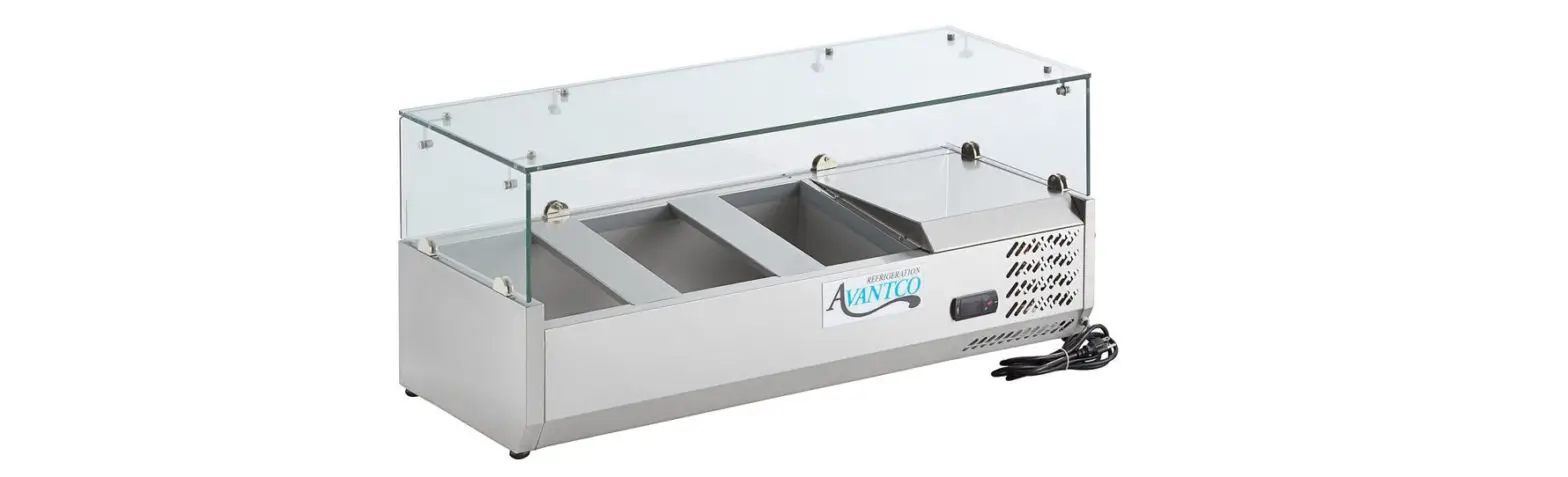
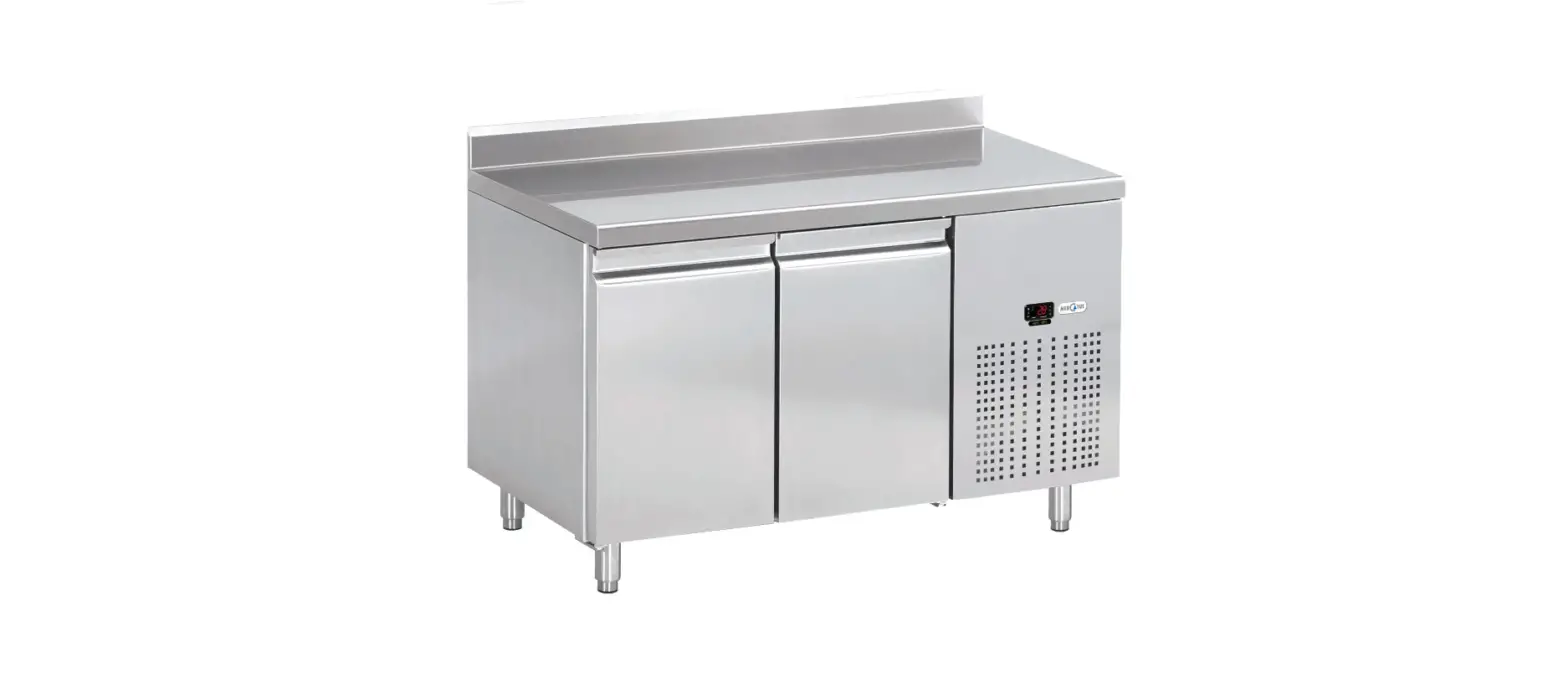
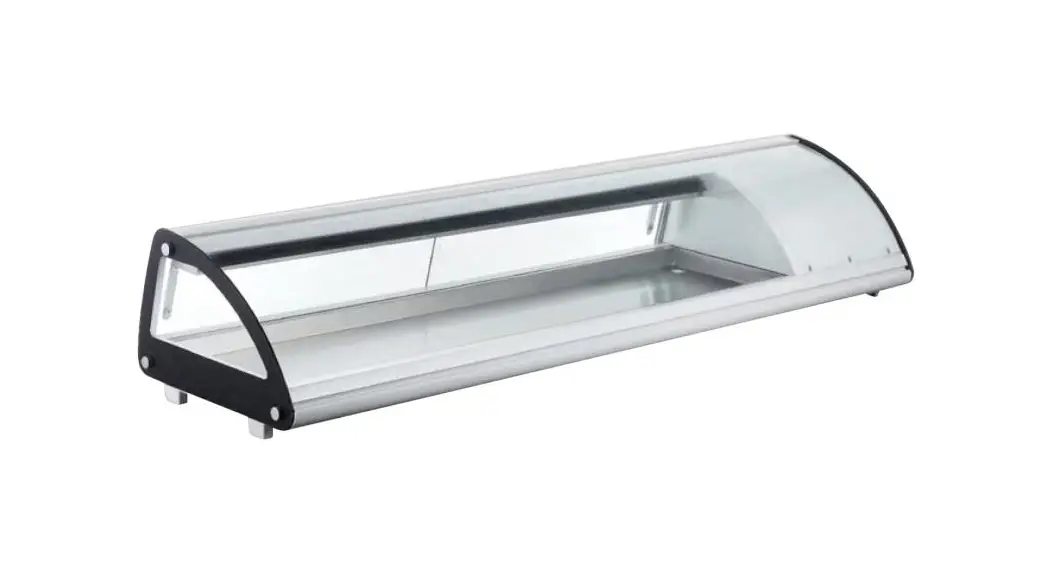
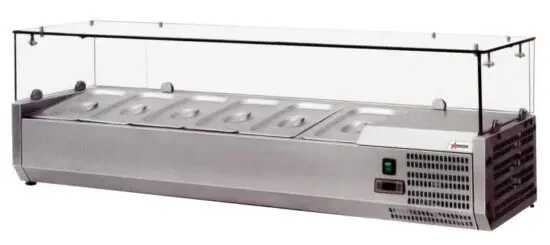
 RS-CN-0004-P Refrigerated Topping Rails
Instruction Manual
 www.omcan.com
Toll Free: 1-800-465-0234
Fax: 905-607-0234
Email: [email protected]
www.omcan.com
OMCAN IS NOT RESPONSIBLE FOR ANY DAMAGES DUE TO WATER LEAKS.
WARRANTY FOR WATER LEAKS IS VOID IF THE WICKING PAD IS NOT REPLACED EVERY SIX MONTHS IF THE AMBIENT ROOM TEMPERATURE EXCEEDS 75°F AND HAS 55% RELATIVE HUMIDITY AND IF THE APPLIANCE DRAIN IS NOT CONNECTED DIRECTLY TO THE FLOOR DRAIN.
General Information
Omcan Manufacturing and Distributing Company Inc., Food Machinery of America, Inc. dba Omcan and Omcan Inc. are not responsible for any harm or injury caused due to any person’s improper or negligent use of this equipment. The product shall only be operated by someone over the age of 18, of sound mind, and not under the influence of any drugs or alcohol, who has been trained in the correct operation of this machine and is wearing authorized proper safety clothing. Any modification to the machine voids any warranty and may cause harm to individuals using the machine or in the vicinity of the machine while in operation.
CHECK PACKAGE UPON ARRIVAL
Upon receipt of an Omcan shipment please inspect for external damage. If no damage is evident on the external packaging, open the carton to ensure all ordered items are within the box, and there is no concealed damage to the machine. If the package has suffered rough handling, bumps or damage (visible or concealed), please note it on the bill of lading before accepting the delivery and contact Omcan within 24 hours, so we may initiate a claim with the carrier. A detailed report on the extent of the damage caused to the machine must be filled out within three days, from the delivery date shown in the shipping documents. Omcan has no recourse for damaged products that were shipped collect or third party.
Before operating any equipment, always read and familiarize yourself with all operations and safety instructions.
Omcan would like to thank you for purchasing this machine. It’s of the utmost importance to save these instructions for future reference. Also, save the original box and packaging for shipping the equipment if servicing or returning the machine is required.
Position on a flat, stable surface. A service agent/qualified technician should carry out installation and any repairs if required. Do not remove any components or service panels on this product. Consult Local and National Standards to comply with the following:
- Health and Safety at Work Legislation.
- Fire Precautions.
- IEE Wiring Regulations.
- Building Regulations.
Safety and Warranty
- The appliance is intended for commercial use.
- DO NOT attempt to service the item yourself.
- DO NOT use damaged appliances. If you are in any doubt, consult Omcan.
- DO NOT use electrical appliances inside the appliance (e.g. heaters, ice-cream makers, etc.), unless they are of the type recommended by the manufacturer.
- Keep ventilation openings, in the appliance enclosure or in the built-in structure, clear of obstruction.
- DO NOT use a mechanical device or other means to accelerate the defrosting process, other than those recommended by the manufacturer.
- DO NOT damage the refrigerant circuit.
- DO NOT stand or support yourself on the appliance or glass panel.
- DO NOT allow oil or fat to come into contact with the plastic components. Clean immediately if contact occurs.
- DO NOT place combustion, explosive or volatile article, corrosive acid or alkali, or liquid into the unit.
- DO NOT use this appliance to store medical supplies.
- DO NOT use jet/pressure washers to clean the appliance.
- DO NOT allow children to play with the packaging, and destroy plastic bags safely.
- Always carry, store and handle the appliance in a vertical position and move by holding the base of the appliance.
- Always switch off and disconnect the power supply to the unit before cleaning.
- Keep all packaging away from children. Dispose of the packaging in accordance with the regulations of local authorities.
- If the supply cord is damaged, it must be replaced by the manufacturer, its service agent or similarly qualified persons in order to avoid a hazard.
- This appliance is not intended for use by persons (including children) with reduced physical, sensory or mental capabilities, or lack of experience and knowledge unless they have been given supervision or instruction concerning the use of the appliance by a person responsible for their safety.
- Children should be supervised to ensure that they do not play with the appliance.
- For indoor use only. Not suitable for installation in an area where a water jet could be used. Must not be cleaned by a water jet.
- To guarantee safe operation, ensure that the appliance is set up and connected as described in the instruction manual.
- Any repairs and work on the appliance should only be carried out by the customer service department.
- Do not store explosive substances such as aerosol cans with a flammable propellant in this appliance.
1 YEAR PARTS AND LABOUR WARRANTY
Within the warranty period, contact Omcan Inc. at 1-800-465-0234 to schedule an Omcan authorized service technician to repair the equipment locally.
Unauthorized maintenance will void the warranty. The warranty covers electrical and part failures, not improper use.
Please see https://omcan.com/disclaimer for complete info.
WARNING:
The packaging components are classified as normal solid urban waste and can therefore be disposed of without difficulty.
In any case, for suitable recycling, we suggest disposing of the products separately (differentiated
waste) according to the current norms.
DO NOT DISCARD ANY PACKAGING MATERIALS IN THE ENVIRONMENT!
Technical Specifications
| Model | RS-CN-0004-P | I RS-CN-0005-P | I RS-CN-0006-P | I RS-CN-0009-P |
| Rated Power Input | 160W | |||
| Rated Current | 1.2A | I 1.3A | ||
| Consumption | 1.2 kw/h | 1.3 kw/h | 1.4 kw/h | |
| Refrigerant | R134a (120g) | I R134a (125g) | R134a (130g) | R134a (155g) |
| Electrical | 125V / 50Hz | |||
| Volume | 45 L 11.6 cu.ft. | I 50 L / 1.8 cu.ft. | I 60 L12.1 cu.ft. | I 70 L / 2.5 cu.ft. |
| Temperature Range | 2 – 10°C / 35.6 – 50°F | |||
| Max Ambient Temp Rating | 32°C / 90°F | |||
| Foaming Agent | CP/IP | |||
| Weight | 99.2 lbs. / 45 kgs. | 114.6 lbs. / 52 kgs. | 121.3 lbs. / 55 kgs. | 143.3 lbs. / 65 kgs. |
| Dimensions | 47.2″ x 15.6″ x 8.9″ 1200 x 395 x 225mm | 55.1″ x 15.6″ x 8.9″ 1400 x 395 x 225mm | 59″ x 15.6″ x 8.9″ 1500 x 395 x 225mm | 78.7″ x 15.6″ x 8.9″ 2000 x 395 x 225mm |
| Protection Class | ||||
| Noise | 56dB | |||
| Item Number | 40535 | I 40536 | I 39594 | I 39595 |
Installation
- Remove the appliance from the packaging. Make sure that all protective plastic film and coatings are thoroughly removed from all surfaces. To prevent injury or damage to the unit, the appliance should be unpacked and set up by two people.
- Maintain a distance of 20cm (7 inches) between the unit and walls or other objects for ventilation. Increase this distance if the obstacle is a heat source.
- Level the appliance by adjusting the screw feet. It should be placed on a level solid surface to reduce vibration and noise.
- The ambient temperature must be between 10-32°C/50-89.6°F (Climatic Class 4). Avoid locating it in direct sunlight or near heat sources such as an oven or a radiator.
- Please make sure the appliance is properly ventilated.
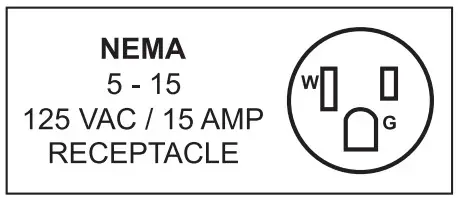
- Power supply and voltage at the operating point that complies with the details on the rating label. The plug must be accessible after installation.
- Correctly connect and disconnect the plug. When inserting the plug, it must be plugged tightly when pulling out the plug, the plug should be held by hand. Never pull the supply cord directly.
- If the showcase is to be shut down for long period, switch it off and disconnect the plug from the socket-outlet.
Clean the appliance and leave the lid open to prevent odor. - Important! For your personal safety, this appliance must be properly grounded. This appliance is equipped with a cord having a grounding wire with a grounding plug. The plug must be inserted into an outlet that is properly grounded and installed. Consult a qualified electrician or service center if you do not completely understand the grounding instructions. If doubt exists as to whether the appliance is properly grounded, have a qualified electrician check the circuit to make sure the outlet is properly grounded.
- If the cable does not reach the nearest socket, either rearrange your store layout or ask a qualified electrician to fix a new socket. Do not use an extension cord.
- If power is cut off, wait for at least 3 minutes before restarting the unit to avoid damaging the compressor.
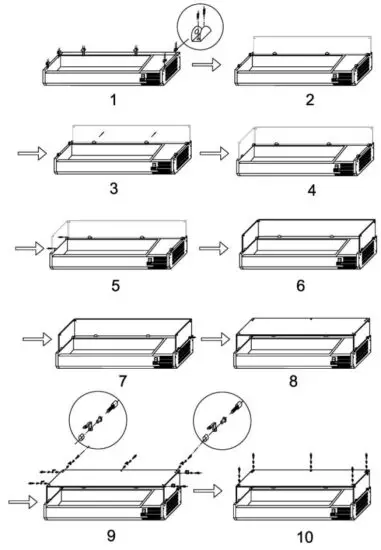
INSTALLATION OF FIT GLASS PANELS
ATTENTION: RISK OF BREAK WITH THE GLASS PANEL.
Note: Ensure the hole in the collar for the grub screw faces inwards.
Note: Ensure the screw hole furthest from the edge of the panel goes to the back of the appliance.
Note: Ensure the soft end of the grub screw is the end making contact with the glass.
Note: Ensure the short end of the bolt assembly is on the outside of the panels.
Note: The glass panel must not be used as a shelf.
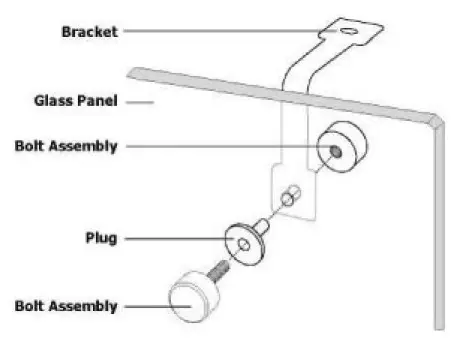
- Unpack the wooden/carton box carefully; it’s recommended to do this work with two people.
- Screw the collars to the rim of the appliance.
- Slot the two side panels into the collars, with the holes in the glass at the top.
- Screw a grub screw into each collar to secure the panels.
- Slot the rear panel into the collars, with the holes in the glass at the top.
- Screw a grub screw into each collar to secure the panel.
- Slot the plastic bushes into each of the holes.
- Screw the brackets to the inside of each panel using the bolt assemblies.
- Place the top panel onto the brackets, ensuring all holes line up.
- Insert the bush and attach the top panel to the brackets with the bolt assemblies.
GLASS PANEL ASSEMBLY GUIDE
Operation
STORING FOOD
To get the best results from your appliance, follow these instructions: Only store foodstuffs in the appliance when it has reached the correct operating temperature. Ensure GN container bays are full at all times, even if the GN containers are unused or empty. Empty bays will greatly reduce the efficiency of the appliance.
TURN ON
- Ensure the power switch is set to [O] and turned on at the socket.
- Switch on the Power [I]. The current temperature within the appliance is displayed.
- The
 control panel flash for 3 min for an anti-short cycle delay between the motor compressor stop and the following restart.
 control panel flash for 3 min for an anti-short cycle delay between the motor compressor stop and the following restart.
TEMPERATURE SETTING AND CONTROL
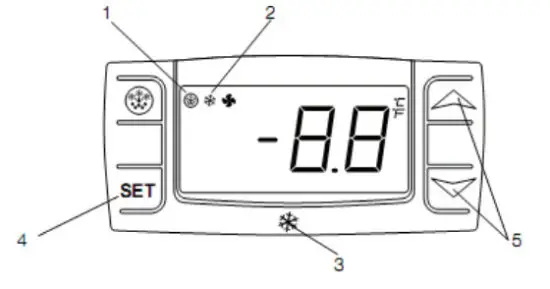
- Defrosting light.
- Compressor operation light.
- Digital thermostat.
- Programming key (service agent only).
- Temperature modification keys.
HOW TO SEE THE SET POINT
- Push and immediately release the SET key, the set point will be shown.
- Push and immediately release the SET key or wait for about 5s to return to normal visualization.
HOW TO CHANGE THE SETPOINT
- Push the SET key for more than 2 seconds to change the setpoint value.
- The value of the setpoint will be displayed and the “°C” starts blinking.
- To change the set value push the UP or DOWN arrows within 10s.
- To memories, the new setpoint value pushes the SET key again or waits for 10s.
MANUAL DEFROST
The appliance will automatically run a defrost cycle every 12 hours.
Note: The cycle starts from the time the appliance is initially powered up.
To manually defrost the appliance:
- Press and hold the DEFROST button for 5 seconds.
- The defrost cycle will start immediately and the Defrost LED illuminates. The defrost will last 20 minutes.
Note: Starting a manual defrost also resets the automatic defrost timer. The next automatic defrost will start 12 hours after the manual defrost has finished.
Maintenance
ROUTINE MAINTENANCE
Switch off and disconnect from the power supply before cleaning.
- Clean the enclosure and interior of the appliance as often as possible.
- Wash the unit with a moist cloth. Never allow the switch, control panel, cable, or plug to get wet.
- Do not use abrasive cleaning agents. These can leave harmful residues. Use only mild soapy water.
- Ensure that no cleaning water penetrates into the electrical components.
- Must not be cleaned by a water jet.
- Always wipe dry after cleaning with a soft cloth.
- Take care when cleaning the rear of the appliance.
- An agent or qualified technician must carry out repairs if required.
- If the appliance is to be left inactive for long periods, unplug the appliance after having turned the switch to the OFF position, empty the refrigerating compartment and clean thoroughly.
SPECIAL MAINTENANCE
The instructions given in the following paragraph are for SKILLED PERSON.
- Periodically clean the condenser using suitable tools (vacuum cleaner or soft brushes).
- Check that the electrical connections are not loose.
- Check that the thermostat and the sensor are in proper working order.
- Recommend that an agent or qualified technician clean the condenser.
Troubleshooting
| Fault | Probable Cause | Action |
| The appliance is not working. | The unit is not switched on. | Check the unit is plugged in correctly and switched on. |
| Plug and lead are damaged. | Call your agent or qualified technician. | |
| The fuse in the plug has blown. | Replace the fuse (GB). | |
| Power supply. | Check power supply. | |
| Internal wiring fault. | Call your agent or qualified technician. | |
| The appliance turns on, but the temperature is too high/low. | Too much ice on the evaporator. | Defrost the appliance. |
| Condenser blocked with dust. | Call your agent or qualified technician. | |
| The appliance is located near a heat source or airflow to the condenser is being interrupted. | Move the refrigerator to a more suitable location. | |
| The ambient temperature is too high. | Increase ventilation or move the appliance to a cooler position. | |
| Unsuitable foodstuffs are being stored in the appliance. | Remove any excessive hot foodstuffs or blockages to the fan. | |
| The appliance is overloaded. | Reduce the amount of food stored in the appliance. | |
| The appliance is unusually loud. | Loose nut/screw. | Check and tighten all nuts and screws. |
| The appliance has not been installed in a level or stable position. | Check installation position and change if necessary. |
Parts Breakdown
Model RS-CN-0004-P 40535
Model RS-CN-0005-P 40536
Model RS-CN-0006-P 39594
Model RS-CN-0009-P 39595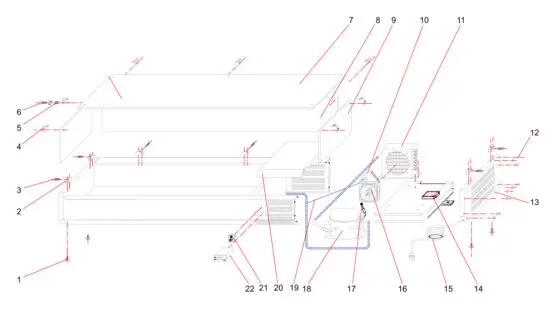
Parts Breakdown
Model RS-CN-0004-P40535
| Item No. | Description | Position |
| 74633 | Feet for 40535 | 1 |
| 74634 | Glass Fixing Clip for 40535 | 2 |
| 74635 | Glass Fixing Screw for 40535 | 3 |
| 74636 | Glass Linking Clip for 40535 | 4 |
| 74637 | Bushing for 40535 | 5 |
| 74638 | Glass Fixing Nut Bolt for 40535 | 6 |
| 74639 | Top Glass for 40535 | 7 |
| 74640 | Back Glass for 40535 | 8 |
| 74641 | Side Glass for 40535 | 9 |
| 74642 | Filter Drier for 40535 | 10 |
| 74643 | Condenser for 40535 | 11 |
| 74644 | Plastic Cap for 40535 | 12 |
| 74645 | Side Cover for 40535 | 13 |
| 74646 | Junction Box for 40535 | 14 |
| 74647 | Plug for 40535 | 15 |
| 74648 | Condenser Fan for 40535 | 16 |
| 74649 | Charging Valve for 40535 | 17 |
| 74650 | Compressor for 40535 | 18 |
| 74651 | Capillary Tube for 40535 | 19 |
| 74652 | Unit Room Cover for 40535 | 20 |
| 74653 | Main Switch for 40535 | 21 |
| 42142 | Dixell Thermostat for 40535 | 22 |
| 60983 | Pan Divider (13” x 1.5”) for 40535 |
Model RS-CN-0005-P 40536
| Item No. | Description | Position |
| 42122 | Feet for 40536 | 1 |
| 42123 | Glass Fixing Clip for 40536 | 2 |
| 42124 | Glass Fixing Screw for 40536 | 3 |
| 42125 | Glass Linking Clip for 40536 | 4 |
| 42126 | Bushing for 40536 | 5 |
| 42127 | Glass Fixing Nut Bolt for 40536 | 6 |
| 42128 | Top Glass 78×15.5 for 40536 | 7 |
| 41519 | Back Glass 78×7.5 for 40536 | 8 |
| 42129 | Side Glass for 40536 | 9 |
| 42130 | Filter Drier for 40536 | 10 |
| 42131 | Condenser for 40536 | 11 |
| 42132 | Plastic Cup for 40536 | 12 |
| 42133 | Side Cover for 40536 | 13 |
| 42134 | Junction Box for 40536 | 14 |
| 42135 | Plug for 40536 | 15 |
| 42136 | Condenser Fan for 40536 | 16 |
| 42137 | Charging Valve for 40536 | 17 |
| 42138 | Compressor for 40536 | 18 |
| 42139 | Capillary Tube for 40536 | 19 |
| 42140 | Unit Room Cover for 40536 | 20 |
| 42141 | Main Switch for 40536 | 21 |
| 42142 | Dixell Thermostat for 40536 | 22 |
| 60983 | Pan Divider (13”x1.5”) for 40536 |
Parts Breakdown
Model RS-CN-0006-P 39594
| Item No. | Item No. Description | Position |
| 74619 | Feet for 39594 | 1 |
| 43023 | Glass Sneeze Guard Entire Set for 39594 | 02-Sep |
| 74620 | Filter Drier for 39594 | 10 |
| 74621 | Condenser for 39594 | 11 |
| 74622 | Plastic Cap for 39594 | 12 |
| 74623 | Side Cover for 39594 | 13 |
| 74624 | Junction Box for 39594 | 14 |
| 74625 | Plug for 39594 | 15 |
| 74626 | Condenser Fan for 39594 | 16 |
| 74627 | Charging Valve for 39594 | 17 |
| 74628 | Compressor for 39594 | 18 |
| 74629 | Capillary Tube for 39594 | 19 |
| 74630 | Unit Room Cover for 39594 | 20 |
| 74631 | Main Switch for 39594 | 21 |
| 42142 | Dixell Thermostat for 39594 | 22 |
| 60983 | Pan Divider (13”x1.5”) for 39594 |
Model RS-CN-0009-P 39595
| Item No. | Description | Position |
| 74597 | Feet for 39595 | 1 |
| 74598 | Glass Fixing Clip for 39595 | 2 |
| 74599 | Glass Fixing Screw for 39595 | 3 |
| 74600 | Glass Linking Clip for 39595 | 4 |
| 74601 | Bushing for 39595 | 5 |
| 74602 | Glass Fixing Nut Bolt for 39595 | 6 |
| 74603 | Top Glass for 39595 | 7 |
| 74604 | Back Glass for 39595 | 8 |
| 74605 | Side Glass for 39595 | 9 |
| 74606 | Filter Drier for 39595 | 10 |
| 74607 | Condenser for 39595 | 11 |
| 74608 | Plastic Cap for 39595 | 12 |
| 74609 | Side Cover for 39595 | 13 |
| 74610 | Junction Box for 39595 | 14 |
| 74611 | Plug for 39595 | 15 |
| 74612 | Condenser Fan for 39595 | 16 |
| 74613 | Charging Valve for 39595 | 17 |
| 74614 | Compressor for 39595 | 18 |
| 74615 | Capillary Tube for 39595 | 19 |
| 74616 | Unit Room Cover for 39595 | 20 |
| 74617 | Main Switch for 39595 | 21 |
| 42142 | Dixell Thermostat for 39595 | 22 |
| 60983 | Pan Divider (13”x1.5”) for 39595 |
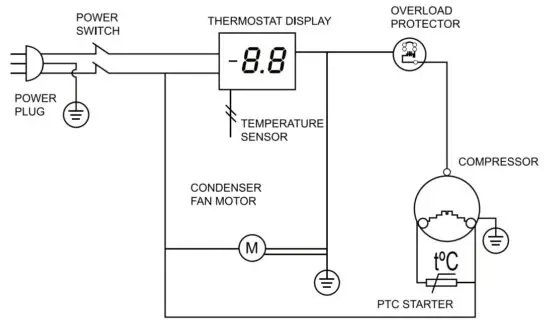
Electrical Schematics
Model RS-CN-0004-P 40535
Model RS-CN-0005-P 40536
Model RS-CN-0006-P 39594
Model RS-CN-0009-P 39595
Notes
Warranty Registration
Thank you for purchasing an Omcan product. To register your warranty for this product, complete the information below, tear off the card at the perforation and then send it to the address specified below. You can also register online by visiting:
https://omcan.com/warranty-registration/
| For mailing in Canada OMCAN PRODUCT WARRANTY REGISTRATION 3115 Pepper Mill Court, Mississauga, Ontario Canada, L5L 4X5 | For mailing in the US OMCAN PRODUCT WARRANTY REGISTRATION 4450 Witmer Industrial Estates, Unit 4, Niagara Falls, New York USA, 14305 |
or email to: [email protected]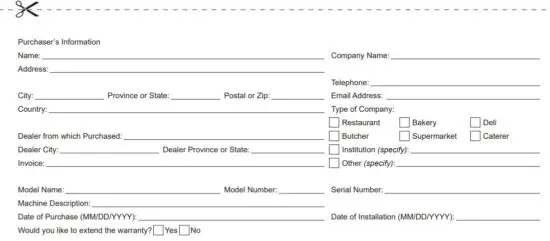 Thank you for choosing Omcan
Since 1951 Omcan has grown to become a leading distributor of equipment and supplies to the North American foodservice industry. Our success over these many years can be attributed to our commitment to strengthening and developing new and existing relationships with our valued customers and manufacturers.
Today with partners in North America, Europe, Asia, and South America, we continually work to improve and grow the company. We strive to offer customers exceptional value through our qualified local sales and service representatives who provide convenient access to over 5,000 globally sourced products.

 Omcan
Omcan Disclaimer – Omcan