
better bathrooms BeBa_27401 Sensor Flush Plates

IMPORTANT SAFETY INSTRUCTIONS
- There are no user maintainable parts, do not attempt to disassemble or repair them.
- Ensure the flush plate is situated in the correct position before installation and is not exposed to excessive heat or moisture.
- The device should not be exposed to excessive knocks or bumps.
- If the accessories are damaged, they must not be used, and replacements should be ordered from the manufacturer or retailer.
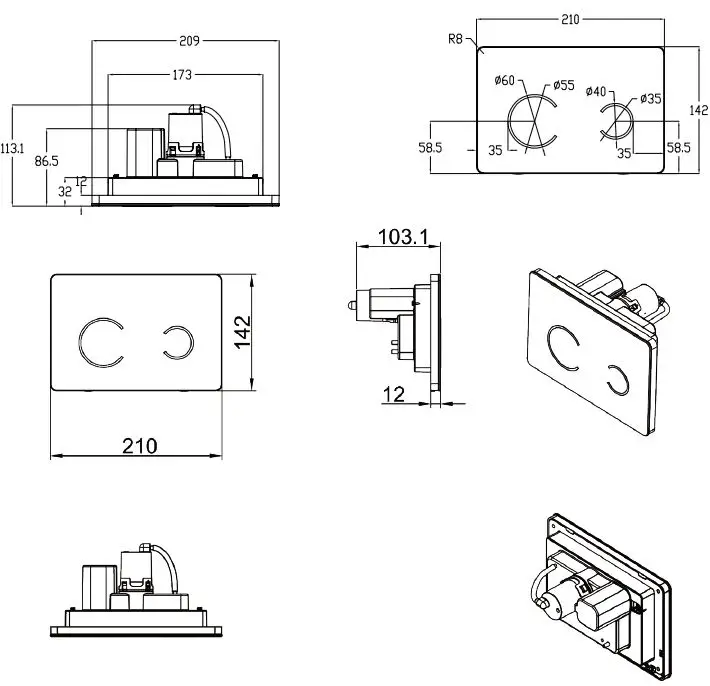
PRODUCT OVERVIEW
INSTALLATION
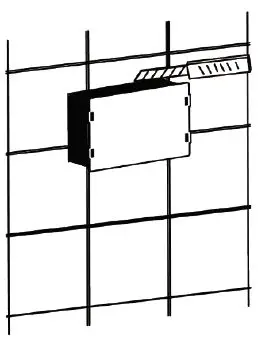
- After you have chosen the ideal location for your sensor flush plate. Use the control panel base to mark where you wish to install the flush plate.

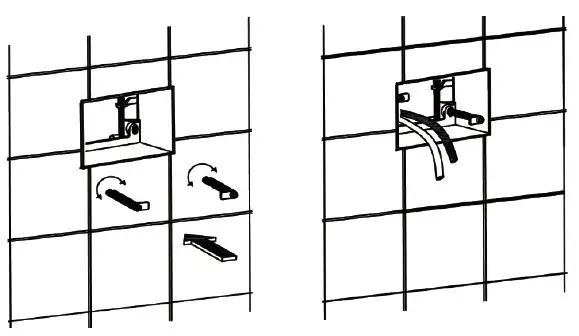
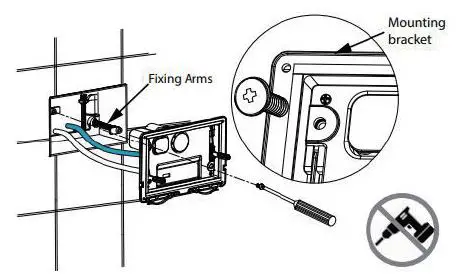
- Measure the depth of the flush plate and create a cavity in the wall equal to the depth of the flush plate. Pull the pipes for installation through the cavity and thread them through the back of the base. Insert the base into the wall and Screw the fixing arms (supplied) into position. The rods may need cutting down depending on the thickness of the finished wall/surface.

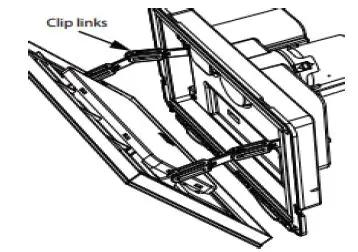
- Remove the glass panel completely. Push the glass front down from to the top and tilt the top towards you. Un-clip the glass by expanding the clip links and keep aside until installation is completed.

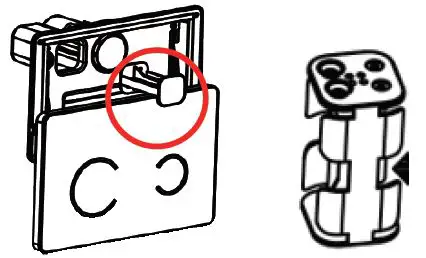
- Remove the battery compartment by simply sliding it out of the unit as shown. Insert 4 x AA batteries (not included) into the battery compartment keep safe for further installation.

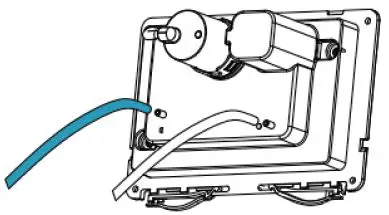
- Connect the air hoses from the cistern to the flush plate as shown. Attach the blue hose to the semi-circle symbol and the transparent hose to the full circle symbol.

- Make sure the cistern is fully commissioned before mounting the bracket in place. Locate the mounting bracket onto the fixing arms and secure the top left and bottom right corners with the screws provided and tighten with a screwdriver. Be careful not to overtighten. Re-connect the clip links and cable ribbon to the glass cover and insert the battery holder. Reinstall the glass plate. Once correctly installed the flush plate will illuminate for a couple of seconds.

OPERATION
When the unit is first powered on, a long beep will be made, at the same time the indicator lights of full-flush and half-flush lights will illuminate for a few seconds before flashing 3 times. Then the product will then be ready to use.
- Reduced Flush: Hover your hand over the smaller right-hand circle to activate the flush. The LED light will Illuminate.
- Full Flush: Hover your hand over the larger left-hand circle to activate the flush. The LED light will Illuminate.
If the flush plate is touched for more than 5 seconds it won’t flush.
LOW BATTERY
When the battery power is low, the product can still work normally. The LED light will flash 10 times and an alarm will sound for 10 seconds to remind the user the batteries are low. When there is no power, the LED light will slowly flash with a frequency of 2 times per second and the bell will sound. If batteries are exhausted completely, the glass panel can be removed to reveal the manual flush button. The manual override is not intended as a long-term solution.
MANUAL OVERRIDE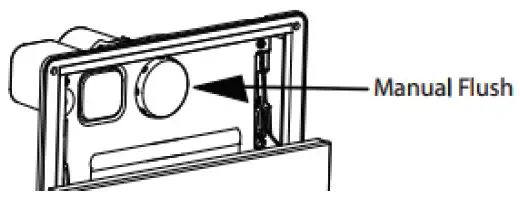
When using the manual push-button, unplug the cable ribbon and take the front glass off the chain links. Keep safe to prevent damage.
SPECIFICATIONS
| Batteries | 4 x AA (not included) |
| Ingress protection | IPX4 |
| Sensor distance | 0-60mm (from glass panel) |
| Sensing time | 0.2-5 seconds |
| Weight | 0.7 kg |