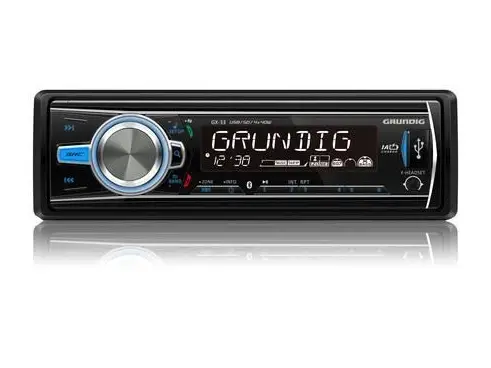

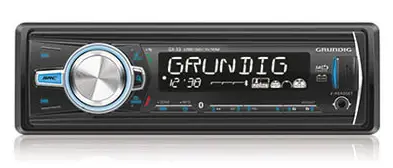
GRUNDIG GX-33 Media Player
Get started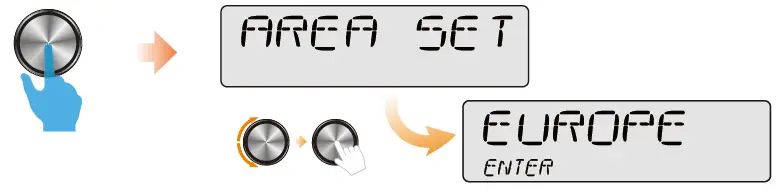
Select suitable country area for this unit:
- EUROPE (Eastern/Western Europe)
- MID-EAST (Middle East)
- RUSSIA (Russia)
- OCEANIA (Australia)
- JAPAN (Japan)
- USA (United States)
- LATIN (Latin America)
- ASIA (Asia Pacific)
Select suitable country area for this unit, otherwise the unit can not work properly.
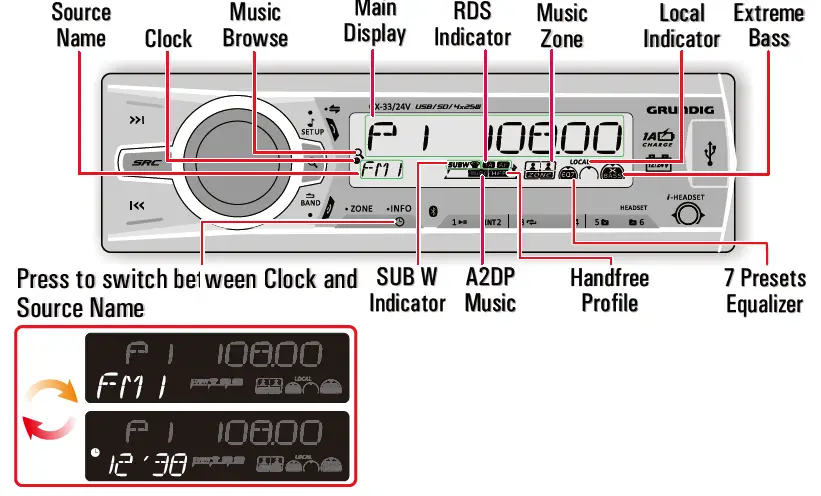
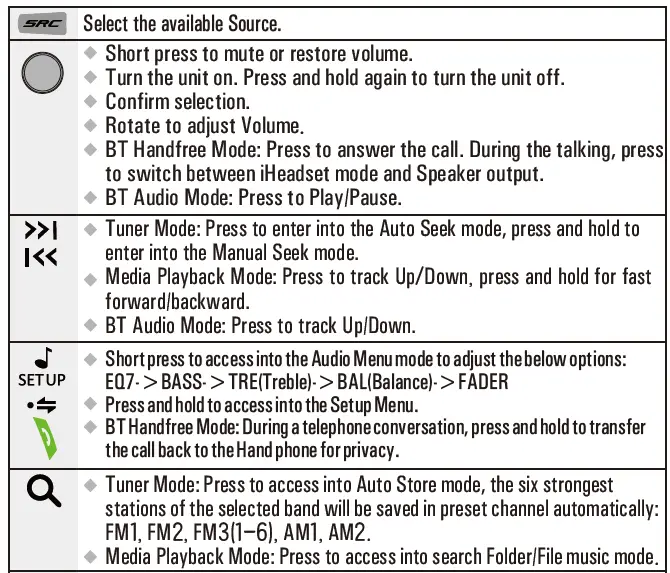
Overview of the unit
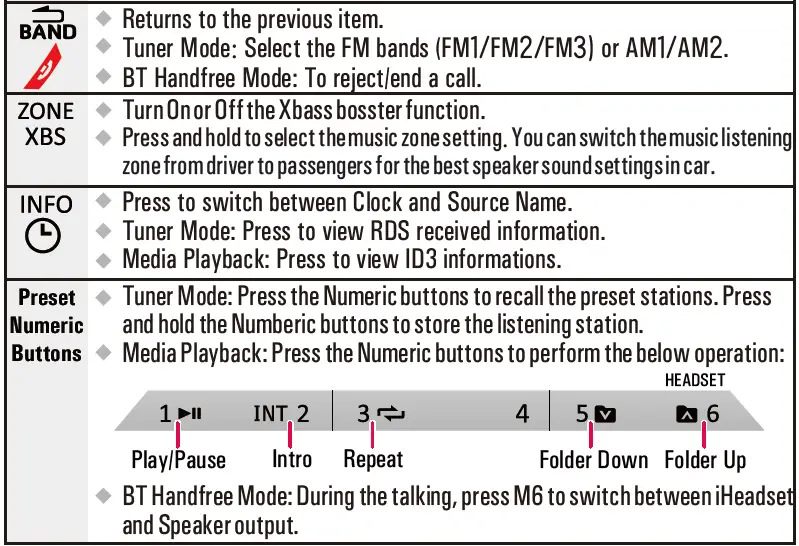
Use Bluetooth Device
Pairing the Bluetooth device
On your Bluetooth-enabled device, follow the steps below.
- Search for Bluetooth devices.
- In the device list, select GRUNDIG
- Enter the default password “0000”, and then confirm the password entry. If the pairing is successful, [PAIRED] will be displayed on the LCD screen of this system.
Making a call
You can dial number through the mobile phone.
- Use the Mobile Phone to dial and make an outgoing call
- Once completed the dialing, the phone number and [CALL—] is displayed.
Receiving a Call
- If there is an incoming call, the phone number will be displayed. if the incoming call has no phone number, [PHONE IN] will be displayed.
- Press to answer/accept the call
- When conversation ends, press to terminate the call.
Call Transfer
You can transfer voice from car speakers to mobile phones during a telephone conversation. During a telephone conversation, press and hold voice transfers from car speakers to mobile phone.
- i-Headset private mode

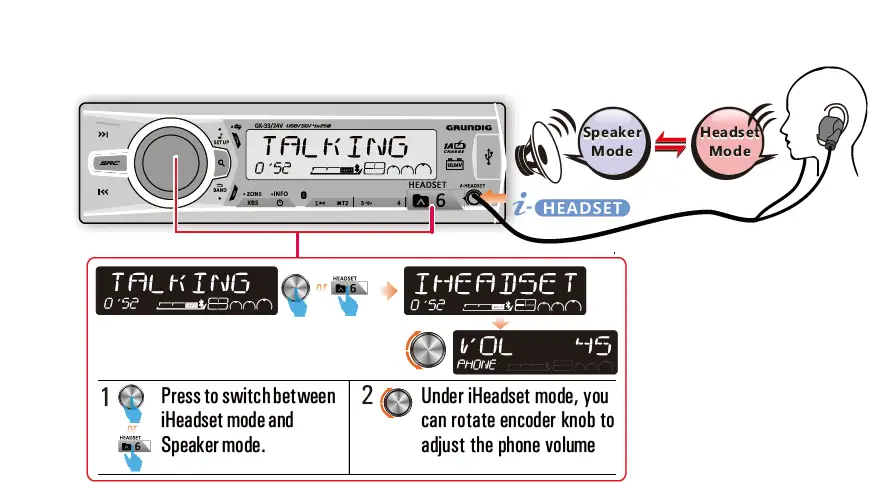
Keeping your telephone conversation in privacy by using this unit’s unique iHeadset feature:
- Plug in the Handfree headset or earphone into the iHeadset socket.
- During a telephone conversation, to switch to “iHeadset” mode by pressing the or buttons, so the voice from the other end can only be heard thru the headset or earphone. Pressing either one of these 2 buttons again to resume to handfree speaker mode.
Bluetooth Audio Streaming A2DP
If the connected Bluetooth device supports Advanced Audio Distribution Profile (A2DP), you can listen to the music stored on the device through the unit. If the device also supports Audio Video Remote Control Profile (AVRCP) profile, you can use the control on the unit or its remote control to play music stored on the device.
- Press SRC repeatedly to select [BT AUDIO].
- Press to start play, press it again to pause.
- To track up/down,
- Press info to view song title information.
Adjust Setup Menu Settings: 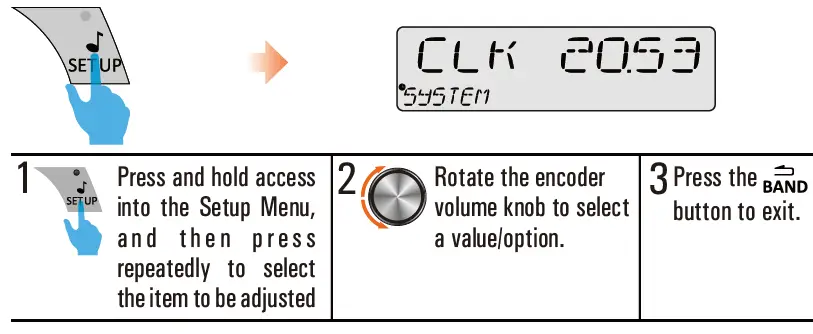
When you press or hold the following button(s):
| Item | Selectable setting |
| RE-CON /DIS-CON | This feature allows to Re-connect or Dis-connect to the paired mobile phone or Bluetooth device by manually. |
| Clock Set | Adjust the Hours and Minutes |
| Clock Format | Select the time format 12H or 24H |
| Beep Tone | Turn On or Off this beep sound |
| LOC On/Off | ON: only stations with strong signal can be broadcast. The Local indicator will light up OFF: Stations of both strong and weak signals can be broadcast. |
| Area | Select suitable country area for this unit: EUROPE; RUSSIA; JAPAN; LATIN; MID-EAST; OCEANIA; USA; ASIA |
| RDS On/Off | Turn On or Off the RDS function. |
| AF (Alternate Frequencies) | ON: The unit will search for another station with stronger signal, but with the same program identification as the current station automatically. OFF: Turn off AF function |
| TA (Traffic Announcement) | ON: When there is traffic announcement, unit will automatically switch to the tuner mode (regardless of the current mode) and begins to broadcast the announcemet on traffic conditions. When the traffic announcement is over, unit will automatically return to the previous mode. OFF: Traffic announcement does not cut in. |
| CT (Clock Time) | ON: Turn on the RDS clock. Time shown on the unit will synchronizes with the clock time of the RDS station. OFF: Turn off the RDS clock. |
|
PTY (Program Type) | Once inside the PTY mode, press the get into program type item, and rotat encoder volume knob to selected category. Available Program Type: POP M; ROCK M; EASY M; LIGHT M; CLASSICS; OTHER M; JAZZ M; COUNTRY; NATION M; OLDIES M; FOLK M; A-TEST; ALARM; NEWS; AFFAIRS; INFO; SPORT; EDUCATE; DRAMA; CULTURE; SCIENCE; VARIED; WEATHER; FINANCE; CHILDREN; SOCIAL; RELIGION; PHONE IN; TRAVEL; LEISURE; DOCUMENT |
Switch music listening zone
This unit is equipped with the most innovative Zone technology which enables driver or passengers to enjoy music with the best speakers balance and experience more vivid sound effect as the artist is intended to create. You can switch the music listening zone from driver to passengers for the best speaker sound settings in car. Press and hold ZONE/XBS to select the following options: 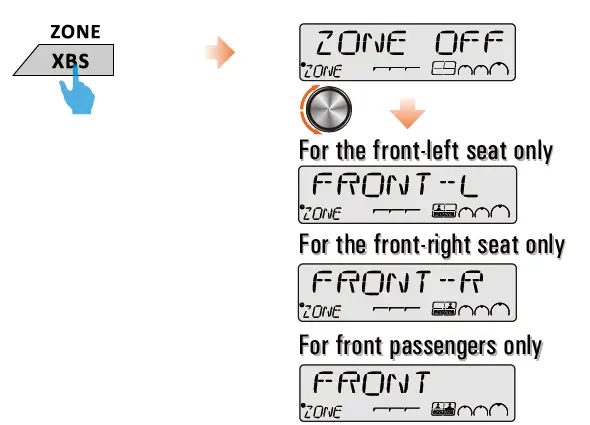
Playing a USB device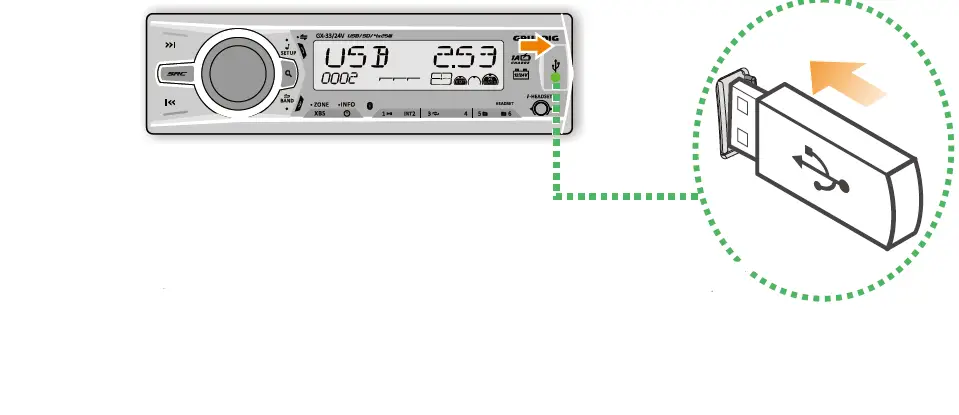
- Slide the USB socket cover to right.
- Insert the USB device into the USB socket.
- Press the SRC to select USB mode, the unit starts playing from the USB device.
Playing a SD Card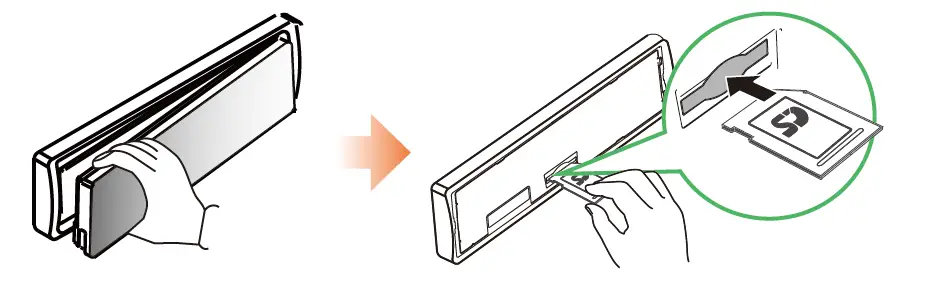
- Press the Panel Release button.
- Insert the card into the card slot.
- Push the left side of the panel rightward
- Close the front panel, press the SRC to select SD CARD mode, then the unit starts playing from the card.
USB Smart Phone 1A charging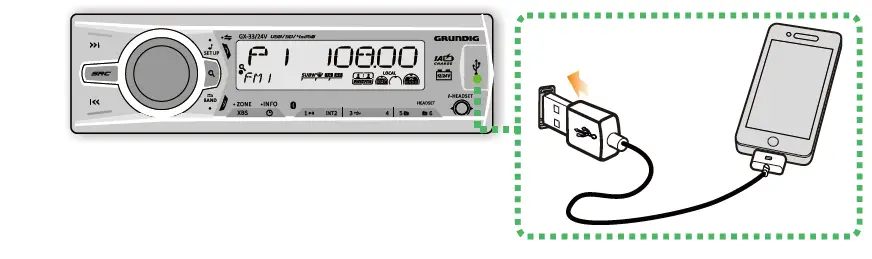
- Slide the USB socket cover to right.
- Insert the iPhone/Smart Phone device into the USB socket.
- Once he iPhone/Smart Phone is connected and recognized, the iPhone/Smart Phone begins to charge.
This USB only can charge Phones, but cannot play or decode music files stores inside the Smart Phones.
Listening to external Aux input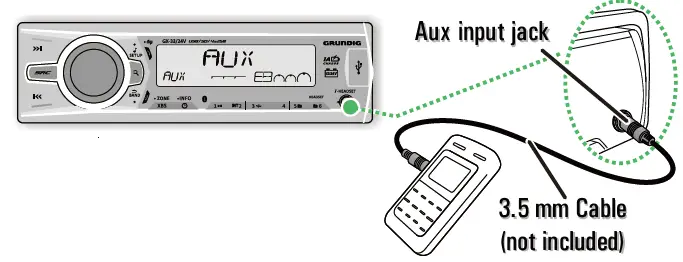
- Press the SRC to select AUX mode.
- Turn on the external component and start playing.
Installing the unit
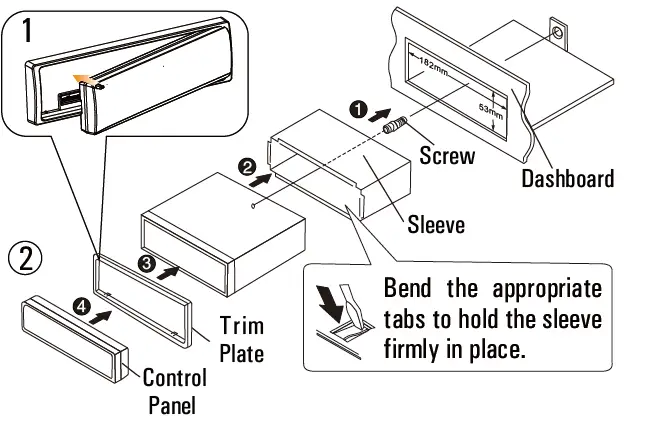
Remove the unit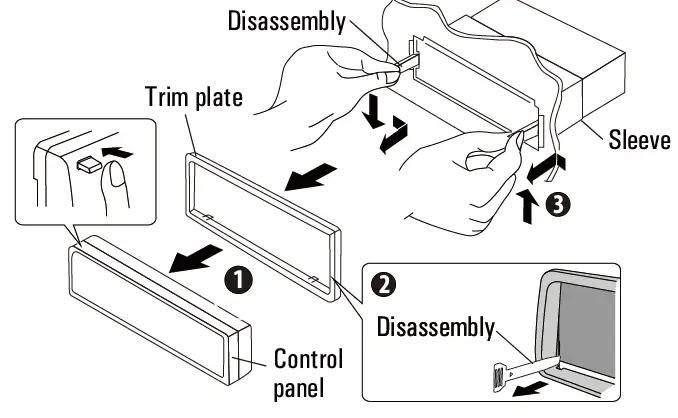
Wiring Connection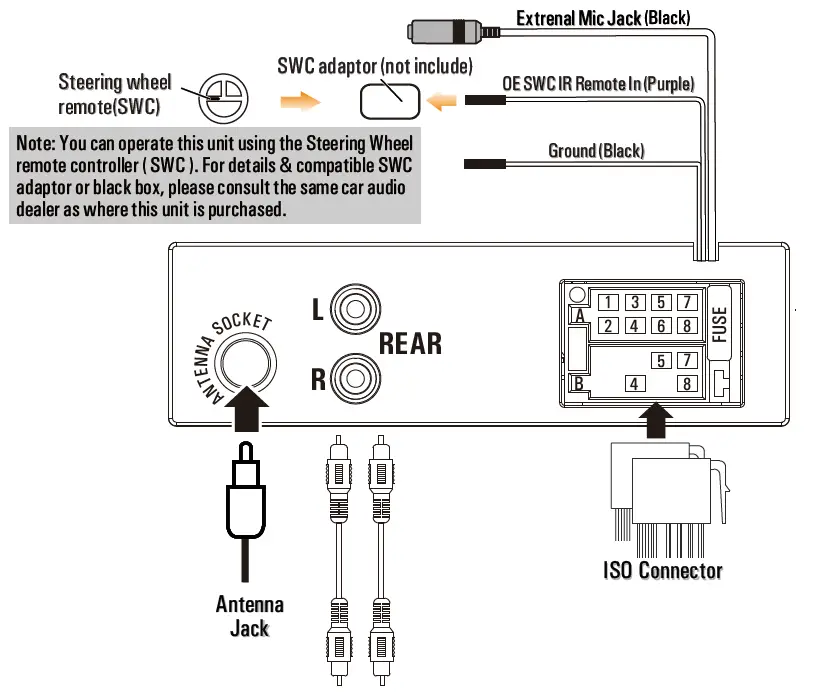
Product Specifications
General
| Power Supply | 12-24V DC, negative ground |
| Fuse | 15A |
| Suitable speaker impedance | 4-8Ω |
| Maximum power output | 25W x 4 |
| Continous power output | 15W x 4RMS (4Ω10%T.H.D) |
| Pre-AMP output voltage | 2.0V |
| Aux-In level | ≥500mV |
| Dimension (WxHxD) | 188 x 58 x 110mm |
Radio Tuner
| Frequency Range | FM | 87.5MHz to 108.0MHz |
| AM | 522kHz to 1620kHz | |
| FM Tuner | Usable Sensitivity (S/N=20dB) | 0.8uV |
| AM Tuner | Sensitivity/Selectivity (S/N=20dB) | 30 uV |
Supports Audio Format
| Maximum MP3/WMA Songs | 65535 |
| Maximum MP3/WMA Folder | 255 |
| Maximum Songs per Folder | 65535 |
USB Device
| USB | 2.0 High Speed |
| USB Port | 1.0A |
| USB Voltage | 5.0V |
| Maximum USB Memory Size | 32G |
| USB Flash Drive and Hard | FAT16/FAT32 |
SD Card
| Support Type of SD Card | SD/SDHC |
| Maximum Capacity | 32G |
Bluetooth
| Output Power | Class 2 |
| Frequency Band | 2.4000 Ghz – 2.4835GHz ISM Band |
| Range | 3 meters (free space) |
| Standard | Bluetooth 2.0 specification |
| Compatible Bluetooth Profiles | Hands-Free Profiles (HFP) A2DP(Advanced Audio Distribution Profile) AVRCP1.3(Audio/Video Remote Control Profile) |
- Size: 420x296mm (After Folding size: 105x148mm )
- Color: 4 color printing
- Paper: 105g
- Printing: Double side printed
 Welcome to grundigcarradio | grundigcarradio