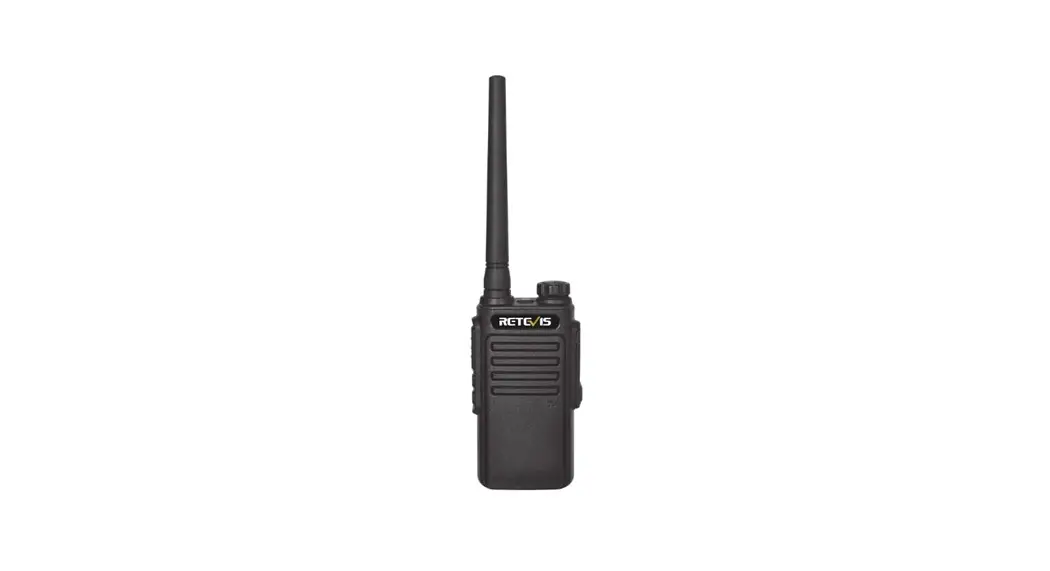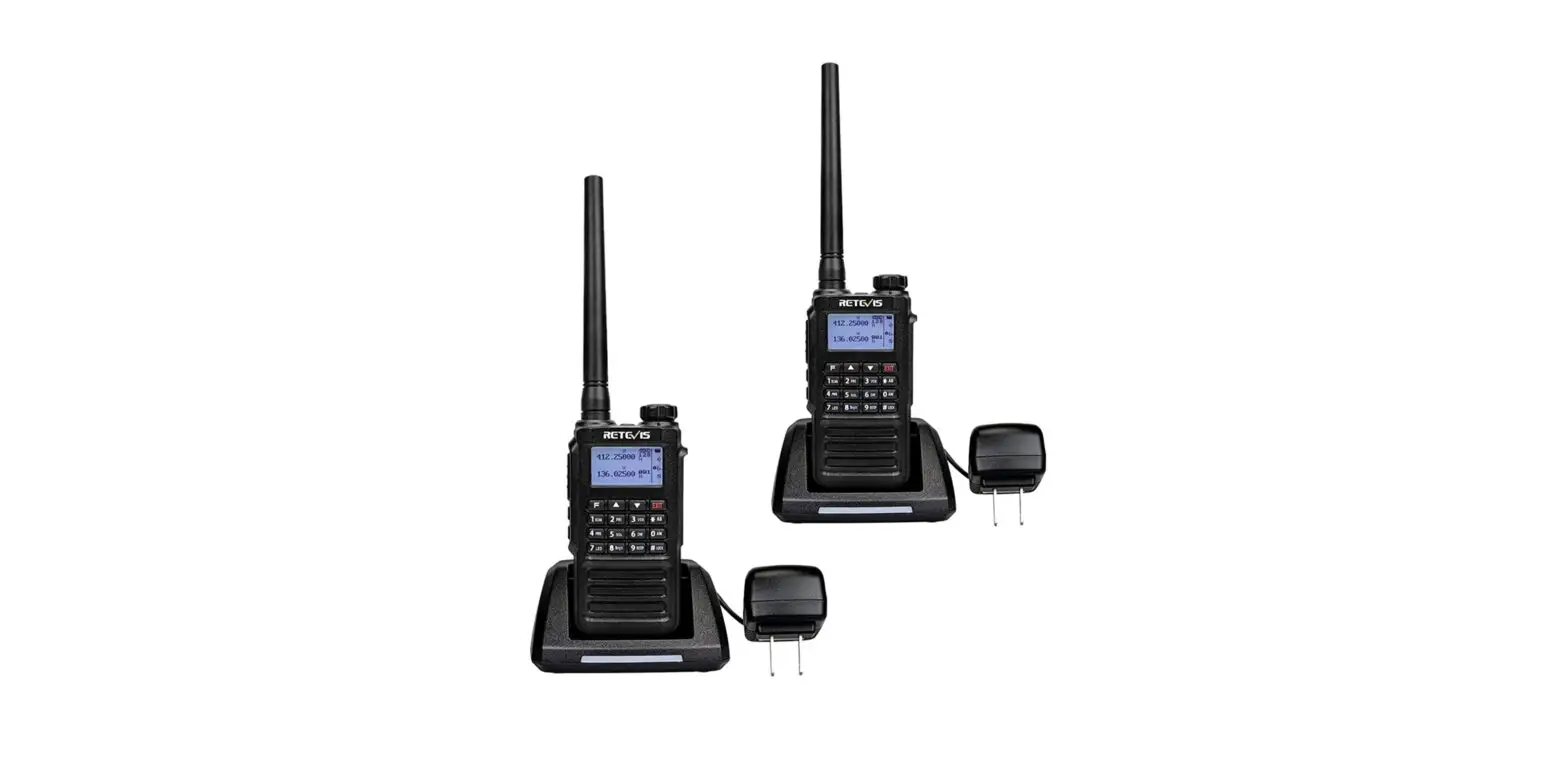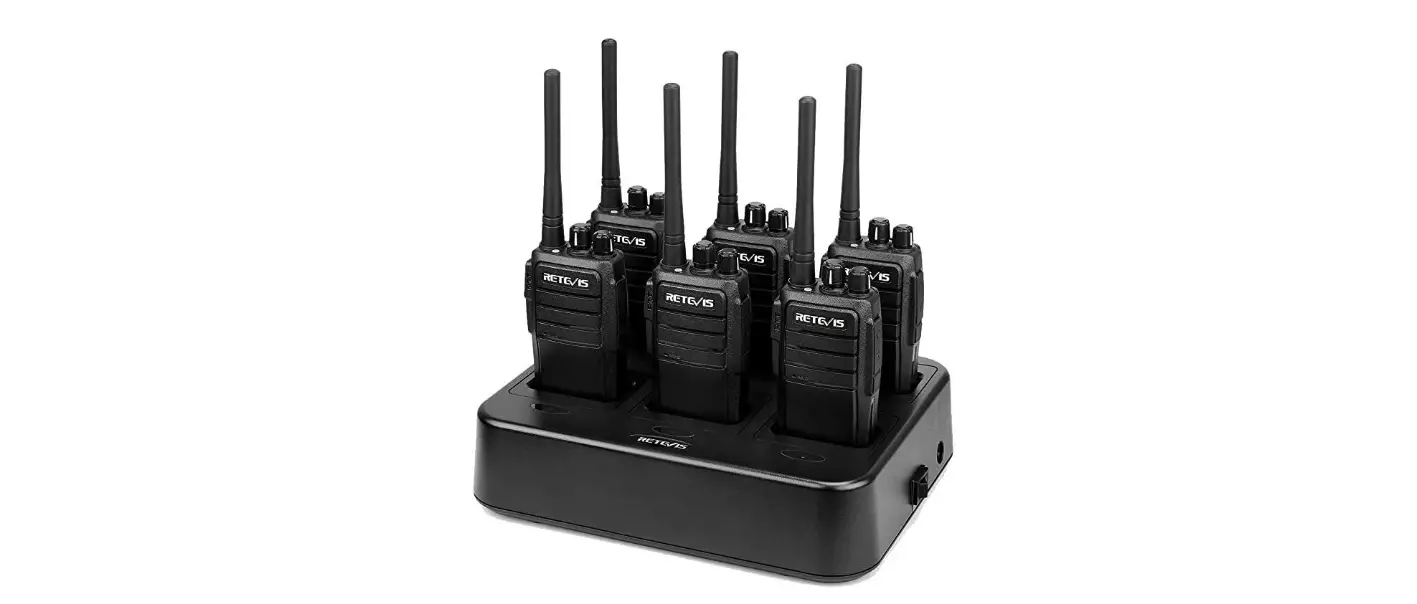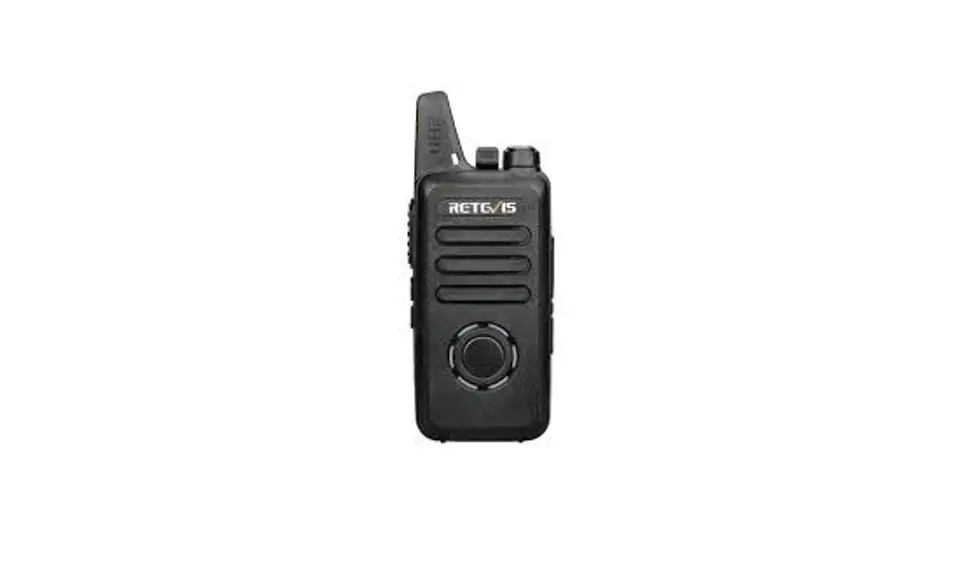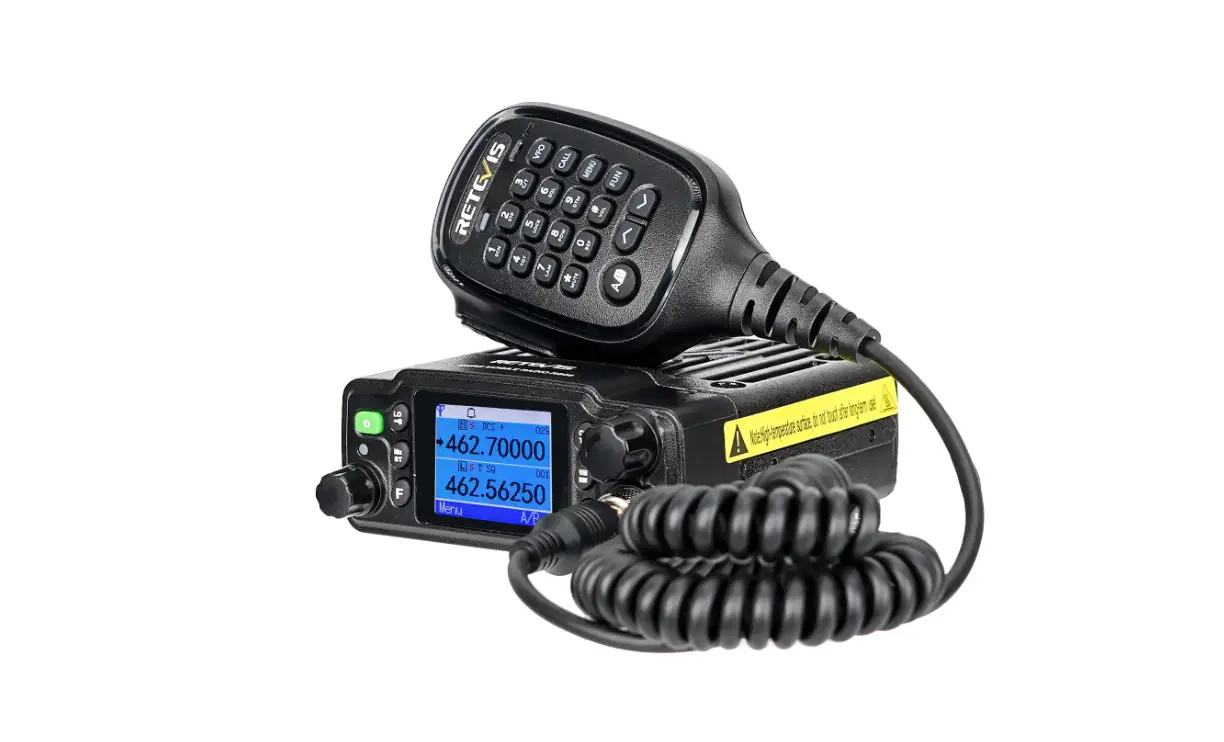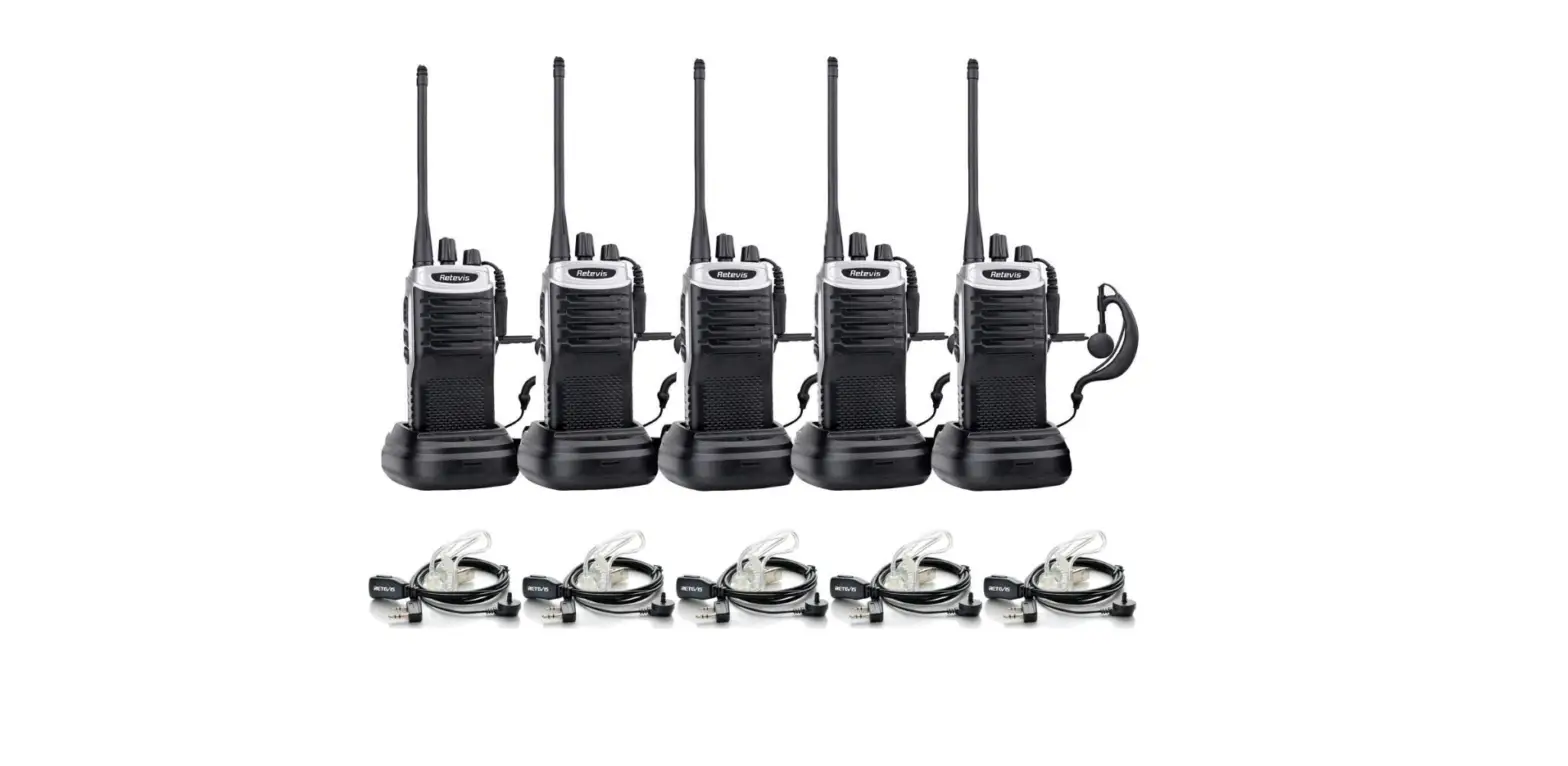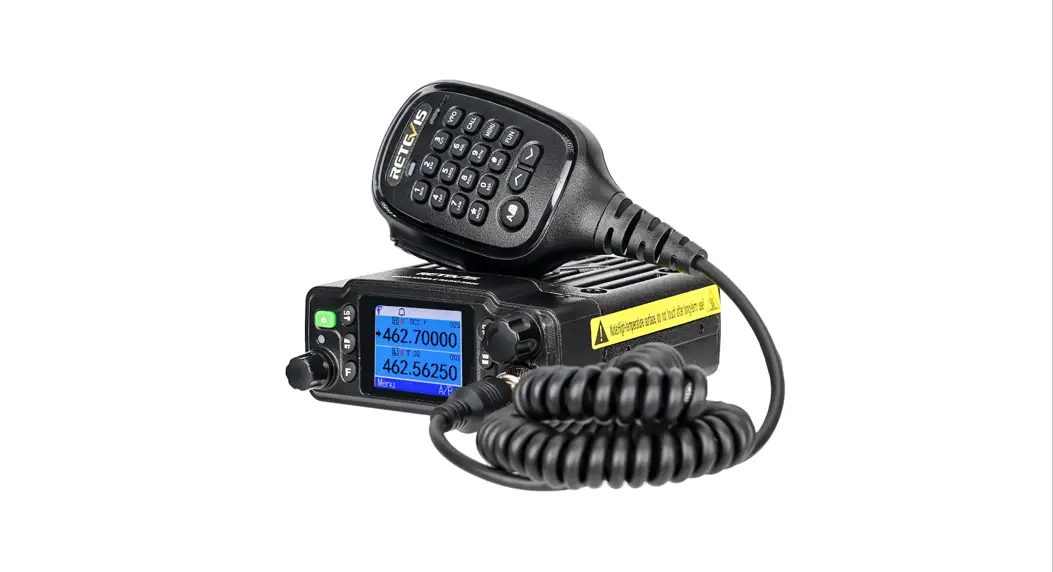
 Retevis RT29 2-Way Long Range Radios Waterproof Mic
 Retevis RT29 2-Way Long Range Radios Waterproof Mic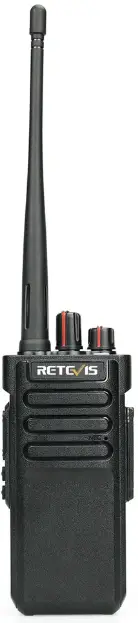
UNPACKING AND CHECKING EQUIPMENT
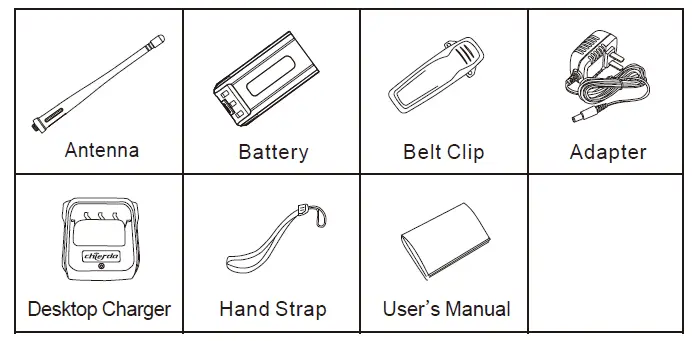
We recommend that you open the packing box before use and check carefully the main transceiver in the packing box and the supplied accessories. If any item is missed or damaged during shipment, please contact the shipper or local dealer.
Supplied Accessories
| Item | QUANTITY |
| Antenna | 1 |
| Battery | 1 |
| Belt Clip | 1 |
| Adapter | 1 |
| Desktop Charger | 1 |
| Hand Strap | 1 |
| User’s Manual | 1 |
PREPARATION
Notice
- Do not charge the battery for a long time!
If the battery is not fully charged within the scheduled time, stop charging. Otherwise, the battery may overheat and smoke, and burst into fire. - Do not throw the battery into the microwave oven and high-pressure container!
- Prevent the break as well as liquid spilling battery from fire!
If the battery is spilling(or exuding a smelly smell), put it away from the inflammable area. The electrolyte spilling from the battery is easy to catch fire, and it will cause the battery smokes or burst into fire suddenly. - Do not use abnormal batteries!
If the battery smells smelly, has different colors, is out of shape or has any abnormal display, please remove the battery from the charger or operating device and do not use it. - Please use a standard charger
The charger supplied is specially designed for this transceiver only, it will charge the battery for more scientific reasons, and safety.
Do not charge the battery for a long time!
Use Li-ion Battery
- Charge the battery before use.
- To prevent the battery pack from discharging, please remove the battery from the transceiver or device when it is not in use, and then store it in a cool dry place
- For battery long-time storage
- Remove the battery from the device
- If possible, discharge the battery.
- Store it in a cool(below 25℃) and dry place.
Battery Characteristic
- The capacity of the battery will reduce step by step after being charged and discharged again and again.
- The battery will be aged even without any usage.
- It will cost a long time to charge the battery in a cool and dry place.
- Battery working life will be reduced if being charged in a hotter place. Battery ages more quickly when stored in a hot place. Please do not leave the battery in the car and put it near any heating device.
- If battery working life becomes shorter, please replace it even it is fully charged. If go on being charged and discharged, the electrolyte will spill.
Charge Li-ion Battery
When the charger is powered on, put the battery in and fully connected, the light will turn red, and start charging. When the battery has been fully charged, the green light on.
Install/Remove Battery Pack
Note:
- Do not short-circuit battery pack terminals or throw the battery packs into fire.
- Do not try to remove the battery pack shell.
- Do not install a battery pack under dangerous conditions, otherwise, the spark will cause an explosion.
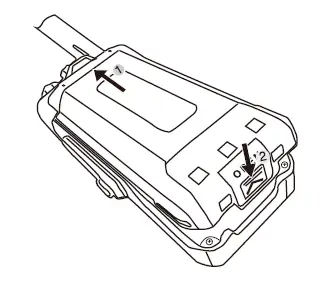
- Insert the top part of the battery pack into the top 2 slots of the transceiver and then press the battery pack down until a “click” sound is heard.


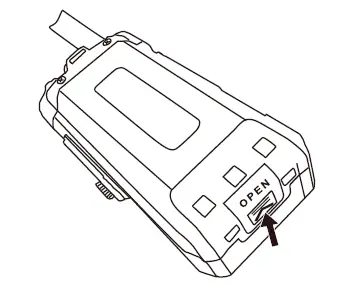
- To remove the battery pack, make sure the transceiver has been turned off, and then press the battery released latch in the bottom of the transceiver, and pull the bottom part of battery away from the transceiver body, and remove the battery.
Install Antenna
Hold the base of the antenna, and rotate it tightly into the connector of the top of the transceiver clockwise.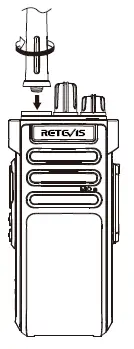
Install/Remove Belt Clip
If necessary, install the supplied screws into the belt clip at the back of the battery pack for easy carry.
To remove the belt clip, directly remove the two screws only.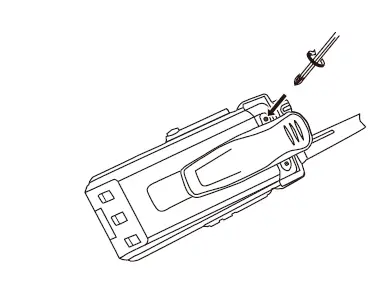
Install Hand Strap
Install the hand strap at the middle circle of the transceiver.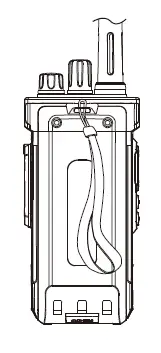
GETTING STARTED

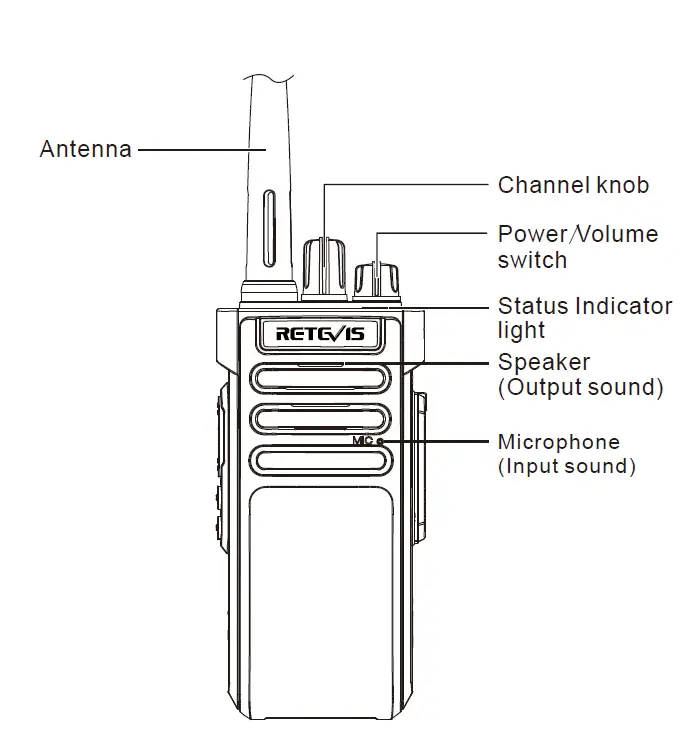
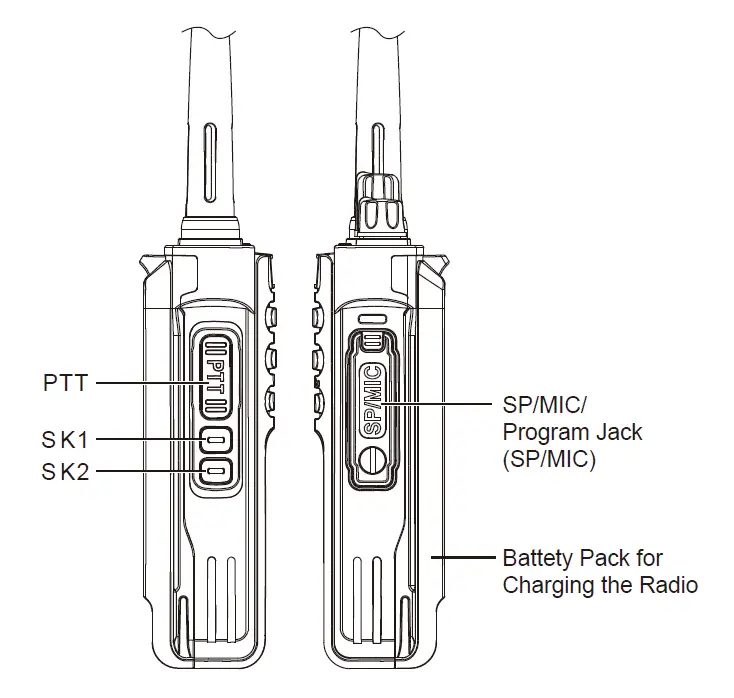
BASIC OPERATION
- State of Indicator light
When Transmitting, the red light is on . When receiving, the green light is on. - Channel Switch
Rotate the switch and select channels 1-16, Counterclockwise means reducing the channel, Clockwise means Increasing the channel, If the current channel is empty, the radio will have a warming voice. - Power switch /Volume control
Turn clockwise to turn on the radio, When turning off the radio, anticlockwise rotate to “click” sound, Adjust the call volume when turning. - PTT Switch
Press PTT and speak into the microphone to call the other party, the red light is on.If this channel is not set to transmit frequency,then it will be “click” sound and red light on, Receive when released, if it has the signal, the green light is on, open the loudspeaker. - Side Key Definition
Follow function for HD10 programming software definition Short press: A, Monitor B, Scan C, Scramble D, VOX E, Alarm Monitor: Monitor whether someone talking on the channel you have selected, if not, you will hear a rustling sound.
Scan: Detect the working status of channel 1 to channel 16 which is defined as a scannable channel (programming software can define whether each channel can be swept or unscannable ). when the scanned channel has a signal, the radio will automatically stop at this channel and for conversation. Scramble: Corresponding groups scrambling processing for the communication on the current channel.
VOX: Switch VOX function.
Alarm: Start alarm function, radio sounds 10s alarm, receive the 20s, Cycle reciprocating.
Exit the alarm, and please press the PPT key. - Squelch level
By adjusting the squelch level setting up to turn on or turn off when the radio receives a strong signal, The lower of the squelch level setting,the larger of opening background noise, and the calling range is farther. but the weaker of the acceptance Anti-interference ability. The function for the factory setting is level 3.You can set up “EDIT”-“Option Features”-“Squelch level” via programming software. Range in 0-9, when on 0 means the squelch is opening, higher of level, squelch not easy to open. - Time-out Timer(TOT)
The purpose of TOT is to prevent radio using the channel too long time, meanwhile avoiding radio long time transmit to cause broken, If continuous transmitting exceeds a limited time(by software setting up), The radio stops transmitting and warning sound. To stop the warning sound, release the PPT switch, radio is in receiving state. Timeout alert : when on transmitting is about to time out, alert by ringing a few seconds(by programming software setting up)in advance. - Scan Switch
When the radio is set to be scannable by the programming software, Rotate the channel on the select knob to any channel to automatically enter the scan state. If current channel on 16, the radio will automatically detect of the activity defined in channels 1to 16 as sweepable channels (programming software can define whether each channel can be swept or unscannable ).when the scanned channel has a signal, the radio will automatically stop at this channel and for conversation.
Note:- The walkie-talkie will stop on the channel with the signal. After the signal disappears, it will continue to scan the next channel after about 10 seconds.
- When the scan channel is less than 2 channels,the radio can not scan.
- If the current channel is not 16 channels, 16 channels are scanned and the current channel is scanned. If the current channel or one of the 16 channels is unscannable, then scan the remaining scannable channels.
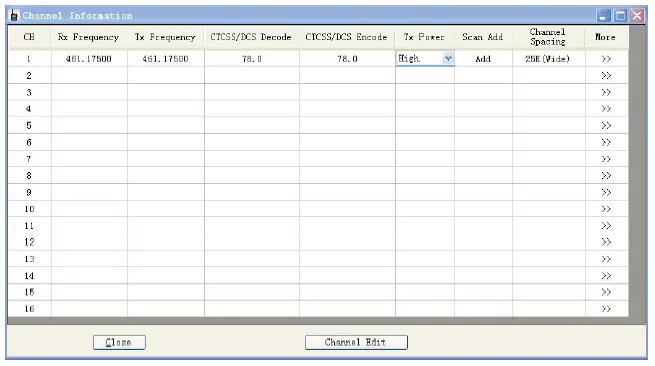
- Non-standard CTCSS self-programming
Non-standard CTCSS can be self-programmed by software a. First, setting up non-standard CTCSS QT signaling on the channel of the radio, it can be from 67.0 CTCSS to 254.1 CTCSS between any set of the QT signaling.
- Voice Prompt Selection
When “Voice Prompt Selection” is off, the transceiver
will not give a voice prompt. When “Voice Prompt Selection” is Chinese, the Chinese voice prompt is activated. When “Voice Prompt Selection” is English, English voice prompt is activated. - Battery Save Mode
To set “Battery Save Mode”, please use programmable software to set the selection.
Note:- Blank means the transceiver is not in battery save mode.
- Making Tick means the transceiver is not in battery save mode.
- Battery Voltage Prompt
Note: Battery voltage too low: when battery voltage is
low to a certain level, if “Voice Prompt Selection” is off, then the transceiver will prompt the “Beep Beep” sound every 15S. If “voice Prompt Selection” is on , then the transceiver will prompt “Please change battery”. If “Voice Prompt Selection” is selected on English / Chinese, press PTT button or use VOX function both do not work and the transceiver is prompting “Please change battery”, and also “Beep” sound until the release PTT button or the finished VOX function. - Busy Channel Lockout
If the BCLO function has been set, then if press the PTT button when receiving the signal, the transmitting is prohibited, and keep beeping until release PTT button. - High/Middle/Low Output Power Selection
This function is set to high power by default at the factory on this machine, users can choose high power, middle power or low power at present working channel by programmable software. - Wide/Narrow Bandwidth Selection
The default bandwidth is “Wide”, users can choose Wideband(25KHz) or Narrowband(12.50KHz) at present working channel. - VOX
1. VOX function frees your hand without pushing the PTT button for transmission. It uses voice to transmit, when voice stops then transmitting stops automatically. Users can use programmable software to ON/OFF this function .- When the VOX function is on at your transceiver channel. Speak to the microphone, the transceiver will transmit your voice automatically.
When stop talking, the transceiver will stop transmitting and wait for receiving. - When you are also wearing a headset.
To use the VOX function, the VOX gain must be adjusted. Setting VOX gains to let the transceiver to recognize the level of voice volume.
If microphone sensitivity is too high, then any noise around will let the transceiver starts transmitting automatically.
If microphone activities is too low, then the transceiver can not pick up your voice. So to make sure the communicable works, the VOX gain must be adjusted at a correct level.
Note: If the VOX function is on and the gain is at a high level, and the activities is also high, then if connect speaker/microphone to the transceiver, the enlarged receding signal through the speaker/microphone may cause the transceiver to start transmitting automatically.
- When the VOX function is on at your transceiver channel. Speak to the microphone, the transceiver will transmit your voice automatically.
- Frequency Read/Write Encryption
Please use programmable software to set this function - Scrambler Function
Users can set the scrambler function ON/OFF on every working channel. Scrambler function is one of the ways for information encryption. Scrambler is to restore the transmission spectrum through the spectrum to complete the change of the transmission spectrum, and to restore the signal after receiving it, so that achieve voice encryption finally. Each channel can select scrambler groups independently. - CTCSS/DCS
Users can set CTCSS/DCS signaling on the transceiver channel. Only when receiving same CTCSS/DCS signaling from another transceiver, the squelch will open. If same channels but with different CTCSS/DCS signaling for calling, then the squelch will not open, only green light is on. CTCSS/DCS codes are listed below:- C TCSS(50)
67.0 69.3 71.9 74.4 77.0 79.7 82.5 85.4 88.5 91.5 94.8 97.4 100.0 103.5 107.2 110.9 114.8 118.8 123.0 127.3 131.8 136.5 141.3 146.2 151.4 156.7 159.8 162.2 165.5 167.9 171.3 173.8 177.3 179.9 183.5 186.2 189.9 192.8 196.6 199.5 203.5 206.5 210.7 218.1 225.7 229.1 233.6 241.8 250.3 254.1 - DCS(116*20)
D017N D023N D025N D026N D031N D032N D036N D043N D047N D050N D051N D053N D054N D055N D065N D071N D072N D073N D074N D114N D115N D116N D122N D125N D131N D132N D134N D135N D143N D145N D152N D155N D156N D162N D165N D172N D174N D205N D212N D217N D223N D225N D226N D243N D244N D245N D246N D251N D252N D254N D255N D261N D263N D265N D266N D271N D274N D305N D306N D311N D315N D325N D331N D332N D343N D345N D346N D351N D356N D364N D365N D371N D411N D412N D413N D423N D425N D431N D432N D445N D446N D452N D454N D455N D462N D464N D465N D466N D503N D506N D516N D523N D526N D532N D534N D546N D565N D606N D612N D624N D627N D631N D632N D645N D654N D662N D664N D703N D712N D723N D731N D732N D734N D743N D754N D765N - DCS(116*2)
D017I D023I D025I D026I D031I D032I D036I D043I D047I D050I D051I D053I D054I D055I D065I D071I D072I D073I D074I D114I D115I D116I D122I D125I D131I D132I D134I D135I D143I D145I D152I D155I D156I D162I D165I D172I D174I D205I D212I D217I D223I D225I D226I D243I D244I D245I D246I D251I D252I D254I D255I D261I D263I D265I D266I D271I D274I D305I D306I D311I D315I D325I D331I D332I D343I D345I D346I D351I D356I D364I D365I D371I D411I D412I D413I D423I D425I D431I D432I D445I D446I D452I D454I D455I D462I D464I D465I D466I D503I D506I D516I D523I D526I D532I D534I D546I D565I D606I D612I D624I D627I D631I D632I D645I D654I D662I D664I D703I D712I D723I D731I D732I D734I D743I D754I D765I
- C TCSS(50)
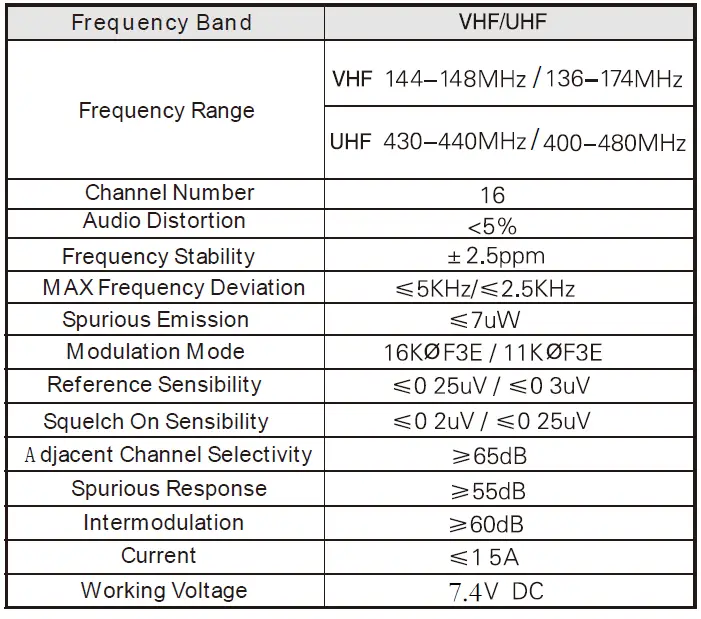
TECHNICAL SPECIFICATION
RF ENERGY EXPOSURE AND PRODUCT SAFETY GUIDE FOR PORTABLE TWO-WAY RADIOS
ATTENTION! Before using this radio, read this guide which contains important operating instructions for safe usage and rf energy awareness and control for compliance with applicable standards and regulations. This two-way radio uses electromagnetic energy in the radio frequency (RF) spectrum to provide communications between two or more users over a distance. RF energy, which when used improperly, can cause biological damage. All Retevis two-way radios are designed, manufactured, and tested to ensure they meet government-established RF exposure levels. In addition, manufacturers also recommend specific operating instructions to users of two-way radios. These instructions are important because they inform users about RF energy exposure and provide simple procedures on how to control it. Please refer to the following websites for more information on what RF energy exposure is and how to control your exposure to assure compliance with established RF exposure limits:http://www.who.int/en/
Local Government Regulations
When two-way radios are used as a consequence of employment, the Local Government Regulations require users to be fully aware of and able to control their exposure to meet occupational requirements. Exposure awareness can be facilitated by the use of a product label directing users to specific user awareness information. Your Retevis two-way radio has a RF Exposure Product Label. Also, your Retevis user manual, or separate safety booklet includes information and operating instructions required to control your RF exposure and to satisfy compliance requirements.
Radio License Governments keep the radios in classification, business two-way radios operate on radio frequencies that are regulated by the local radio management departments (FCC, ISED, OFCOM, ANFR, BFTK, Bundesnetzagentur…).To transmit on these frequencies, you are required to have a license issued by them. For the detailed classification and the use of your two radios, please contact the local government radio management departments. Use of this radio outside the country where it was intended to be distributed is subject to government regulations and maybe prohibited.
Unauthorized modification and adjustment Changes or modifications not expressly approved by the party responsible for compliance may void the user’s authority granted by the local government radio management departments to operate this radio and should not be made. To comply with the corresponding requirements, transmitter adjustments should be made only by or under the supervision of a person certified as technically qualified to perform transmitter maintenance and repairs in the private land mobile and fixed services as certified by an organization representative of the user of those services. Replacement of any transmitter component (crystal, semiconductor, etc.) not authorized by the local government radio management departments equipment authorization for this radio could violate the rules.
FCC Requirements
This device complies with part 15 of the FCC Rules. Operation is subject to the condition that this device does not cause harmful interference. (Licensed radios are applicable); This device complies with part 15 of the FCC Rules. Operation is subject to the following two conditions: (Other devices are applicable)
- This device may not cause harmful interference, and
- this device must accept any interference received, including interference that may cause undesired operation.
NOTE
- This equipment has been tested and found to comply with the limits for a Class A digital device, pursuant to part 15 of the FCC Rules. These limits are designed to provide reasonable protection against harmful interference when the equipment is operated in a commercial environment. This equipment generates, uses, and can radiate radio frequency energy and, if not installed and used in accordance with the instruction manual, may cause harmful interference to radio communications. Operation of this equipment in a residential area is likely to cause harmful interference in which case the user will be required to correct the interference at his own expense.
- This equipment has been tested and found to comply with the limits for a Class B digital device, pursuant to part 15 of the FCC Rules. These limits are designed to provide reasonable protection against harmful interference in a residential installation. This equipment generates, uses, and can radiate radio frequency energy and, if not installed and used in accordance with the instructions, may cause harmful interference to radio communications. However, there is no guarantee that interference will not occur in a particular installation. If this equipment does cause harmful interference to radio or television reception, which can be determined by turning the equipment offand on, the user is encouraged to try to correct the interference by one or more of the following measures:
- Reorient or relocate the receiving antenna.
- Increase the separation between the equipment and receiver.
- Connect the equipment into an outlet on a circuit different from that to which the receiver is connected.
- Consult the dealer or an experienced radio/TV technician for help.
CE Requirements
(Simple EU declaration of conformity) Shenzhen Retevis Technology Co., Ltd. declares that the radio equipment type is in compliance with the essential requirements and other relevant provisions of RED Directive 2014/53/EU and the ROHS Directive 2011/65/EU and the WEEE Directive 2012/19/EU; the full text of the EU declaration of conformity is available at the following internet address: www.retevis.com.
Restriction Information This product can be used in EU countries and regions, including Belgium (BE), Bulgaria (BG), Czech Republic (CZ), Denmark (DK), Germany (DE), Estonia (EE), Ireland (IE), Greece (EL), Spain (ES), France (FR), Croatia (HR), Italy (IT), Cyprus (CY), Latvia (LV), Lithuania (LT), Luxembourg (LU), Hungary (HU), Malta (MT), Netherlands (NL), Austria (AT), Poland (PL), Portugal (PT), Romania (RO), Slovenia (SI), Slovakia (SK), Finland (FI), Sweden (SE) and United Kingdom (UK). For the warning information of the frequency restriction, please refer to the package or manual section.
Disposal The crossed-out wheeled bin symbol on your product, literature, or packaging reminds you that in the European Union, all electrical and electronic products, batteries, and accumulators (rechargeable batteries) must be taken to designated collection locations at the end of their working life. Do not dispose of these products as unsorted municipal waste. Dispose of them according to the laws in your area.
IC Requirements License-exempt radio apparatus This device contains license-exempt transmitter(s)/receiver(s) that comply with Innovation, Science and Economic Development Canada’s license-exempt RSS(s). Operation is subject to the following two conditions:
- This device may not cause interference.
- This device must accept any interference, including interference that may cause undesired operation of the device.
RF Exposure Information
- DO NOT operate the radio without a proper antenna attached, as this may damage the radio and may also cause you to exceed RF exposure limits. A proper antenna is an antenna supplied with this radio by the manufacturer or an antenna specifically authorized by the manufacturer for use with this radio, and the antenna gain shall not exceed the specified gain by the manufacturer declared.
- DO NOT transmit for more than 50% of total radio use time, more than 50% of the time can cause RF exposure compliance requirements to be exceeded.
- During transmissions, your radio generates RF energy that can possibly cause interference with other devices or systems. To avoid such interference, turn off the radio in areas where signs are posted to do so.
- DO NOT operate the transmitter in areas that are sensitive to electromagnetic radiation such as hospitals, aircraft, and blasting sites.
- Portable Device, this transmitter may operate with the antenna(s) documented in this filing in Push-to-Talk and body-worn configurations. RF exposure compliance is limited to the specific belt-clip and accessory configurations as documented in this filing and the separation distance between user and the device or its antenna shall be at least 2.5 cm.
- Mobile Device, during operation, the separation distance between the user and the antenna is subject to actual regulations, this separation distance will ensure that there is sufficient distance from a properly installed externally-mounted antenna to satisfy the RF exposure requirements.
- Occupational/Controlled Radio, this radio is designed for and classified as“ Occupational/Controlled Use Only”, meaning it must be used only during the course of employment by individuals aware of the hazards, and the ways to minimize such hazards; NOT intended for use in a General population/uncontrolled environment.
- General population/uncontrolled Radio, this radio is designed for and classified as“ General population/uncontrolled Use”.
RF Exposure Compliance and Control Guidelines and Operating Instructions To control your exposure and ensure compliance with the occupational/controlled environment exposure limits, always adhere to the following procedures.
Guidelines
- User awareness instructions should accompany the device when transferred to other users.
- Do not use this device if the operational requirements described herein are not met.
Operating Instructions
- Transmit no more than the rated duty factor of 50% of the time. To Transmit (Talk), push the Push to Talk (PTT) button. To receive calls (listen), release the PTT button. Transmitting 50% of the time, or less, is important because the radio generates measurable RF energy exposure only when transmitting in terms of measuring for standards compliance.
- Transmit only when people outside the vehicle are at least the recommended minimum lateral distance away from a properly installed according to installation instructions, externally mounted antenna.
- When operating in front of the face, worn on the body, always place the radio in a Retevis-approved clip, holder, holster, case, or body harness for this product. Using approved body-worn accessories is important because the use of Non-Retevis approved accessories may result in exposure levels, which exceed the IEEE/ICNIRP RF exposure limits.
- Hand-held Mode Hold the radio in a vertical position with the microphone (and other parts of the radio including the antenna) at least 2.5 cm (one inch) away from the nose or lips. The antenna should be kept away from the eyes. Keeping the radio at a proper distance is important as RF exposure decreases with increasing distance from the antenna.

- Phone Mode When placing or receiving a phone call, hold your radio product as you would a wireless telephone. Speak directly into the microphone.
Electromagnetic Interference/Compatibility
NOTE: Nearly every electronic device is susceptible to electromagnetic interference (EMI) if inadequately shielded, designed, or otherwise configured for electromagnetic compatibility. Avoid Choking Hazard 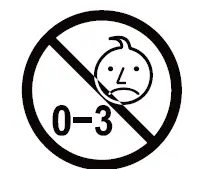 Small Parts. Not for children under 3 years.
Turn off your radio power in the following conditions
- Turn off your radio before removing (installing) a battery or accessory or when charging the battery.
- Turn off your radio when you are in a potentially hazardous environment: Near electrical blasting caps, in a blasting area, in explosive atmospheres (inflammable gas, dust particles, metallic powders, grain powders, etc.).
- Turn off your radio while taking on fuel or while parked at gasoline service stations. To avoid electromagnetic interference and/or compatibility conflicts
- Turn off your radio in any facility where posted notices instruct you to do so, hospitals or health care facilities (Pacemakers, Hearing Aids and Other Medical Devices) may be using equipment that is sensitive to external RF energy.
- Turn off your radio when on board an aircraft. Any use of a radio must be in accordance with applicable regulations per airline crew instructions.
Protect your hearing
- Use the lowest volume necessary to do your job.
- Turn up the volume only if you are in noisy surroundings.
- Turn down the volume before adding headset or earpiece.
- Limit the amount of time you use headsets or earpieces at high volume.
- When using the radio without a headset orearpiece, do not place the radio’s speaker directly against your ear
- Use careful with the earphone maybe possible excessive sound pressure from earphones and headphones can cause hearing loss Note: Exposure to loud noises from any source for extended periods of time may temporarily or permanently affect your hearing. The louder the radio’s volume, the less time is required before your hearing could be affected. Hearing damage from loud noise is sometimes undetectable at first and can have a cumulative effect.
Avoid Burns
Antennas
- Do not use any portable radio that has a damaged antenna. If a damaged antenna comes into contact with the skin when the radio is in use, a minor burn can result. Batteries (If appropriate)
- When the conductive material such as jewelry, keys or chains touch exposed terminals of the batteries, may complete an electrical circuit (short circuit the battery) and become hot to cause bodily injury such as burns. Exercise care in handling any battery, particularly when placing it inside a pocket, purse or other container with metal objects Long transmission
- When the transceiver is used for long transmissions, the radiator and chassis will become hot.
Safety Operation
Forbid
- Do not use charger outdoors or in moist environments, use only in dry locations/conditions.
- Do not disassemble the charger, that may result in risk of electrical shock or fire.
- Do not operate the charger if it has been broken or damaged in any way.
- Do not place a portable radio in the area over an air bag or in the air bag deployment area. The radio may be propelled with great force and cause serious injury to occupants of the vehicle when the air bag inflates.
To reduce risk
- Pull by the plug rather than the cord when disconnecting the charger.
- unplug the charger from the AC outlet before attempting any maintenance or cleaning.
- contact Retevis for assistance regarding repairs and service.
- the adapter shall be installed near the equipment and shall be easily accessible.
Approced Accessories
- This radio meets the RF exposure guidelines when used with the Retevis accessories supplied or designated for the product. Use of other accessories may not ensure compliance with the RF exposure guidelines and may violate regulations.
- For a list of Retevis-approved accessories for your radio model, visit the following website: http://www.Retevis.com
Guarantee
Model Number:—————
Serial Number:——————
Purchasing Date:—————
Dealer:—————
User’s Name:—————
Country:—————
Post Code:—————
Telephone:—————
Telephone:—————
Address:—————
Email:—————
Remarks:—————
Shenzhen Ysair Technology Co., LTD 6 / F, Building 6, Yunli intelligent park, No. 3, Changfa Middle Road, Yangmei community, Bantian street, Longgang District, Shenzhen, China Web: www.retevis.com
E-mail: [email protected]
Facebook: facebook.com/retevis
FAQS
Can you use a walkie-talkie while charging?
Most manufacturers of consumer radios require you to turn the radios off while charging them in your vehicle. This means that you generally will not be able to use the radios to receive and transmit while they are charging.
How do you maintain a radio?
Store your radio in a cool, dry place (ideally at room temperature). Keep your radio out of direct sunlight and extreme temperatures. When you are storing your radio, make sure it is turned off and the batteries are removed.
How long do walkie-talkies stay charged?
Conclusion. Walkie-talkie batteries last, on average, 18 to 24 months.
Do walkie-talkies run out of battery?
Most two-way radios come with rechargeable batteries that may be charged, used and recharged many times before becoming exhausted. There are many factors that influence how long a two-way battery will last. On average, a two-way radio battery will last between 18 and 24 months.
Can all two-way radios communicate?
In summary, any two or more brands of walkie-talkie CAN be made to work with each other, provided that they are on the same frequency band, AND provided that they are or can be programmed to use the same frequencies.
How far do two-way radios work?
Many consumer radios advertise a 30-mile range, but the truth is that most basic consumer radios will not provide anything near this distance. On average, a standard two-way radio is capable of communicating around half of a mile to 2 miles.
What is a 2 way radio good for?
And though they’re great for staying in communication on the road (for trucks, RVs, and cars too), you don’t need to be driving cross-country to get the most out of two-way radio. These are ideal for taking hiking, camping or anywhere you may need to send out an SOS.
How long does a 2-way radio last?
On average, most two-way radio batteries last 18 to 24 months – all dependent on the quality of the battery and how you use your radio. Rechargeable batteries, of course, can be used over and over again.
How long does a wind up radio last?
Inexpensive, and easy to use, this device will give you around seven hours of playback after a full charge. Like the Duronic device above, there are three charging options available for this radio, including solar panels, a wind up crank, and a USB cable for mains charging.
How long do radio batteries last?
On average, most Lithium-ion and Lithium-Ion Polymer radio batteries will provide enough charging cycles to last around 18 to 24 months, depending on how the radio is used, cared for, and charged.
What kind of batteries do walkie talkies use?
Lower-end FRS/GMRS walkie-talkies might use AA or AAA batteries, but most two-way radios use one of 3 types of batteries: NiCad, NiMH or Li-Ion. Ni-Cad or nickel-cadmium batteries have been around the longest.
How many walkie-talkies can be on the same channel?
Two way radios are able to communicate with each other when they are on the same radio frequency. For this reason, there is no limit to the number of walkie-talkies that can connect together, providing they are sharing a frequency.
How far can RF signal travel?
Thus the typical ranges with around 400 MHz frequency range with 1 W transmitter power are up to ~30 kilometers and up to ~80 kilometers with 10 W transmitter power. See a sample picture of an RF link functional factors at the end of this document.