
Coin Changer
CC6100 series
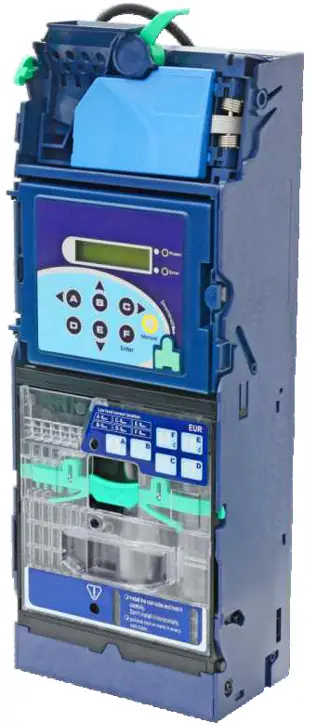
Quick Start Guide
International Currency Technologies Corp.
Use of Materials Limitations
International Currency Technologies Corporation (ICT) all rights reserved.
All materials contained are the copyrighted property of ICT.
All trademarks, service marks, and trade names are proprietary to ICT.
ICT reserves the right at all times to disclose or to modify any information as
ICT deems necessary to satisfy any applicable law, regulation, legal process, or governmental request, or to edit, refuse to post or to remove any information or materials, in whole or in part, in ICT’s sole discretion.
Before use
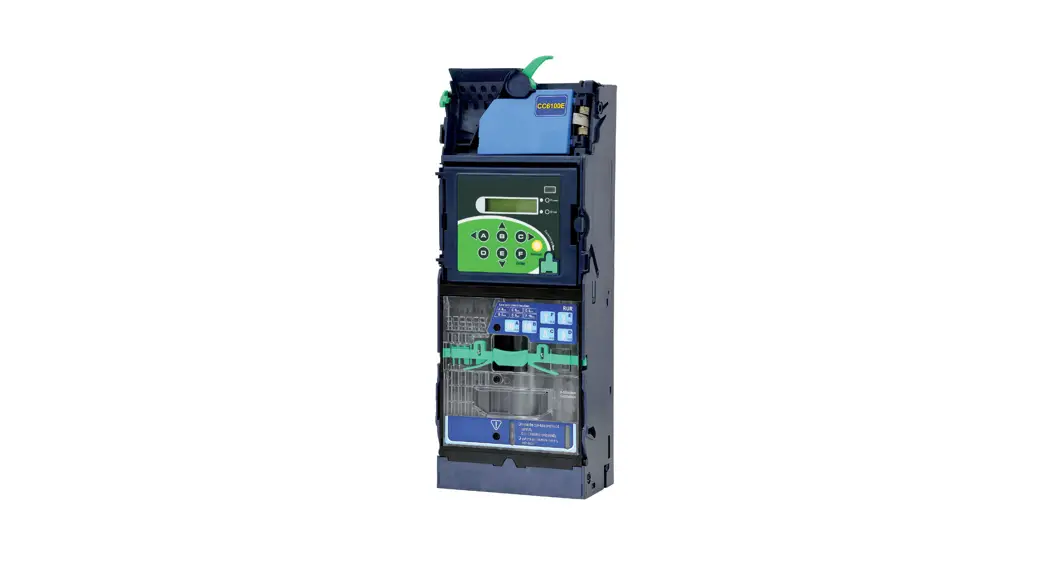
Dear Valuable customer, thank you for purchasing CC6100. CC6100 features six modular coin tubes to provide the highest level of flexibility in managing payout combinations. Japan Standard Communication Interface (JPSTD), MDB, and Executive interface are available, to support multiple applications.
Package Contents:
- CC6100 with one of the following wire harness
WEL-RCC23 Power and Data Communication cable for MDB.
WEL-RCC24 Power and Data Communication cable for JPSTD.
WEL-RCC72 & WEL-RCC54 Power and Data Communication cable for CC6100 Executive & MDB. - Quick Start Guide
CC6100 Installation instructions can be downloaded at: www.ictgroup.com.tw
Select “Support” from the menu, then select “Manual Download”.
Installation
Attention!! Prior to installation, please remove the coin changer from the carton and inspect for damages.
Attention!! Turn off VMC Power during installation-IMPORTANT!!!
Warning!! Do not plug both MDB and Executive connector to VMC board simultaneously!! It may cause damage to the VMC board.
Device Mounting Instruction
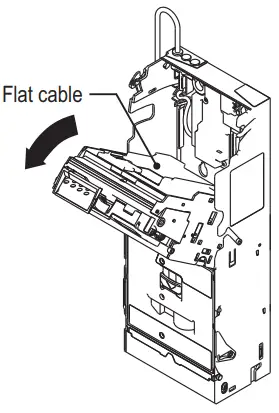
- Press the green hook at the left side of the coin changer and tilt the upper module.
- Unplug the flat cable to separate the upper module from the device.
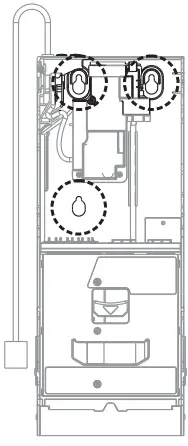
- Loosen the 3 mounting screws with 2 or 3 turns. (do not unscrew these completely) Lift the coin changer to mount inside the vending machine.

- Tighten the screws and place the upper module back to the device.
- Plug the flat cable back to the upper module then close the upper module till it is firmly fixed by the green hook.
The plug device power and communication cable to the vending machine.
Tube Cassette Refill Instruction
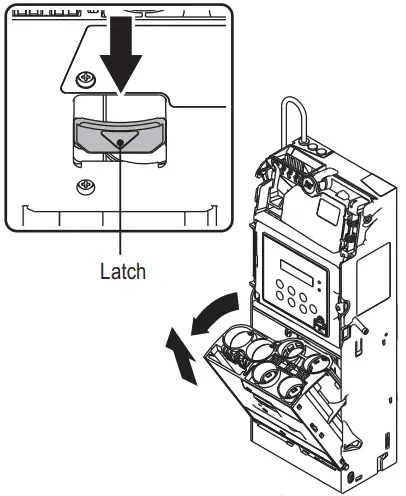
- Press the green cassette fixed latch to pull out the cassette at an upwardly slanted angle.
- Refill coins into tube cassette and ensure that the coins enter the corresponding tubes and are flatly placed. Then place the tubing cassette back to Changer.
*You may choose coin refill mode to fill coins without an open tube cassette.
Installation Checklist
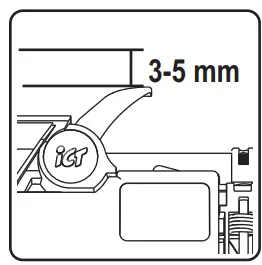
Check that there is a 3 to 5 mm gap between the coin changer return lever and the vending machine return mechanism.
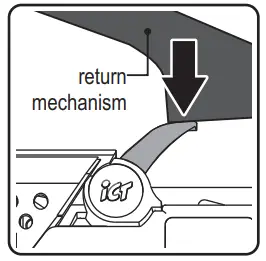
Check that when vending machine return lever has been pressed and released, the reject rate of the coin recognition module can be opened and closed properly.
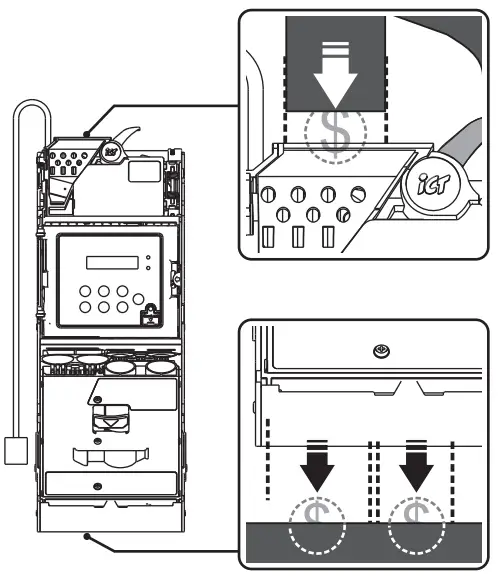
Check that the coin insertion, coin return box, and coin storage box channels of the vending machine line up with the corresponding slots of the coin changer. If the slot has not been lined up, please adjust accordingly.
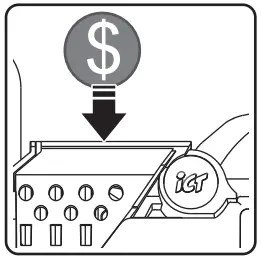
Insert a coin to check whether it can pass through the coin changer successfully. Please ensure that there is no interference around the coin recognition module.
Initialization Checklist
While the vending machine is in an energized state, please DO NOT plug/unplug any wires on CC6100.
Please ensure that there are no interferences between the connected wires, the coin insert, and return device, and the door of the automatic vending machine. After the inspections are complete, then turn on the vending machine power.

Check the number of coins in each coin tube is above the minimum required level. Please refer to the sticker on the tubing cassette for minimum level information. (The coin changer would not work correctly without enough coins in the coin tubes.)
After refilling of tube cassette, the coin changer will detect the adequate coin quantity within a few seconds.
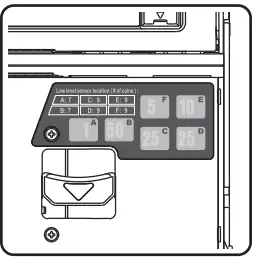
Dispense at least 1 coin from each coin tube to ensure that the dispensed coins fall into the coin return box of the vending machine.
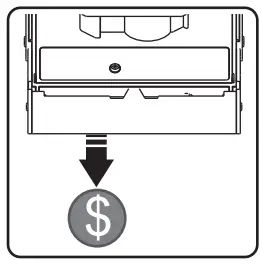
Wiring
Wiring for CC6100 JPSTD Model or MDB Model

ICT Coin Changer provides the MDB or JPSTD cable only. Please let your sales representative know about your vending machine needs.
Wiring for CC6100 Executive & MDB Model

Warning!! Do not plug both MDB and Executive connecter to VMC board simultaneously!! It may cause damage to the VMC board.
LCM Module Description
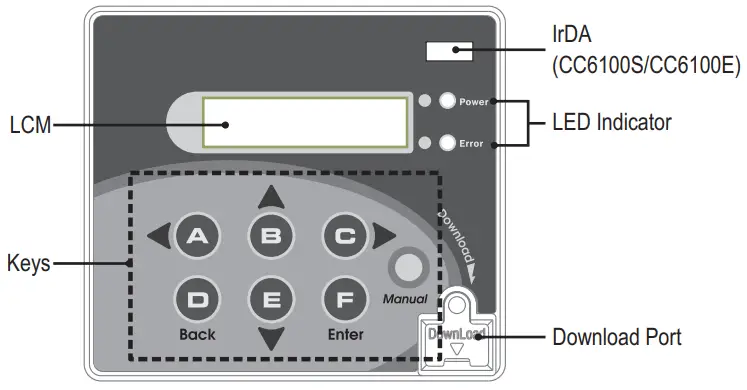
| KEY | Function |
| A | Tube A, move left |
| B | Tube B, move upward |
| C | Tube C, move right |
| D | Tube D, back |
| E | Tube E, move downward |
| F | Tube F, enter |
| Manual | Enter the main menu |
| Operation functions | |||
| Code | LCM Menu Display | Function Description | |
| 100 | Refill Coin | Coin Refill Function by Coin Insertion under Cash Flow Mode. | Accessible without password. Cash Flow Mode only. |
| 101 | Total In/Out | Check the Total Coin PayIn and PayOut Value Counter. | Accessible without password |
| 115 | Clear Tube Count | Clear Counting Memory of All Coin Tube Inventory. | Accessible without password |
| 129 | Language | Set language. | Accessible without password |
To access all menu functions requires password verification. Press “D” 3 times under the main menu to open the password input page. Default Password is ABCD. See next page for complete menu functions.
Setting Functions | |||
Code | LCM Display | Function Description | |
| 102 | Reset Records | Clear the Total Coin PayIn and PayOut Value Record. | |
| 103 | Accept/ Reject Coin Switch | Set Accept or Reject to Coin Denominations. | |
| 104 | Tube Open/ Close Switch | Set Open or Close to Coin Tubes. | |
| 107 | Configure Cash Float | Set Cash Float Configuration for Various Coin Denominations. | Cash Flow Mode only |
| 108 | Activate Cash Float | Set Cash Float Type for Various Coin Denominations. | Cash Flow Mode only |
| 109 | Check Current Cash Float | Check Current Cash Float of Various Coin Denominations. | Cash Flow Mode only |
| 110 | Change Mgmt. | Set the Change Return Mode. | |
| 111 | Idle Display | Set the Standby LCM Display Mode. | |
| 112 | BA Type Setting | Set the BA Interface. | |
| 113 | Default Setting | Restore to Default Factory Settings. | |
| 116 | Cassette Type | Coin Tube Configuration Mode. | Special Function |
| 117 | Error Info | Display Error Message Records. | |
| 118 | Bill(s) per Transaction | Set the Bill Acceptance Limitation for the BA. | ICT BA only |
| 119 | CashFloat Mode | Set Coin Tube Inventory Counting Mode. | Cash Flow Mode only |
| 120 | Set ID | Set Customer & Machine Number. | |
| 121 | Coin->CashBox Setting | Set Coin Acceptance to Cash Box Condition. | |
| 122 | Expansion Escrow Setting | Set Escrow for NTD 50. | Special Function, only for NTD |
| 123 | Sensor Inventory Adjustment | Detect Tube Inventory. | |
| 124 | Reserved Coin | Set Reserved Coin Function. | |
| 125 | Accessibility options | Set LCM accessibility under door-switch status and password security. | |
| 126 | Refill Coin Inventory | Refill Coin Inventory function by inserting coins into tube cassette directly. | |
| 127 | Residual Credit | Credit should remain on VMC. | |
| 128 | Token Learning Mode | Token learning mode. | For MDB & Executive |
| 130 | Reject Lever Setting | Set no refund after inserting payment. | For MDB & Executive |
| 131 | Acceptance limit For Changer | Set Credit Acceptance Limit. | Only MDB for KRW |
| 132 | Maximum for Insert Q’TY | Set limitation of coins in a single transaction. | Only MDB for KRW |
| 133 | Decimal and Scaling | Set Decimal point and Scaling Factor. | For MDB & Executive |
| 134 | Currency Code | Setting Currency Code. | |
| 135 | Error Report | Setting Error Report Function. | |
| 136 | Payout Method | Setting Payout Method(Level 2). | |
| 137 | Refill Option | Setting Refill Option. | |
| 138 | Channel sequence | Setting Channel sequence. | |
| 139 | IDR credit | Setting Indonesia Credit. | Only for Indonesia |
| 140 | EVA-DTS ID data | Setting EVA-DTS ID. | |
| 141 | Bill Escrow Return | Setting Bill Escrow Return. | |
| 142 | Sorting Module Testing | Setting Tube Test Mode. | |
| 143 | Tube Detection(after the sale) | Setting Tube Detection Function. | Only for Russia |
| 144 | Overpay | Set Overpay. | Only for UAH, USD, EUR |
| 146 | Resend Credit | Setting Resend Credit Function. | |
| 147 | RC Settings | Setting Recycle Function. | |
| 148 | VMC Reset TO VMC | Setting VMC reset Function. | |
| 149 | Refill Control(Full Tube) | Setting Refill Control. | |
| 150 | Low inventory report(real) | Setting Low inventory report. | Only for SGD, MYR, THB |
| 151 | Secure mode for THB coin | Setting Secure mode. | Only for THB |
| 152 | Fuji dispensing coin mode | Setting Fuji dispensing coin mode. | Only for THB |
| 153 | RFID deduction amount | RFID deduction amount setting mode. | JPSTD-TWD and THB |
| 154 | RS232 mode | RS232 mode setting. | |
| 156 | Set give changes order | TWD set gives changes to order. | Only for TWD |
| 157 | VMC support value | Set up VMC support value. | |
| 158 | Set up and write each tube stock of coins | THB set up and write each tube stock of coins. | Only for THB |
| 160 | JPY Amount display | JPY Amount display options | Only for JPY |
| 161 | NTD 50 special entry condition | NTD 50 special entry condition setting | Only for TWD |
Executive Setting Functions | |||
Code | LCM Display | Function Description | |
| 200 | Sell Mode | Set Single Vend or Multi Vend. | Executive only |
| 201 | Price Display | Set Price Display on VMC. | Executive only |
| 202 | Product Price | Set Product Price Holding by Changer. | Executive only |
| 203 | Price Holding | Set Price Holding by Changer or VMC. | Executive only |
| 204 | 2nd Price for Cashless | Set 2nd price for cashless function on or off. | Executive only |
| 205 | Enable Bill Acceptance | Set BA enable with or without e-key. | Executive only |
| 207 | Residual Credit | Setup residual credit. | Executive only |
| 208 | Acceptance limit For Changer | Set Credit Acceptance Limit. | Executive only |
| 209 | Credit limit For Cashless | Set Credit limit for cashless. | Executive only |
| 210 | Bill(s) per Transaction | Set BA limitation per transactio. | Executive only |
| 211 | Exact Change Notice | Set exact change notice on display. | Executive only |
| 212 | Exact Rate | Set Exchange Rate. | Executive only |
| 213 | Overpay | Set Overpay. | Executive only |
DIP Switch Setting
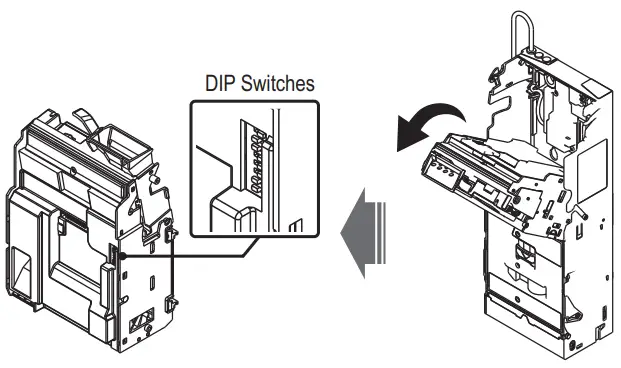
DIP Switch Setting for JPSTD, MDB
| FUNCTION | SW1 | SW2 | SW3 | SW4 | SW5 | SW6 | SW7 | SW8 |
| High anti-counterfeiting (1st coin value) | ON | |||||||
| High acceptance (1st coin value) | OFF | |||||||
| High anti-counterfeiting (2nd coin value) | ON | |||||||
| High acceptance (2nd coin value) | OFF | |||||||
| High anti-counterfeiting (3rd coin value) | ON | |||||||
| High acceptance (3rd coin value) | OFF | |||||||
| High anti-counterfeiting (4th coin value) | ON | |||||||
| High acceptance (4th coin value) | OFF | |||||||
| Reserved | ON | |||||||
| Reserved | OFF | |||||||
| Reserved | ON | |||||||
| Reserved | OFF | |||||||
| Calibration Mode | ON | |||||||
| Reserved | OFF | |||||||
| Reserved | ON | |||||||
| Reserved | OFF | |||||||
Note:
- SW3-ON, High anti-counterfeiting: CNY $1, RUB $5, TWD $50
- SW4-ON, High anti-counterfeiting: RUB $10
- Acceptance rate setting, SW1 to SW4, is limited to some regions or denominations.
Please contact your local dealer for further information.
DIP Switch Setting for EXECUTIVE
| FUNCTION | SW1 | SW2 | SW3 | SW4 | SW5 | SW6 | SW7 | SW8 |
| High anti-counterfeiting (1st coin value) | ON | |||||||
| High acceptance (1st coin value) | OFF | |||||||
| High anti-counterfeiting (2nd coin value) | ON | |||||||
| High acceptance (2nd coin value) | OFF | |||||||
| High anti-counterfeiting (3rd coin value) | ON | |||||||
| High acceptance (3rd coin value) | OFF | |||||||
| High anti-counterfeiting (4th coin value) | ON | |||||||
| High acceptance (4th coin value) | OFF | |||||||
| Reserved (MDB) | ON | |||||||
| Reserved (Executive) | OFF | |||||||
| Reserved | ON | |||||||
| Reserved | OFF | |||||||
| Calibration Mode | ON | |||||||
| Reserved | OFF | |||||||
| Reserved | ON | |||||||
| Reserved | OFF | |||||||
Note:
- SW3-ON, High anti-counterfeiting: CNY $1, RUB $5, TWD $50
- SW4-ON, High anti-counterfeiting: RUB $10
- Acceptance rate setting, SW1 to SW4, is limited to some regions or denominations.
Please contact your local dealer for further information.
DIP Switch Setting for CC6100SA
| FUNCTION | SW1 | SW2 | SW3 | SW4 | SW5 | SW6 | SW7 | SW8 |
| High anti-counterfeiting (1st coin value) | ON | |||||||
| High acceptance (1st coin value) | OFF | |||||||
| High anti-counterfeiting (2nd coin value) | ON | |||||||
| High acceptance (2nd coin value) | OFF | |||||||
| High anti-counterfeiting (3rd coin value) | ON | |||||||
| High acceptance (3rd coin value) | OFF | |||||||
| High anti-counterfeiting (4th coin value) | ON | |||||||
| High acceptance (4th coin value) | OFF | |||||||
| Calibration Mode | ON | |||||||
| Reserved | OFF | |||||||
| Reserved | ON | |||||||
| Reserved | OFF | |||||||
| Reserved | ON | |||||||
| Reserved | OFF | |||||||
| Reserved (Turn off the sleep mode) | ON | |||||||
| Reserved (Turn on the sleep mode) | OFF | |||||||
Note:
- SW3-ON, High anti-counterfeiting: CNY $1, RUB $5, TWD $50
- SW4-ON, High anti-counterfeiting: RUB $10
- Acceptance rate setting, SW1 to SW4, is limited to some regions or denominations.
Please contact your local dealer for further information.
Error Message
| Code | Cause | LED |
| E10 | LCM Panel Open | 5 Red + 2 Red |
| E11 | Checksum Error | Red Light |
| E12 | The signal from the coin base was not received when the power was turned on. | Red Light |
| E13 | Two seconds after activation, the SYSTEM did not wait for the READY signal from the DEVICE and jumped to the exception. | 1 Red |
| Two seconds after a transaction, the SYSTEM did not wait for the READY signal triggered by the DEVICE. | ||
| E14 | Coil 1 is damaged. | 3 Red + 1 Red |
| E15 | Coil 2 is damaged. | 3 Red + 2 Red |
| E16 | Coil 3 is damaged. | 3 Red + 3 Red |
| E17 | Low-level LED is damaged. | 3 Red + 5 Red |
| E18 | Coin separator sensor problem. | 3 Red + 4 Red |
| E19 | The deck is open for over 30 seconds. | 5 Red + 1 Red |
| E20 | Both the first and second group motors cannot be positioned. | 7 Red |
| E21 | The first motor group cannot be positioned. The first motor group might be damaged, coins or foreign objects might have caused the motor to stuck, coins are stuck in the coin tube, or the semicircle disk has derailed. | None |
| E22 | The second motor group cannot be positioned. The second motor group might be damaged, coins or foreign objects might have caused the motor to stuck, coins are stuck in the coin tube, or the semicircle disk has derailed. | None |
| E23 | Broke away or incorrectly positioned coin tubes. | 5 Red |
| E24 | Coins got stuck at the coin separation area or the coin tube opening twice in a row, causing the HI Level Sensor to fail to detect the coin twice in a row. | 6 Red + 4 Red |
| E25 | “A” Tube Low Level = empty, HI Level = full at setup. | None |
| E26 | “B” Tube Low Level = empty, HI Level = full at setup. | None |
| E27 | “C” Tube Low Level = empty, HI Level = full at setup. | None |
| E28 | “D” Tube Low Level = empty, HI Level = full at setup. | None |
| E29 | “E” Tube Low Level = empty, HI Level = full at setup. | None |
| E30 | “F” Tube Low Level = empty, HI Level = full at setup. | None |
| E31 | Barcode Reader error. | None |
| E32 | The three sets of LEDs used to distinguish Coin size have been damaged. | None |
| E33 | Recognition Ver Error | None |
| E35 | Normal Mode Fished. Only for THB | None |
| E36 | Security Mode-Locked. Only for THB | None |
| E37 | Security Mode Listed. Only for THB | None |
| E38 | Coin Calibration fail. Only for THB | None |
| None | The “Inhibit” signal is transmitted by the interface. | 2 Red |
Taiwan
International Currency Technologies Corporation
No.28, Ln. 15, Sec. 6, Minquan E. Rd., Neihu Dist., Taipei City 114, [email protected] (For Sales)
[email protected] (For Customer Service)
Website: www.ictgroup.com.tw
© 2013 International Currency Technologies Corporation
V. 5.0 Part Number: H6491D-R
 ICT - International Currency Technologies