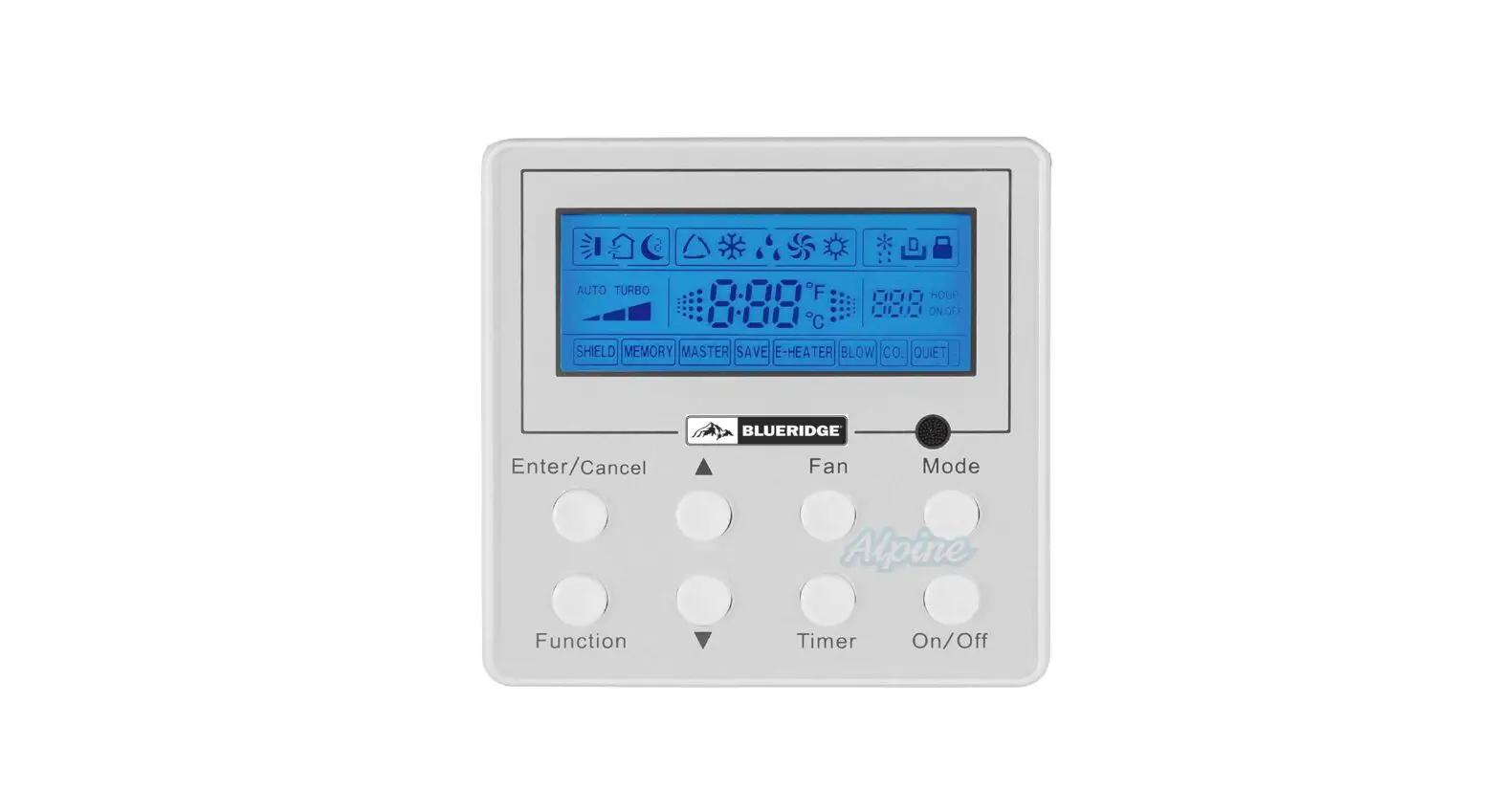


Owner’s Manual
Original Instructions
Wired Remote Controller XK19
Compatible Models:
BMKH12MCC
BMKH18MCC
BMKH09MFCC
BMKH12MFCC
BMKH18MFCC
BMKH24MFCC
Thank you for choosing our product.
Please read this Owner’s Manual carefully before operation and retain it for future reference.
If you have lost the Owner’s Manual, please contact the local agent at 800-865-5931 or visit www.alpinehomeair.com.
User Notice
- Never install the wired remote controller in the moist circumstance or expose it directly under the sunlight.
- Never beat, throw, and frequently disassemble the wired remote controller and the wireless remote controller.
- Never operate the wired remote controller and the wireless remote controller with wet hands.
- Do not remove or install the wired controller by yourself. If there is any question, please contact our after-sales service center.
- The wired controller is a general model, applicable for several kinds of units. Some functions of the wired controller are not available for certain kinds of units, more details please refer to the owner’s manual of unit. The setting of such unavailable function will not affect unit’s operation.
- The wired controller is universal. The remote receiver is either in the indoor unit or in the wired controller. Please refer to the specific models.
- As for some indoor units connected with the wired controller, if use the remote controller whose set temperature is adjustable under auto mode, the wired controller will receive the mode signal of remote controller, rather than its set temperature under the auto mode.
- The wired controller is the universal component. When indoor unit has connected with the wired controller, display status of indoor unit is decided by the indoor unit. Valid status and invalid status are all belong to normal status.
 Please read the manual carefully before using and installing this product.
1 Symbols on LCD
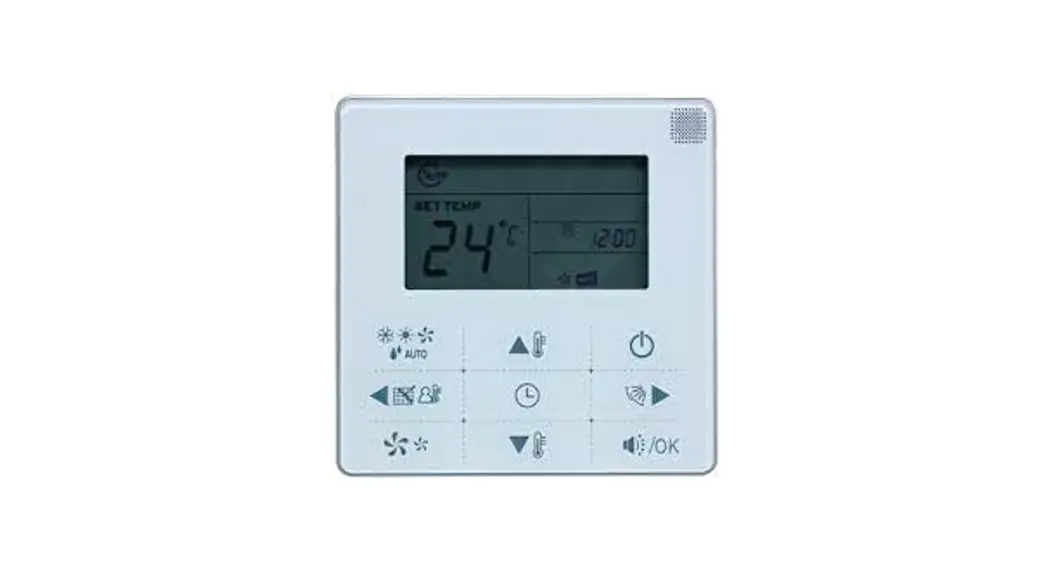
1.1 Outside View of the Wired Remote Controller
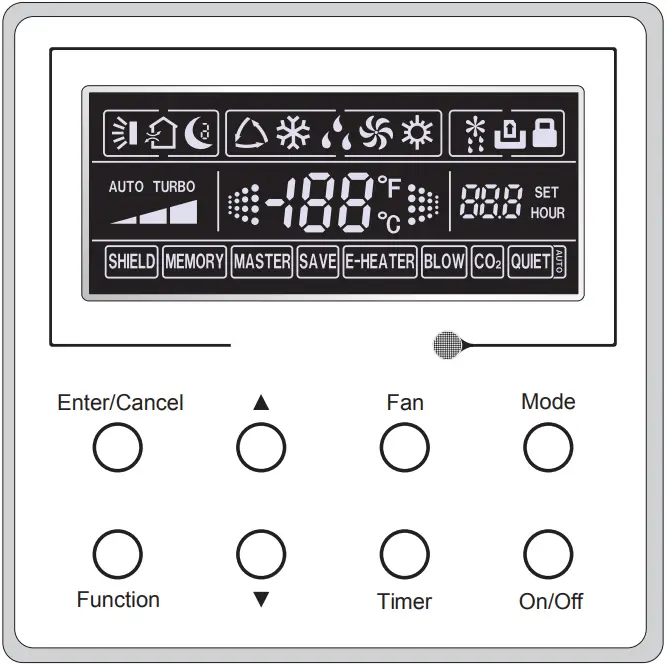 Fig.1 Outside View of the Wired Remote Controller
1.2 LCD of the Wired Remote Controller
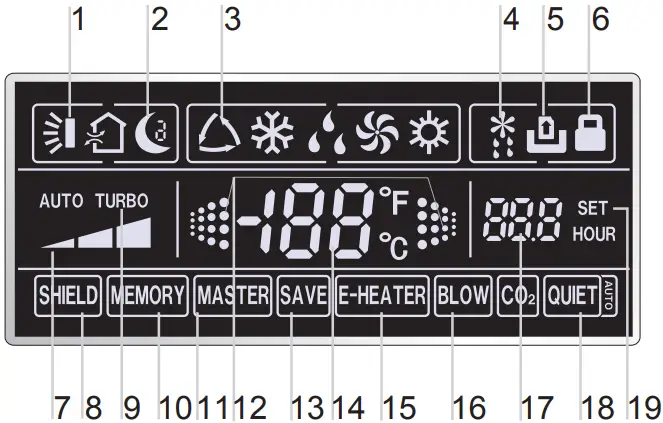
Fig.2 LCD of the Wired Remote Controller
Table 1
| No. | Symbols | Description |
| 1 |  | Swing function. |
| 2 |  | Sleep function. |
| 3 |  | Running modes of the indoor unit (Cooling, Dry, Fan and Heating). |
| 4 |  | Defrosting function for the outdoor unit. |
| 5 |  | Gate-control function |
| 6 |  | Lock function. |
| 7 |  | High, middle, low or auto fan speed of the indoor unit. |
| 8 |  | Shield functions (buttons, temperature, On/Off or Mode is shielded by the remote monitor. |
| 9 |  | Turbo function. |
| 10 |  | Memory function (The indoor unit resumes the original setting state after power failure and then power recovery). |
| 11 |  | Master wired remote controller (this function is yet unavailable for this unit). |
| 12 |  | It blinks under on state of the unit without operation of any button. |
| 13 |  | Energy-saving function. |
| 14 |  | Ambient/preset temperature value. |
| 15 |  | Electric auxiliary heating function. |
| 16 |  | Blow function. |
| 17 |  | Timing value. |
| 18 |  | Quiet function (two types: quiet and auto quiet) |
| 19 | SET | It will be displayed under the debugging mode. |
2.1 Buttons on the Wired Remote Controller
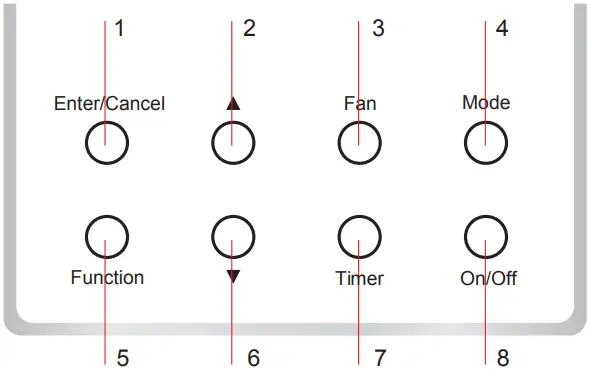
Fig. 3 Buttons on the Wired Remote Controller
2.2 Function of the Buttons
Table 2
| No. | Name | Function |
| 1 | Enter/Cancel | Function selection and cancellation. |
| 2 | ▲ | 1 Running temperature setting of the indoor unit, range:16~30℃(61~86°F). 2 Timer setting, range:0.5-24 hr. |
| 3 | ▼ | |
| 4 | Fan | Setting of the high/middle/low/auto fan speed. |
| 5 | Mode | Setting of the Cooling/Heating/Fan/Dry/Auto mode of the indoor unit. |
| 6 | Function | Switchover among the functions of Turbo/Save/E-heater/Blow etc.. |
| 7 | Timer | Timer setting. |
| 8 | On/Off | Turn on/off the indoor unit. |
| 4+2 | ▲+Mode | Press them for 5s under off state of the unit to Enter/Cancel the Memory function (If memory is set, indoor unit after power failure and then power recovery will resume the original setting state. If not, the indoor unit is defaulted to be off after power recovery. Memory off is default before delivery.). |
| 3+6 | Fan+▼ | By pressing them at the same time under off state of the unit,  will be displayed on the wired remote controller for the cooling only unit, while will be displayed on the wired remote controller for the cooling only unit, while  will be displayed on the wired remote controller for the cooling and heating unit. will be displayed on the wired remote controller for the cooling and heating unit. |
| 2+6 | ▲+▼ | Upon startup of the unit without malfunction or under off state of the unit, press them at the same time for 5s to enter the lock state, in which case, any other buttons won’t respond the press. Repress them for 5s to quit this state. |
| 4+6 | Mode+▼ | Under OFF state, the Celsius and Fahrenheit scales can be switched by pressing “Mode” and “▼” for five seconds. |
| 5+7 | Function +Timer | Under OFF state, it is available to go to the commissioning status by pressing “Function” and “Timer” for five seconds, and let “00” displayed on the temperature display area by pressing “Mode”, then adjust the options which is shown on the timer area by pressing “▲” and “▼”. There are totally four options, as follows: 1 Indoor ambient temperature is sensed by the return air temperature sensor ( 01 displayed on the timer area). 2 Indoor ambient temperature is sensed by the wired controller (02 displayed on the timer area). 3 The return air temperature sensor is selected under the cooling, dry, or fan mode; while the wired controller temperature sensor is selected under the heating or auto mode. (03 is displayed on the timer area). 4 The wired controller temperature sensor is selected under the cooling, dry, or fan mode; while the return air temperature sensor is selected under the heating mode. (04 is displayed on the timer display area). |
| 5+7 | Function +Timer | Under OFF state, it is available to go to the commissioning status by pressing “Function” and “Timer” for five seconds. Press “Mode” button to until “01” icon is shown at the temperature display area. The setting status will be shown at timer area. Press “▲” and “▼” button to adjust and two options are available: 1 Three low levels (01) ; 2 Three high levels (02). |
3 Operation Instructions
3.1 On/Off
Press On/Off to turn on the unit and turn it off by another press.
Note: The state shown in Fig.4 indicates the “Off” state of the unit after power on. The state shown in Fig.5 indicates the “On” state of the unit after power on.
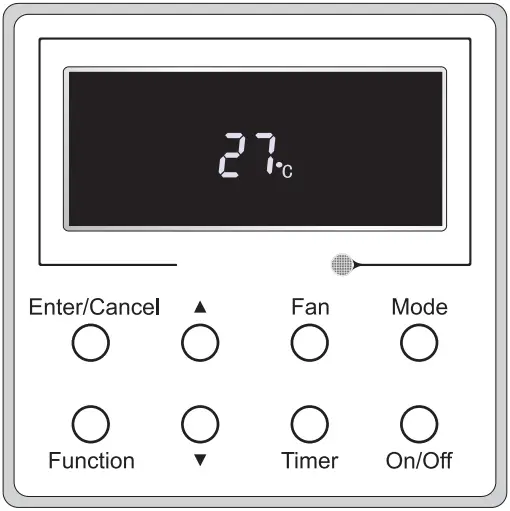
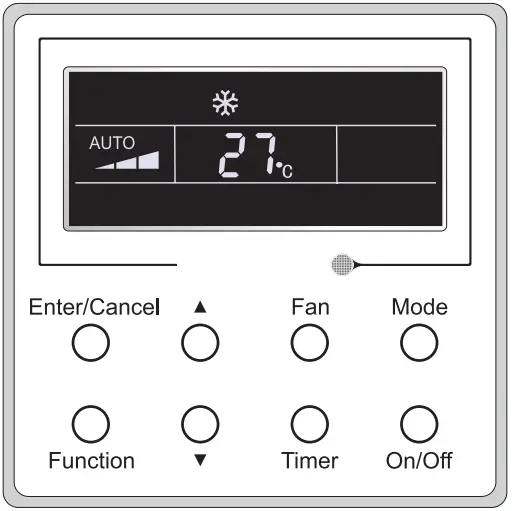
Fig. 4 “Off” State Fig. 5 “On” State
3.2 Mode Setting
Under the “On” state of the unit, press Mode to switch the operation modes as the following sequence:Auto-Cooling-Dry-Fan-Heating.

3.3 Temperature Setting
Press ▲ or ▼ to increase/decrease the preset temperature. If press either of them continuously, the temperature will be increased or decreased by 1ºC(1°F) every 0.5s,as shown in Fig.6.
In the Cooling, Dry, Fan or Heating mode, the temperature setting range is 16~30ºC(61~86°F).
In the Auto mode, the setting temperature is unadjustable.
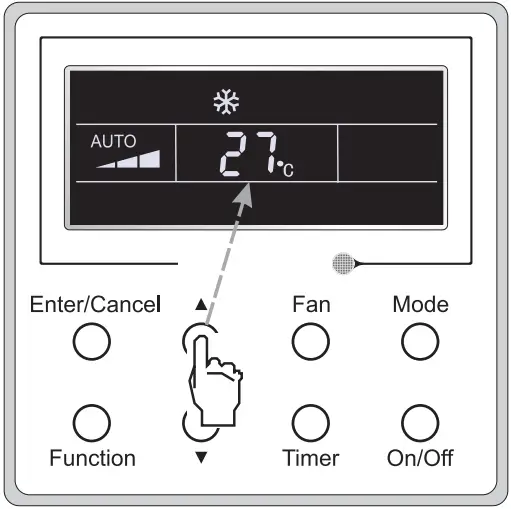
Fig.6
3.4 Fan Setting
Under the “On”/”Off” state of the unit, press Fan and then fan speed of the indoor unit will change circularly as shown in Fig.7.

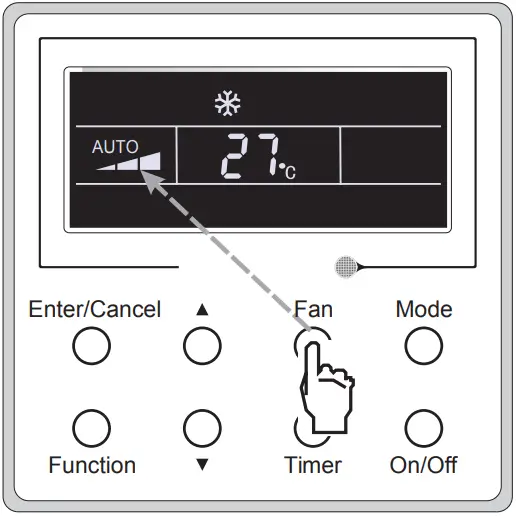
Fig.7
3.5 Timer Setting
Under the “On”/”Off” state of the unit, press Timer to set timer off/on.
Timer on setting: press Timer, and then LCD will display “xx.x hour”, with “hour” blinking. In this case, press ▲ or ▼ to adjust the timing value. Then press Enter/Cancel to confirm the setting.
Timer off setting: press Timer, if LCD won’t display xx.x hour, and then it means the timer setting is canceled.
Timer off setting under the “On” state of the unit is shown as Fig.8.
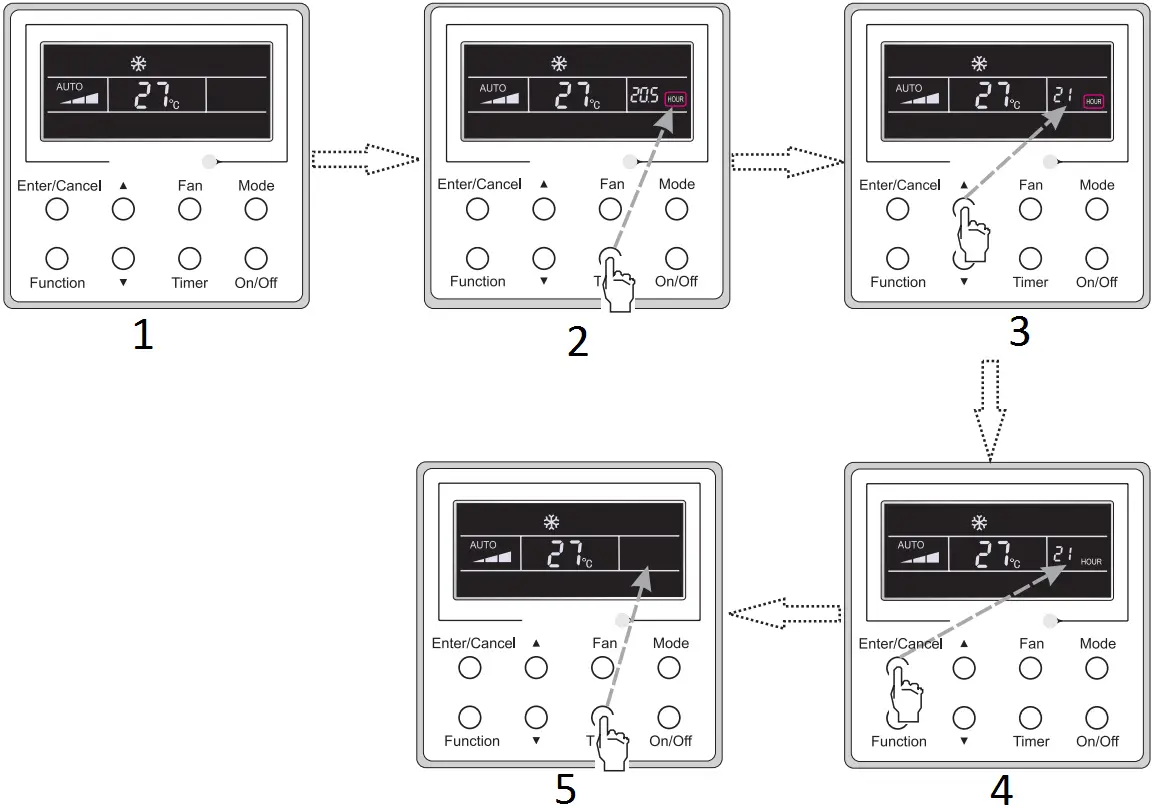
Fig. 8 Timer off Setting under the “On” State of the Unit
- Turn on the unit,without setting timer
- Press “Timer”button to set
- Press “Increase”or “Decrease” button to adjust time
- Press “Enter/Cancel”to finish timer setting
- Press “Timer” button to cancel timer setting
Timer range: 0.5-24hr. Every press of ▲ or ▼ will make the set time increased or decreased by 0.5hr. If either of them is pressed continuously, the set time will increase/ decrease by 0.5hr every 0.5s.
3.6 Swing Setting
Swing On: Press Function under on state of the unit to activate the swing function. In this case,  will blink. After that, press Enter/Cancel to make a confirmation.
Swing Off: When the Swing function is on, press Function to enter the Swing setting interface, with blinking. After that, press Enter/Cancel to cancel this function.
Swing setting is shown as Fig.9.
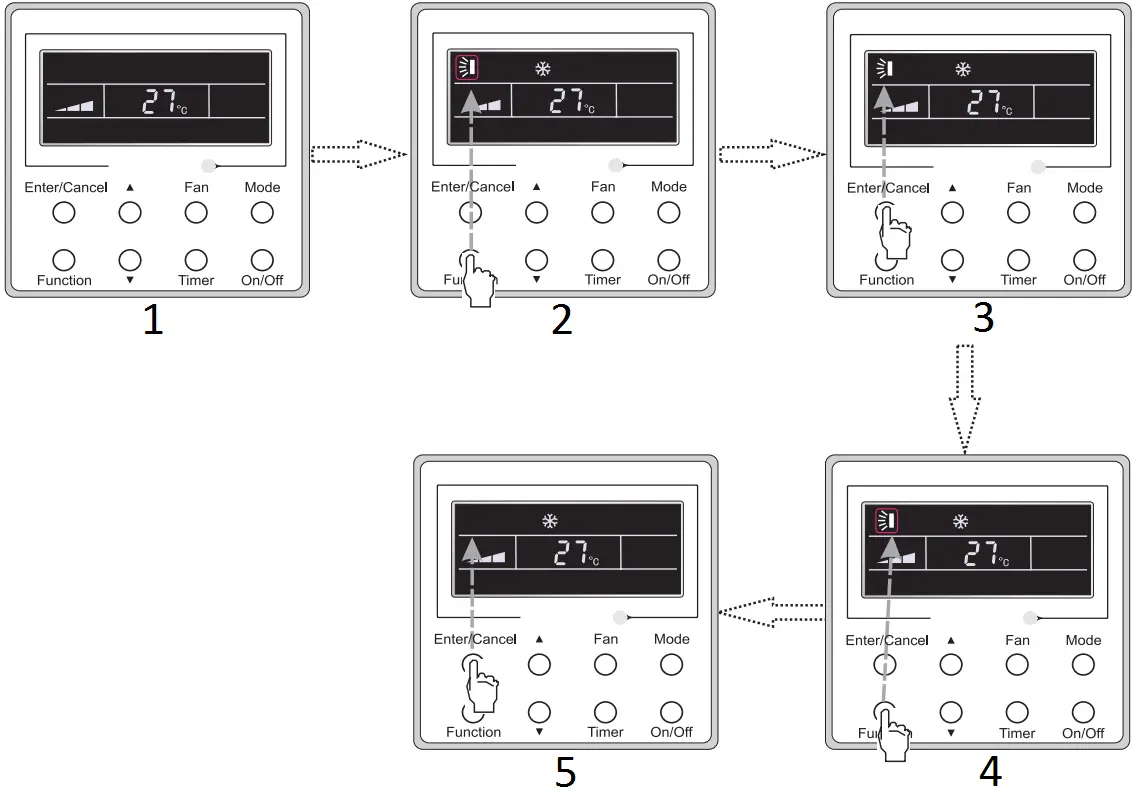
Fig. 9 Swing Setting
- Turn on the unit,without turning on swing function
- Press “Function”button into swing state
- Press “Enter/Cancel” to confirm
- Press “Function”button into swing state
- Press “Enter/Cancel” to cancel swing
Note:
1 Sleep, Turbo or Blow setting is the same as the Swing setting.
2 After the setting has been done, it has to press the key “Enter/Cancel” to back to the setting status or quit automatically fice seconds later.
3.7 Fresh Air Valve Function Setting
Turn on fresh air valve function:
Under unit on status, press Function button on the panel to select “Fresh air valve” function option. When  icon flashes, it enters fresh air valve setting mode. Previous temperature display position will display the level of fresh air valve. Press ▲ or ▼ button to adjust the level of fresh air valve within the range from 1 to 10. Then press Enter/Cancel button to activate this function.
Turn off fresh air valve function:
If fresh air valve function has been set, press Function button on the panel to select “Fresh air valve” function option. When icon flashes, if you press Enter/Cancel button without pressing ▲ or ▼ button, fresh air valve function will be canceled; if you press Enter/Cancel button after pressing ▲ or ▼ button, fresh air valve function will be activated.
Note:
if you press panel button to set fresh air valve function on, ventilation (ventilation 1) function will be activated too; if you press panel button to set fresh air valve function off, ventilation function will be canceled too.
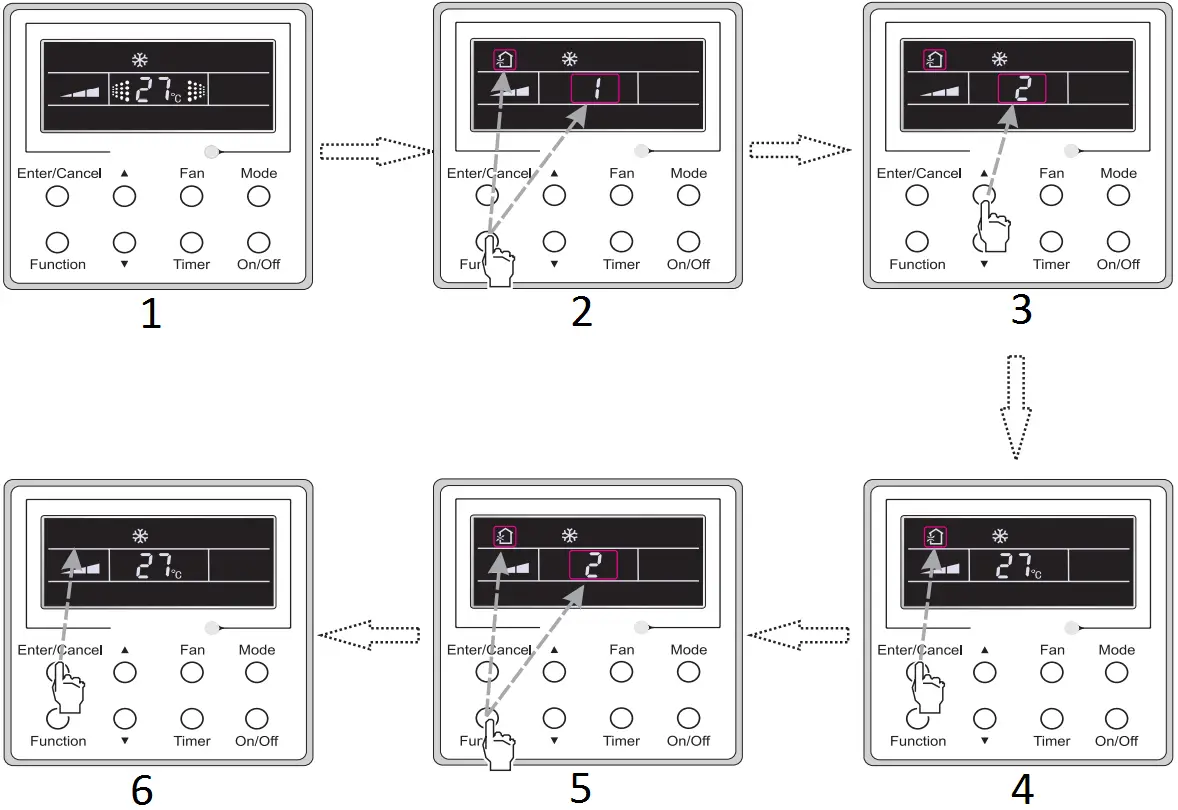
Fig. 10 Fresh Air Function Setting
- Turn on the unit with the “AIR” function deactivated
- Press the “Function” button to select the “AIR” function option.
- Press ▲or▼ to adjust the “AIR” type.
- Press the “Enter/Canel” button to activate the “AIR” function.
- Press the “Function” button to select the “AIR” function option.
- Press the “Enter/Canel” button to deactivate the “AIR” function.
3.8 Sleep Setting
Sleep on: Press Function under on state of the unit till the unit enters the Sleep setting interface. Press Enter/Cancel to confirm the setting.
Sleep off: When the Sleep function is activated, press Function to enter the Sleep setting interface. After that, press Enter/Cancel to can this function.
In the Cooling or Dry mode, the temperature will increase by 1ºC after the unit runs under Sleep 1 for 1hr and 1ºC after another 1hr.After that, the unit will run at this temperature.
In the Heating mode, the temperature will decrease by 1ºC after the unit runs under Sleep 1 for 1hr and 1ºC after another 1hr. After that, the unit will run at this temperature.
Sleep setting is shown as Fig.11.
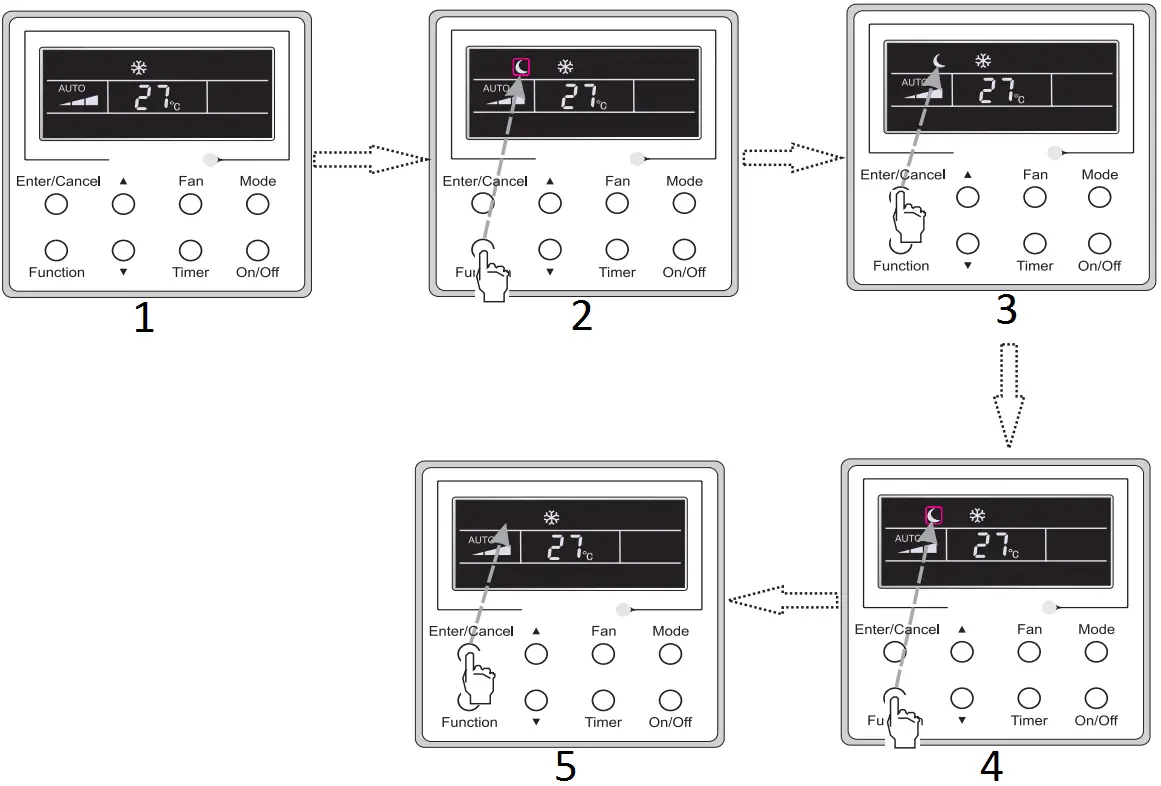
Fig. 11 Sleep Setting
- Turn on the unit,without turning on sleep
- Press “Function” button into sleep
- Press “Enter/Cancel”button to turn on sleep
- Press “Function” button into sleep
- Press “Enter/Cancel”to cancel sleep
3.9 Turbo Setting
Turbo function: The unit at the high fan speed can realize quick cooling or heating so that the room temperature can quickly approach the setting value.
In the Cooling or Heating mode, press Function till the unit enters the Turbo setting interface and then press Enter/Cancel to confirm the setting.
When the Turbo function is activated, press Function to enter the Turbo setting interface and then press Enter/Cancel to cancel this function.
Turbo function setting is as shown in Fig.12.
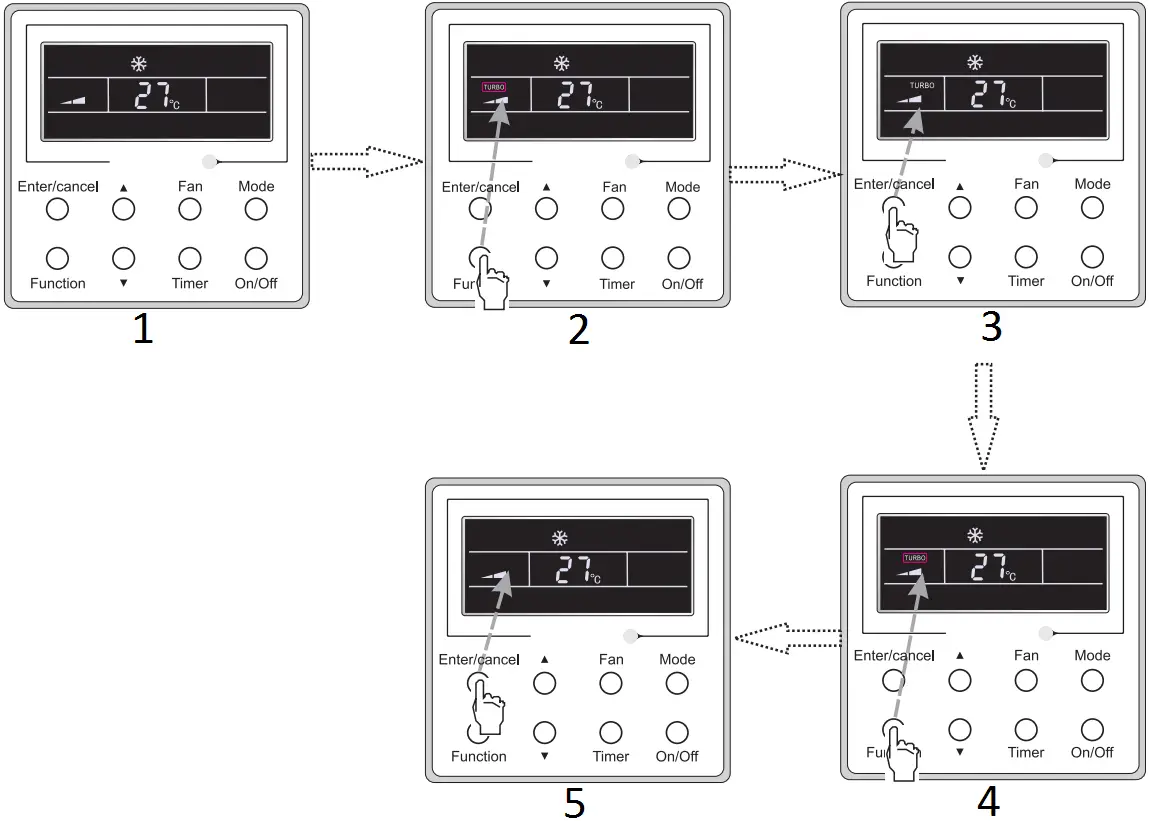
Fig.12 Turbo Setting
- Turn on the unit,without turning on turbo
- Press”Function”button into turbo state
- Press “Enter/cancel”to turn on turbo function
- Press “Function”button into turbo state
- Press “Enter/Cancel”to turn off turbo function
3.10 Energy Saving Function Setting
Turn on energy saving function:
1) Energy Saving Setting for Cooling
When the unit runs under the COOL or DRY mode, press Function button to select “SAVE” function option, with “SAVE” flashing, and then press ▲ or ▼ to adjust the lower limit, after that, press the Enter/Cancel button to activate this function.
2) Energy Saving Setting for Heating
When the unit runs under the HEAT mode, press Function button to select “SAVE” function option, with “SAVE” flashing, and then press ▲ or ▼ to adjust the upper limit, after that, press Enter/Cancel button to activate this function.
Note:
under energy saving setting mode, press “MODE” button to switch the energy saving setting for COOL or HEAT mode.
Cancel energy saving function:
If energy saving function has been set, press Function button on the panel to select “SAVE” function option. When icon flashes, if you press Enter/Cancel button without pressing ▲ or ▼ button, energy saving function will be canceled; if you press Enter/Cancel button after pressing ▲ or ▼ button, energy saving function will be activated.
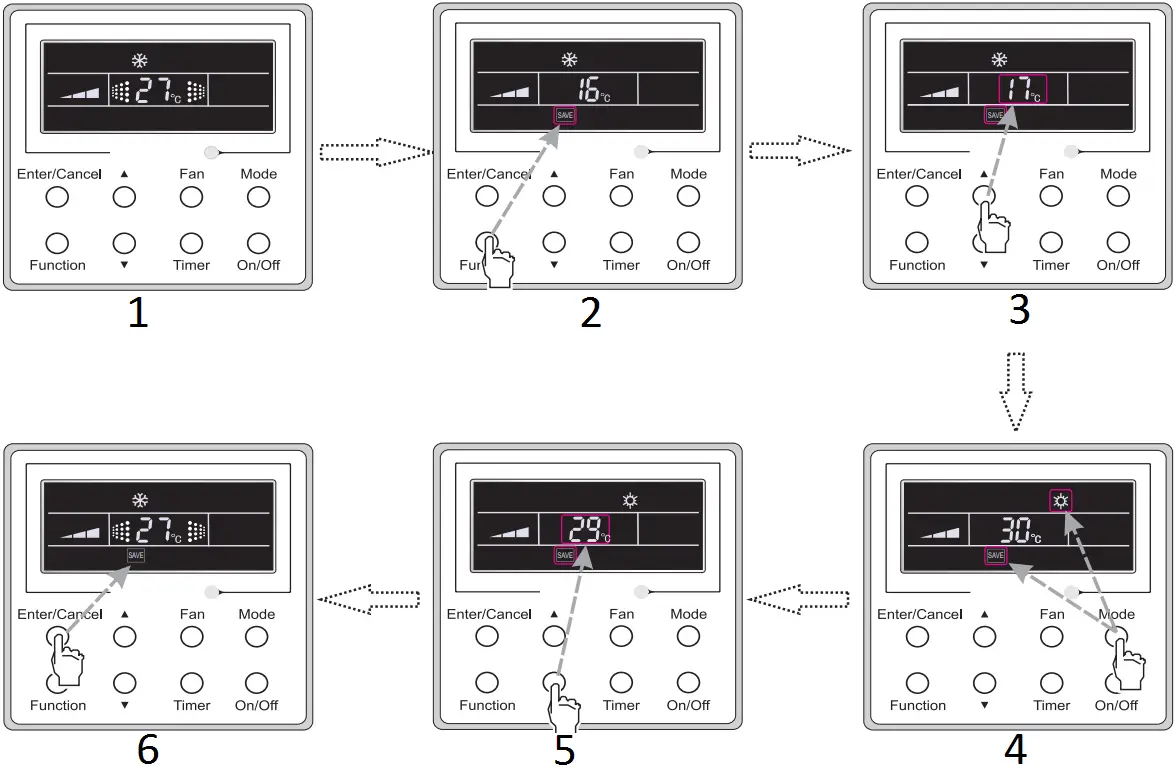
Fig. 13 Energy Saving Function Setting
- Turn on the unit with the “SAVE” function deactivated
- Press the “Function” button to select the “SAVE” function option.
- Press ▲or▼ to adjust the lower limit.
- Press the “Monde” button to switch to the “SAVE” setting for heating.
- Press ▲or▼ to adjust the upper limit.
- Press the “Enter/Canel” button to activate the “SAVE” function.
3.11 E-heater Setting
E-heater (auxiliary electric heating function): In the Heating mode, E-heater is allowed to be turned on for improvement of efficiency.
Once the wired remote controller or the remote controller enters the Heating mode, this function will be turned on automatically.
Press Function in the Heating mode to enter the E-heater setting interface and then press Enter/Cancel to cancel this function.
Press Function to enter the E-heater setting interface, if the E-heater function is not activated, and then press Enter/Cancel to turn it on.
The setting of this function is shown as Fig.14 below:
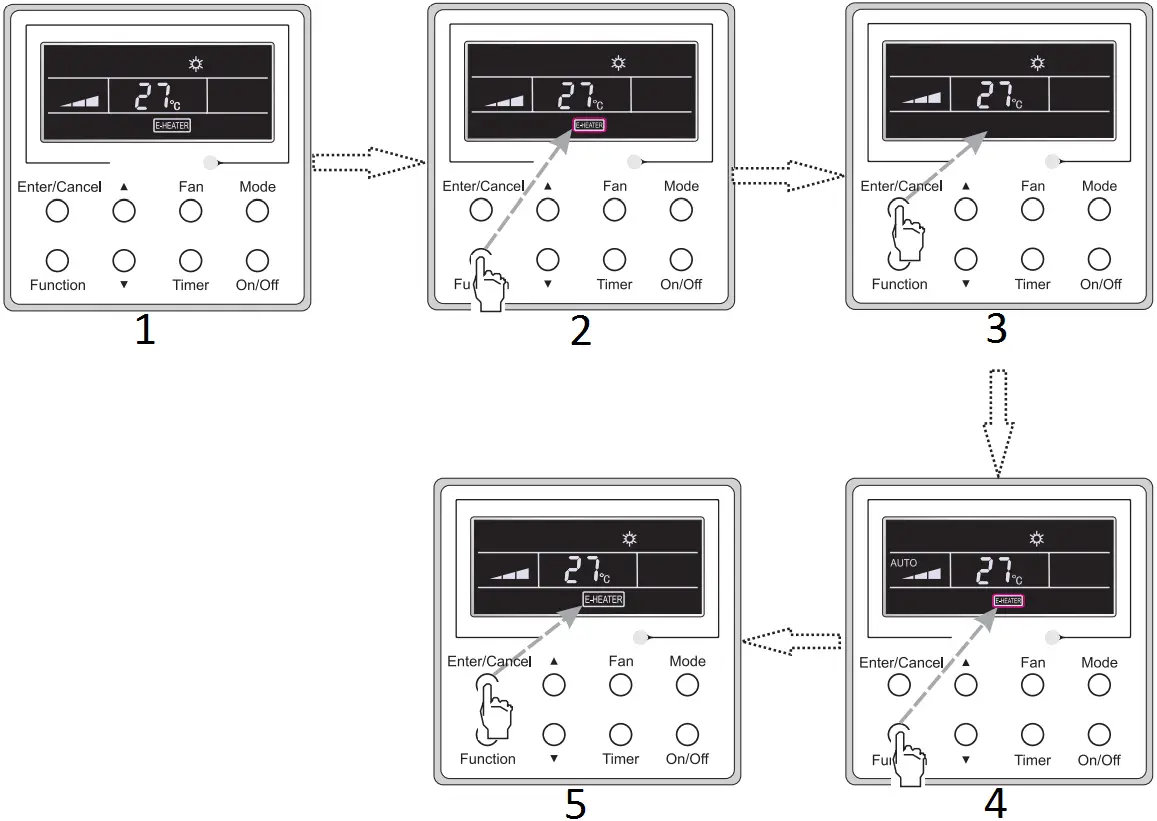
Fig.14 E-heater Setting
- Auxiliary electric heating function will be automatically turned on under heating mode
- Press “Function”button into this function
- Press “Enter/Cancel”button to turn off this function
- Press “Function” button into auxiliary electric heating function
- Press “Enter/Cancel”button to turn on this function
3.12 Blow Setting
Blow function: After the unit is turned off, the water in evaporator of indoor unit will be automatically evaporated to avoid mildew.
In the Cooling or Dry mode, press Function till the unit enters the Blow setting interface and then press Enter/Cancel to active this function.
When the Blow function is activated, press Function to the Blow setting interface and then press Enter/Cancel to cancel this function.
Blow function setting is as shown in Fig.15
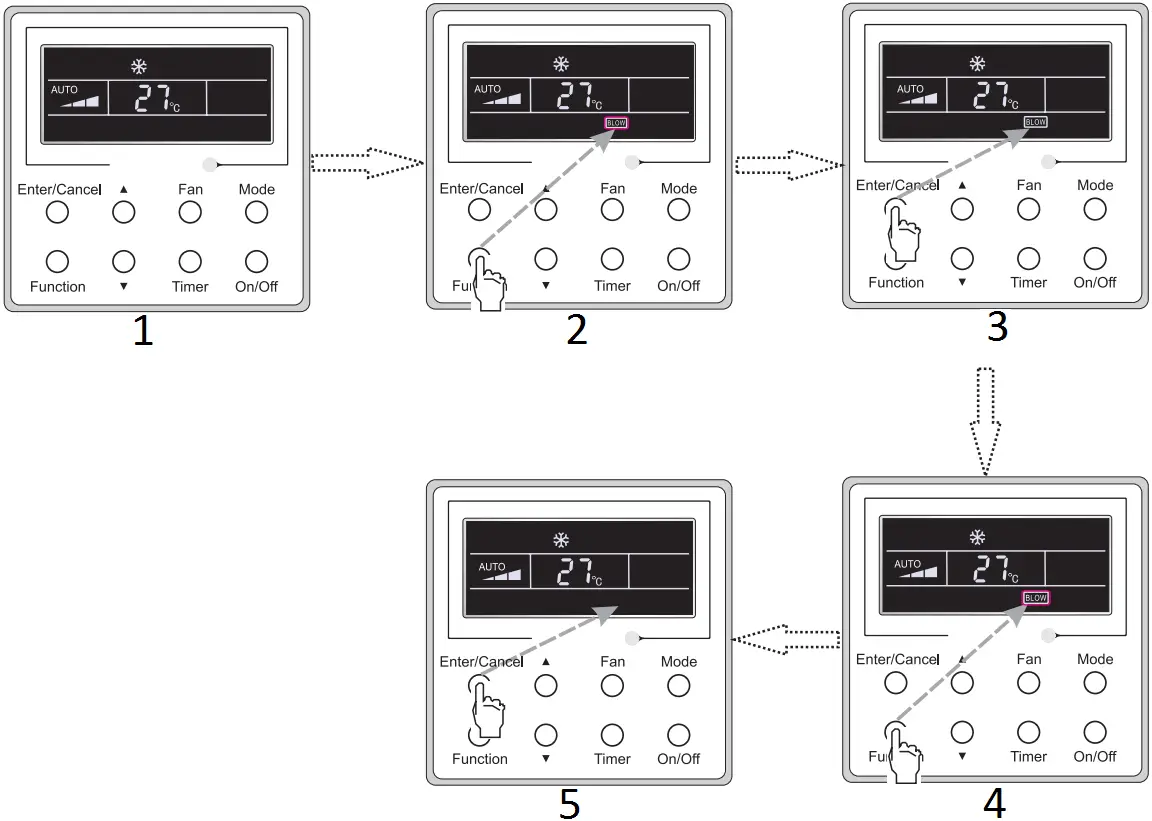
Fig.15 Blow Setting
- Turn on the unit, without turning on blow function
- Press “Function” button into blow state
- Press “Enter/Cancel” button to turn on blow function
- Press “Function” button into blow state
- Press”Enter/Cancel” button to turn off blow funtion
Notes:
1 When the Blow function is activated, if turning off the unit by pressing On/Off or by the remote controller, the indoor fan will run at the low fan speed for 2 min, with “BLOW” displayed on the LCD. While, if the Blow function is deactivated, the indoor fan will be turned off directly.
2 Blow function is unavailable in the Fan or Heating mode.
3.13 Quiet Function Setting
Turn on quiet function:
Under unit on status, press Function button on the panel to select “Quiet” function option. When “Quiet” or “Auto quiet” flashes, it enters quiet function setting mode. Press ▲ or ▼ button to switch between “Quiet” and “Auto quiet” function.
Then press Enter/Cancel button to activate this function.
Cancel quiet function:
If quiet function has been set, press Function button on the panel to select “Quiet” function option. When “Quiet” or “Auto quiet” flashes, if you press Enter/Cancel button without pressing ▲ or ▼ button, quiet function will be canceled; if you press Enter/Cancel button after pressing ▲ or ▼ button, quiet function will be activated.
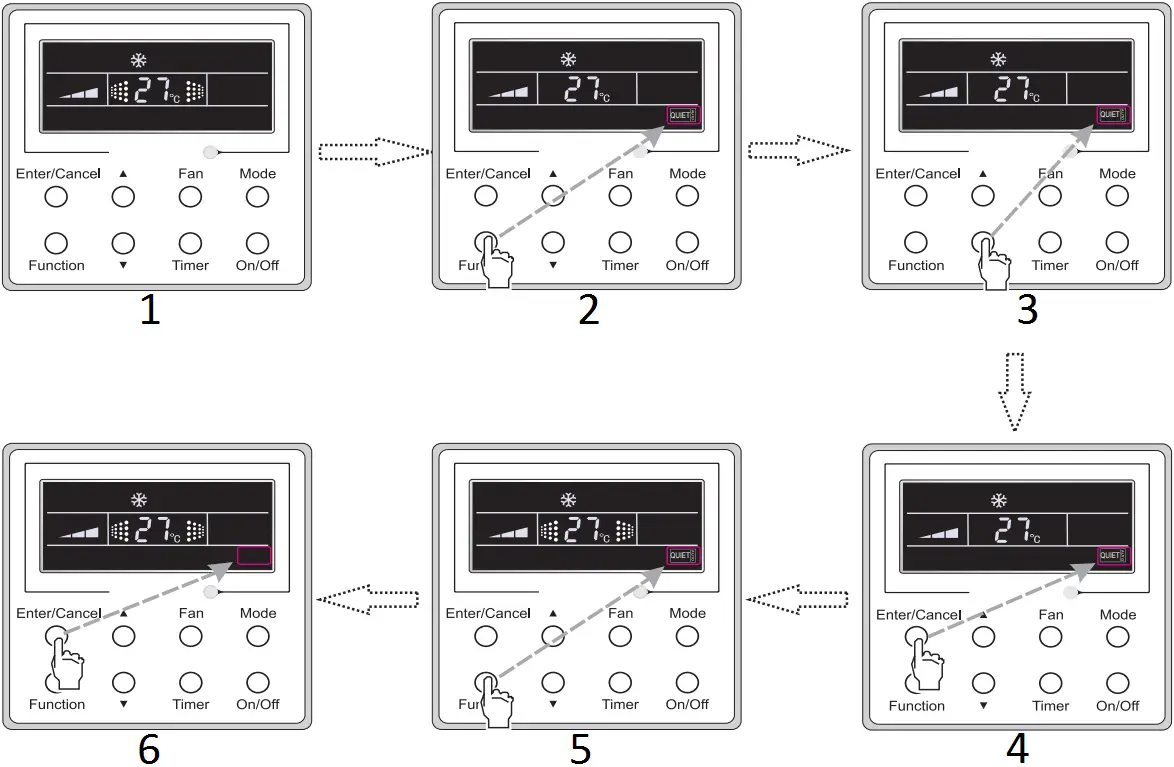
Fig. 16 Setting of Quiet Function
- Turn on the unit with the “Quiet” function deactivated
- Press the “Function” button to select the “Quiet” function option.
- Press ▲or▼ to select the desired type, “QUIET” or “AUTO QUIET”.
- Press the Enter/Cancel button to activate this function.
- Press the Function button to select the “Quiet” function option.
- Press the “Enter/Canel” button to deactivate this function.
3.14 Other Functions
(1). Lock
Upon startup of the unit without malfunction or under the “Off” state of the unit, press ▲ and ▼ at the same time for 5s till the wired remote controller enters the Lock function. In this case, LCD displays  . After that, repress these two buttons at the same time for 5s to quit this function.
Under the Lock state, any other button press won’t get any response.
(2). Memory
Memory switchover: Under the “Off” state of the unit, press Mode and ▲ at the same time for 5s to switch memory states between memory on and memory off. When this function is activated, Memory will be displayed. If this function is not set, the unit will be under the “Off” state after power failure and then power recovery.
Memory recovery: If this function has been set for the wired remote controller, the wired remote controller after power failure will resume its original running state upon power recovery. Memory contents: On/Off, Mode, set temperature, set fan speed and Lock function.
(3). Selection of the Temperature Sensor
Under OFF state of the unit, press both “Function” and “Timer” for five seconds to go the commissioning status. Under this status, adjust the display in the temperature display area to “00” through the button “Mode”, and then adjust the option of the temperature sensor in the timer display area through the button ▲ or▼.
1 Indoor ambient temperature is sensed at the return air inlet(01 in the timer display area).
2 Indoor ambient temperature is the sensed at the wired controller(02 in the timer display area).
3 Select the temperature sensor at the return air inlet under the cooling, dry and fan modes, while select the temperature sensor at the wired controller under the heating and auto modes.(03 in the timer display area).
4 Select the temperature sensor at the wired controller under the cooling, dry and fan modes, and select the temperature sensor at the return air inlet under the heating mode and auto modes (04 displayed in the timer display area).
After the setting, press “Enter/Cancel” to make a confirmation and quit this setting status.
Pressing the button “On/Off” also can quit this commissioning status but the set data won’t be memorized.
Under the commissioning status, if there is no any operation in 20 seconds after the last button press, it will back to the previous state without memorizing the current data.
Note:
After connected with indoor unit, if the type of ambient temperature sensor has not been manually set, the wired controller will select the ambient temperature sensor according to the model of connected IDU; if it connects to cassette type IDU, duct type IDU, floor ceiling type IDU, ceiling type IDU, it will adopt 3, otherwise it will adopt 1. If the type of ambient temperature sensor is set manually, the wired controller will subject to the manual setting, and will not set according to automatic IDU model selection.
(4). Selection of the Fan Speed
Under OFF state of the unit, press both the buttons “Function” and “Timer” for five seconds to go to the commissioning status, and then adjust the display in the temperature display area to 01 through the button “Mode” and adjust the setting of the fan speed, which comes to two options.
01: Three low fan speeds; 02: Three high fan speeds
After the setting, press “Enter/Cancel” to make a confirmation and quit this setting status.
Pressing the button “On/Off” also can quit this commissioning status but the set data won’t be memorized.
Under the commissioning status, if there is no any operation in 20 seconds after the last button press, it will back to the previous state without memorizing the current data.
4 Installation and Dismantlement
4.1 Connection of the Signal Line of the Wired Remote Controller
- Open the cover of the electric control box of the indoor unit.
- Let the single line of the wired remote controller through the rubber ring.
- Connect the signal line of the wired remote controller to the 4-pin socket of the indoor unit PCB.
- Tighten the signal wire with ties.
- The communication distance between the main board and the wired remote controller can be up to 65.6 feet ( the standard distance is 26.2 feet)
4.2 Installation of the Wired Remote Controller
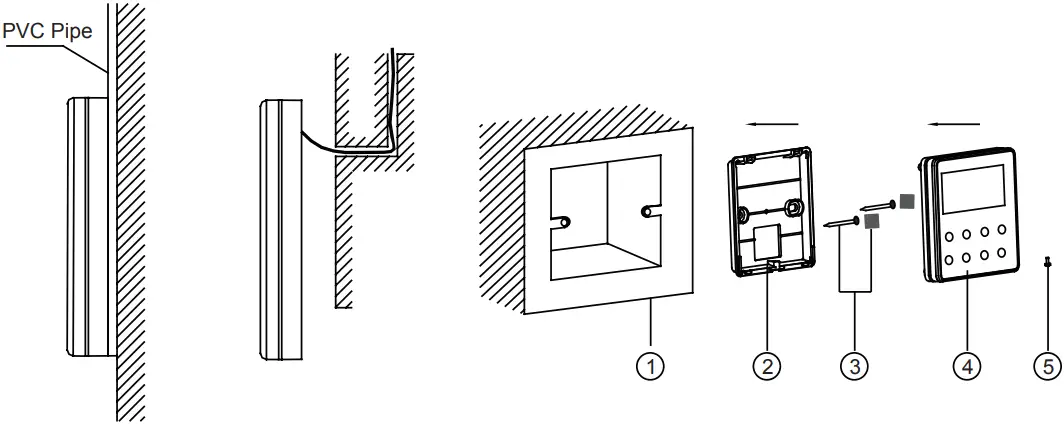
Fig.17 Accessories for the Installation of the Wired Remote Controller
Table 3
| No. | 1 | 2 | 3 | 4 | 5 |
| Name | Socket box embedded in the wall | Soleplate of the Wired Remote Controller | Sponge 20×20×2 Screw M4X25 | Front Panel of the Wired Remote Controller | Screw ST2.9X6 |
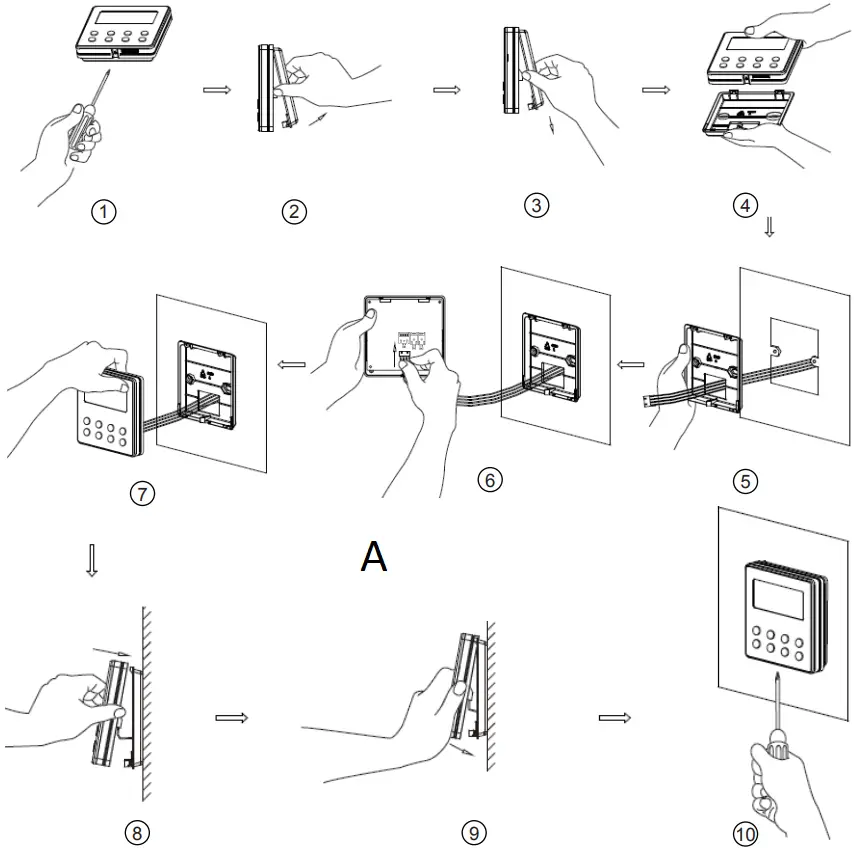
Fig.18
Fig.18 shows the installation steps of the wired remote controller, but there are some issues that need your attention.
A
Note: CN1 is 485 communication interface and it used for connecting the 4-core communication wire. These two needle stands(CN2aCN3) are used for connecting the smart zone controller. There is no sequence for these two needle stands. You can connect one or two needle stand(s) basing on the requirement.
(1). Prior to the installation, please firstly cut off the power supply of the wire buried in the installation hole, that is, no operation is allowed with electricity during the whole installation.
(2). Pull out the four-core twisted pair line from the installation holes and then let it go through the rectangular hole behind the soleplate of the wired remote controller.
(3). Stick the soleplate of wired controller on the wall and then use screw M4×25 to fix soleplate and installation hole on wall together, attach the sponge 20×20×2 at the screw hole and then press it with fingers to make sure it’s attached firmly.
(4). Insert the four-core twisted pair line into the slot of the wired remote controller and then buckle the front panel and the soleplate of the wired remote controller together.
(5). Finally, fix the front panel and the soleplate of the wired remote controller tightly by screws ST2.9X6.
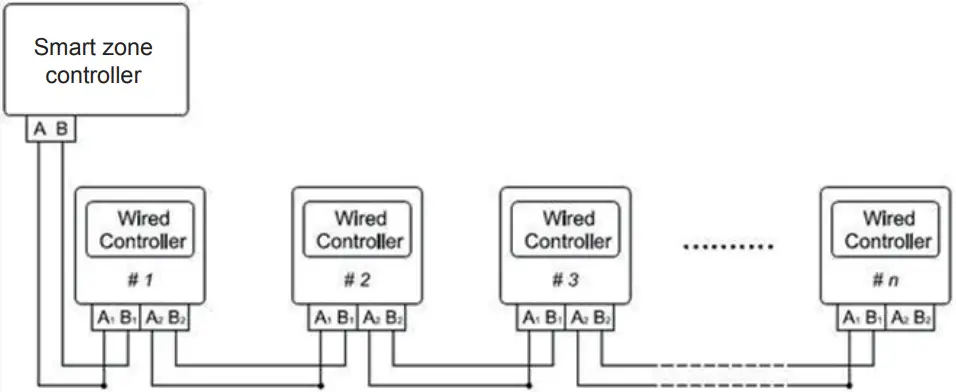
Fig.19
Fig.19 shows the schematic diagram of control system connection. XK19 can connect the smart zone controller (integrated control system). “n” indicates the number of communication node address (programmable wired controller XK19). The complete system is composed of the smart zone controller, wired controller XK19 and communication cable. The wired controller XK19 can support 16 communication node addresses at the most (n≤16).
Terminal A and terminal B of the smart zone controller are respectively connected to the corresponding communication needle stand terminal of the #1wired controller by the communication cable; the other needle stand of #1 wired controller is connected to the #2 wired controller through the telecommunication cable and so forth until connect to the #n wired controller. Except the last wired controller in the control system (only use CN2 or CN3, and the other one will not be connected), there’s no the sequence and the importance for the wired controller. The series number in the figure is only for the sake of clarity.
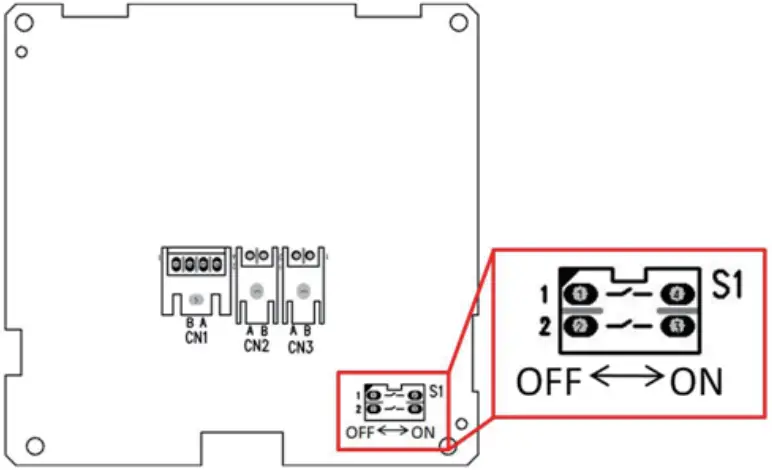
Fig.20
Fig.20 shows schematic diagram of DIP switch. There is a 2-bit DIP switch on the main board of wired controller XK19. As for the last #n wired controller in the control system, the 1-bit and the 2-bit of the DIP switch should be manually pulled to position “on” and position “off” respectively. The DIP switches of other wired controllers should be kept at the initial ex-factory status (1-bit and 2-bit are set at position “off”).
CAUTION!
Please pay special attention to the followings during the connection to avoid the malfunction of the air conditioning unit due to electromagnetic interference.
1 Separate the signal and communication lines of the wired remote controller from the power cord and connection lines between the indoor and outdoor unit, with a minimum interval of 20cm, otherwise the communication of the unit will probably work abnormally.
2 If the air conditioning unit is installed where is vulnerable to electromagnetic interference, then the signal and communication lines of the wired remote controller must be the shielding twisted pair lines.
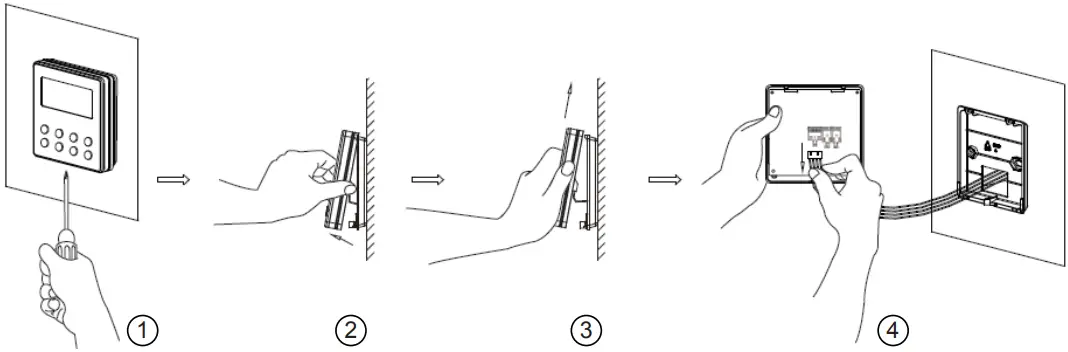
4.3 Dismantlement of the Wired Remote Controller
5 Errors Display
If there is an error occurring during the operation of the system, the error code will be displayed on the LCD, as show in Fig.21. If multi errors occur at the same time, their codes will be displayed circularly.
Note: In event of any error, please turn off the unit and contact the professionally skilled personnel.
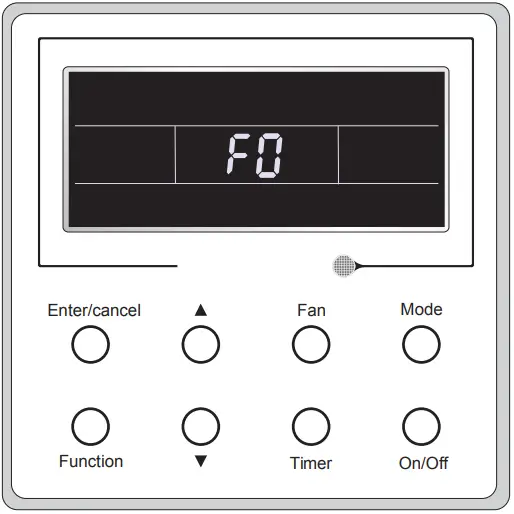
Fig.21
Table 4 Meaning of Each Error
| Error | Error Code |
| Return air temperature sensor open/short circuited | F1 |
| evaporator temperature sensor open/short circuited | F2 |
| Indoor unit liquid valve temperature sensor open/short circuited | b5 |
| Indoor gas valve temperature sensor open/ short circuited | b7 |
| IPM temperature sensor open/short circuited | P7 |
| Outdoor ambient temperature sensor open/ short circuited | F3 |
| Outdoor unit condenser mid-tube temperature sensor open/short circuited | F4 |
| Discharge temperature sensor open/short circuited | F5 |
| Indoor and outdoor communication error | E6 |
| DC bus under-voltage protection | PL |
| DC bus over-voltage protection | PH |
| Compressor phase current sensing circuit error | U1 |
| Compressor demagnetization protection | HE |
| PFC protection | Hc |
| IPM Temperature Protection | P8 |
| Over-power protection | L9 |
| System charge shortage or blockage protection | F0 |
| Capacitor charging error | PU |
| High pressure protection | E1 |
| Low pressure protection | E3 |
| Compressor stalling | LE |
| Over-speeding | LF |
| Drive board temperature sensor error | PF |
| AC contactor protection | P9 |
| Temperature drift protection | PE |
| Sensor connection protection | Pd |
| DC bus voltage drop error | U3 |
| Outdoor fan 1 error protection | L3 |
| Outdoor fan 2 error protection | LA |
| Drive board communication error | P6 |
| Compressor overheating protection | H3 |
| Indoor and outdoor units unmatched | LP |
| Communication line misconnected or expansion valve error | dn |
| Running mode conflict | E7 |
| Pump-down | Fo |
| Defrost or oil return |  |
| Forced defrosting | H1 |
| Compressor startup failure | Lc |
| High discharge temperature protection | E4 |
| Overload protection | E8 |
| Whole unit over-current protection | E5 |
| Over phase current protection | P5 |
| Compressor desynchronizing | H7 |
| IPM Current protection | H5 |
| Compressor phase loss/reversal protection | Ld |
| Frequency restricted/reduced with whole unit current protection | F8 |
| Frequency restricted/reduced with IPM current protection | En |
| Frequency restricted/reduced with high discharge temperature | F9 |
| Frequency restricted/reduced with anti freezing protection | FH |
| Frequency restricted/reduced with overload protection | F6 |
| Frequency restricted/reduced with IPM temperature protection | EU |
| Indoor unit full water error | E9 |
| Anti-freezing protection | E2 |
| AC input voltage abnormal | PP |
| Whole unit current sensing circuit error | U5 |
| 4-way valve reversing error | U7 |
| Motor stalling | H6 |
| PG motor zero-crossing protection | U8 |
| Compressor inhalation temperature sensor error | dc |
| Communication error between IDU and grid connection | Ln |
| Communication error between ODU and grid connection | LM |
| Main error at grid connection side | y2 |
| Indoor fan tripping error | U0 |
| IDU network address error | y3 |
| Ip address allocation overflow | yb |

66174339
 Alpine Home Air Products: Contractor-grade furnaces, heaters, air conditioners and indoor-air quality products at wholesale prices.