LTR-V RF Sensor
Product Information
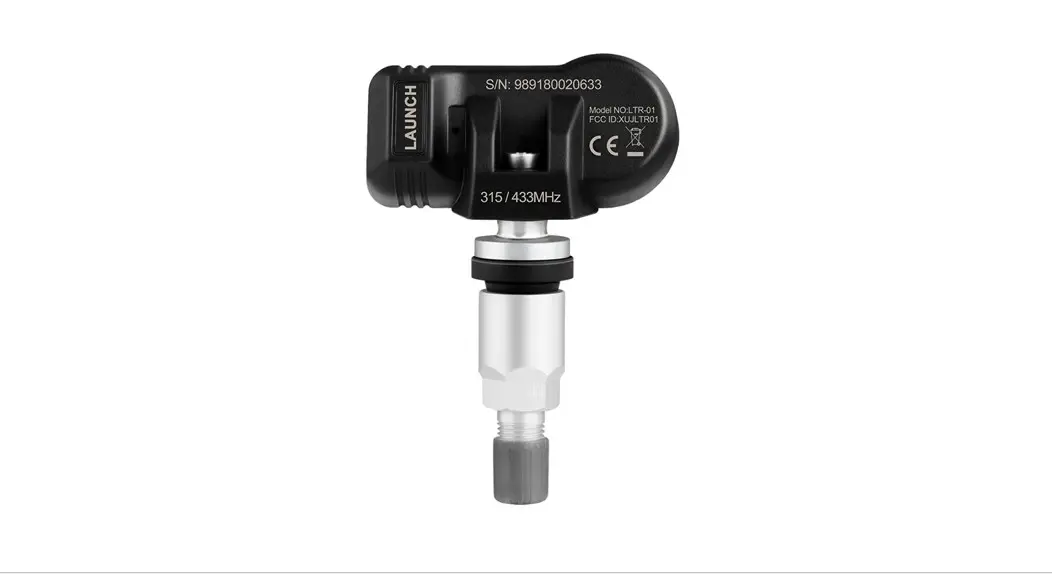
The LTR-V RF-Sensor is a TPMS sensor used for monitoring tire
pressure and temperature. It is manufactured by LAUNCH and can be
obtained from their website www.x431.com or by contacting their
overseas service team at +86-755-84557891 or
[email protected].
The product comes with a Quick Start Guide that contains
important safety instructions, installation steps, technical
parameters, and FCC warnings. The device complies with part 15 of
the FCC Rules and FCC radiation exposure limits for an uncontrolled
environment.
The product components include a cap washer & nut, valve
stem rubber grommet, valve core assembly, sensor body, and
screw.
Product Usage Instructions
Before operating the LTR-V RF-Sensor, it is important to read
the Quick Start Guide carefully and follow the safety instructions
provided. Any maintenance or repair work must be carried out by
trained experts to avoid damage to the TPMS sensor.
To install the sensor, follow these steps:
- Loosen the tire by removing the valve cap and nut and deflating
the tire. Use the bead loosener to break the tire bead. Caution:
The bead loosener must be facing the valve. - Install the valve stem rubber grommet and valve core assembly
onto the sensor body. - Insert the sensor into the tire valve stem and tighten it with
the screw provided. - Inflate the tire to the recommended pressure and reinstall the
valve cap and nut.
Once installed, the sensor will automatically transmit tire
pressure and temperature data to a compatible TPMS receiver. If you
experience any issues with the device, consult the dealer or an
experienced radio/TV technician for help.
LAUNCH does not assume any liability for faulty or incorrect
installation of the unit. All information, illustrations, and
specifications in the manual are based on the latest information
available at the time of publication. The right is reserved to make
changes at any time without notice. We shall not be liable for any
direct, special, incidental, indirect damages, or any economic
consequential damages (including the loss of profits) due to the
use of the document.
LAUNCH
www.x431.com
+86-755-84557891 [email protected]
LTR-V
RF-Sensor
Quick Start Guide
IMPORTANT: Read these instructions carefully and use this unit properly before operating. Failure to do so may cause damage and/or personal injury and will void the product warranty.
Safety Instructions
Any maintenance and repair work must be carried out by trained experts. Failure to do so may result in the failure of the TPMS sensor. LAUNCH does not assume any liability in case of faulty or incorrect installation of the unit.
CAUTION
When mounting/dismounting the wheel, follow the operation guideline of wheel changer manufacturer strictly. Do not race with the vehicle on which the LTR-V RF sensor is mounted, and always keep the drive speed under 240km/h. To guarantee optimal performance, the sensors may only be installed with original valves and accessories provided by LAUNCH. Make sure to program the sensors using LAUNCH-specific TPMS tool prior to installation. Do not install programmed TPMS sensors in damaged wheels. After installing the TPMS sensor, test the vehicle’s TPMS following the steps described in the original manufacturer’s user manual to confirm proper installation.
FCC Warning
Note: Any changes or modifications not expressly approved by the party responsible for compliance could void the user’s authority to operate the equipment. This equipment has been tested and found to comply with the limits for a Class B digital device, pursuant to part 15 of the FCC Rules. These limits are designed to provide reasonable protection against harmful interference in a residential installation. This equipment generates uses and can radiate radio frequency energy and, if not installed and used in accordance with the instructions, may cause harmful interference to radio communications. However, there is no guarantee that interference will not occur in a particular installation. If this equipment does cause harmful interference to radio or television reception, which can be determined by turning the equipment off and on, the user is encouraged to try to correct the interference by one or more of the following measures:
– Reorient or relocate the receiving antenna.
– Increase the separation between the equipment and receiver.
– Connect the equipment into an outlet on a circuit different from that to which the receiver is connected.
– Consult the dealer or an experienced radio/TV technician for help.
This device complies with part 15 of the FCC Rules. Operation is subject to the following two conditions: (1) This device may not cause harmful interference, and (2) this device must accept any interference received, including interference that may cause undesired operation.
FCC Radiation Exposure Statement: This equipment complies with FCC radiation exposure limits set forth for an uncontrolled environment .
Disclaimer of Warranties and Limitation of Liabilities
All information, illustrations, and specifications in this manual are based on the latest information available at the time of publication. The right is reserved to make changes at any time without notice. We shall not be liable for any direct, special, incidental, indirect damages or any economic consequential damages (including the loss of profits) due to the use of the document.
Components & Controls
Cap Washer&nut
Valve stem Rubber grommet and valve core assembly
InstallationSteps
1. Loosening the tire
Remove the valve cap and nut and deflate the tire. Use the bead loosener to break the tire bead.
Caution: The bead loosener must be facing the valve.
Sensor body
Screw
Technical Parameters
Weight Dimension Working Voltage IP Rating
<24g About 76*27.2*27mm 3V IP67
When replacing or servicing the sensor, please only use the original valves and accessories provided by LAUNCH to ensure proper sealing. It is mandatory to replace the sensor if it is externally damage. Always remember to tighten the nut to the correct torque of 4N·m.
TWC-411NIC
2. Dismounting the tire Clamp the tire on the tire changer, and adjust the valve at 1 o’clock to the tire fitting head. Use the tire tool to dismount the tire bead.
Caution: Always observe this starting point during the whole dismounting process.
3. Dismounting the sensor Remove the cap and nut from the valve stem, and then remove the sensor assembly from the wheel rim.
4. Mounting the sensor and valve
Step 1. Remove the cap and nut from the valve stem.
5. Remounting the tire
Place the tire on the rim, ensure that the valve starts on the opposite side of the rim from the tire fitting head. Mount the tire over the rim.
Caution: Strictly follow tire changer manufacturer’s instructions to mount the tire.
Step 2. Place the valve stem through the valve hole of the rim, ensuring the sensor body located on the inside of the rim. Assemble the nut back on the valve stem with a torque of 4N·m, then tighten the cap.
Caution: Make sure that the nut and cap are installed on the outside of the rim.
Warranty
The sensor is guaranteed to be free from material and manufacturing defects for a period of twenty-four (24) months or for 31000 miles, whichever comes first. This warranty covers any defects in materials or workmanship under normal use during the warranty period. Excluded from the warranty are defects due to improper installation and usage, induction of defect by other products, damage due to collision or tire failure.
 X431
X431