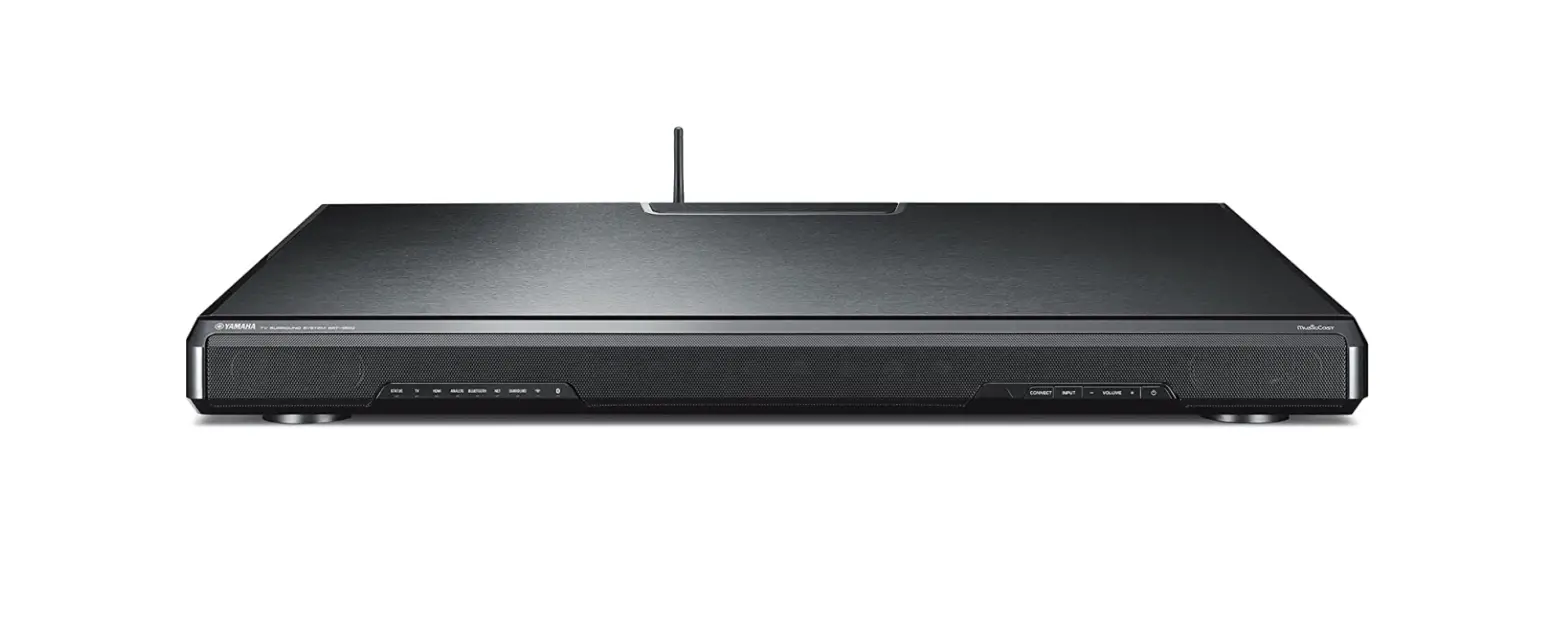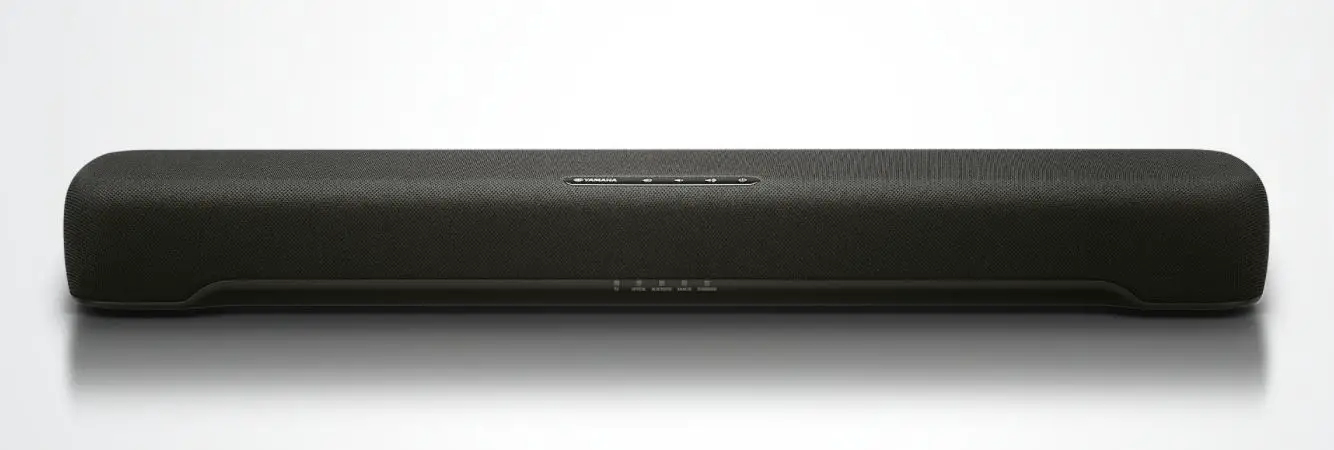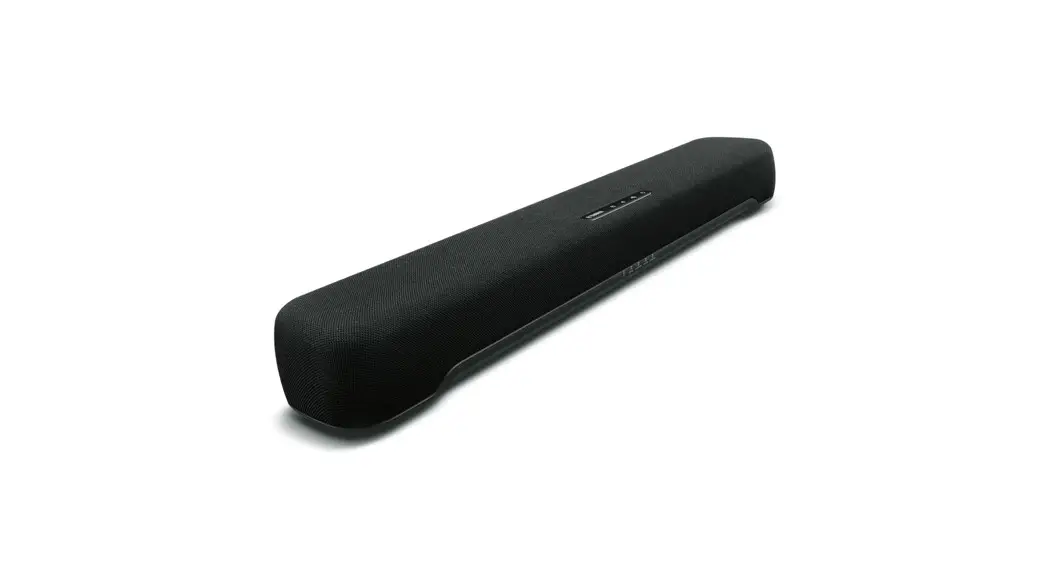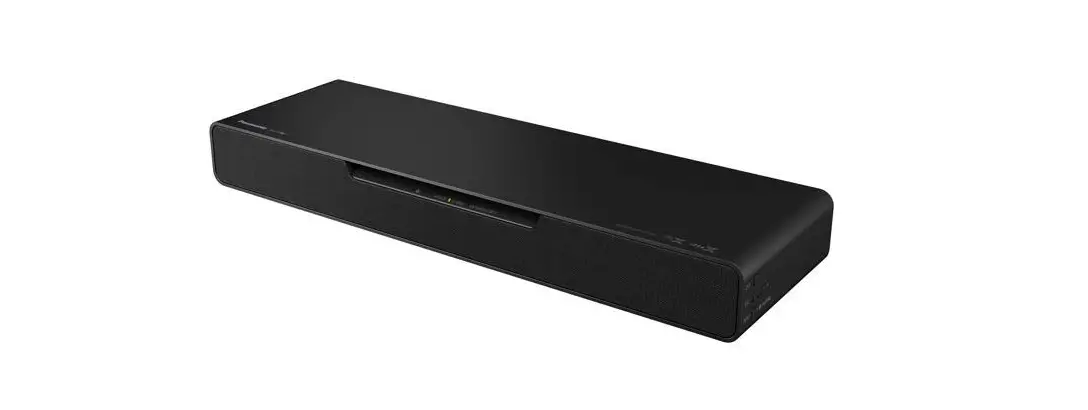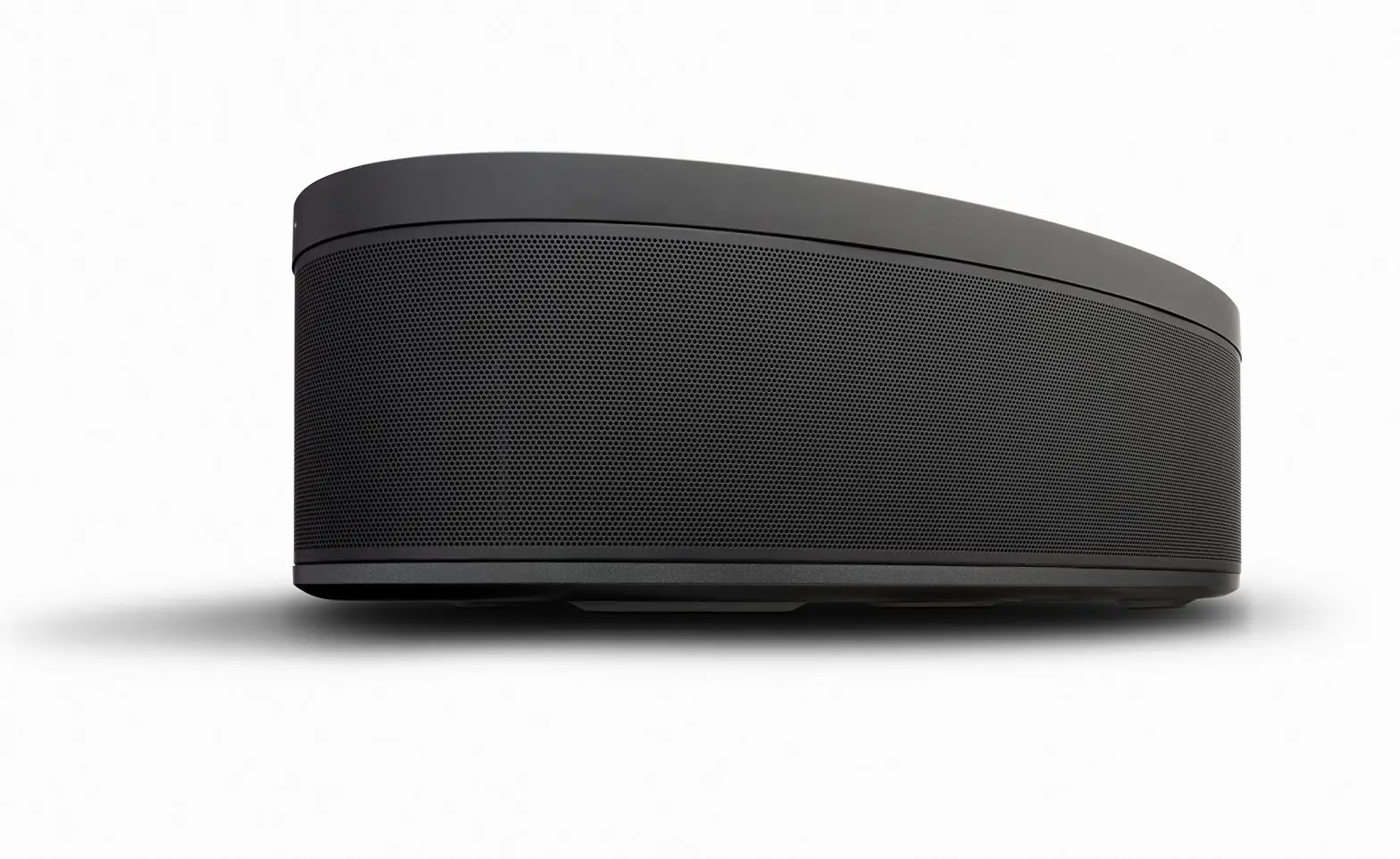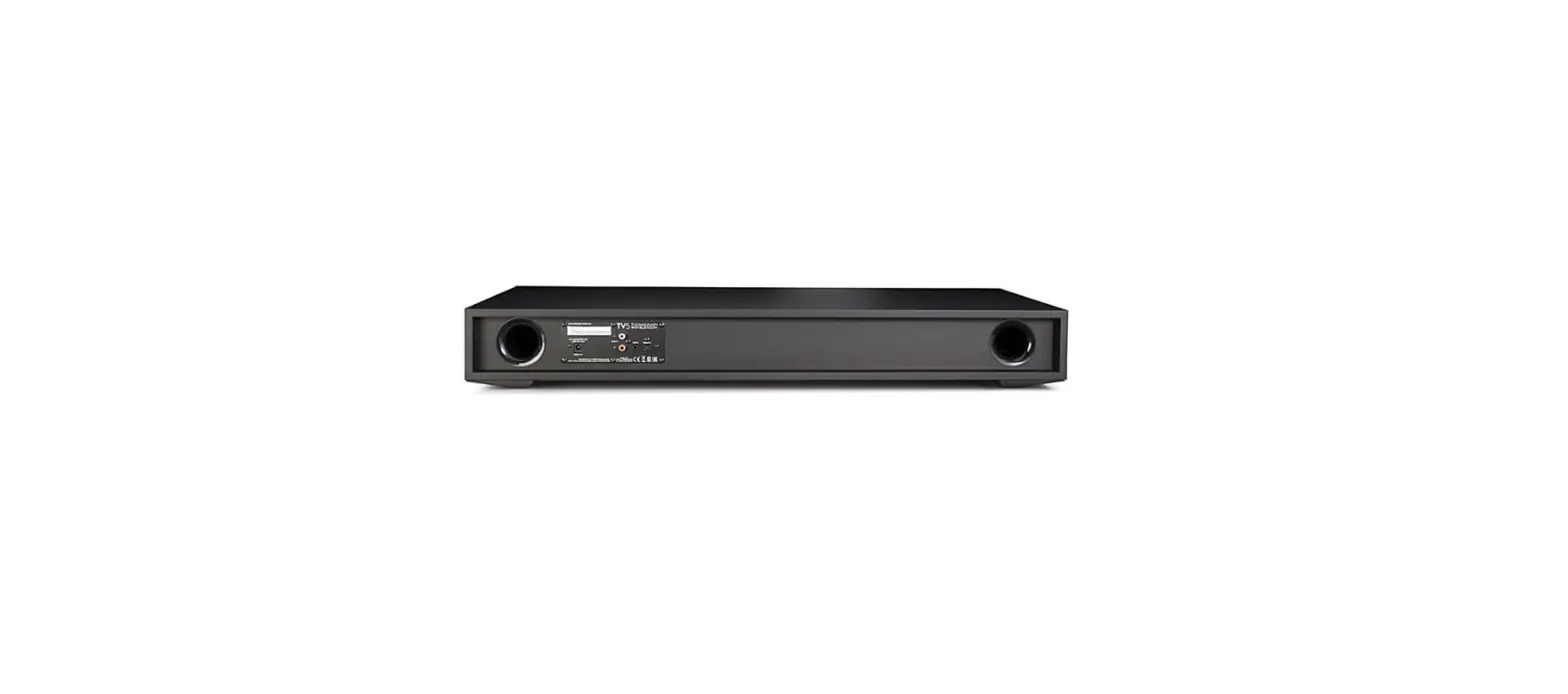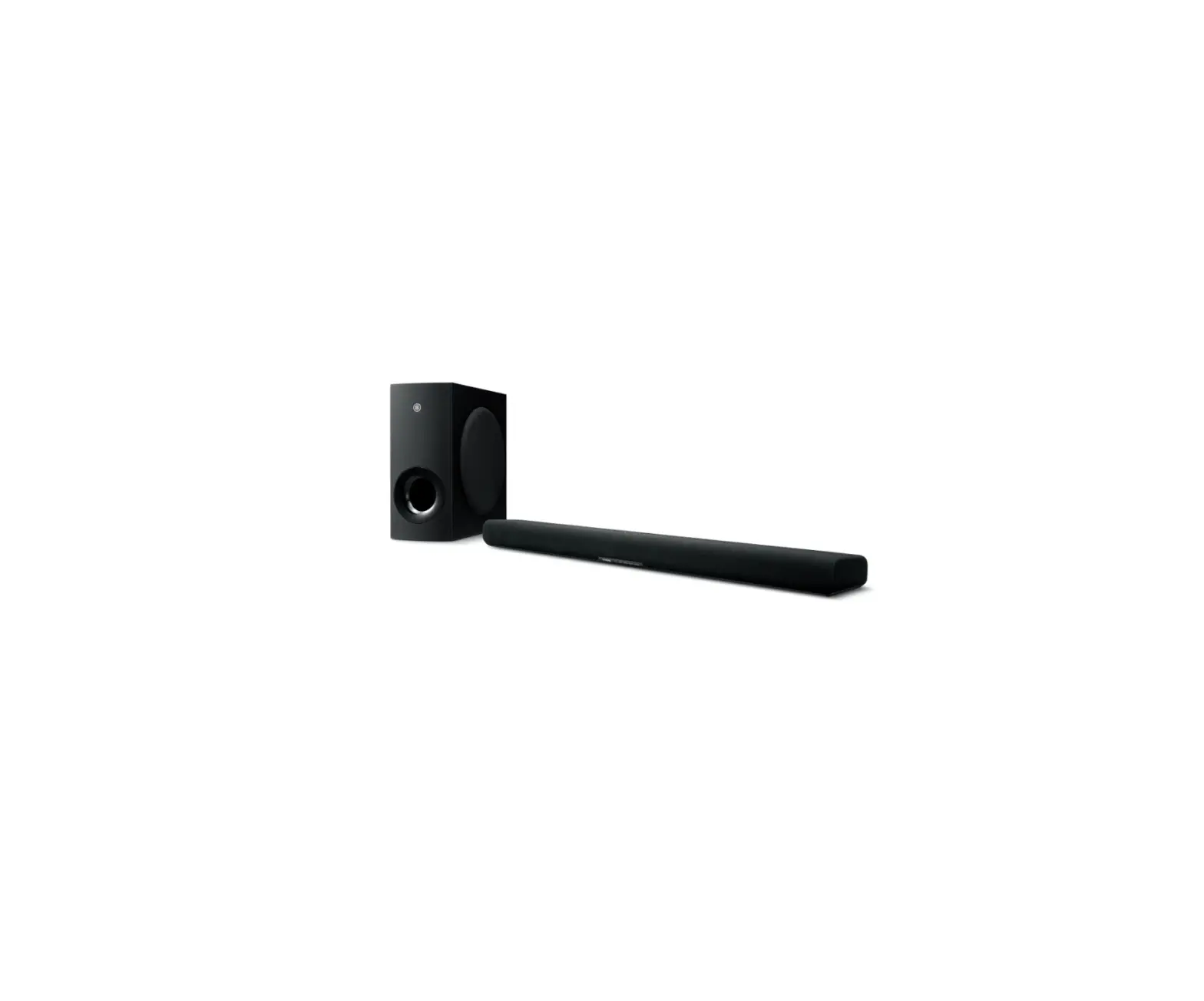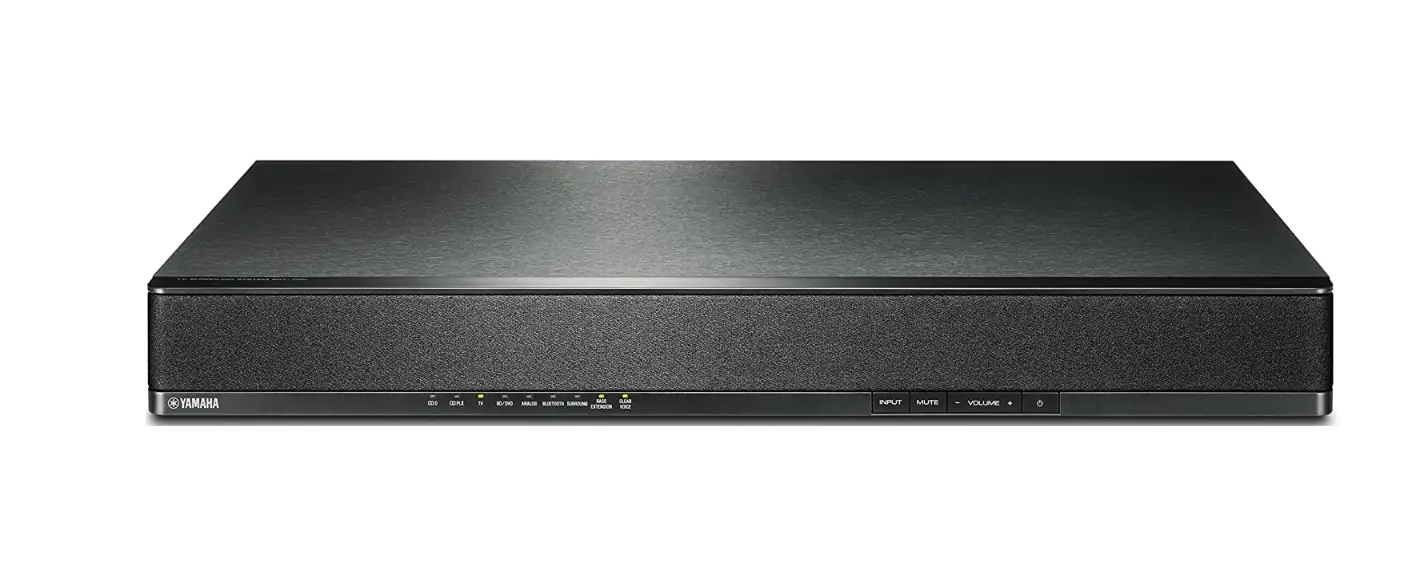

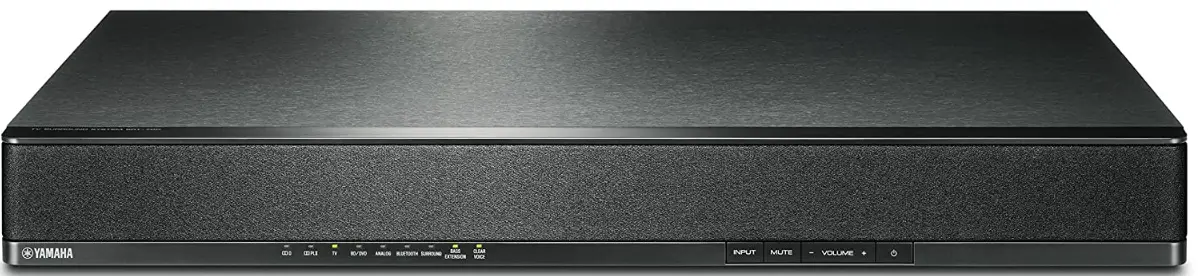
Yamaha SRT-700 TV Speaker Base
INTRODUCTION
CAUTION: READ THIS BEFORE OPERATING YOUR UNIT.
- To assure the finest performance, please read this manual carefully. Keep it in a safe place for future reference.
- Install this unit in a well ventilated, cool, dry, clean place – away from direct sunlight, heat sources,vibration, dust, moisture, and/or cold. For proper ventilation, allow the following minimum clearances (excludes a TV placed on top of thisunit).
- Top: 5 cm (2 in), Rear: 5 cm (2 in), Sides: 5 cm (2 in)
- Locate this unit away from other electrical appliances, motors, or transformers to avoid humming sounds.
- Do not expose this unit to sudden temperature changes from cold to hot, and do not locate this unit in an environment with high humidity (i.e. a room with a humidifier) to prevent condensation inside this unit, which may cause an electrical shock, fire, damage to this unit, and/or personal injury
- Avoid installing this unit where foreign objects may fall onto this unit and/or this unit may be exposed to liquid dripping or splashing. On the top of this unit, do not place:
- Other components, as they may cause damage and/or discoloration on the surface of this unit.
- Burning objects (i.e. candles), as they may cause fire, damage to this unit, and/or personal injury.
- Containers with liquid in them, as they may fall and liquid may cause electrical shock to the user and/or damage to this unit.
- Do not cover this unit with a newspaper, tablecloth, curtain, etc., in order not to obstruct heat radiation. If the temperature inside this unit rises, it may cause fire, damage to this unit, and/or personal injury.
- Do not plug in this unit to a wall outlet until all connections are complete.
- Do not operate this unit upside-down. It may overheat, possibly causing damage.
- Do not use force on switches, knobs and/or cords.
- When disconnecting the power cable from the wall outlet, grasp the plug; do not pull the cable.
- Do not clean this unit with chemical solvents; this might damage the finish. Use a clean, dry cloth.
- Only voltage specified on this unit must be used.
Using this unit with a higher voltage than specified is dangerous and may cause fire, damage to this unit, and/or personal injury. Yamaha will not be held responsible for any damage resulting from use of this unit with a voltage other than specified. - To prevent damage by lightning, keep the power cable and outdoor antennas disconnected from a wall outlet or the unit during a lightning storm.
- Do not attempt to modify or fix this unit. Contact qualified Yamaha service personnel when any service is needed. The cabinet should never be opened for any reasons.
- When not planning to use this unit for long periods of time (i.e. vacation), disconnect the AC power plug from the wall outlet.
- Be sure to read the “Troubleshooting” section on common operating errors before concluding that this unit is faulty.
- Before moving this unit, press to set this unit in standby mode, and disconnect the power supply cable from the wall outlet.
- Condensation will form when the surrounding temperature changes suddenly. Disconnect the power supply cable from the outlet, then leave the unit alone.
- Install this unit near the wall outlet and where the AC power plug can be reached easily.
- Secure placement or installation is the owner’s responsibility. Yamaha shall not be liable for any accident caused by improper placement or installation of speakers.
Notes on remote controls and batteries - Do not spill water or other liquids on the remote control.
- Do not drop the remote control.
- Do not leave or store the remote control in the following places:
- places of high humidity, such as near a bath
- places of high temperatures, such as near a heater or a stove
- places of extremely low temperatures
- dusty places
- Do not expose the remote control sensor of this unit to direct sunlight or lighting such as inverted fluorescent lamps.
- If the batteries grow old, the effective operation range of the remote control decreases considerably. If this happens, replace the batteries with two new ones as soon as possible.
- Do not use old batteries together with new ones.
- Do not use different types of batteries (such as alkaline and manganese batteries) together. Read the packaging carefully as these different types of batteries may have the same shape and color.
- Exhausted batteries may leak. If the batteries have leaked, dispose of them immediately. Avoid touching the leaked material or letting it come into contact with clothing, etc. Clean the battery compartment thoroughly before installing new batteries.
- Do not carry batteries in a pocket or purse with metal objects like coins, etc.
- Do not throw away batteries with general house waste. Dispose of them correctly in accordance with your local regulations.
- Keep batteries away from children. If a battery is accidentally swallowed, contact your doctor immediately.
- When not planning to use the remote control for long periods of time, remove the batteries from the remote control.
- Do not charge or disassemble the supplied batteries.
- The batteries shall not be exposed to excessive heat such as sunshine, fire or like.
WARNING
TO REDUCE THE RISK OF FIRE OR ELECTRIC SHOCK, DO NOT EXPOSE THIS UNIT TO RAIN OR MOISTURE.
As long as this unit is connected to the AC wall outlet, it is not disconnected from the AC power source even if you turn off this unit by . In this state, this unit is designed to consume a very small quantity of power. (Power key)
Turns on the power of this unit or sets it to the standby mode.
Do not use this unit within 22 cm (9 inches) of persons with a heart pacemaker implant or defibrillator implant.
Radio waves may affect electro-medical devices. Do not use this unit near medical devices or inside medical facilities.
FOR U.K. CUSTOMERS
If the socket outlets in the home are not suitable for the plug supplied with this appliance, it should be cut off and an appropriate 3 pin plug fitted. For details, refer to the instructions described below.
NOTE
The plug severed from the mains lead must be destroyed, as a plug with bared flexible cord is hazardous if engaged in a live socket outlet. SPECIAL INSTRUCTIONS FOR U.K. MODEL.
IMPORTANT
THE WIRES IN THE MAINS LEAD ARE COLOURED IN ACCORDANCE WITH THE
FOLLOWING CODE:
Blue: NEUTRAL
Brown: LIVE
As the colours of the wires in the mains lead of this apparatus may not correspond with the coloured markings identifying the terminals in your plug, proceed as follows:
The wire which is coloured BLUE must be connected to the terminal which is marked with the letter N or coloured BLACK. The wire which is coloured BROWN must be connected to the terminal which is marked with the letter L or coloured RED. Making sure that neither core is connected to the earth terminal of the three pin plug.
Supplied items
Make sure you have received all of the following items.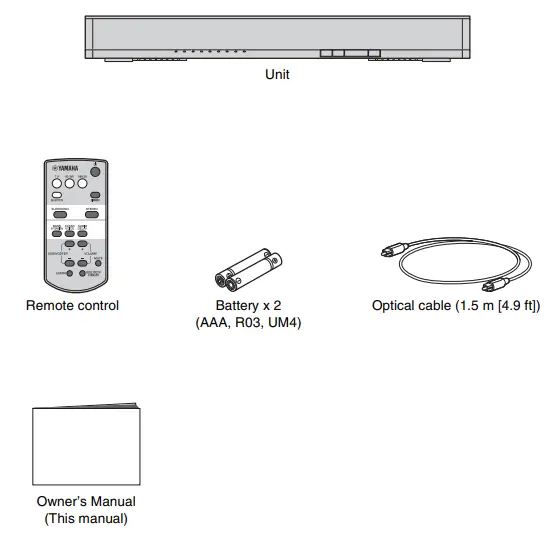
Preparing the remote control
Peel off the protection sheet before use.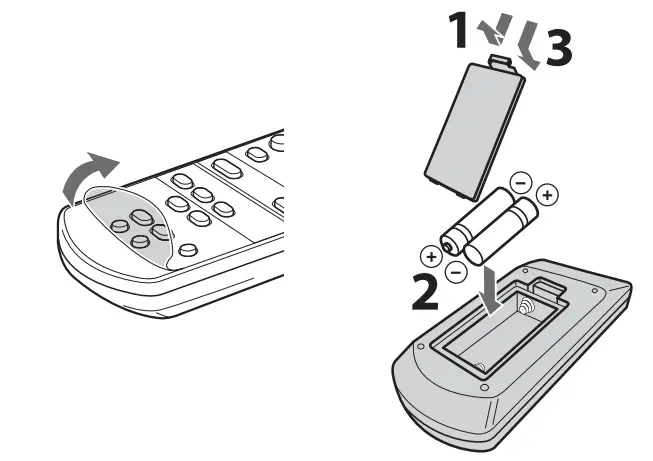
Operating range of the remote control
Remain within the operating range shown below.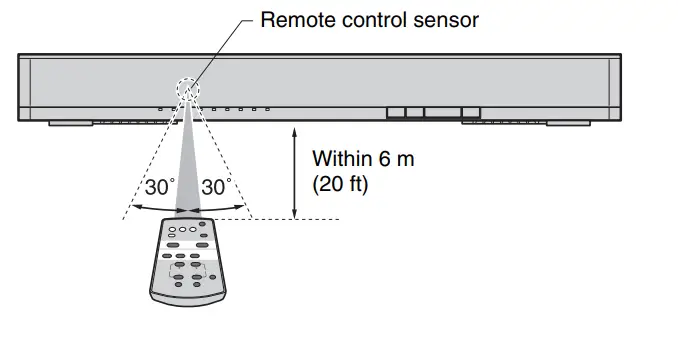
Features
Enjoy powerful and realistic sound from the unit. The unit is a home theater system which can be easily installed and connected to a TV and other devices.
- AIR SURROUND XTREME
Enjoy 7.1 channel surround sound, which creates a wide and deep soundstage, as if speakers are set, not only on the front, but also on the left and right, and behind the listener (p.9). - Bass extension
Enjoy a powerful bass sound with the Yamaha original bass boost technology “Advanced Bass Extension Processing” (p.9). - Bluetooth® connection
Content on a Bluetooth compatible smartphone, tablet, or computer can be played back easily (p.10).
You can enjoy realistic and impressive sound as close to the original by the Compressed Music Enhancer. - HOME THEATER CONTROLLER
You can operate the unit easily by installing the dedicated controlling application “HOME THEATER CONTROLLER.” - TV’s remote control learning function
Operate the unit with the TV’s remote control (p.12). - Clear voice
Makes voice sound (such as dialogues and narrations) clear (p.9).
Frequently asked questions
The following section covers popular functions and frequently asked questions about the unit.
Can I operate the unit using the remote control of the TV? Switching between the remote controls of the TV and unit is inconvenient.
Yes. You can control the unit using your TV’s remote control by the “TV’s remote control learning” function (p.12).
This function is available only for the IR (infrared) remote control. Check your TV’s remote control type.
Can I improve the clarity of dialogue?
Yes. Dialogue in movies, TV news, sports programs, etc., can be made clearer using the “clear voice” function (p.9).
Can I operate the unit using a smartphone? And, can I turn on/off the unit with a smartphone?
Yes. You can operate the unit with your smartphone by using the dedicated control application “HOME THEATER CONTROLLER” (p.11). When using this function, it is necessary to connect your smartphone to the unit through Bluetooth connection. Also, if you use the Bluetooth standby mode function, the unit will turn on when a Bluetooth connection is made between your smartphone and the unit, and turns off when disconnected (p.11).
Part names and functions of the unit
Front panel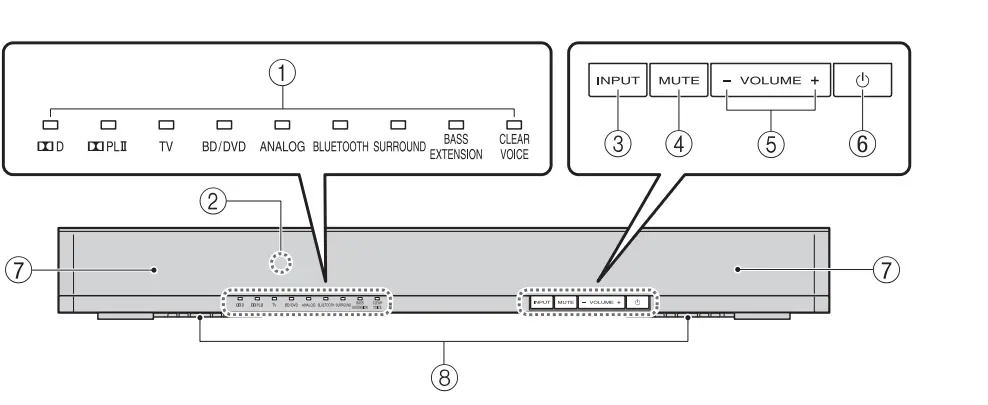
- Indicators
Indicate the status of the unit. Refer to “Operations” (p.8 to 9) for the main functions of the indicators. - Remote control sensor
Receives infrared signals from the remote control of the unit (p.2). - INPUT key
Selects an input source to be played back (p.8). - MUTE key
Mutes the audio output. Press the key again to unmute (p.9). - VOLUME (+/–) keys
Adjust the volume (p.8). - (power) key
Turns on or off (standby) the unit (p.9).
HINT
• The unit may automatically turn off when the auto power standby function is enabled (p.14). - Speakers
HDual built-in subwoofers
The built-in subwoofers are located in the bottom part of the unit.
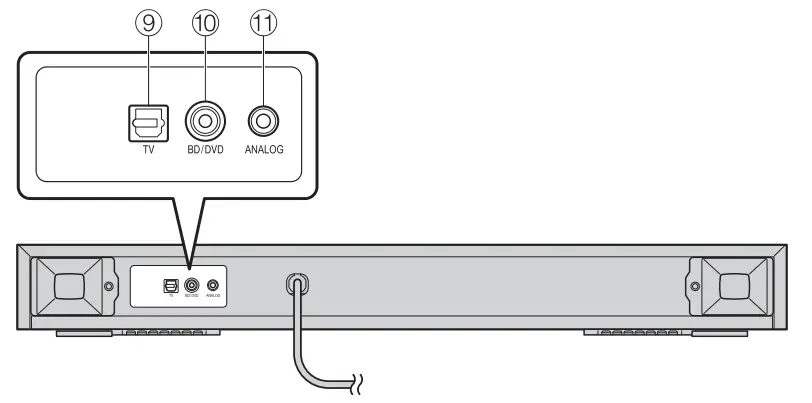
Rear panel
- TV input jack
For connecting to a TV with an optical cable (p.6). - bD/DVD input jack
For connecting to a playback device, such as a Blu-ray Disc (BD) player, with a coaxial digital cable (p.7). - ANALOG input jack
For connecting an external device with a 3.5 mm stereo mini plug cable (p.7).
Installations
Place the unit on a flat surface such as on top of a TV cabinet, and then place a TV on top of the unit.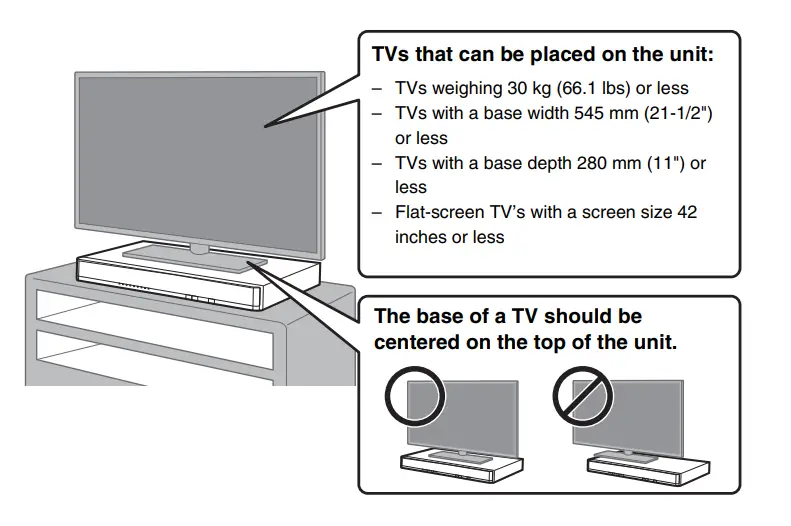
Cautions
- CRT TVs cannot be placed on the unit.
- If the TV base is too large to fit on top of the unit, place the unit in another location such as on an open shelf. In that case, make sure that the shelf is well-ventilated with enough clearance around the unit to prevent the heat from accumulating inside the unit.
- Place the unit so that it does not protrude from the TV cabinet’s edges.
- Do not place any device other than a TV on the unit. If a device such as a BD player is placed on the unit, a malfunction due to vibrations may occur, or the TV installation may become unstable.
Furthermore, if a hard object is placed on the unit, it may cause scratches on the unit. - Never fix the unit to a wall or other surface using a fall prevention device, such as wire or bracket, supplied with the TV. Doing so may cause the unit fall together with the TV if an accident such as an earthquake occurs. Read the instruction manual of your TV carefully and fix the TV to a wall or sturdy object following the instruction.
- The unit contains non-magnetic shielding speakers. Do not place magnetically sensitive items (hard diskb drive, etc.) near the unit.
- Determine the installation location considering the connection with external devices (such as a TV).
Obtaining better surround sound effect
For better surround sound effect, refer to the following points when installing the unit.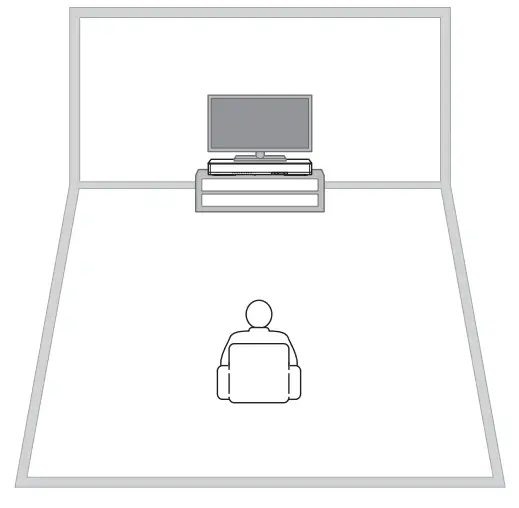
- Keep a distance of more than 2 meters (6.6 ft) between the unit and listener.
- Install the unit in front of the listening position.
Connections
Connect to a TV (or other peripheral device).
CAUTIONS
- Do not connect the power cable of the unit to the AC wall outlet before making connections.
- Do not use excessive force when inserting the cable plug. Doing so may damage the cable plug or terminal.
- Connect the TV and unit with the optical cable (supplied).
Remove the cap of the optical cable and check the direction of the plug.
- Connect the power cable of the unit to an AC wall outlet.
- Set the TV as follows.
- Set the TV volume to minimum.
- Disable the TV built-in speaker output (if available).

HINT
- If a setting to disable the speaker output is not available on your TV, you may disable it by connecting headphones to the headphone jack on the TV. For details, refer to the manuals of the TV.
- The TV and BD/DVD input jacks support the following audio signals.
- PCM (2 channel)
- Dolby Digital (up to 5.1 channel)
Unit (rear)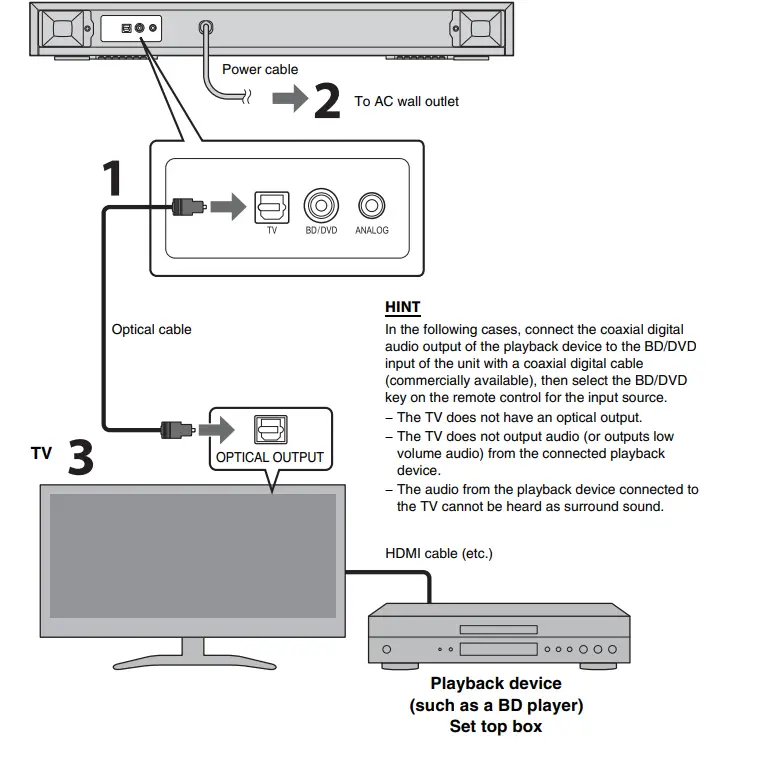
Digital connection of an external device
You can connect an external device that has a coaxial digital audio output, such as a DVD player, to the BD/DVD input jack of the unit.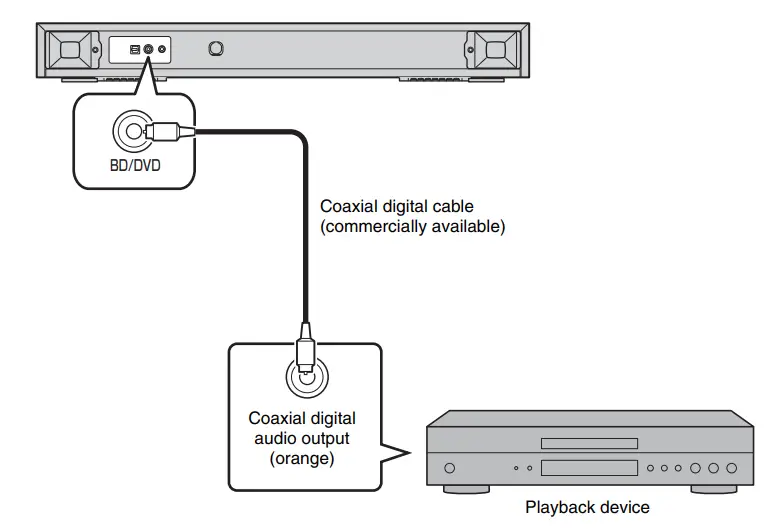
NOTE
Select the BD/DVD key on the remote control for the input source.
Analog connection of an external device (game console)
You can connect an external device, such as a game console or TV that does not havea digital audio output, to the ANALOG input jack of the unit.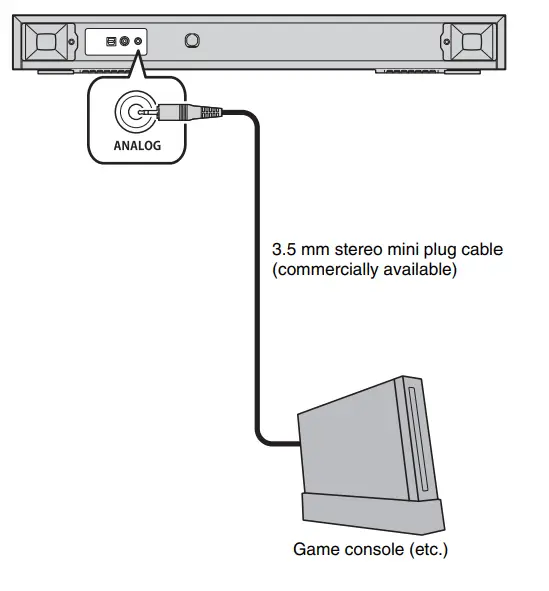
NOTE
- Select the ANALOG key on the remote control for the input source.
- If you can adjust the volume on an external device connected to the ANALOG input jack of the unit, adjust it to the same volume as the external device connected to the TV or BD/DVD input jack.
Indicators
The indicators on the front panel flash or light up, to indicate the operation and setting status.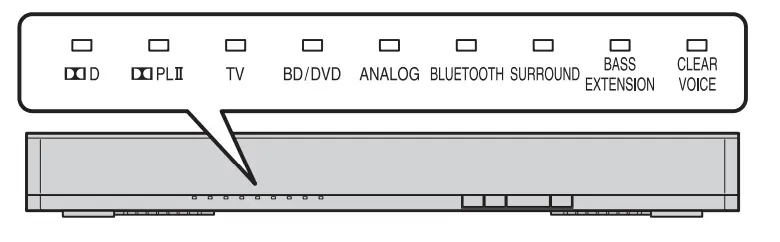
In this manual, illustrations of the nine in-line indicators are used for explanation.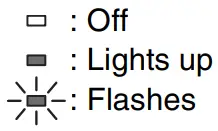
(Example: When the  indicator and SURROUND indicator flash, and the TV indicator lights up)
- Input keys
Select an input source to be played back.
TV ..………………TV audio
BD/DVD.……….Audio from a device connected to the BD/DVD input jack
ANALOG..…….Audio from a device connected to the ANALOG input jack
BLUETOOTH …………………….Audio from a Bluetooth connecteddevice
The indicator for the selected input source lights up. (Example: when TV is selected)
HINT- To play audio of the playback device connected to the TV or to watch videos of the playback device, set the TV’s input source to the playback device.
- For details on Bluetooth connection, refer to “Listening to the sound from a Bluetooth device” (p.10).
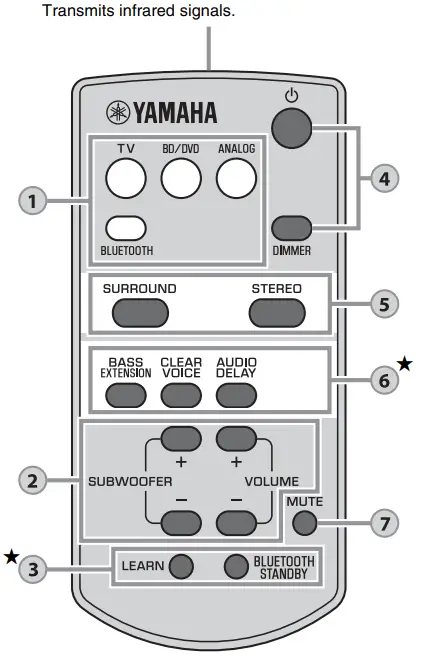
- SUBWOOFER keys (+/–)
Adjust the volume of the subwoofer.
VOLUME keys (+/–)
Adjust the volume of the unit.
Keys that require pressing for more than 3 seconds
LEARN, BLUETOOTH STANDBY, AUDIO DELAY
Remote control signal transmitter
- LEARN key★
Sets the unit to the TV’s remote control learning mode (p.12).
BLUETOOTH STANDBY key★
Enables/disables the Bluetooth standby mode (p.11). - (power) key
Turns on or off (standby) the unit.
Turned on Bluetooth standby (p.11)
Turned offDIMMER key
Switches the brightness of the indicators. Pressing the key each time switches the status of the indicators as follows.
Indicators illuminate bright just after the operation and become the set brightness after a few seconds. - SURROUND and STEREO keys
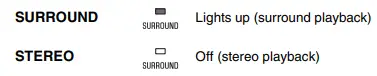
Switch between surround and stereo (2 channel) playback. When surround playback is selected, you can enjoy a realistic sound effect using Yamaha’s exclusive AIR SURROUND XTREME.
HINT- When 2 channel stereo signals are played in surround, the
 indicator lights up.
 - By installing the dedicated free application “HOME
THEATER CONTROLLER” to a Bluetooth device, such as a smartphone, you can choose the following surround modes: TV PROGRAM, MOVIE, MUSIC, SPORTS, and GAME.
- When 2 channel stereo signals are played in surround, the
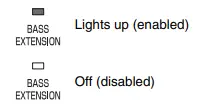
- BASS EXTENSION key
Enables/disables the bass extension function. When this function is enabled, you can enjoy a powerful bass sound with the Yamaha original bass boost technology “Advanced Bass Extension Processing.”
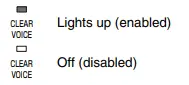
CLEAR VOICE key
Enables/disables the clear voice function.
When this function is enabled, you can enjoy clear voice sounds while watching movies TV dramas, news programs or sports programs.
AUDIO DELAY key★
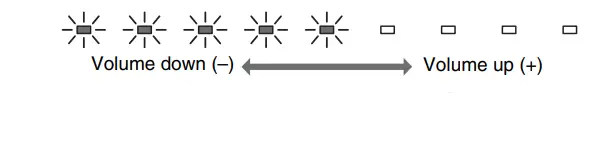
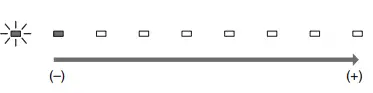
Adjusts the audio delay to synchronize the sound with the video when the video image on the TV may seem delayed with respect to the sound. Follow the procedure below to adjust the audio delay.- Hold down the AUDIO DELAY key for morethan 3 seconds.
The left most indicator flashes.
- Press the SUBWOOFER (+/-) key to adjust the audio delay.
Pressing the SUBWOOFER (+) key delays the audio output timing.
- To finish the adjustment, press the AUDIO DELAY key.
HINT
The adjustment will be finished automatically if no operations are performed for 20 seconds.
- Hold down the AUDIO DELAY key for morethan 3 seconds.
- MUTE key
Mutes the audio output. Press the key again to unmute.


 Bluetooth standby (p.11)
 DIMMER key


Decoder indication
The unit supports the following audio signals. You can check the type of the input audio signal by the color of the indicator.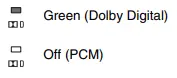
Listening to the sound from a Bluetooth device
You can play back wirelessly from Bluetooth devices, such as a smartphone or digital music player.
See also the operating manual of the Bluetooth device for more details.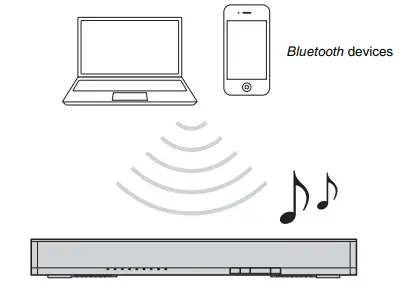 Perform the following steps to use a Bluetooth device with the unit.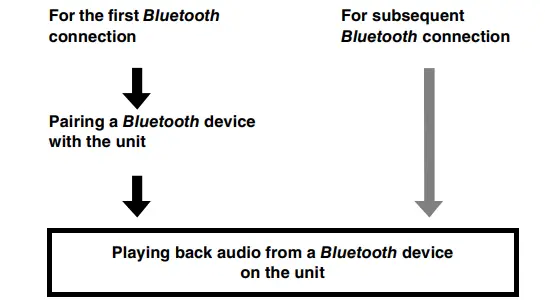
Pairing a Bluetooth device with the unit
When connecting to a Bluetooth device for the first time, “pairing” between the device and unit is required. “Pairing” is necessary for each Bluetooth device you use.
Once “pairing” with a device is completed, subsequent connection with that device willnot require “pairing.”
- Press the BLUETOOTH key on the unit’s remote control to select Bluetooth as the input source.
The BLUETOOTH indicator on the front panel flashes.
- Turn on the Bluetooth function of the device to be paired, and
perform pairing.
The operation varies depending on the device. Refer to the operation manual of the
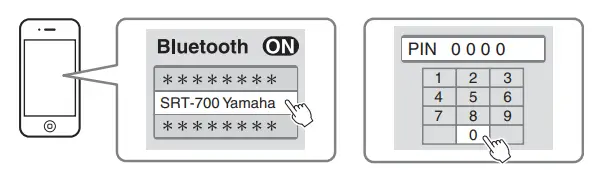
device. - Select “SRT-700 Yamaha” in the Bluetooth device list on the device.
If a passkey (PIN) is required, enter the number “0000.” When pairing is completed
 , or a completion message appears on the device.
NOTE- Perform pairing with the Bluetooth device and unit within 10 meters (33 ft) of each other.
- Up to eight Bluetooth devices can be paired with the unit. If a ninth device is paired, pairing data for the device with the oldest connection date will be deleted.
- If pairing information for a device is deleted, to use that device again, pairing of the device is required again.
- If a Bluetooth device is already connected to the unit, terminate that Bluetooth connection (p.11), then perform pairing with the new device.
- Refer to “Bluetooth” (p.17) in “Troubleshooting” if pairing cannot be achieved.

 When pairing is completed
 , or a completion message appears on the device.
Playing back audio from a Bluetooth device on the unit
- With the unit turned on, press the BLUETOOTH key on the unit’s remote control to select Bluetooth as the input source.
The BLUETOOTH indicator on the front panel flashes.
- Turn on the Bluetooth function of the device and then connect.
When Bluetooth connection is made correctly, the BLUETOOTH indicator of the unit lights up.
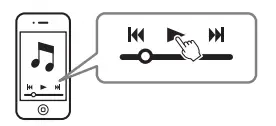
- Play back a song on the device.

NOTE- Perform Bluetooth connection with the device and unit within 10 meters (33 ft) of each other.
- It may be necessary to select “SRT-700 Yamaha” in the Bluetooth device list again, in the event that a connection problem occurs. You may have to change the output setting to output audio to the unit, depending on the Bluetooth device you are using.
- Adjust the volume level of the Bluetooth device as required.
- If a Bluetooth device is already connected to the unit, terminate that Bluetooth connection, then connect with the new device.


Terminating Bluetooth connection
Bluetooth connection is terminated in the following cases. When the Bluetooth connection is terminated with the unit turned on, the BLUETOOTH indicator changes from the lit status to the flashing status and the unit enters the connection wait status.
- The Bluetooth function is turned off on the compatible device.
- The BLUETOOTH key on the unit’s remote control is pressed for more than 3 seconds.
- The unit is turned off.
Using the Bluetooth standby mode
The Bluetooth standby mode allows you to turn on (or off) the unit automatically, linked with the operation of the Bluetooth device.
- With the unit turned on, hold down the BLUETOOTH STANDBY key on the unit’s remote control for more than 3 seconds.
Holding down the BLUETOOTH STANDBY key for 3 seconds each time toggles the mode between enabled and disabled.”
When the Bluetooth standby mode is enabled and the unit is turned off, the indicator lights up in red (Bluetooth standby).
Functions available on Bluetooth devices with Bluetooth standby mode enabled
Power on interlock function (when the unit is turned off)
When Bluetooth connection is made on the device, the unit will turn on and will be ready to play back sound from the device.
Power off interlock function (when the unit is turned on)
The unit will be turned off when Bluetooth connection is terminated on a Bluetooth device. (Only when BLUETOOTH is selected as the input source.)


Using the HOME THEATER CONTROLLER application
By installing the dedicated free application “HOME THEATER CONTROLLER” to a Bluetooth device, such as a smartphone, you can perform various operations easily and conveniently with the Bluetooth device. (Setting items: basic operation, surround mode, sound adjustments)
NOTE
- To use the application, connect the unit and a Bluetooth device via Bluetooth connection.
- If you enable the Bluetooth standby mode of the unit, you can turn on the power of the unit with the Bluetooth device.
For details on “HOME THEATER CONTROLLER”, see the product information on our website.
Settings
Programming the unit with the TV’s remote control (TV’s remote control learning function)
Once you program the unit, you can control it with your TV’s remote control for functions such as turning on/off the TV and unit simultaneously, or volume up/down and muting/ unmuting of the unit.
- This function is available only when your TV’s remote control uses IR (infrared) signal.
- A radio wave remote control will not work.
- If you want to use a cable or satellite set top box’s remote control to operate the unit, use your original
TV’s IR (infrared) remote control to program the unit, then use the set top box’s remote control to operate. - If by changing the volume of the unit the TV’s volume also changes, set the TV’s volume to minimum, or disable speaker output.
- Turn off the TV.
- Turn off the unit.
- Hold down the LEARN key on the unit’s remote control for more than seconds to set the unit to the learning mode.
When the unit is in the learning mode, the indicators on the front panel flash as shown below.
NOTE- Steps 4 to 7 require only the TV’s remote control and the keys on the front panel of the unit. The remote control of the unit is not necessary.
- If the unit has already learned functions, the following indicators light up.
Mute: TV
Volume (–): BD/DVD
Volume (+): ANALOG
Power: BLUETOOTH
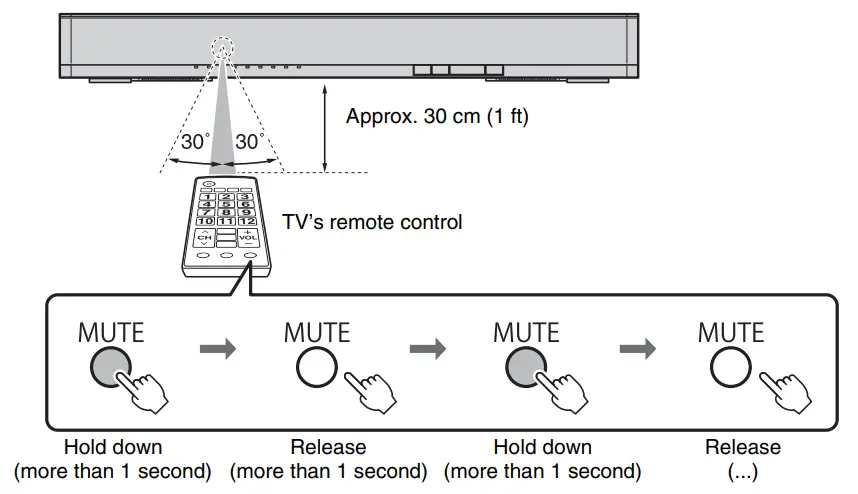
- Teach the unit the “Mute” code of the TV’s remote control.
- Press MUTE on the front panel of the unit.

- While pointing your TV’s remote control at the remote control sensor, hold down the mute key for more than 1 second twice or three times.


- Press MUTE on the front panel of the unit.
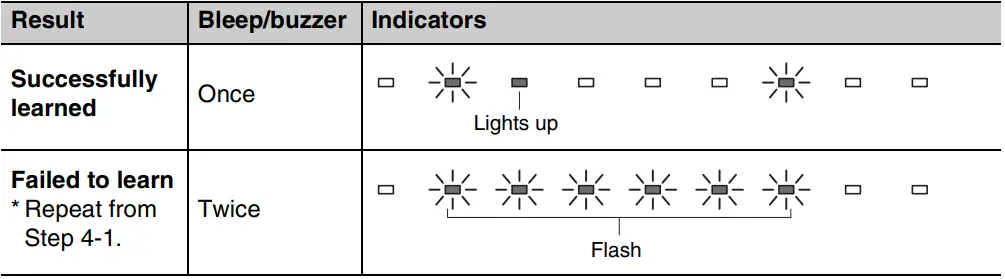
- Teach the unit the “Volume (–)” code of the TV’s remote control.
- Press VOLUME (–) on the front panel of the unit.

- While pointing your TV’s remote control at the remote control sensor, hold down the volume (–) key for more than 1 second twice or three times.

- Press VOLUME (–) on the front panel of the unit.
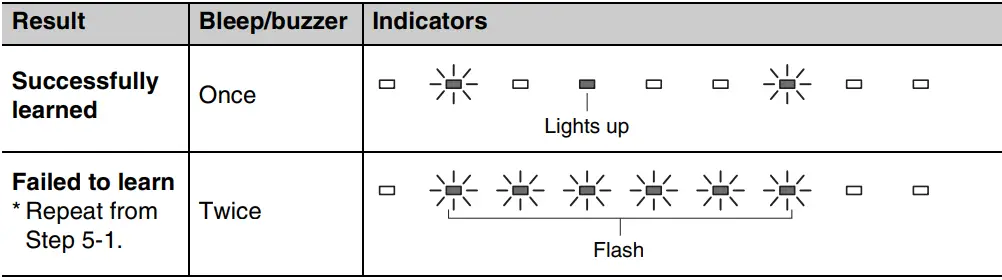
- Teach the unit the “Volume (+)” code of the TV’s remote control.
- Press VOLUME (+) on the front panel of the unit.

- While pointing your TV’s remote control at the remote control sensor, hold down the volume (+) key for more than 1 second twice or three times.

- Press VOLUME (+) on the front panel of the unit.
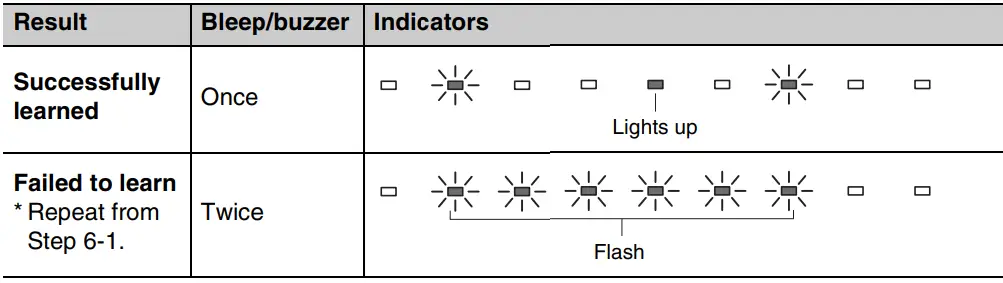
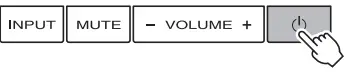
- Teach the unit the “Power” code of the TV’s remote control.
- Press (power) on the front panel of the unit.

- While pointing your TV’s remote control at the remote control sensor, hold down the power key for more than 1 second twice or three times.

- Press (power) on the front panel of the unit.
- To finish the learning mode, press the LEARN key on the unit’s remote control.
This completes the necessary settings. Now you can operate the unit with the TV’s remote control’s mute key, volume keys, or power key.
HINT- The learning mode will be finished automatically if no operations are performed for 5 minutes.
- Set the TV volume to minimum. When you turn up the volume of the unit with the TV’s remote control, the volume of the TV may be turned up at the same time. In this case, follow Step 3 in “Connections” (p.6) to change the TV setting.
- You can press the (power) key on the unit’s remote control to finish learning mode.



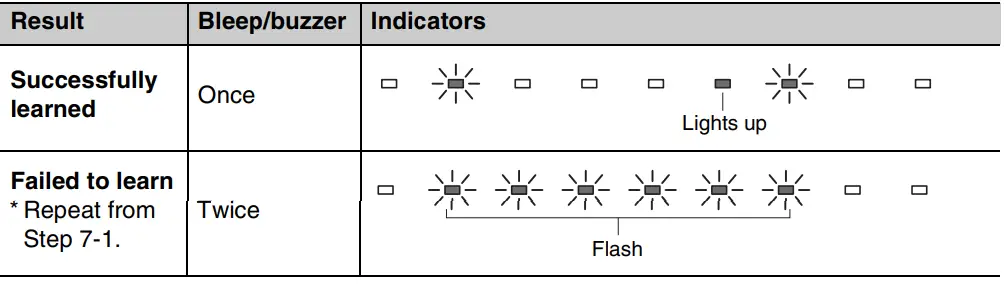
Clearing all programmed functions
- With the unit turned off, hold down the LEARN key on the unit’s remote control for more than 3 seconds (for entering the learning mode).
When the unit is in the learning mode, the indicators on the front panel flash as shown below.
- Hold down INPUT on the front panel of the unit for more than 3 seconds.
The corresponding indicator of the learned function turns off and the indicators on the front panel flash as shown below.
If the clearing is completed, you will hear the bleep sound three times.
- Press the LEARN key on the unit’s remote control.


Setting the auto power standby function
By enabling the auto power standby function, you can avoid forgetting to turn off the unit after use, or if you fall asleep while watching TV.
NOTE
- When the auto power standby function is enabled and one of the following conditions is met, the unit will automatically turn off.
- No operations for 8 hours
- No audio input and no operations for 20 minutes when BLUETOOTH is selected as the input source.
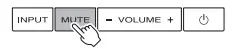
- With the unit turned off, hold down the MUTE key on the unit’s remote control for more than 3 seconds to enable/disable the auto power standby function.
You can check the status of the auto power standby function with the indicators on the front panel for several seconds right after the unit is turned on.
HINT- Initial setting varies depending on the country or region.
- U.K. and Europe models: enabled
- Other models: disabled

Initializing the unit
Follow the procedure below to initialize the unit.
- Turn off the unit.
- Hold down (power) on the front panel of the unit for more than 3 seconds.
Troubleshooting
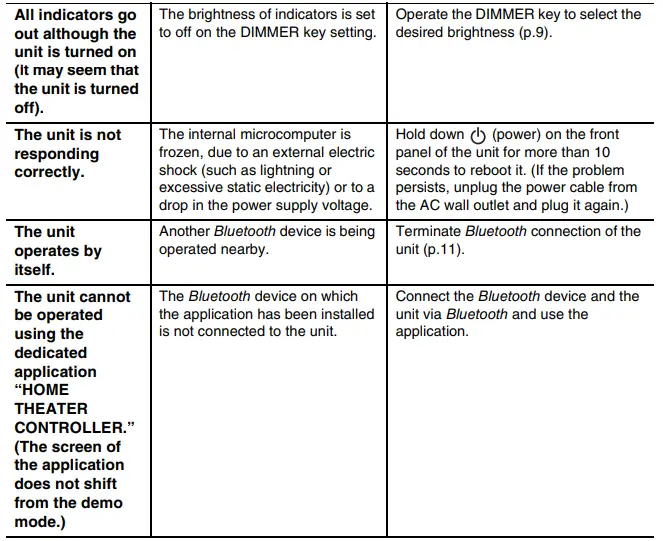
Refer to the table below when the unit does not function properly. If the problem you are experiencing is not listed below or if the instructions below do not help, turn off the unit, disconnect the power cable, and contact the nearest authorized Yamaha dealer or service center.
First, check the following:
- The power cables of the unit, TV and playback devices (such as BD players) are connected to AC wall outlets securely.
- The unit, TV and playback devices (such as BD players) are turned on.
- The connectors of each cable are securely inserted into jacks on each device.
Power and system
| Problem | Cause | Remedy |
| The power turns off suddenly. | The auto power standby function worked.
When the auto power standby function is enabled and one of the following conditions is met, the unit will automatically turn off. – No operations for 8 hours – No audio input and no operations for 20 minutes when BLUETOOTH is selected as the input source. | Turn on the unit again. To stop the unit from turning off automatically, disable the auto power standby function (p.14). |
| The protection circuitry has been activated. (The D indicator on the front panel of the unit flashes.) | After confirming that all connections are made properly, turn on the unit again. If the power often suddenly turns off, unplug the power cable from the AC wall outlet and contact the nearest authorized Yamaha dealer or service center. | |
| Bluetooth connection is terminated on a Bluetooth device when the Bluetooth standby mode is enabled. | Disable the Bluetooth standby mode (p.11). | |
| The power cannot be turned on. | The protection circuitry has been activated three times consecutively. (If you try to turn on the power in this condition, the
D indicator on the front panel of the unit flashes.) | To protect the product, the power cannot be turned on. Unplug the power cable from the AC wall outlet and contact the nearest authorized Yamaha dealer or service center. |
 Audio
Audio 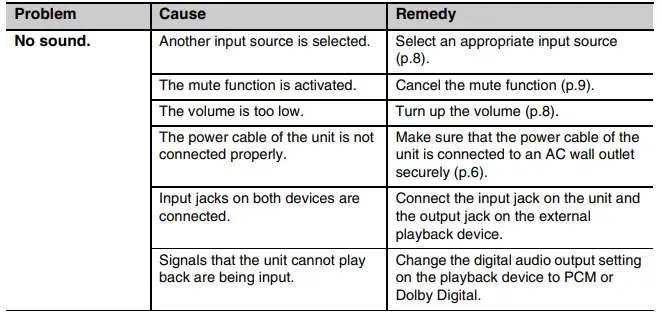
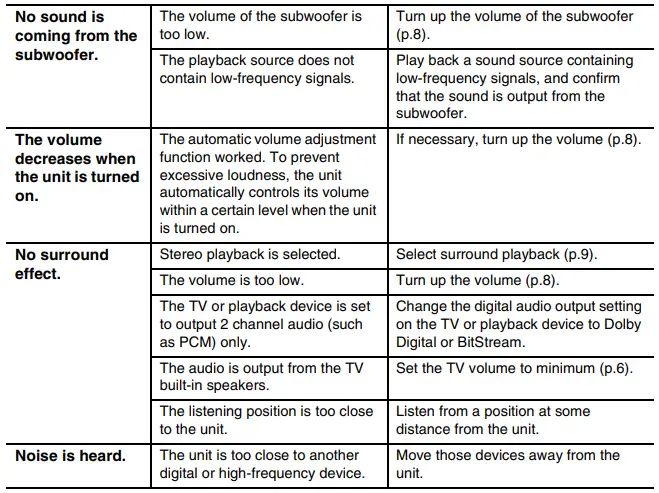 Remote control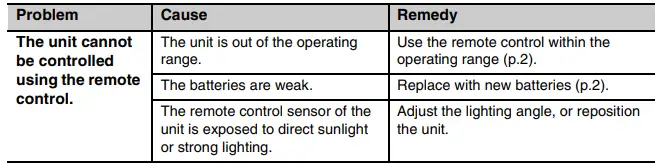
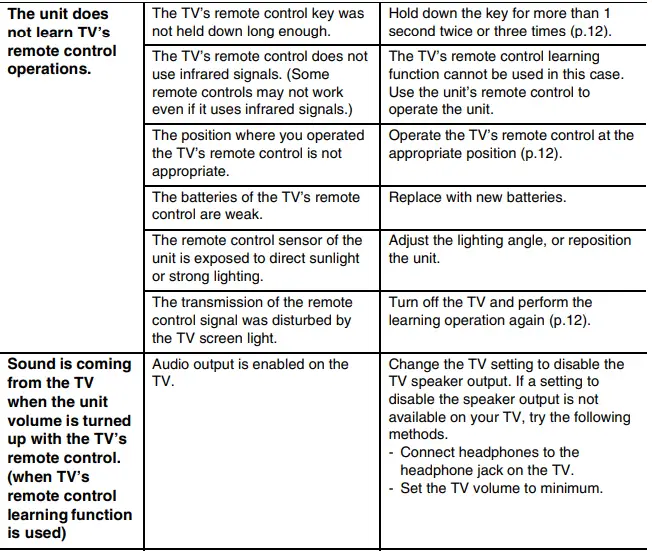
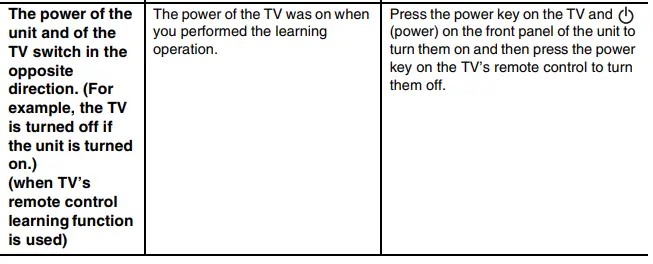 Bluetooth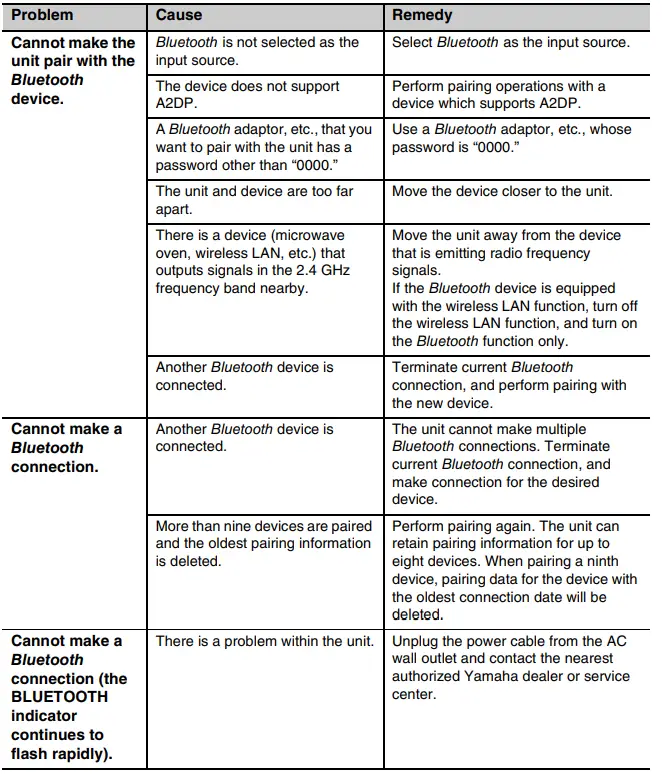
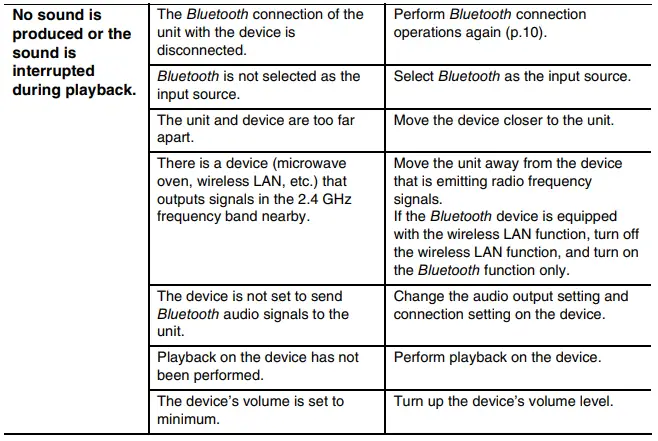
Specifications

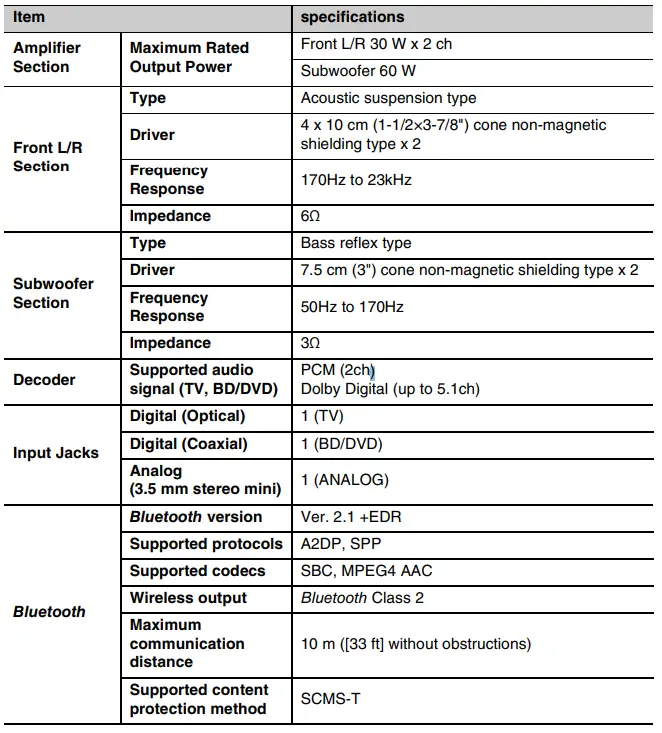
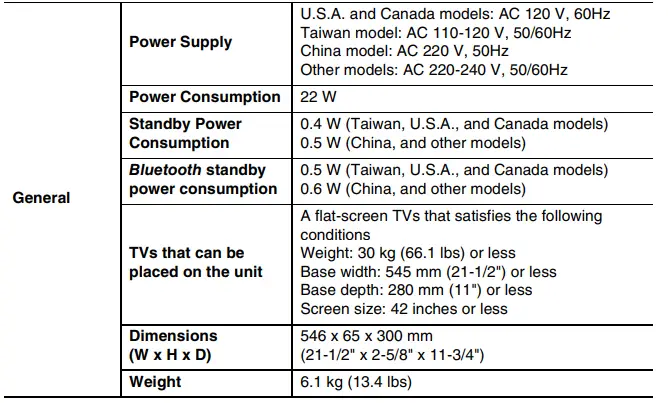
Specifications are subject to change without notice.
This system is equipped with Yamaha’s AIR SURROUND XTREME virtual sound technology that achieves superior positional, high-grade 7.1 channel surround sound using the unit.
Bluetooth
Bluetooth is a registered trademark of the Bluetooth SIG and is used by Yamaha in accordance with a license agreement.
Manufactured under license from Dolby Laboratories. Dolby, Pro Logic, and the double-D symbol are trademarks of Dolby Laboratories. “Blu-ray Disc™”, “Blu-ray™”, and the logos are trademarks of the Blu-ray Disc Association.
Bluetooth
- Bluetooth is a technology for wireless communication employing the 2.4 GHz frequency band, a band which can be used without a license.
Handling Bluetooth communications - The 2.4 GHz band used by Bluetooth compatible devices is a radio band shared by many types of equipment. While Bluetooth compatible devices use a technology minimizing the influence of other components using the same radio band, such influence may reduce the speed or distance of communications and in some cases interrupt communications.
- The speed of signal transfer and the distance at which communications is possible differs according to the distance between the communicating devices, the presence of obstacles, radio wave conditions and type of equipment.
- Yamaha does not guarantee all wireless connections between the unit and devices compatible with Bluetooth function.
Information for Users on the Collection and Disposal of Old Equipment and Used Batteries
These symbols on the products, packaging, and/or accompanying documents mean that used electrical and electronic products and batteries should not be mixed with general household waste. For proper treatment, recovery and recycling of old products and used batteries, please take them to applicable collection points, in accordance with your national legislation and the Directives 2002/96/EC and 2006/66/EC.
By disposing of these products and batteries correctly, you will help to save valuable resources and prevent any potential negative effects on human health and the environment which could otherwise arise from inappropriate waste handling.
For more information about the collection and recycling of old products and batteries, please contact your local municipality, your waste disposal service or the point of sale where you purchased the items.
[Information on Disposal in other Countries outside the European Union] These symbols are only valid in the European Union. If you wish to discard these items, please contact your local authorities or dealer and ask for the correct method of disposal.
Note for the battery symbol (bottom two symbol examples): This symbol might be used in combination with a chemical symbol. In this case it complies with the requirement set by the Directive for the chemical involved.
FAQS
Can you use this sub with an older pioneer receiver that doesn’t have a lte sub output and if so how?
You may need to consider contacting the receiver manufacturer for their recommendation, as they may have a specific suggested output.
You will likely need to connect into one of your receiver’s available RCA Line Outputs.
If i use a splitter from the sub out ports to the lfr input, will there be a problem with impedance?
No
Can this connect to a sound bar via Bluetooth?
The S 808 does not feature wireless connectivity. The soundbar/source will need to have a dedicated RDA subwoofer output to connect the S 808 subwoofer.
How many watts is it?
50 watts of continuous power (100 watts peak)
What is the standby power consumption?
According to my Kill-A-Watt meter, it was about 0.4 W when I first installed it about 10 months ago,
can you connect it to SVS wireless kit?
It appears that a powered subwoofer like the Jamo S 808 would work with this wireless transmitter/receiver system according to the SVS website.
is this 220v or 110v
us 110v
Is there an APP for controlling this sound baser?
yes.but so basic setting only
Will this subwoofer turn on and off automatically with the amplifier?
“POWER” AUTO/ON/OFF – When this switch is in the “AUTO” position, the subwoofer will
automatically turn “on” when it senses a signal. It will automatically go into “standby mode”
after 15-20 minutes with no signal. When this switch is in the “OFF” position, the subwoofer
will remain “off” until the switch is manually turned back to the “ON/AUTO” position s
when will these be in stock through amazon again? I dont like third party sellers.
Do not know but get one from other places if need be. These are fantastic for small rooms
Klipsch says i will need a single-ended rca cable leading from the “sub out” port but it has both right and left channels. do i need a splitter?
No splitter will be needed. Using a male-male RCA subwoofer cable, connect the cable to the subwoofer’s RCA Line Input labeled “LFE.”