 USERS GUIDE
Revision: 0.00
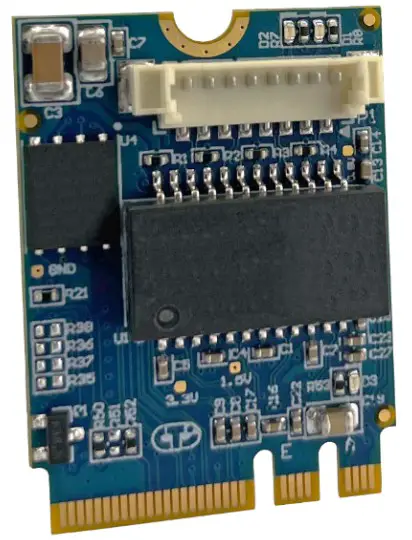
M.2 GbE
CTIM-00055 Revision 0.00 2021-02-25

PREFACE
Disclaimer
The information contained within this user’s guide, including but not limited to any product specification, is subject to change without notice.
Connect Tech assumes no liability for any damages incurred directly or indirectly from any technical or typographical errors or omissions contained herein or for discrepancies between the product and the user’s guide.
Customer Support Overview
If you experience difficulties after reading the manual and/or using the product, contact the Connect Tech reseller from which you purchased the product. In most cases the reseller can help you with product installation and difficulties.
In the event that the reseller is unable to resolve your problem, our highly qualified support staff can assist you. Our support section is available 24 hours a day, 7 days a week on our website at: https://connecttech.com/support/resource-center/. See the contact information section below for more information on how to contact us directly. Our technical support is always free.
Contact Information
| Mail/Courier | Connect Tech Inc. Technical Support 42 Arrow Road Guelph, Ontario Canada N1K 1S6 |
| Contact Information | [email protected] [email protected] https://www.connecttech.com Toll Free: 800-426-8979 (North America only) Telephone: +1-519-836-1291 Facsimile: 519-836-4878 (on-line 24 hours) |
| Support | Please go to the Connect Tech Resource Center for product manuals, installation guides, device drivers, BSPs and technical tips. Submit your technical support questions to our support engineers. Technical Support representatives are available Monday through Friday, from 8:30 a.m. to 5:00 p.m. Eastern Standard Time. |
Limited Product Warranty
Connect Tech Inc. provides a 2-year Warranty for this product. Should this product, in Connect Tech Inc.’s opinion, fail to be in good working order during the warranty period, Connect Tech Inc. will, at its option, repair or replace this product at no charge, provided that the product has not been subjected to abuse, misuse, accident, disaster or non-Connect Tech Inc. authorized modification or repair.
You may obtain warranty service by delivering this product to an authorized Connect Tech Inc. business partner or to Connect Tech Inc. along with proof of purchase. Product returned to Connect Tech Inc. must be pre-authorized by Connect Tech Inc. with an RMA (Return Material Authorization) number marked on the outside of the package and sent prepaid, insured and packaged for safe shipment. Connect Tech Inc. will return this product by prepaid ground shipment service.
The Connect Tech Inc. Limited Warranty is only valid over the serviceable life of the product. This is defined as the period during which all components are available. Should the product prove to be irreparable, Connect Tech Inc. reserves the right to substitute an equivalent product if available or to retract the Warranty if no replacement is available.
The above warranty is the only warranty authorized by Connect Tech Inc. Under no circumstances will Connect Tech Inc. be liable in any way for any damages, including any lost profits, lost savings or other incidental or consequential damages arising out of the use of, or inability to use, such product.
Copyright Notice
The information contained in this document is subject to change without notice. Connect Tech Inc. shall not be liable for errors contained herein or for incidental consequential damages in connection with the furnishing, performance, or use of this material. This document contains proprietary information that is protected by copyright. All rights are reserved. No part of this document may be photocopied, reproduced, or translated to another language without the prior written consent of Connect Tech, Inc.
Copyright 2021 by Connect Tech, Inc.
Trademark Acknowledgment
Connect Tech, Inc. acknowledges all trademarks, registered trademarks and/or copyrights referred to in this document as the property of their respective owners. Not listing all possible trademarks or copyright acknowledgments does not constitute a lack of acknowledgment to the rightful owners of the trademarks and copyrights mentioned in this document.
ESD Warning
 Electronic components and circuits are sensitive to ElectroStatic Discharge (ESD). When handling any circuit board assemblies including Connect Tech COM Express carrier assemblies, it is recommended that ESD safety precautions be observed. ESD safe best practices include, but are not limited to:
- Leaving circuit boards in their antistatic packaging until they are ready to be installed.
- Using a grounded wrist strap when handling circuit boards, at a minimum you should touch a grounded metal object to dissipate any static charge that may be present on you.
- Only handling circuit boards in ESD safe areas, which may include ESD floor and table mats, wrist strap stations and ESD safe lab coats.
- Avoiding handling circuit boards in carpeted areas.
- Try to handle the board by the edges, avoiding contact with components.
REVISION HISTORY
| Revision | Date | Changes |
| 0 | 25-02-21 | Initial Release |
INTRODUCTION
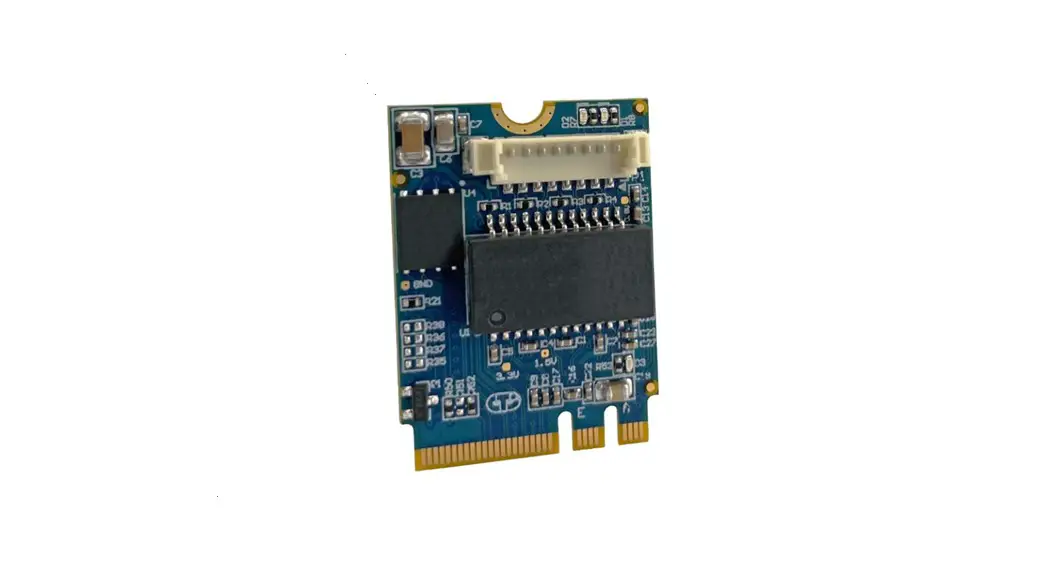
The M.2 GbE expansion board adds an additional ethernet connection to any existing carrier board through the M.2 A or E key expansion slot. Ideal for customers needing to add wired network connections within space-constrained applications, this industrial grade expansion board utilizes an Intel I210 controller for optimized performance and trusted reliability.
Product Features and Specifications
| Form Factor | M.2 2230 Key A+E |
| Ports | 1x 10/100/1000BASE-T |
| Controller | Intel® Ethernet Controller I210-AT |
| Host Interface Bus | x1 PCIe v2.1, SMBus |
| Dimensions | 22mm x 30mm (M.2 Type-2230-D3-A-E) * (0.87” x 1.18”) *exceeds M.2 max topside height spec |
| Cable (Optional, not included) | CBG383 (RJ-45 Female, 8-pin Picoblade) |
| LEDs | Activity, Link, Power |
| Operating Temperature* | -40º C to +85º C *A minimum air-flow rate of 125CFM is recommended to operate reliably at ambient temperatures over 65ºC |
| Weight | 3g (0.11oz) |
| Warranty | 2 Year Warranty and Free Technical Support |
Part Numbers / Ordering Information
| Part Number | |
| M2G101 | 10/100/1000BASE-T, M.2 GbE 2230 Key A+E, -40ºC to 85ºC, ROHS |
PRODUCT OVERVIEW
Block Diagram
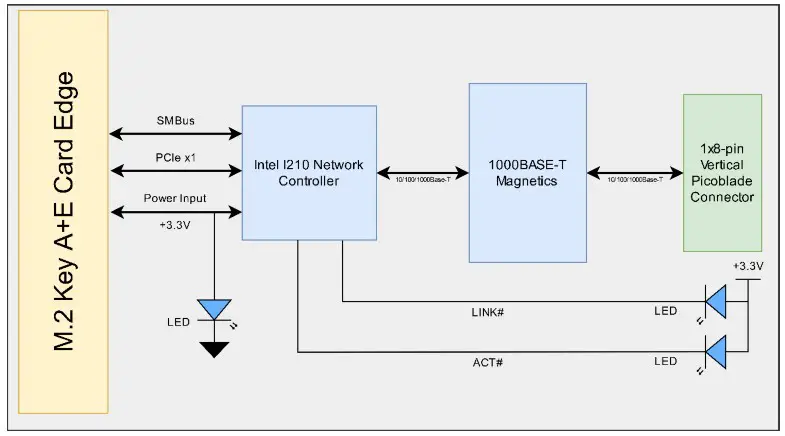
Connector Summary & Locations
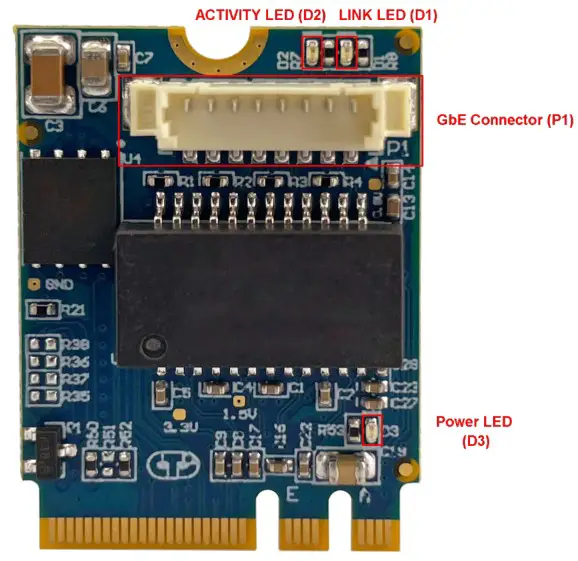
| Designator | Description |
| P1 | Gigabit Ethernet Connector |
| D1 | Activity Indicator |
| D2 | Link Indicator |
| D3 | Power OK Indicator |
DETAILED FEATURE DESCRIPTION
M.2 Edge Connector
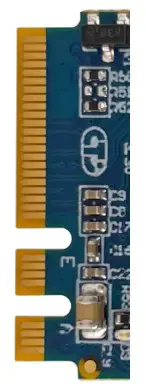
| Function | M.2 Card Edge Connector | |||
| Location | P2 | |||
| Pinout | Signal | Pin | Pin | Signal |
| GND | 1 | 2 | +3.3V | |
| NC | 3 | 4 | +3.3V | |
| NC | 5 | 6 | NC | |
| GND | 7 | 8 | Connector Key | |
| Connector Key | 9 | 10 | Connector Key | |
| Connector Key | 11 | 12 | Connector Key | |
| Connector Key | 13 | 14 | Connector Key | |
| Connector Key | 15 | 16 | NC | |
| NC | 17 | 18 | GND | |
| NC | 19 | 20 | NC | |
| NC | 21 | 22 | NC | |
| NC | 23 | 24 | Connector Key | |
| Connector Key | 25 | 26 | Connector Key | |
| Connector Key | 27 | 28 | Connector Key | |
| Connector Key | 29 | 30 | Connector Key | |
| Connector Key | 31 | 32 | NC | |
| GND | 33 | 34 | NC | |
| PERO+ | 35 | 36 | NC | |
| PERO- | 37 | 38 | NC | |
| GND | 39 | 40 | NC | |
| PETO+ | 41 | 42 | NC | |
| PETO- | 43 | 44 | NC | |
| GND | 45 | 46 | NC | |
| REFCLKO+ | 47 | 48 | NC | |
| REFCLKO- | 49 | 50 | NC | |
| NC | 51 | 52 | PERSTO# | |
| CLKRECtO# | 53 | 54 | NC | |
| PEWAKEO# | 55 | 56 | NC | |
| GND | 57 | 58 | 12C _DATA | |
| NC | 59 | 60 | I2C_CLK | |
| NC | 61 | 62 | ALERTS# | |
| GND | 63 | 64 | NC | |
| NC | 65 | 66 | NC | |
| NC | 67 | 68 | NC | |
| GND | 69 | 70 | NC | |
| NC | 71 | 72 | +3.3V | |
| NC | 73 | 74 | +3.3V | |
| GND | 75 | |||
10/100/1000 Ethernet (GbE)
| Function | Gigabit Ethernet Connector | 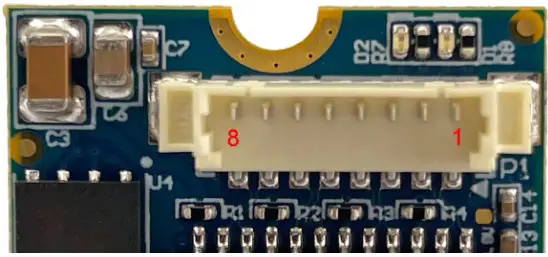 | |
| Location | P1 | ||
| Type | Molex Moblade 1×8 Vertical | ||
| Connector | 533980871 | ||
| Mating | 510210800 | ||
| Cable | CBG383 | ||
| Pinout | Pin | Description | |
| 1 | MX3- | ||
| 2 | MX3+ | ||
| 3 | MX2- | ||
| 4 | MX2+ | ||
| 5 | MX1- | ||
| 6 | MX1+ | ||
| 7 | MX0- | ||
| 8 | MXO+ | ||
On-board Indicator LEDs
| LED | Location | Description |
| ACT | D1 | Activity Indicator |
| LINK | D2 | Link Indicator |
| PWR OK | D3 | Power OK Indicator. When illuminated indicates power is provided to M.2 GbE board. |
TYPICAL INSTALLATION
- Ensure the host system is powered off.
- Insert the M.2 GbE into a 2230 Key A or E card slot; secure the card down with a screw.
- Attach a CBG383 (RJ-45 to Picoblade) cable or custom cabling solution to P1.
- Attach a network RJ46 Cat -5e or Cat 6 cable connected to your network to the CBG383 cable
- Power on the system.
- Under Linux, use lspci to verify the presence on the M.2 GbE, then using ifconfig to verify the
M.2 GbE Card is enumerated as a network interface.
THERMAL DETIALS
The M.2 GbE card has an operating temperature range on -40°C to +85°C, however, it is important that’s adequate cooling is provided to ensure reliable operation. It is the customer’s responsibility to design their system such that the ambient temperature and airflow is within specifications for the Intel® Ethernet Controller I210-AT.
The table below illustrates simulation data from Intel®, this is just a guideline but should be taken into account by system designers. The table lists Tcase as a function of airflow and ambient temperature. This table can be used as an aid in determining a starting point for the optimum airflow for the I210.
Note that Connect Tech does not recommend use with zero airflow at ambient temperatures over 65°C. From internal testing, it was found that at a full 1Gbps load as the ambient temperatures approach ~70°C the Tcase will exceed 100°C.
Table 13-14. Thermal Simulation Results for Various Environmental Conditions
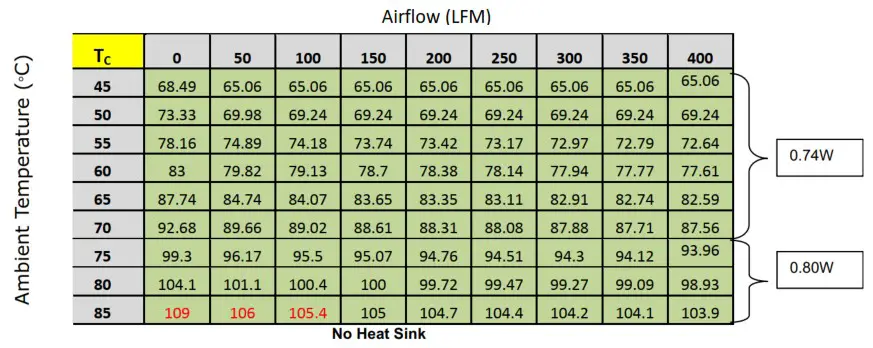
Note: The red value(s) indicate airflow/ambient combinations that exceed the allowable case temperature.
SOFTWARE
Driver Support for Intel I210
Additional drivers may be needed to properly operate the GbE Port. These drivers can be downloaded directly from Intel website at the below link:
https://downloadcenter.intel.com/product/64399/Intel-Ethernet-Controller-I210-Series
CABLES
The following table shows the available cables
| Part Number | Drawing Number | Description |
| CBG383 | CTIC-00320 | RJ-45 panel mount to 8-pin Picoblade |
Document: CTIM-00055
Date: 2021-02-25
CONNECT TECH
www.connecttech.com
[email protected]
CONNECT TECH INC. | 42 ARROW ROAD, GUELPH, ON N1K 1S6 CANADA|TEL: +1.519.836.1291|800.426.8979
 Connect Tech Inc., Embedded Computing Experts
 Resource Center - Connect Tech Inc.
 Intel® Ethernet Controller I210 - Product Info, Docs, Support and...