
Manual
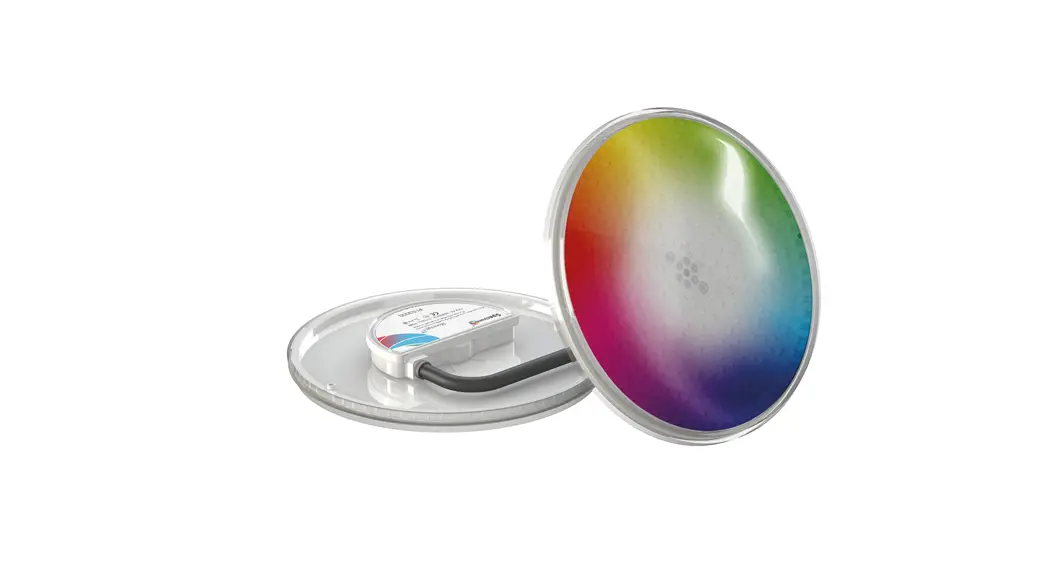
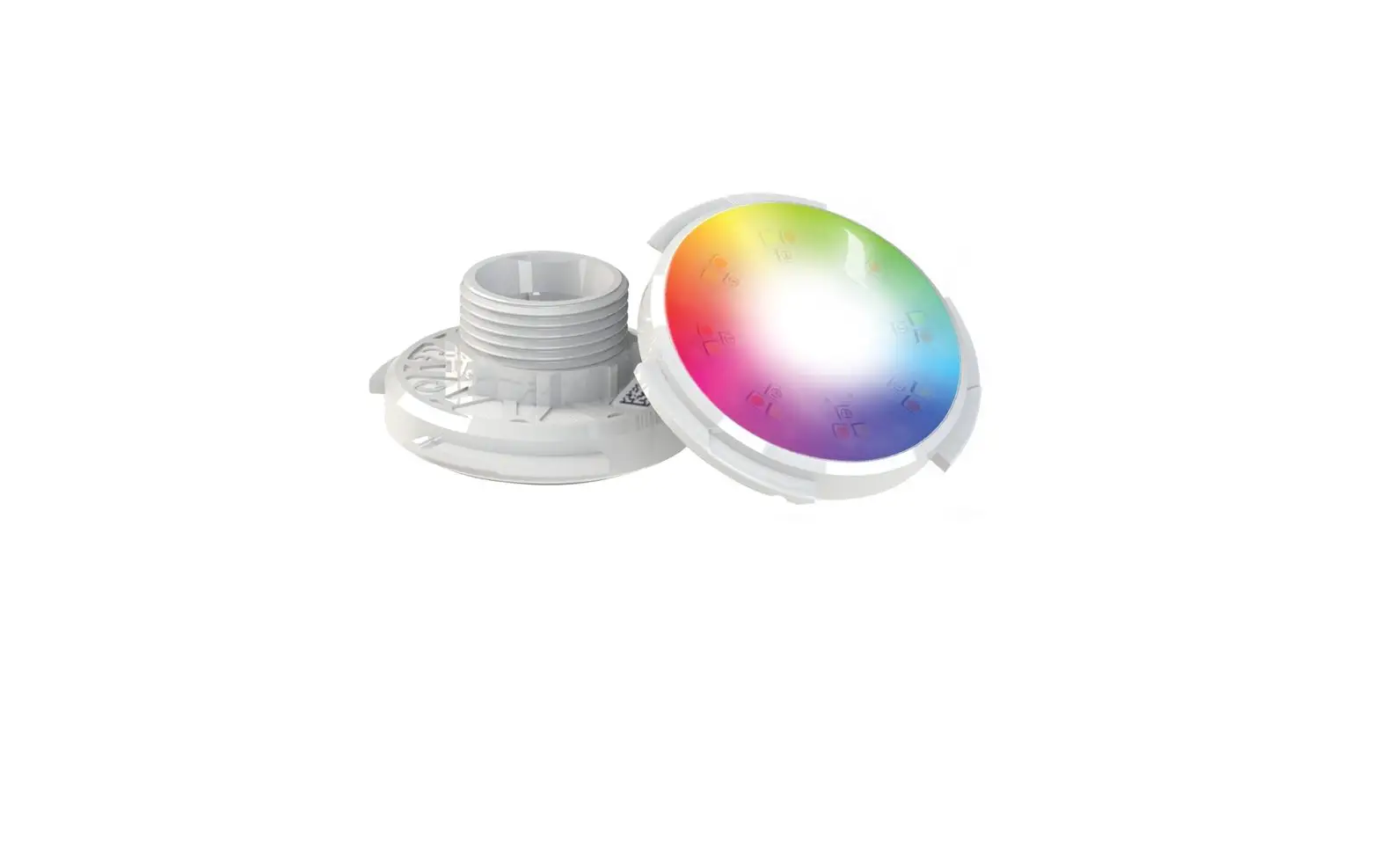
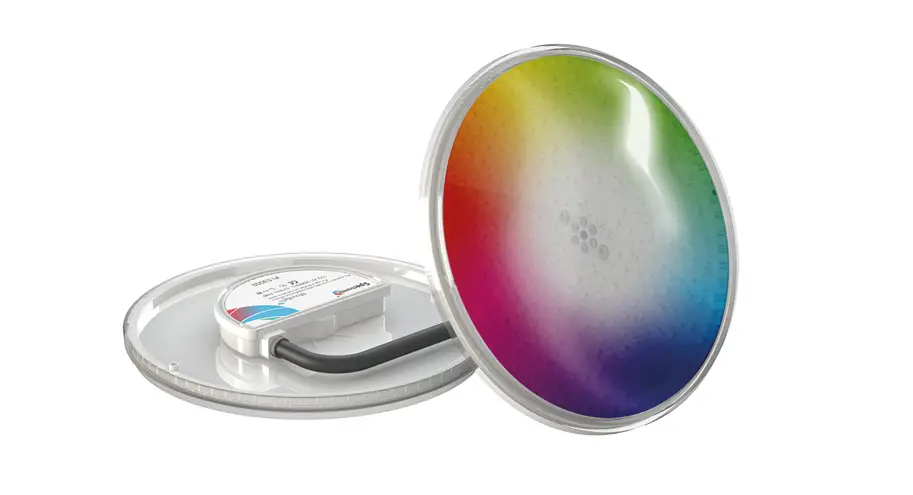
DVP050
DVP100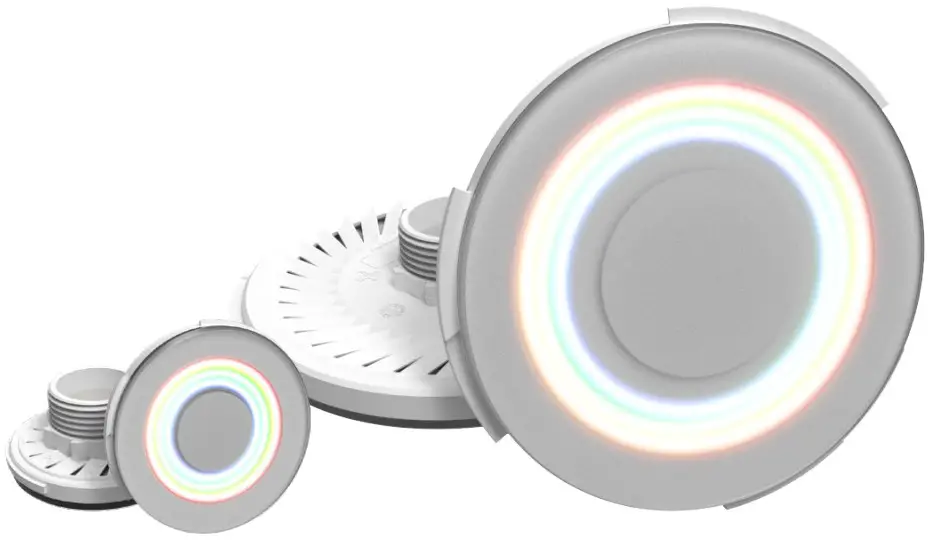
Visit www.Duratec.be for other available languages
DURA VISION Pro
Technical specifications
| Lamp Type | Description | Voltage | Power | Color temper | Luminous flux* |
| DVP050-RGBW | All colors and Tunable white | 10-14 VAC | 33 W | n.a. | 1200 lm |
| DVP100-RGBW | All colors and Tunable white | 10-14 VAC | 85 W | n.a. | 3500 lm |
(*) Propulsion systems remains a tolerance of +/- 10% on luminous flux measurements @ 25°C ; 12VAC
 For operation only with a safety isolation transformer
Minimum input voltage: 10 VAC 50 Hz (at lamp terminals)
Nominal input voltage: 12 VAC 50 Hz (at lamp terminals)
Maximum input voltage: 14 VAC 50 Hz (at lamp terminals)
 IEC Protection Class III
Operation on DC voltages is NOT allowed
Maximum water temperature: +40°C Lamps have to be kept out of ice zones
Ingress protection rate: IP68 measured at 3m max depth = 3m
Remarks
Water conditions
Prevent damage to your pool lamps and wires due to unstable water conditions.
Your local government may have enacted guidelines for your pool water conditions to apply by. If not we strongly advise the following parameter specifications to be applied:
pH level : 6,8 – 7,6
Free Chlorine max: 3ppm
Combined chlorine: max. 1 ppm
Water temperature: max +40°C and lamps need to be kept out of ice zones
Always adhere to the instructions provided by your chemical brand/supplier for the correct use and application of pool chemicals.
Saltwater pools or pools fitted with a saltwater chlorine generator contain salt in the pool water. Salt is a corrosive material. Overdosage and/or consistent levels of salt increase the possibility of deterioration of your pool lamps and cables. As a rule of thumb, a concentration of 35gr/l salt can be accepted when pH values are between 7,2-7,4.
In any case, we urge proper use, care, and maintenance of your installation, in order to minimize the effect of corrosion and deterioration.
Please be aware that pool lamps and tables with defects caused due to abnormalities in the water condition are not covered by our factory warranty.
Installation/maintenance
The luminaire is maintenance-free If the luminaire needs to be replaced, it needs to be completely removed from the water
If the external flexible cable or cord of this luminaire is damaged, it shall be exclusively replaced by the manufacturer or his service agent or a similarly qualified person in order
to avoid hazardVISION Pro Pool lamps must be completely submerged into the water during operation. Fixing the lamps with adhesives or silicone kit into a niche is not allowed Not following these instructions, will void the warranty.
Box contents
DVP050-RGBW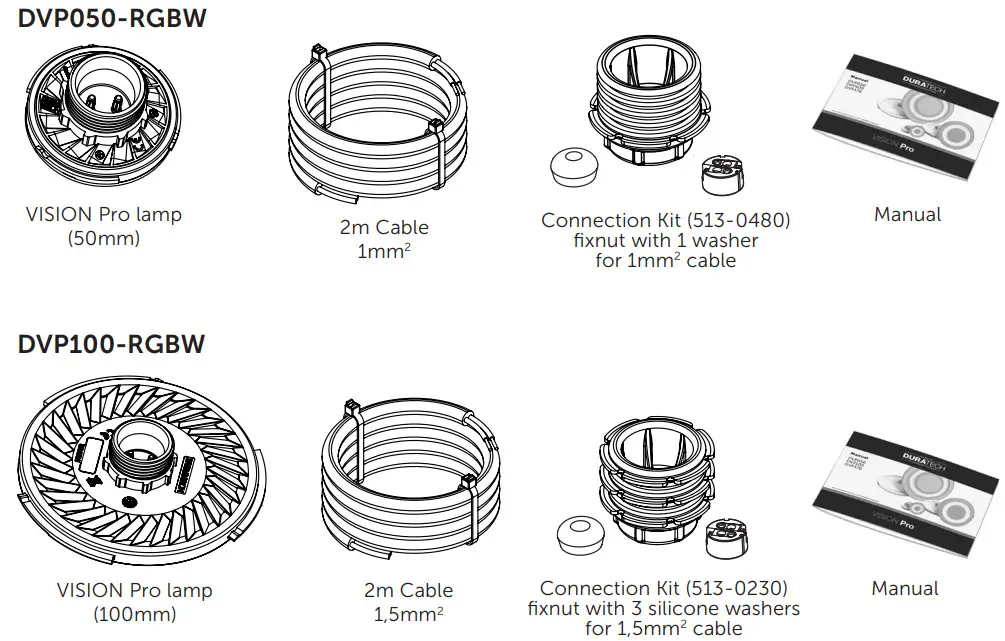
Installation instructions
 Installing connector
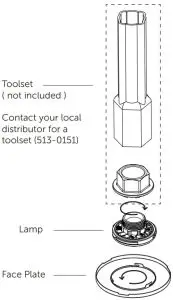 Installing connector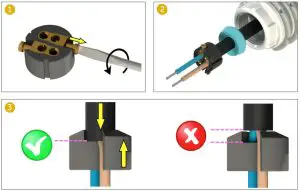
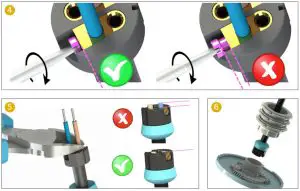 DVP050 & PZA-WG
For installations with DVP050 & PZA-WG-S or PZA-WG-G:
Please make sure to only use 1 silicone washer for the Fix nut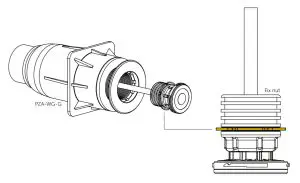 DVP050 Removal tool
When DVP050 needs to be removed from the PZA-WG wall conduits, a special tool is needed (513-0491)*
- Insert the tool over the lamp, straight into the wall conduit
- Twist the tool counterclockwise the lamp should be snapped into the 3 hooks of the tool
- Pull the lamp straight out of the wall conduit

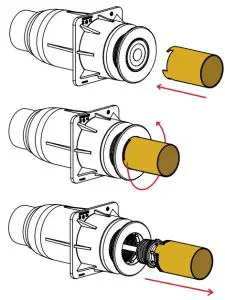
* Available separately
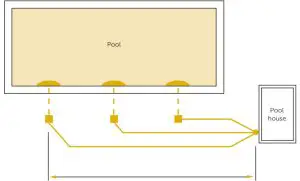
Wiring instructions Setup 1
For new installations
Each lamp is connected to the transformer by a separate cable
SELECT
CABLE SECTION & MAXIMUM LENGTH
 2m cable included in lamp package Separate cable ( not included )Always use a toroïdal transformer
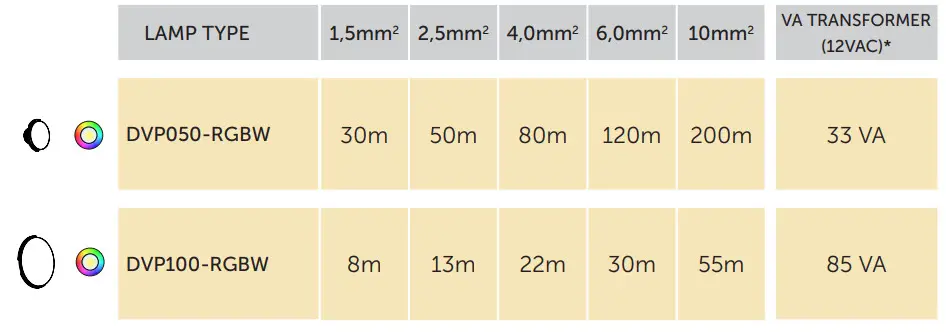
STABLE OPERATION OF THE POOL LIGHTS IS ONLY GUARANTEED WHEN THE INSTALLED CABLE CROSS-SECTION
MATCHES OR EXCEEDS THE ADVISED VALUES IN THE ABOVE TABLE
* The transformer VA rating must be greater or equal to the sum of VA ratings of all connected lamps.
These cable lengths are calculated with worst-case voltage drops in the electrical wiring.
Wiring instructions setup 2
For existing or other installations
All lamps are connected to the transformer via 1 cable
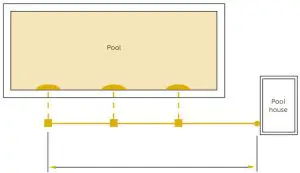
2m cable included in the lamp package Separate cable ( not included )Always use a toroïdal transformer
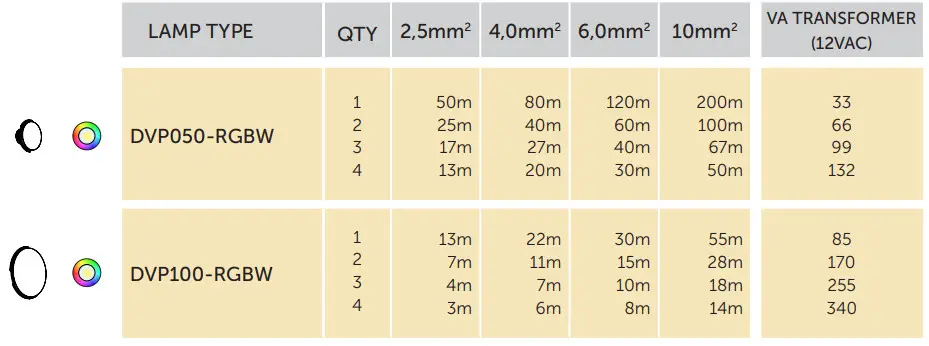
STABLE OPERATION OF THE POOL LIGHTS IS ONLY GUARANTEED WHEN THE INSTALLED CABLE CROSS-SECTION MATCHES OR EXCEEDS THE ADVISED VALUES IN THE ABOVE TABLE
Wiring remarks
For installations with LINK Controller or LINK Master
Third-party equipment such as frequency inverters and electric motors can generate excessive noise on the 230VAC / 400VAC power line.
This noise might be injected into the adjacent 12VAC power line and disturb the power line communication towards the VISION Pro RGBW lights.
To prevent this, please take care of the following:
Keep 230VAC / 400VAC power line cables at least 50cm separated over their full length from the 12VAC power line towards any RGB lightsDo not mix 12VAC and 230VAC / 400VAC power line cables into the same cable trays
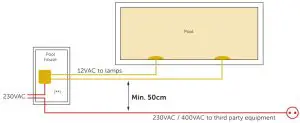
(**) Do not mix 12VAC and 230VAC / 400VAC power line cables into the same cable trays
Synchronizing
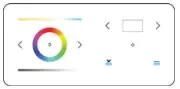 With LinkTouch
+ LINK Controller (PLP-REM or PLP-REM-350)*
+ LINK Master (DLM450 or DLM600)
First, make sure the LinkTouch is paired (see manual LinkTouch)
Turn the lamps on and spin the color wheel on the LinkTouch until the lamps react.
If the lamps do not react, turn them off and back on until they react to the color wheel.
As soon as the lamps follow the color wheel: wait 1 minute. The lamps are now synced.
 With Transmitter
+ LINK Controller (PLP-REM or PLP-REM-350)*
Turn the lamps on en push the UP button 10 times. Wait for 5 seconds, then turn the lamps off. Repeat this process until the lamps react to the remote. As soon as the lamps follow the remote: wait 1 minute. The lamps are now synced.
Manual synchronization (without DURALINK control products)
- Switch ON the 12 VAC line voltage and make sure that all lamps light up.
- Switch OFF the 12 VAC line voltage and wait for at least 20 sec (max 60 sec)
- Switch ON and switch OFF (max 3 sec ON and max 3 sec OFF)
- Switch ON and switch OFF (max 3 sec ON and max 3 sec OFF)
- Switch ON
- The lamps should now all be on color program 6: Blue
*PLP-REM or PLP-REM-350 need to have firmware V6.7 (29-07-20) or newer
Color programs
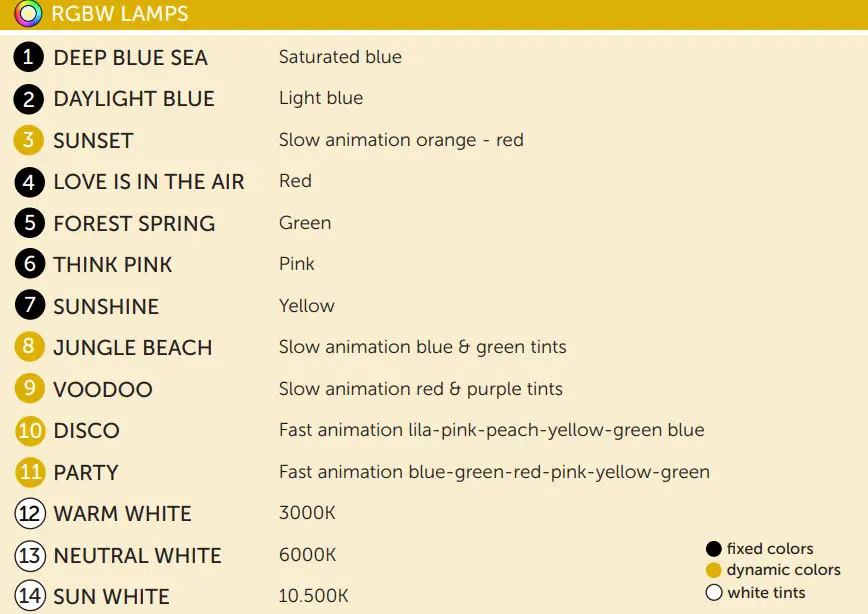
*all color programs are dimmable if are used (in PLC mode) LINK Touch, LINK Controller, or LINK Master
Troubleshooting
PROBLEM
- The pool light is flickering
SOLUTION
- Switch the lamps ON and select the Cold white color program
- Remove the lamp from the water, unscrew the fixing nut, pull back the gasket and the black cable jacket, so you can reach the brass contacts inside the connector block (do not remove the connector block)
- Measure the voltage at the lamp terminals (while the lamp is still ON)
- The voltage at the lamp should be at least 10VAC 50Hz. If the measured line voltage is below 10VAC:
A. Check the output voltage at the transformer terminals. This voltage should be between 12VAC and 14VAC. Verify that the used transformer VA rating is sufficient for powering all connected lamps
B. If the transformer output voltage is ok, then install a thicker cable between the transformer and the lamp. (wiring instructions p. 14-19)
- Several pool lights in the pool show different color programs
Make sure that all lamps are connected to the same 12VAC power line. Execute the synchronization as explained on p.20
Declaration of Conformity
Declarations of conformity covering this product are available for download from the House of Duratech website: www.Duratec.be
Contact details
Propulsion Systems by
Dooren 72
1785 Merchtem, Belgium
Tel +32 2 461 02 53
www.Duratec.be
info@propulsionsystems.be www.propulsion systems.be
DURA VISION Pro 
We reserve the right to change all or part of the contents of this document without prior notice