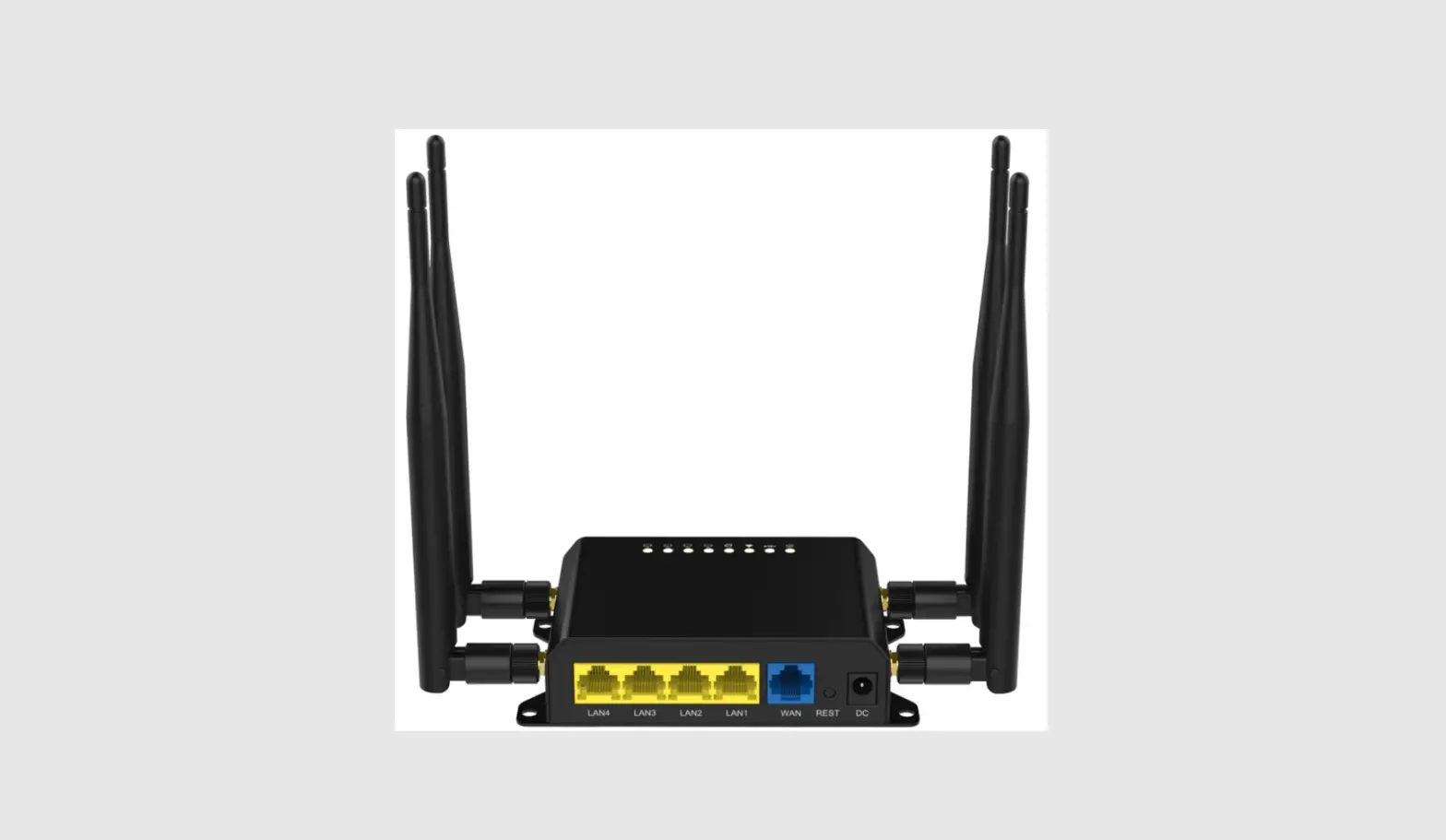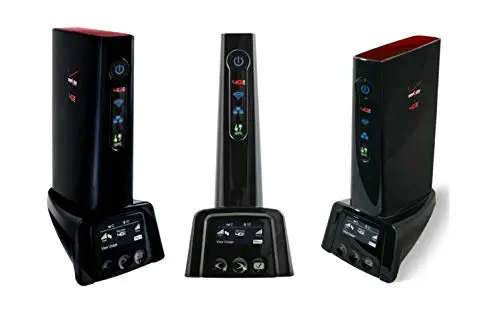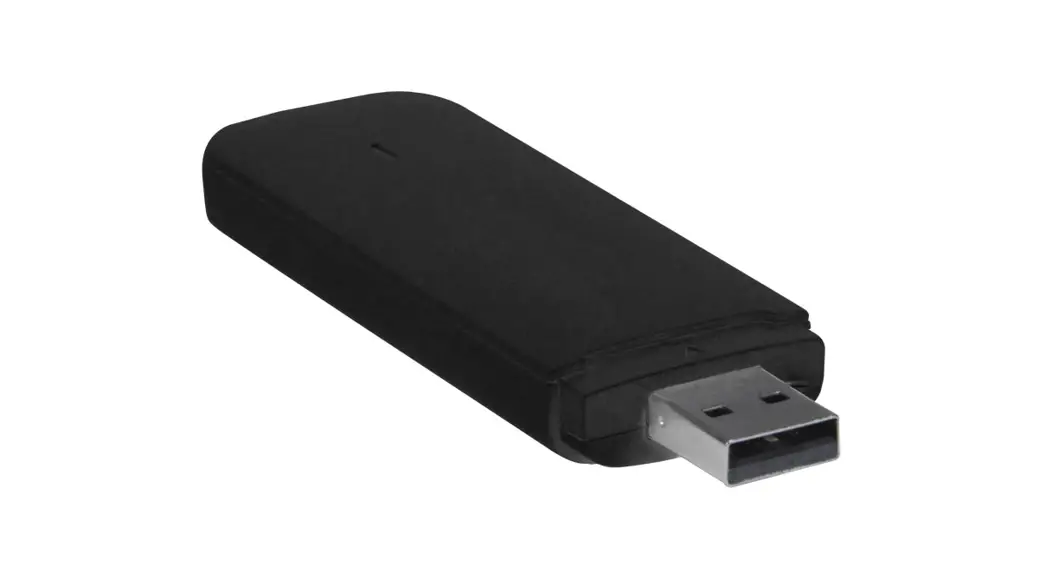
 E-4GU-1/3/5/6
USB MODEM INSTALLATION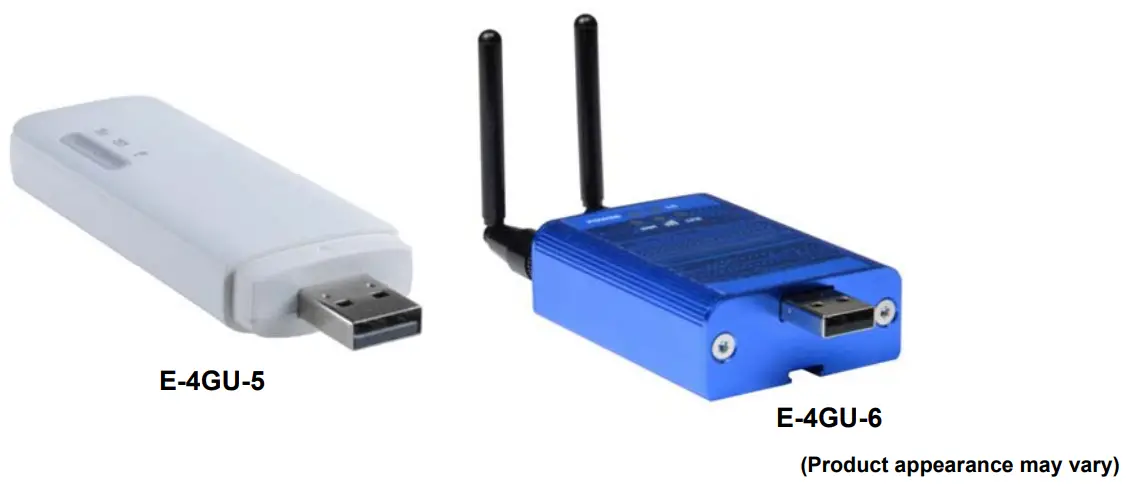
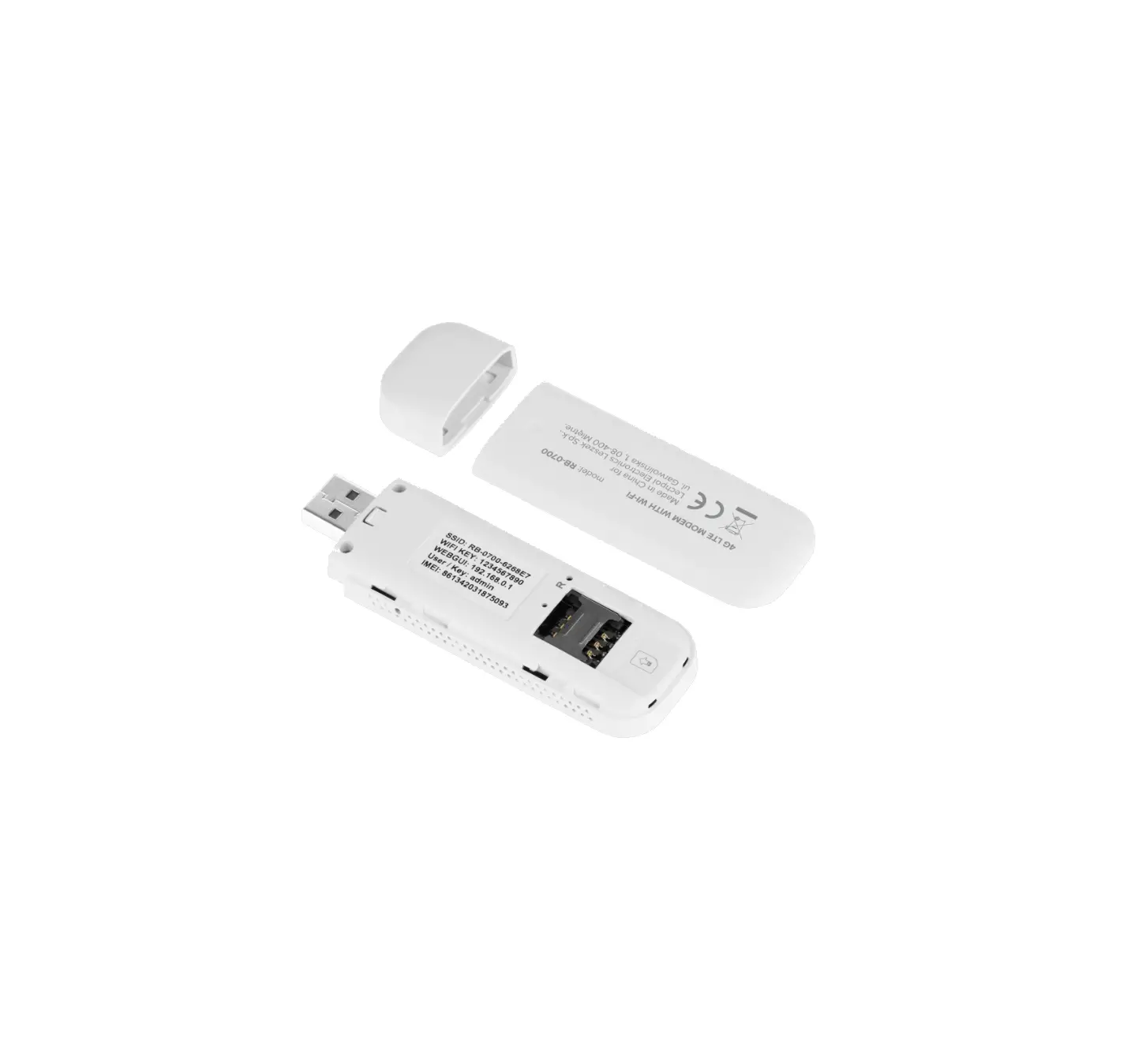
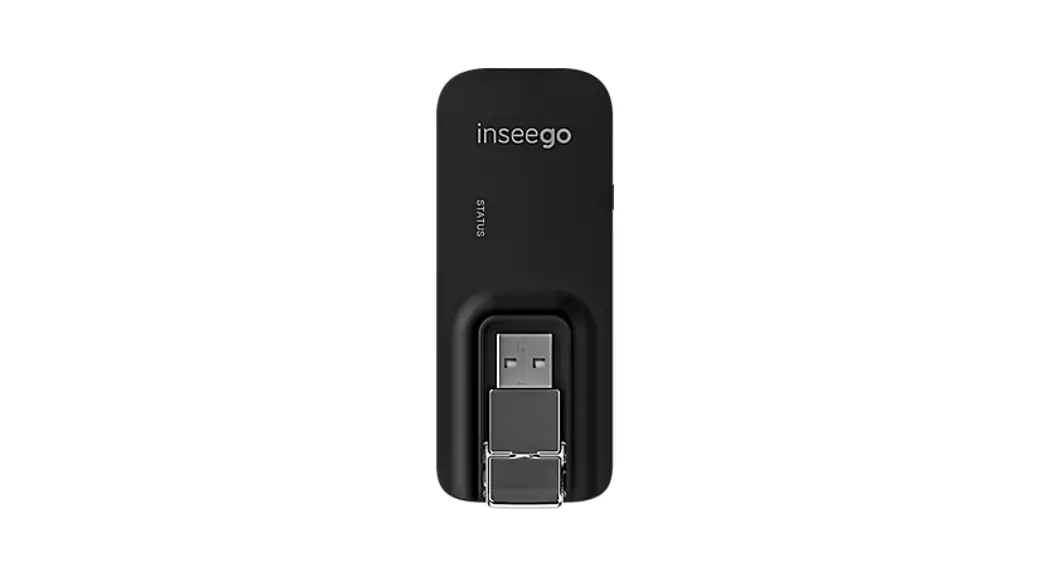
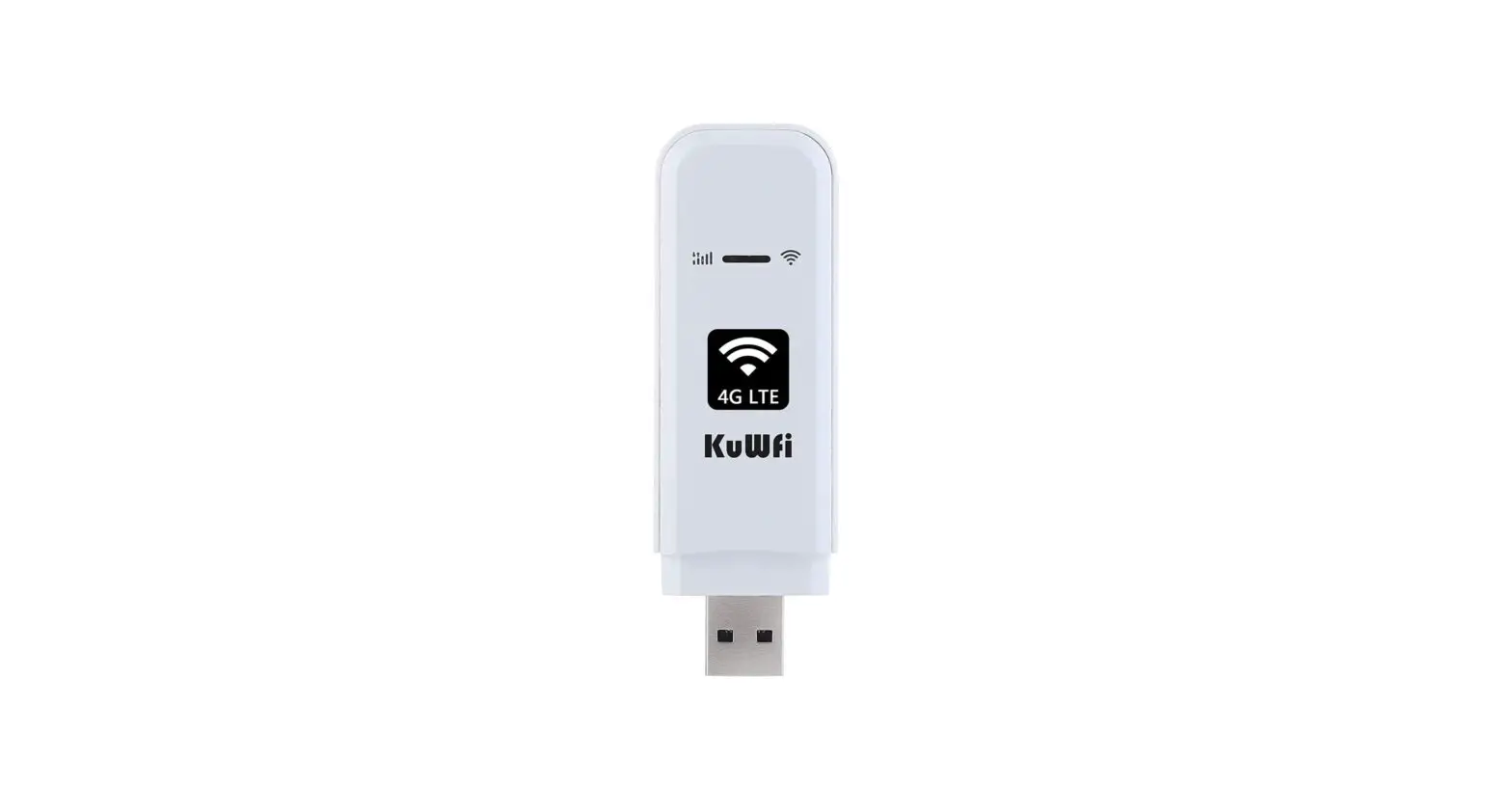
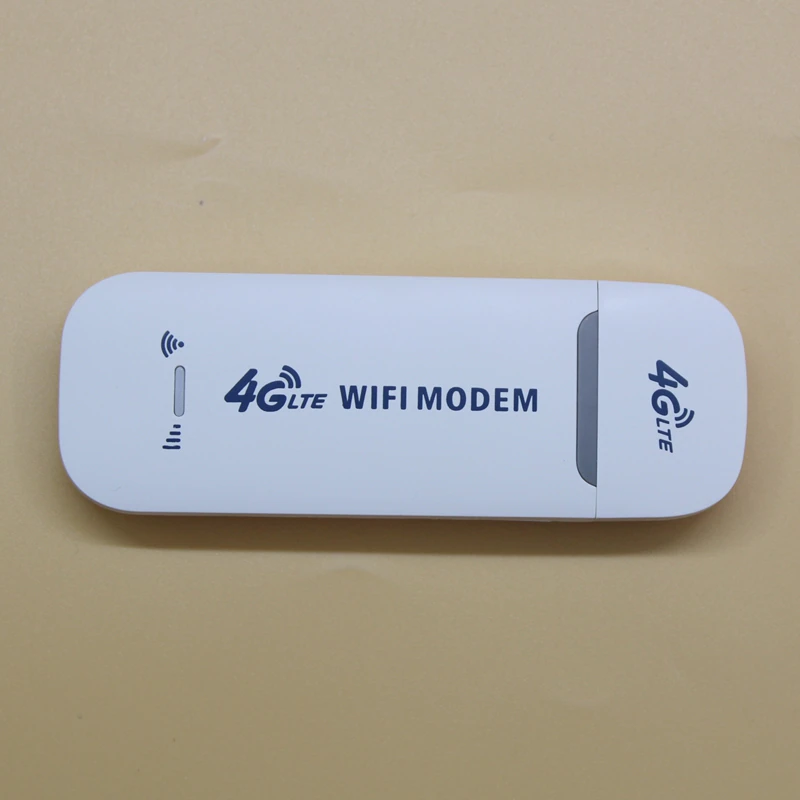
E-4GU-5 USB 4G WiFi Modem
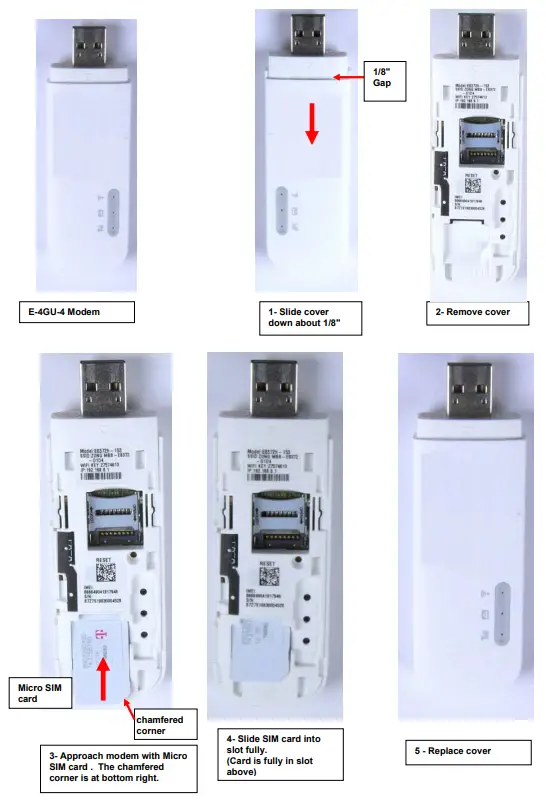
The E-4GU-x Modem is used to enable SMS alert messages to be sent from an ENVIROMUX Enterprise Environment Monitoring System (SYSTEM) to any user’s cell phone or device capable of receiving SMS messages. Before connecting the modem to the SYSTEM, a GSM SIM card configured for SMS messaging must be installed to the modem following instructions from the modem manufacturer. If the ENVIROMUX 3G/4G Data Transfer features are going to be used (E-xD SYSTEM models only), the IM card must also be configured to support this instead of or in addition to SMS messaging (see page 5).
To use E-4GU-1/3 the E-2D/5D/16D must be running firmware version 2.60 or later. E-MINI-LXO must be running version 3.2or later.
The E-4GU-1/3 modems accept the mini SIM card and the micro SIM card (when used with a micro-to-mini SIM card adapter). It is compatible with the E-xD and E-MINI- LXO models. The E-4GU-5 modem accepts the mini SIM card and is only compatible with the E-xD. It is not compatible with the E-MINI-LXO. The E-4GU-6 modem accepts the micro SIM card and is only compatible with the E-xD (firmware version 4.4 or later). It is not compatible with the E-MINI-LXO.
Cell phone SIM cards
A SIM card or Subscriber Identity Module is a portable memory chip used in some models of cellular telephones. It can be thought of as a mini hard disk that automatically activates the phone (or in this case the GSM modem) into which it is inserted. SIM cards are available in four standard sizes. The first is the size of a credit card (85.60 mm x 53.98 mm x 0.76 mm). The next, more popular miniature version (“mini”) has a width of 25 mm, a height of 15 mm, and a thickness of 0.76 mm. The third, the “micro” version measures 15 mm x 12 mm x 0.76 mm, and lastly the “nano” measures 12.3 mm x 8.8 mm x 0.67 mm.
Some cellular service providers use SIM cards. Verify with your service provider that their SIM card will work with 3G (or 4G if
applicable) GSM-type modems before purchasing their SIM card. See charts on the last page for SIM card compatibility.
Note: Make sure the SIM card is for GSM communication (not CDMA), configured to send SMS messages, and is not locked (some SIM cards are “locked” to search for a specific IMEI number of the phone to operate).
With the SIM card installed, plug the modem into an available USB Type-A port on the SYSTEM. 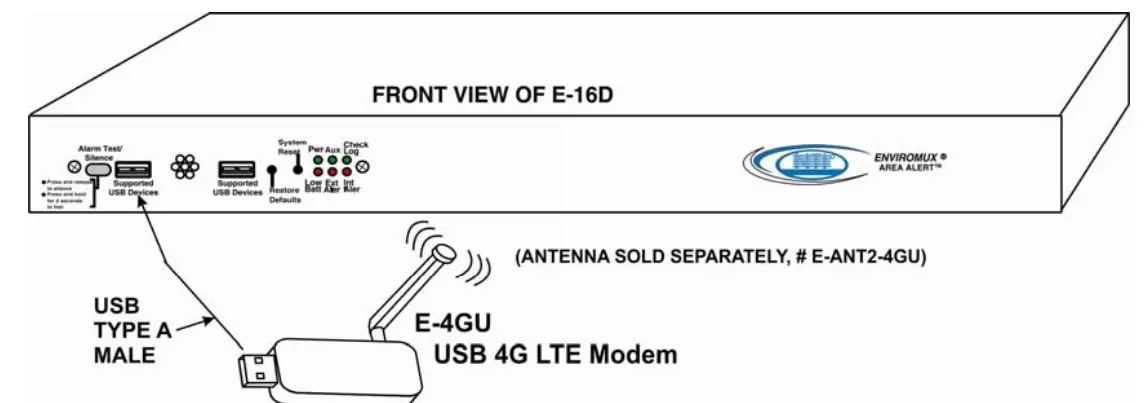
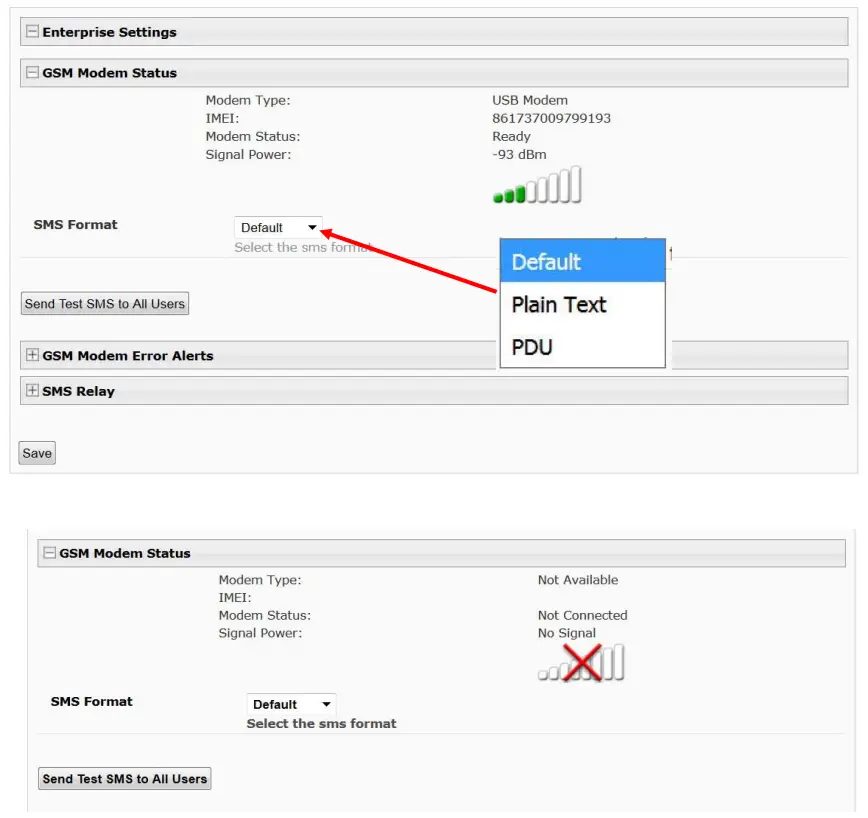
Once installed, the SYSTEM will sense the modem and provide status information on the “Enterprise Configuration” page in the web browser.
When a modem is present, the type, status, IMEI number, and signal strength will be displayed. The modem will work with a signal strength between -111dBm (weak) and -51dBm (strong).
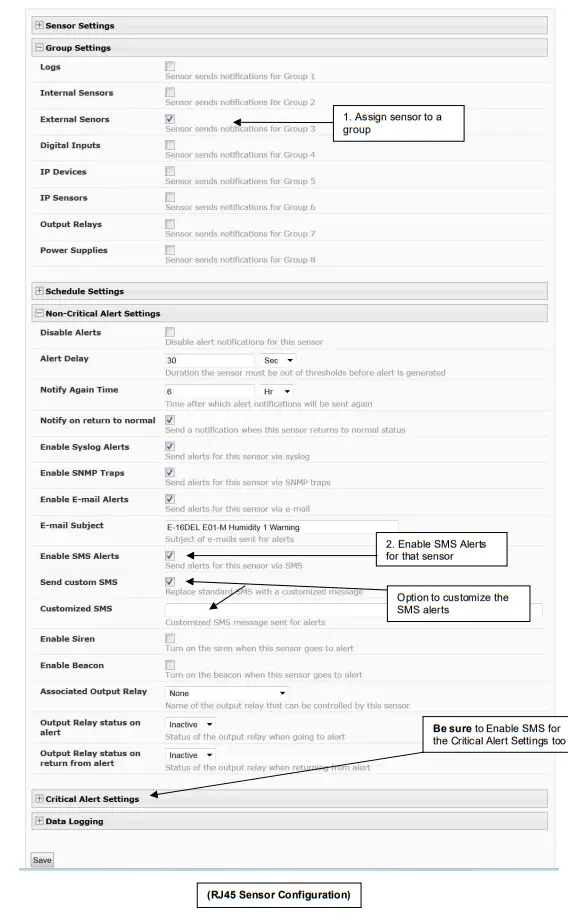
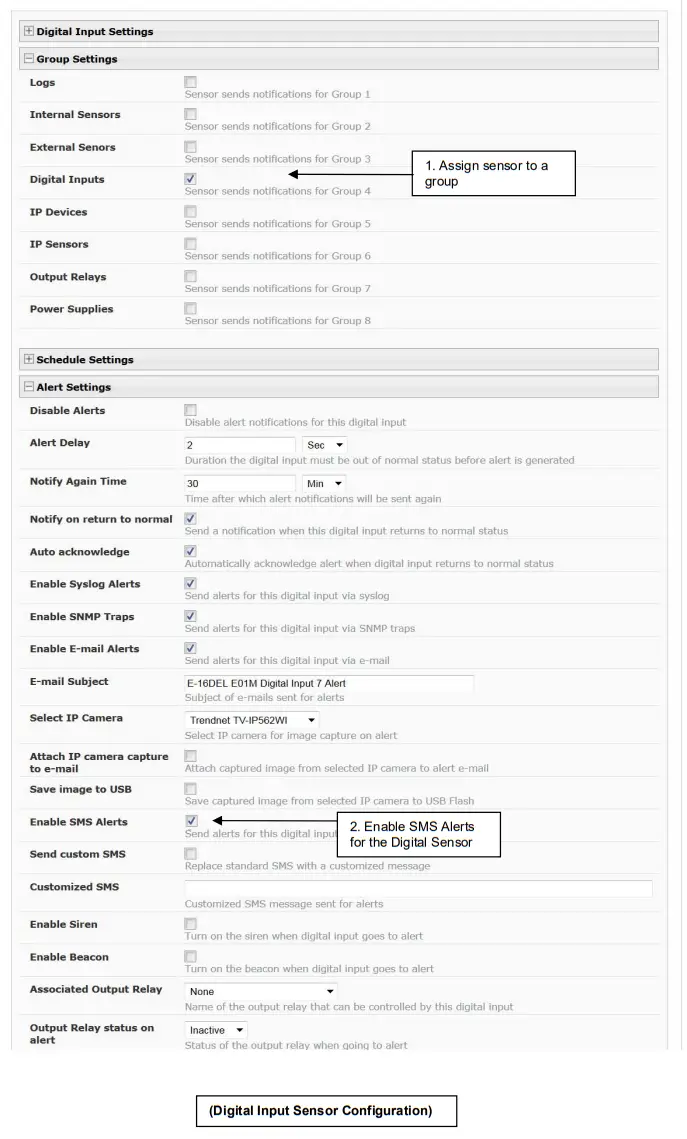
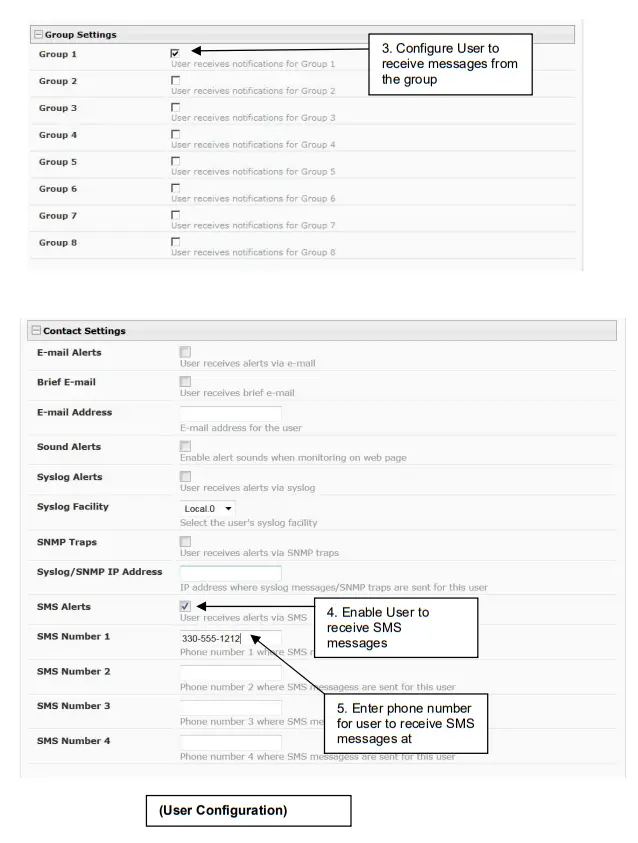
To send and receive SMS messages, be sure to enable SMS messaging in the configuration for each applicable sensor and for each user that will receive them. (Refer to your respective SYSTEM manual for configuration instructions.)
Enterprise Configuration
E-16DEL E01-M Humidity 1 Configuration (Type: Temperature/Humidity)
Digital Input Configuration
3G/4G Data Support (E-xD Models only)
3G/4G Data Transfer And SMS Messaging
To use your USB modem for a 3G/4G Data connection, your SIM card must be configured to support 3G/4G data connections and have either a public or private IP address. Make sure the account associated with the SIM card also has SMS messaging enabled if this feature will be used. With 3G/4G data connection support, the ENVIROMUX can be configured (“Enable 3G/4G Data” below) to send all alert messaging through the USB modem instead of requiring an Ethernet connection for these messages.
Note: When configured for 3G data transfer and SMS messaging only, no access to the ENVIROMUX will be possible through the modem.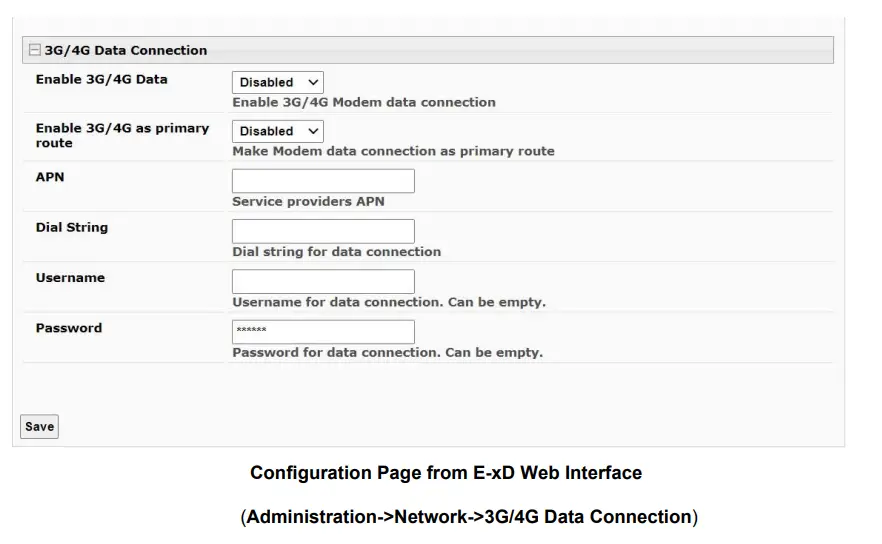
3G/4G Data Transfer, SMS Messaging, and Web Interface
To access the web interface through your USB modem, your SIM card must be configured to support 3G/4G data connections and have a public IP address. The NVIROMUX can be configured (“Enable 3G/4G as the primary route” above) to send all alert messaging through the USB modem instead of requiring an Ethernet connection for these messages. With a public IP address, you will also be able to access the web interface using the IP address of the SIM card for full control of the ENVIROMUX through the modem.
Make sure the account associated with the SIM card also has SMS messaging enabled if this feature will be used.
Contact your service provider to obtain a SIM card with the features you desire.
Note: If the 3G/4G Data connection is enabled as the primary internet connection, make sure that a reliable signal exists between the modem and service provider. Otherwise, attempts made by the ENVIROMUX to communicate with devices on the network may be delayed and cause unnecessary alert messages.
DDNS Settings
If you are going to access the web interface of ENVIROMUX through your USB modem, and your service provider does not support a fixed (static) IP address (only offers a dynamic IP address), then in order to reliably access the ENVIROMUX web interface through the modem, the ENVIROMUX DDNS support feature will need to be configured.
The ENVIROMUX supports DDNS services with many providers, for example, No-IP, Dydns, and FreeDNS. (See a list of known providers below). Any provider compatible with inadyn daemon will work with the E-xD. For general information on inadyn go to https://github.com/troglobit/inadyn.
Simply establish an account with a DDNS provider. Then, enable the support, enter a value in seconds (range is 30-764000) for the Update Period, and enter the DDNS service provider and other required pieces of information indicated below.
The Update Period determines how often the ENVIROMUX will check with the DDNS provider to verify that it has the correct IP address associated with the DDNS hostname. If the IP address they have is different than that in the ENVIROMUX, the recorded IP address will be updated with the IP address in the ENVIROMUX.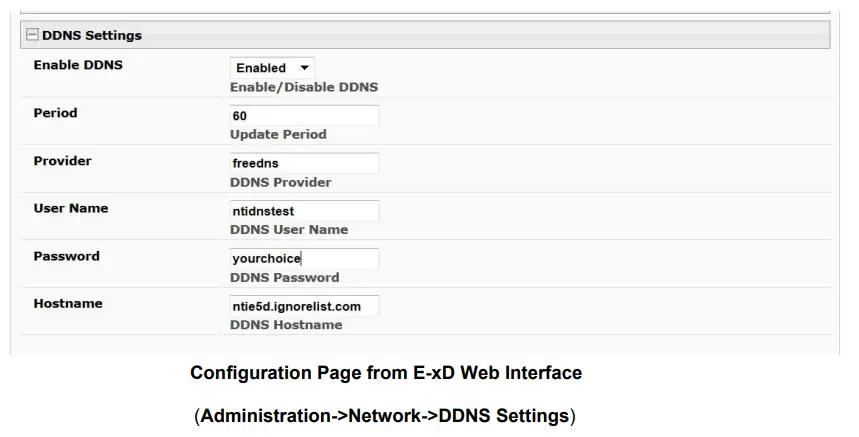
DNS Provider List
| DDNS Provider | Provider Name To Use | DDNS Provider | Provider Name To Use |
| ChangelP | changeip | gira.de | gira |
| OVH | ovh | sitelutions.com | sitelutions |
| Strato | strato | dnsomatic.com | dnsomatic |
| cloudxns | cloudxns | dynsip.org | dynsip |
| ddnss.de | ddnss.de | no-ip.com | no-IP |
| dhis | dhis | 3322.org | 3322 |
| dnsexit | dnsexit | he.net | he |
| dtdns | dtdns | spdyn.de | spdyn |
| duckdns | duckdns | nsupdate.info | nsupdate |
| duiadns | duiadns | loopia.com | loopia |
| dyndns.org | dyndns | domains.google.com | domains.google |
| dynv6.com | dynv6 | tzo.com | tzo |
| easydns.com | easydns | zerigo.com | zerigo |
| freedns.afraid.org | freedns | zoneedit.com | zoneedit |
| freemyip.com | freemyip | ||
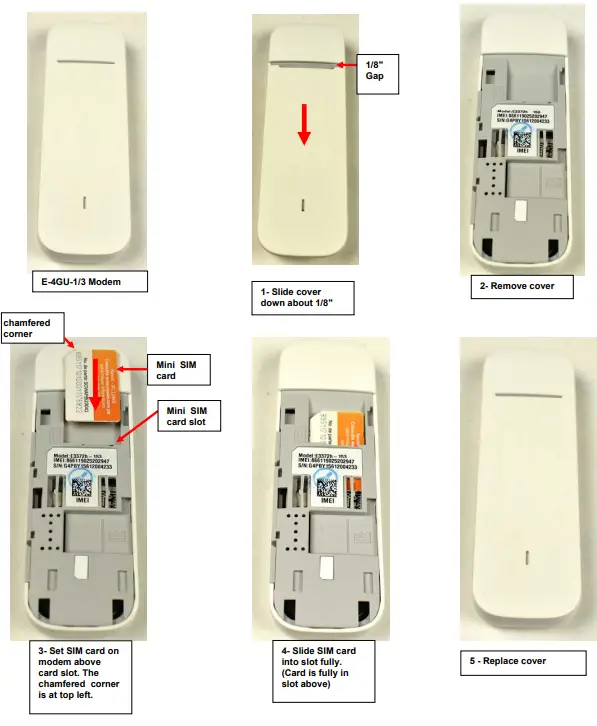
Install SIM card in E-4GU-1/3 Modem
Install SIM card in E-4GU-5 Modem
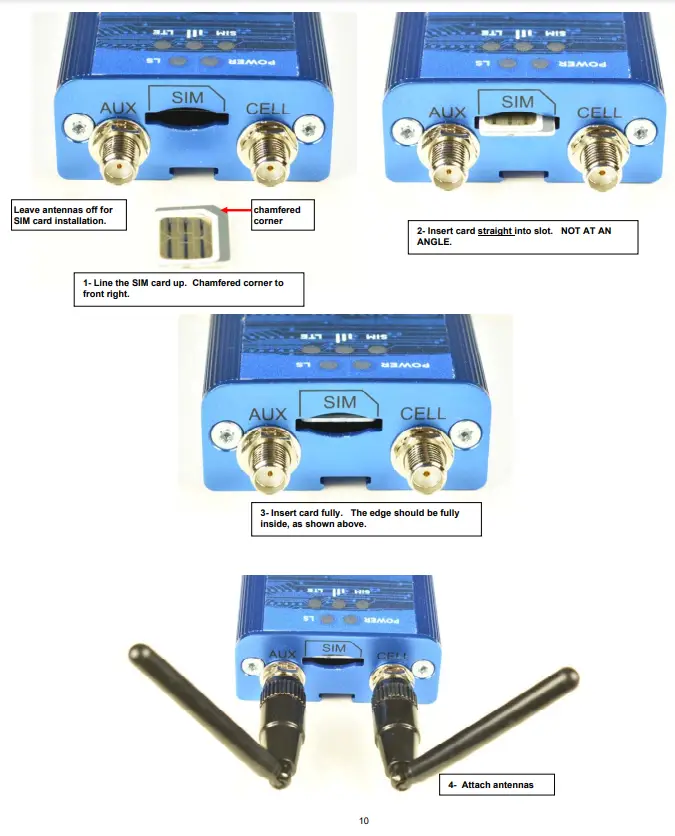
Install SIM card in E-4GU-6 Modem
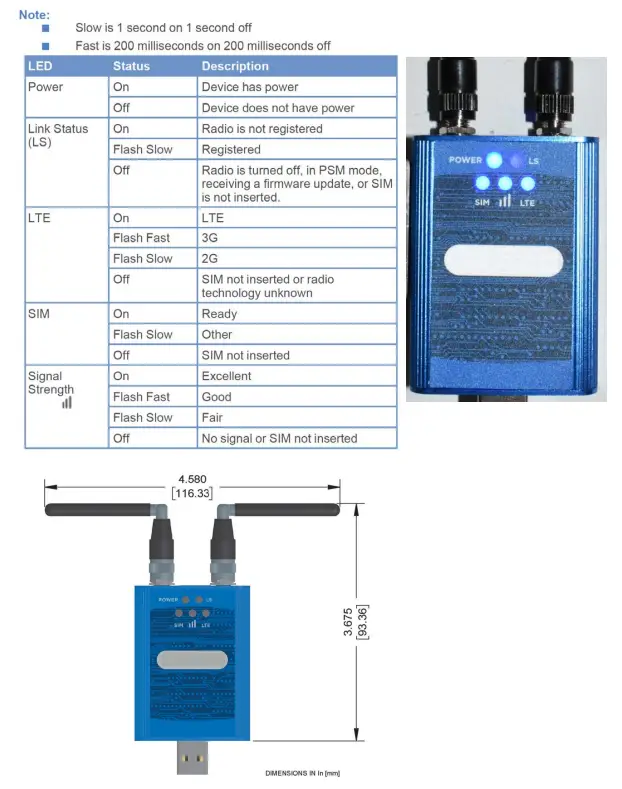
E-4GU-6 Modem LEDs
The E-4GU-6 includes 5 LEDs to provide status information as per the chart below.
Specifications
| Protocol Supported | SMS |
| SIM Card supported | Mini (25x15x0.76mm) and Micro (15x12x0.76mm)(w/Adapter) |
| Cellular Standard supported | 2G/3G/4G |
| Connector | USB Type A Male |
| External Antenna | Two CRC-9 ports provided (antenna not included) |
| Compatibility | E-2D/5D/16D with firmware version 2.60 or later and E-MINI-LXO with firmware version 3.2 or later |
| Regulatory Approvals | CE,RoHS |
| NTI# | 4G LTE Bands Supported* | 4G Frequencies Supported | 3G Support | 2G Support |
| E-4GU-1 | 1/2/4/5/7/28 | FDD 700/850/1700/1900/ 2100/2600 MHz | WCDMA(UMTS) DC-HSPA+/HSPA+/HSPA/UMTS 850/1700/ 1900/2100MHz | GSM/GPRS/EDGE 850/900/1800/1900 MHz |
| E-4GU-3 | 1/3/7/8/28/40 | FDD700/900/1800/2100/ 2600 Mhz, TDD 2300 MHz | WCDMA(UMTS) DC-PA+/HSPA+/ HSPA/UMTS 900/ 2100MHz | GSM/GPRS/EDGE850/900/1800/1900 MHz |
Check with your service provider to determine what band(s) must be supported by your modem for your area to determine what model is right for you.
E-4GU-5
| Protocol Supported | SMS |
| Network Protocol | LTE, 4G |
| External Antenna | Two CRC-9 ports provided (antenna not included) |
| 4G Network Band supported | LTE:1/3/7/8/20 |
| 3G Network Band supported | UMTS: 900/ 2100MHz |
| 2G Network Band supported | GSM: 850/900/1800/1900 MHz |
| SMS Modes | Text and PDU |
| SIM Card supported | Mini (25x15x0.76mm) and Micro (15x12x0.76mm)(w/Adapter) |
| USB Connector | Type A Male Plug |
| WiFi | Access Point for up to 10 WiFi users |
| Input Voltage | 5VDC |
| Dimensions (WxDxH) | 28x88x11>5mm (1.1×3.46x.45 In.) without Antennas |
| Operating Temperature | -10°C to 40°C (14°F to 104°F) |
| Storage Temperature | -20°C to 70°C (-4°F to 158°F) |
| Humidity Range | 5% to 95% R.H (Non-Condensing) |
| Compatibility | E-2D/5D/16D with firmware Rev. 3.8 or newer |
| Regulatory Approvals | CE, RoHS |
Note: When connected to the ENVIROMUX system, the E-4GU-5 modem extends 3.07″ from the edge of the case.
E-4GU-5
| Protocol Supported | SMS |
| Security Supported | SSL/TLS 1.2 or higher |
| SIM Card supported | Micro (15x12x0.76mm) |
| Cellular Standard supported | 2G/3G/4G |
| 4G Network Band supported | LTE: 1/2/3/4/5/7/8/12/18/19/20/25/26/28 |
| 3G Network Band supported | UMTS: 800/850/900/ 1700/1900/2100MHz |
| 2G Network Band supported | GSM: 850/900/1800/1900 MHz |
| Connector | USB Type A Male |
| External Antenna | Two CRC-9 ports provided (antennas included) |
| Compatibility | E-2D/5D/16D with firmware version 4.4 or later |
| Operating Temperature | -40°C to +85°C |
| Storage Temperature | -40°F to +185°F (-40°C to +85°C) |
| Relative Humidity | 15% to 85% operating and storage |
| Dimensions (WxDxH) | 2.45” x 1.79” x 0.78” (6.22 x 4.54 x 1.98 cm) |
| Regulatory Approvals | CE,RoHS, TAA Compliant |
| Safety Approval | UL, cUL, IEC 62368-1 |
References
 专业的云计算、动态域名服务提供商 - 公云PubYun
 DDNS - Service • Kostenloser DynDNS Service • Deutscher DynDNS Dienst Anbieter
-
DNS-O-Matic | Distribute dynamic IP changes to multiple services (dnsomatic.com)
 My Dyn Account
-
dynsip.org
 Free dynamic DNS for IPv6
-
easyDNS
-
FreeDNS - Free DNS - Dynamic DNS - Static DNS subdomain and domain hosting
-
Free DDNS
 Schalter, Steckdosen & smarte Technik | Gira
-
Hurricane Electric Internet Services - Internet Backbone and Colocation Provider
-
Web hosting and domain names for your website
-
Free Dynamic DNS - Managed DNS - Managed Email - Domain Registration - No-IP
-
www.nsupdate.info
-
Sitelutions - Solutions for your site. All in one place.
-
spDYN - der sichere Dynamic-DNS-Service von Securepoint
-
zerigo.com
-
Zoneedit – Under New Management
-
GitHub - troglobit/inadyn: Dynamic DNS client with SSL/TLS support
 专业的云计算、动态域名服务提供商 - 公云PubYun
 DDNS - Service • Kostenloser DynDNS Service • Deutscher DynDNS Dienst Anbieter
 DNS-O-Matic | Distribute dynamic IP changes to multiple services (dnsomatic.com)
 My Dyn Account
 dynsip.org
 Free dynamic DNS for IPv6
 easyDNS
 FreeDNS - Free DNS - Dynamic DNS - Static DNS subdomain and domain hosting
 Free DDNS
 Schalter, Steckdosen & smarte Technik | Gira
 Hurricane Electric Internet Services - Internet Backbone and Colocation Provider
 Web hosting and domain names for your website
 Free Dynamic DNS - Managed DNS - Managed Email - Domain Registration - No-IP
 www.nsupdate.info
 Sitelutions - Solutions for your site. All in one place.
 spDYN - der sichere Dynamic-DNS-Service von Securepoint
 zerigo.com
 Zoneedit – Under New Management
 GitHub - troglobit/inadyn: Dynamic DNS client with SSL/TLS support