 DRAGEN TruSight Oncology 500 Analysis
Software v1.1 on ICA
User Guide
ILLUMINA PROPRIETARY
Document # 200015530 v00
August 2022
For Research Use Only. Not for use in diagnostic procedures.
Dragen TruSight Oncology 500 Analysis Software
DRAGEN TruSight Oncology 500 Analysis Software v1.1 on ICA User Guide
This document and its contents are proprietary to Illumina, Inc. and its affiliates (“Illumina”), and are intended solely for the contractual use of its customer in connection with the use of the product(s) described herein and for no other purpose. This document and its contents shall not be used or distributed for any other purpose and/or otherwise communicated, disclosed, or reproduced in any way whatsoever without the prior written consent of Illumina. Illumina does not convey any license under its patent, trademark, copyright, or common-law rights nor similar rights of any third parties by this document.
The instructions in this document must be strictly and explicitly followed by qualified and properly trained personnel in order to ensure the proper and safe use of the product(s) described herein. All of the contents of this document must be fully read and understood prior to using such product(s).
FAILURE TO COMPLETELY READ AND EXPLICITLY FOLLOW ALL OF THE INSTRUCTIONS CONTAINED HEREIN MAY RESULT IN DAMAGE TO THE PRODUCT(S), INJURY TO PERSONS, INCLUDING TO USERS OR OTHERS, AND DAMAGE TO OTHER PROPERTY, AND WILL VOID ANY WARRANTY APPLICABLE TO THE PRODUCT(S).
ILLUMINA DOES NOT ASSUME ANY LIABILITY ARISING OUT OF THE IMPROPER USE OF THE PRODUCT(S) DESCRIBED HEREIN (INCLUDING PARTS THEREOF OR SOFTWARE).
© 2022 Illumina, Inc. All rights reserved.
All trademarks are the property of Illumina, Inc. or their respective owners. For specific trademark information, see www.illumina.com/company/legal.html.
Document # 200015530 v00
For Research Use Only. Not for use in diagnostic procedures.
Getting Started
You can execute DRAGEN ™TruSight ™ Oncology 500 (TSO 500) Analysis Software v1.1 on Illumina ® Connected Analytics (ICA) v2.
Use the following instructions to configure an analysis run in the ICA interface using graphical mode or command-line interface (CLI). For more information about using ICA, refer to the Illumina Connected Analytics support site page. For more information about running a TSO 500 analysis on ICA, refer to the TruSight Oncology 500 support site page.
Prerequisites
To use ICA to perform interactive data analysis, complete the following prerequisites:
- Purchase ICA and enable ICA Flow.
- Upload sequencing data files to an ICA project.
- Make sure a TSO 500 bundle is available when setting up a project.
Analysis Modes and Configuration
In ICA v2, there are two modes available to launch analysis:
- Graphical user interface
- Command-line interface (CLI)
When starting a new analysis for DRAGEN TSO 500 Analysis Software v1.1, select a TSO 500 project, TSO 500 pipeline, and the appropriate storage size.
For DRAGEN TSO 500 Analysis Software v1.1 on ICA v2, storage size depends on the data set. Using the small or medium storage option is usually sufficient. However, S4 flow cells require the large storage option.
Graphical Mode
In graphical mode, the following pipeline run settings must be configured to initiate a DRAGEN TSO 500 Analysis Software v1.1 run successfully.
| Name | Type | Required | Description |
| sample_sheet | File | Yes | The path to the samplesheet.csv file. |
| run_folder | Folder | No | The path to the run folder containing BCL files. If starting from FASTQ files, this folder is optional. |
| fastq_ folder | Folder | No | The path to the FASTQ folder containing FASTQ files. If starting from BCL files, this folder is optional. |
| resource_ folder | Folder | Yes | The path to the resource folder. |
| hashtable_ folder | Folder | Yes | The path to the hashtable folder. |
| sample_ pair_ids | String | No | A comma-delimited list of pair IDs or sample IDs to process. Use this field to restrict analysis to a subset of pair IDs or sample IDs. |
| first_ tile_only | Bool | No | A flag to specify using only the first flow cell tile. |
| start_ from_fastq | Bool | No | A flag to specify starting from FASTQ files. This flag must be set to true if fastq_folder is provided. The flag must be set to false if run_folder is provided. |
ICA CLI
The same configuration fields as described in Graphical Mode on page 1 must be modified for each ICA CLI run.
Analysis Methods
The DRAGEN TSO 500 Analysis Software v1.1 uses the following tools to analyze sequencing data.
- DNA Analysis Methods
– DNA Alignment and Realignment
– Read Collapsing
– Indel Realignment and Read Stitching
– Small Variant Calling
– Small Variant Filtering
– Copy Number Variant (CNV) Calling
– Phased Variant Calling
– Variant Merging
– Annotation
– Tumor Mutational Burden (TMB) Scoring
– Microsatellite Instability (MSI) Status
– Contamination Detection - RNA Analysis Methods
– Downsampling
– Read Trimming
– Alignment
– Duplicate Marking
– Fusion Calling
– RNA Fusion Filtering
– Splice Variant Calling
– Annotation
– Fusion Merging
For more information on analysis methods, refer to DRAGEN TruSight Oncology 500 Analysis Software v1.1 User Guide (Document # 200014849).
Output Folders
This section describes each output folder generated during analysis and where to find metric and analytic files when the pipeline is executed on ICA.
High-Level Folder Structure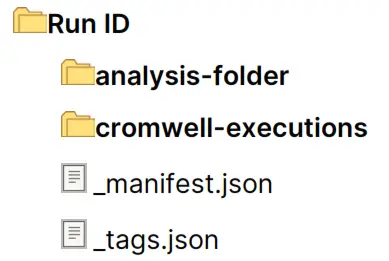
Analysis Folder
The analysis folder contains the following two subfolders: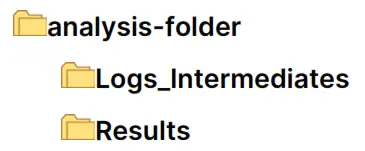
Logs_Intermediates—Contains folders for each submodule in the DRAGEN TSO 500 Analysis Software v1.1 on ICA pipeline. The folders contain a copy of all the relevant files required to create the metric output files and report files, as well as the combined log files at the root level and subfolders for each sample.
 | analysis-folder |
| Logs_Intermediates |
| AlignCollapser |
| Annotation |
| Cleanup |
| CnvCaller |
| CombinedVariantOutput |
| Contamination |
| DnaFastqValidation |
| DnaQCMetrics |
| FastqDownsample |
| FastqGeneration |
| MergedAnnotation |
| MetricsOutput |
| Msi |
| PhasedVariants |
| ResourceVerification |
| RnaAlignmentFusionCaller |
| RnaAnnotation |
| RnaFastqValidation |
| RnaFusionMerge |
| RnaQCMetrics |
| RnaSpliceVariantCalling |
| RunQc |
| SampleAnalysisResults |
| SamplesheetValidation |
| SmallVariantFilter |
| StitchedRealigned |
| Tmb |
| TrimFastq |
| VariantCaller |
| VariantMatching |
Results—Contains the aggregated MetricsOutput.tsv file and the combined dsdm.json file at the root level. Additionally, the Results folder contains a subfolder for each sample.
| analysis-folder |
| Results |
 | MetricsOutput.tsv |
| sample_1 |
| sample_2 |
| dsdm.json |
Each sample subfolder contains files required for generating result metrics and the files relevant for analysis.
If using only DNA samples, the Results subfolder contains the following files:
If using only RNA samples, the Results subfolder contains the following files:
| analysis-folder |
| Results |
| MetricsOutput.tsv |
| {RNA_Sample_id} |
| AllFusions.csv |
| CombinedVariantOutput.tsv |
| RNA_Annotated.json.gz SpliceVariants.vcf |
If using only DNA and only RNA samples, the Results subfolder combines both previous structures as follows.
If using paired DNA and RNA samples, the Results subfolder contains the following files::
| analysis-folder |
| Results |
| MetricsOutput.tsv |
| {Pair_id} |
| CombinedVariantOutput.tsv |
| {DNA_Sample_id} |
| CopyNumberVariants.vcf |
| DNAMergedSmallVariants_Annotated.json.gz |
| MergedSmallVariants.genome.vcf |
| MergedSmallVariants.vcf |
| TMB_Trace.tsv |
| {RNA_Sample_id} |
| AllFusions.csv |
| RNA_Annotated.json.gz |
| SpliceVariants.vcf |
Cromwell Executions
Cromwell log files are generated from the execution of the DRAGEN TSO 500 Analysis Software v1.1 on ICA pipeline. The files are grouped by the subworkflow and the pipeline task that is being executed.
Revision History
| Document | Date | Description of Change |
| Document # 200015530 v00 | August 2022 | Initial Release |
 Illumina
5200 Illumina Way
San Diego, California 92122 U.S.A.
+1.800.809.ILMN (4566)
+1.858.202.4566 (outside North America)
[email protected]
www.illumina.com
For Research Use Only. Not for use in diagnostic procedures.
© 2022 Illumina, Inc. All rights reserved.
 Illumina | Sequencing and array-based solutions for genetic research
 TruSight Oncology 500 Support