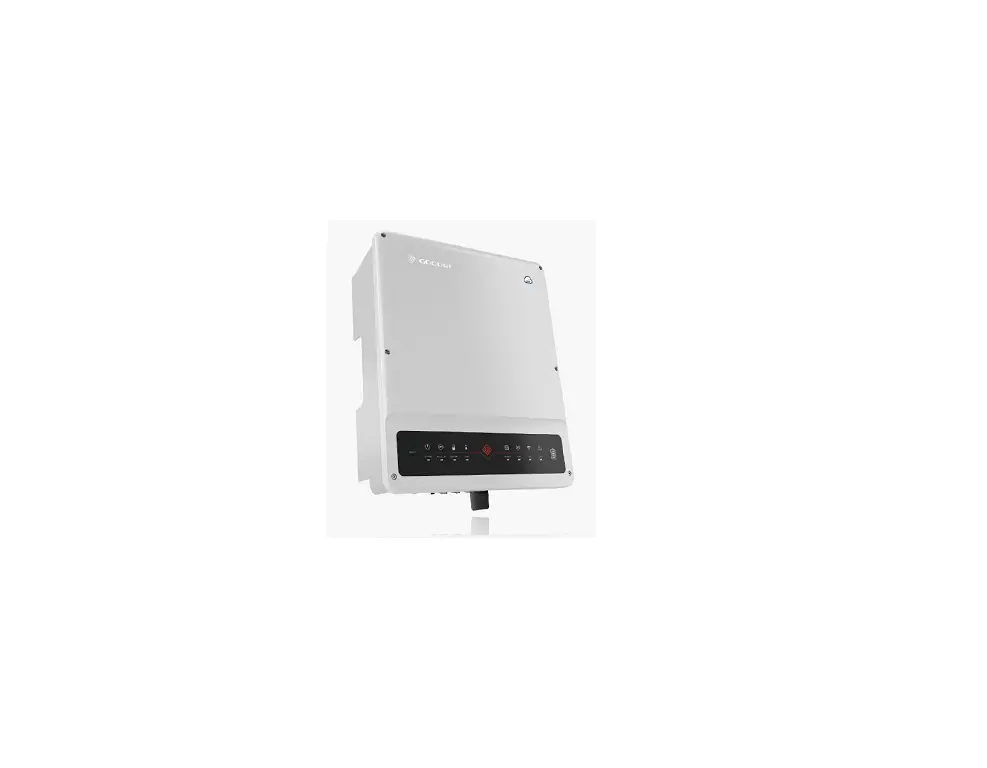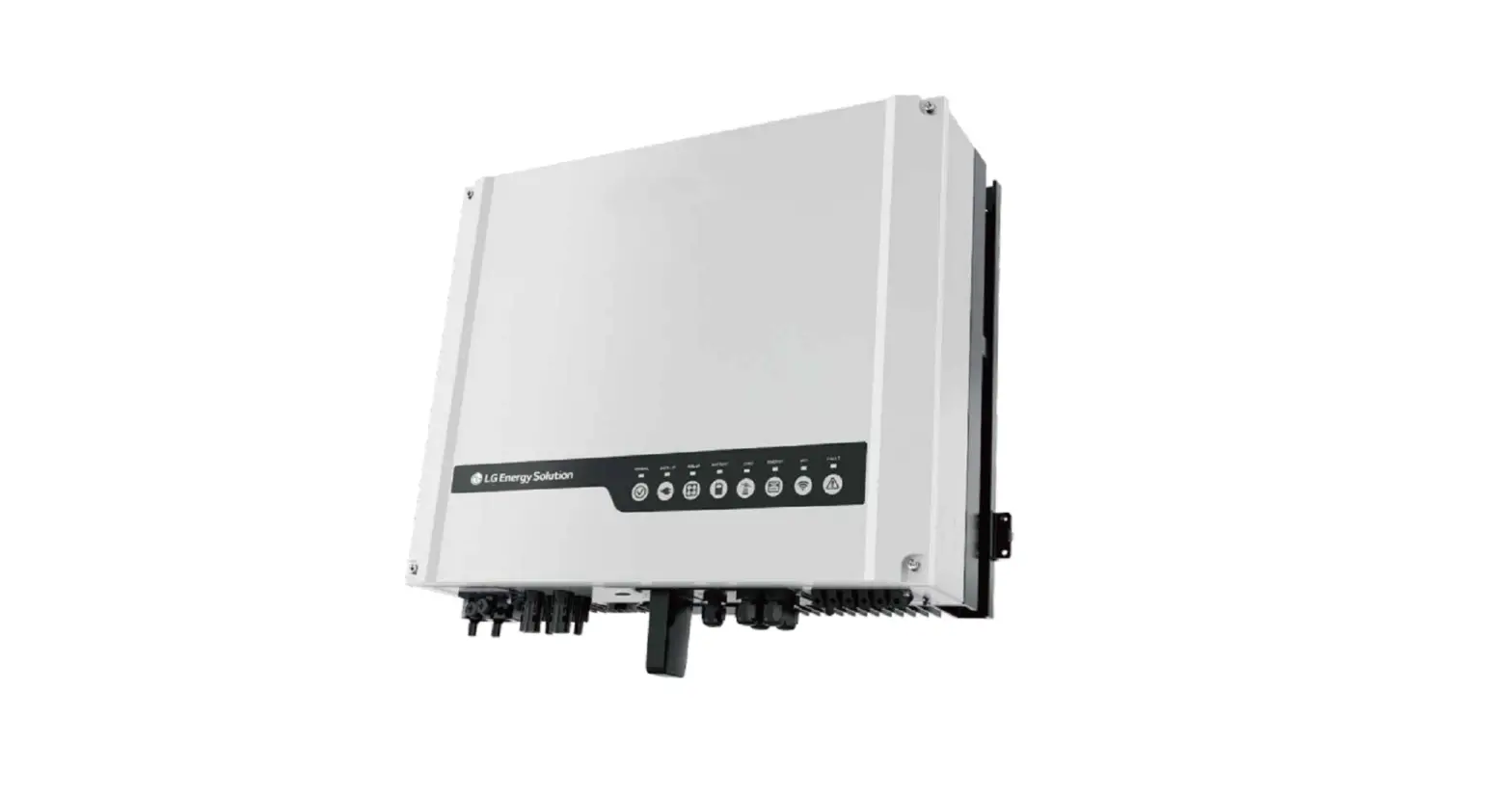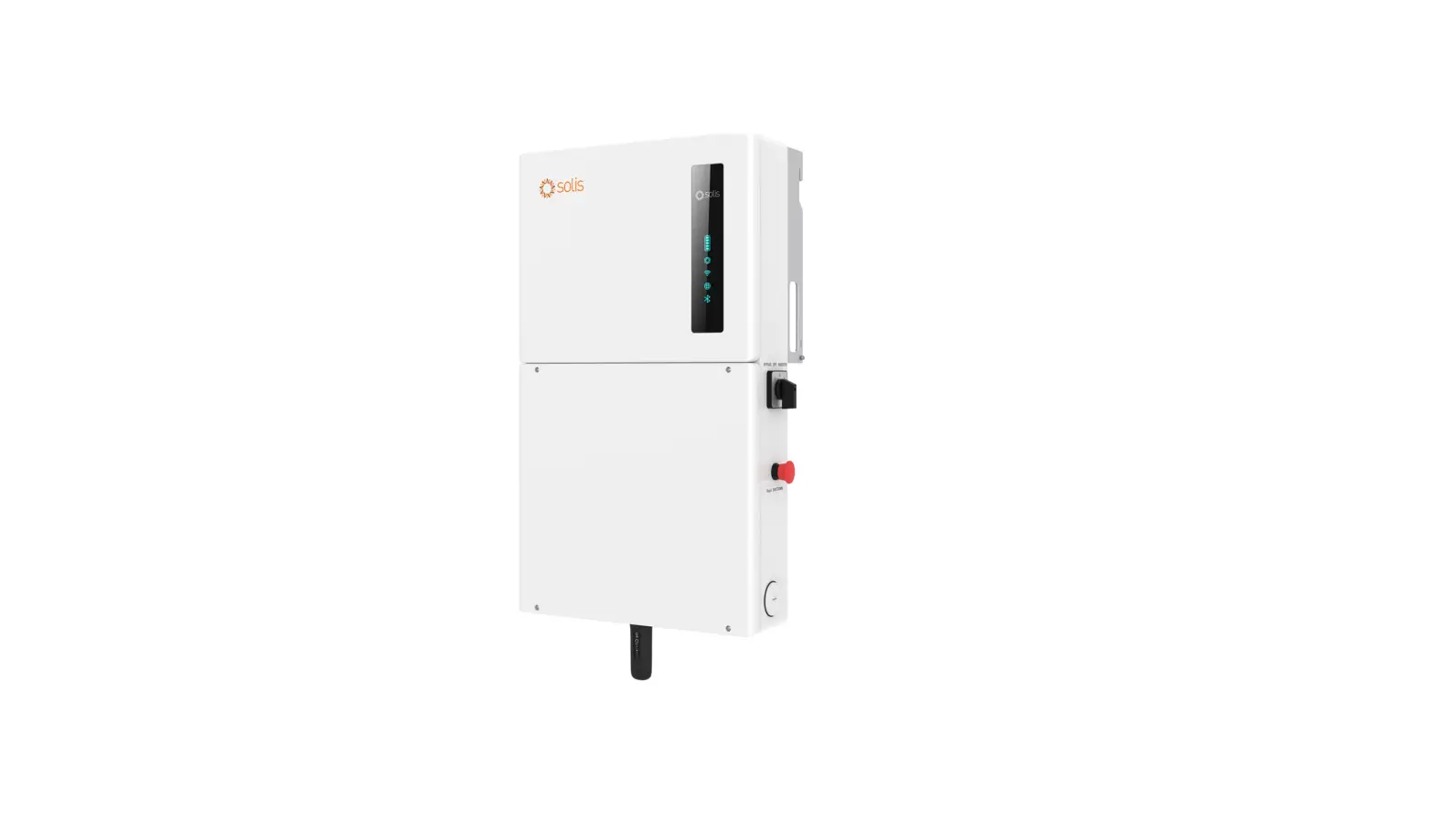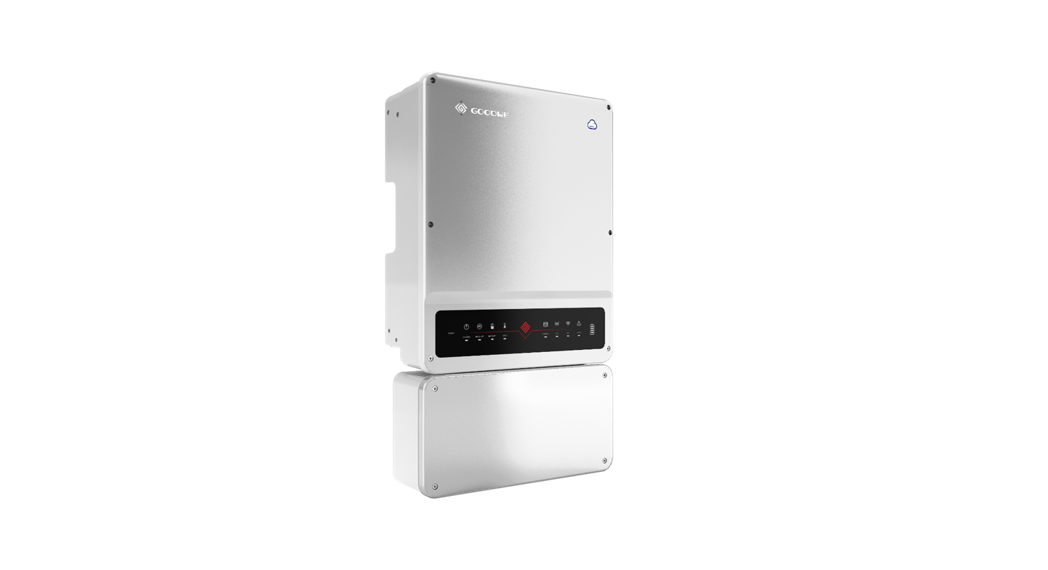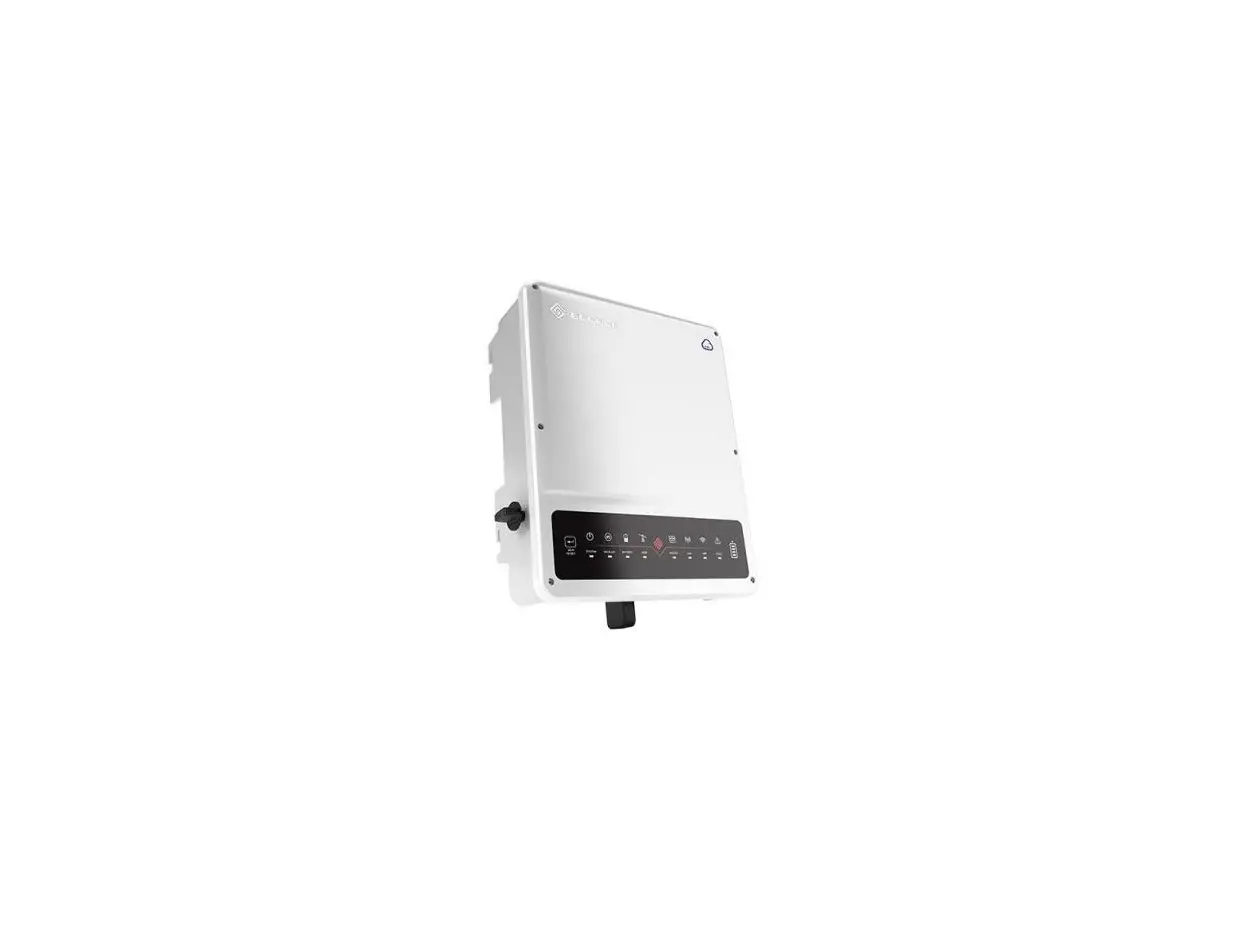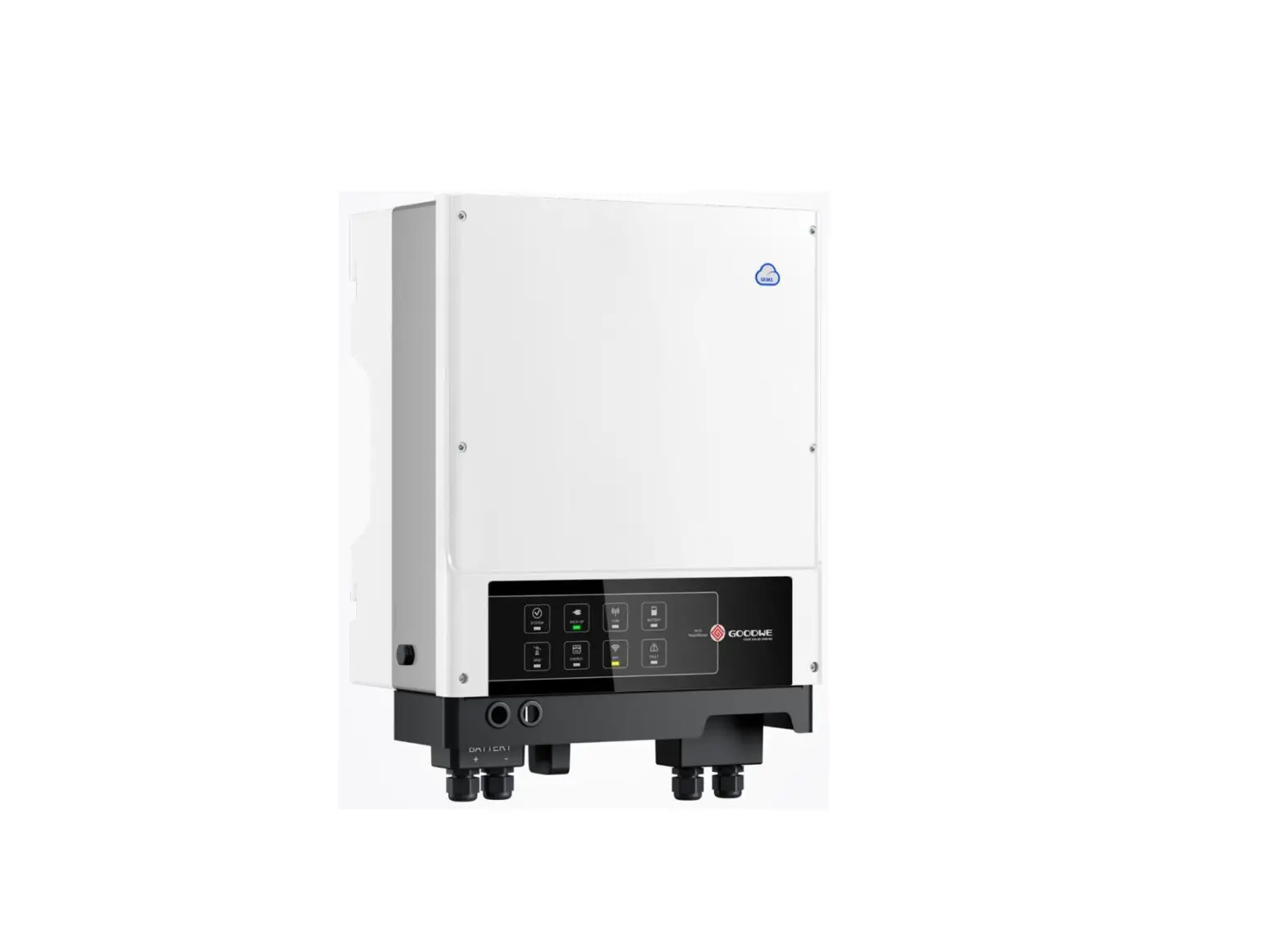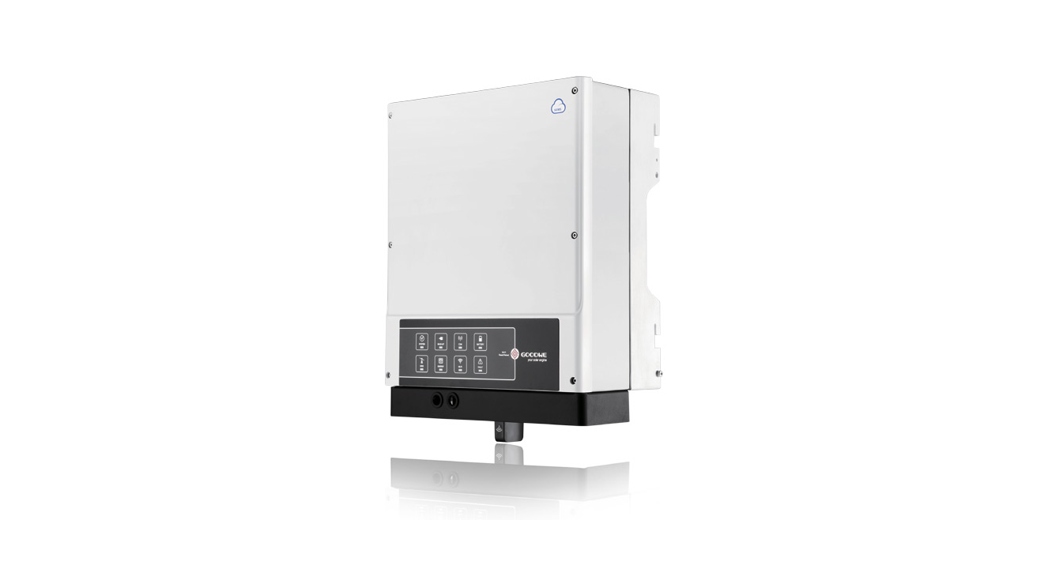


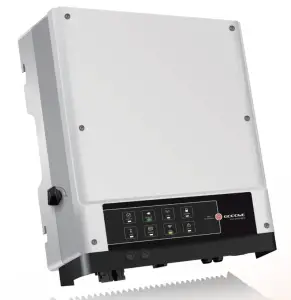
 EM SERIES USER MANUAL
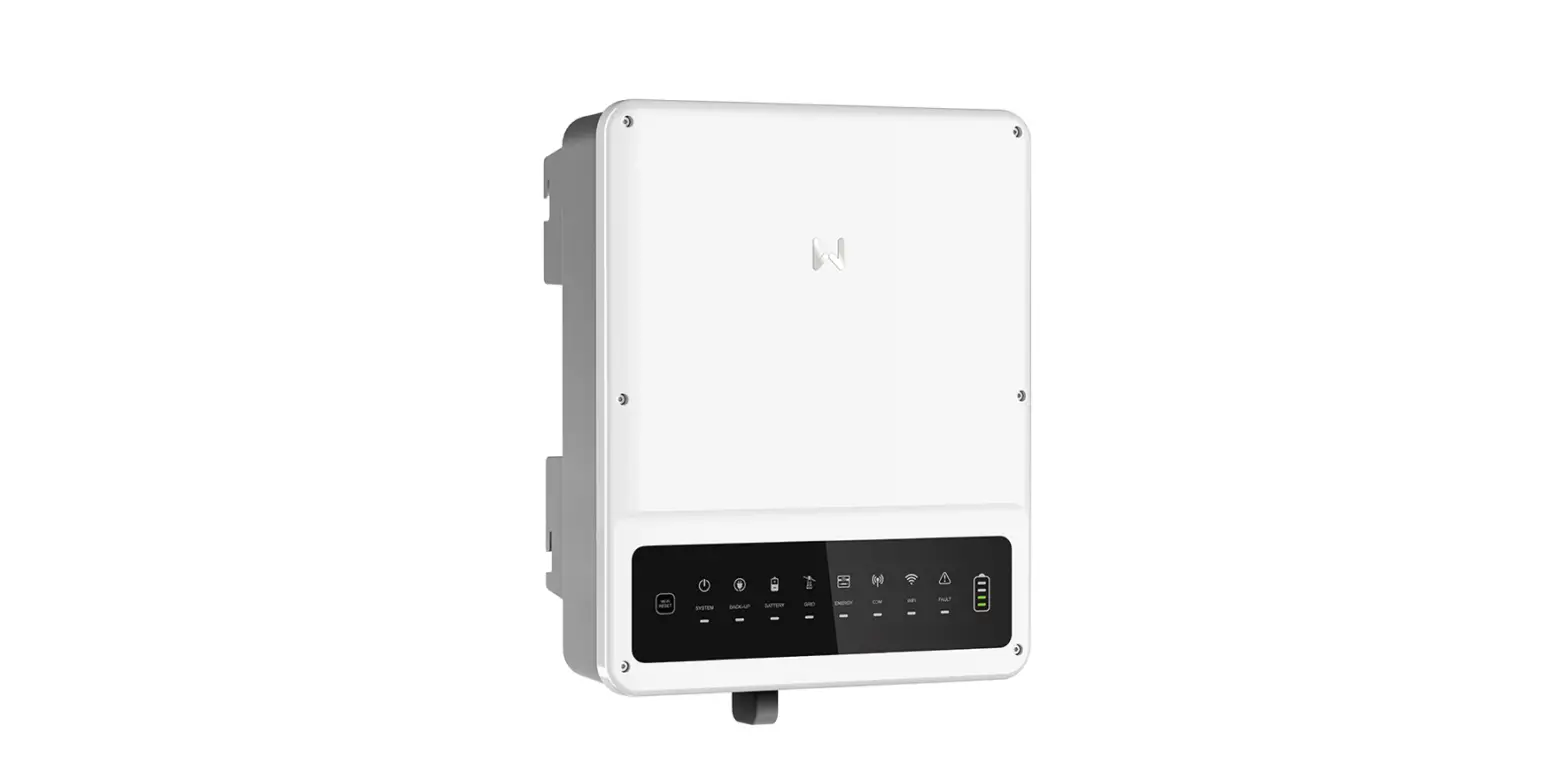
HYBRID INVERTER
Rev.1.1
2021-01-08
 |  |
| https://www.semsportal.com/home/pvmaster | https://www.semsportal.com/home/AppDownload |
 |  |
| https://www.linkedin.com/company/jiangsu-goodwe-power-supply-technology-co-ltd-/ | http://en.goodwe.com |
JIANGSU GOODWE POWER SUPPLY TECHNOLOGY CO.,LTD
No. 90 Zijin Rd., New District, Suzhou, 215011, China
www.goodwe.com
[email protected]
INTRODUCTION
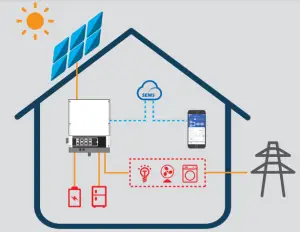
The Good We EM series of hybrid/bidirectional solar inverters are designed for use in solar systems that integrate a photovoltaic system (PV), batteries, loads and the local grid for energy management. The energy produced by the PV system is used to optimize system self-consumption. Excess power is used for battery charging, and any remaining power can be exported to the grid. The battery can discharge to support loads when PV power is insufficient to meet self-consumption demands. If both PV power and battery power are insufficient, the system will draw power from the grid to support connected loads.
Note:
The introduction describes the general behavior of the EM system. The operating mode can be adjusted via the PV Master app according to the system’s layout. The diagram below shows the EM system’s general operating modes.
OPERATING MODES INTRODUCTION
The EM system will typically operate in one of the following modes, based on the configuration and layout of your system.
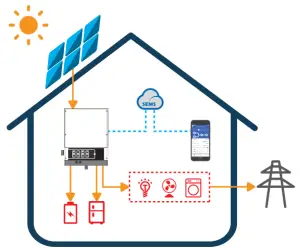
Mode Ⅰ
The energy produced by the PV system is used to optimize self-consumption. Excess energy is used for battery charging. Any remaining excess energy is exported to the grid.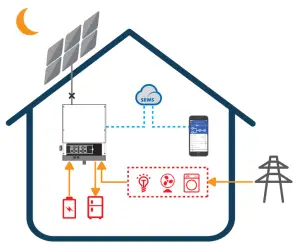 Mode Ⅱ
When there is no PV present, and the battery has insufficient change, the EM system will supply the load using grid power.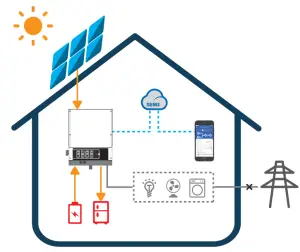 Mode Ⅲ
If the grid fails, the system automatically switches to backup mode, in which the load can be supplied by the PV or battery.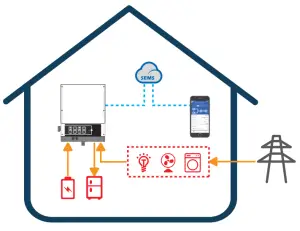 Mode Ⅳ
The battery can be charged using grid power, with charge time/power-adjustable via the PV Master app.
Safety & Warnings
The EM series of inverters from Jiangsu GoodWe Power Supply Technology Co., Ltd. (also referred to as Goodwe) strictly complies with relevant safety rules for product esign and testing. Please read and adhere to all the instructions and warnings on the inverter and in the user manual during installation, operation, and maintenance. Improper use could cause personal injury or damage to property.
Explanation of Symbols
 | Caution! Failure to observe the warning notices in this manual may result in injury. |
 | The danger of high voltage and electric shock! |
 | The danger of a hot surface! |
 | Components in the product can be recycled. |
 | This side up! The package must be transported, handled, and stored such that the arrows always point upwards. |
 | No more than six (6) identical packages to be stacked on top of each other. |
 | Products should not be disposed of as household waste. |
 | Fragile – The package/product should be handled carefully and never tipped over or thrown. |
 | Refer to the operating instructions. |
 | Keep dry! The package/product must be protected from excessive humidity and must be stored undercover. |
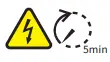 | You must wait at least 5 minutes after disconnecting the inverter from the utility grid and from the PV before touching any live internal parts. |
 | CE mark |
Safety Warning
Installation and maintenance of the inverter must be performed by qualified electricians, in compliance with the local authority and grid company standards, wiring rules, and requirements (e.g., AS 4777 and AS/NZS 3000 in Australia).
Before installing any wiring connection or electrically operating the inverter, all battery and AC power sources must be disconnected from the inverter for at least 5 minutes to ensure the inverter is totally isolated to avoid electric shock.
The inverter’s surface temperature may exceed 60℃ during operation, so please ensure it has cooled down before touching it, and ensure the inverter is out of reach of children.
Opening the inverter’s cover or modifying any components without the manufacturer’s authorization will invalidate the product’s warranty.
The inverter must be operated in accordance with the instructions in this user manual; failure to do so may result in damage to the product and will invalidate the manufacturer’s warranty.
Appropriate methods must be adopted to protect the inverter from static damage. Any damage caused by static is not covered by the manufacturer’s warranty.
PV negative (PV-) and battery negative (BAT-) connections on the side of the inverter are not grounded by design. Connecting PV- to earth is strictly forbidden.
PV modules used with the inverter must have an IEC61730 class A rating, and the total open-circuit voltage of the PV string/array must be lower than the maximum rated DC input voltage of the inverter. Any damage caused by PV over-voltage is not covered by the manufacturer’s warranty.
The inverter’s built-in residual-current monitoring unit (RCMU) removes DC residual current above 6mA, so an external RCD (type A) can be used with the system (≥30mA).
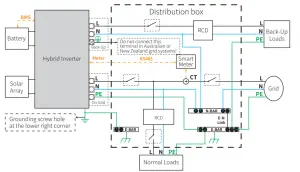
In Australia, the inverter’s internal switching does not maintain neutral integrity. This must be addressed with an appropriate external connection configuration, such as that provided in the system connection diagram for Australia on page 20.
In Australia, the output from the backup side in the switch box should be labeled “Main Switch UPS Supply”. The output from the normal load side in the switch box should be labeled “Main Switch Inverter Supply”.
Product Overview
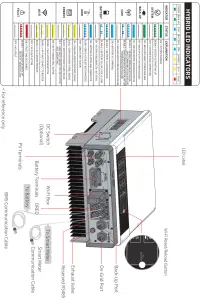
INSTALLATION INSTRUCTIONS
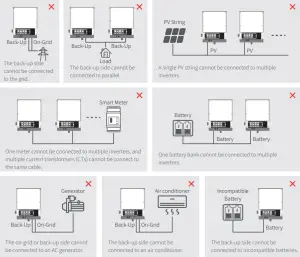
Incorrect Installation
Please avoid the following installation errors, which will damage the system or the inverter.
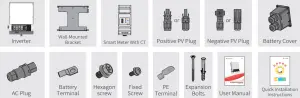
Packing List
Upon receiving the hybrid inverter, please check to ensure none of the components shown below are missing or damaged.
Mounting
Selecting a Mounting Location
For the protection and convenient maintenance of the inverter, the mounting location should be selected carefully based on the following rules:
No part of the system should block the switch or breaker that disconnects the inverter from DC and AC power.
Rule 1. The inverter should be installed on a solid surface, suitable for the inverter’s dimensions and weight.
Rule 2. The inverter should be installed vertically or at an angle not exceeding 15°.
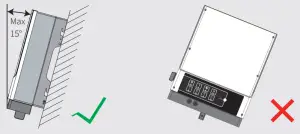
Rule 3. The ambient temperature must be lower than 45°C.
(High ambient temperature will cause the inverter’s power to be derated.)
Rule 4. The inverter’s installation site should be undercover and protected from direct sunlight and poor weather conditions such as snow, rain, lightning etc.
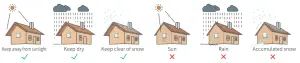
Rule 5. The inverter should be installed at eye level for convenient maintenance.
Rule 6. The product label on the inverter should be clearly visible after installation.
Rule 7. Leave enough space around the inverter, as shown in the figure below.
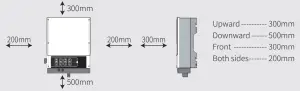
The inverter must not be installed near flammable or explosive substances or strong electromagnetic equipment.
Mounting
Remember that this inverter is heavy! Please be careful when removing it from the packaging.
The inverter is suitable for mounting on concrete or other non-combustible surfaces only.
Step 1
Please use the supplied mounting bracket as a template to drill 4 correctly positioned holes (10 mm in diameter, and 80 mm in depth).
Use the expansion bolts in the accessory box to fix the mounting bracket securely onto the wall.
Note: The load-bearing capacity of the wall must be greater than 17kg; otherwise it may not be able to support the inverter.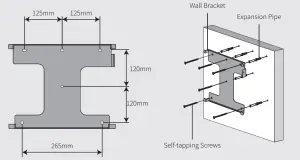 Step 2
Carry the inverter by holding the heatsink on two sides and placing the inverter on the mounting bracket.
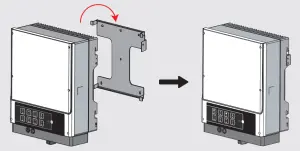
Step 3
The ground cable should be connected to the ground plate on the grid side.
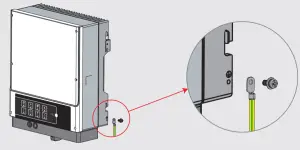
Step 4
If required, the inverter can be locked to prevent theft.
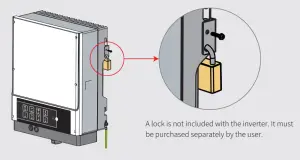
Electrical Wiring Connection
PV Wiring Connection
Before connecting PV panels/strings to the inverter, please make sure the following requirements are met:
- The total short-circuits current of a PV string must not exceed the inverter’s max DC current.
- The PV string’s minimum isolation resistance to the ground must exceed 18.33kΩ to prevent the risk of shock.
- The PV string must not be connected to an earth/grounding conductor.
- Use the correct PV plugs supplied in the accessory box. (BAT plugs are similar to PV plugs. Please confirm you have chosen the correct plugs.)
Note: MC4 or QC4.10 or Amphenol plugs are included in the accessory box. Instructions for connecting these are provided below:
Step 1
Prepare the PV cables and PV plugs.
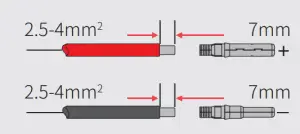
Note:
- Please use the PV plugs and connectors supplied in the accessory box.
- PV cable should be standard 2.5‒4mm 2
Step 2
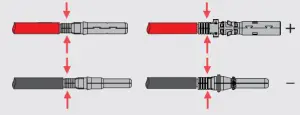
Connect the PV cables to the PV connectors.
| MC4 / QC4.10 Series | AMPHENOL Series |
 | |
Note:
- PV cables must be tightly crimped into the connectors.
- For Amphenol connectors, the limit buckle must not be pressed.
- There will be an audible click when the connector is correctly inserted into the PV plug.
Step 3
Screw on the cap and plug it into the side of the inverter.
Note: There will be an audible click when the connector is correctly inserted into the PV plug.
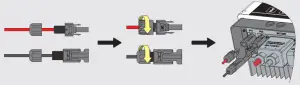
PV string polarity must not be reversed during connection, to prevent damage to the inverter.
Battery Wiring Connection
Please take care to avoid the risk of electric shock or chemical hazards.
Make sure there is an external DC breaker (≥63A) connected to batteries without a built-in DC breaker.Ensure the breaker is off and the battery’s nominal voltage meets EM series specifications before connecting the battery to the inverter. Ensure the inverter is fully isolated from PV and AC power.
The capacity of a lithium battery (pack) must be 50Ah or larger. Battery cabling requirements are as per Figure 2.4.2-1.
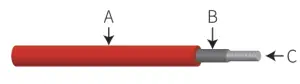
| Grade | Description | Value |
| A | Outside Diameter Insulation | 10-14 mm |
| B | Isolation Section | NA |
| C | Conductor Core Section | 20-35 mm |
Battery wiring connection process
Step 1
Prepare battery cables and accessories and insert the battery power cable into the battery cover.
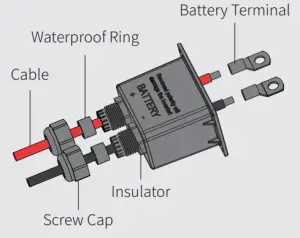 Note:
Note:
- Please use the accessories supplied in the accessory box.
- The battery power cable should be 20‒35mm².
Step 2
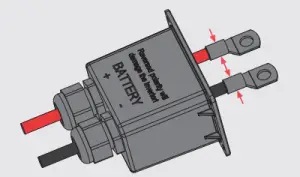
Prepare the battery terminals
- Strip the cable sleeve to expose 10mm of the metal core.
- Use an appropriate crimping tool to tightly compress the battery terminal onto the exposed metal core.
Step 3
Connect the battery terminal to the inverter.
Note:
Please make sure the battery’s polarity (+/-) is not reversed.
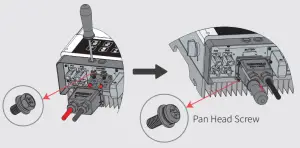
* To connect compatible lithium batteries (LG / PYLON / BYD / GCL / DYNESS / ALPHA), please refer to the battery connection information in the EM Quick Installation Instructions.
Battery Protection
The battery will act as a protective charge/discharge current limiter under any of the conditions as below:
- Battery SOC (state of charge) is lower than I-DOD (depth of discharge).
- Battery voltage is lower than the discharge voltage.
- Battery overheating protection.
- Battery communication is abnormal for a lithium battery.
- Battery management system (BMS) limitation for a lithium battery.
When charge/discharge current limit protection occurs:
- In on-grid mode, battery charge/discharge operation may be abnormal.
- In off-grid mode, the backup supply will shut down.
Note:
• In off-grid mode, if the backup supply shuts down because of the battery having low SOC or voltage, all PV power will be used to charge the battery until its SOC reaches 40% +(1-DOD)/2, then the back-up supply will be activated.
• In on-grid mode, the battery is protected from over-discharge by DOD and the discharge voltage. In off-grid mode, it is protected only by the discharge voltage as a priority.
• The battery’s DOD setting prevents the inverter from discharging the battery’s reserve power. As soon as the DOD limit is reached, the load will only be supplied by either PV power or the grid. After several continuous days in which little or no battery charging occurs, the battery may continue to self-consume energy to support communication with the inverter. Behavior varies between batteries from different manufacturers, but if the battery’s SOC reaches a certain level, the inverter will boost the SOC back up. This protection mechanism safeguards against the battery reaching 0% SOC.
On-grid and Back-up Connection
An external AC breaker is required for an on-grid connection to isolate the system from the grid when necessary.
Requirements for the on-grid AC breaker are shown below.
| Inverter model | AC breaker specification |
| GW3048-EM | 32A / 230V (e.g. DZ47-60 C32) |
| GW3648-EM | 32A / 230V (e.g. DZ47-60 C32) |
| GW5048-EM | 32A / 230V (e.g. DZ47-60 C32) |
Note: The absence of an AC breaker on the backup side will result in damage to the inverter in the event of a backup side electrical short-circuit. The backup function cannot turn off during on-grid operation.
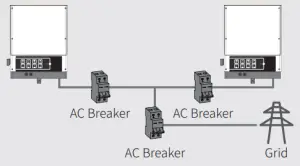
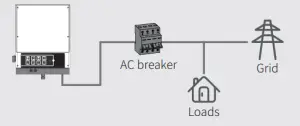
- Use a separate AC breaker for each individual inverter.

- On the AC side, the individual breaker should be connected between the inverter and the grid, and before the load.

The procedure for on-grid and backup connection is shown below:Make sure the inverter is fully isolated from any DC or AC power before connecting the AC cable.
Note:
- The neutral cable should be blue, the line cable should be black or brown (preferred) and the protective earth cable should be yellow-green.
- For AC cabling, the PE cable should be longer than the neutral and line cables, such that if the AC cable slips or is pulled out, the protective earth conductor will be the last to remain in place and support any strain.
Step 1-1 On-Grid
Prepare the terminals and AC cables according to the information in the appropriate table.

| Grade | Description | Value |
| A | Outer Diameter | 13-22 mm |
| B | Separated Wire Length | 10-15 mm |
| C | Conductor Wire Length | 12-14 mm |
| D | Conductor Core Section | 8-10 mm |
Step 1-2 Back-Up
Prepare the terminals and AC cables according to the information in the appropriate table.
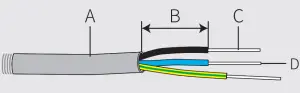
| Grade | Description | Value |
| A | Outer Diameter | 10~14mm |
| B | Separated Wire Length | 7~10mm |
| C | Conductor Wire Length | 7~9mm |
| D | Conductor Core Section | 4-6 mm |
Note: If not using on-grid power or the backup function to charge the battery, wire with a conductive core of 4‒6mm² can be used.
Step 2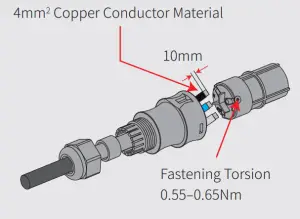
- Prepare the terminals and AC cables.
- Insert the AC cable into the terminal cover and screw the three cables tightly onto the connectors.
Note:
- Please use the terminals supplied in the components box;
- Make sure the cable sleeve is not trapped with the conductor.
Step 3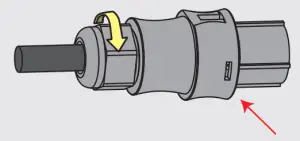
Lock the terminal cover and fasten the terminal cap.
Note: Make sure the terminal cover is correctly locked onto the terminal.
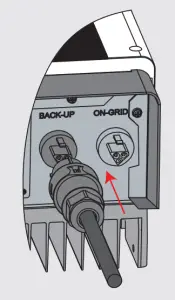
Step 4-1 On-Grid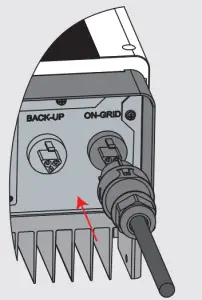 Connect the assembled AC terminals onto the inverter.
Note: Make sure the terminals are connected to the ‘On-Grid’ side (the other side is connected to the public grid).
Step 4-2 Back-Up
Connect the assembled AC terminals to the inverter.
Note: Make sure the terminals are connected to the ‘Back-Up’ side (the other side is connected to the public grid).
Adjustable Settings
The inverter includes an interface in which the user can set functions, such as trip points, trip time, time of reconnection, active and invalid QU curve and PU curve values etc. using special firmware. Please contact after-sales support to obtain the firmware and details of the adjustment method.
Adjustable Settings
The inverter includes an interface in which the user can set functions, such as trip points, trip time, time of reconnection, active and invalid QU curve and PU curve values etc. using special firmware. Please contact after-sales support to obtain the firmware and details of the adjustment method.
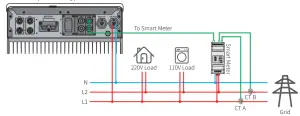
Connection for a SPLIT Grid System
There is a solution to enable the inverter to work in an on-grid mode in a SPLIT grid system. For details, please check the official application instructions on our website: GoodWe Hybrid Solution For Split Grid Type.
Declaration for Back-Up Function
EM series hybrid inverter backup outputs have overload functionality.
For details please refer to the technical parameters section (Page 31).
The inverter will derate for self-protection at high ambient temperatures.
The statement below sets out the general policies governing energy storage inverters of series EH, EM, ES, ET, BH, BT and SBP.
- For Hybrid inverters (Series EH, EM, ES, and ET), a standard PV installation typically includes the inverter, PV panels and a battery. If the system is not connected to a battery, it is strongly recommended not to use the backup function. The manufacturer will not be liable for any consequences arising from the user’s failure to follow this instruction, and the standard warranty will be invalidated.
- Under normal circumstances, the backup switching time is less than 10ms (the minimum requirement for a UPS). However, external factors may cause the system to fail in backup mode. As such, we recommend that users be aware of such conditions and follow the instructions below:
- Do not connect loads that are dependent on a stable energy supply for reliable operation.
- Do not connect a total load that exceeds the maximum backup capacity.
- Try to avoid loads that may create very high start-up current surges, such as inverters, air-conditioners and high-power pumps.
- Depending on the state of the battery itself, battery current may be limited by factors including but not limited to temperature and weather conditions.
Accepted Loads:
The EM series inverter is able to supply a continuous 2300VA output or max 3500VA in less than 10 seconds on the back-up side to support back-up loads. The inverter will derate for self-protection at high ambient temperatures.
- Acceptable backup loads: Television, computer, fridge, fan, illumination lamps, microwave oven, electrical rice cooker and router etc.
- Unacceptable back-up loads: Air conditioner, water pump, heaters, washing machine, electromagnetic oven, compression engine, hair drier and vacuum cleaner etc. Any other loads with high inrush current at start-up are also unacceptable.
Note:
For convenient maintenance, please install an SP3T switch on the backup side and the on-grid side. This enables adjustment of supply loads with backup, grid, or default settings.
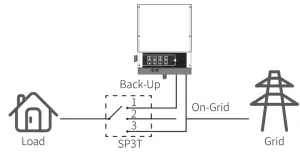
- The backup load is supplied by the backup side.
- The backup load is isolated.
- The backup load is supplied from the grid side.
Declaration for Back-Up Overload Protection
The inverter will restart if overload protection is triggered. Preparation time for restarting will increase in duration (one hour at most) if overload protection is triggered repeatedly. Take the
following steps to restart the inverter immediately:
Decrease backup load power to within maximum limits.
In the PV Master app → Advanced Setting → Click “Reset Back-Up Overload History”.
2.4.4 Smart Meter & CT Connection
Make sure the AC cable is fully isolated from AC power before connecting the Smart Meter & CT.
The Smart Meter with integral current transformer (CT) included with the product is compulsory for EM system installation. It is used to detect grid voltage, current direction and magnitude. It also communicates with the inverted RS485 communication.
Note:
- The Smart Meter & CT is correctly configured. Please do not alter any settings on the Smart Meter.
- Only one Smart Meter can be used for each EM series inverter.
- Three CTs must be used for one Smart Meter and must be connected on the same phase with Smart Meter power cable.
Smart Meter & CT Connection Diagram
- For single-phase grid

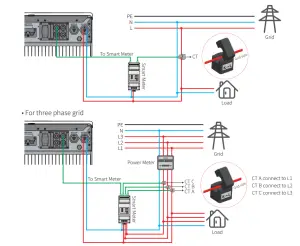
Note:
- Please use the Smart Meter with 3 CTs supplied with the product.
- The CT cable is 3m as default, but can be extended to a maximum of 5m.
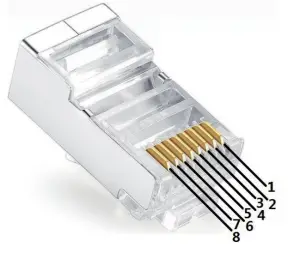
- The Smart Meter communication cable (RJ45) is attached to the inverter (“To Smart Meter” cable). It can be extended to a maximum of 100m, and must use a standard RJ45 cable and plug, as below:
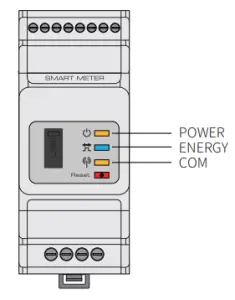
Smart Meter LED Indications
| STATUS | OFF | ON | Blinking |
| POWER | Not working | Working | / |
| ENERGY | / | Importing | Exporting |
| COM | Blink once when transferring data to the inverter | ||
Detailed Pinout for Each Port on the Inverter
BMS: CAN communication is configured by default. If RS485 communication is to be used, please contact after-sales support to obtain the correct communication cable.
| Position | Colour | BMS Function | Smart Meter Function | EMS |
| 1 | Orange-white | 485_A2 | NC | 485_A |
| 2 | Orange | NC | NC | 485_B |
| 3 | Green-white | 485_B2 | 485_B1 | 485_A |
| 4 | Blue | CAN_H | NC | NC |
| 5 | Blue-white | CAN_L | NC | NC |
| 6 | Green | NC | 485_Al | 485_B |
| 7 | Brown-white | NC | 485_B1 | NC |
| 8 | Brown | NC | 485_Al | NC |
DRED and Remote Shutdown Device Connection
A DRED (demand response enabling device) is required for installation in Australia and New Zealand (and can also be used for remote shutdown in European countries), in compliance with Australia and New Zealand safety requirements (or those of European countries). The inverter includes the required control logic and DRED interface, but the DRED itself is not provided by the inverter manufacturer.
Connection details for DRED and remote shutdown are shown below:
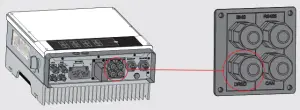
Step 1
Unscrew the plate from the inverter.
Note: DRED should be connected via the “DRED Port” as the figure shows.
Step 2
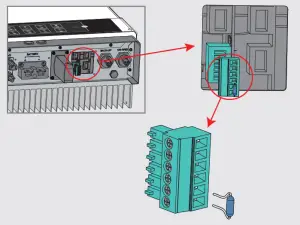
- Unplug the 6-pin terminal and disconnect the resistor.
- Remove the resistor and retain the 6-pin terminal for the next step.
Note: The 6-pin terminal in the inverter has the same pinout as the DRED. Please leave it in the inverter if no external device is connected.
Step 3-1 For DRED
- Push the DRED cable through the plate.
- Connect the DRED cable to the 6-pin terminal.
The function of each position on the connector is shown below.
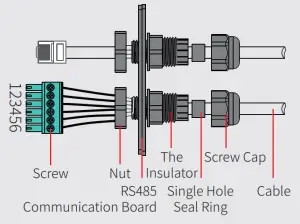
| NO. | 1 | 2 | 3 | 4 | 5 | 6 |
| Function | DRM1/5 | DRM2/6 | DRM3/7 | DRM4/8 | REFGEN | COM / DRMO |
Step 3-2 For Remote Shutdown
- Push the cable through the plate.
- Wiring for connector positions 5 and 6, respectively.
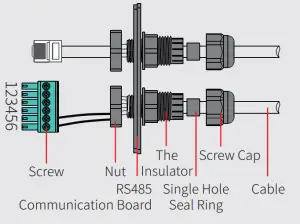
| NO. | 5 | 6 |
| Function | REFGEN | COM / DRMO |
Step 4
Connect the DRED terminal at the correct location on the inverter.
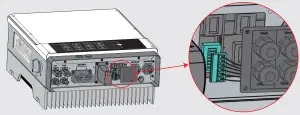
Earth Fault Alarm Connection
The EM series inverter complies with IEC 62109-2 13.9. The fault indicator LED on the inverter cover will light up and the system will email fault information to the customer.
The inverter should be installed at eye level for convenient maintenance.
SEMS Portal
SEMS Portal is an online monitoring system. After the installation of the communication connection is complete, you can access www.semsportal.com or download the app by scanning the QR code to monitor your PV plant and device.
Please contact the after-sales team for more information on how to use SEMS Portal.
 https://www.semsportal.com/home/AppDownload
Wiring Scheme for EM Series Hybrid Inverters
Note: This diagram illustrates the wiring scheme for the EM series hybrid inverter, not the electrical wiring standard.
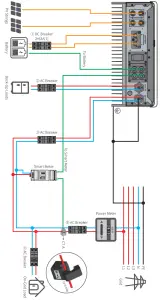
Please select a breaker according to the specifications below
| Inverter | 1 | 2 | 3 | 4 | 5 |
| GW3048-EM | 63A/60V | 32A/400V AC breaker | Depends on household loads | ||
| GW3648-EM | DC Breaker | 32A/400V AC breaker | |||
| GW5048-EM | 32A/400V AC breaker | ||||
- For batteries with attached breakers, the external DC breaker can be omitted.
- Only for lithium batteries with BMS communication.
- CT must not be connected in reverse. Please follow “House→Grid” instructions for the correct connection.
System Connection Diagrams
Note: In accordance with Australian safety regulations, the neutral cables of the on-grid side and the backup side must be connected together, otherwise the backup function will not work.
This diagram shows an example application where neutral is connected to PE in the distribution box.
Applies to: Australia, New Zealand, South Africa, etc. (Please follow local wiring regulations!)
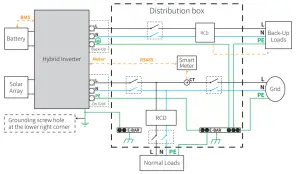
This diagram shows an example configuration for grid systems without special requirements for electrical wiring connections.
Note: The backup PE line and earthing bar must be grounded properly and effectively.
Otherwise, the backup function may perform abnormally when the grid fails.
SYSTEM OPERATION
Wi-Fi Configuration
This section illustrates configuration via the web interface. You can also complete configuration using the PV Master app. Wi-Fi configuration is essential for online monitoring and maintenance.
Preparation:
- The inverter must be powered up with a battery or grid power.
- A router with internet access to the website www.semsportal.com is required.
Step 1
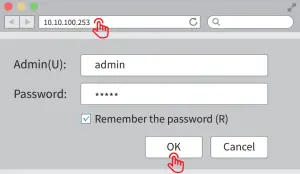
- Connect Solar-WiFi* to your PC or smartphone (* Its name is the last 8 characters of the inverter’s serial number.).
- Open a browser and log in at 10.10.100.253 Admin (User): admin; Password: admin.
- Click “OK”.
Step 2
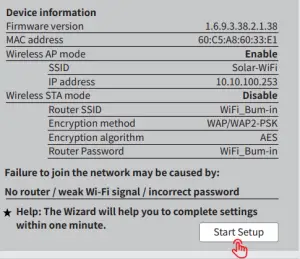
- Click “Start Setup” to choose your router.
- Click “Next”.
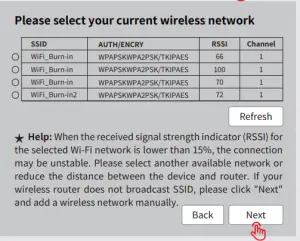
Step 3
- Enter the password for the router, then click “Next”.
- Click “Complete”.
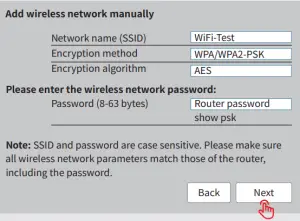 Note:
Note:
If the Wi-Fi module fails to connect to the network after entering the correct password, the hotspot password may contain special characters not supported by the module. 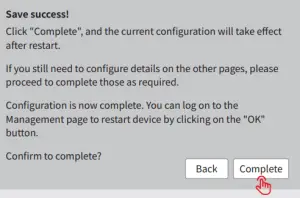
Note:
- Please make sure the password and encryption method/algorithm are the same as the router’s.
- If everything is ok, the Wi-Fi LED on the inverter will change from a pattern of two blinks to four blinks and then to a constant state, indicating successful Wi-Fi connection to the server.
- Wi-Fi configuration can also be completed using the PV Master app. For details please see the PV Master app.
Wi-Fi Reset & Reload
Wi-Fi reset restarts the Wi-Fi module. Wi-Fi settings will be reprocessed and saved automatically.
Wi-Fi reload will restore the Wi-Fi module’s default factory settings.
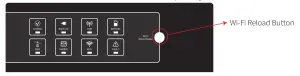
Wi-Fi Reset
Short press reset button.
Wi-Fi LED will blink for a few seconds.
Wi-Fi Reload
Long press reset button (longer than 3s).
Wi-Fi LED will double blink until Wi-Fi is configured again.
Note:
Wi-Fi reset & reload functions should only be used when:
- Wi-Fi loses connection to the internet or cannot connect to the PV Master app successfully.
- The “Solar-WiFi signal” cannot be detected, or you have other Wi-Fi configuration problems.
PV Master App
PV Master is an external monitoring/configuration application for hybrid inverters. It can be used on Android and iOS smartphones and tablets. Its main functions are as described below:
- Edit the system configuration to operate as required by the customer.
- Monitor and check the performance of the hybrid system.
- Wi-Fi configuration.
Please download the PV Master app from the Google Play Store or Apple App Store. You can also download the app by scanning the QR code on the back of this user manual.
Please download “PV Master Operation Instructions” from www.goodwe.com
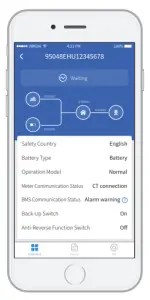
CEI Auto-Test Function
A PV auto-test function for CEI is included in the PV Master app to meet Italy’s requirements. For detailed instruction for this function please refer to “PV Master Operation Instructions”.
OTHERS
Error Messages
The error messages below will be displayed on the PV Master app or reported by e-mail if an error occurs.
| Error Message | Explanation | Reason | Solutions |
| Utility Loss | Public grid power is not available (power is lost or on-grid connection fails) | The inverter cannot detect the connection of grid | 1. Use a multi. meter to check whether there is a voltage present on the AC side. Make sure grid power is available. 2. Ensure AC cables are properly and securely connected. 3. If all is well, please turn off the AC breaker and turn it back on after 5 minutes. |
| VAC Failure | Grid voltage is not within the permissible range | Inverter detects that AC voltage exceeds the normal range required by the safety country. | 1. Ensure the inverter’s safety country is set correctly. 2. Use a multi. meter to check that the AC voltage (Between L and N) is within the normal range. Repeat this check on the AC breaker side. a.If the AC voltage is high, make sure the AC cable complies with the requirements stated in the user manual and is not too long, b.If the voltage is low, make sure the AC cable is properly connected and the AC cable sleeve is not compressed into the AC terminal. 3. Make sure the grid voltage in your area is stable and within normal range. |
| FAC Failure | Grid frequency is not within the permissible range | Inverter detects that the grid frequency is outside the normal range required by the safety country. | 1. Make sure the inverter’s safety country is set correctly. 2. If the safety country is correct, please check the inverter display to ensure the AC frequency (FAC) is within a normal range. 3. if FAC failure only appears a few times and resolves quickly, it may be caused by occasional grid frequency instability. |
| PV Over Voltage | The total DC voltage of the PV string is too high | The total voltage (short-circuit voltage) of each PV string is higher than the maximum DC input voltage of the inverter. | Check the PV string VOC is lower than the max PV input voltage of the inverter If the VOC of the PV string is high, please decrease the number of panels to make sure VOC does not exceed the maximum DC input voltage of the inverter. |
| Over Temperature | The temperature inside the inverter is too high | The inverter’s working environment has caused a high-temperature condition | 1. Try to decrease ambient temperature around the inverter. 2. Make sure the installation complies with the instructions in the inverter’s user manual. 3. Try to shut down the inverter for 15 mins, then restart it. |
| Isolation Failure | ISO failure could occur for multiple reasons, such as poor PV panel grounding, a faulty DC cable, aging of PV panels, or comparatively high ambient humidity, etc. | Isolation failure could occur for multiple reasons, such as poor PV panel grounding, a faulty DC cable, aging of PV panels, or comparatively high ambient humidity, etc. | 1. Use a multi. meter to check whether the resistance between the earth and the inverter frame is close to zero. If it is not, please ensure that the connection is adequate. 2. Excessive humidity can cause isolating.’ failure. 3. Check the resistance between PV1+/PV2+/BAT+/PV- and earth. If the resistance is lower than 33.3k, check the system’s wiring connections 4. Try to restart the inverter. Check whether the fault still occurs. If not, it may have been caused by an intermittent problem. Please contact the after-sales team for further support. |
| Ground Failure | Ground leakage current is too high | Ground failure could occur for multiple reasons, such as the poor connection of the neutral cable on the AC side, or comparatively high ambient humidity, etc. | Using a multimeter, check for a voltage between the earth and the inverter frame. This should normally be around OV. if a voltage is present, it suggests the neutral and ground cables are not properly connected on the AC side. if this only occurs when air humidity is higher than normal, such as early morning, at dawn or on rainy days, and only lasts a short time, this is normal behavior. |
| Relay Check Failure | Self-checking for relay failure | Neutral and ground cables are not connected well on the AC side or just an occasional failure | Using a multi-meter, check for high voltage between the N and PE cable on the AC side. This should normally be lower than 10V. If the voltage is higher than 10V, this suggests the neutral and ground cables are not properly connected on the AC side. You may need to restart the inverter. |
| DC Injection High | / | The inverter detects a higher DC component in the AC output | Try to restart the inverter. Check if the fault still occurs. if not. it is just an intermittent condition. Otherwise. contact after-sales support immediately. |
| EEPROM R/W Failure | / | Caused by a strong external magnetic field etc. | Try to restart the inverter. Check if the fault still occurs. if not. it is just an intermittent condition. Otherwise, contact after-sales support immediately. |
| SR Failure | Internal communication fails | Caused by a strong external magnetic field etc. | Tf• to restart the inverter. Check if the fault still occurs. If not. it is just an intermittent condition. Otherwise. contact after-sales support immediately. |
| DC Bus High | BUS voltage is over-high | / | Try to restart the inverter. Check if the fault still occurs. if not, it is just an intermittent condition. Otherwise, contact after-sales support immediately. |
| Back-Up Overload | The backup site is overloaded | Total backup load power is higher than the backup nominal output power | Reduce back-up loads to ensure the total load power is less than the nominal backup output power (please refer to page 11). |
Troubleshooting
Checks Before Turning On AC Power
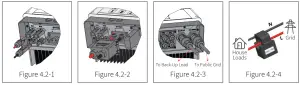
- Battery Connection: Check the connection between the EM inverter and the battery: Polarities (+/-) must not be reversed (refer to figure 4.2-1).
- PV Input Connection: Check the connection between the EM inverter and PV panels: Polarities (+/-) must not be reversed (refer to figure 4.2-2).
- On-Grid and Back-Up Connection: Check the on-grid connection to the power grid, and the back-up connection to the loads: Polarities (L1/L2/L3/N should be in sequence) must not be reversed (refer to figure 4.2-3).
- Smart Meter and CT Connection: Ensure the Smart Meter and CT are connected between the house loads and grid and match the Smart Meter direction markings on the CT (refer to figure 4.2-4).
Checks When Starting the EM and Turning On AC Power
Battery Settings, BMS Communication and Safety Country:
After connecting Solar-WiFi* (*The name of the Wi-Fi connection is the last 8 characters of the inverter’s serial number), check “Param” settings in the PV Master app to ensure the battery type selected matches the battery installed and that the “Safety Country ” Setting is correct. Please change these settings in “Set” if they are not correct.
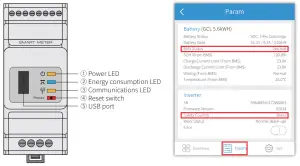
Note: For compatible lithium batteries, BMS status will display “Normal” after selecting the correct battery manufacturer.
Problems During Operation
Inverter does not start up with battery only
Solution:
Ensure the battery voltage is greater than 48V, otherwise, the battery will be unable to start the EM inverter.
Inverter is not started up with PV only
Solution:
- Ensure the PV voltage is greater than 125V (200V is required to enter on-grid mode).
- Check the connection between EM and PV panels: Polarities (+/-) must not be reversed.
The inverter doesn’t discharge or output without PV or when PV is lower than load power
Solution:
- Check that the EM inverter and Smart Meter are able to communicate.
- Ensure load power is higher than 150W.
a. The battery will not discharge continuously unless load power is greater than 150W.
b. If the battery does not discharge when meter power is greater than 150W, please check the Smart Meter & CT connection and polarity. - Make sure SOC (state of discharge) is higher than 1-DOD (depth of discharge). If the battery discharges to below 1-DOD, it will only discharge again when SOC is charged to (20%+1-DOD) /2 and SOC>105% -DOD. (If immediate battery discharge is required, the user should restart the battery.)
- Use the app to check whether the charge time has been set already since the battery cannot discharge whilst charging. (The battery will prioritize charging when charge/discharge times coincide).
Battery does not charge when PV power is greater than load power
Solution:
- Check the discharge time setting on the app.
- Check whether the battery is fully charged and the battery voltage reaches “charge voltage”.
High power fluctuation during battery charge or discharge
Solution:
- Check whether there is a fluctuation in load power.
- Check whether there is a fluctuation in PV power.
Battery does not charge:
Solution:
- Ensure BMS communication is OK using the PV Master app (for lithium batteries).
- Check that the CT is connected in the correct position and direction, as per chapter 2.4.4: Smart Meter & CT Connection.
- Check whether the total load power is much greater than PV power.
Questions & Answers (Q & A)
Wi-Fi Configuration
Q: Why can’t I find the Solar-WiFi* signal on mobile devices?
A: Normally the Solar-WiFi* signal can be detected immediately after powering up the inverter.
However, the Solar-WiFi signal will disappear when the EM unit connects to the internet. If you need to change settings, connect via the router instead. If you can’t find the Wi- Fi signal or connect to the router, please try to reload the Wi-Fi settings (refer to 3.1 Wi-Fi Configuration).
Q: Why can’t I connect to the Solar-WiFi* signal on my phone?
A: The Wi-Fi module can only connect to one device at a time. If the signal is already connected to another device, you will be unable to connect to it using your phone.
Q: Why does the Wi-Fi module fail to connect to the network after I select the correct router hotspot and enter the right passwords?
A: It’s possible that your hotspot password contains special characters not supported by the module. Please modify your password to include only Arabic numerals and or uppercase/lowercase letters.
Battery Operation
Q: Why does the battery not discharge when the grid is not available, while it discharges normally when grid is available?
A: On the app, the off-grid output and back-up functions must be enabled for the battery to
discharge in off-grid mode.
Q: Why is there no output on the backup side?
A: To enable the backup supply, “Back-Up Supply” on the PV Master app must be turned on. In off-grid mode or when grid power is disconnected, the “Off-Grid Output Switch” function must also be turned on.
Note: When enabling the “Off-Grid Output Switch” function, don’t restart the inverter or battery, otherwise the function will be switched off automatically.
Q: With lithium batteries, why does the battery switch always trip when it is started up?
A: The lithium battery switch will normally trip for the following reasons:
- BMS communication fails.
- Battery SOC is too low, and the battery trips to protect itself.
- An electrical short-circuit occurred on the battery connection side. There may be other reasons. Please contact after-sales support for further information.
Q: Which battery should I use with the EM series inverter?
A: Lithium batteries compatibility with EM series inverters, and with a nominal voltage of 48V can be used. For compatible lithium batteries please refer to the battery list in the PV Master app.
PV Master Operation and Monitoring
Q: Why can’t I save settings in the PV Master app?
A: This could be caused by loss of connection to the Solar-WiFi * signal.
- Ensure you have already connected to Solar-WiFi* directly (if no other devices are connected)
or via the router (if you have connected Solar-WiFi* to your router). The app’s homepage
should display if the connection is working. - Make sure you restart the inverter 10 minutes after changing settings, since the inverter will
save settings every 10 minutes during normal operation. We recommend changing settings
when inverter is in standby mode.
Q: Why is the information displayed on the homepage different from that on the param page, for e.g., parameters such as charge/discharge, PV value, load value or grid value?
A: The data refresh frequency varies, so there may be inconsistencies between information displayed on different pages in the app, as well as between the portal and the app.
Q: Some columns (e.g. battery SOH) display NA. Why does this happen?
A: NA indicates that the app has not received data from the inverter or server due to a communication problem e.g., with battery communication or communication between the inverter and the app.
About Smart Meter and Power Limit Function
Q: How do I activate the output power limit function?
A: In an EM system, this function can be implemented as follows:
- Ensure the Smart Meter is connected and communicating properly.
- Turn on the export power limit function and set the max output power to grid in the app.
Note: Even if the output power limit is set to 0W, there may still be a deviation of max 100W when exporting to the grid.
Q: Why is power still being exported to the grid after I set the power limit to 0W?
A: The export limit can be 0W in theory, but this may deviate by around 50-100W in an EM system.
Q: Can I replace the Smart Meter supplied with the EM system with another brand of a meter or change some of the settings in the Smart Meter?
A: No. The inverter and Smart Meter use a dedicated communications protocol that is not supported by other brands of meters. Additionally, manually changing the meter’s settings could cause a communication failure.
Q: What is the maximum current allowed through the CT on the Smart Meter?
A: The max current for the CT is 120A.
Other Questions
Q: Is there a quick way to get the system working?
A: For the shortest setup, please refer to the “EM Quick Installation Instructions” and “PV Master App Instruction”.
Q: What kind of load can connect to the backup side?
A: Please refer to section 2.4.3 On-Grid & Back-Up Connection: Declaration for Back-Up Overload Protection
Q: Will the inverter’s warranty of the inverter still be valid if, for some particular reason, we cannot completely follow the instructions in the user manual for installation or operation?
A: Normally we would still provide technical support for problems caused by failing to adhere to the instructions in the user manual. However, we cannot guarantee to provide replacements or accept returns. Therefore, if there are particular reasons why you cannot fully comply with the instructions, please contact the after-sales team for advice in the first instance.
Disclaimer
EM series inverters must be transported, installed and operated under specified environmental and electrical conditions. The manufacturer has the right not to provide after-sales services or assistance under the following conditions:
- The inverter is damaged during transportation.
- The inverter is outside its one-year warranty and an extended warranty was not
- The inverter has been installed, refitted or operated improperly, without the manufacturer’s prior
- The inverter has been installed or operated under improper environmental or technical conditions, as described in this user manual, without the manufacturer’s prior consent.
- The requirements described in this manual were not adhered to during installation or configuration of the inverter.
- The inverter has been installed or operated contrary to the requirements or warnings provided in this user manual.
- The inverter is broken or damaged by any force majeure e.g., lightning, earthquake, fire hazard, storm, or volcanic eruption.
- The inverter’s hardware or software has been disassembled, modified, or updated in any way without the manufacturer’s prior consent.
- The inverter has been installed or operated contrary to any relevant international or local policies or regulations.
- Any non-compatible batteries, loads of other devices have been connected to the EM system.
Note:
The manufacturer retains the right to explain all the contents in this user manual. To ensure IP65 rating compliance, the inverter must be well sealed: Please install the inverter within one day of unpacking; otherwise please seal all unused terminals/holes such that there is no risk of water or dust ingress.
Maintenance
The inverter requires periodical maintenance. Details are provided below:
- Ensure the inverter is fully isolated from all DC and AC power for at least 5 minutes before starting any maintenance work.
- Heat sink: Please use a clean towel to clean up the heat sink once a year.
- Torque: Please use a torque wrench to tighten AC and DC wiring connections once a year.
- DC breaker: Check the DC breaker regularly, and activate it 10 times in a row once a year.
- Operating the DC breaker will clean its contacts and extend its lifespan.
- Waterproof plate: Replace the waterproof plate of the RS485 connector and other parts once a year.
Technical Parameters
| Technical Data | GW3048D-EM | GW3648D-EM | GW5048D-EM |
| Battery Input Data | |||
| Battery Type | Li-lon | Li-lon | Li-lon |
| Nominal Battery Voltage (V) | 48 | 48 | 48 |
| Max. Charging Voltage (A) | ≤60 (Configurable) | ≤60 (Configurable) | ≤60 (Configurable) |
| Max. Charging Current (A) [1] | 50 | 50 | 50 |
| Max. Discharging Current (A) [1] | 50 | 50 | 50 |
| Battery Capacity (Ah) [2] | 50~2000 | 50~2000 | 50~2000 |
| Charging Strategy for Li-Ion Batteries | Self-adaption to BMS | Self-adaption to BMS | Self-adaption to BMS |
| PV String Input Data | |||
| Max. DC Input Power (W) | 3900 | 4600 | 6500 |
| Max. DC Input Voltage (V) [3] | 550 | 550 | 550 |
| MPPT Range (V) | 100~500 | 100~500 | 100~500 |
| Start-up Voltage (V) | 125 | 125 | 125 |
| Min. Feed-in Voltage (V) [4] | 150 | 150 | 150 |
| MPPT Range for Full Load (V) | 280~500 | 170~500 | 230~500 |
| Nominal DC Input Voltage (V) | 360 | 360 | 360 |
| Max. Input Current (A) | 11/11 | 11/11 | 11/11 |
| Max. Short Current (A) | 13.8 | 13.8/13.8 | 13.8/13.8 |
| No. of MPP Trackers | 1 | 2 | 2 |
| No. of Strings per MPP Tracker | 1 | 1 | 1 |
| AC Output Data (On-grid) | |||
| Nominal Power Output to Utility Grid(W) | 3000 | 3680 | 5000 [5] |
| Max. Apparent Power Output to Utility Grid (VA) [6] | 3000 | 3680 | 5000 |
| Max. Apparent Power from Utility Grid (VA) | 5300 | 5300 | 5300 |
| Nominal Output Voltage (V) | 230 | 230 | 230 |
| Nominal Output Frequency (Hz) | 50/60 | 50/60 | 50/60 |
| Max. AC Current Output to Utility Grid (A) | 13.6 | 16 | 22.8 [7] |
| Max. AC Current From Utility Grid (A) | 23.6 | 23.6 | 23.6 |
| Output Power Factor | ~1 (Adjustable from 0.8 leading to 0.8 lagging) | ||
| Output THDi (@Nominal Output) | <3% | <3% | <3% |
- Actual charge and discharge currents also depend on the battery.
- In off-grid mode, battery capacity should be greater than 100Ah.
- Maximum operating DC voltage is 530V.
- When there is no battery connected, the inverter only starts feeding in if the string voltage exceeds 200V.
- 4600 for VDE0126-1-1&VDE-AR-N4105 & CEI 0-21 (GW5048-EM).
Technical Data GW3048D-EM GW3648D-EM GW5048D-EM AC Output Data (Back-up) Max. Output Apparent Power (VA) 2300 2300 2300 Peak Output Apparent Power (VA)*8 3500, 10 sec 3500, 10 sec 3500, 10 sec Automatic Switch Time (ms) 10 10 10 Nominal Output Voltage (V) 230 (±2%) 230 (±2%) 230 (±2%) Nominal Output Frequency (Hz) 50/60 (±0.2%) 50/60 (±0.2%) 50/60 (±0.2%) Max. Output Current (A) 10 10 10 Output THDv (@Linear Load) <3% <3% <3% Efficiency Max. Efficiency 97.6% 97.6% 97.6% Max. Battery to Load Efficiency 94.5% 94.5% 94.5% Europe Efficiency 97.0% 97.0% 97.0% MPPT Efficiency 99.9% 99.9% 99.9% Protection . Anti-islanding Protection Integrated PV String Input Reverse Polarity Protection Integrated Insulation Resistor Detection Integrated Residual Current Monitoring Unit Integrated Output Over Current Protection Integrated Output Short-circuit Protection Integrated Output Over-Voltage Protection Integrated General Data Operation Temperature Range (℃) -25~60 -25~60 -25~60 Relative Humidity 0~95% 0~95% 0~95% Operating Altitude (m) 4000 4000 4000 Cooling Nature Convection Nature Convection Nature Convection Noise (dB) <25 <25 <25 User Interface LED & APP LED & APP LED & APP Communication with BMS [9] RS485; CAN RS485; CAN RS485; CAN Communication with Meter RS485 RS485 RS485 Communication with Portal Wi-Fi Wi-Fi Wi-Fi Weight (kg) 16 17 17 Size (Width*Height*Depth mm) 347*432*175 347*432*175 347*432*175 Mounting Wall Bracket Wall Bracket Wall Bracket Protection Degree IP65 IP65 IP65 Standby Self-consumption (W) <13 <13 <13 Topology Battery Isolation Battery Isolation Battery Isolation - For CEI 0-21 GW3048-EM is 3300,GW3648-EM is 4050,GW5048-EM is 5100;for VDE-AR-N4105 GW5048-EM is 4600.
- 21.7A for AS4777.2.
Technical Data GW3048D-EM GW3648D-EM GW5048D-EM Certifications and Standards [10] Grid Regulation VDE-AR-N4105; VDE-AR-N4105; VDE-AR-N4105; VDE 0126-1-1 VDE 0126-1-1 VDE 0126-1-1 EN 50549-1;G98,G100; EN 50549-1;G98,G100; EN 50549-1;G99,G100; CEI 0-21;AS/NZS 4777.2 CEI 0-21;AS/NZS 4777.2 CEI 0-21;AS/NZS 4777.2 NRS 097-2-1 NRS 097-2-1 NRS 097-2-1 Safety Regulation IEC/EN62109-1&2, IEC/EN62109-1&2, IEC/EN62109-1&2, IEC62040-1 IEC62040-1 IEC62040-1 EMC EN61000-6-1, EN61000-6-1, EN61000-6-1, EN61000-6-2, EN61000-6-2, EN61000-6-2, EN61000-6-3, EN61000-6-3, EN61000-6-3, EN61000-6-4 EN61000-6-4 EN61000-6-4 EN 61000-4-16, EN EN 61000-4-16, EN EN 61000-4-16, EN 61000-4-18, EN 61000-4-18, EN 61000-4-18, EN 61000-4-29 61000-4-29 61000-4-29 - Can be reached only if PV and battery power are sufficient.
- CAN communication is configured by default. If RS485 communication is used, please replace the corresponding communication line.
- Not all certifications and standards are listed. Please see the official website for further details.
Other Tests
For Australian requirements, in the THDi test, Zref should be added between inverter and mains.
RA, XA for Line conductor
RN, XN for Neutral conductor Zarif:
RA=0, 24; XA=j0,15 at 50Hz;
RN=0, 16; XN=j0,10 at 50Hz
Quick Check List to Avoid Danger
- The inverter must not be installed near flammable or explosive materials or strong electromagnetic equipment. Please refer to 2.3.1 Select Mounting Location.
- Remember that this inverter is heavy! Please be careful when removing it from the packaging.
Please refer to 2.3.2 Mounting. - Ensure the battery breaker is off and the battery’s nominal voltage complies with EM series specifications before connecting the battery to the inverter, and ensure the inverter is fully isolated from PV and AC power. Please refer to 2.4 Electrical Wiring Connection.
- Ensure the inverter is fully isolated from DC and AC power before connecting the AC cable.
Please refer to 2.4.3 On-Grid and Back-Up Connection. - Ensure the AC cable is fully isolated from AC power before connecting the Smart Meter & CT, please refer to 2.4.4 Smart Meter & CT Connection.
Appendix Protection Category Definition
Overvoltage category definition
| Category I | Applies to equipment connected to a circuit where measures have been taken to reduce transient overvoltage to a low level. |
| Category II | Applies to equipment not permanently connected to the installation. Examples are appliances, portable tools, and other items of plug-connect- ed equipment. |
| Category III | Applies to fixed equipment downstream of and including the main distribution board. Examples are switchgear and other industrial equipment. |
| Category IV | Applies to equipment permanently connected at the installation point (upstream of the main distribution board). Examples are electricity meters, primary overcurrent protection equipment and other items of equipment connected directly to outdoor open lines. |
Moisture Location Category Definition
| Moisture Parameters | Level | ||
| 3K3 | 4K3 | 4K4H | |
| Temperature Range | 0~+40℃ | -33~+40℃ | ~20~+55℃ |
| Moisture Parameters | 5%~85% | 15%~100% | 4%~100% |
Environment category definition
| Environment Condition | Ambient Temperature | Relative Humidity | Applies to |
| Outdoor | -20~50℃ | 4%~100% | PD3 |
| Indoor Unconditioned | -20~50℃ | 5%~95% | PD3 |
| Indoor conditioned | 0~40℃ | 5%~85% | PD2 |
Pollution degree definition
| Pollution Degree I | No pollution or only dry, non-conductive pollution occurs. The pollution has no influence. |
| Pollution Degree II | Normally only non-conductive pollution occurs. Occasionally, temporary conductivity caused by condensation must be expected. |
| Pollution Degree III | Conductive pollution occurs, or dry non-conductive pollution that becomes conductive due to condensation occurs, which is as expected. |
| Pollution Degree IV | Persistent conductive pollution occurs, for example, pollution caused by conductive dust, rain or snow. |