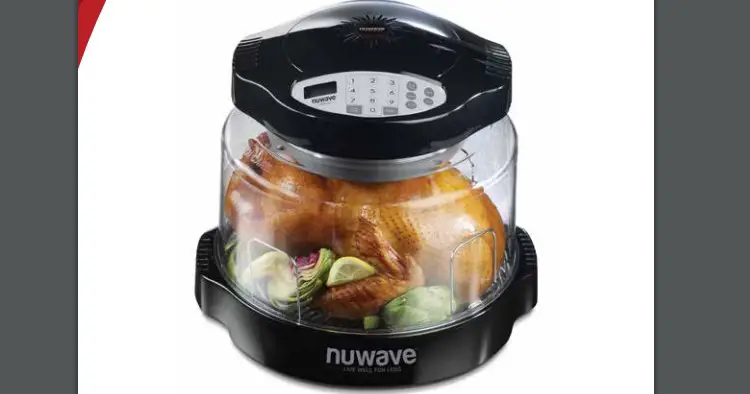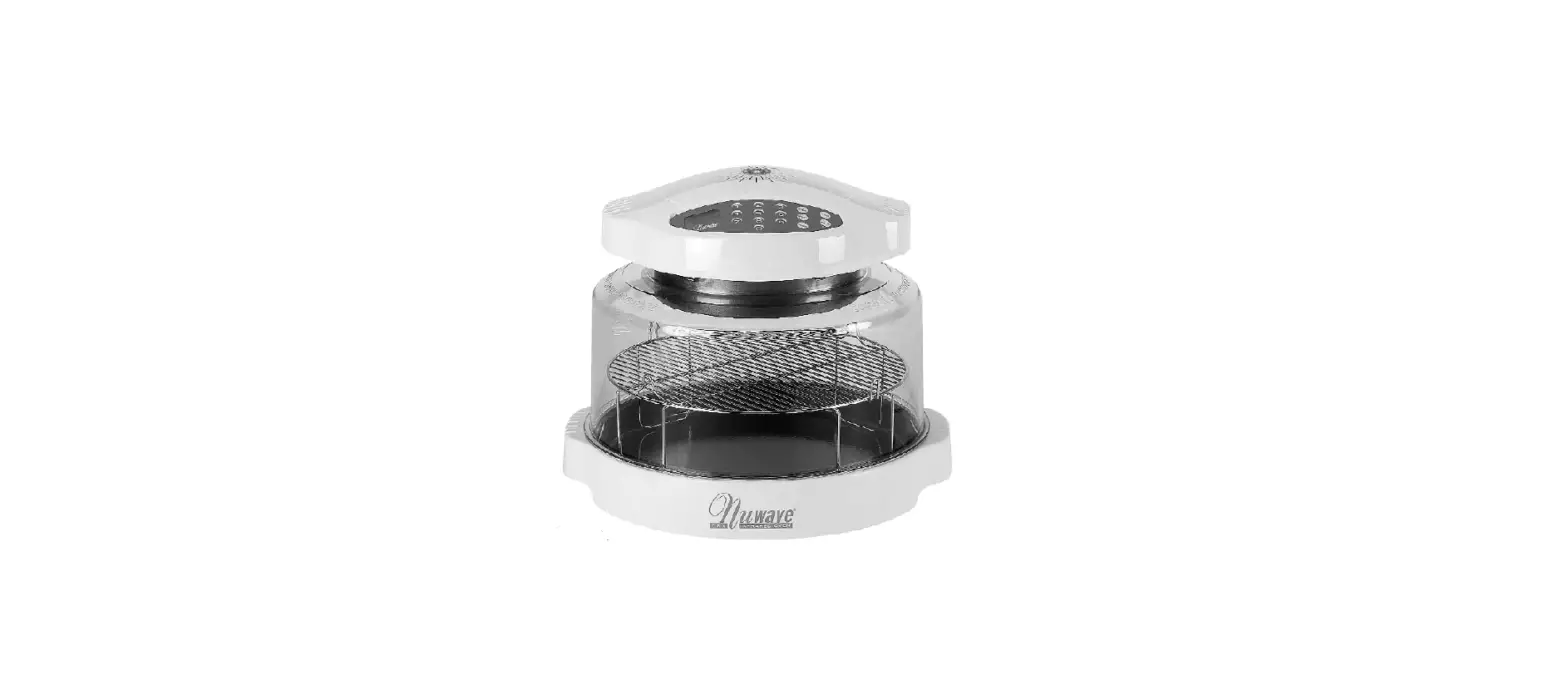
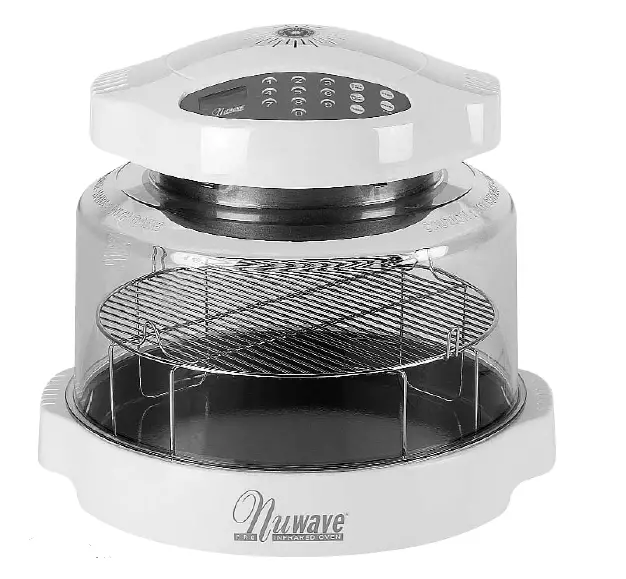
Nuwave 20008 infrared oven
IMPORTANT SAFEGUARDS
When using electrical products, especially when children are present, basic safety precautions should always be followed, including the following:
READ ALL INSTRUCTIONS BEFORE USING
DANGER – To reduce the risk of electrocution:
- Read all instructions, safeguards, and warnings before using the appliance.
- Do not place an appliance where it can fall or be pulled into water or other liquids.
- Do not reach for an appliance that has fallen into the water. Unplug immediately!
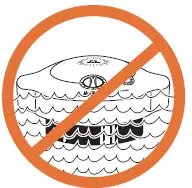
- Do not immerse the cord, plug, or power head in water or other liquids.
WARNING – To reduce the risk of burns, electrocution,
fire, or injury :
- This appliance should not be used by children. Close supervision is necessary when this product is used near children.
- Use this appliance for its intended purpose as described in this brochure. Do not use any other accessories or attachments not recommended by the manufacturer. They may result in fire, electrical shock, or personal injury.
- Never operate this appliance if it has a damaged cord or plug; not working properly; has been dropped or damaged; or dropped into water. Return the appliance to an authorized customer service center for inspection, repair, or adjustment.
- Keep the cord away from heated surfaces.
- Always unplug power cord by pulling on the plug. DO NOT unplug by pulling on cord.
- Never force the plug into an outlet.
- Do not operate outdoors or operate where aerosol (spray) products are being used or where oxygen is being administered.
- Do not let the cord hang over the edge of the table or counter.
- Do not place on or near a hot gas or electric burner or in a heated oven.
- Do not move the appliance while it contains hot food. Use extreme caution when removing hot liner pan or cooking rack.
- Before removing the plug from the wall, turn the unit off first.
- Do not use this appliance for anything other than it is intended.
- Check all electrical wiring. Beware of damaged cord or plug.
- This appliance is for household use only; it is designed to process normal household quantities. It is not suitable for continuous or commercial operation.
- Do not disassemble the product. There are no user-serviceable parts.
- Do not leave the appliance unattended while in use.
- Use the handles when lifting the dome from the base.
- Do not touch hot surfaces. Use the handles provided or use oven mitts.
- Stop or pause cooking before removing the dome to check or turn the food. The dome and power head should be placed on the dome holder.
- Always remove the dome away from you so the escaping steam is channeled away from your face.
- If the power cord is damaged, it should be replaced by a special cord or assembly from the manufacturer or its service agent.
- Use caution when disposing of hot grease.
- Keep this manual handy for easy future reference.
- The appliances are not intended to be operated by means of an external timer or separate remote-control system.
SAVE THESE INSTRUCTIONS
Electrical Information
The cord length of this appliance was selected to reduce Safety Hazards that may occur with a long cord. Extension cords are available and may be used if care is exercised in their use. If an extension cord is used: (1) The marked electrical rating of the extension cord should be at least as great as the electrical rating of the appliance, and (2) The longer cord should be arranged so that it does not drape over the counter or table top where it could be accidentally pulled off the counter or table or tripped over.
Certain models of the appliance may have a polarized plug (one blade is wider than the other). This plug is intended to fit into a polarized outlet only one way. If the plug does not fit fully into the outlet, reverse the plug. If it still does not fit properly, contact a qualified electrician. Do not attempt to modify the plug in any way.
WARNING
Electric shock hazard. Use with adequate electrical system. Do not use if cord or plug is damaged.
All metal items in the oven, such as the liner pan and cooking rack can get very hot during cooking. Please be careful when removing these items from a hot oven. Always wear oven mitts or use pot holders. Allow liner pan and cooking rack to cool completely before cleaning. The dome opening may expand slightly when hot. In rare instances, the power head could detach itself from the dome completely thereby causing hot air to escape from between the dome and the power head.
PARTS / ASSEMBLY DIAGRAM
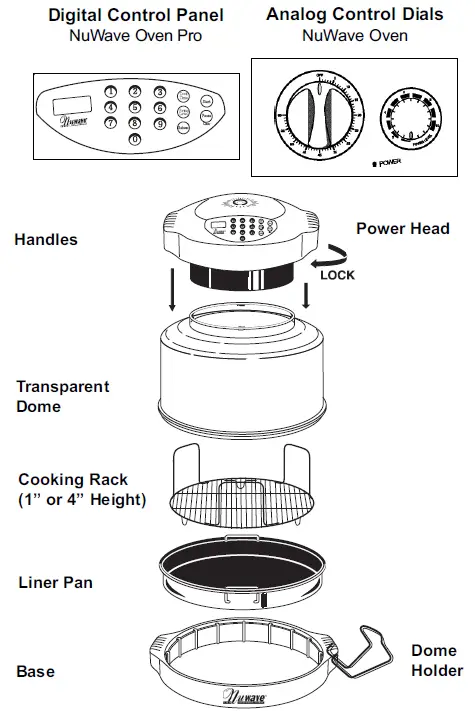
Before Using
- Before using, wash dome, liner pan, base, and cooking rack in warm soapy water or clean in the dishwasher.

- IMPORTANT: DO NOT WASH OR IMMERSE POWER HEAD
IN WATER OR IN THE DISHWASHER. THE OUTER SURFACE CAN BE CLEANED BY WIPING CAREFULLY WITH A DAMP DISHCLOTH OR SPONGE.
Assembly
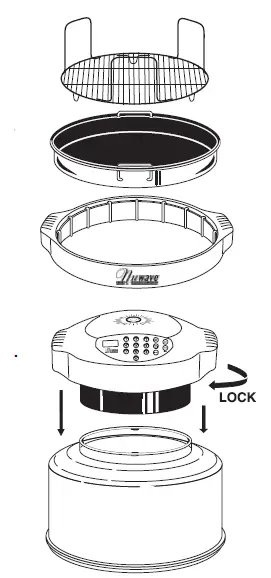
- Place the base on a firm stable surface.
- Place liner pan inside the base. When placing the liner pan inside the base, make sure the handles are positioned at the dropped-down position. If the handles are not fully dropped down, the dome may not fit over the base properly (see illustration on pg.6).
- Place a dual-level cooking rack on the liner pan according to cooking requirements.
- Place food on the cooking rack.
- Place dome over food and onto the base. The dome should fit onto the base evenly.
- Place the power head into the rim of the dome and lock it into place by rotating the power head clockwise until the locking lugs are engaged.
- Set cook time and power level according to cooking requirements.
General Use Instructions
- Make sure the unit is safely plugged into a properly grounded outlet and that the cord is not touching any hot object.
- Make sure that the liner pan has been placed within the base.
- Do not place the liner pan directly onto a stove burner or direct heat source. Damage may result.
- Metal or glass dishes, pans, and foil or anything used in a regular oven may be safely used within the NuWave Oven.
How to Open Power Head and Dome Assembly
Make sure the power head is tightly locked on to the dome, then the whole assembly can be easily lifted and put aside as shown in steps 1, 2 and 3.
Place dome holder under either side of base handle. Make sure both feet of the dome holder are placed inside the handle, and the dome holder is resting horizontally on a flat surface. Then the assembled power head and dome can be placed on the dome holder as shown in step 3. 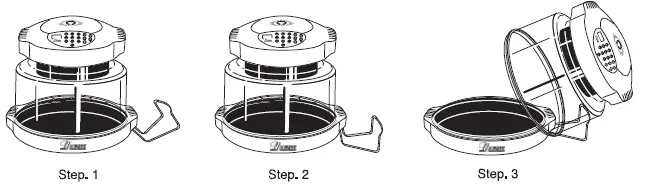
CAUTION
- Do not touch the dome or any surface on the cooking area during operation. The air inside the dome can reach 350F/177C which makes the surface very hot and may cause burns.
- Do not open the dome or remove the power head while it is still operating. Turn the cook time dial to “OFF” first to turn off the power before removal, or if digital, push
“PAUSE”.
Cooking Instructions
Lift dome only by the handles on the power head. Once the power head and the dome is assembled, the handles of the power head will allow you to lift both together when removing or checking food.
When removing liner pan while it is still hot, be extremely careful and always use oven mitts. The retractable handles are provided for this purpose. For best results, follow the time, power, and cooking rack height instructions given in the cooking chart and the recipe book.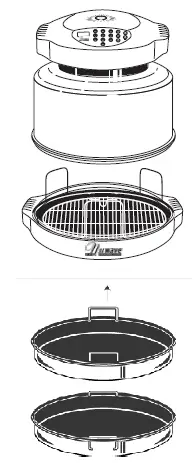
No preheating is required.
NOTE: NuWave Oven uses lower cooking temperatures to prevent the burning of the foods while promoting faster cooking.
The following is the relation between the power level and the inside temperature for your reference :
Models Containing 3” Ring
Models that have a 3” Extender Ring for the NuWave Oven should be used for multi-level cooking with the various racks or with oversized food items that might not normally fit under the standard dome. Generally, any food item (such as a ham or turkey) that exceeds 10 pounds would require the use of the Extender Ring for optimal cooking.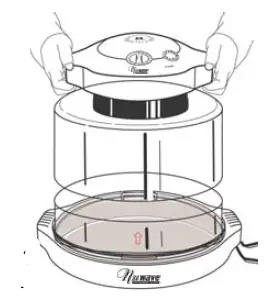
Care & Use:
Similar to the original dome, the Extender Ring is constructed from high-impact Lexan polycarbonate. It should not be cleaned with any harsh abrasive but it is also dishwasher safe.
Directions:
The Extender Ring should be positioned between the original dome and the base. The addition of the Extender Ring will expand the NuWave Oven’s available cooking space by approximately 440 cubic inches. When adding the Extender Ring to the NuWave Oven, make sure the Extender Ring fits snugly onto the dome. When the ring is placed under the dome incorrectly the overlapping edges will not fit together properly.
Please use caution when using the ring. If improperly used, heat or steam could escape from the oven possibly burning your skin or altering the cooking time. The Extender Ring should only be used as an accessory item to the NuWave Oven and not be used as a replacement for the dome, base, or any other component of the NuWave Oven.
DIRECTIONS FOR DIGITAL NUWAVE OVENS
NuWave Oven Pro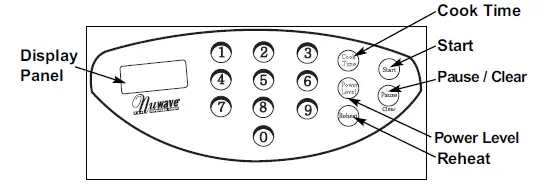
EASY START: Oven is preset to cook at Power Level 10
To start cooking, press the COOK TIME button, enter the time required, and press START. If cooking at any other power level other than HI(10), the Power Level button will be needed. See “Setting Power Level”.
CONTROL PANEL ON POWER HEAD – “0” should appear in the window when the program is clear
SETTING COOK TIME
Press the COOK TIME Button. The MIN indicator will flash in the lower right corner of the display panel. Enter the required time in hours and minutes by pressing the corresponding numerals. For example, 1 hour and 30 minutes would be entered by pressing 130. The display panel will show 1:30. If the required time is in minutes, you only need to enter 1 or 2 numbers. For example, 5 minutes just push #5; 46 minutes, push 46. If the number needs to be corrected, clear the entry by pressing the pause/clear button twice. Then reenter the correct numbers.
START COOKING
Press START to begin cooking. The remaining cooking time will appear in the display panel and the colon between the hours and minutes will blink ON and OFF. The oven will automatically stop cooking when the time has expired and will beep to alert you that it has stopped.
PAUSE / CLEAR COOKING
To PAUSE the cooking time, press the Pause/Clear button one time. The remaining cooking time will stay in the display panel but the colon will not be blinking.
To CLEAR the cooking time, press the Pause/Clear button twice. The remaining cook time will be fully cleared and a “0” will appear.
SETTING POWER LEVEL*
- Press the POWER LEVEL button.
- The default “HI” setting is indicated in the display panel (power level 10)
- PWR indicator flashes in the display panel. To override the default and change the power level, just press the desired cooking power:
1(10% power) to 9(90% power). The power is entered as a single digit like 9 or 3. To reset to HI, press 0. - Verify the correct power setting on the control panel.
- If the power setting needs to be corrected, reenter the required number.
- To check the power level during cooking, press POWER once and the setting will appear on the display panel for a few seconds. The remaining cooking time will then reappear.
NOTE: Maximum allowed cook time for HI power is 2 hours. If cooking time is set to more than that, it will automatically revert back to 2:00 hours. Simply add more time after the initial 2 hours has expired. For lower power settings, the maximum allowed time is
9 hours 59 minutes.
Do not press Power Level unless you want to change the Default setting (power level 10).
Power Level Settings:
| Power Level 9 8 | Oven temperature 325 °F / 163 °C 300 °F / 149 °C | Press Button: 9 8 | Panel Display P90 P80 |
| 7 6 | 275 °F / 135 °C 250 °F / 121 °C | 7 6 | P70 P60 |
| 5 | 225 °F / 107 °C | 5 | P50 |
| 4 | 175 °F / 79 °C | 4 | P40 |
| 3 | 150 °F / 66 °C | 3 | P30 |
| 2 | 116 °F / 47 °C | 2 | P20 |
| 1 | 106 °F / 41 °C | 1 (Low) | P10 |
REHEAT FUNCTION
All Digital Ovens are equipped with a REHEAT button. This can be used to reheat single portion-sized foods. To activate the reheat function, make sure the program is clear (pause/clear button). LCD will read 0. Press the REHEAT button. This will program power level HI for 4 minutes. Press START. The alarm will beep when time has expired. For example, if you are reheating leftover pizza, simply place the slice on the 4-inch rack, press reheat, then start. If you reheat a rice or noodle dish, place the single serving amount on an oven-safe dish or on a piece of foil. If you want the rice or noodles softer, cover with foil and add a sprinkle of water.
Directions for NuWave Oven Analog Control Dials
Setting Cooking Time
The Cook time dial is located on the front of the power head. You can turn the cook time dial to the desired cooking time. The power indicator light will come on. As time lapses, the dial will return to the “OFF” position. The maximum cooking time is one hour.
During cooking, you can add or reduce the cooking time by turning the cook time dial. Same as with all mechanical timers, for accuracy, turn the cook time dial past the desired time, then turn it back to the desired setting. For example: If the desired time setting is 5 minutes, then turn the cook time dial to 10 minutes, then turn back to 5.
Important: For U.S.A. models, before checking or removing food, turn the cook time dial to “OFF” to turn off the heating power.
DO NOT OPEN OR REMOVE THE POWER HEAD WHILE IT IS STILL OPERATING. 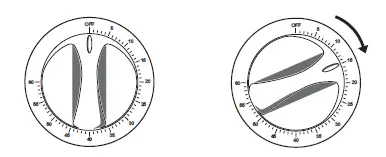
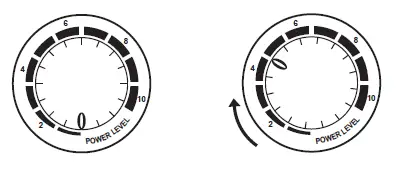
Setting Cooking Power Level
- The power level dial is located on the front of the power head.
- Turn the power level dial to the desired power setting, from 1 to 10(HI).
- You can adjust the power higher or lower during cooking.

To Start Cooking
Set the cook time dial to the desired setting. (As with any timer, you may want to turn the dial past the desired time and then turn back to the desired setting).
To Pause / End Cooking
Turn the cooking time dial to “OFF”, bell rings, and the cooking stops.
Note
For some models, when the power head is lifted and the safety switch located in the handles is activated, the unit will automatically shut off for your safety. To reactivate the unit, put back the power head properly in position, and turn the cook time dial back to “OFF” first, then set it to the remaining cook time. Cooking will resume.
CLEANING AND CARE INSTRUCTIONS
General Instructions:
Unplug the unit before cleaning. For all parts, other than the power head, wash with mild soap and water then dry with towel or allow to air dry. Clean after each use. All parts are dishwasher safe except for the power head. When using a dishwasher, do not use dryer function as this results in extreme heats that can weaken the material in the Dome. Protect the metal and plastic surfaces; do not use abrasive cleaners or scouring pads. The outer surface of the power head can be cleaned by wiping it with a damp cloth.
IMPORTANT TIPS:
- Check the power outlet for proper operation. Do not operate the unit with other major appliances in the same power outlet. Check the power level if the unit cooks too slowly.
- Check to see if the electrical plug is properly plugged into the outlet.
- Always turn off and unplug the unit before washing.
- Moisture may build up inside the dome when cooked food is not removed soon after cook time has expired. The steam/moisture build-up can be avoided by doing the following:
- Remove food soon after it is done cooking.
- If it is desirable to keep the food warm until served, reset the cooking time at low power (1 or 2).
THE MANUFACTURER WARRANTS
The infrared cooking system including the power head, dome, cooking rack, liner pan, base, and all electrical components to be free from defects and workmanship under normal household use, when operated in accordance with the Manufacturer’s written instructions provided with each unit for one (1) year from date of purchase. The Manufacturer will provide the necessary parts and labor to repair any part of the infrared cooking system at the Hearthware Home Products Service Department. After the expiration of the warranty, the cost of the labor and parts will be the responsibility of the owner.
THE WARRANTY DOES NOT COVER
The non-stick coating (if applicable) on any part of the cooking system. The Limited Warranty is voided if repairs are made by an unauthorized dealer or the serial number data plate is removed or defaced. Normal deterioration of finish due to use or exposure is not covered by this Warranty. This Limited Warranty does not cover failure, damages or inadequate performance due to accident, acts of God (such as lightning), fluctuations in electric power, alterations, abuse, misuse, misapplications, corrosive type atmospheres, improper installation, failure to operate in accordance with the Manufacturer’s written instructions, abnormal use or commercial use.
TO OBTAIN SERVICE
The owner shall have the obligation and responsibility to: Pay for all services and parts not covered by the warranty; Prepay the freight to and from Service Department for any part or system returned under this warranty; Carefully package the product using adequate padding material to prevent damage in transit. The original container is ideal for this purpose. Include in the package owner’s name, address, daytime telephone number, a detailed description of the problem, and your “RGA number.” (Call 1-888-NUWAVE1(689-2831) or e-mail [email protected] to obtain the RGA(Return Goods Authorization) number.)
Provide the cooking system model & serial number and proof of date of purchase (a copy of the receipt) when making claims under this warranty.
MANUFACTURER’S OBLIGATION
The Manufacturer’s obligation under this Limited Warranty is limited to repairing or replacing any part of the infrared cooking system expressly covered by this Limited Warranty which upon examination is found to be defective under normal use. The Limited Warranty is applicable only within the continental United States and only to the original purchaser of the manufacturer’s authorized channels of distribution.
THE LIMITED WA R R A N T Y M AY N O T BE ALTERED, VARIED OR EXTENDED EXCEPT BY A WRITTEN INSTRUMENT EXECUTED BY THE MANUFACTURER. THE REMEDY OF REPAIR OR REPLACEMENT AS PROVIDED UNDER THIS LIMITED WARRANTY IS EXCLUSIVE. IN NO EVENT SHALL THE MANUFACTURER BE LIABLE FOR ANY CONSEQUENTIAL OR INCIDENTAL L DAMAGES TO ANY PERSON, WHETHER OR NOT OCCASIONED BY NEGLIGENCE OF THE MANUFACTURER, INCLUDING WITHOUT LIMITATION, DAMAGES FOR LOSS OF USE, COSTS OF SUBSTITUTION, PROPERTY DAMAGE, OR OTHER MONEY LOSS.
Some states do not allow the exclusion or limitation of incidental or consequential damages, so the above limitation exclusions may not apply. This Limited Warranty gives specific legal rights, and there may also be other rights which vary from state to state.
EXCEPT AS OTHERWISE EXPRESSLY PROVIDED ABOVE, THE MANUFACTURER MAKES NO WARRANTIES EXPRESSED OR IMPLIED ARISING BY AW OR OTHERWISE, INCLUDING WITHOUT LIMITATION, THE IMPLIED WARRANTIES OF MERCHANTABILITY AND FITNESS FOR A PARTICULAR PURPOSE TO ANY OTHER PERSON.
READ YOUR OWNER’S MANUAL.
IF YOU STILL HAVE ANY QUESTIONS ABOUT THE OPERATION OR WARRANTY OF THE PRODUCT,
PLEASE CONTACT HARDWARE HOME PRODUCTS
1-888-NUWAVE1(689-2831), email: [email protected]
Hearthware Home Products is proud to announce that the NuWave Oven is 100% RoHS compliant! RoHS stands for “the Restriction Of the use of certain Hazardous Substances in electrical and electronic equipment”. The RoHS Directive took effect on July 1, 2006, and it bans the placing on the European market of new electrical and electronic equipment containing more than the allowed
levels of 6 types of potentially harmful heavy metals and chemicals including lead, cadmium, mercury, hexavalent chromium, polybrominated biphenyl (PBB), and polybrominated diphenyl ether (PBDE) flame retardants.
RoHS Restricted Materials
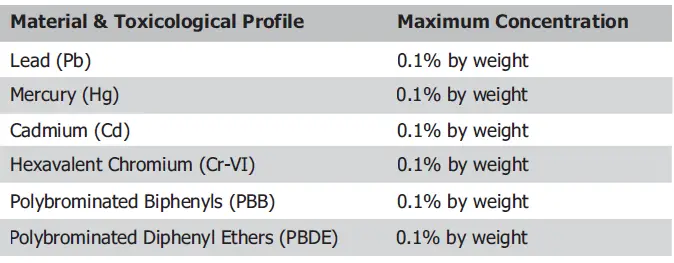
Currently, there are no environmental laws that require anyone in the USA to abide by these guidelines; however, we made a conscious decision more than a year and a half ago to voluntarily follow this directive for the manufacture of our NuWave Ovens as we wanted to do our part to help preserve the environment.
If you want to find out more about the RoHS Directive, please visit http://en.wikipedia.org/wiki/RoHS
THE NUWAVE OVEN
INFRARED COOKING SYSTEM
www.NUWAVEOVEN.com
www.NUWAVEOVEN.net
To obtain warranty service, contact the Service Department at this
toll free number: 1-888-NUWAVE1 (689-2831) or
Hearthware Home Products
880 Lakeside Dr., Gurnee, IL 60031, U.S.A.
www.HEARTHWARE.com