 Tesira
AMP-450P Amplifier
Installation & Operation Guide
PRODUCT DESCRIPTION
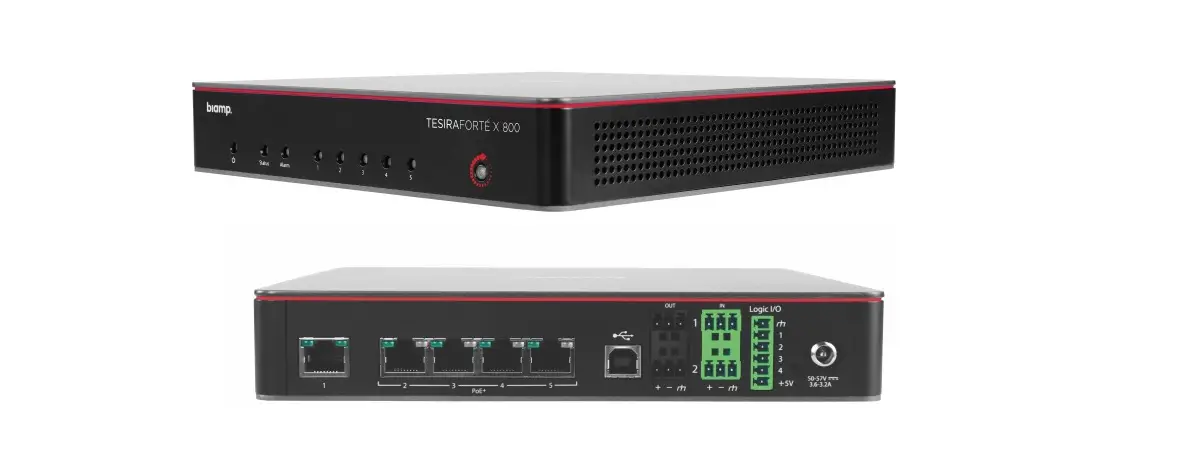
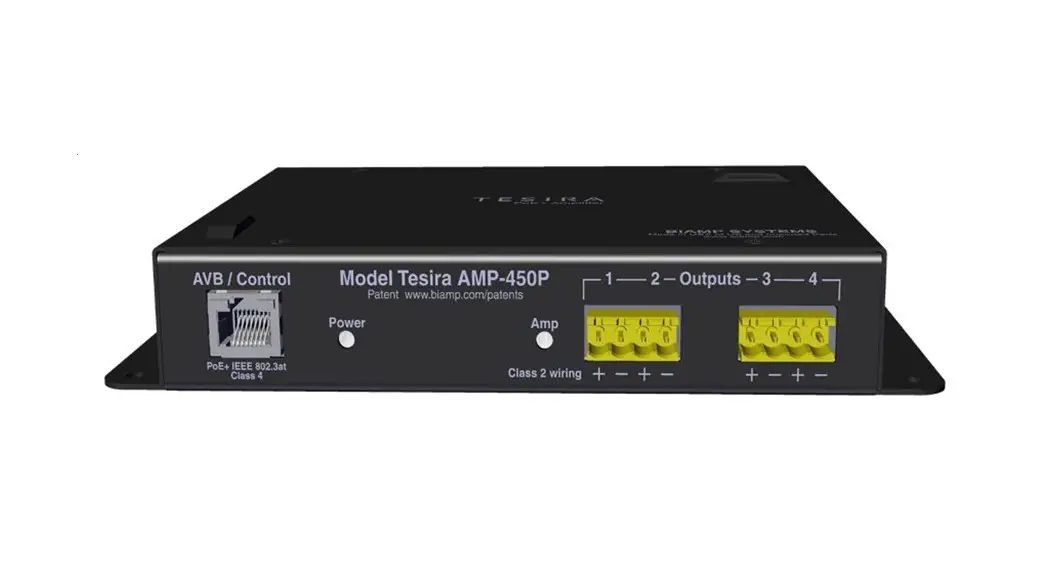
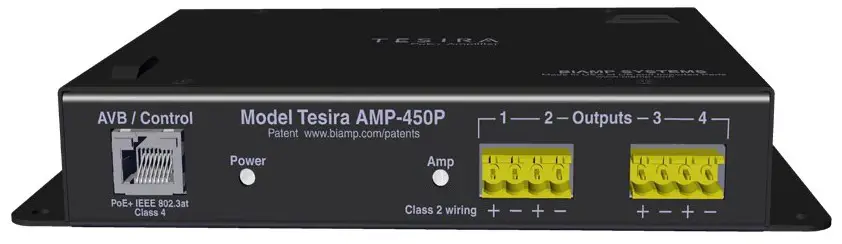
The AMP-450P is a four-channel AVB PoE+ amplifier for use in Tesira® systems.
The output channels are software configurable including selectable power versus channel count. PoE+ power allows the AMP-450P to be placed wherever you need it. Suitable for air-handling spaces, the amplifier can be located close to ceiling speakers or mounted directly to the Desono C-IC6 speaker with the BPAK mounting kit.
The AMP-450P includes an internal limiter and can provide 3W RMS of continuous power to all four channels. The Tesira AMP-450P is also capable of operating in a “burst” mode to support higher power levels for dynamic content for brief periods. The amplifier serves as a dedicated endpoint in a Tesira system, making installations easier to design, support and maintain. The AMP-450P is ideal for Tesira-equipped conference rooms and other applications.
SETUP AND USE
The Tesira software provides an intuitive interface for setup and programming of the AMP-450P. The information supplied by this manual relates to physical connections and device setup. For more details on software setup, please consult the Tesira Help File. For device specifications, please consult the AMP-450P Datasheet.
INSTALLATION
Install away from heat sources, such as vents, radiators, heat registers and stoves. Also avoid installing near water or steam. The amplifier has a secondary support point via chain or wire for connecting to the building structure. Do not exceed the maximum ambient operating temperature of 32° – 104° (0° – 40° C).
FEATURES
- Four channels; 3 watts of continuous power per channel
- Burst mode to handle peak signals in accordance with ANSI/CTA-2006-B; supports up to 50 watts (4Ω load) or 30 watts (8Ω load) per channel
- Powered by PoE+ (IEEE 802.3at Class 4, 30W)
- Class D amplifier topology
- Fan-less operation
- Includes internal limiter function
- Software-selectable power versus channel count
- Evaluated to the requirements of UL 2043 and is suitable for use in air handling spaces
- LED indicators for power and amplifier status
- Configurable via Tesira software
- Can be mounted directly to the C-IC6 speaker with the BPAK mounting kit
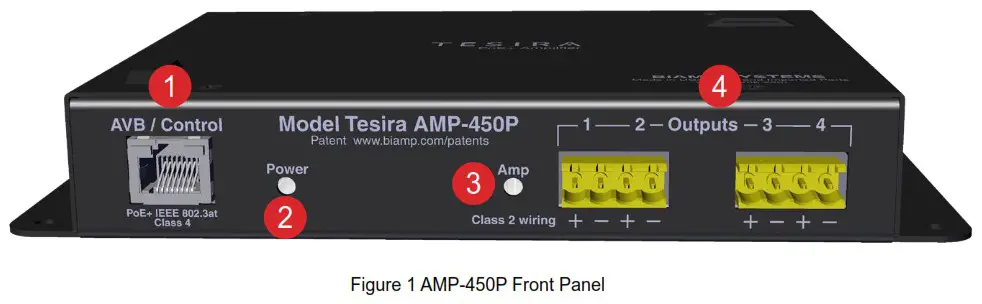
Front Panel and Connectors
- AVB/Control
Facilitates connection to the Tesira AVB network for audio and control. This RJ-45 port may either be connected directly to the Tesira AVB port (via a PoE+ injector) for a single device system or via a PoE+ network switch in a multi-device AVB system. IEEE 802.3at Power over Ethernet Plus (PoE+) Class 4 is required as there are no other provisions for power inlet. - Power/System Status
A multi-color LED provides information about the status of the device.
| Status | LED Indicator |
| No Power | Off |
| Powered but not ready to receive configuration | Red Solid |
| Ready to receive configuration or updating firmware | Yellow Solid |
| Configured and ready to participate in the system | Green Solid |
| Amplifier is in Locate mode (triggered from the softwre | Green Flashing |
| Unit has Major Alarm condition | Red Flashing |
| Unit has Minor Alarm condition | Yellow Flashing |
| Unit has both a Major and Minor Alarm condition | Red & Yellow Flashing |
3. Amp Status
A multi-color LED provides information about the status of the amplifier.
| Status | LED Indicator |
| No power | Off |
| Clip detected | Red Solid |
| Amplifier limiter engaged | Yellow Solid |
| Powered | Green Solid |
| Amplifier is in Locat mode (triggered from the software) | Green Flashing |
| Amplifier has failed to initialize, an error is present, or the amp is temporarily muted due to an audio burst | Red Flashing |
| PoE+ power is not available or insufficient to power the amplifier so it has been turned off | Red & Yellow Flashing |
4. Output 1-4
4 x 3W RMS or 2 x 7W RMS or 1 x 15W RMS output at low impedence 4Ω/8Ω.
Amplifier Output and Wiring
The amplifier can be configured in either single channel, two-channel or four-channel mode in the Tesira software. Any unconfigured channels will not pass audio even if speakers are connected.
1x15W RMS
| Channel | Output |
| 1 | 15W |
| 2 | Not Used |
| 3 | Not Used |
| 4 | Not Used |
1 x 15W
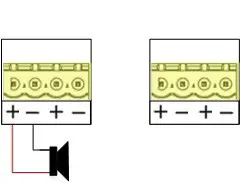 Figure 2 Amplifier Speaker Wiring 1x15W RMS
2x7W RMS
| Channel | Output |
| 1 | 7W |
| 2 | 7W |
| 3 | Not Used |
| 4 | Not Used |
2 x 7W
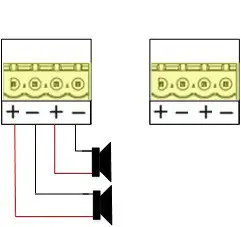 Figure 3 Amplifier Speaker Wiring 2x7W RMS
4x3W RMS
| Channel | Output |
| 1 | 3W |
| 2 | 3W |
| 3 | 3W |
| 4 | 3W |
4 x 3W
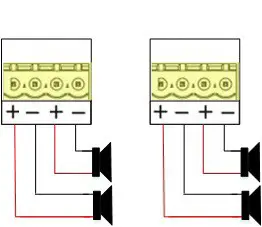
Figure 4 Amplifier Speaker Wiring 4x3W RMS
Mounting & Installation
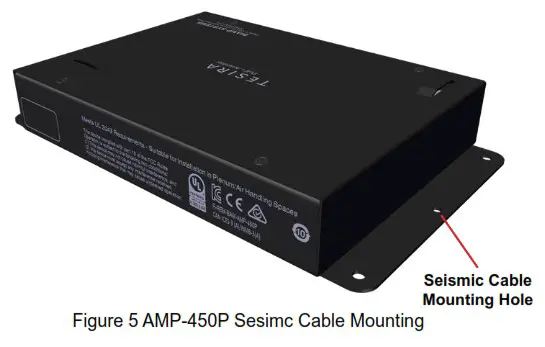
Flanges on each side of the unit have mounting holes to secure the AMP-450P with hardware (not provided) if desired. An optional seismic cable may be installed through the center hole on the left mounting flange in lieu of hardware mounting.
Newer versions of the AMP-450P (Sept 2018 or later) come equipped with clips that can secure the AMP-450P above a ceiling tile to the ceiling “T-bars.”
General Mounting and Installation Notes
- 330 feet (100 meters) maximum from the Ethernet switch to the AMP450P
- Flange pre-drilled for seismic cable installation
- Includes ceiling T-bar mounting clips (x2)
Seismic Cable Installation (optional)
To install the optional seismic cable, place the unit in the desired location:
- Feed the seismic cable through the hole in the AMP-450P mounting flange as shown in Figure 5.

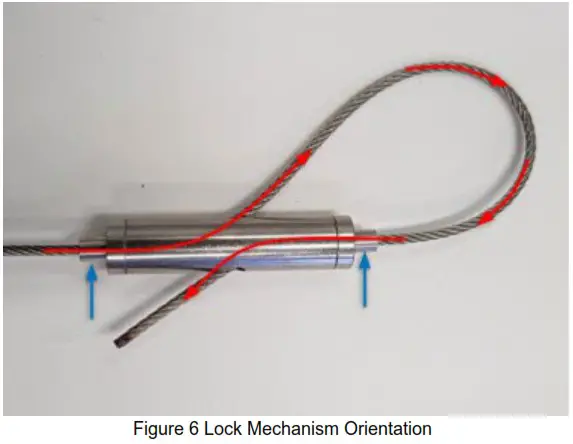
- Feed the cable through one end of the locking mechanism as shown in Figure 6.
NOTE: The ends indicated by the blue arrow need to be depressed to allow the cable to pass through. Internal guides ensure the cable will be routed through the correct path. - Attach the loop to a secure location and apply sufficient tension for minimal slack.
- Make sure the ends of the lock mechanism are in the locked position (out) as indicated by the blue arrows as shown in Figure 6.
T-Bar Clip Installation
If using clips to install the AMP-450P above a ceiling tile, do the steps that follow:
- Remove ceiling tiles adjacent to the mounting location as required for access.
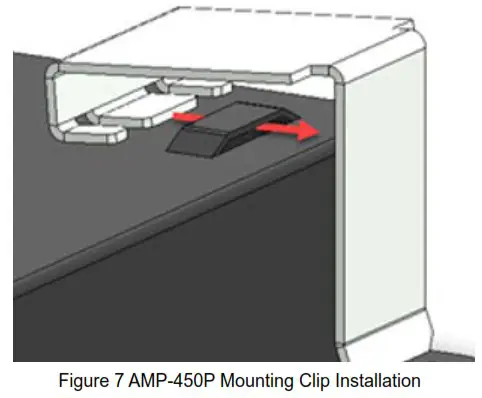
- Install the clips onto the notched fittings on top of the AMP-450P as shown in Figure 7.
- Fit the clips over two perpendicular T-bars (in the corner) above the ceiling title with the AMP-450P oriented as required.
- NOTE: If installing a TB-1 tile bridge (typically installed to accommodate TCM or DCM model plenums and microphones) the AMP-450P may be mounted to any edge of the ceiling T-bar and the TB-1. See the TB-1 and/or TCM-1 installation manuals for more information at https://www.biamp.com/downloads.
BPAK Clip Installation
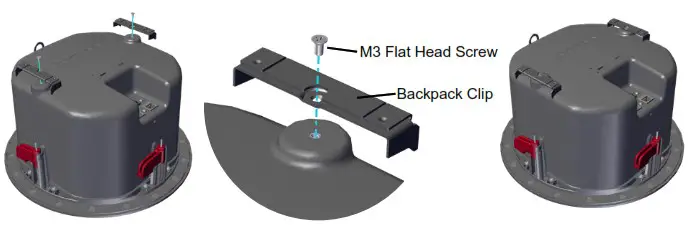
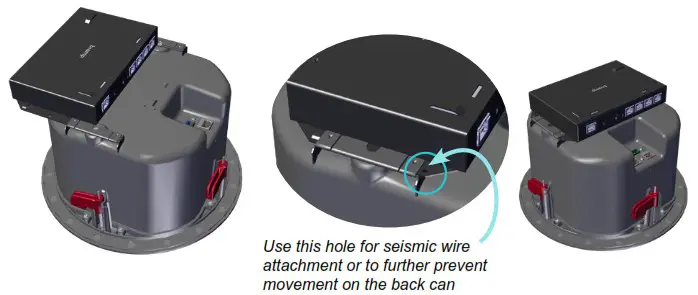
The BPAK Backpack Clip Kit allows a Tesira AMP-450P to be attached to the top of a Desono C-IC6 back can.
- Attach clips

- Fully slide unit into clips

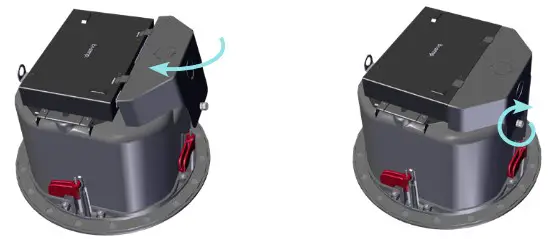
- A cover is provided for conduit usage. Punch out and feed wiring through the opening, and connect per the device instructions. Insert tabs into the slots on the Tesira unit and tighten the thumb screw to secure the cover to the C-IC6 enclosure.
CONTACT US
Email: [email protected]
Web: support.biamp.com
Warranty: biamp.com/legal/warranty-information
Safety & Compliance: biamp.com/compliance
A: 9300 S.W. Gemini Drive Beaverton, OR 97008 USA
W: www.biamp.com
 Biamp-Downloads
 Home - Biamp Cornerstone
 Biamp - Connecting People Through Extraordinary Audiovisual Experiences