 RAYCHEM SENZ Wi-Fi Alexa Setup Apps
User Guide
SETUP AND SYSTEM REQUIREMENTS
Before proceeding, ensure you have the following:
- The SENZ WIFI app downloaded and installed on your smartphone (download the SENZ WIFI app from App Store or Google Play)
- An account setup in the SENZ WIFI app with your own username and password
- At least one linked nVent RAYCHEM SENZ WIFI thermostat installed
- Confirmed that you can control the SENZ WIFI thermostat(s) via the SENZ WIFI app
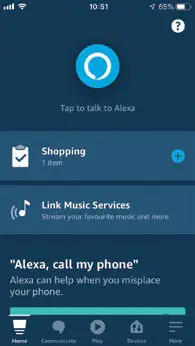
- Downloaded the Alexa app on your smartphone
Once you have completed the above setup requirements, follow the steps below is to enable the Alexa Skill for the SENZ WIFI thermostat:
HOW TO ENABLE THE ALEXA SKILL FOR THE SENZ WI-FI THERMOSTAT
- Open the Alexa app on your smartphone
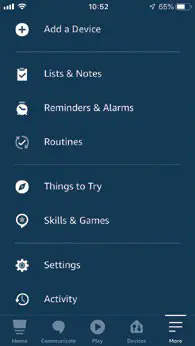
- Click the ‘More’ icon at the bottom right to open up the settings

- Click on ‘Skills & Games’
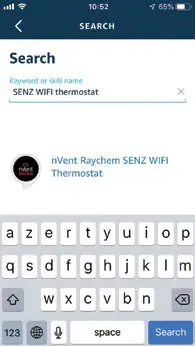
- Search for the SENZ WIFI Thermostat skill name and click on it
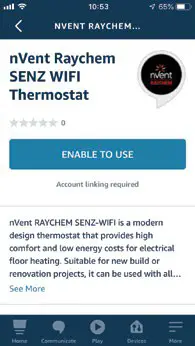
- Click ‘ENABLE TO USE’ which will open the login page on id.senzthermostat.nVent.com
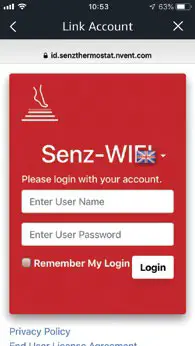
- Sign in to your id.senzthermostat.nVent.com account using your username and password for the SENZ WIFI app
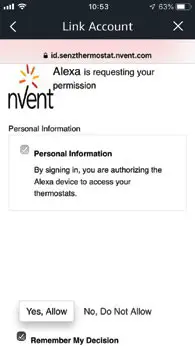
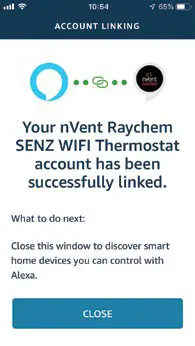
- When you see the permission request to link your Alexa account with the id.senzthermostat.nVent.com account, click ‘Yes, Allow’
- Close the app window by clicking the ‘CLOSE’ button
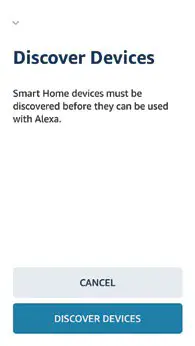
- Start discovering SENZ WIFI thermostats you can control with Alexa by clicking ‘Discover Devices’
- Follow the Alexa procedure to put the devices in groups or skip this step
- Your SENZ WIFI thermostats are now visible in the Alexa app on the devices tab
EXAMPLES OF VOICE COMMANDS
| Desired Action | What Happens | Can be Applied to | Voice Command | Example Text |
| Turn heating OFF | Puts the thermostat to Constant Mode and changes the ‘Set to’ temperature to 5°C. This effectively turns your floor heating system off. | Individual thermostat or Group | Alexa, turn [thermostat/group name] OFF. | Alexa, turn Bathroom OFF. |
| Put thermostat(s) to Weekly Schedule | The thermostat will resume its Weekly Schedule (Program). | Individual thermostat or Group | Alexa, set/turn [thermostat/group name] to HEAT. OR Alexa, turn [thermostat/group name] ON. | Alexa, put the Kitchen to HEAT. OR Alexa, turn Kitchen ON. |
| Set thermostat(s) to aspecific temperature | Change the ‘Set to’ to the desired temperature. Note: In Weekly Schedule (Program 1,2 or 3) after 2 hours the Schedule will resume. In Constant mode this action is permanent. | Individual thermostat or Group | Alexa, set/turn [thermostat/group name] to [temperature]. | Alexa set Living Room to 23 degrees. |
| Set thermostat(s) to a specific temperature for a specified duration | Changes the ‘Set to’ to the desired temperature for the specified number of hours. | Individual thermostat orGroup | Alexa, set/turn [thermostat/groupname] to [temperature] for [time duration]. | Alexa, turn Kitchen to 23 degrees for 2 hours. |
| Set thermostat(s) to a specific temperature until a certain time | Changes the ‘Set to’ to the desired temperature until the specific time requested. | Individual thermostat or Group | Alexa, set/turn [thermostat/group name] to [temperature] until [time]. | Alexa, set Living Room to 23 degrees until 4pm. |
| Find out the current temperature | No changes are made. Current temperature is announced. | Individual thermostat or Group | Alexa, what is the temperature of [thermostat/group name]? | Alexa, what is the temperature of Bathroom? |
| Find out the set temperature | No changes are made. The set temperature is announced. | Individual thermostat only | Alexa, what is [thermostat name] set to? | Alexa, what is Kitchen set to? |
| Find out in which mode the thermostat is | No changes are made. Thermostats mode is announced. | Individual thermostat only | Alexa, in which mode is [thermostat name]? | Alexa, in which mode is Living Room? |
| Raises temperature by 1°C | Raise the ‘Set to’ by 1°C. Note: In Weekly Schedule (Program 1,2 or 3) after2 hours the Schedule will resume. In Constant mode this action is permanent. | Individual thermostat or Group | Alexa, raise [thermostat/group name]. | Alexa, raise the Bathroom. |
| Raises temperature by a certain number of degrees | Raise the ‘Set to’ by a certain number of °C. Note: In Weekly Schedule (Program 1,2 or 3) after 2 hours, the Schedule will resume. In Constant mode this action is permanent. | Individual thermostat or Group | Alexa, raise [thermostat/group name] by [number] degrees. | Alexa, raise the Kitchen by 2 degrees. |
| Lower temperature by 1°C | Lower the ‘Set to’ by 1°C. Note: In Weekly Schedule (Program 1,2 or 3) after 2 hours, the Schedule will resume. In Constant mode this action is permanent. | Individual thermostat or Group | Alexa, make [thermostat/group name] cooler/colder. OR Alexa, lower [thermostat/group name] | Alexa, make Living Room cooler/colder. OR Alexa, lower Living Room. |
| Lower temperature by a certain number of degrees | Lower the ‘Set to’ by a certain number of °C. Note: In Weekly Schedule (Program 1,2 or 3) after 2 hours the Schedule will resume. In Constant mode this action is permanent. | Individual thermostat or Group | Alexa, lower [thermostat/group name] by [number] degrees. | Alexa, lower the Bathroom by 2 degrees. |
Our powerful portfolio of brands:
nVent.com/RAYCHEM
 Senz
Senz Electrical Heat Tracing | Heat Tracing | nVent RAYCHEM