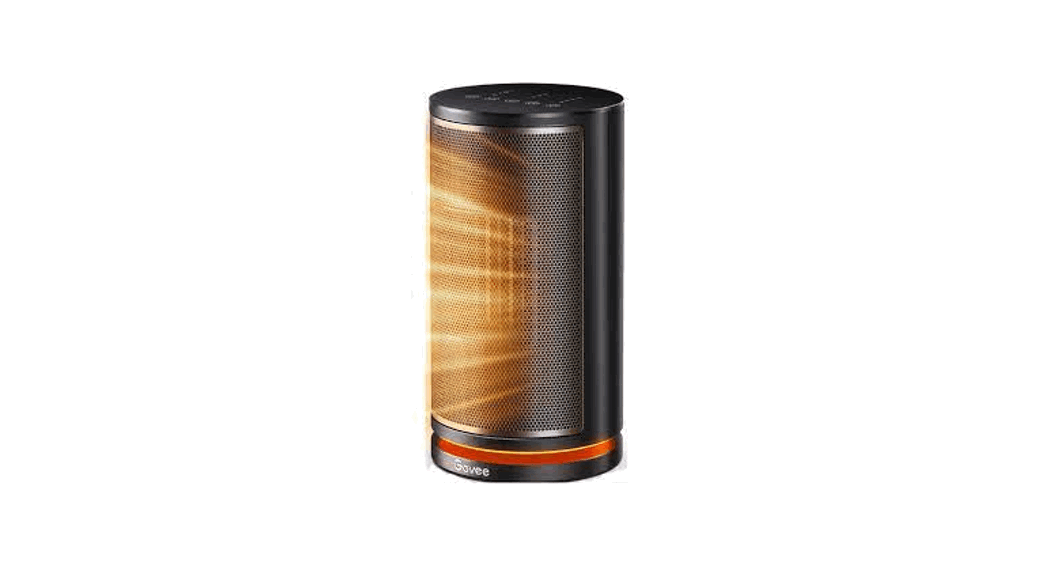
 H7131 Smart Heater
User Manual
Safety Instructions
General Safety
IMPORTANT INSTRUCTIONS
When using electrical appliances, basic precautions should always be followed to reduce the risk of fire, electric shock, and injury to persons, including the following:
- Read all instructions before using this heater.
- This heater is hot when in use. To avoid burns, do not let bare skin touch hot surfaces. If provided, use handles when moving this heater. Keep combustible materials, such as furniture, pillows, bedding, papers, clothes, and curtains at least 3 feet (0.9m) from the front of the heater and keep them away from the sides and rear.
- Extreme caution is necessary when any heater is used by or near children or invalids and whenever the heater is left operating and unattended.
- Always unplug heater when not in use.
- Do not operate any heater with a damaged cord or plug or after the heater malfunctions, has been dropped or damaged in any manner. Discard heater, or return to authorized service facility for examination and/or repair.
- Do not use outdoors.
- This heater is not intended for use in bathrooms, laundry areas and similar indoor locations. Never locate heater where it may fall into a bathtub or other. water container.
- Do not run cord under carpeting. Do not cover cord with throw rugs, runners, or similar coverings. Do not route cord under furniture or appliances. Arrange cord away from traffic area and where it will not be tripped over.
- To disconnect heater, turn controls to off, then remove plug from outlet.
- Do not insert or allow foreign objects to enter any ventilation or exhaust opening as this may cause an electric shock or fire, or damage the heater.
- To prevent a possible fire, do not block air intakes or exhaust in any manner. Do not use on soft surfaces, like a bed, where openings may become blocked.
- A heater has hot and arcing or sparking parts inside. Do not use it in areas where gasoline, paint, or flammable liquids are used or stored.
- Use this heater only as described in this manual. Any other use not recommended by the manufacturer may cause fire, electric shock, or injury to persons.
- Always plug heaters directly into a wall outlet/receptacle. Never use with an extension
- cord or relocatable power tap (outlet/power strip).
- Faulty wall outlet connections may cause the wall outlet to overheat. Be sure that the heater plug fits tightly into the outlet before using. When using the heater, check to make sure the heater plug is not overheating. If necessary, have a qulified electrician check or replace the wall outlet
- This heater can only be used when the ambient temperature is normal. When the heater detects that the ambient temperature is too high, it will automatically shut down. Please inspect for any objects on or adjacent to the heater that may casue hight temperatures.
- This appliance has a polarized plug (one blade is wider than the other). To reduce the risk of electric shock, this plug is intended to fit in a polarized outlet only one way. If the plug does not fit fully in the outlet, reverse the plug. If it still does not fit, contact a qualified electrician. Do not attempt to defeat this safety feature.
SAVE THESE INSTRUCTIONS
Included in the Box
| Item | Quantity |
| Space Heater | 1 |
| User Manual | 1 |
| Quick Start Guide | 1 |
Introduction
Govee Smart Heater is suitable for bedrooms, living rooms, offices, etc. Equipped with PTC heating elements, this smart heater can heat your room quickly in 3 seconds after it is powered on. With one tap in the app, you can adjust the heating based on your needs, bringing instant warmth and maximum home comfort during cold weather.
Part Names
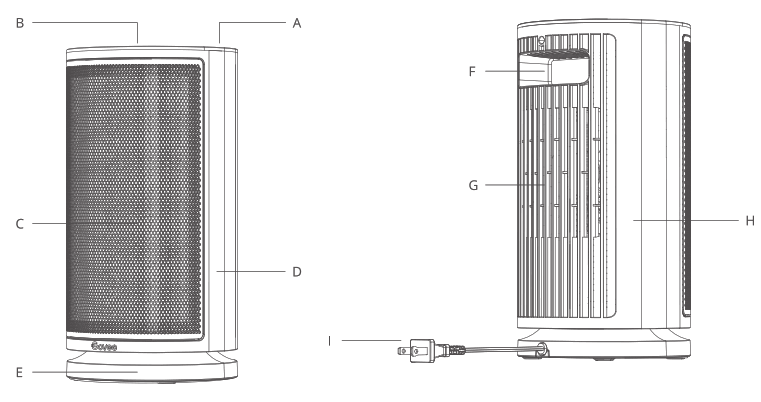
A. Cover
B. Control Panel
C. Air Outlet
D. Front Guard
E. Base
F. Built-in Handle
G. Air Inlet
H. Rear Guard
I. Power Cord & Plug
 Controls
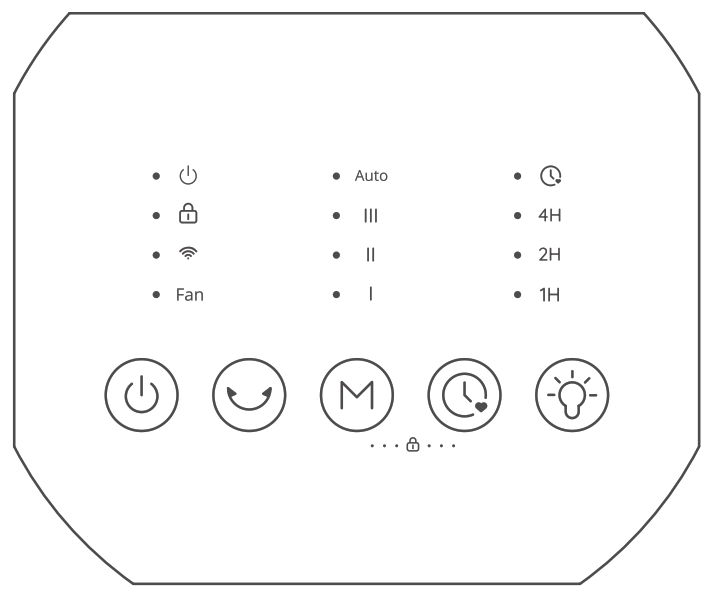
 Power Button
Touch to power on or off. Oscillation Button
Touch to start or stop the oscillation. Mode Button
Touch to cycle through Heat Setting I, Heat Setting II, Heat Setting III, ECO Mode, and FAN Mode.
Note: Press and hold Power Button and Mode Button for 10 seconds to restore the heater to factory settings and disconnect it from Wi-Fi and Bluetooth. Timer Button
Touch to set a timer. Night Light Button
Touch to turn the night light on or off.
Indicator Status
| Indicator | Working Status | Light Status |
| I | Heat Setting I | Solid White |
| ii | Heat Setting ii | Solid White |
| iii | Heat Setting III | Solid White |
| ECO | ECO Mode | Solid White |
| FAN | Fan Mode | Solid White |
 | Powered On | Solid Red |
 | Safety Lock On | Solid White |
| Safety Lock Triggered | Flashes White | |
 | Wi-Fi Connected | Solid White |
| All Indicators | Overheat Protection Triggered | Flashes 3 Times |
Note: According to related safety standards, the power indicator should always light red when the heater is working.
Functions
Memory Function
This heater will memorize the previous settings (heat settings, oscillation, Wi-Fi connection) when it is powered off. The settings will be active again when this heater is turned on.
24-hour Automatic Shutdown
This heater will shut down automatically when it has been used for 24 hours straight in case the user forgets to power it off.
Overheat Protection
When the heater detects that the ambient temperature exceeds 104°F (40°C), it will automati-cally power off and all its indicators will flash three times. The heater will automatically resume when it detects that the ambient temperature is lower than 104°F (40°C). Note: Overheat protection can be dismissed by unplugging the heater from power and waiting for 30 minutes for it to cool down before plugging back in.
Tip-over and Motion Protection
When the heater is moved or knocked over, it will automatically power off and stop all functions. This protection can be dismissed by placing the heater on a flat and sturdy surface and keeping it upright before using it again.
Note: This heater is embedded with a motion sensor. When it senses tip-over or unintended motion, the heater will automatically shut off.