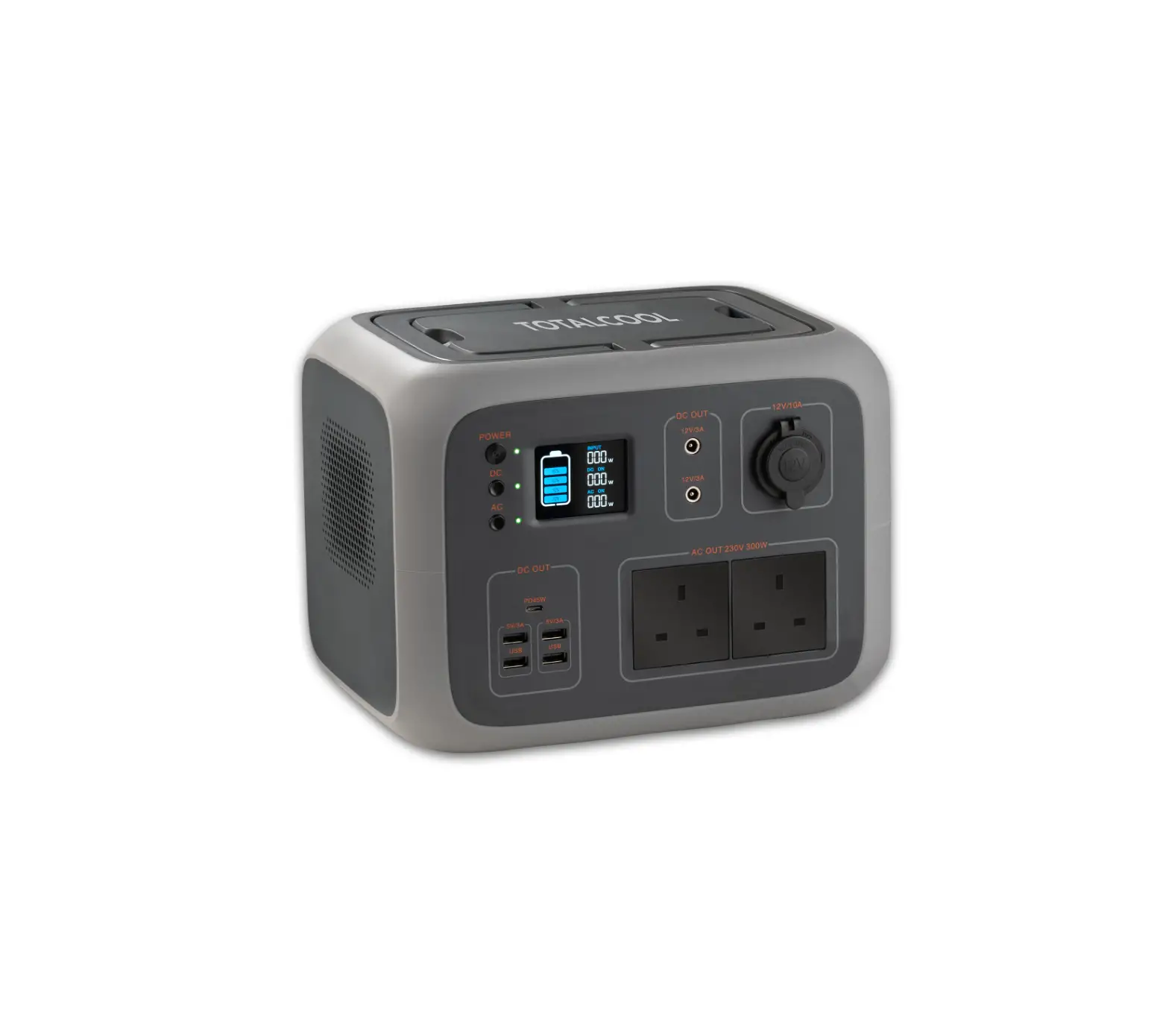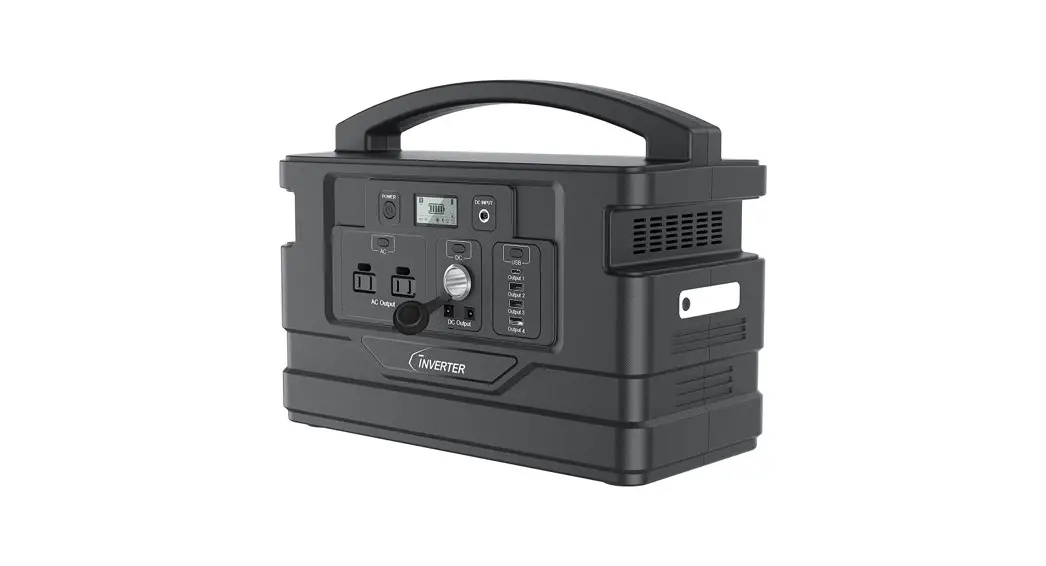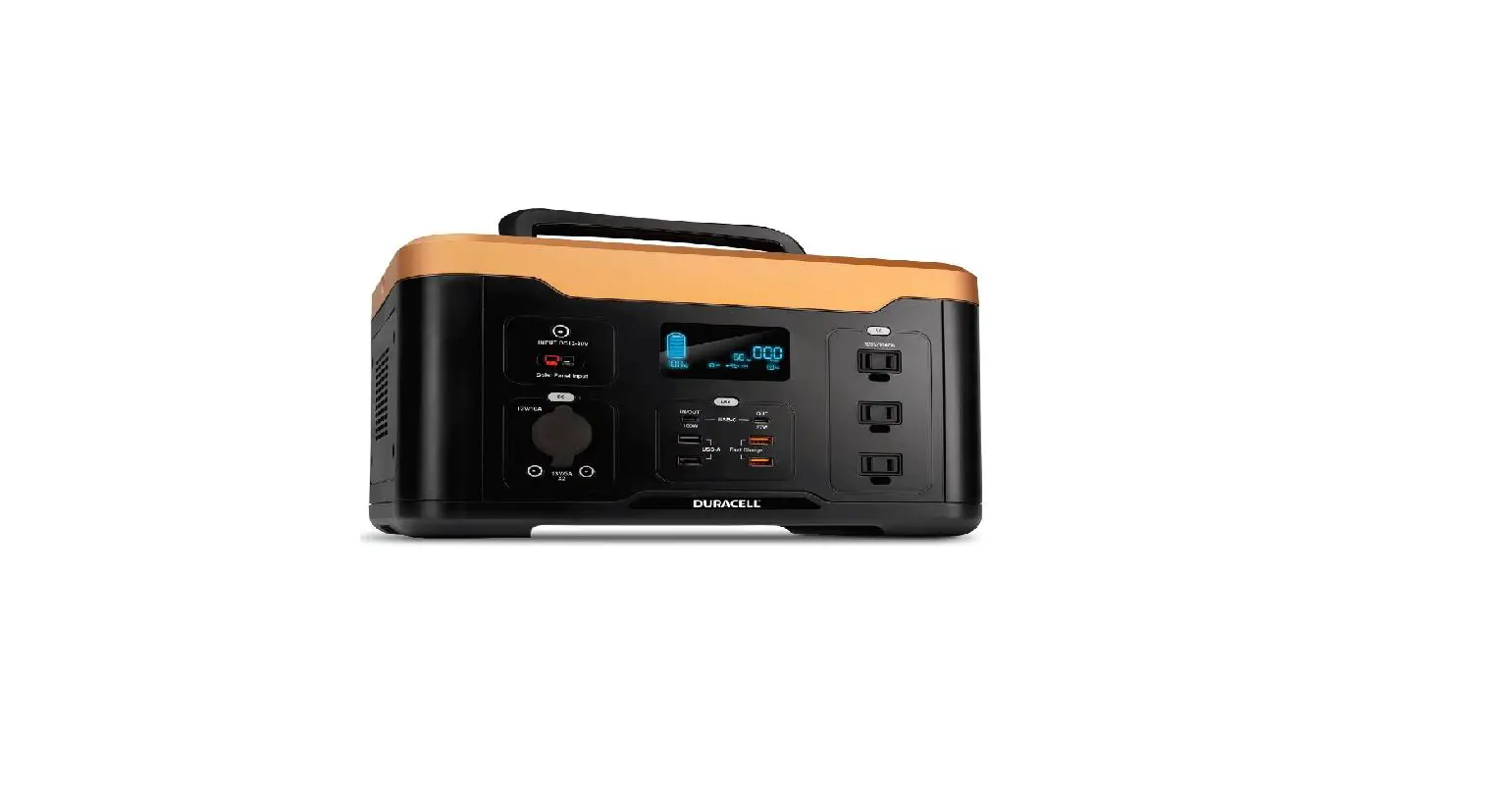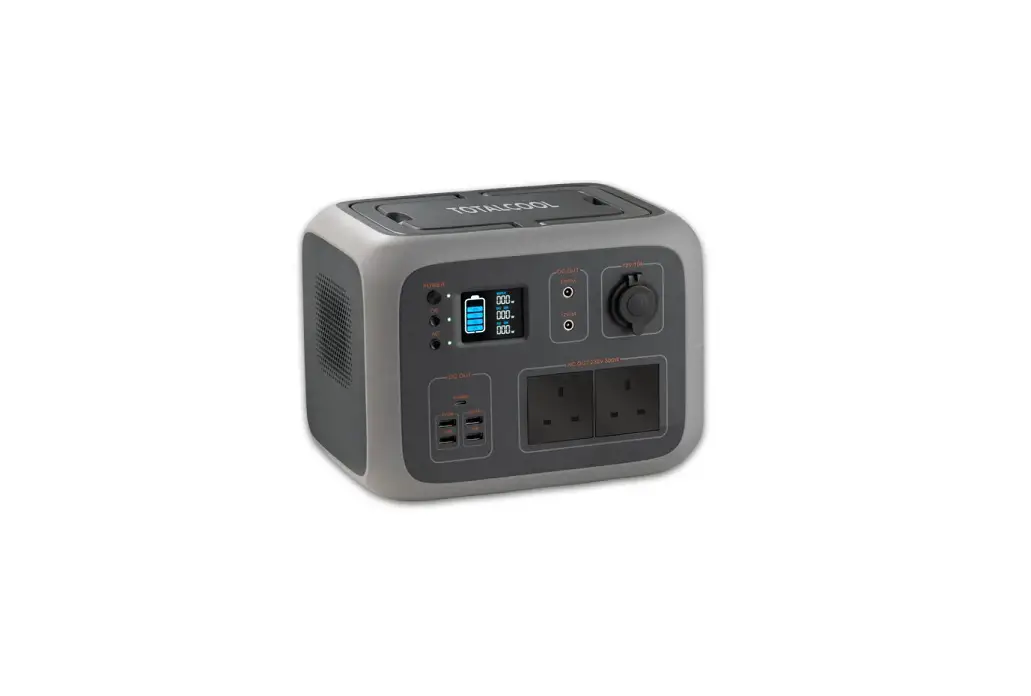
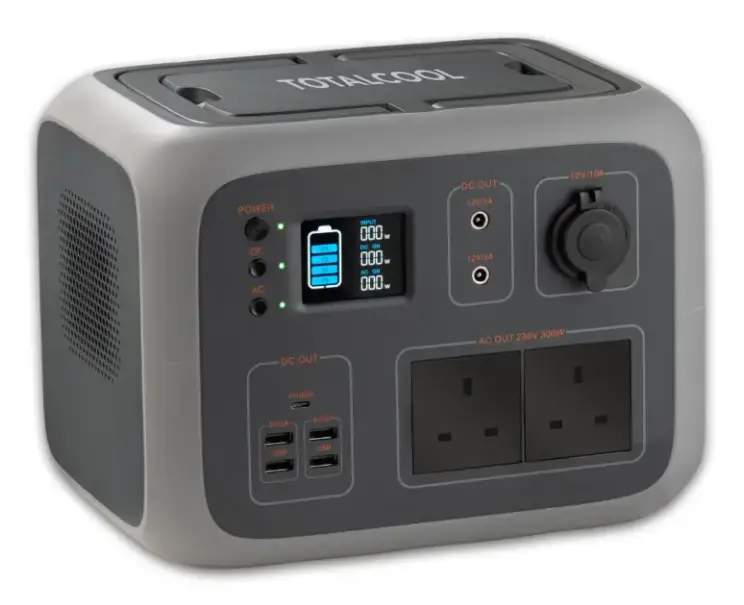
TOTALCOOL Totalpower 500 Portable Lithium Power Inverter User Guide

INTRODUCTION
Please note the below comments while reading this user guide.
- Due to product improvements, partial changes in appearance and specifications may be made without prior notice.
- This manual cannot be copied or reproduced.
- If the product requires maintenance, please contact your place of purchase for further information.
DISCLAIMER
- The company shall not be liable for any damage caused by force majeure such as fire, typhoon, food, earthquake or customer’s intentional negligence, misuse or use under other abnormal conditions.
- Defect caused by non-standard connectors is not compensable.
- The company does not assume any responsibility for damage caused by not operating the product in accordance with the instructions in this user guide.
- This product is not suitable neither for atomic energy equipment, aerospace equipment, transportation equipment, medical equipment or anything related with personal safety equipment that relies heavily on uninterrupted electricity which must be guaranteed. It is assumed that if the product is used on the above equipment or machine, the company is not liable for any personal accidents, fires, or problems caused by the malfunction of the product.
SAFE OPERATING GUIDELINES
Please be sure to observe the following for safe use:
 DANGER DANGER | The situation in which people die or are seriously injured to a large extent due to improper operation. |
| WARNING | The possibility of death or serious injury due to incorrect operation. |
| ATTENTION | Human or property damage may occur due to incorrect operation. |
Serious Injury: refers to blindness, injury, electric shock, fracture, poisoning and other sequelae, and to be hospitalised or regularly need to go to the hospital for treatment.
Injuries: refers to injury, burn, electric shock that do not require hospitalisation or go to the hospital regularly for a long period of time.
Property Damage: refers to damage to houses, household property, livestock or pets.
| This indicates that attention should be paid to fire, rupture and high temperature when operating the product. Specific attention is described in the figure. |
 | This means that this behaviour is prohibited when operating a product. Specific prohibited content is described in the icons or text in or near the icons. |
 | Represents the mandatory operation of the product in accordance with the instructions. Specific mandatory content is described in graphics or text in or near the figure number. |
DANGER
| Please do not disassemble, repair or transform the product. It may cause electric shock, heat, fire and other dangers. |
| Do not put the product near a fire source or put it into a fire or heat, which will cause fire or burns and other dangers. |
| This product can not be charged and used in dew, bathrooms, rain and other wet places; do not use water to clean the product. It will cause electric shock, heat, fire and other dangers. |
| Do not touch this product or connector plug when your hands are wet. It may cause electric shock. |
| Do not use metal to contact AC output interface. It may cause electric shock, fever, fire and other dangers. |
| If any liquid from this product become in contact with your eyes, please wash with clean water and see a doctor immediately or there may be a risk of blindness. |
| Do not put in general waste disposal. Electricity shock, heat and fire may occur in the refuge collection truck or in the refuge collection centre. |
| Do not use AC connections other than those specified. It may cause electric shock, fire and so on. |
| Please conform to the rated specifications of the connection interface or the connecting machine, and do not exceed the specifications. It may cause electric shock, fire and so on. |
| Do not forcefully bang or drop the product. It may cause electric shock, heat, fire or damage to the unit. |
| Do not place, store or use in places that are prone to falling or dropping (such as high shelves). It may cause electric shock, heat, fire or damage to the unit. |
| Handle with care whilst the product is charging or in use. Due to vibration and shock during movement it may cause heat, fire, electric shock or damage to the unit. |
WARNING
| Please keep the area where the product is used or stored clean and free from dust, powder or small metal fragments. Contact with the terminal may cause a short circuit, accidents such as smoke or fire. |
| Please be sure to check the product before use. In case of any abnormality such as breakage, cracks, leakage and AC line breakage, please stop using the product immediately. |
| If the AC wire is damaged, please pay attention to the following. Do not move the AC wire, do not unplug the AC wire from the input port. Keep the AC wire away from any heat source, do not trample or pull the AC wire etc. Damaged AC wiring can cause problems such as, heat, fire and electric shock. |
| Do not let children use this product. It may cause accidents or injuries. |
| Do not use, if electrical products can not be plugged in due to loose or deformed interface. This may cause electric shock, heat and fire. |
| Please do not use or keep in the car, trunk, loading table if too hot i.e. under direct sunlight. It may cause product failure or deterioration. |
| If the liquid inside the product touches the skin or clothes, please wash off with water immediately. Otherwise this may cause skin irritation or injury etc. |
| Remove the AC cable from the socket if lightning strikes during charging. |
| Do not use in thunder storms, as large currents from the socket may be generated and cause fire and other accidents. |
| Please charge in the specified voltage range (AC 100-240v). Otherwise, it may cause over heating, fire and other accidents. |
| Please do not put the product upside down when using or storing it. It may cause leakage, heat, fire and other accidents. |
NOTE
| Please stop using the product immediately when there is any abnormality such as rusting, peculiar smell etc. |
| The transportation of the product shall conform to the provisions of laws and regulations of dangerous goods. The built-in lithium ion battery capacity is more than the United Nations regulations (100Wh), therefore, the product must be packed, labelled and declared in accordance with IATA (international air transport association) regulations when transported by air or ship. Please consult with the shipping company for details. |
| When transporting the product with a car, etc., please fix the product so that it cannot be moved. Otherwise it may cause damage to the product, resulting in electric shock, heat, fire, etc. |
| Do not allow this product and the AC cable to get wet with water or other liquids. It may cause short circuit, heat, fire, etc. |
| Please charge, use and store this product under 40ºC, otherwise it may cause poor performance or overheating. |
| In case of accidental fall or impact, the body of the product may be damaged and cause electric shock, heat, fire, etc. Please stop using immediately and contact place of purchase. |
| Please carefully read the operating instructions of any electrical products to be connected. Failure to operate the electrical products correctly may result in accidents or injuries. Before connecting electrical products, please make sure that the electrical products are stopped (power off), as the sudden start of electrical products may cause accidents or injuries. |
| Be sure to turn off the main power button during storage to prevent unnecessary discharge of the battery and prevent electric shock. |
USER GUIDE
Please read this user guide before use and follow its guidance. Keep this user guide for future reference.
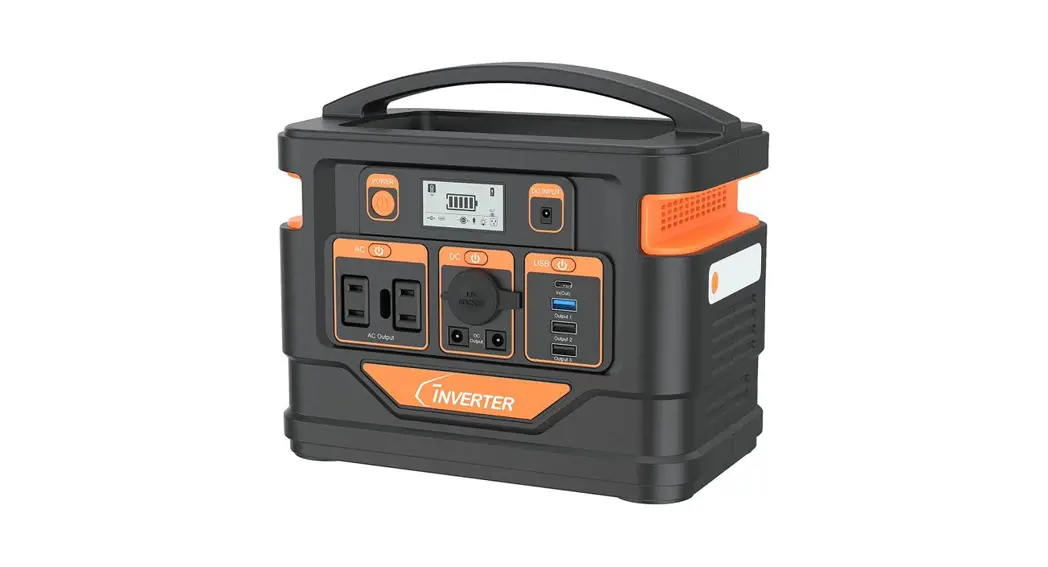
PACKED ITEMS
Before opening the package, please check whether the package is damaged and after opening the package please check whether the product is damaged or missing accessories.
| NO | ITEM | QTY |
| 1 | Portable Power Station | 1 |
| 2 | AC adaptor (including AC charging cable) | 1 |
| 3 | Cigarette lighter cable (cigarette port to DC7909 connector male) | 1 |
| 4 | MC4 cable (MC4 connector to DC 7909 connector male ) | 1 |
| 5 | Type-C cable | 1 |
| 6 | User guide | 1 |
| 7 | Certificate of QC PASS | 1 |
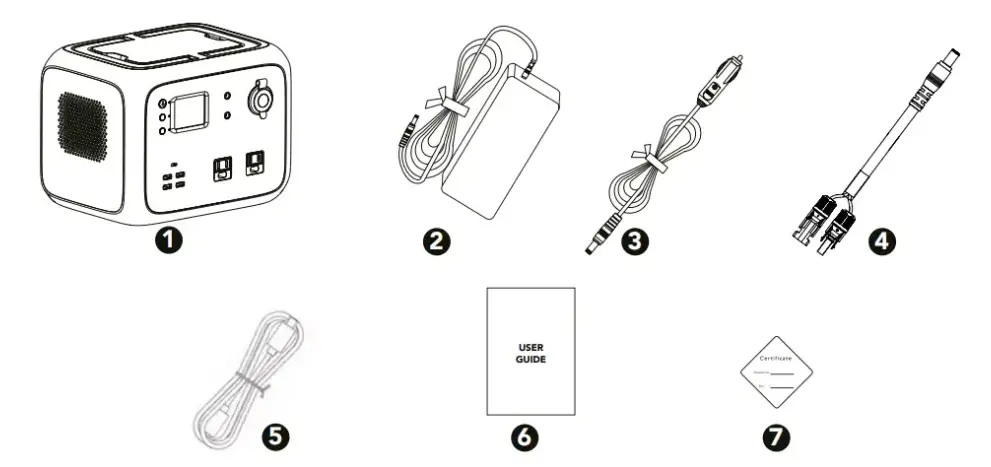
Note: picture is only for reference, please assume the product is the standard model.
FUNCTION INTRODUCTION
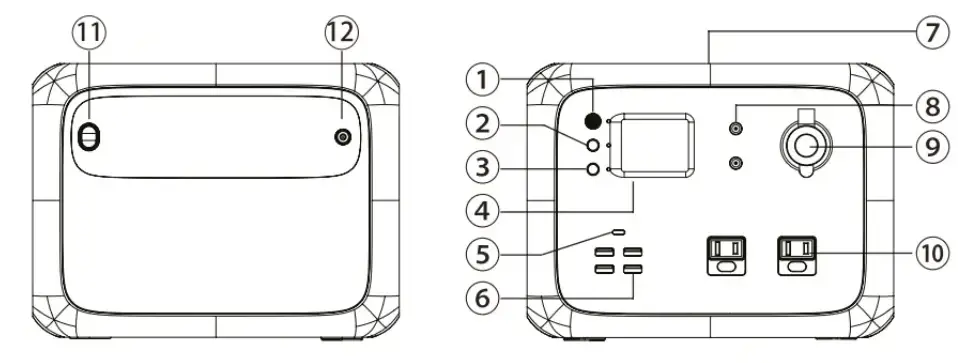
- Main power button
- DC power button
- AC power button
- LCD screen
- 45W USB-C PD output
- USB output port
- Wireless charging pad
- DC 12V 5521 output port
- DC12V car ignitor output port
- AC outlets
- LED lamp switch
- Power input port
LCD SCREEN
- Charging power
- DC ON/OFF 3
- DC output power
- AC ON/OFF
- AC output power
- Battery capacity indicator

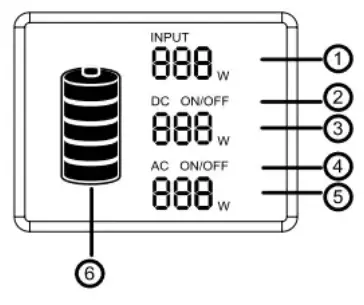
LCD BATTERY DISPLAY
The LCD Battery Display indicates the charge level. There are 5 segments of the battery, approximating 20%~40%~60%~80%~100% of capacity. During use, segments will disappear from the display. Indicating the remaining capacity. When charging, you will notice a battery segment blinking with 1 second interval. This indicates the current charge status and the number under INPUT shows the real-time charging power. Once it is fully charged, all battery segments will be lit and remain solid.
Note: If the product malfunctions, error codes would be displayed on screen
CHARGING INSTRUCTIONS
Note: Please charge the product to 100% before using.
When charging the product, the battery capacity display icon on the LCD screen will be on dynamic status. After the battery is charged fully, the display icon will be on static status.
CHARGING THE PRODUCT USING AC (MAINS POWER)
Note: Always use the standard AC Adaptor that comes with the product.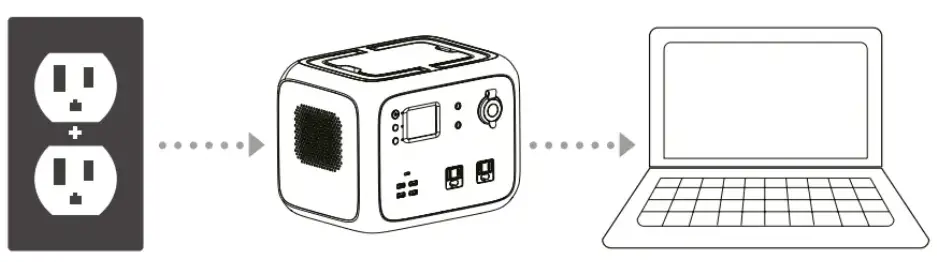
- Connect the product and socket with the AC charger in the package.
- Please unplug the charger when charging is complete (it takes about 6-7hrs to fully recharge the product if using 90W AC adapter charger)
Note: It is normal for this product to get hot during charging.
Note: Make sure that the wiring is in good contact, otherwise the contact terminals may melt or ignite at high temperatures.
USING A CAR CHARGER TO CHARGE THE PRODUCT
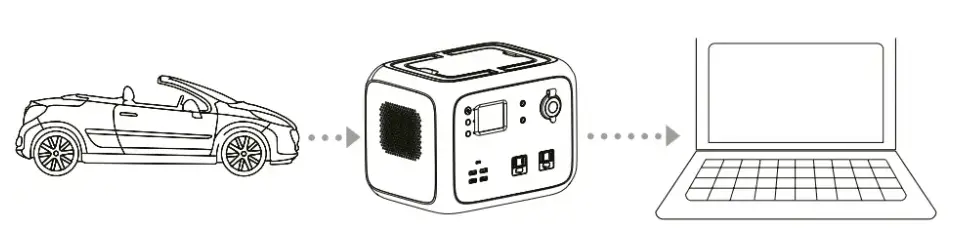
- Connect the product and the 12 volt cigarette lighter socket with the 12 volt cigarette lighter cable in package.
- Charge the product after starting the car.
Note: Make sure that the wiring is in good contact, otherwise the contact terminals may melt or ignite at high temperatures.
HOW TO CHARGE THIS PRODUCT
- Using a Solar Panel to charge the product.


- Chose suitable solar panel (DC12-40V/120W).
- Put the solar panel under strong sunshine, face to the sun.
- Take the part MC4 cable, connect the solar panel and the product.
- When the product is charged fully by the solar, it will stop charging automatically. Please take out the charging cable, and turn off the product. Note: Please make sure all cables are connected correctly. Failure to do this can cause increased temperature status or sparking.
Note: Please charge the product in environments below 40ºC.
Note: During charging, it is normal for the product to get a little hot. Note: The charging time differs when light intensity is different.
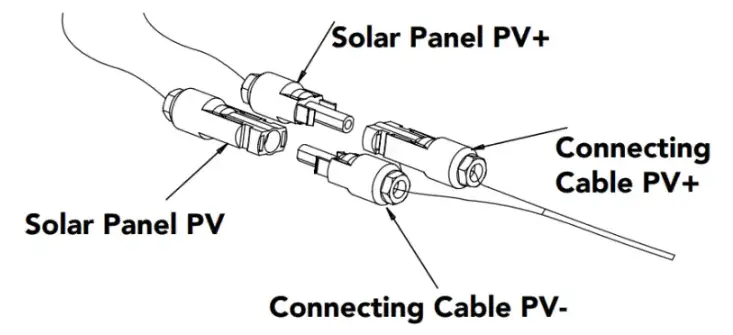
Note: Make sure that the positive and negative poles of solar panels are connected correctly. Refer to the following connection chart.
DISCHARGING INSTRUCTIONS
CONTROL PANEL BUTTON OPERATION
- Main Power Button
Power on: Short press the main power button, the power indicator lights and the LCD screen lights up.
Power off: Press and hold the main power button over 2 seconds, the indicator will be off and the LCD screen will be off. - DC power button
DC power on: Press and hold the DC button over 2 seconds, the DC indicator will light and the LCD will display “DC ON”.
DC power off: Press and hold the DC button for over 2 seconds, the DC indicator will be off, and the LCD will display “AC OFF”. - AC power button
DC power on: Press and hold the AC button for over 2 seconds, the AC indicator will light and the LCD will display “AC ON”.
DC power off: Press and hold the AC button for over 2 seconds, the AC indicator will be off and the LCD will display “AC OFF”. Note: Turn off these buttons to save power when not using.
Note: The LCD background light will automatically go off after no operation for a period of time, and will be on again when short pressing any button.
Note: If the DC/AC button is turned off and there is no other operation, it will shut down automatically after 10 minutes to save power.
CONNECTIBLE DEVICES
- USB output port: smartphone, MP3 player, digital camera, electronic reader,tablet computer, etc.
- Type-C PD output port: smart phones, tablets, etc.
- DC 12V 5521 output port: mainly used for LED light bulb lighting.
- DC12V Cigarette Lighter output port: Totalfreeze portable fridge freezer,
Totalcool 3000 cooling system, Sat Nav and other 12V equipment. - AC output port: notebook computer, camera, display devices and other AC power supply working equipment.
Note: DC output is suitable for most products on the market. Some products with instantaneous high current may trigger over-current protection.
Note: Please make sure that the connected electrical products are working properly before using this product.
Note: AC output will work with electrical products that use power below 300W.
Note: According to different electrical products, rated power below 300W may not be used (air conditioning, motor and other equipment requiring instantaneous high current).
Note: The output will stop automatically after overload protection.
Note: If the output stops repeatedly, please stop using it immediately. Only by eliminating the problem can it be used. Please contact place of purchase.
Note: Noise may occur in the broadcast of video players or TVs etc which are connected to this product.
ESTIMATION OF BACKUP TIME
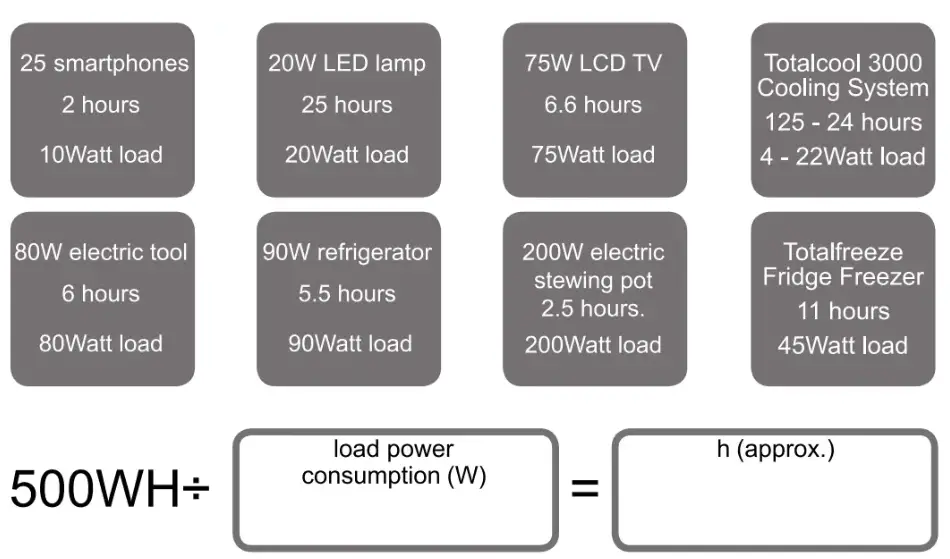
Note: The above data are for reference only. The backup time varies with the power of different loads.
STORAGE AND MAINTENANCE
- Fully charge the machine before storage.
- Switch off all power buttons.
- If there is any dirt on the product, soak and wring out a cloth to wipe it clean.
- Please do not use gasoline, volatile oil, thinner, kerosene, etc. which have the function of dissolving the resin.
- Keep the product dry and in a dust free zone. Do not use in temperatures above 40ºC and avoid direct sunlight.
- Please fully charge the product at least once every six months.
Note: Please do not keep in the vehicle, trunk, loading platform if the vehicle is to hot i.e. under direct sunlight. It may cause product failure, degradation or thermal problems.
TECHNICAL SPECIFICATION
| Output | |||
| AC output | Rated voltage | 100-120Vac | 220-240Vac |
| Rated power | 300W | ||
| Peak power | 400W | ||
| Overload capability | 300W:5load<450W@120S; 450W<load@1s; | ||
| Frequency | 50/60Hz(adjustable) | ||
| DC12V output(cigarette lighter) | Rated voltage | 12Vdc (12-14V Workable) | |
| Rated current | 10A | ||
| DC12V output(5521) | Rated voltage | 9.6-12.6Vdc CD | |
| Rated current | 3A | ||
| USB output | QC | BC1.2,Apple,Samsung | |
| Rated voltage | 5V | ||
| Rated current | 3A | ||
| Type-C output | QC | PD2.0 (45W) | |
| Rated output | 5V3A, 9V3A ,12V3A ,15V3A , 20V2.25A | ||
| Wireless charge | QI 1.2.4 | Most devices | |
| Output power | 5W/7.5W/10W | ||
| LED lighting | While the power button is on, press the LED light button in turn, the order of LED light will be: full brightness–half brightness- SOS–turn off | ||
| Input@ | |
| Input voltage | 12-40 Vdc |
| Input power | 120W MAX |
| Battery | |
| Rated capacity | 500Wh |
| Rated voltage | 11.1 Vdc |
| Battery cell type | Li-ion |
| Voltaqe range | 9.6-12.6Vdc |
| General | |
| Protection level | IP21 |
| Working environment condition | Relative humidity: 10%-90% |
| Temperature: 0-40°( | |
| Size | 259.5*191*196mm |
| Net weight | 6.2 kgs |
Note:
- It may cause input low-voltage protection of some equipment if the voltage is low.
- Solar panel charge type: MPPT
TROUBLESHOOTING
If the product cannot charge or power other devices, please check according to following steps:
- Make sure the power button is turned on.
- Make sure the AC and DC power buttons are on, viz. the LED on the right of
the button is green - Check the battery capacity, if it’s lower than 10%, please recharge the
product as soon as possible. - Make sure the load power connected didn’t exceed the limit power of this product, each port has a limit for the power connected
Note: If you can’t clear the trouble after the above steps, please contact place of purchase.
| Error code | Cause | Protection Condition | Recovery condition |
| E01 | Low temperature protection | Heat sink Temp.:75°C | Auto Recover when the temps10°C |
| E02 | Low temperature protection | <-8ºC | > -2 C. self-recovery |
| E03 | Battery over temperature | >68ºC | <58°C, self-recovery |
| E04 | Battery low temperature | < -8ºC | >-2 °C, self-recovery |
| E05 | Battery charge over temperature | > 48ºC | <38°C, self-recovery |
| E07 | Battery charge low temperature | <0ºC | >5°C, self-recovery |
| E09 | Total voltage too low | <9.6V | >10.5° C recover charging |
| E18 | PV input over voltage | >45V | <40V self-recovery |
| E25 | DC 12V output over voltage | Battery voltage >13V | Recover by pressing button |
| E26 | DC12V-1output over loaded | Load power >140W | Recover by pressing button |
| E27 | DC12V-1 output over current | output current >11A or short-circuit | Recover by pressing button |
| E28 | DC12V-1 input over current | Current >-1A | Recover by pressing button |
| E29 | DC12V-2output over loaded | Load power >75W | Recover by pressing button |
| E30 | DC12V-2 output over current | Output current > 6A or short-circuit | Recover by pressing button |
| E31 | DC12V-2 input over current | Current >-1A | Recover by pressing button |
| E34 | System overloaded, DC output stop | Total power>420W at 3mins | Recover by pressing button |
| E36 | Inverter output overloaed | Power>300W at 2mins or power >450W | Recover by pressing button |
| E37 | Inverter output overcurrent | AC output short-circuit | Recover by pressing button |
| E38 | System overloaded, AC output stop | Total power>420W at 3mins | Recover by pressing button |
FREQUENTLY ASKED QUESTIONS AND ANSWERS (FAQ)
How to check the state of charge?
- The battery icon display on the LCD display shows the battery level and charge status.
How to use the product to charge other electronic devices?
- Check the user manual or search for such information online to learn about the charging parameters of your electronic devices.
- Check the power of each output port. For example, the maximum rated output power of the AC output port is 300W. This means that if the power of the connected electronic device exceeds 300W for a long time, the inverter will turn off the output.
What is the depth of discharge (DOD)?
- To prolong the battery life, the product has a DOD setting to 90%, which means that only 90% of the battery capacity can be discharged, and retain 10% to avoid damage to the battery due to excessive discharge.
Can it charge and discharge simultaneously?
- Yes, but it is not recommended to charge and discharge at the same time in order to protect the battery life.
Can it be charged by using 2 solar panels in parallel?
- Yes, just make sure the total open circuit voltage (VOC) of the solar panels are less than 40V, otherwise it may trigger the charging overvoltage protection or cause damage.
How to extend the using time of CPAP?
- It is recommended to turn off its humidifier, heater and set a lower pressure. 50Hz/60Hz frequency switching (factory setting: 60 Hz).
- Press the power button to turn the product on, then press the DC and AC button at the same time. The LCD will illuminate and display the current frequency (50Hz or 60Hz). Release the button and continue to the next step.
- Press and hold the DC button or AC button to select 50Hz and 60Hz. The frequency displayed on the LCD will change accordingly.
- After selecting the desired frequency, press the DC button and AC button at the same time to complete the setting. Enable after restart, step 1 can be repeated to check the current frequency.
Can the AC output work a built in refrigerator or air conditioner?
- Workable for low power, and over 100W is not recommended. The starting power of a built in refrigerators and air conditioners are generally 5 – 7 times more than the rated power, which easily triggers AC overload.
Can two power stations be used in parallel?
- No.
DISPOSAL
 Place the packaging material in the appropriate recycling waste bins your local recycling centre or specialist dealer for details about how to do this in accordance with the applicable disposal regulations.
RETURNS & REFUND POLICY
- Totalcool Limited offer a 14 day no quibble return policy if you are not happy with your purchase for whatever reason.
- This does not affect your statutory rights to a full refund within 30 days should the Totalcool prove faulty, but we also provide a 2-year warranty to cover faulty parts.
- All returns must be in their original condition and in their original packaging. A copy of your purchase receipt / invoice must be enclosed along with a description of the reason for return.
- Once the unit has been received by us, we will inspect the unit and accessories and if satisfactory a full refund will be offered less any postage charges.
- Refunds will be processed 3 5 working days after inspection has taken place.
- WE DO NOT ACCEPT ANY RETURNS AT SHOWS OR EXHIBITIONS.
- Please see Purchase Invoice for Returns Address
Totalcool Ltd
www.totalcool.co.uk
Company number: 09633704 United Kingdom

 Home - Totalcool