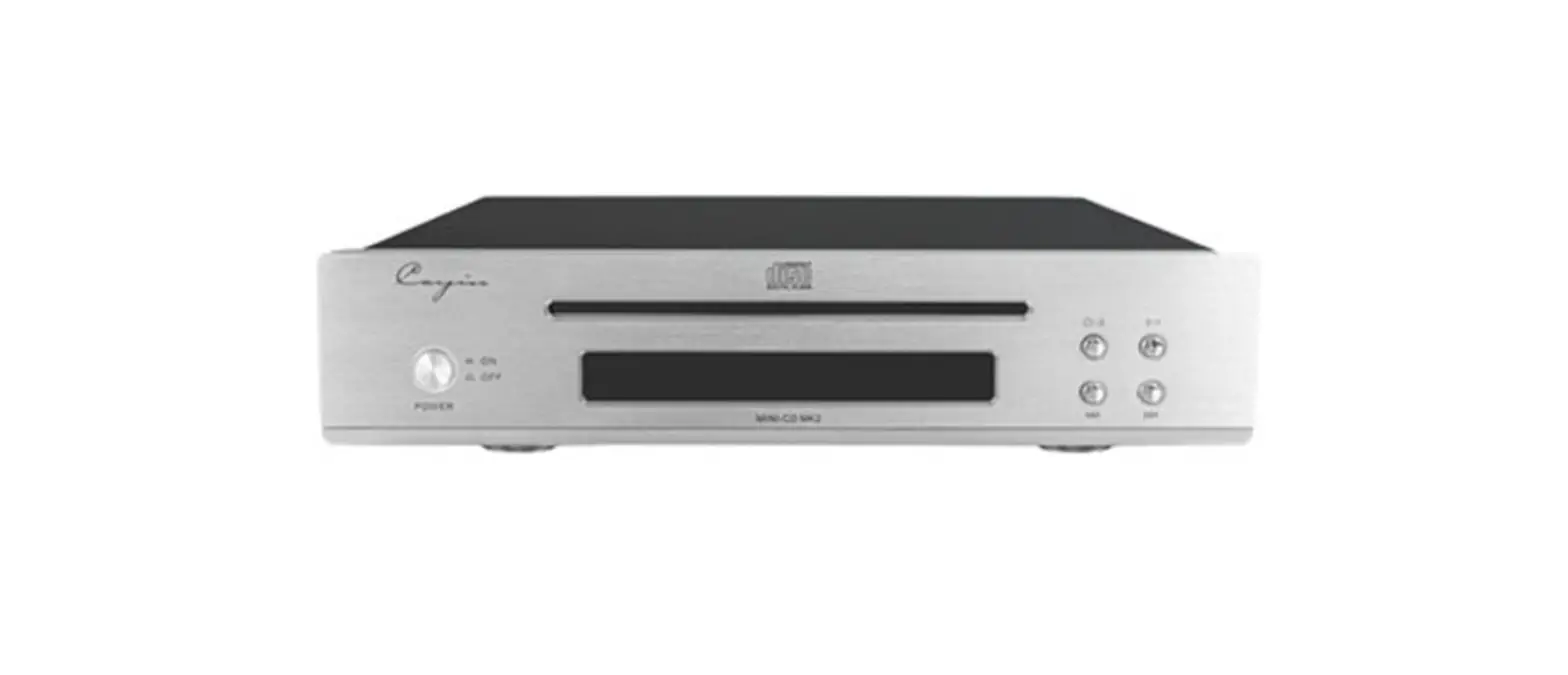

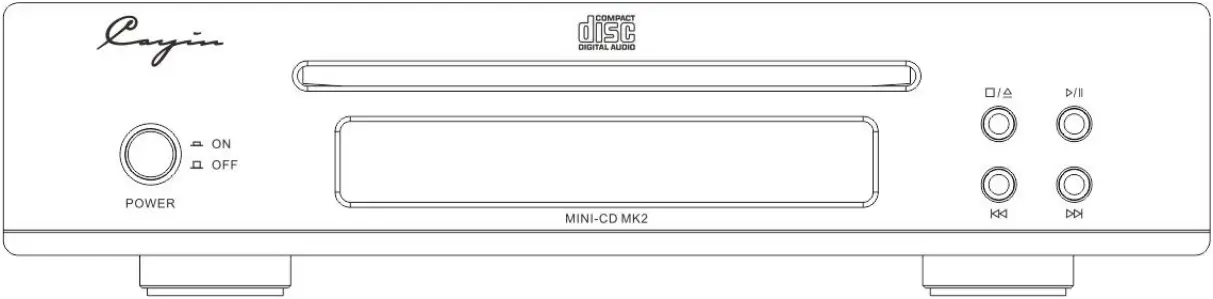
MINI-CD MK2
COMPACT DISC PLAYER
User Manual
We sincerely thank you for choosing MINI-CD MK2 Compact Disc Player. We have prepared this user manual to help you understand the features and familiarize with the operation. We recommend all customers read thorough this manual before they start to use the device.
Attention:
 Please make sure the serial number on the package, device chassis and warranty card are intact and identical. In case of damage, missing or tempered on warranty card or serial number, Cayin reserves the right to refuse warranty service for the device.All rights reserved. Reproduction, translation, dissemination or adoption of any MINI-CD MK2 related documentations and/or system firmware is prohibited without written approval from Cayin.The user manual is a documentation of the product based on the specification at the time of print. Cayin reserves the right to change product specification without prior notice.
Package Content:
Please check the product package before you open it, the package should be free from any physical damage or water stain. You should find the following items when you open the package:
- MINI-CD MK2 compact disc player x1
- User Manual x1
- Warranty Card x1
- Power Adapter x1
- Remote Control x1
- AAA R03/1.5V battery x2
Note: Items not included in the package content are not provided.
Product Features:
Suction-type CD drive with high-quality shockproofSanyo laser optical head provides consistent performancePremium performance ES9018K2M D/A converter chipset from ESS Technology, Inc.Supports S/PDIF digital audio output through RCA coaxial interfaceSupports I²S digital audio output through HDMI interfaceSupports RCA stereo audio outputUpsampling Rate/Mute indicator, infrared remote control, VFD dynamic displayAluminum alloy panel, advanced wire-drawing process, simple and stylish designExternal high-quality power adapter to reduce the interference of the power system to the internal circuit
Specification:
 Output level: 2.0V.5dBFrequency response: 20Hz~20kHz (.5dB)Distortion and noise: ≤0.007% (1kHz)S/N ratio: ≥90dB (20-20KHz, A-weighted)Dynamic range: ≥90dB (20-20KHz, A-weighted)Crosstalk: ≥77dBDigital output: S/Pdif: RCA coaxial, 0.5Vp-p@75Ω, output impedance 75Ω
I²S: HDMI-A interfaceDimensions: 240mmx213mmx58mm (WxDxH)Net weight: ≈2.0kgMaximum power consumption: 12WDisc support: 12cm CD disc
Front Panel Functional Description
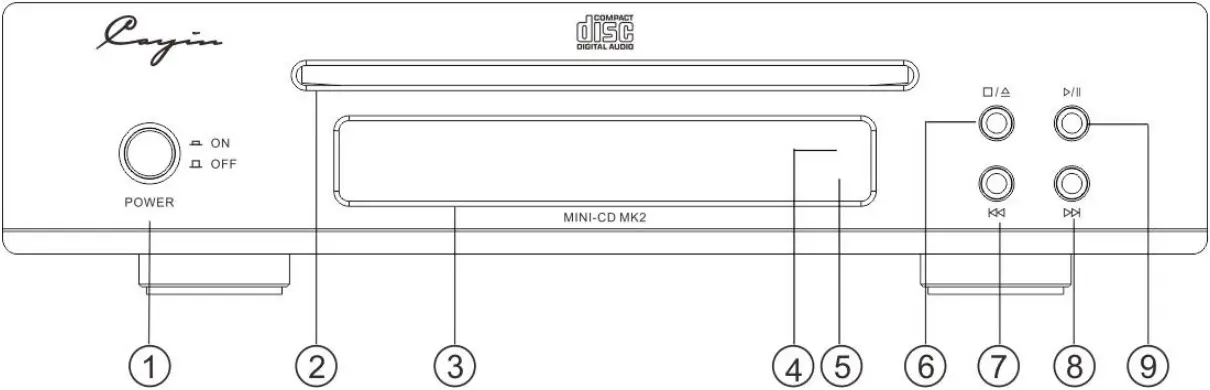
(1) Power On/Off:
Turn on and off the CD player.
(2) Disc Tray:
Insert and eject CD disc.
(3) VFD Display:
Display various working status.
(4) Function Indicator:
a. Indicator consistently on: SRC function in regular operation
b. Indicator flashing: It is at mute state
(5) Remote Sensor Window:
Receive commands from infrared remote control.
(6) Stop button/Insert/Eject:
During play or pause mode, press the button to stop playing.
Press it again to eject the disc, press it a third time to insert the disc.
(7) Skip (previous) Button/Fast-Reverse Button: Refer to “5. Track search” in “Basic Operation”, hold the button depressed for fast-reverse operation.
(8) Skip (next) Button/Fast-Forward Button: Refer to “5. Track search” in “Basic Operation”, hold the button depressed for fast-forward operation.
(9) Play/Pause Button:
Refer to “2. Playback, 3. Pause” in “Basic Operation”.
Rear Panel Functional Description
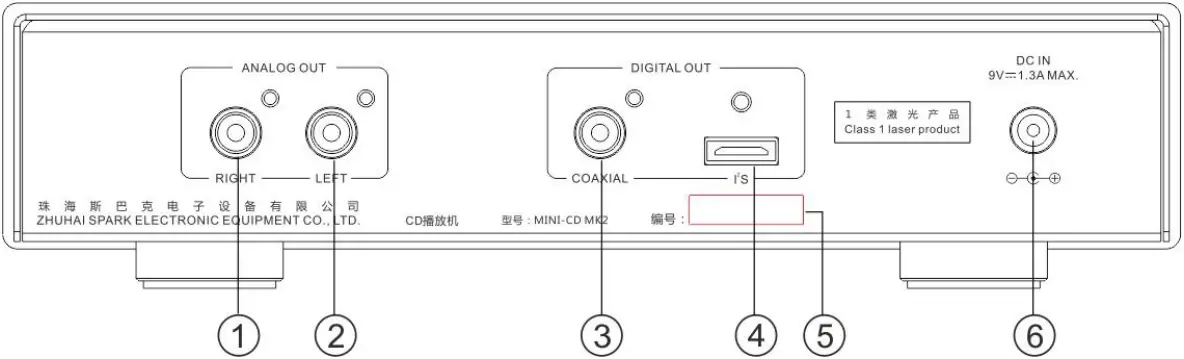
(1) Analog Audio Signal Output Terminal (Right Channel)
Connect the audio input terminal on the right channel of the power amplifier with an audio signal cable.
(2) Analog Audio Signal Output Terminal (Left Channel)
Connect the audio input terminal on the left channel of the power amplifier with an audio signal cable.
(3) Coaxial Digital Signal Output Terminal (S/PDIF)
Connect the coaxial digital input terminal of the converter with a standard 75Ω coaxial digital cable.
(4) I²S Output Interface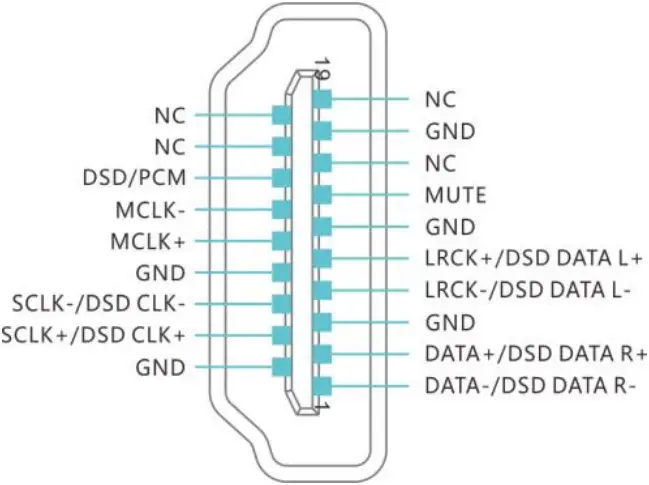 Use an HDMI cable to connect the HDMI-A port with the HDMI port of a converter (such as iDAC-6MK2) supports I²S.
The I²S physical interface of MINI-CD MK2 adopts the standard 19-pin HDMI-A interface. The pin definition was defined in-housed by Cayin. It is incompatible with custom interfaces of other brands nor standard HDMI interface.
The HDMI-A pin definition of MINI-CD MK2 as shown on the right.
(5) Serial NO.
Please record the serial number on the product warranty card.
(6) DC Power Input Socket
Input DC power.
Connection:
1. Connect to power adapter
(1) Connect the DC plug of the original power adapter matching the MINI-CD MK2 to the DC socket.
(2) Connect the power adapter to an AC socket, as shown in the figure below.
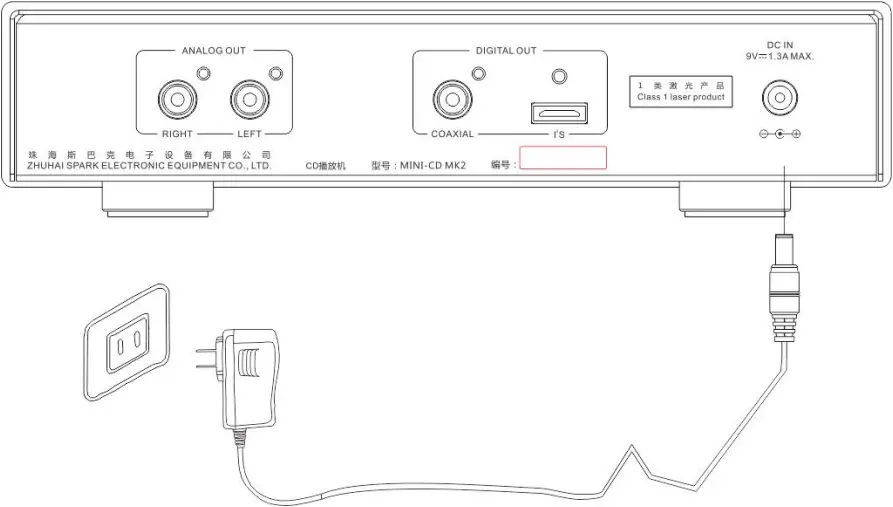
Attention: Only use the original power adapter when you operate the MINI-CD MK2. Cayin will not be responsible for fire hazard or other accidents caused by using other power adapters.
2. Connect to power amplifier
Connect the red plug of the audio signal cable (not included in this package) to the “RIGHT” red output terminal of “ANALOG OUT” on the rear panel of the MINI-CD MK2, and connect the white plug to the “LEFT” white output terminal, then connect the other end of the audio cable to the audio input terminal of the corresponding channel of the power amplifier. As shown in the figure below
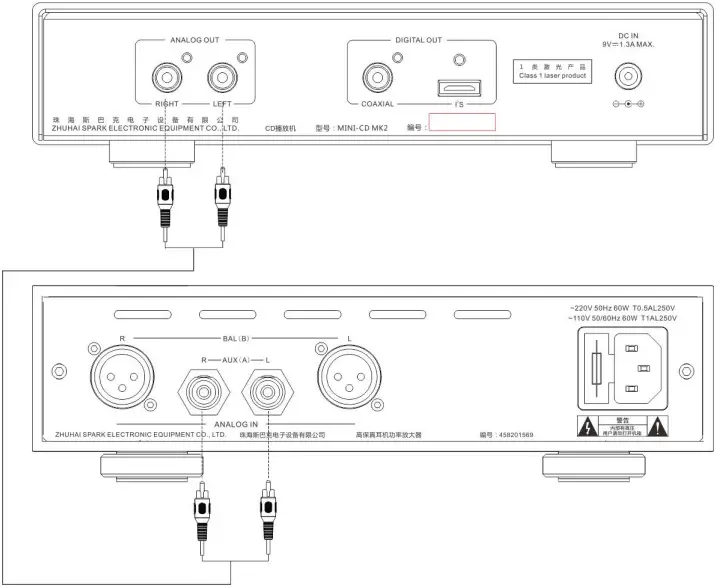
3. Connect to D/A converter
Connect the coaxial digital output terminal to the coaxial digital input terminal of the DAC with a standard 75 coaxial digital cable. After D/A conversion, connect it to the power amplifier with an analog audio signal cable, as shown in the figure below. You can also connect the HDMI interface to the HDMI port of the DAC with HDMI cable. After D/A conversion, connect it to the power amplifier with the analog audio signal cable, as shown in the figure below.
Remote Control Unit
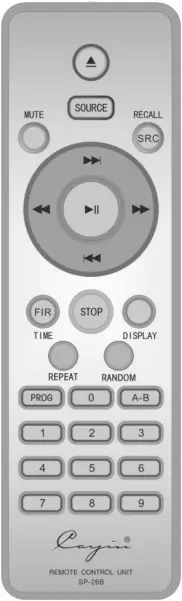
- “
 ”:Insert/eject disc
 - “SOURCE”: Nonfunctional
- “MUTE”: Mute button
- “SRC”: Sample Rate Converter option, “RECALL” is unavailable
- “
 ”: Play/Pause button
 - “
 ”: Fast-Forward button
 - “ ”: Fast-Reverse button
- “
 ”: Refer to “5. Track search” in “Basic Operation”
 - “ ”: Refer to “5. Track search” in “Basic Operation”
- “FIR”: Filter option, “TIME” is unavailable
- “STOP”: Stop button
- “DISPLAY”: Brightness adjustment of the display
- “REPEAT”: Repeat button
- “RANDOM”: Random button
- “PROG”: Nonfunctional
- “0” “1” “2”… “9”: Number button
- “A-B”: Nonfunctional
 ”:Insert/eject disc
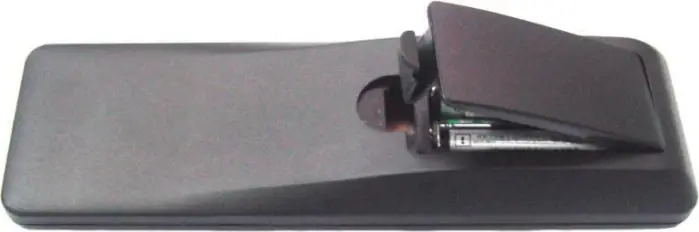
How to install the batteries:
(1) Put in two ” AAA R03/1.5V” batteries with correct polarity.
(2) Please replace the battery if the remote control does not work properly.
Basic Operation:
Please double check to use the original power adapter that matches with MINI-CD MK2 before powering on, and make sure all connections are connected properly in the system.
1. Turning on/off the unit
Press the “POWER” on the front panel. It will display “NO DISC” if there is no disc in the disc tray; If you have inserted a disc, the first track will be played automatically after reading disc; To power off during playback, please stop the disc first.
2. Playback
Place the compact disc in the disc tray label-side up, the MINI-CD MK2 will read the disc and play the first track automatically.
3. PauseDuring playback, press the “  ” button on the front panel or the “
  ” button on the remote control to interrupt the playback temporarily.During pause mode, press the “ ” button on the front panel or the “ ” button on the remote control to resume playback from the position where pause mode was entered.Even when the player is in pause mode, the disk motor is still working. Since leaving the player in this condition can shorten the lifetime of the motor, do not leave the player in pause mode for a long period of time.
4. Stop
During playback or in pause mode, press the “  ” button on the front panel or the “STOP” button on the remote control to stop a disc. The total track and play time will be shown on the display.
5. Track search
(1) Using the skip buttonsDuring playback, press the ”  ” button on the front panel or the ”
  ” button on the remote control advances to the beginning of the next track. If the current track is the last track, press this button advances to the beginning of the first track.During playback, press the ”
  ” button on the front panel or the ”
  ” button on the remote control returns to the beginning of the previous track. If the current track is the first track, press this button returns to the beginning of the last track.
(2) Using the numeric buttons (Remote only)The first nine tracks on a disc can be selected by pressing the corresponding button.When accessing track numbers equal or greater than 10, press the two buttons of the track numbers in 2 seconds.
For example, to select track 2, press the 2 button.
To select track 12, press the 1 button and the 2 button in 2 seconds. After you pressing the 1 button, the unit will wait for the second number for 2 seconds. If the second number is not entered in 2 seconds, the first track will be played.
6. Fast-forward/Fast-reverse
Hold the button depressed, playback advances or reverses at high speed.Hold ”  ” button on the remote control or the ” ” button on the front panel depressed for fast-forward operation.Hold ”
  ” button on the remote control or the ” ” button on the front panel depressed for fast-reverse operation.Release the button to start playback at normal speed.
7. Repeat (Remote Only)Press the “REPEAT” button once to repeat the current track, the display will show”REP ONE”, then it will show the symbol “r” and play the current track repeatedly.Press the “REPEAT” button again to repeat the entire disc, the display will show “REP ALL”, then it will show the symbol “r” and play the tracks on the current disc in sequence repeatedly .Press the “REPEAT” button a third time to cancel the repeat function, the display will show “NORMAL”. Normal playback resumes when the symbol “r” disappears.During stop, this function is not available.
8. Random (Remote Only) Press “RANDOM” button once, the display will show “RANDOM”. Then it will show the symbol “r” and the unit will play from random tracks until all tracks are played.Press “RANDOM” button again, the unit will return to normal.
9. Brightness adjustment (Remote Only)Press “DISPLAY” button to adjust brightness of display window.Press “DISPLAY” button every once, the brightness of display window will circularly change from “bright” to “brighter” and “dim”.
10. SRC (Remote Only)
Press the “SRC” button on the remote control to turn on/off the upsampling rate function. You can choose from “Off”, “44K”, “88K”, “176K” and “352K”.
Please select an appropriate SRC upsampling rate according to the specifications supported by the converter. There will be no audio signal if the upsampling rate over the supported range of the converter.
11. Filter (Remote Only)
Press “FIR” button on the remote control to choose filter, you can choose between “SLOW” and “SHARP”.
Precautions
The unit supports CD disc. We suggest you to use genuine license CD.Please keep the disc surface cleaning and avoid hands touch the surface directly.When you wipe discs, please move the cloth from the center hole toward the outer edge.If a strange noise or vibration be heard or occur after starting playback, there might be something wrong with the disc, immediately press the Open/Stop button to stop the disc rotation.Please take out the disc from the disc tray and put it back in a CD case when you do not need to use it.
Safety Precautions
- The unit has laser system. In order to prevent the hurt from laser radiation directly, please do not take the CD player apart.
- Please make sure to use the original power adapter before operating the MINI-CD MK2.
- Please unplug the power cable if you don’t need to use the unit for a long time.
- Be careful not to drop the unit or subject to other strong shocks.
- Condensation may form in the unit if:
 The unit is in a room where the heater has just been turned on.The unit is in a room with steam or high humidity.The unit is brought from cold surroundings into a well-heated room.The unit is brought from a chilled (e.g., air-conditioned room or car) to a hot and humidity place.If condensation has formed inside the unit, it will not work properly. Place the unit in a dry surrounding for several hours before using it.
 - Beware of electric shock! Do not disassemble the power adapter, there are no components in the adapter that need to be fixed.
- The MINI-CD MK2 must be keep away from water dripping or water splitting, do not place any objects filled with liquids such as vases or some others on the top or around.
- Do not attempt to services this product yourself, all services and maintenance must be conducted by authorized services technician. Do not attempt to disassemble this product by yourself if you are not a professional technician, it may cause damage to the product.
- Please disconnect power cable before you attempt to clean the CD player. Please use soft clean cloth to wipe clean the chassis, do not use volatile solution or corrosive cleaning product.
- Place the MINI-CD MK2 at a flat surface, make sure all four supporting tips are evenly loaded.
- Do not place any flammable material on the MINI-CD MK2.
- Do not operate the MINI-CD MK2 under direct sunlight or high temperature, it will cause serious deviation or even damage to the electronic components.
- The CD player will become hot during operation, please keep it at a well-ventilated environment and do not cover it with anything.
- Please contact your Cayin dealer or retail shop, or authorized after-sales service if the machine is not working properly.
Trouble Shooting
To ensure the MINI-CD MK2 will function at premium condition, please follow the basic operation and safety precaution as advice. Improper operation might lead to malfunction, if you run into trouble as stated below, please check before you panic. Sometime the problem are related to associated equipment or cables, please also check and make sure everything is in proper condition. Please contact your Cayin agent or retail shop, or our after-sales service if the problem cannot be rectified.
Problem | Cause | Remedy |
Cannot power on | The power adapter is not connected properly | Check the power supply circuit of the power adapter |
| Poor contact of the DC plug of the power adapter | Reconnect the DC plug of the power adapter | |
| Power is not connected | Connect power cord securely | |
Can’t play the disc | The disc is scratched seriously or dirty | Change a good disc or clean the disc |
| The disc is placed reversed or there is dew condensed on the laser head | Place the disc label-side up. Place the player in a dry surrounding for several hours | |
| The disc cannot be identified | Play the discs that can be identified by the player | |
No sound | The signal cables are not connected well | Connect the signal cables well |
| The function of the remote control is not sensitive | Disturbed by something in surrounding | Remove the disturbing source |
| The batteries don’t have enough power | Replace the batteries | |
| There are obstacles between the remote control and the unit | Remove the obstacles |