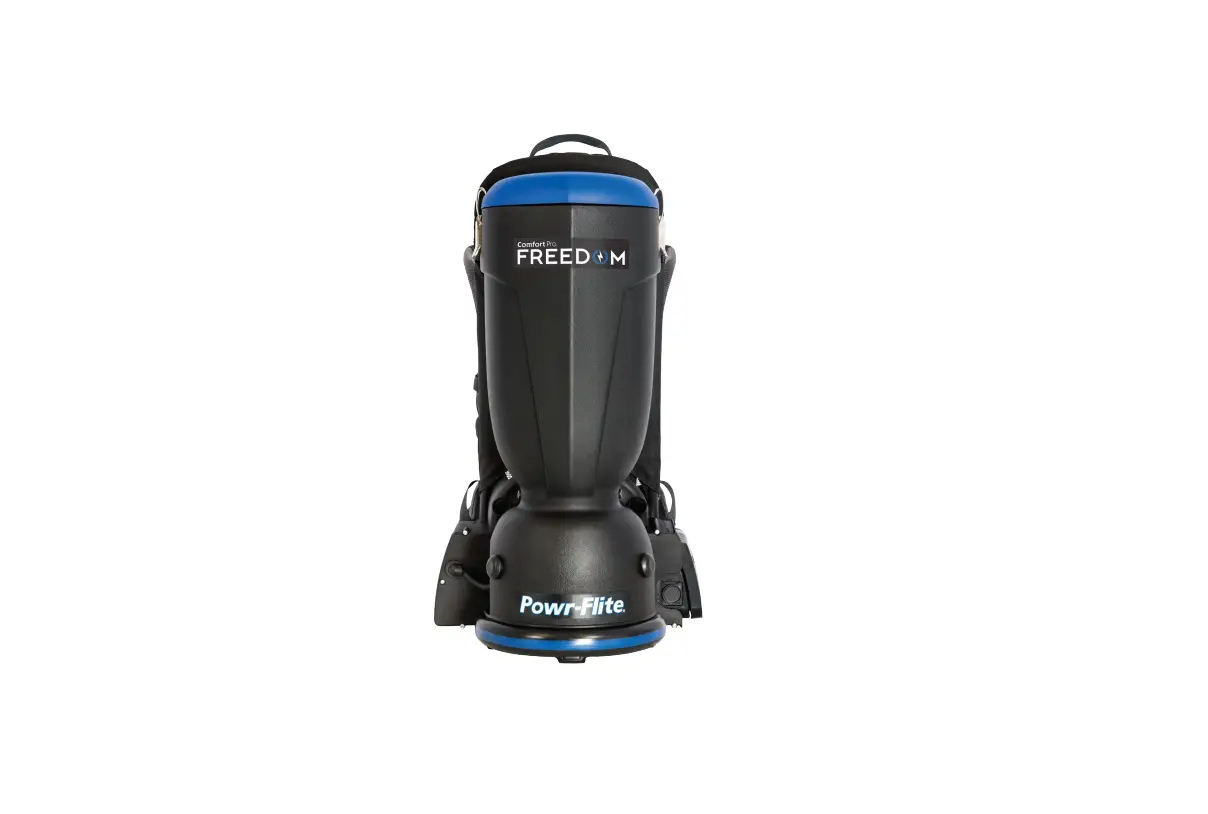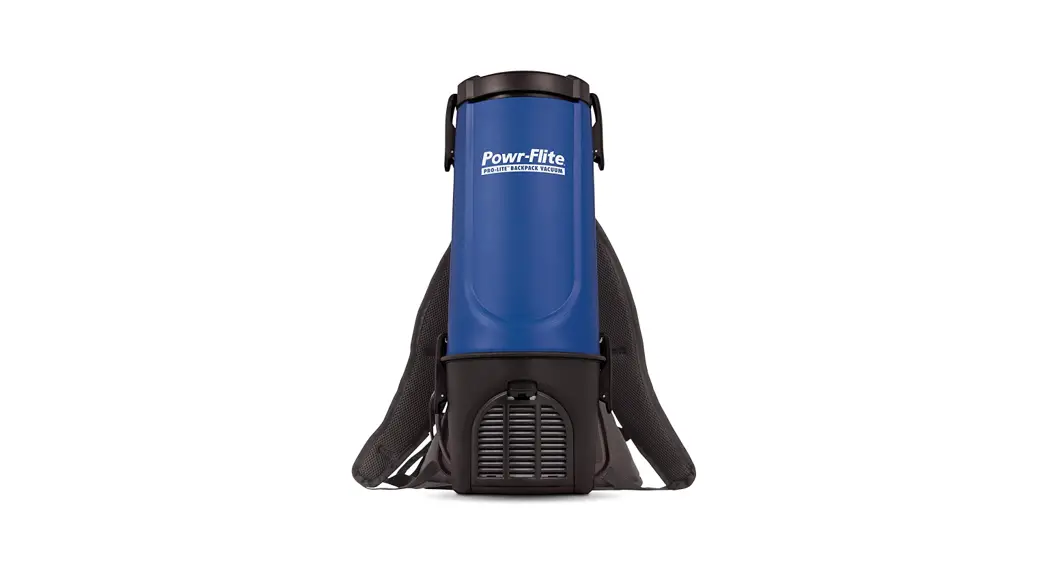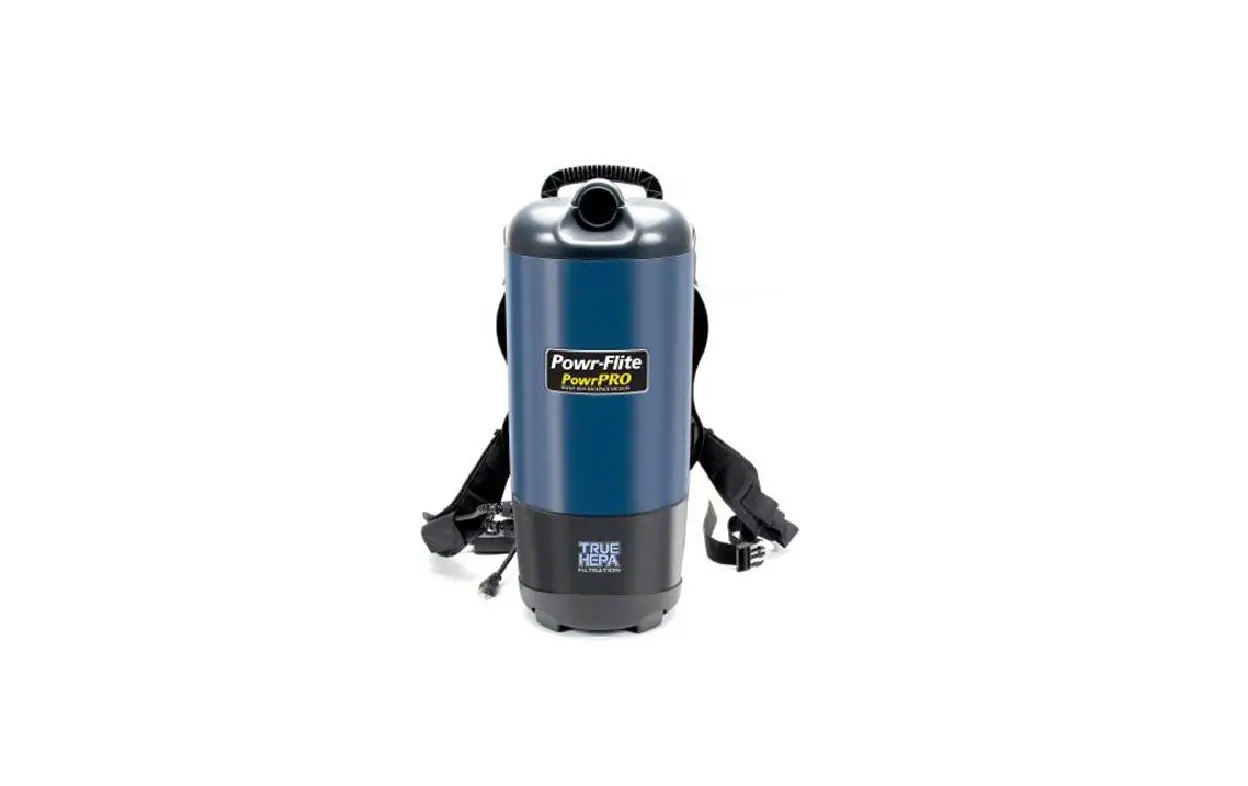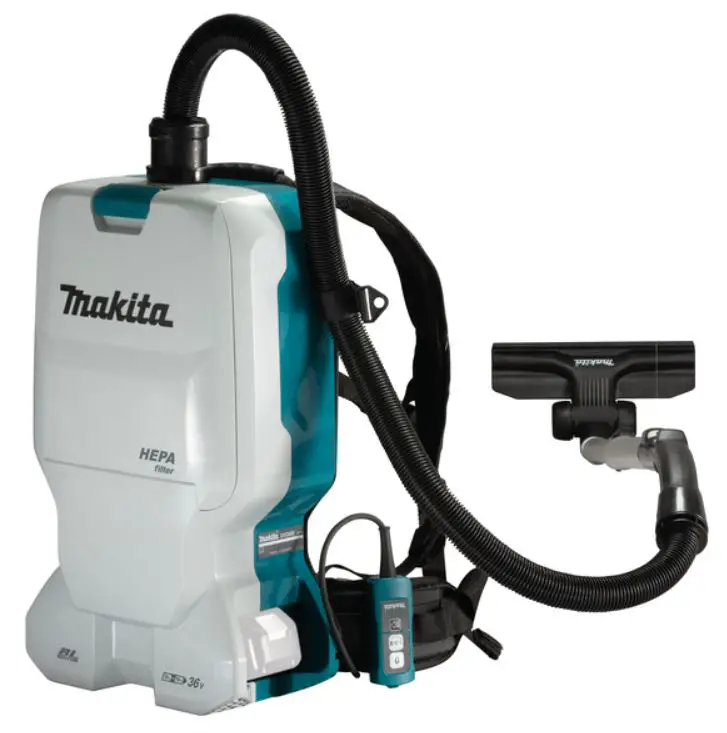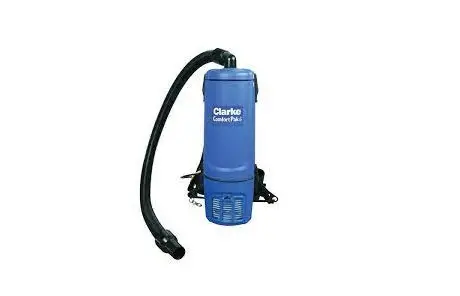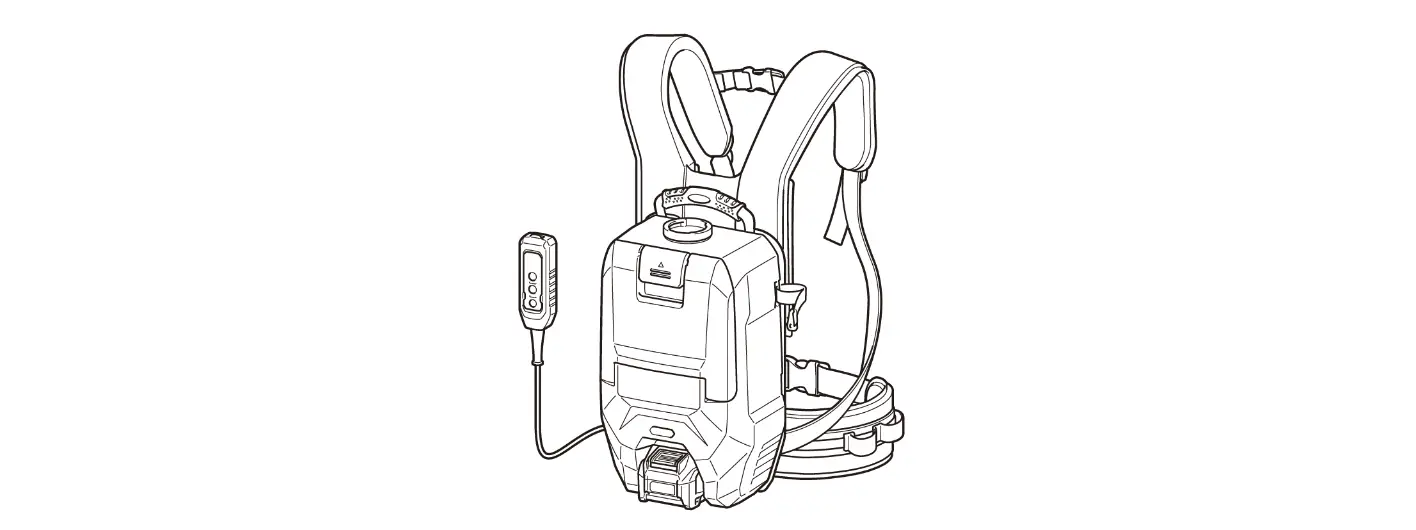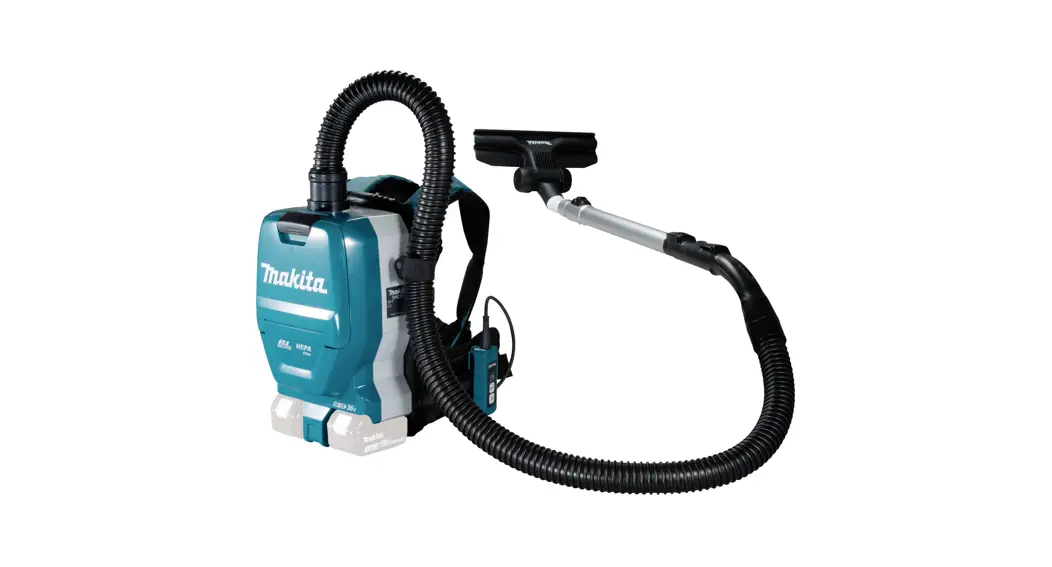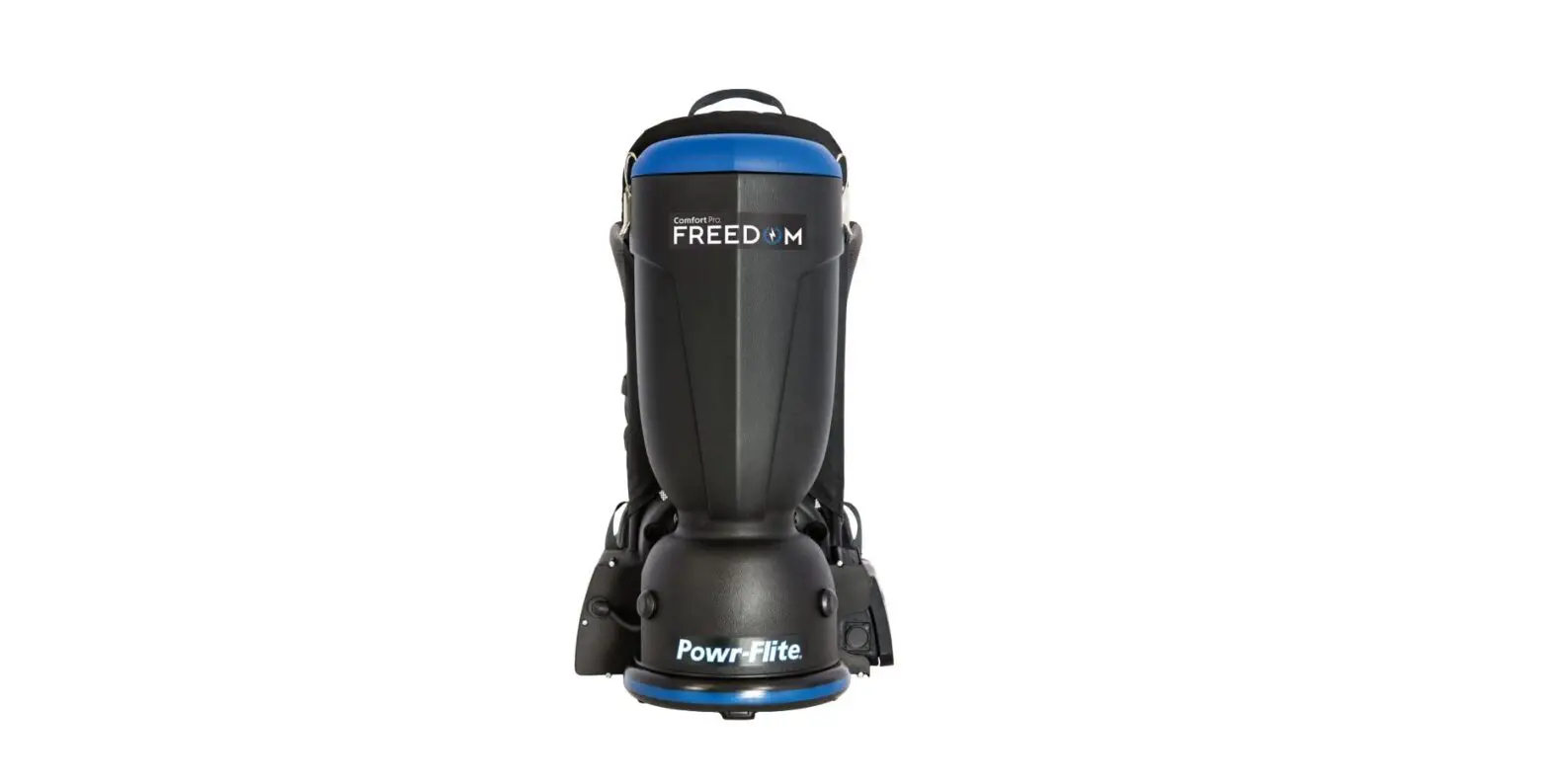

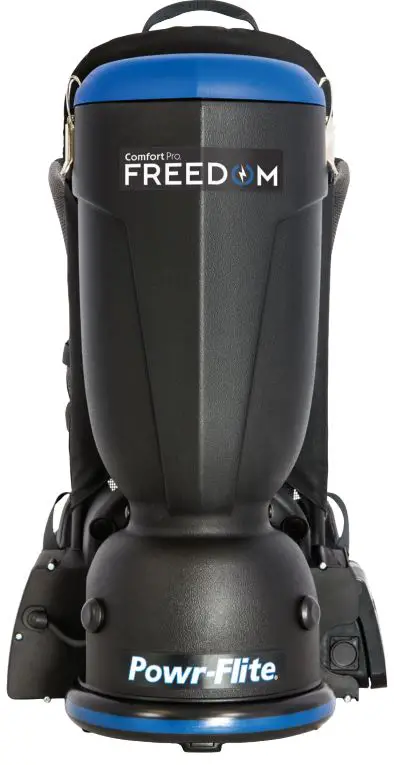
Powr-Flite CPF6P-1 CPF6 Series Comfort Pro FREEDOM Backpack Vacuum Cleaner
IMPORTANT BATTERY INFORMATION
ATTENTION
- The battery for this unit is shipped in a mode that requires an intial charge to activate that can take approximately 3 hours to complete.
- Once fully charged, the LED indicator on the charger will change from RED to GREEN. Charge time can vary, depending on where the charger is located.
- For best results, locate your charger away from direct sunlight, in a room that has good air movement and a temperature between 50-86 °F (10-30 °C).
- The Charger light could remain GREEN when plugged into a warm battery.
- The charger light will change to RED once the battery cools and charging begins
- An added feature to the battery is the inclusion of a sleep mode element to the battery circuitry in order to minimize battery discharge during shipment and subsequent storage. The normal state of a battery, or active mode, includes a “fuel gauge” that is always ON and monitoring the state of the cells in the battery. This state causes the battery to discharge faster than when in sleep mode where the fuel gauge turns on and off a few times a minute to collect data from the cells of the battery. Sleep mode lessens the discharge seep inherent in batteries and is automatic whenever the battery is not charging or discharging.
- THE BATTERY MUST BE CHARGED TO “WAKE IT UP” OUT OF SLEEP MODE PRIOR TO INITIAL USE.
- There will be a small delay when the unit is switched ON after inserting a battery into the unit. This function will prevent the misuse of the unit due to the possibilty of a HOT start.
This manual has important information for the use and safe operation of the Comfort Pro. Read this manual carefully before starting the machine. Keep the manual available at all times and instruct all operators to read this manual.
| REPLACEMENT / ACCESSORIES | |
| MODEL | COMFORT PRO 6 – CPF6S & CPF6P |
| BATTERY | X1200C |
| CHARGER | X1194 |
| MICRO HEPA FILTER BAG (10 PK) | X9678 |
| CLOSED MOUTH PAPER BAG (10 PK) | X9735 |
| OPEN MOUTH PAPER BAG (10 PK) | X9737 |
| MICRO CLOTH BAG | X9679 |
| INLET FILTER | X9683 |
| EXHAUST FILTER | X9682 |
| REPLACEMENT BRUSH STRIP FOR POWR-GLIDE | CT192 |
IMPORTANT SAFETY INSTRUCTIONS
WARNING!
Read all instructions before using. Save these instructions. Following the cleaning instructions will prolong the life of your Powr-Flite vacuum.
When using an electrical appliance, basic precautions should always be followed.
- Use only as instructed in this manual. Use only the recommended attachments and replacement parts.
- Do not use outdoors or on wet surfaces.
- Do not use to pick up liquids. This vacuum is for Dry Pickup only.
- Do not allow to be used as a toy. Close attention is necessary when used by or near children.
- If the unit is not working as it should, has been dropped, damaged, left outdoors, or exposed to water, return it to a service center before using.
- Do not vacuum up hard or sharp objects, as they may damage the hose, vacuum bag or the vacuum motor.
- Do not use without paper vacuum bag, cloth bag and filters in place.
- Do not operate the vacuum while it is standing on a high-pile carpet. The exhaust airflow is restricted and will cause the unit to overheat.
- Do not put any objects into openings. Do not use any opening blocked. Keep free of dust, lint, hair and anything that might reduce airflow.
- Keep hair, loose clothing, fingers, and all parts of body away from openings and moving parts.
- Use with extra care when cleaning stairs.
- Do not vacuum flammable or combustible materials or anything that is burning or smoking, such as cigarettes, matches, or hot ashes.
- Do not use with dust bag not in place.
- Sparks inside the motor can ignite flammable vapors or dust. To reduce the risk or fire or explosion, do not use near combustible liquids, gases, or dusts, such as gasoline or other fuels, lighter fluid, cleaners, oil-based paints, or natural gas.
- To reduce the risk of inhaling toxic vapors do not vacuum or use near toxic or hazardous materials.
- Keep children and unauthorized persons away from the vacuum when in use.
- This machine is not intended for use by persons with reduced physical, sensory or mental capabilities, or lack of experience and knowledge.
- Do not attempt to service the vacuum yourself. Repair by anyone other than an authorized repair service center may void the warranty.
STORAGE
Always store the vacuum in cool, dry place.
SAFETY WARNINGS AND PRECAUTIONS
BATTERY AND CHARGING SYSTEM:
To reduce the risk of electric shock, fire, battery explosion, or injury, use appliances only with specifically designed battery packs.
- Use only Powr-Flite charger X1194 and Powr-Flite battery pack X1200C. Use of any other battery packs may create a risk of injury and fire.
- Disconnect the battery pack from the machine before making any adjustments, changing accessories or storing machine.
- DO NOT expose battery packs to temperatures above 122°F (50°C). Never leave battery packs in automobiles on hot days, where temperatures can be much higher than the outside temperature.
- DO NOT use or store vacuum or batteries in wet or moist conditions, or with flammable or combustible materials.
- DO NOT charge batteries or store battery for extended periods,1 month or more, in temperatures above 90°F
(32°C) or below 40°F (5°C). - When charging, make sure that the charger has at least 6 inches of clearance on all sides. Adequate airflow is required to cool the charger when in use.
- Connect charging cord to a properly grounded outlet only. See Grounding Instructions.
- DO NOT use a damaged cord or plug for charging.
- DO NOT pull on charger’s cord to unplug. Grasp and pull the plug, not the cord.
- DO NOT handle the charger’s cord plug with wet hands when inserting into electrical outlet.
- Keep sparks and flames away from batteries. DO NOT smoke near batteries or charger.
- DO NOT charge the unit outdoors.
- DO NOT attempt to repair, service, or modify the battery system or charger. Have servicing performed by a qualified repair person using only identical replacement parts. This will ensure that the safety of the product is maintained. Contact Powr-Flite Customer Service with any issues.
- DO NOT short-circuit the battery or charger terminals with conductive items such as paper clips. This can deliver high current, resulting in heat and fire.
- DO NOT crush, drop, incinerate or damage the battery pack. DO NOT use a battery pack that has been damaged in any way. DO NOT incinerate the battery even if it is severely damaged or non-working. The battery can explode in a fire.
- Under abusive conditions, liquid may be ejected from the battery; avoid contact. If contact accidentally occurs, flush with water. If liquid contacts eyes, seek additional medical help. Liquid ejected from the battery may cause irritation or burns.
- Follow all charging instructions and do not charge the battery pack or appliance outside of the temperature range specified in the instructions. Charging improperly or at temperatures outside of the specified range may damage the battery and increase the risk of fire.
- Do not modify or attempt to repair the appliance or the battery pack (as applicable) except as indicated in the instructions for use and care.
INSTALLING BATTERY PACK INTO VACUUM
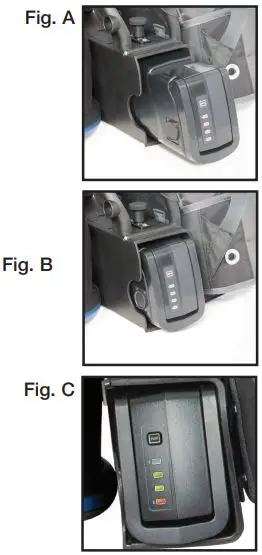
1. Holding battery by the front, carefully slide the battery into lower housing until it clicks in place. place (Fig. A).
2. Connector is spring-loaded. Battery will need to be pushed fully into position. (Fig. B)
BATTERY FUEL GAUGE
The battery fuel gauge indicates the approximate run time remaining on the battery. When the battery button is pressed, one to four indicators will light up, indicating the approximate battery charge remaining (Fig. C) as follows:
- All 4 lights on: Full Charge
- 3 lights on: 70% Charge
- 2 lights on: 45% Charge
- 1 light on: 25% Charge
- 1 light on and blinking: Low battery, charge when possible
CHARGER GROUNDING INSTRUCTIONS
THE COMFORT PRO FREEDOM BATTERY CHARGER MUST BE GROUNDED. If the charger should malfunction or stop working, grounding provides a path of least resistance for electrical current, thereby reducing the risk of electrical shock. This unit is equipped with a cord that has an equipment-grounding conductor and grounding plug. The plug must be inserted in an appropriate outlet that is properly installed and grounded in accordance with all local codes and ordinances. Cutting off the ground wire or using a cord that is not equipped with a ground plug will void the warranty on the unit, and Powr-Flite will accept NO liability associated with the unit.
WARNING!
Improper connection of the equipment-grounding conductor can result in a risk of electric shock. Check with a qualified electrician or service person if you are in doubt as to whether the outlet is properly grounded. Do not modify the plug provided with the appliance. If it will not fit the outlet, have a proper outlet installed by a qualified electrician.
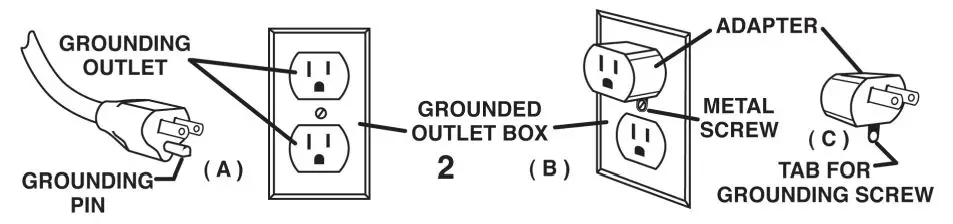
The vacuums are for use on a nominal 120-volt circuit, and have a grounded plug that looks like the plug illustrated in Figure A. A temporary adapter that looks like the adapter illustrated in Figure B and C may be used to connect this plug to a 2-pole receptacle as shown in Figure B if a properly grounded outlet is not available. The temporary adapter should be used only until a properly grounded outlet (Figure A) can be installed by a qualified electrician. The green-colored rigid ear, lug, or the like, extending for the adapter must be connected to a permanent ground such as a properly grounded outlet box cover. Whenever the adapter is used, it must be held in place by a metal screw.
Note: In Canada, the use of a temporary adapter is not permitted by the Canadian Electrical Code.
WARNING!
The replacement or repair of damaged wiring should only be performed by a qualified electrician or service engineer from the manufacturer or authorized service center.
OPERATING INSTRUCTIONS
IMPORTANT!
PERFORM PROPER INSTALLATION OF HEPA BAGS AND CORD IN COMFORT PRO BACKPACK VACUUMS.
Please read the following instructions carefully. They will help to get the best performance from this professional commercial vacuum cleaner and to maintain it in optimum condition. Always make sure the main power of the vacuum is off and the unit is not plugged in when doing any maintenance on the vacuum.
PREPARING TO VACUUM
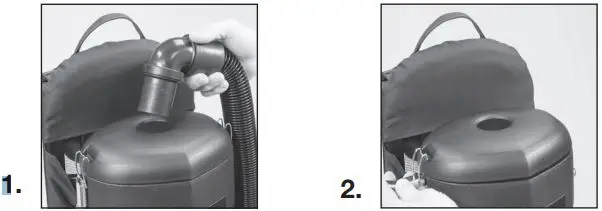
- Remove vacuum hose from top of unit. (Fig. 1)

- Release the two latches and lift off lid. (Fig. 2)
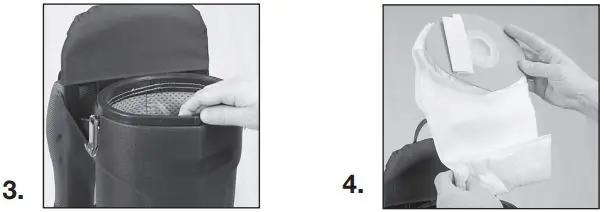
- Ensure Micro Cloth bag is fully seated on Comfort Pro tank housing. (Fig. 3)

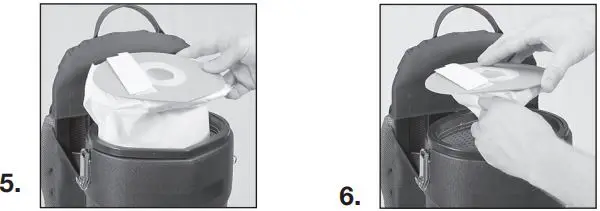
- Fold the bottom 2” of the HEPA bag up and hold into place. (Fig. 4)
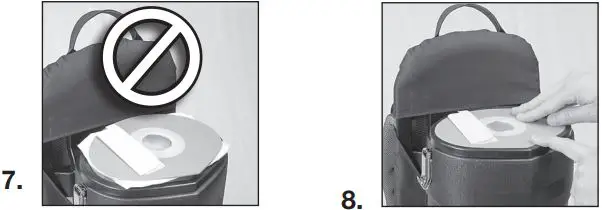
- Insert HEPA bag inside of micro cloth bag. (Fig.5)

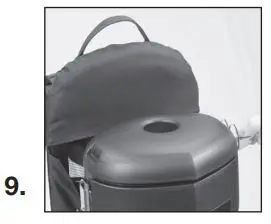
- Squeeze bag just below the cardboard collar and drop onto rubber gasket. (Fig. 6)
- Ensure that white bag is not protruding under cardboard collar. (Fig. 7)

- NOTE: Cardboard must be properly seated inside gasket groove. Cardboard will be flush with gasket. (Fig. 8)
- Replace lid, lock down the two latches and install hose. (Fig. 9).

OPERATING THE BACKPACK VACUUM
- Fasten the ends of the top and bottom wand together.
- Attach the floor tool to end of wand. Align the steel ring with the groove on the floor tool to ensure a secure fit and tighten.
- Turn the unit on, and proceed with vacuuming.
- The on/off switch is conveniently located on the body of the backpack vacuum (Fig. 10)
PROPER VACUUMING MOTION FOR LARGE AREAS
- Begin with the wand parallel to your body.
- Draw the top of the wand in toward your waist and twist at the waist walking backward or forward, in a side-to-side motion.
- The motion is similar to mopping and keeps the upper body and arms from tiring.
WARNING!
Always unplug machine before cleaning, or making any adjustments or repairs.
The backpack vacuum has four levels of filtration: the paper vacuum bag, a micro cloth filter, a pre-motor filter and an exhaust filter. These bags and filters capture fine dust particles and protect the motor from dirt. It is important to replace the paper bag when it is no more than ½ full and to clean the filters on a regular schedule and replace as necessary.
Paper Vacuum Bag
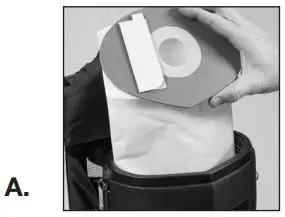
- 1. Remove paper bag. Insert a new paper bag into the cloth bag, making sure the cardboard disk is centered on the flexible sealing ring. When you replace the lid, the short nozzle in the center of the lid will be closed over the central hole of the cardboard disk of the paper vacuum bag providing a seal. (Fig. A)

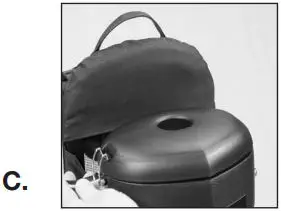
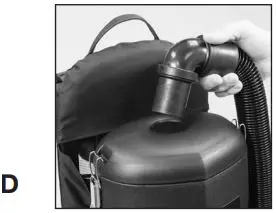
- 2. Replace the lid. Fasten latches and replace hose. (Figs. C-D)

 Micro Cloth Filter
After each use, the cloth filter bag should be inspected. Hand wash the cloth filter bag every 6 months using cold water and no detergent. Line dry. - 3. Remove the micro cloth bag, clean and replace. (Fig. B)

- 4. Replace paper vacuum bag and lid. Fasten latches and insert hose. (Figs. C-D)
Pre-Motor Filter
The pre-motor filter is located under the micro cloth filter. Inspect after each use. The filter can be washed using cold water and no detergent. Lay flat to dry. Replace every 6 months. - 5. Remove the lid, the paper vacuum bag, and the cloth bag to expose the pre-motor filter.
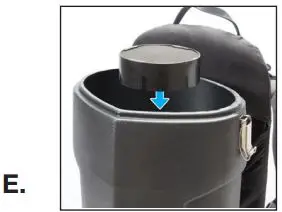
- 6. Remove the foam pre-motor filter from the dust compartment, clean and replace. If filter is extremely dirty, rinse out and air dry before replacing back into vacuum. (Fig. E)

- 7. Reinstall the cloth bag, the paper vacuum bag and replace the lid, fasten latches and insert the hose. (Figs. C-D)
Exhaust Filter
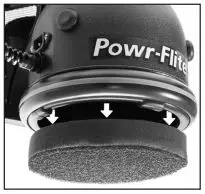
The exhaust filter is an easy-access washable, reusable post-motor filter located on the bottom of the vacuum. For average use of the vacuum, remove and clean the exhaust motor filter every 3 months. The filter can be washed using cold water and no detergent. Lay flat to dry. Replace once a year. - 8. Remove the foam post-motor filter, clean and replace.
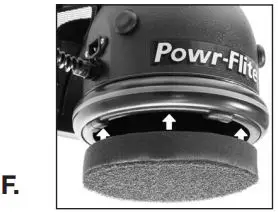
- 9. Reinstall the filter at the bottom of the vacuum. (Fig. F)

 Micro Cloth Filter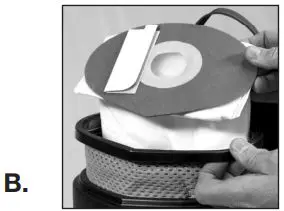
Wearing the Backpack Vacuum
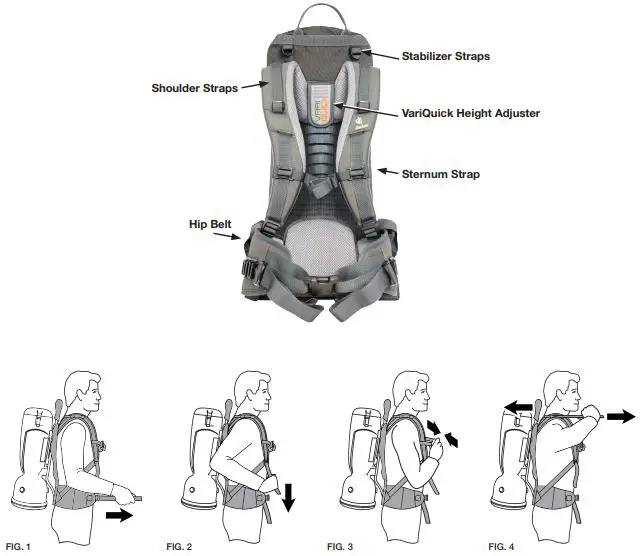
The backpack is designed to balance the weight of the vacuum on the hips, not the shoulders.
- Adjust the VariQuick height adjuster to your back length.
- Loosen all of the straps and place the vacuum on your back.

- Place the hip belt over your hip and connect the buckle. Your hip bones should be centered between the top and bottom of the belt. Pull the straps forward to tighten the hip belt. (Fig. 1)
- Pull down the shoulder straps to tighten the backpack on your shoulders. (Fig. 2) Do not tighten too tight. The main weight of the vacuum should be on the hip belt. The anchor points of the shoulder straps should ideally be be-tween the shoulder blades. Adjust the VariQuick height adjuster if necessary to properly fit the vacuum to your back length.
- Adjust the sternum strap on a comfortable part of your chest and close the strap. (Fig. 3)
- Loosen or tighten the stabilizer straps as needed, to fit your back. (Fig. 4)
- Do final adjustments on the shoulder and stabilizer straps as needed to balance the weight of the vacuum on the hips.
TROUBLESHOOTING
- If the vacuum will not operate, check the following:
- The battery pack connection to the vacuum.
- The battery pack is charged.
- That the switch is in the “on” position and functioning properly.
- If the battery pack is not charging, check that the charger is plugged into 120 Volt outlet and that the battery is properly connected to the charger. Also check fuse in charger.
- If the exhaust air from the bottom of the vacuum is warmer than usual, check, clean or replace all filters.
- If loss of suction occurs, check the following:
- Check that debris is not plugging the hose, wand, and/or floor tool.
- Check, clean or replace both Intercept Micro and Micro Cloth filters.
- Check that the hose cuffs are fitting tightly on the hose and are not cracked.
- Check that the cap is properly attached to the vacuum body.
- If the charger’s LED indicator is off and there is no output voltage when plugged in, check both ends of the power cord.
The backpack vacuum has been fitted with a thermal overload switch to protect the motor against damage should the airflow be blocked for extended periods. This may occur if the vacuum bag is overfull, the micro cloth bag is clogged, or if the vacuum hose or exhaust is blocked. The vacuum motor will stop before it can get too hot. If this happens, empty and thoroughly clean the vacuum bag and filters, or free any blockage and ensure that adequate airflow is restored. After the motor cools, you will be able to restart the machine – this may take up to 20 minutes.
SPECIFICATIONS
Specifications and parts are subject to change without notice. Please refer to www.Powr-Flite.com for the latest schematic drawing and parts list.
| PRODUCT SPECIFICATIONS | ||
| MODEL | COMFORT PRO FREEDOM 6 | COMFORT PRO FREEDOM 6 PREMIUM |
| ITEM# | CPF6S | CPF6P |
| TOOL KIT* | Standard | Hands-Free |
| BODY | High Density Polyethylene | High Density Polyethylene |
| DIMENSIONS (L X W X H) | 10 in x 12.5 in x 26.5 in 25.4 cm x 31.8 cm x 67.3 cm | 10 in x 12.5 in x 26.5 in 25.4 cm x 31.8 cm x 67.3 cm |
| MACHINE WEIGHT (LBS. / KG) | 8.75 lbs. / 3.96 kg | 8.75 lbs. / 3.96 kg |
| HARNESS WEIGHT (LBS. / KG) | 3.2 lbs. / 1.45 kg | 3.2 lbs. / 1.45 kg |
| BATTERY WEIGHT (LBS. / KG) | 5.75 lbs. / 2.61 kg | 5.75 lbs. / 2.61 kg |
| CORD LENGTH / TYPE | 50 ft. / 15 m, direct plug | 50 ft. / 15 m, direct plug |
| CAPACITY (QUARTS / LITERS) | 6 qt. / 5.69 l | 6 qt. / 5.69 l |
| FILTRATION | 5 stage HEPA | 5 stage HEPA |
| WATERLIFT | 62 in. / 157 cm | 62 in. / 157 cm |
| CFM /CMM | 70 cfm / 1.98 cmm | 70 cfm / 1.92 cmm |
| CLEANING PRODUCTIVITY | 7,407 sq. feet per hour 688 sq. meters per hour | 7,407 sq. feet per hour 688 sq. meters per hour |
| SOUND LEVEL | 62 dBa | 62 dBa |
| BATTERY RUN TIME | 55 minutes | 55 minutes |
| BATTERY CHARGE TIME | 2.5 hours | 2.5 hours |
| APPROVALS | CRI Silver Level Approved | CRI Silver Level Approved |
TOOL KITS
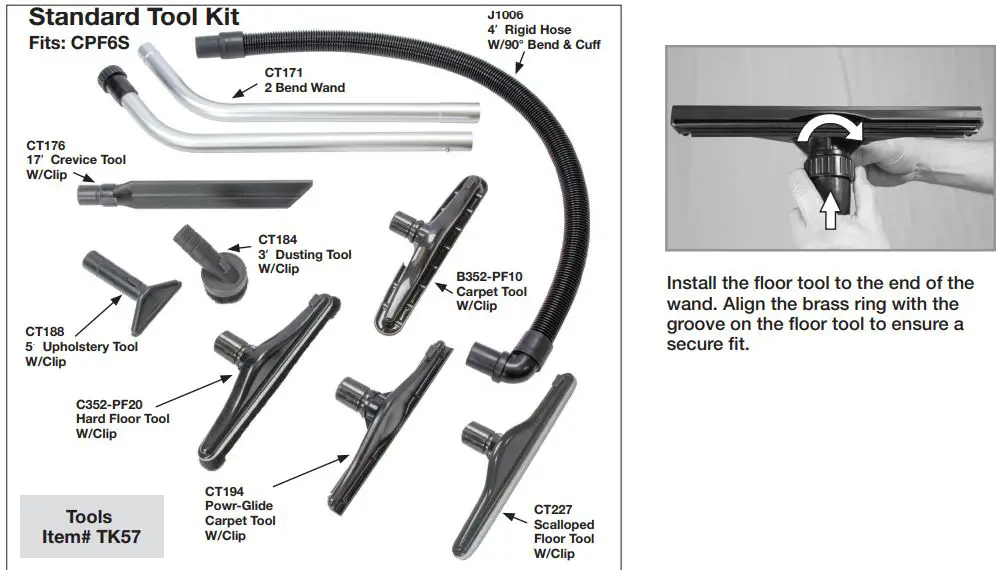

TOOLS SCHEMATICS AND PARTS LIST
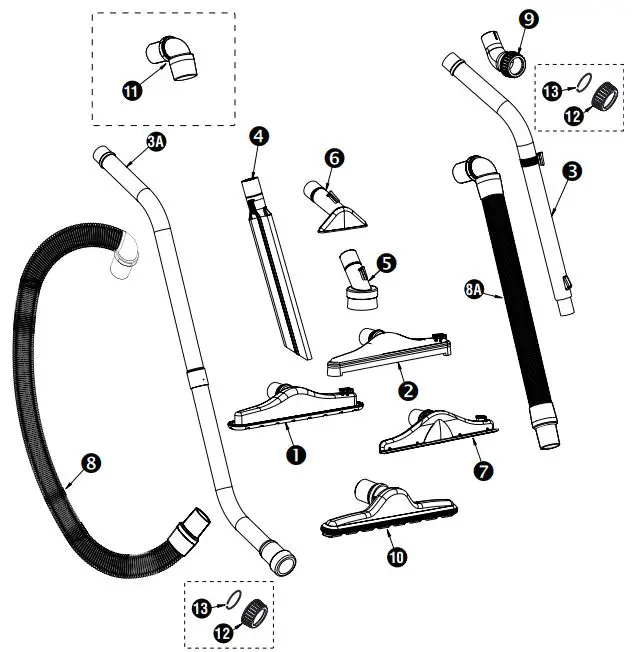
| STANDARD TOOL KIT – FITS CPF6S | |||
| ITEM | DESCRIPTION | PART NO. | OTY |
| 1 | CARPET TOOL W/CLIP | B352-PF10 | 1 |
| 2 | HARD FLOOR TOOL W/CLIP | C352-PF20 | 1 |
| 3A | DOUBLE BEND WAND | CT171 | 1 |
| 4 | 17″ CREVICE TOOL W/CLIP | CT176 | 1 |
| 5 | 3″ DUSTING TOOL W/CLIP | CT184 | 1 |
| 6 | 5″ UPHOLSTERY TOOL W/CLIP | CT188 | 1 |
| 7 | POWR-GLIDE CARPET TOOL W/CLIP | CT194 | 1 |
| 8 | 4′ CRUSH PROOF HOSE W/90° CUFF | J1006 | 1 |
| 10 | 14” SCALLOPED FLOOR TOOL | CT227 | 1 |
| 11 | 90 DEGREE SWIVEL CUFF | J1004 | 1 |
| 12 | NUT | J1009 | 1 |
| 13 | RING | J1010 | 1 |
| PREMIUM TOOL KIT – FITS CPF6P | |||
| ITEM | DESCRIPTION | PART NO. | OTY |
| 1 | CARPET TOOL W/CLIP | B352-PF10 | 1 |
| 2 | HARD FLOOR TOOL W/CLIP | C352-PF20 | 1 |
| 3 | SINGLE BEND TELESCOPING WAND W/CLIP | CT170 | 1 |
| 4 | 17″ CREVICE TOOL W/CLIP | CT176 | 1 |
| 5 | 3″ DUSTING TOOL W/CLIP | CT184 | 1 |
| 6 | 5″ UPHOLSTERY TOOL W/CLIP | CT188 | 1 |
| 7 | POWR-GLIDE CARPET TOOL W/CLIP | CT194 | 1 |
| 8A | 2′ – 6′ STRETCH HOSE W/90° CUFF | J1005 | 1 |
| 9 | ONE BEND WAND ADAPTOR | J1007 | 1 |
| 10 | 14” SCALLOPED FLOOR TOOL | CT227 | 1 |
| 11 | 90 DEGREE SWIVEL CUFF | J1004 | 1 |
| 12 | NUT | J1009 | 1 |
| 13 | RING | J1010 | 1 |
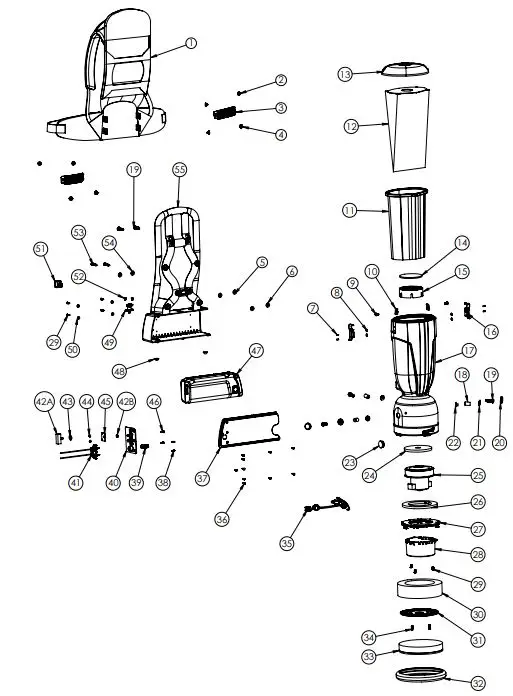
| No. | Part No. | Qty | Description | No. | Part No. | Qty | Description | |
| 1 | X9658 | 1 | Deuter Backpack Harness | 41 | X1201 | 1 | Terminal Block | |
| 2 | A352-9401 | 4 | Female Shoulder Rivet | 42A | X1523 | 1 | Momentary Switch | |
| 3 | X1241 | 2 | Belt Clip w/Retainer | 42B | 1 | Nut Used For Mounting X1523 Onto X1526 | ||
| 4 | A352-9402 | 4 | Male Shoulder Rivet | |||||
| 5 | X8235 | 2 | Washer | 43 | 7CM004 | 1 | Washer | |
| 6 | X1466B | 2 | Rubber Mounting | 44 | X8257 | 2 | Nyloc Nut | |
| 7 | X9758 | 4 | Rivet | 45 | X1526 | 1 | Momentary Switch Mounting Bracket | |
| 8 | 01575 | 4 | Washer | |||||
| 46 | X9748 | 2 | Screw 6-32 x 5/8” | |||||
| 9 | X9754 | 2 | Screw 1/4-20 x 5/8” | |||||
| 47 | X1200C | 1 | Battery | |||||
| 10 | X9691 | 2 | Clip Nut | |||||
| 48 | X1260 | 2 | Rubber Foot | |||||
| 11 | X9679A | 1 | 6 Qt. Microcloth Bag With Gasket | |||||
| 49 | X1207 | 1 | Spring Loaded Plunger | |||||
| 12 | X9739 | 1 | Hepa Paper Bag (10 Pk.) | |||||
| 50 | X9747 | 4 | Washer | |||||
| X9735 | 1 | Closed Mouth Paper Bag (10 Pk.) | ||||||
| 51 | X9028 | 1 | Rocker Switch | |||||
| X9737 | 1 | Open Mouth Paper Bag (10 Pk.) | ||||||
| 52 | X1263 | 2 | Screw 8-18 x 3/8” | |||||
| 13 | X9666 | 1 | 6Qt Backpack Lid | |||||
| 53 | X8843 | 2 | Bolt 1/4-20 x 1-1/4” | |||||
| 14 | X9683 | 1 | Inlet Filter | |||||
| 54 | 2568 | 2 | Harness Mounting Washer | |||||
| 15 | X9668 | 1 | Inlet Filter Base | |||||
| 55 | X1382 | 1 | Harness Frame | |||||
| 16 | A352-3300 | 2 | Lid Latch | |||||
| 17 | X9664 – F | 1 | 6Qt Housing w/Filter | |||||
| 18 | X9681 | 3 | Rubber Motor Mount | |||||
| 19 | X9688 | 5 | Motor Mounting Bolt | |||||
| 20 | X9734 | 2 | Screw Cap | |||||
| 21 | X9733 | 2 | Screw Cap Base | |||||
| 22 | X9713 | 3 | Motor Mounting Weldnut | |||||
| 23 | X1395 | 1 | Plug, Round Hole .187 Dia” | |||||
| 24 | X9079 | 1 | Gasket 3/8” Donut Motor Seal | |||||
| 25 | X1208 | 1 | 5.1” Vacuum Motor | |||||
| 26 | X1205 | 1 | Motor Plate Gasket | |||||
| 27 | X9671 | 1 | Motor Mounting Bracket | |||||
| 28 | X9669 | 1 | Motor Shield | |||||
| 29 | X9690 | 7 | 8-18 Hi-Lo Screw | |||||
| 30 | X9717 | 1 | Sound Damping Foam Ring | |||||
| 31 | X9667 | 1 | Exhaust Filter Plate | |||||
| 32 | X9685 | 1 | Housing Bumper | |||||
| 33 | X9682 | 1 | Filter, Exhaust Backpack | |||||
| 34 | X9676 | 2 | Screw 8-18 x 3/4” | |||||
| 35 | X1261 | 1 | Power Harness | |||||
| 36 | A732-8314 | 10 | Screw #8-18 x 5/8” | |||||
| 37 | X1383 | 1 | Battery Cover | |||||
| 38 | X1198 | 2 | Screw #4 x 1/2” | |||||
| 39 | X1206 | 1 | Battery Eject Spring | |||||
| 40 | X1384 | 1 | Battery Terminal Wall | |||||
For warranty information go to www.Powr-Flite.com
A Tacony Company
3101 Wichita Court • Fort Worth, TX 76140-1755
1-800-880-2913 • Fax: 1-817-551-0719
 Commercial Floor Care Equipment | Powr-Flite