 DOC022.97.80629
HQ1110, HQ1130, HQ1140, HQ2100H
Q2200, HQ4100, HQ4200, HQ4300
06/2020, Edition 1
Basic User Manual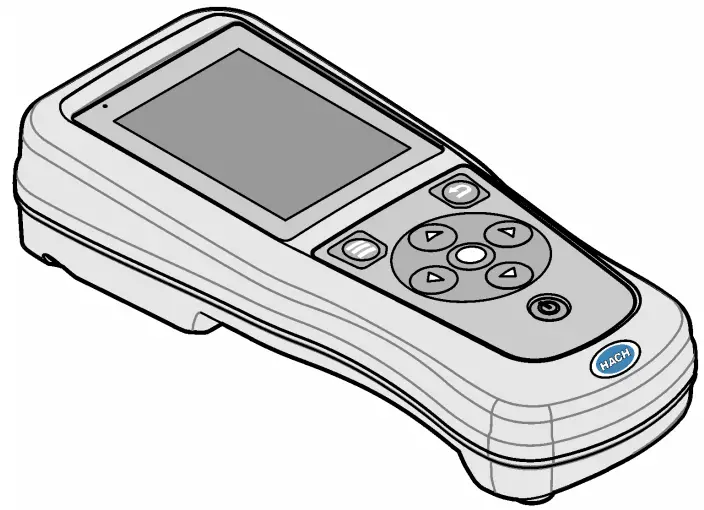
Section 1
Online user manual
This Basic User Manual contains less information than the User Manual, which is available on the manufacturer’s website.
Section 2
Product overview
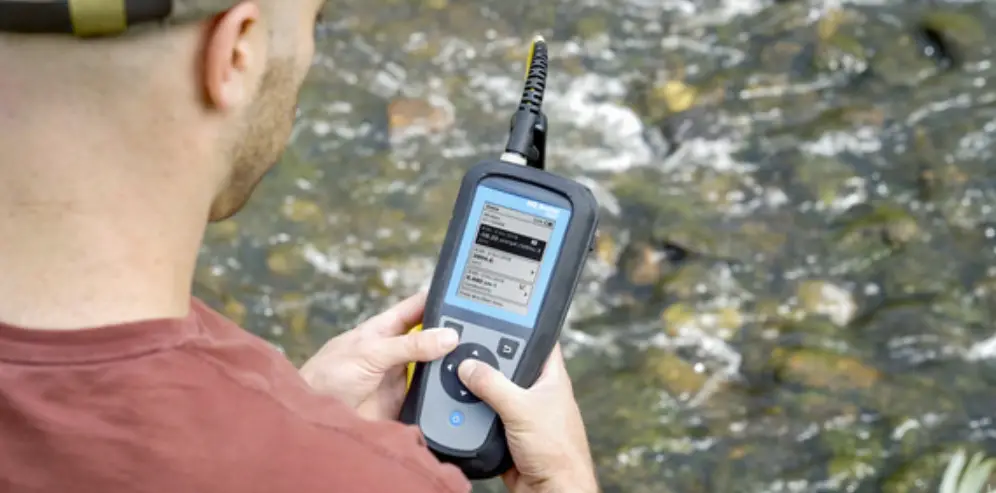
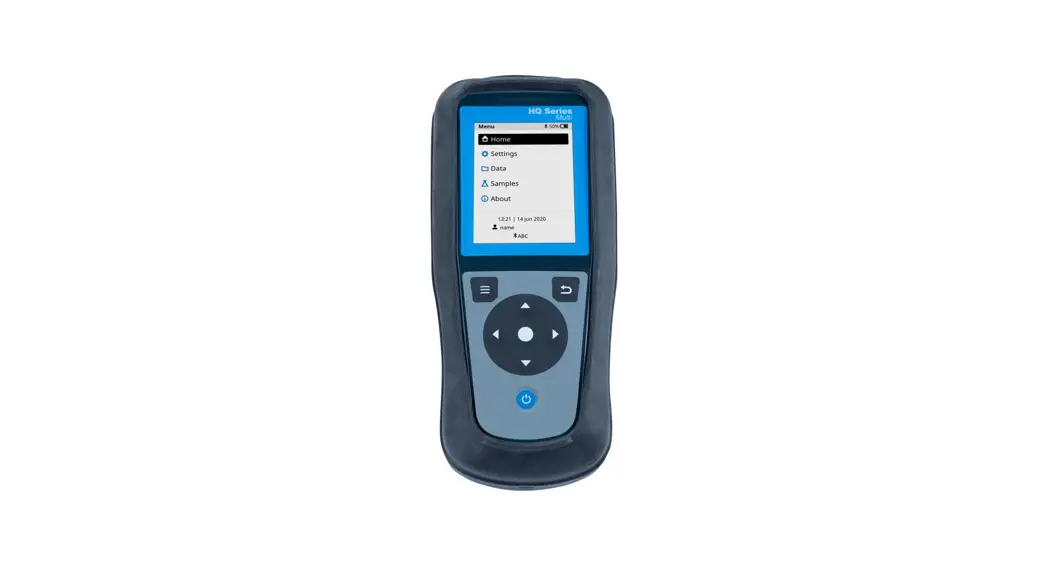
The HQ Series portable meters are used with digital Intellical¹ probes to measure one or more water quality parameters. Refer to Figure 1. The meter automatically recognizes the type of probe that is connected. The meter can connect to a PC or USB storage device to transfer data that is saved in the meter. The optional Hach Communication Dongle (HCD) connects the meter to Claros™.
The HQ Series portable meters are available in eight models. Table 1 shows the types of probes that can connect to each model.
Figure 1 Product overview
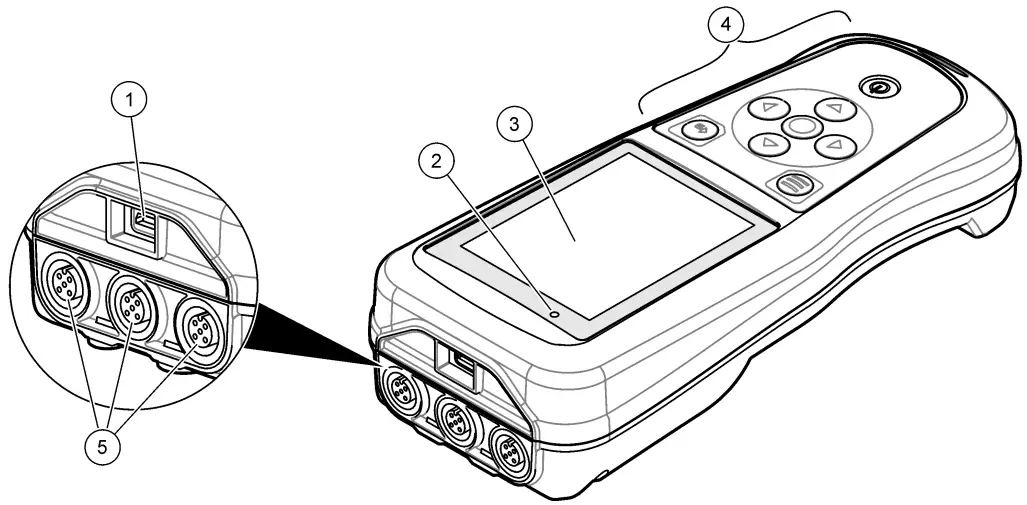
- Micro-USB connector
- LED indicator
- Display
- Keypad
- Intellectual probe ports (three probe-port options shown)
Table 1 HQ Series meter models
| Meter model | Probe connectors | pH/mV/ORP2 probes | LDO/LBOD3 probes | Conductivity4 probes | ISE5 probes |
| HQ1110 | 1 | ✔ | |||
| HQ1130 | 1 | ✔ | |||
| HQ1140 | 1 | ✔ | |||
| HQ2100 | 1 | ✔ | ✔ | ✔ | |
| HQ2200 | 2 | ✔ | ✔ | ✔ | |
| HQ4100 | 1 | ✔ | ✔ | ✔ | ✔ |
| HQ4200 | 2 | ✔ | ✔ | ✔ | ✔ |
| HQ4300 | 3 | ✔ | ✔ | ✔ | ✔ |
Section 3
Specifications
Specifications are subject to change without notice.
| Specification | Details |
| Dimensions (L x W x H) | 22 x 9.7 x 6.3 cm (8.7 x 3.8 x 2.5 in.) |
| Weight | HQ1110, HQ1130, HQ1140 and HQ2100: 519 g (18.3 oz); HQ2200: 541 g (19.1 oz); HQ4100: 530 g (18.7 oz); HQ4200: 550 g (19.4 oz); HQ4300: 570 g (20.1 oz) |
| Enclosure rating | IP67 with battery compartment installed |
| Power requirements (internal) | Rechargeable lithium-ion battery 18650 (18-mm diameter x 65-mm length, cylindrical), 3.7 VDC, 3400 mAh; Battery Life: > 1 week with typical use (10 readings/day, 5 days/week in Continuous or Push to read mode, or > 24 hours in Interval mode with 5-minute intervals and shutdown timer ≤ 15 minutes) |
| Power requirements (external) | Class II, USB power adapter: 100–240 VAC, 50/60 Hz input; 5 VDC at 2 A USB power adapter output |
| Meter protection class | IEC Class III (SELV (Separated/Safety Extra-Low Voltage) powered); USB power adapter is IEC Class II (double-insulated) |
| Operating temperature | 0 to 60 °C (32 to 140 °F) |
| Charging temperature | 10 to 40 °C (50 to 104 °F) |
| Operating humidity | 90% (non-condensing) |
| Storage temperature | –20 to 60 °C (–4 to 140 °F) maximum 90% relative humidity (non-condensing) |
| Probe connector | 5-pin M12 connector for Intellical probes |
| Micro-USB connector | The micro-USB connector enables USB cable and USB power adapter connectivity. |
| Data log (internal) | HQ1000 Series: 5000 data points; HQ2000 Series: 10,000 data points; HQ4000 Series: 100,000 data points |
- pH/mV/ORP probes include temperature
- LDO/LBOD probes include temperature
- Conductivity probes include salinity, TDS (total dissolved solids), resistivity, temperature
- Ion-selective probes such as ammonia, nitrate, chloride, fluoride, sodium
| Specification | Details |
| Data storage | Automatic storage in Push to read and Interval modes. Manual storage in Continuous mode. |
| Data export | USB connection to PC or USB storage device (limited to the storage device capacity) |
| Temperature correction | Off, automatic and manual (parameter-specific) |
| Certifications | CE, FCC, ISED, RCM, KC, ETL Verified: US DOE/ NRCan Energy Efficiency, RoHS |
| Warranty | HQ1000 and HQ2000 series: 1 year (US), 2 years (EU); HQ4000 series: 3 years (US), 3 years (EU) |
Section 4
General information
In no event will the manufacturer be liable for direct, indirect, special, incidental, or consequential damages resulting from any defect or omission in this manual. The manufacturer reserves the right to make changes in this manual and the products it describes at any time, without notice or obligation. Revised editions are found on the manufacturer’s website.
4.1 Safety information
NOTICE
The manufacturer is not responsible for any damages due to misapplication or misuse of this product including, without limitation, direct, incidental and consequential damages, and disclaims such damages to the full extent permitted under applicable law. The user is solely responsible to identify critical application risks and install appropriate mechanisms to protect processes during a possible equipment malfunction.
Please read this entire manual before unpacking, setting up, or operating this equipment. Pay attention to all danger and caution statements. Failure to do so could result in serious injury to the operator or damage to the equipment.
Make sure that the protection provided by this equipment is not impaired. Do not use or install this equipment in any manner other than that specified in this manual.
4.2 Use of hazard information DANGER
Indicates a potentially or imminently hazardous situation that, if not avoided, will result in death or serious injury. WARNING
Indicates a potentially or imminently hazardous situation that, if not avoided, could result in death or serious injury. CAUTION
Indicates a potentially hazardous situation that may result in minor or moderate injury.
NOTICE
Indicates a situation that, if not avoided, may cause damage to the instrument. Information that requires special emphasis.
4.3 Precautionary labels
Read all labels and tags attached to the instrument. Personal injury or damage to the instrument could occur if not observed. A symbol on the instrument is referenced in the manual with a precautionary statement.
 Electrical equipment marked with this symbol may not be disposed of in European domestic or public disposal systems. Return old or end-of-life equipment to the manufacturer for disposal at no charge to the user.
4.4 Product components
Make sure that all components have been received. Refer to Figure 2. If any items are missing or damaged, contact the manufacturer or a sales representative immediately.
Figure 2 Product components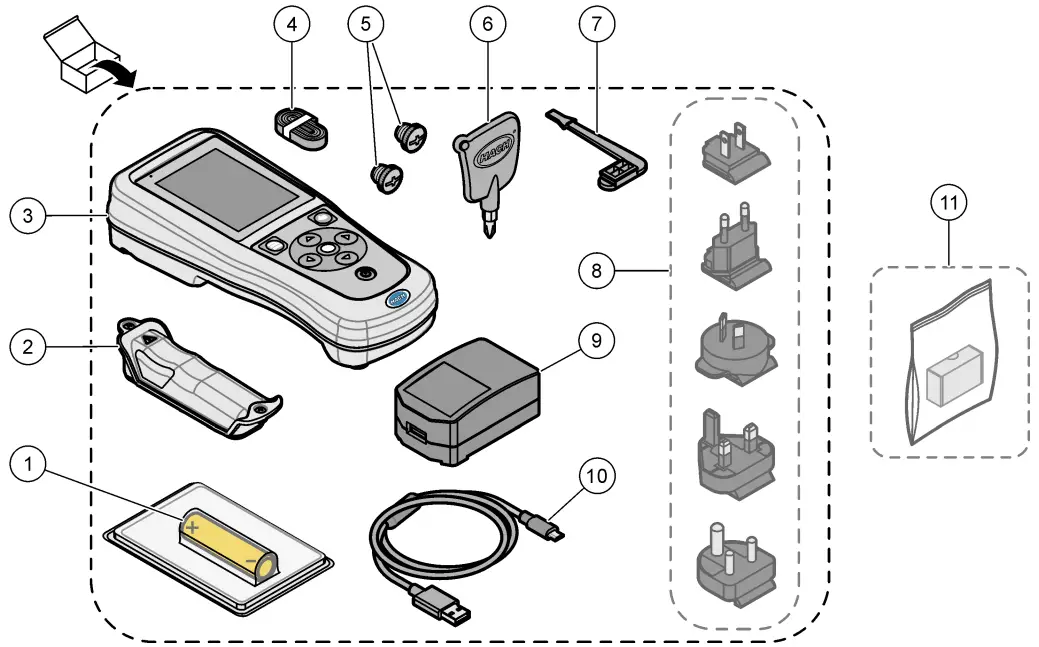
| 1 Rechargeable lithium-ion battery | 7 USB port plug |
| 2 Battery compartment | 8 Optional power plugs |
| 3 Meter | 9 USB power adapter |
| 4 Hand lanyard | 10 USB cable, Type A to micro, 1 m (3.3 ft) |
| 5 Probe connector plugs | 11 Optional Hach Communication Dongle (HCD) |
| 6 Screwdriver (#1 Phillips) |
4.5 Certification
Canadian Radio Interference-Causing Equipment Regulation, ICES-003, Class B:
Supporting test records reside with the manufacturer.
This Class B digital apparatus meets all requirements of the Canadian Interference-Causing Equipment Regulations.
Supporting test records reside with the manufacturer. The device complies with Part 15 of the FCC Rules. Operation is subject to the following conditions:
- The equipment may not cause harmful interference.
- The equipment must accept any interference received, including interference that may cause undesired operation.
Changes or modifications to this equipment not expressly approved by the party responsible for compliance could void the user’s authority to operate the equipment. This equipment has been tested and found to comply with the limits for a Class B digital device, pursuant to Part 15 of the FCC rules.
These limits are designed to provide reasonable protection against harmful interference when the equipment is operated in a commercial environment. This equipment generates, uses, and can radiate radio frequency energy and, if not installed and used in accordance with the instruction manual, may cause harmful interference to radio communications. Operation of this equipment in a residential area is likely to cause harmful interference, in which case the user will be required to correct the interference at their expense. The following techniques can be used to reduce interference problems:
- Move the equipment away from the device receiving the interference.
- Reposition the receiving antenna for the device receiving the interference.
- Try combinations of the above.
4.6 Hach Communication Dongle (optional)
The optional Hach Communication Dongle (HCD) uses Bluetooth®6 Low Energy to communicate with Claros™. Follow all manufacturer guidance and warnings to install and operate the device. Refer to the documentation that is supplied with the HCD.
4.7 Intended use CAUTION
Chemical exposure hazard. Obey laboratory safety procedures and wear all of the personal protective equipment appropriate to the chemicals that are handled. Refer to the current safety data sheets (MSDS/SDS) for safety protocols.
The HQ Series portable meters are intended for use by individuals who measure water quality parameters in the laboratory or in the field. The HQ Series meters do not treat or alter the water.
Section 5
Installation
DANGER
Multiple hazards. Only qualified personnel must conduct the tasks described in this section of the document.
5.1 Lithium battery safety WARNING Fire and explosion hazards. Lithium batteries may get hot, explode or ignite and cause serious injury if exposed to abuse conditions.
- Do not use the battery if there is visible damage.
6. The Bluetooth® word mark and logos are registered trademarks owned by the Bluetooth SIG, Inc., and any use of such marks by HACH is under license.
- Do not use the battery after a strong shock or vibration occurs.
- Do not expose the battery to fire or ignition.
- Keep the battery at temperatures less than 70 °C (158 °F).
- Keep the battery dry and away from water.
- Prevent contact between the positive and negative battery terminals.
- Do not let unauthorized persons touch the battery.
- Discard the battery in accordance with local, regional, and national regulations.
- Do not use or store the instrument in direct sunlight, near a heat source, or in high-temperature environments such as a closed vehicle in direct sunlight.
5.2 Install the battery
WARNINGFire and explosion hazards. This equipment contains a high-energy lithium battery that can ignite and cause fire or explosion, even without power. To maintain the safety provided by the instrument enclosure, the instrument enclosure covers must be installed and secured with the supplied hardware.
 WARNING
Explosion and fire hazards. Battery substitution is not permitted. Use only batteries that are supplied by the instrument manufacturer.
Only use the manufacturer-supplied lithium-ion rechargeable battery. Refer to Figure 3 for battery installation or removal.
Figure 3 Battery installation and removal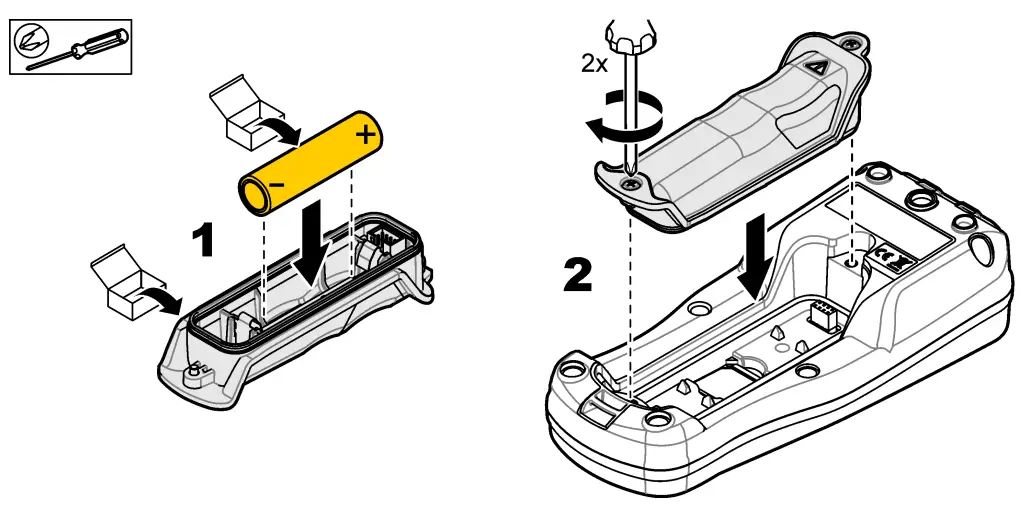
5.3 Charge the battery
 DANGER
Electrocution hazard. If this equipment is used outdoors or in potentially wet locations, a Ground Fault Circuit Interrupt (GFCI/GFI) device must be used for connecting the equipment to its main power source. WARNING
Fire hazard. Use only the external power supply that is specified for this instrument. WARNING
Electrical shock hazard. Externally connected equipment must have an applicable country safety standard assessment.
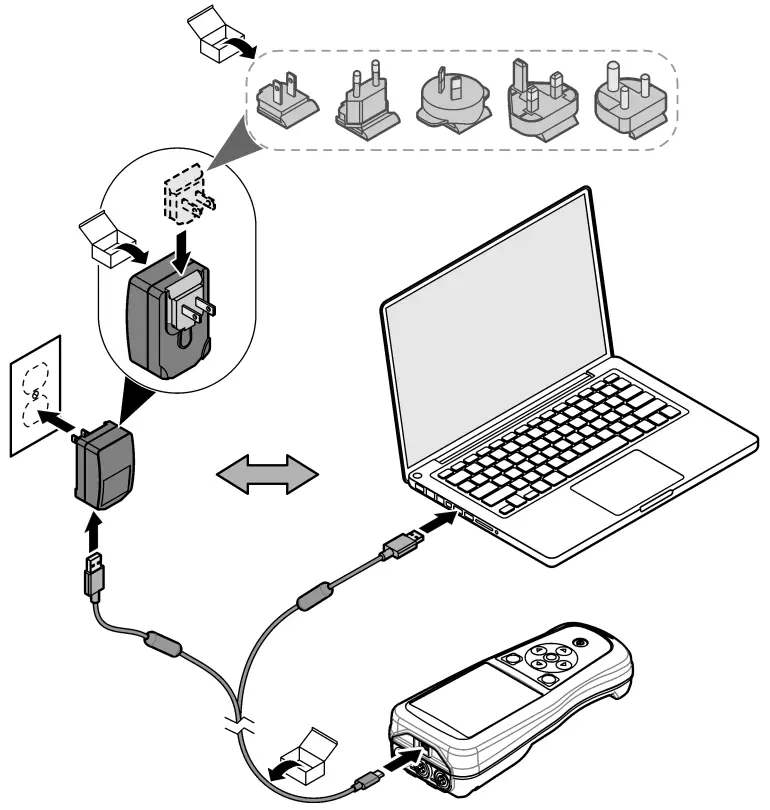
Use the supplied USB cable and USB power adapter or a PC to charge the battery. Refer to Figure 4. When the instrument connects to power and the on/off key is pushed, the green LED indicator is on. The user can operate the instrument while the battery charges. A battery with no charge becomes fully charged after approximately 5 hours when the USB power adapter is used and the instrument power is off.
Figure 4 Connect to the USB power adapter or a PC
5.4 Install the lanyard
Install the lanyard to safely hold the meter. Refer to Figure 5.
Figure 5 Lanyard installation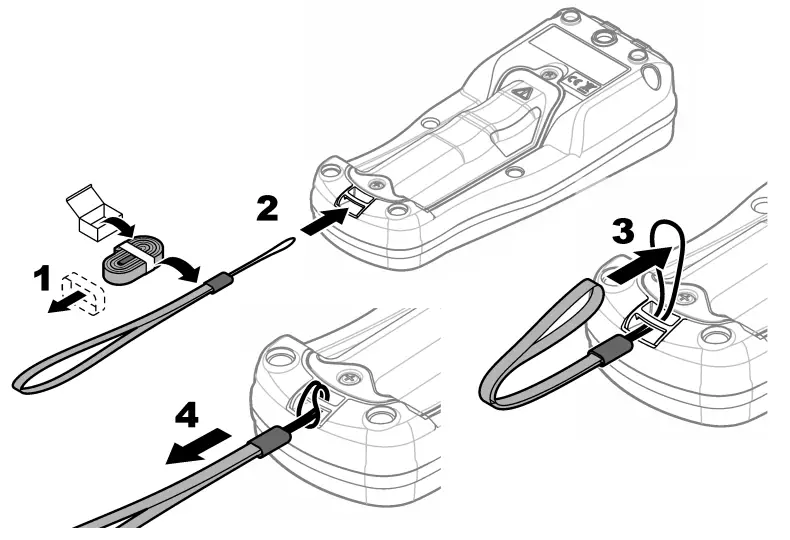
5.5 Install the probe and USB port plugs
Install the port plugs in the probe port(s) and USB port when the ports are not in use to keep the enclosure rating of the instrument. Refer to Figure 6 and Figure 7.
Note: Figure 6 shows a meter with three probe ports. Some meter models have only one or two probe ports.
Figure 6 Port plug installation
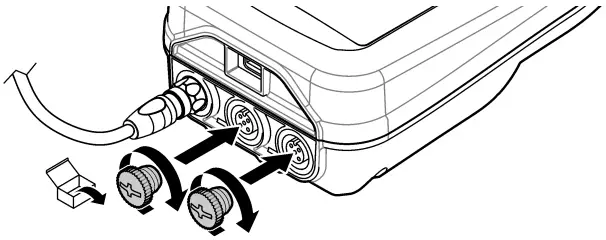
Figure 7 USB port plug installation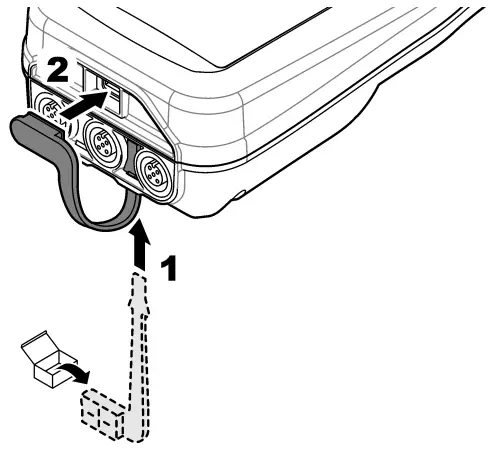
Section 6
Startup
6.1 Start the meter
Push  to start the meter. If the meter does not start, make sure that the battery is installed correctly or the meter is connected to a power source. Refer to Charge the Battery on page 8.
6.2 Select the language
When the meter is powered on for the first time or when a new battery is installed, the display shows the language selection screen. Select the applicable language. The user can also change the language from the Settings menu.
6.3 Set the date and time
When the meter is powered on for the first time or when a new battery is installed, the display shows the Date-Time screen. Complete the steps that follow to set the date and time.
Note: The user can also change the date and time from the Settings menu.
- Push the up and down arrow keys to select a date format.
- Push the right arrow to go to the date and time.
- Push the up and down arrow keys to change the date and time.
- Push the right arrow to highlight Save.
- Select Save to keep the settings.
6.4 Connect a probe
Make sure to set the time and date in the meter before a probe is connected. The timestamp for a probe is set when the probe is first connected to the meter. The time stamp automatically records the probe history and the time when measurements are made. Refer to Figure 8 to connect a probe to the meter.
Figure 8 Connect a probe to the meter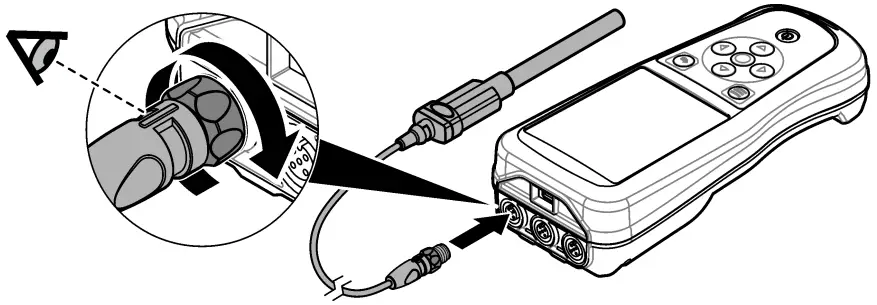
Section 7
After startup, the display shows the home screen. Refer to the Home screen on page 13. Use the keypad to select the available options and to change values. Refer to Keypad on page 15. Use the main menu to go to settings and other menus. Refer to the Main menu on page 16.
7.1 Home screen
The display shows the home screen when the meter is on and a probe is connected to the meter.
Refer to Figure 9. The HQ4100, HQ4200, and HQ4300 models have a color display. For models with two or three probe ports, the screen shows all of the connected probes. Refer to Figure 10.
The tasks that follow are available from the home screen:
- Measure samples
- Calibrate a probe
- Verify a calibration
- Set sample IDs (identification)
- View and manage data
- Read step-by-step instructions
Figure 9 Home screen example—One probe
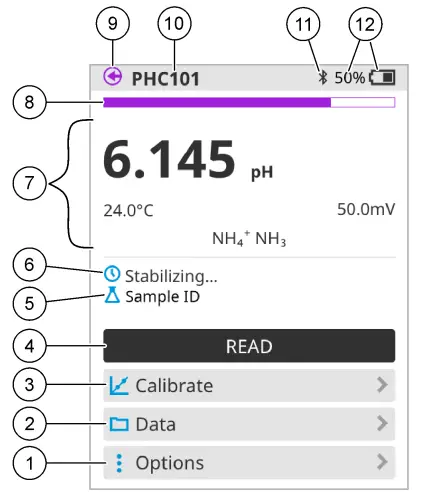
| 1 Options menu: gives access to instructions and other menus 2 Data menu: gives access to view and manage data 3 Calibrate button: starts a calibration 4 Read button: reads the sample or standard solution value 5 Sample ID: shows the name of the sample that is measured 6 Message area: shows the measurement status, sample ID, errors, and warnings | 7 Measurement value section: shows the measured value, temperature, and units 8 Measurement stability status indicator: shows the status of the measurement 9 Intellical probe port: shows the port location of the connected probe 10 Intellical probe name: shows the model name of the connected probe 11 Bluetooth® icon (if Hach Communication Dongle is installed): shows when a Bluetooth connection is active 12 Battery charge indicator: shows the percent of the battery charge |
Figure 10 Home screen example—Two or three probes
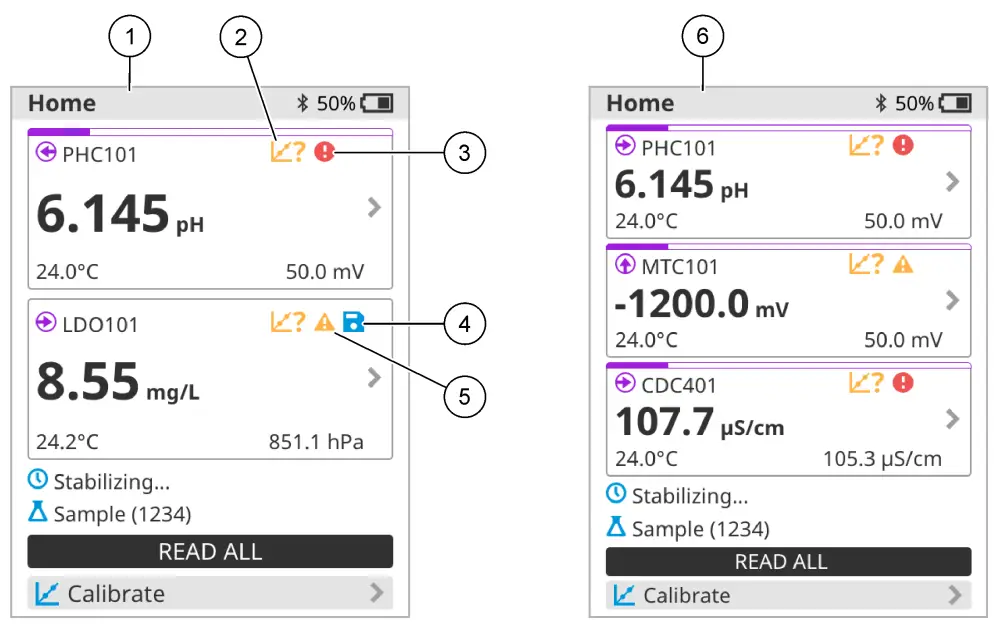
| 1 Home screen with two probes 2 Calibrations icon: indicates that the calibration was not accepted or has expired 3 Error icon (refer to Troubleshooting on page 20) | 4 Save icon: the measurement data is in the data log 5 Warning icon (refer to Troubleshooting on page 20) 6 Home screen with three probes |
7.2 Keypad
Refer to Figure 11 for a description of the keypad.
Figure 11 Keypad description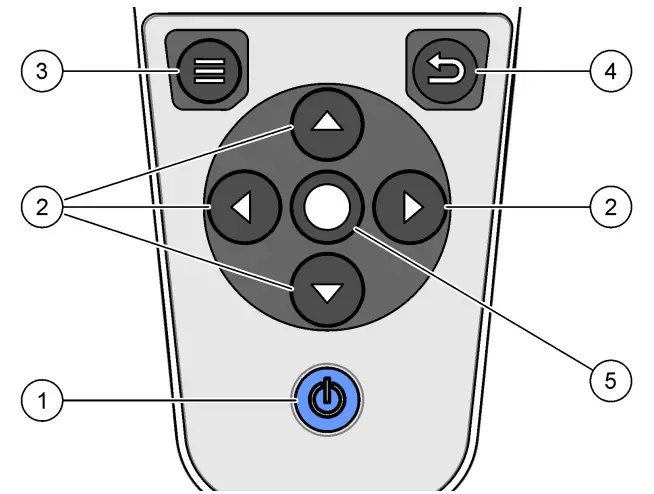
| 1 | On/off key | 4 | Back key |
| 2 | Navigation arrows | 5 | Select key |
| 3 | Menu key |
7.3 Main menu
Push  to go to the main menu. Refer to Figure 12.
Figure 12 Main menu description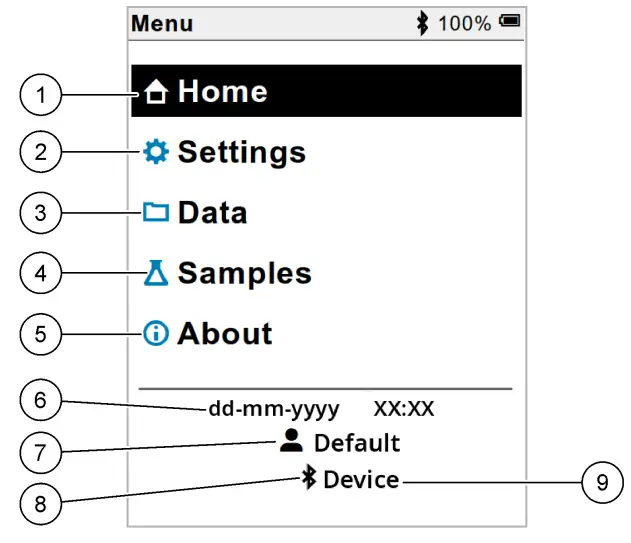
| 1 Home screen 2 Settings menu 3 Data menu 4 Sample ID menu 5 About meter screen | 6 Date and time 7 User ID 8 Bluetooth® icon (if HCD is installed) 9 Bluetooth® device ID (if HCD is installed) |
Section 8
Operation
This section gives general operating instructions for the meter. For more complete instructions, refer to the on-screen instructions in the meter or in the user manual for the probe.
8.1 Measure samples
The steps that follow are general steps to measure samples with the meter.
- Select the measurement mode. Refer to Meter settings on page 18.
- Prepare the sample for measurement. Refer to the on-screen instructions in the meter or in the user manual for the probe.
- Measure the sample as follows:
• Push to read mode: Select Read (or Read all) to measure the sample value. The meter automatically saves the value.
• Interval mode: Select Start (or Start all) to start the measurements. The meter automatically measures and saves the sample value at the specified time intervals. Select Stop (or Stop all) to stop the measurements.
• Continuous mode: The meter measures the sample value continuously. Select Save (or Save all) to save the value that shows on the display screen.
After each measurement, the display shows the result. The save icon shows on the display if the result is saved in the data log.
8.2 Calibrate a probe
The steps that follow are general steps for probe calibration with the meter. To change the calibration settings, refer to Probe settings on page 19.
- From the home screen, select
 Calibrate. If more than one probe is connected, select the probe to calibrate. The display shows the solution(s) to use for the calibration.
 - Prepare the buffers or standard solutions for calibration. Use the on-screen instructions in the meter or in the user manual for the probe.
- Select Read to start the calibration. The meter measures the value of the calibration solution.
When the measurement is complete, the display shows the result. - Select Read to measure the value of the other buffers or standard solutions, if applicable. Select Save to save the calibration.
 Calibrate. If more than one probe is connected, select the probe to calibrate. The display shows the solution(s) to use for the calibration.
Note: If the calibration is not accepted, refer to the on-screen troubleshooting instructions in the meter or in the user manual for the probe.
8.3 Verify the calibration
The steps that follow are general steps to verify a probe calibration with the meter. To change the verification settings, refer to Probe settings on page 19.
- From the home screen, select Options > Verify calibration. The display shows the buffer or standard solution to use for the verification.
Note: If more than one probe is connected, select the probe to verify. - Prepare the buffer or standard solution for verification. Use the on-screen instructions in the meter or in the user manual for the probe.
- Select Read to start the verification. The meter measures the value of the verification solution.
When the measurement is complete, the display shows the result. - If the verification is successful
 , select Save to save the result.
Note: If the verification is not accepted, refer to the on-screen troubleshooting instructions in the meter or in the user manual for the probe.
 , select Save to save the result.
8.4 Include sample ID with measurement data
The instrument can save a sample name (ID) with the stored measurement data. Enter multiple sample names in the instrument, then select the applicable sample name before the samples are measured. The instrument adds numbers to samples with the same name, e.g., “Sample name (2)”.
- Push
 and select Samples.
 - Select an option.
| Option | Description |
| Sample | Selects the sample name to save with the sample measurements. |
| Create new sample | Opens a screen to add new sample names. Sample names can include letters and numbers. |
| Delete samples | Removes sample names. |
8.5 Include user ID with stored data
The instrument can record a user name (ID) with the stored data. Enter multiple user names in the instrument, then select the applicable user name before calibrations or measurements are started.
- Push and select Settings. The list of settings shows.
- Select Users.
- Select an option.
| Option | Description |
| User | Selects the user name. The selected user name shows on the main menu screen and is saved with the stored data. |
| Create new user | Opens a screen to add new user names. User names can include letters and numbers. |
| Delete users | Removes user names. |
Section 9
Meter settings
Complete the steps that follow to change the general settings for the meter.
Note: Password protection may prevent access to some menus. Refer to the online user manual for information on access control.
- Push and select Settings. The list of settings shows.
- Select an option.
| Option | Description |
| [Probe name] | Changes the probe-specific settings for measurements, calibration, and verification. Refer to Probe settings on page 19 to change the settings for the connected probe. |
| Measurement mode | Sets when measurements are started. Options: Push to read, Continuous or Interval. Push to read: The sample is measured only when Read is pushed. Data is saved in the data log automatically when the stability criteria are met. Interval: The sample is measured at regular intervals for a specified duration. Data is stored in the data log automatically. Continuous: The meter measures the sample value continuously. Data is only saved in the data log when the user selects Save. |
| Temperature | Sets the temperature units to °C or °F. |
| Display | Changes the settings for the display. Options: Brightness, Backlight, and Shutdown. Brightness: Changes the intensity of the backlight. Options: 10 to 100% (default: 50%). Backlight: Sets the backlight off when the meter is not used for a specified time. Options: 15 seconds, 30 seconds, 1 minute, 5 minutes, or Never. Shutdown: Sets the meter off when the meter is not used for a specified time. Options: 1 minute, 2 minutes, 5 minutes, 10 minutes, 30 minutes, 1 hour, 2 hours, or Never. |
| Sound | Sets the meter to make a sound during key presses or notifications. Options: Key Press, Stability Alert, Reminder, Error/Warning Alert, or (battery) Charge Complete. |
| Users | Selects a user, adds a new user, or deletes a user. |
| Date-Time | Sets the date/time format, date, and time in the meter. |
| Language | Sets the meter language. |
| Access | Sets a password to prevent access to the probe settings, some meter settings (measurement mode, temperature, language) and software updates. A user without a password cannot delete settings or data when the access control is on. |
| Diagnostics | Makes a diagnostic file for technical support or service if a technical problem occurs. The user must connect the meter to a PC to get the file. |
Section 10
Probe settings
When a probe is connected to the meter, the user can change the probe settings for measurements, calibrations and verifications. Refer to the steps that follow to access the settings for the connected probe. For a complete description of the settings, refer to the online user manual for the meter.
Note: Password protection may prevent access to some menus. Refer to the online user manual for information on security settings.
- Push and select Settings. The list of settings shows.
- Select the probe name.
- Select the applicable option: Measurement, Calibration, or Verification.
Section 11
Data management
The meter saves the data from sample measurements, calibrations and verifications as follows:
- Sample measurements—The meter automatically saves the measured sample data when the measurement mode is Pushed to read or Interval. When the measurement mode is Continuous, the user must select Save to save the measured sample data. The save icon shows on the Home screen when the measured sample data is in the data log.
- Calibration data—The user must select Save to save the calibration data. The calibration data is saved in the meter and in the Intellectual probe.
- Verification data—The user must select Save to save the verification data.
Complete the steps that follow to view, export, or delete data.
- Push and select Data, or select Data from the Home screen.
- Select an option.
| Option | Description |
| View data | Shows the data in the data log. The most recent data shows first. Push the down arrow to see more data. The calibration icon shows when the data type is calibration data. The verification icon shows when the data type is verification data. To see more details for a data point, select a data row and push the right arrow. To apply a filter and show only the filtered data, push the left arrow and select a parameter, data type, or date range. |
| Export data | Sends a copy of all of the data in the data logs to a connected PC or a USB storage device. To connect the instrument to a PC, refer to Figure 4 on page 10. To connect the instrument to a standard USB storage device, use a micro USB to USB Type-A adapter. Alternatively, use a USB storage device that has a micro USB connector. When the instrument connects to a PC, a File Explorer window opens to the connected instrument drive. Expand the drive and look for a subfolder with the meter name and serial number. The data file shows as a .csv file with the date and time as the file name. Save the .csv file to a location on the PC. Note: If the File Explorer window does not open automatically, open a File Explorer window and look for a drive with the meter name. |
| Calibration history | Shows the current and previous calibration data for a connected probe. |
| Delete data | Erases all of the data in the data log. Password protection may prevent access to the delete data option. |
Section 12
Maintenance
CAUTIONMultiple hazards. Only qualified personnel must conduct the tasks described in this section of the document.
12.1 Clean the instrument
Clean the exterior of the instrument with a moist cloth and a mild soap solution and then wipe the instrument dry as necessary.
12.2 Replace the battery
Replace the battery when the battery does not charge or does not hold a charge. Use only the battery and the battery charger that are supplied by the manufacturer. Refer to Install the battery on page 8.
12.3 Prepare for shipping
The instrument contains a lithium-ion battery, which is regulated as a hazardous material and must comply with hazardous goods regulations for all types of transport. Use the procedures that follow to send the instrument for repair or maintenance:
- Disconnect the probes before shipping.
- Clean and decontaminate the instrument before shipping.
- For the best safety, remove the lithium-ion battery from the device and do not send the battery. If the battery must be sent, keep the battery installed in the battery enclosure but do not attach the battery enclosure to the instrument. Put the battery enclosure with the installed battery in separate packaging to prevent contact with electrically conductive materials (e.g., metals).
- Ship the instrument in the original packaging or ship the instrument in alternative protective packaging.
Section 13
Troubleshooting
13.1 Use the on-screen troubleshooting instructions
The user interface has troubleshooting instructions to help correct problems that can occur during measurements, calibrations, and verifications. When a problem occurs, the display shows the error  or warning icon with a short description of the problem. Push the right arrow to see the recommended procedures to correct the problem.
Section 14
Replacement parts
WARNINGPersonal injury hazard. Use of non-approved parts may cause personal injury, damage to the instrument, or equipment malfunction. The replacement parts in this section are approved by the manufacturer.
Note: Product and Article numbers may vary for some selling regions. Contact the appropriate distributor or refer to the company website for contact information.
Replacement parts
| Description | Item no. |
| Battery, rechargeable 18650 lithium-ion, 3.7 VDC, 3400 mAh | LEZ015.99.00001 |
| Cable, USB 2.0 plug type A to micro plug type B, 0.91 m (3 ft) | LEZ015.99.00002 |
| Field case for standard probes | LEZ015.99.A001A |
| Field case for rugged probes | LEZ015.99.A002A |
| Hand lanyard and dust plugs | LEZ015.99.A005A |
| Kickstand with hand strap | LEZ015.99.A003A |
| Protective glove | LEZ015.99.A004A |
| USB power adapter, 5 VDC, 2 A, 100–240 VAC, US | LEZ015.99.00006 |
| USB power adapter, 5 VDC, 2 A, 100–240 VAC, EU + the UK | LEZ015.99.00004 |
| USB power adapter, 5 VDC, 2 A, 100–240 VAC, China | LEZ015.99.00005 |
| USB power adapter, 5 VDC, 2 A, 100–240 VAC, ROW | LEZ015.99.00007 |
 HACH COMPANY World Headquarters
P.O. Box 389, Loveland, CO 80539-0389 U.S.A.
Tel. (970) 669-3050
(800) 227-4224 (the U.S.A. only)
Fax (970) 669-2932
[email protected]
www.hach.com © Hach Company/Hach Lange GmbH, 2020.
All rights reserved. Printed in the U.S.A.
 Geräte und Reagenzien für die Wasserqualitätsanalyse | Hach
 Hach | Hach