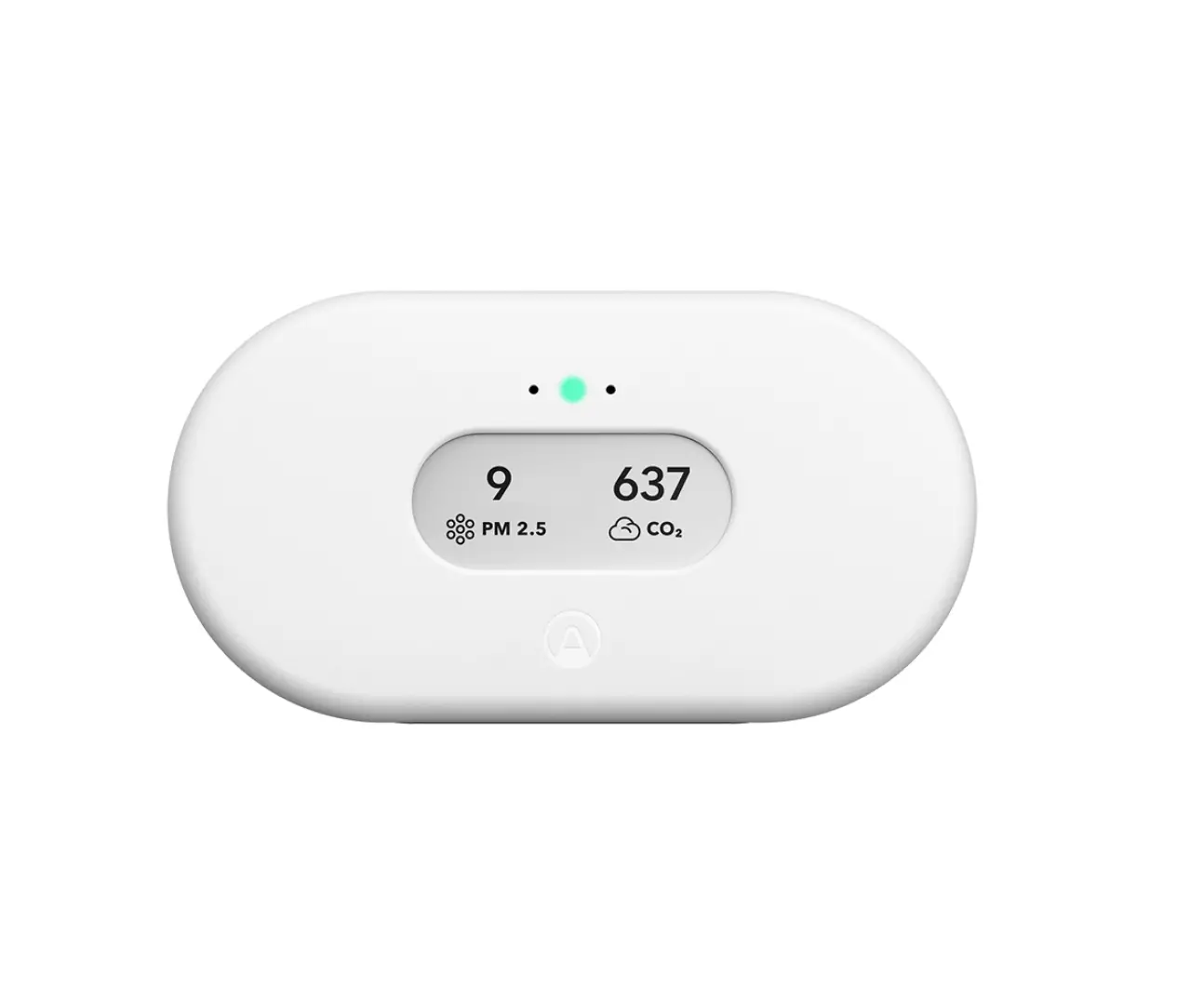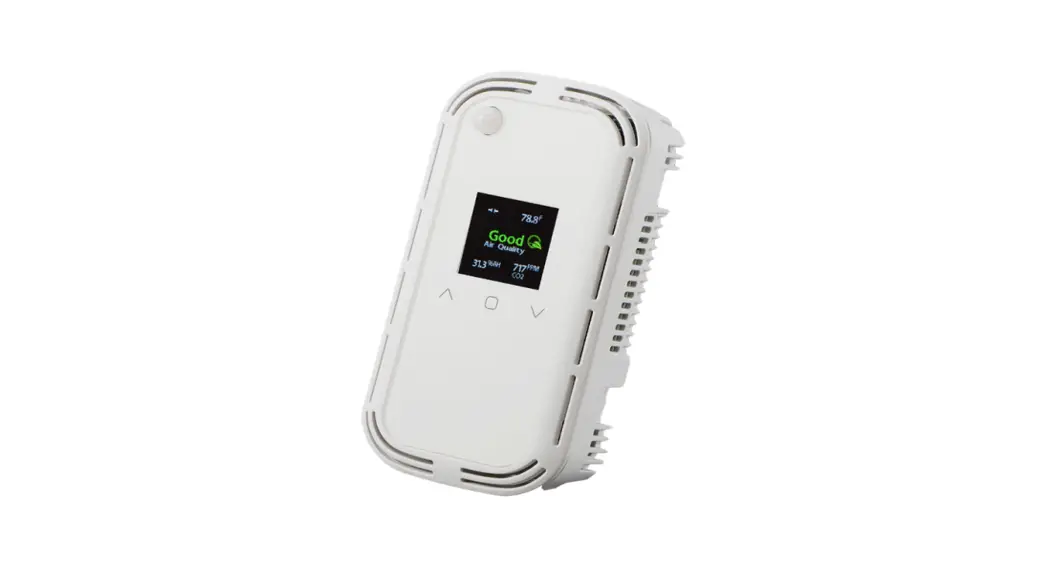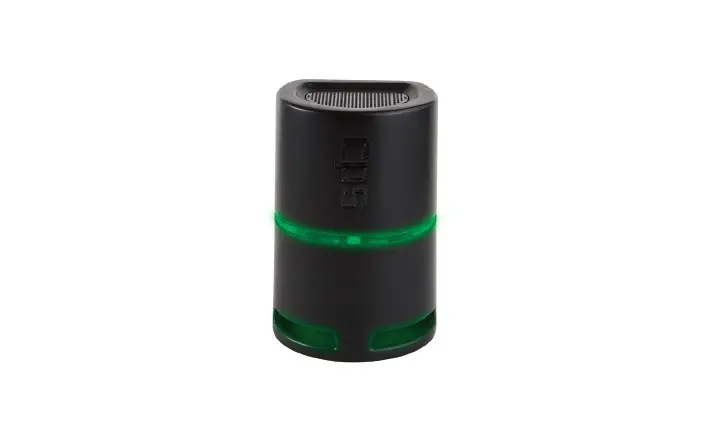
CPS IAQPRO SmartAir Professional Indoor Air Quality Meter Owner’s Manual

GENERAL SAFETY INSTRUCTIONS
Please read, follow and understand the contents of this entire manual, with special attention given to Warning statements.
FOR USE BY PROFESSIONAL OPERATORS ONLY.
WARNING: The SmartAir is NOT a life-safety device and does NOT provide absolute values for all indoor airborne solids, liquids or gases that may be detected. It does NOT replace the capability of existing Smoke Alarms, Carbon Monoxide Alarms, Heat Detectors or any other dedicated life safety devices intended for use in residential or commercial environments.
The SmartAir does NOT provide audible alarms for CO2, VOC’s, PM2.5, PM10, Relative Humidity, Temperature, Building Pressure or Dew Point.
STORAGE NOTE: THIS DEVICE IS A PRECISION INSTRUMENT AND IT IS STRONGLY
RECOMMENDED TO ALWAYS STORE IT INSIDE UNDER NORMAL TEMPERATURE AND HUMIDITY CONDITIONS. If the IAQPRO has been stored in
temperature extremes, it must be placed indoors, unplugged in NORMAL
TEMPERATURE AND HUMIDITY conditions for 6 to 8 hours before being powered ON.
OVERVIEW
The SmartAir is a compact, professional, instrument for measuring 9 different critical factors that determine the quality of indoor air. After placement on an interior residential surface, detailed air quality data can be obtained by pairing this meter to a mobile device running the CPS Link app. The app will summarize air quality conditions and send a homeowner friendly report with recommended solutions (if problems found). Technicians may enter repair costs into the report by using their paired smart device.
Technicians may then review this report on screen, or print or e-mail the report as a PDF. The
SmartAir is great for documenting the quality of indoor air, and recommending additional products or services that technicians can provide to resolve indoor air quality problems.
FEATURES/BENEFITS
| FEATURES | BENEFITS |
| No Buttons, Controls or Calculations | Extremely simple operation |
| Light bar | Intuitive color bar provides air quality status (ranging from Green/Good to Red/Severe) to reflect PM2.5, PM10, tVOC and CO2 readings |
| IAQPRO Paired To Mobile Device – With CPS Link app | Mobile device provides information about indoor air quality and will create a customiz- able, user friendly report showing an analysis by the internal sensors |
| VOC Sensor – Detects Volatile Organic Compounds |
If a value is in a Moderate to Severe range, the CPS Link app will recommend one or more remedial solutions |
| Combustible And Non – Combustible Gas Sensor | |
| Particulate Matter Sensor – Detects particles ≤ 2.5 µ and 2.5 ≤ 10 µ (microns) | |
| Environmental Sensor – Reads indoor temperature, relative humidity and building pressure | Determines if temperature, relative humidity or building pressure are within the indoor comfort zone as specified by ANSI/ASHRAE Standard 55. |
| Customizable Reports | Technician can enter prices to complete any repairs (Recommended Solutions) |
| Export Test Data | Technician can save, print or e-mail |
IAQPRO LAYOUT
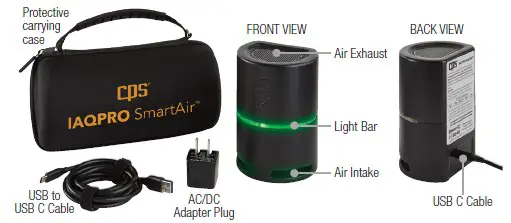
SPECIFICATIONS
| Product Specifications | |
| Wireless Transmission Range | Up to 150 ft (46 m) Direct line of sight |
| Size/Weight | 5”H (12.7cm), 3.5” (9cm) Dia., [0.65 Lb (0.3 kg)] |
| Power Cord (USB-C Cable) | 6.6 Ft. (2 m) |
| AC/DC Adapter Plug | Input: 100~240V; 50~60Hz; 0.4A Output: DC 5V; 2.0A Conforms to UL STD 62368-1 Certified to CSA STD C22.2 No. 62368-1 |
| Protective Carrying Case | EVA semi-rigid shell, with internal compartments |
| Agency Approvals | FCC (Tested and found to be compliant with FCC 47 CFR Part 15B: 2017, ISED ICES-003: Issue 06 (2016). |
| CE Approvals | EMC (Electromagnetic Compatability Emissions) EN: EN 61326-1 2013 Basic Level | EN 55011: 2009/A1:2010 | EN 61000-3-2:2014 | EN 61000-3-3:2013 | EN 301 489-1 V2.1.1(2017-02) | EN 301 489-17 V3.1.1(2017-02) |
| Warranty | 1 year |
| Geotag Feature | Time, Date, Location |
SPECIFICATIONS (CONT’D)
| SmartAir Sensor Specifications | |||||
| Air Quality Factor | Measurement | Accuracy | Minimum Time To Acquire Accurate Data* | Values Displayed In App | |
| Minimum | Maximum | ||||
| Temperature | Temperature | ±2.3 ºF (±1.3 ºC) |
Immediate | 32F (0C) | 122F (50C) |
| Pressure | Building Pressure | ±0.100 in.WC (±0.25 hPa) | 120 in. WC (300 hPa) | 441 in. WC (1100 hPa) | |
| DP | Dew Point Temperature | ±2.3º F (± 1.3 ºC) ± 5% Of Reading | 32F (0C) | 122F (50C) | |
| rH | Relative Humidity | ±5% of Reading | 10% | 95% | |
| Indoor Comfort Zone (Heating/Cooling Season) | Temperature & Humidity | +/- 2.3F (+/- 1.3C), +/-5% of Reading | 61F (16C) & 10% r.H. | 93F (34C) & 95% r.H. | |
| tVOC’s | Total Volatile Organic Compounds | ±(50 ppb + 15%) | 5 Minutes To 60 Minutes | 0 ppb | 5,000 ppb** |
| CO2 | Carbon Dioxide | ± (100 ppm +3% Of Reading) | 3 Minutes | 0 ppm | 5,000 ppm |
| PM2.5 | Fine Particulate Matter | ± 25ug/m3 for < 100 ug/m3; ±25% for > 100ug/m3 |
Immediate | 0 ug | 400 ug |
| PM10 | Particulate Matter | 0 ug | 600 ug | ||
SPECIFICATIONS (CONT’D)
| Color Range Values | |||||
| Levels | GOOD (Green) | SATISFACTORY (Yellow) | MODERATE (Dark Yellow) | POOR (Orange) | SEVERE (Red) |
| PM2.5 (µg/m3) | 0~30 µg/m3* | 31~60 µg/m3* | 61~90 µg/m3* | 91~250 µg/m3* | >250 µg/m3* |
| PM10 (µg/m3) | 0~50 µg/m3* | 51~100 µg/m3* | 101~250 µg/m3* | 251~430 µg/m3* | >430 µg/m3* |
| CO2 (PPM) | 0~599 ppm** | 600~999 ppm** | 1000~ 2499 ppm** | 2500~ 4999 ppm** | >5000 ppm** |
| tVOC’s (PPB) | 0~149 ppb | 150~299 ppb | 300~449 ppb | 450~600 ppb | >600 ppb |
*Per World Health Organization; **Per Engineering Toolbox
SETTING THE tVOC SENSOR BASELINE (Approximately 24 Hours, 5 Minutes Required)
- User must set the tVOC sensor baseline PRIOR TO INITIAL USE.
- Follow instructions below or connect unit to CPS Link App for online guidance.
- Unit does NOT need to be connected to app during the initial 24 hrs. time period (Step 1- 2).
- Unit must be connected to CPS Link app to complete Step 3.
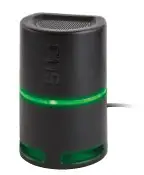
Step 1: (24 Hours Required) Select a secure location INDOORS,
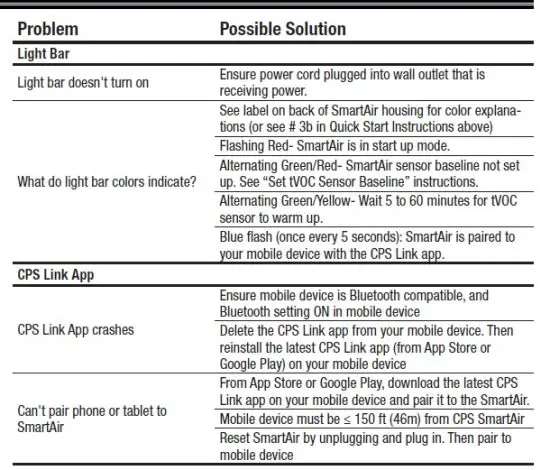
plug unit into power source to turn ON and allow it to run for 24 consecutive hours. Light bar will initially turn RED, then alternate Green/Red during this time period.
Step 2: (5 Minutes Required) Relocate the unit to a secure, dry
location OUTDOORS with access to power (do not locate in direct sunlight). It is OK to disconnect the unit from the INDOOR power source while relocating it to the OUTDOOR location.
Power unit ON and wait for 5 mins.
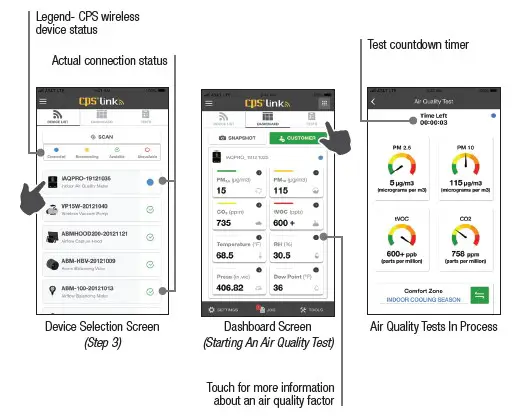
Step 3: Open the CPS Link App on your smart device and select the IAQPRO icon to connect unit.
Once connected, online guidance screens will appear prompting completion of Step 1 & 2 above. Swipe right to advance to the SET BASELINE screen. Touch the SET BASELINE
option to save tVOC baseline and complete setup.
CONDUCT AN INDOOR AIR QUALITY TEST
The tVOC sensor requires a stabilization period when powered ON (the light bar will flash Green/
Yellow during this process). The stabilization period can last between 5 to 60 minutes depending on the combination of storage conditions and time (minutes, days, weeks) the unit was powered
OFF. Unit can be powered ON during travel between jobs to minimize jobsite stabilization time using available automobile USB power connections or other readily available portable power devices.
a. For more accurate readings and to generate an Indoor Air Quality Test Report, start a
30-minute test (default setting).
- the “TESTS” icon (upper right of screen), then.
- Choose the “Air Quality” option (lower left of screen).
- Choose a “Standard Test” (30 minutes) or “Custom Test”.
- If “Standard Test” selected, touch “Start Test” button to begin. A new screen will appear, and the timer counts backwards from 30 minutes.
- To conduct a test shorter or longer than 30 minutes, select “Custom Test.” Enter the desired test period (minimum of 5 min to a maximum of 23 hrs, 59 mins, 59 seconds), then press “Start Test”.
b. The light bar on the SmartAir housing will display a color indicating the range (see chart at right) within which the highest reading for ONE of these values
(PM2.5, PM10, tVOC or CO2) is found. Note: If the SmarAir is paired to your mobile device with the CPS Link app, it will emit a a short blue flash once every 5 seconds
c. For more detailed information about any item being measured, see the Information Section in the app.
| GREEN | Good |
| YELLOW | Satisfactory |
| DARK YELLOW | Moderate |
| ORANGE | Poor |
| RED | Severe |
d. Users are encouraged to pair the SmartAir to a mobile device using the CPS Link app for more detailed information about the quality of indoor air.
CREATING A CUSTOMIZED REPORT AND JOB PROPOSAL
The SmartAir is a compact, professional, Indoor Air Quality monitor used for measuring various aspects of indoor air (temperature, static pressure, dew point, relative humidity, volatile organic compounds, carbon dioxide, and particulate matter PM2.5 and PM10). After placement on an interior residential surface, detailed air quality data can be obtained by pairing this meter to a mobile device running the CPS Link app. The app will summarize air quality conditions and send a homeowner a friendly report with recommended solutions (if problems found). Technicians may enter repair costs into the report by using their paired smart device.
Technicians may then review this report on screen, print or email the report as a PDF. The SmartAir is great for documenting the quality of indoor air and recommending additional products or services that technicians can provide to resolve indoor air quality problems.
a. Generating a Customizable Report and Proposal – After running an indoor air quality test
choose “View Results” at the bottom of the dashboard.
b. A screen will appear showing the “Air Quality Issues.” Choose “Continue” at the bottom.
This will take you to the “Causes and Solutions” screen.
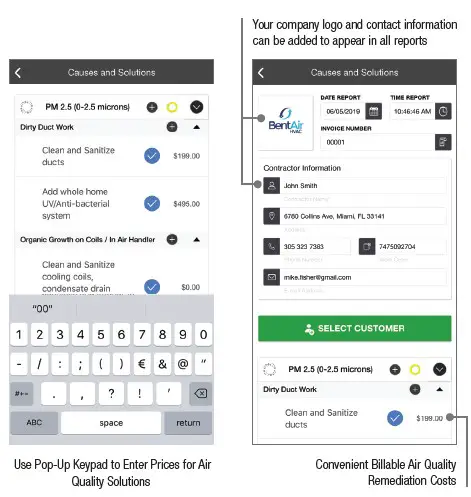
c. A screen will appear showing the “Causes and Solutions.” Here you can fill in your information
(Contractor Information) if you have not already done so in the “Profile” section found
under the Main Menu.
d. Next you can either select a customer or enter a new customer’s information by choosing the “Select Customer” button. (Customers can be entered under the Main Menu / Tools / My
Customers. To enter a new customer, select “ADD NEW” in the bottom right corner).
e. Add Custom Causes and Solutions – By choosing the icon next to a cause or solution you can add in custom causes and solutions not included in CPS Link.
f. Enter Service Prices – You can choose a solution by clicking the circle next to that solution which will add a icon next to that solution and enable you to enter a price for that product and/or service.
g. Saving & Sending A Proposal – Once you have entered pricing information, choose “Continue” located at the bottom. This will bring up your proposal. At the bottom of the proposal
you can choose to email or view the proposal. You also have the option to choose “Done” which will save the proposal to your “Job” folder under the main menu so you can view or send it at a later date.
AIR QUALITY READINGS (Issues, Causes, Solutions)
| Indoor Air Quality Issues | Potential Causes | Recommended Solutions | Recommended Indoor Levels |
|
Hot or Cold Temperatures in Rooms | Unbalanced HVAC System | Install Home Balancing Kit in all supply grilles |
The World Health Organization recom- mends 64 °F (18 °C) |
| Building Envelope Excessive Leaking | Perform blower door test | ||
| Perform leak inspection of all potential leak sources (windows, doors, chimney, wall insulation) | |||
| Missing or Damaged Insulation | Perform thermal imaging inspection to determine sources of insufficient insulation | ||
|
High Humidity Level | Return and/or Supply Duct Leaks | Perform leak inspection and repair all leaks in ductwork |
OSHA recommends 20–60% relative humidity. |
| Oversized AC Unit/Short Cycling | Calculate appropriate equipment size and adjust accordingly | ||
| Building Envelope Excessive Leaking | Perform blower door test | ||
| Perform leak inspection of all potential leak sources (windows, doors, chimney, walls insulation) | |||
|
High PM2.5 (0- 2.5 microns) | Dirty Ductwork | Clean and sanitize ducts |
US EPA recommends an average <12 μg/ m3 or less per day over duration of 1 year. |
| Add whole home UV/anti-bacterial system | |||
| Organic Growth on Coils/in Air Handler | Clean and sanitize cooling coils, condensate drain pan/lines and interior of air handler cabinet | ||
| Add UV light and antimicrobial tabs to condensate drain pan | |||
| Return Duct Leaks, Contaminate Infiltration | Perform leak inspection and repair all leaks in ductwork | ||
| Dirty Supply Grilles | Clean supply grilles | ||
| High PM10.0 (2.5-10.0 microns) |
Poor Filtration | Add return filters with MERV rating (≥ 12) | US EPA 24-hour standard <65 μg/ m3 based on the 3-year average of the annual 98th percentile concentrations. |
| Add local HEPA filtration to remove particles > 3 microns |
AIR QUALITY (Issues, Causes, Solutions) Cont’d
| Indoor Air Quality Issues | Potential Causes | Recommended Solutions | Recommended Indoor Levels |
|
High tVOC Level | VOC Contaminants | Remove contaminants inside home or garage | No federally enforce- able limits, but 50 ~ 325 ppb are thought to be acceptable, but recommended to not exceed 500 ppb. |
| The U.S. EPA reports that on average, 60% of VOC’s enter the home through an attached garage | Improve ventilation inside home or garage | ||
| Add garage ventilation fan to exhaust/create negative pressure | |||
| Seal garage/mud door from home | |||
| Mechanical equipment issues | Inspect gas appliances and heaters for leaks | ||
| High CO2 Level | Insufficient returns | Add or increase size of return registers in bedrooms | 350-1,000 ppm is typical level in occupied spaces with good air exchange. |
| Inadequate ventilation | Add ERV (Energy Recovery Ventilation) or HRV (Heat Recovery Ventilation) to exchange stale air with fresh air | ||
|
High Or Low Building Pressure | Negative air pressure in summer |
Inspect windows, doors or other openings in the building envelope for air leaks | Slightly positive +.02-in. to +.03-in. WC. can make a huge difference in building comfort and efficiency. |
| Negative air pressure in winter | |||
| Positive air pressure in summer | |||
| Positive air pressure in winter | |||
|
High Or Low Dew Point | In the summer, conden- sation forms on ducts, air diffusers, walls or ceilings | Ensure AC system is proper size (tons) and functioning properly. Check ductwork or building envelope for leaks. Determine if insulation missing |
OSHA recommends 24 to 60 °F (−4.5 to 15.5 °C) |
| In the winter, conden- sation forms inside exterior walls |
APP SCREENS (IAQPRO + CPS Link)
Area inside BLUE or RED trapezoid shape indicates Indoor Comfort Zone (for Cooling or Heating Seasons) as specified by ANSI/ASHRAE Standard 55
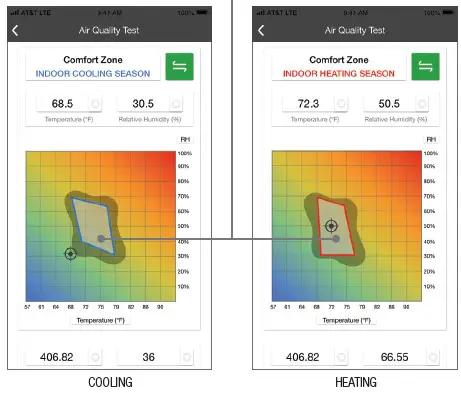
Icon indicates room temperature and humidity being measured at test location.
Determine if your temperature and humidity readings are within the COOLING or HEATING Comfort Zone (trapezoid) shown above.
APP SCREENS (IAQPRO + CPS Link)
TROUBLESHOOTING GUIDE
WARRANTY
CPS Products, Inc. guarantees this product will be free of manufacturing and material defects to the original owner for one year from the date of purchase. If the product should fail during the
guarantee period it will be repaired or replaced (at our option) at no charge. This guarantee does not apply to equipment that has been altered, misused or solely in need of field service maintenance.
All repaired equipment will carry an independent 90 day warranty. This repair policy does not include equipment that CPS determines is beyond economical repair.
CPS LOCATIONS
CPS PRODUCTS, INC. U.S.A.
3600 Enterprise Way, Miramar, Florida 33025, USA Tel: 305-687-4121, 1-800-277-3808 Fax: 305-687-3743
E-mail: [email protected] Website: www.cpsproducts.com
 CPS Products: HVAC/Refrigeration Tools for Service Technicians