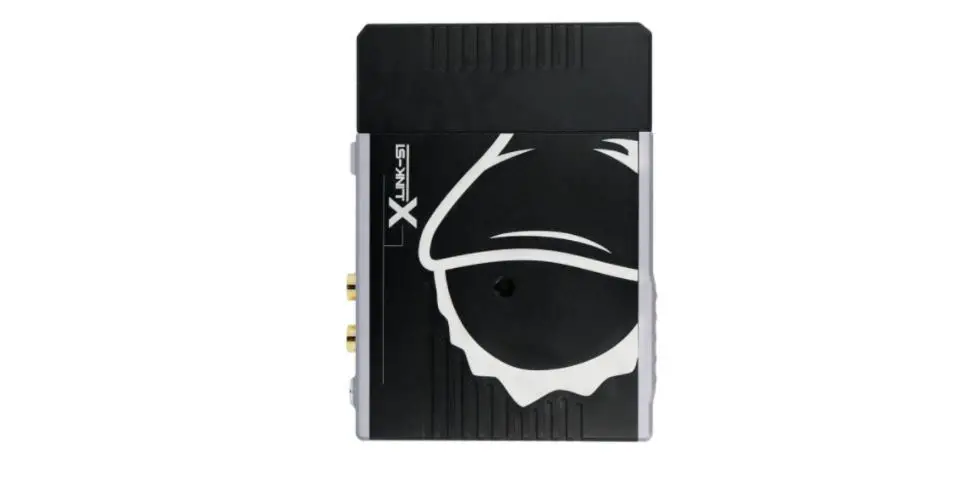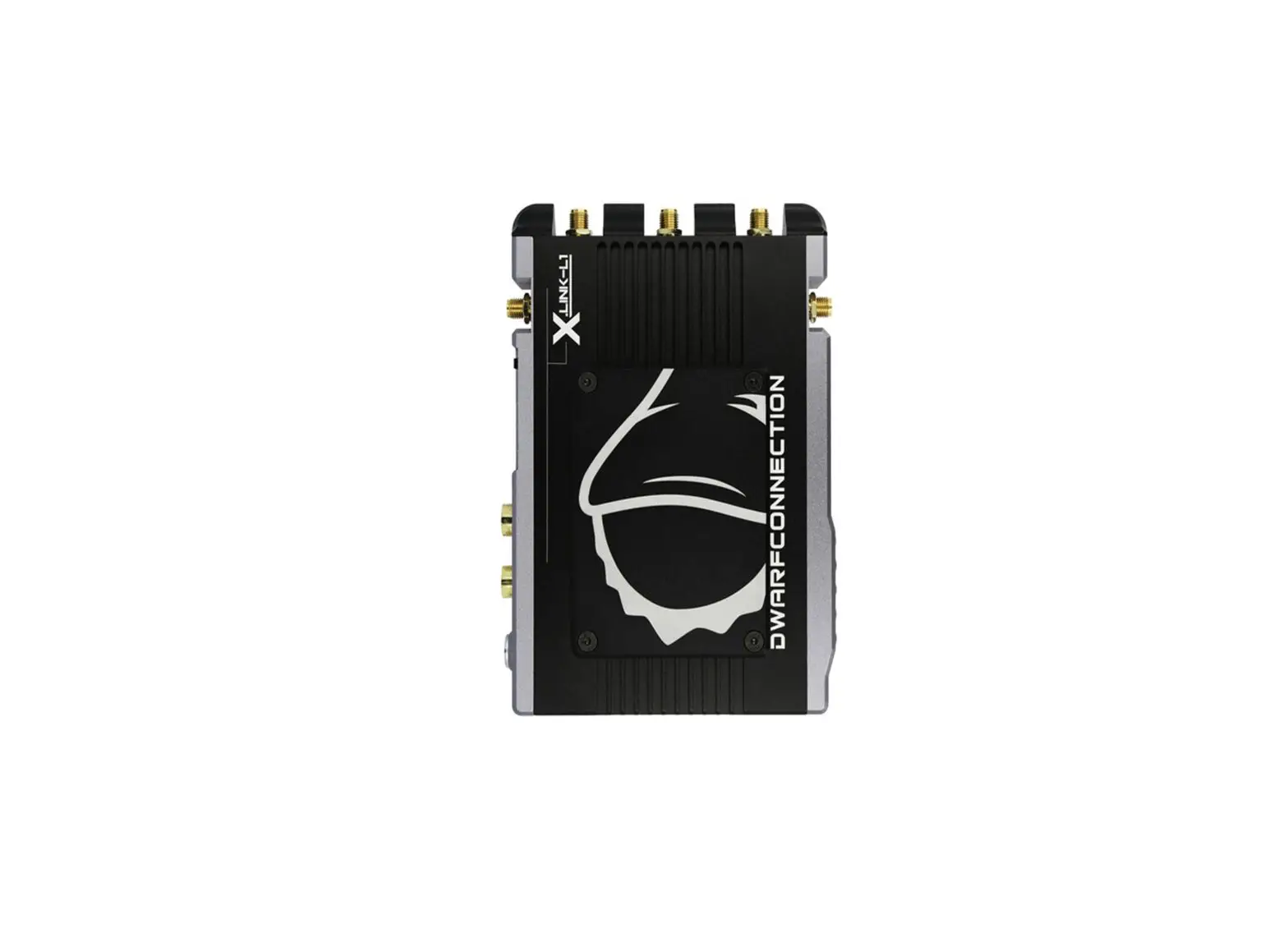
DWARE CONNECTION X.LiNK-XS3 Whdi Receiver User Manual
Introduction
Congratulations on purchasing the DC-LINK video transmission system!
Please read this manual carefully before operating your product. You can also access this through our website: www.dwarfconnection.com Also read the safety information enclosed with your DwarfConnection product, as it contains more detailed information on product and health safety!
The technology contained in this product, including the device itself as well as related software and trademarks, is protected by law. Any duplication or reproduction without the written permission of the copyright owner is prohibited, in part or in full. All third-party brands or copyrights mentioned in this manual are the property of their respective owners.
This manual is valid for:
- DC-X.LINK-XS3.HDMI
- DC-X.LINK-XS3.SDI
Safety Precautions
WARNING: READ BEFORE USE TO REDUCE THE RISK OF PERSONAL INJURY OR PROPERTY
DAMAGE, INCLUDING DAMAGE TO YOUR TRANSMITTER/RECEIVER AND OTHER POTENTIAL
HAZARDS.
HANDLING
Handle your DC-LINK system with care. You may damage the devices if you disassemble, drop, bend, burn, crush or otherwise subject them to unnecessary force. Do not use a device with a damaged enclosure. Using a damaged product may cause injury. Do not expose your devices to liquids of any kind!
This can cause a short circuit and overheating. If your devices do come into contact with liquids, do not attempt to dry them using an external heat source. If the device comes into contact with liquid or corrosive chemicals, immediately turn off the power and remove the power supply. Do not operate the device near fire, gas lines or electrical mains or in high humidity or dusty surroundings.
Do not block or otherwise impede ventilation slots or unused connectors, as this may result in a short circuit, fire or electric shock.
DC-LINK systems are designed to work in ambient temperatures between 0° and 40°C / 32° to 100°F and should be stored between ambient temperatures of -20° and 60°C / 0° and 140°F. Ensure sufficient ventilation when operating your DC-LINK system in warm temperatures to prevent overheating. Do not leave your devices in places in which the temperature may exceed 60°C / 140°F as this may damage the product or pose a potential fire risk. Keep your device away from heat sources and out of direct sunlight. If your device becomes too hot, disconnect it from its power source if it is plugged in, move it to a cooler place, and do not use it until it has cooled. If you accidentally operated your DC-LINK system at temperatures lower than 0° C / 32° F try to avoid condensation water: Do not allow your device to cool down in the cold! Put your device in the case immediately after turning it off!
CARE & CLEANING
Unplug the product and power adapter before cleaning, during lightning storms, or when unused for extended periods of time. Use a clean, soft, and dry cloth to clean devices and their accessories. Do not use any chemical detergent, powder, or other chemical agents (such as alcohol or benzene) to clean the product or accessories.
REPAIR, SERVICE & SUPPORT
Disassembling the devices may cause injury to you or damage to your device. Do not attempt to repair your DC-LINK system yourself. Opening your device voids warranty. If devices cease working or have been damaged, contact our support team.
PROLONGED HEAT EXPOSURE
Your DC-LINK system generates heat during normal operation and complies with applicable surface temperature standards and limits. Avoid prolonged, direct or indirect skin contact when the devices are in use because exposing skin to hot surfaces for a long period of time may cause discomfort or burns.
ENVIRONMENTAL RESTRICTIONS
To prevent damage to your DC-LINK system, do not use or store the devices oraccessories in dusty, smoky, damp, or dirty environments. Leaving the devices in places in which the temperature may exceed 60°C / 140°F may cause damage to the devices or pose a fire risk.
RADIO FREQUENCE INTERFERENCE
Observe rules that prohibit the use of wireless technology in certain environments. Your devices are designed to comply with regulations governing radio frequency emissions but use of such systems can negatively affect other electronic equipment.
RECYCLING
Please recycle all packaging, devices and accessories in accordance with U.S. regulations.
Overview
The DC-LINK-CLR2 is a high-performance WHDI video transmission system which transmits uncompressed video and audio signals up to 300 m / 1,000 ft with no latency (< 0.001 s delay).
Due to the conscious decision not to implement DFS (Dynamic Frequency Selection) the device has a longer range, greater stability and better usability than comparable systems that DO use DFS.
The transmitter and receiver both have 3G-SDI and HDMI connectors (Plug & Play). When a video source is attached, the transmitter automatically selects the input (SDI is prioritized). The receiver’s 3G-SDI and HDMI outputs can be used simultaneously.
Characteristics
- Max. transmission range 300m/1000ft line of sight
- Rapid and reliable connectivity, no need for complex pairing
- Real-time transmission with no latency (< 0.001s)
- Uncompressed transmission. 10-bit, 4:2:2 transmissions via 3G-SDI or HDMI without format conversion
- Supports formats up to and including 1080p 60Hz
- 2- channel audio transmission, embedded audio transmission on CH1 & CH2 via SDI or HDMI
- Operates within the license-free 5GHz ISM band, frequency range from 5.1 to 5.9GHz
- Multicast support 1:1 or 1:n transmissions with up to four parallel systems
- Limited Metadata Support: Start/Stop, Timecode*
- Metadata Cross Translation (SDI to HMDI)*
- High grade aluminium casing: extremely durable and heat regulating
- Variable Input Voltage from 7,2-18,0V DC allows the system to be operate with a variety of batteries or power supplies
- Status displays for DC power, video and RSSI signal strength
- 2x 1/4“ Thread
- NPF battery mount male and female for sandwich setup
- Plug-and-Play design. Ready to use without the need for complex configuration
- 1 Year warranty by manufacturer
* Due to various standards metadata compatibility can be limited. Improvements are made constantly. Please check latest firmware.
Product Description
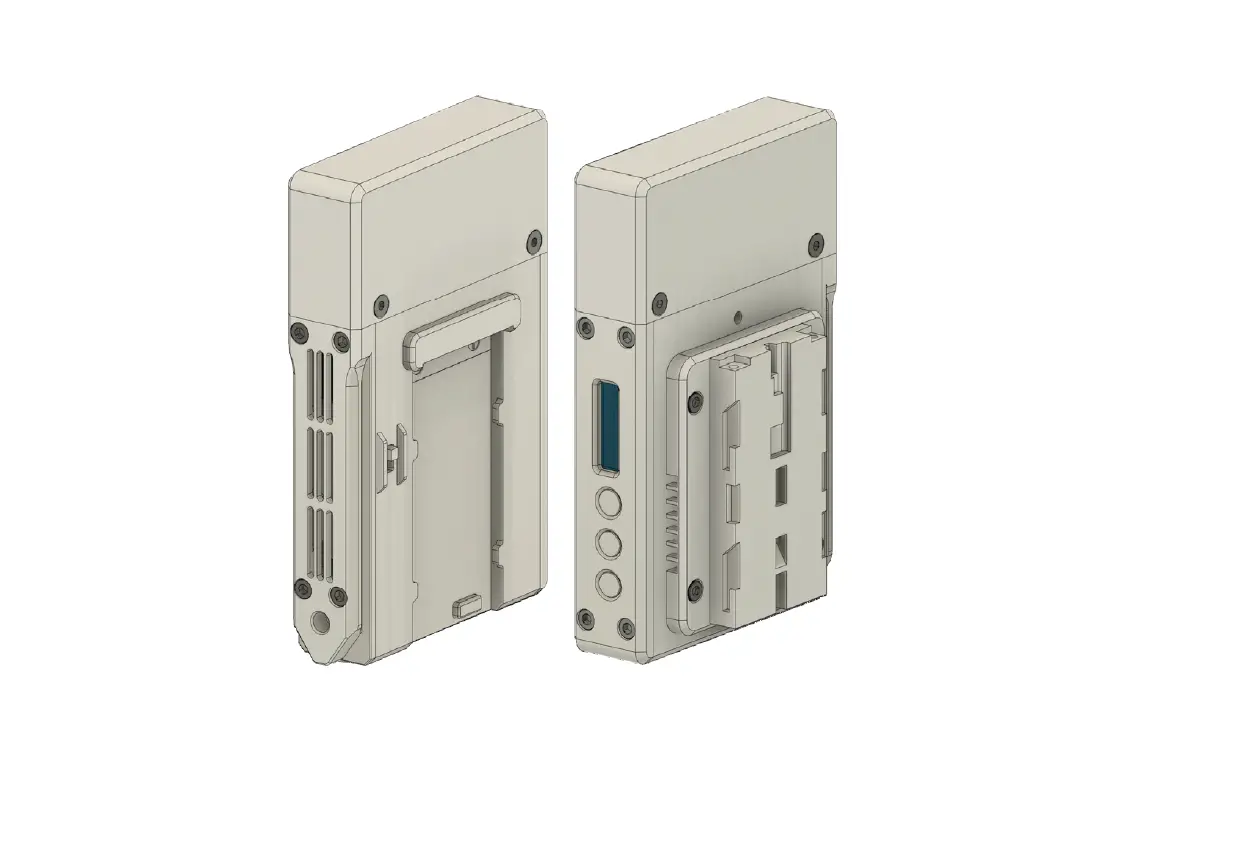
XS3 Receiver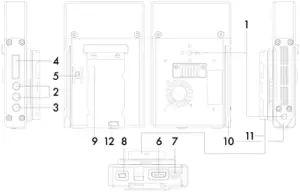
- 1/4“ Thread
- Control Buttons
- Menu Button
- OLED display
- Power Switch
- HDMI OUT
- DC-IN 7,2 – 18V
- Mini USB: For firmware upgrade
- NPF Battery Port
- Nato Rail
- NPF Sandwich Plate
- Battery Release Button
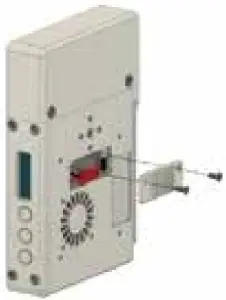
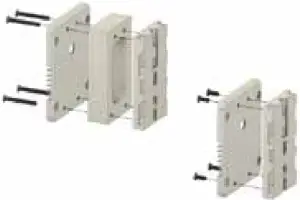
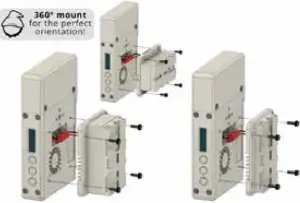
DC.LINK XS3 NPF-Battery Adapter Assembly Guide
- Remove the Case-Power-Mate by unscrewing both M3x6 Hat Head screws and pull out the red 2 pan connector.

- You can either Install the NPF Battery Plate with or without the spacer. To guarantee access to the battery release button on the ATOMOS Shogun, install the spacer using the provided (4) M SOS flat bead screw;

- After removing the Case-Power-Plate you can access and pull out the red 1,pin connector cable and connect it with the NPF-battecy plate 2-pin plug. Bolt on the assembly with the provided (4) M3x6 socket screws

360º Mount for the perfect orientation!
Scope of Delivery
- 1x Receiver
- 1x Multidirectional NPF Battery Plate
- 1x Spacer for NPF Battery Plate
- 1x Mounting Piece for NPF Battery Plate
- 1x Power Cable 4pin to D-Tap
- 4x M3x6 socket head screws
- 4x M3x25 flat head screws
- Quick Start Guide
- Assembly Guide
- USB flash drive with product manual
Operation
- Use the enclosed D-Tap cables or a NPF battery to power your receiver. Only use 4-pin cables provided by DwarfConnection to power your DC-LINK system! Other cables might cause damage of your products!
- Turn on your devices.
- Make sure transmitter and receiver are set to the same channel. Switch channels if necessary. (Find detailed instructions in “Features”)
Signal Distribution
Connect the receiver’s SDI or HDMI output to the SDI or HDMI input of the
monitoring/recording device.
Only use high quality 7,2 – 18,0V batteries.
Features
Menu Navigation
Use the MENU button to easily navigate through the sub menus of your DC-LINK device. Press several times until the referring indicator is flashing. Then use + and – to change the state and confirm with MENU.
OLED Display
The OLED Display shows all important information on the transmitter and the receiver. To make any changes to your settings, use MENU to navigate to the desired Sub-Menu. Then use + and – to make your changes and confirm with MENU.
Received Signal Strength Indicator (RSSI)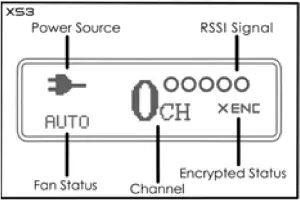
The RSSI display shows the strength of the signal, allowing the operator to check, if the system is working properly.
Display | Status | Description |
RSSI | 0-1 LEDs | Radio signal strength is weak and artefacts are visible in the video signal |
2-3 LEDs | Radio signal strength is normal and video quality is good | |
| 4-5 LEDs | Radio signal strength is very strong and video quality is very good |
Choosing a Channel
To choose a channel on the transmitter/receiver press MENU and select with the + or – button. Press MENU again to confirm.
The system works on 10 channels in the license-free 5 GHz ISM frequency band, using numbers 0-9.
You can choose from 41 different channels. This is due to Multi Brand Connectivity, which makes your DC-LINK receiver compatible with multiple other Brands.
When working with a DwarfConnection transmitter, always use channels 0-9! To learn more about Multi Brand Connectivity, please read the corresponding section of this manual.
Transmitter and receiver have to be set to the same channel to work. If several systems are used at the same time, do not use neighboring channels to avoid interference. A maximum number of 4 systems can be used simultaneously.
Master Channel Selection
All receivers on the same channel will react to channel changes of the transmitter and follow automatically. Of course, a receiver can switch to another channel independently at any time.
Multi Brand Connectivity
Your X.LINK-XS3 receiver is equipped with DwarfConnections’s unique Multi Brand Connectivity Feature that makes it compatible with most common non-DFS WHDI wireless video systems on the market by letting you choose from different frequency sets. This is as easy as choosing a channel:
Use the MENU button to go to channel selection
Choose a channel from different frequency sets using the + and – buttons. The letter on your display shows the frequency set, the number shows the channel. The channels used by DwarfConnection transmitters, do NOT show a letter. Therefore, when working with a DC-LINK transmitter, choose from channel 0 to 9 on your receiver.
Besides the DwarfConnection frequencys there are 3 more frequency sets: A0- A9, B0-B9, C0-C9, CA. These frequency sets correspond with the channel sets, other manufacturers are using.
The channel sets and referring frequencies are:
0-9 (DwarfConnection):
5550, 5590, 5630, 5670, 5150, 5190, 5230, 5270, 5310, 5510
A0-A9:
5825, 5190, 5230, 5755, 5795, 5745, 5765, 5775, 5785, 5805
B0-B9:
5130, 5210, 5250, 5330, 5370, 5450, 5530, 5610, 5690, 5770
C0-C9 plus CA:
5150, 5230, 5270, 5310, 5510, 5550, 5590, 5630, 5670, 5755, 5795
On Screen Display (OSD)
The OSD shows status information in case of transmission or signal problems. In live situations the OSD might be distracting or simply unwanted. Therefore, it can be turned off: Press the MENU button several times to navigate to the OSD menu and select the desired state by using the + or – button. Confirm your selection with MENU. An indicator on the OLED display of the receiver shows the OSD state.
Metadata Cross Translation*
Camera metadata is transmitted through SDI only. On your XS3 HDMI receiver, the incoming information is translated into HDMI, which allows you to use metadata bound features, like automatic recording on your monitor.
Fan Control & Cinema Mode
Fan control allows you to turn the fans of the devices on or off to keep them cool but also prevent unwanted noise. Press MENU to navigate to the fan menu and select the desired state by using + or – .
AUTO indicates cinema mode, which triggers the fans using the start / stop flags of the camera. Once you hit record, the fan will stop, ensuring total silence. After recording, it will turn back on automatically. Cinema mode is bound to metadata support.*
√ switches the fans on permanently. X switches the fans off.
CAUTION!
For a long product life, we highly recomment NOT to operate your DC-LINK with permanently switched off fans. Whenever you are operating your devices without cooling, monitor the temperature and make cooling breaks when the indicator on your display is flashing (60°C / 140°F). THE DEVICES DO NOT HAVE AN EMERGENCY OUT!
If you allow your devices to get too hot, you might cause serious damage of your equipment.
Encryption
In encryption mode, the transmitter sends an encoded signal that only linked receivers can read, making it easy to protect confidential content that is not meant for everyone’s eyes.
To activate encryption mode, press the MENU button until ENC is flashing. Use + or – to check either ✓ENC or XENC and confirm with MENU.
To link your devices, set your transmitter and all the receivers to the same channel, then activate encryption on your transmitter. All receivers will follow into encryption mode automatically. Settings remain active after turning your devices off. This means that ENC can be prepared prior to shooting and will stay active unless you turn it off.
A linked receiver does not HAVE to stay linked. To take a receiver out of the encrypted system, simply turn off ENC. Then you can easily access another (unencrypted) transmitter’s images by choosing the referring channel within seconds. To link back to the previous (encrypted) transmitter, turn ENC on again.
* Due to various standards metadata compatibility can be limited. Improvements are made constantly. Please check latest firmware.
IMPORTANT
Switching back and forth between two encrypted systems is not possible.
You cannot slip into an encrypted wireless system, if your receiver was not initially linked to the transmitter. If you want to add a new receiver to an encrypted system, you need to link the whole system again.
Maintenance
Please do not attempt to repair, modify or alter these devices under any circumstances.
Clean the devices with a soft, clean, dry and lint-free cloth. Do not open the devices, they contain no user-serviceable parts.
Storage
The devices can be stored at temperatures between -20°C and 60°C. For longterm storage, please use the original transport case and avoid environmental conditions such as high humidity, dust, or excessively acidic or base surroundings.
 WARNING!
To ensure your own safety, please use only high-quality brand name batteries, and follow the safety instructions provided by the manufacturer.
Troubleshooting
Possible Cause | Possible Solution | |
| No video output | Lack of power | Check power supplies of transmitter and receiver and ensure that all cables are connected properly and that there is sufficient power. |
| Antennas | Ensure antennas are not damaged and are firmly connected. Please use the DC-Scan to check. | |
| Video connection cable | Examine the transmitter’s “Video” LED display. If the LED is dark, check the HDMI or SDI connection cable. | |
| Frequency selection | Ensure that the transmitter and receiver are set to the same channel | |
| Unsupported video format | Make sure you using a supported video format. | |
| Inadequate video quality | Connections | Ensure that all SDI or HDMI cables are firmly connected. |
| Range is too great or signal is obstructed | Check how many “RSSI” LEDs are lit on the receiver. For decent quality, at least 2-3 LEDS should be lit. If only one is lit, the signal is weak and the distance between transmitter and receiver should be reduced. Alternatively, obstacles between the devices should be removed or another channel selected. | |
| Radio signal is experiencing interference | Open the DC-Scan and choose a free channel. |
For more input, please visit www.dwarfconnection.com/faq
Technical Specifications
| HDMI | SDI | |
| Connections | lx HDMI Input (Type A female) lx DC Input (4-pin female) | 2x SDI Output (BNC female) |
Power | 7,2 – 18,0V DC | 7,2 – 18,0V DC |
| Power Consumption | < 8 W | < 8 W |
Dimensions (LxWxH), w/oAntennas | 130,5 x 72 x 21,75mm 5,1″ x 2,8″ x 0,9″ | 130,5 x 72 x 21,75mm 5,1″ x 2,8″ x 0,9″ |
| Weight | 288,8g / 10,2oz | 376,6g / 13,3oz |
Supported Video Formats | 1080p (60, 59.94, 50, 30, 29.97, 25, 24, 23.98) 1080i (60, 59.94, 50) 720p (60, 59.94, 50) | 1080p (60, 59.94, 50, 30, 29.97, 25, 24, 23.98) 1080i (60, 59.94, 50) 720p (60, 59.94, 50) |
| Audio Format | Embedded Audio on Ch 1 & 2 Audio 24bit/48kHz | Embedded Audio on Ch 1 & 2 Audio 24bit/48kHz |
Displays | 0.91″ OLED panel | 0.91″ OLED panel |
Receiver Sensitivity | – 75 dBm | – 75 dBm |
| Bandwidth | 40MHz | 40MHz |
Operating Temperature | 32 – 100°F (Operation) 0 – 140°F (Storage) | 32 – 100°F (Operation) 0 – 140°F (Storage) |
Warranty
This product has a limited warranty of one year, starting from the date of purchase. Warranty may be voided by:
- Physical damage of the product
- Any damage caused by improper use, maintenance or storage
- Damage resulting from the use of incorrect power supplies
- Damage not related to the design of the product or the quality of its manufacture
For more information about warranty procedures please contact your retailer or simply ask us.

| AT | BE | CY | CZ | DK | EE | FI |
| FR | DE | EL | HU | IE | IT | LV |
| LT | LU | MT | NL | PL | PT | SK |
| SI | ES | SE | UK | BG | RO | HR |
In all EU member states, operation of 5150-5250MHz is restricted to indoor use only.

DwarfConnection GmbH & Co KG
Münzfeld 51
4810 Gmunden
AUSTRIA