JH-762S Vintage Radio Bluetooth Speaker
Product Information
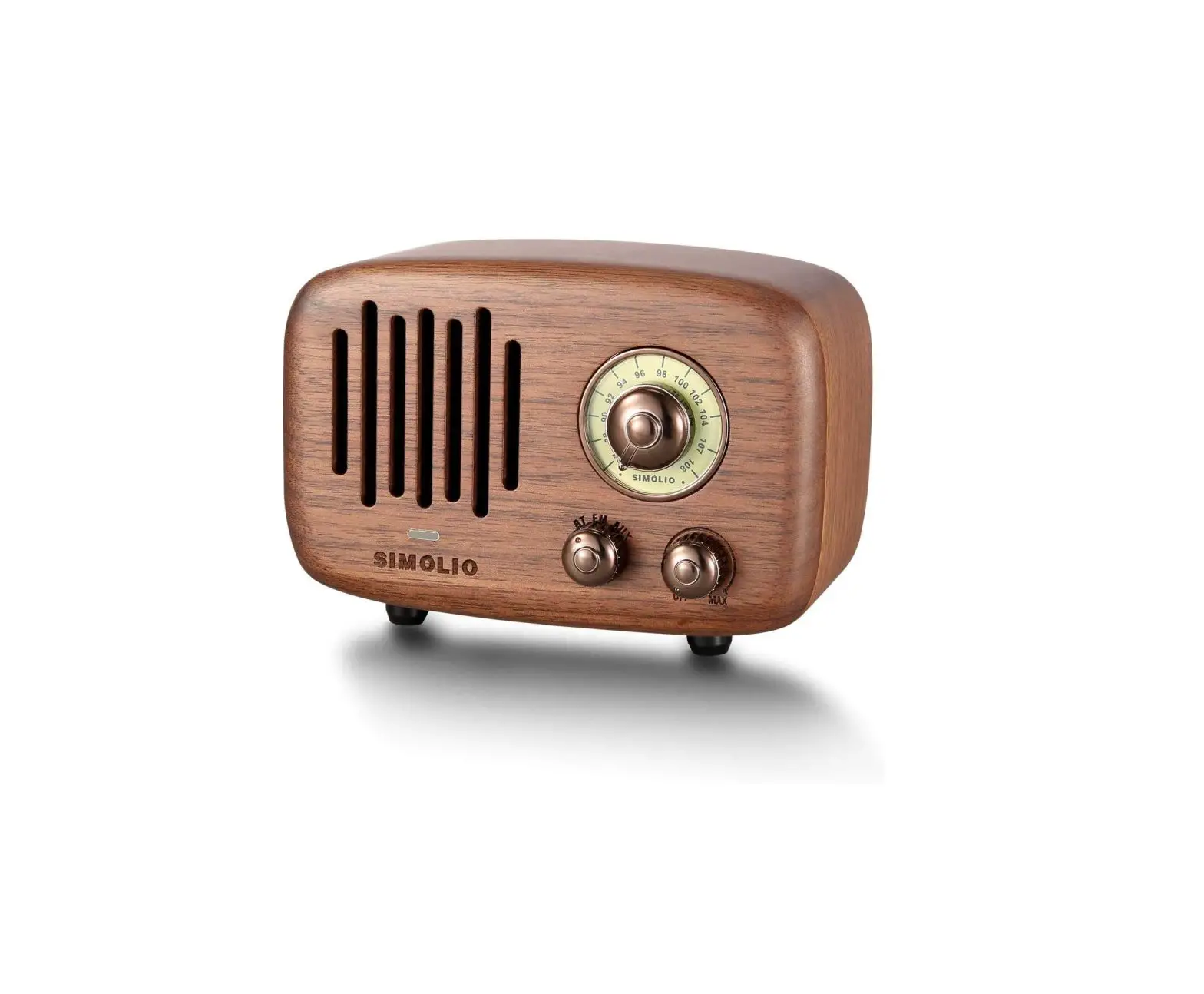
The SIMOLIO Vintage Radio Bluetooth Speaker JH-762S is a
portable speaker that combines vintage radio design with modern
Bluetooth technology. It features a function selection knob, volume
knob/power switch, LED indicator, frequency scale, turning knob,
AUX port/antenna port, micro USB charging port, and pluggable
antenna. The speaker is powered by a 3.7V/4000mAh Li-ion battery
and can be charged using the included micro USB charging cable.
Package Contents
- Vintage Radio Bluetooth Speaker
- Carrying Case
- Micro USB Charging Cable
- 3.5mm Audio Cable
- User Manual
Product Usage Instructions
3.1 Charging the speaker
- Plug the supplied USB cable into the power source.
- The charging indicator will stay solid red when the speaker is
charging. - After fully charged, the red light will go off, and the green
light will turn on. - It takes 10 hours for the internal 2*2000mAh Li-ion batteries
to be fully charged. - When completely charged, the battery can deliver 12-20 hours of
radio play or 8-12 hours of Bluetooth speaker or AUX player time
(depending on the volume).
3.2 Using the speaker as a Bluetooth Speaker
- Turn the function selection knob to BT, and the LED indicator
will turn white. - Turn on your Bluetooth device (e.g., mobile phone) and find the
name “Simolio” to connect. - Once Bluetooth is connected, there will be a beep, and you can
open the music player to listen to music. - When disconnected from Bluetooth, there will be a beep, and the
Bluetooth indicator will flash.
3.3 Using the speaker as an FM Radio
- Turn the function selection knob to FM.
- The LED indicator will turn solid green.
- Rotate the turning knob to select a channel.
Note: For better FM signal, you can plug in the antenna or the
3.5mm audio cable into the speaker’s AUX port.
If you need further assistance or have any questions, please
contact our customer support team at [email protected] (for USA)
or [email protected] (for UK).
Sales & Support Email: [email protected] (for USA) [email protected] (for UK)
Vintage Radio Bluetooth Speaker JH-762S
SIMOLIO
94 96 98 100
102 104 107
SIMOLIO BTFM AUX
MAX
User Manual
www.amazon.com/simolio
Sales & Support Email: [email protected] (for USA) [email protected] (for UK)
JH-762S Manual
Thank you for choosing the SIMOLIO Bluetooth stereo speakers. Please read this guide carefully and keep it in a safe place for future reference. If you need any further assistance, please contact our customer support team at:
[email protected] (for USA) [email protected] (for UK) Response Time: 2-24h, excl. holidays
JH-762S Manual
Contents
1. Product Diagram …………………………………………………. 01 2. Package Contents ……………………………………………….. 02 3. User Instructions …………………………………………………. 02
3.1 Charging the speaker ……………………………………………… 02 3.2 Using the speaker as a Bluetooth Speaker ……………………… 03 3.3 Using the speaker as a FM Radio ……………………………….. 03 3.4 Using the speaker as an AUX Player ……………………………. 04 4. Technical Specifications ………………………………………. 04 5. Safety Instructions………………………………………………… 05 6. Limited Warranty ………………………………………………… 06 7. Troubleshooting …………………………………………………… 06
JH-762S Manual
1. Product Diagram
4 5
OFF MAX
132
1 Function selection knob 2 Volume knob/Power switch 3 LED indicator 4 Frequency scale 5 Turning knob
Portable Bluetooth Speaker with FM Radio Mode No.;JH762S Charing Input: DC 5V —1A Li-iom Battery:3.7V/4000mAh Made in China Service Email :[email protected] (for USA)
[email protected] (for UK) [email protected] (for DE)
ANTENNA CHARGING AUDIO IN
67
8
6 AUX port / Antenna port 7 Micro USB charging port 8 Pluggable antenna
01
JH-762S Manual
102 104 107 102 104 107
2. Package Contents
Vintage Radio Bluetooth Speaker
Carrying Case
SIMOLIO
94 96 98 100
SIMOLIO BT FM AUX
MAX
Micro USB Charging Cable
3.5mm Audio Cable
User Manual
Vintage Radio Bluetooth Speaker SIMOLIO
94 96 98 100 SIMOLIO
OFF MAX
88 90 87
108
JH-762
User Manual
Sales & Support Email: [email protected] (for USA) [email protected] (for Europe)
3. User Instructions
3.1 Charging the speaker * Plug the supplied USB cable to the power source. * The charging indicator will stay solid red when the speaker is in charge.
After fully charged, the red light will go off, and the green light will be on. * It takes 10 hours for the internal 2*2000mAh Li-ion batteries to be fully charged. * When completely charged, the battery will be able to deliver 12-20 hours of radio play or 8-12 hours of Bluetooth speaker time or AUX player time. (depending on the volume)
02
JH-762S Manual
3.2 Using the speaker as a Bluetooth Speaker
* Turn the function selection knob to “BT”, the LED indicator turns to white. * Turn on the Bluetooth device such as a mobile phone to find the name of
“Simolio”and click it to connect. * When Bluetooth is connected, there will be a beep, open the music player
to listen to music. * After disconnected the Bluetooth, there will be a beep and the Bluetooth
indicator will flash.
3.3 Using the speaker as a FM Radio * Turn the function selection knob to the “FM”. * The LED indicator will turn to solid green. * Rotate the turning knob to select a channel.
Note: You can plug the antenna or the 3.5mm audio cable into the speaker’s AUX port to get better FM signal.
Portable Bluetooth Speaker with FM Radio Mode No.;JH762S Charing Input: DC 5V —1A Li-iom Battery:3.7V/4000mAh Made in China Service Email :[email protected] (for USA)
[email protected] (for UK) [email protected] (for DE)
ANTENNA CHARGING
AUDIO IN
or
AUX port / Antenna port
ANTENNA
AUDIO IN
Portable Bluetooth Speaker with FM Radio Mode No.;JH762S Charing Input: DC 5V —1A Li-iom Battery:3.7V/4000mAh Made in China Service Email :[email protected] (for USA)
[email protected] (for UK) [email protected] (for DE)
ANTENNA CHARGING
AUDIO IN
AUX port / Antenna port
ANTENNA
AUDIO IN
pluggable antenna
3.5mm audio cable
03
JH-762S Manual
3.4 Using the speaker as an AUX Player * Turn the function selection knob to “AUX”. * The orange LED indicator is on. * Unplug the antenna from the rear of the speaker first, then insert one end of the supplied 3.5mm AUX cable to the speaker, and the other end to your phone or tablet etc. Open the music player to enjoy music.
4. Technical Specifications
FM Working Frequency
87MHz-108MHz Input
5.0V/1A
Bluetooth Working Frequency 2.4GHz ISM
Range
30 feet
Bluetooth Version
4.0
Weight
429 g
Battery capacity SNR Maximum Distortion
2000mAH*2
FM/BT>75dB; AUX>80dB
0.5%
Size
Audio output
Charging Time
143(L)*68(W)*100(H)mm 2*8W (Max 10H
04
JH-762S Manual
5. Safety Instructions
1. Please read this manual carefully and follow the instructions for all operations and use. 2. Always keep this product dry, and do not expose them to extreme temperatures. 3. Do not charge at the water source or in the rain to prevent electric shock. 4. Do not damage the cable, especially at the connector. 5. Switch off the speaker after use. Unplug the USB charging cable when it is not in use or during a thunderstorm. 6. Please keep the speaker away from heat sources(including all equipment that generates heat), such as stoves. 7. Do not disassemble the speaker. Please refer all servicing to qualified person only!
05
JH-762S Manual
6. Limited Warranty 1. This vintage radio has full 12-month warranty against manufacturing defects from the date of purchase. Do not cover appearance damage or damage due to acts of nature, accident, misuse, abuse, negligence, commercial use, or modification of or to any part of the product. 2. The warranty period begins from the original date of purchase. 3. The warranty period is not extended if we repair or replace warranted product.
7. Troubleshooting
06
JH-762S Manual
Problem
What to do
* On your Bluetooth device:
Turn the Bluetooth feature off and then on;
Speaker cannot Delete Simolio from the Bluetooth list on your
connect with
device, pair again.
Bluetooth device * Move your Bluetooth device closer to the speaker
and away from any interference and obstructions.
* Check by pairing a different Bluetooth device.
No sound
* Increase the volume on your speaker, your Bluetooth device and music source.
* Move your Bluetooth device closer to the speaker and away from any interference or obstructions.
* Check by using a different music source. * Check by pairing a different Bluetooth device
Poor sound quality
* Check by using a different music source. * Check by pairing a different Bluetooth device. * Move your Bluetooth device closer to the speaker and
away from any interference or obstructions.
07
JH-762S Manual
Problem
No sound or noise at a certain FM frequency
What to do
* Increase the volume on your speaker. * Extend the antenna to get better signal. * Move your speaker away from any interference or
obstructions.
Poor sound quality from a device connected by AUX cable
No audio from a device connected by AUX cable
* Make sure the AUX cable is connected in place. * Check by connecting to another device.
* Make sure the AUX cable is connected in place. * Increase the volume on your speaker, your
Bluetooth device and music source. * Check by connecting to a different device.
* Make sure the charging cable is connected in place.
Battery won’t charge
*
If your speaker has been exposed to high or low temperatures, let the speaker return to room
temperature and try charging again.
08
 Amazon.com: SIMOLIO