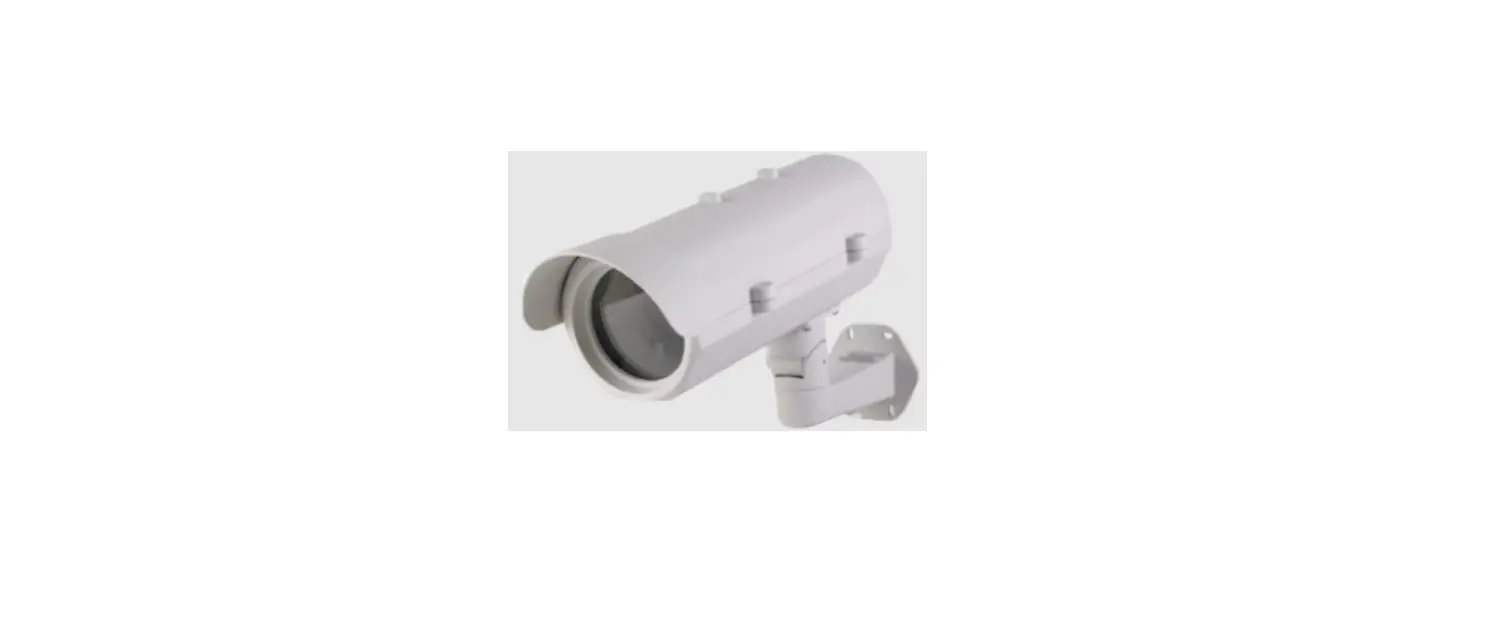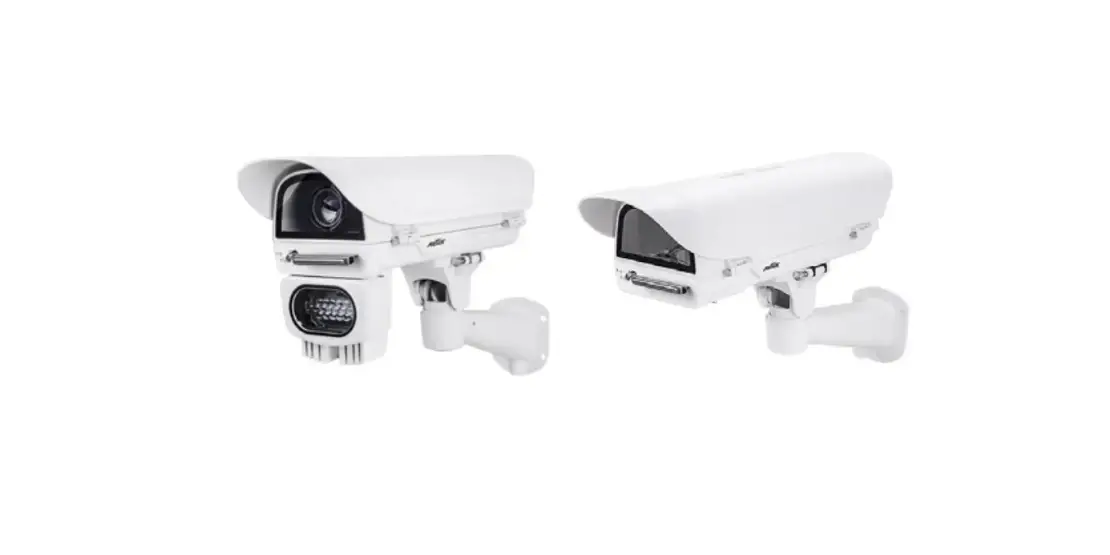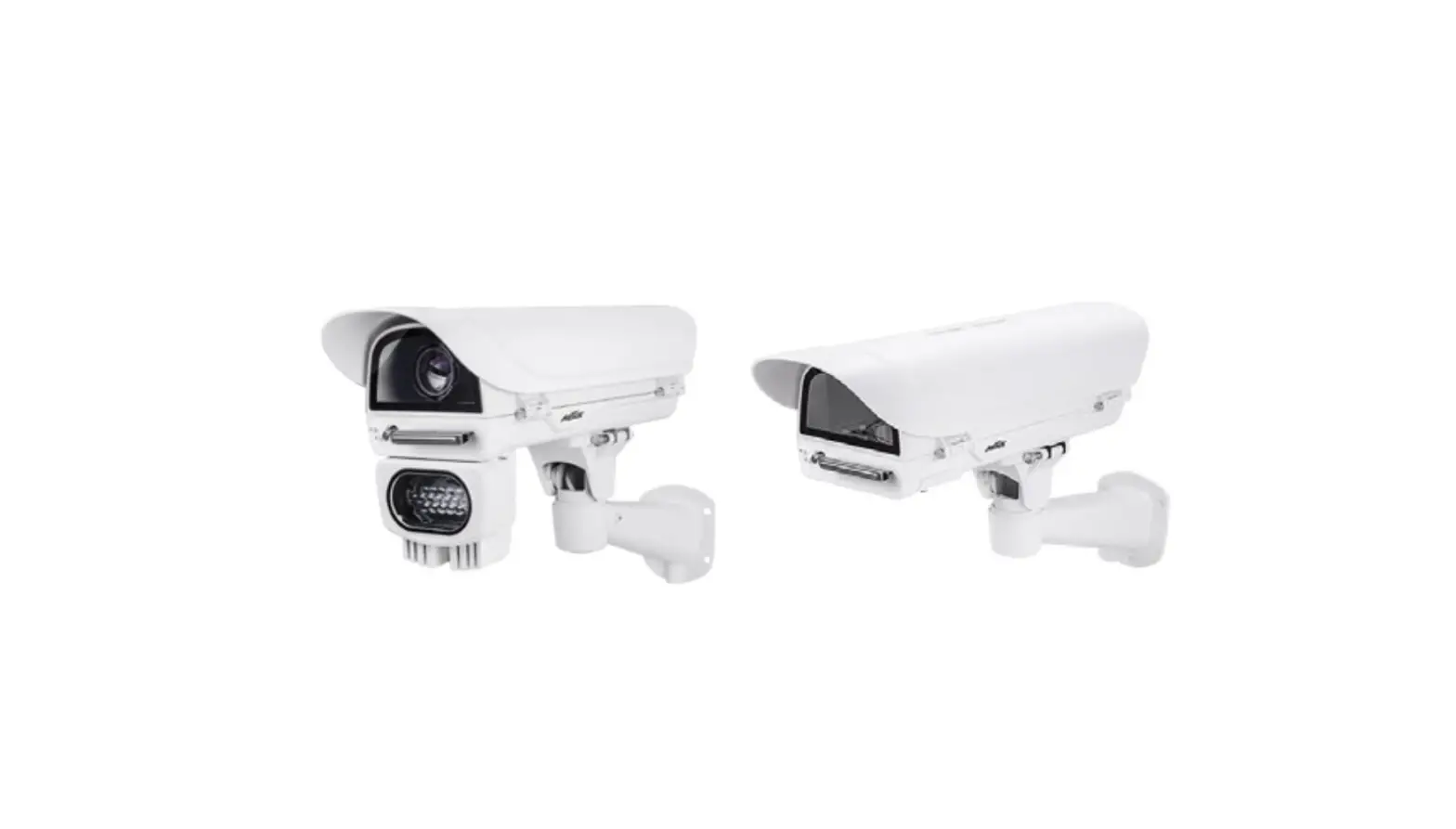
TKH SECURITY HSG04 All Weather Outdoor Housing Camera Installation Guide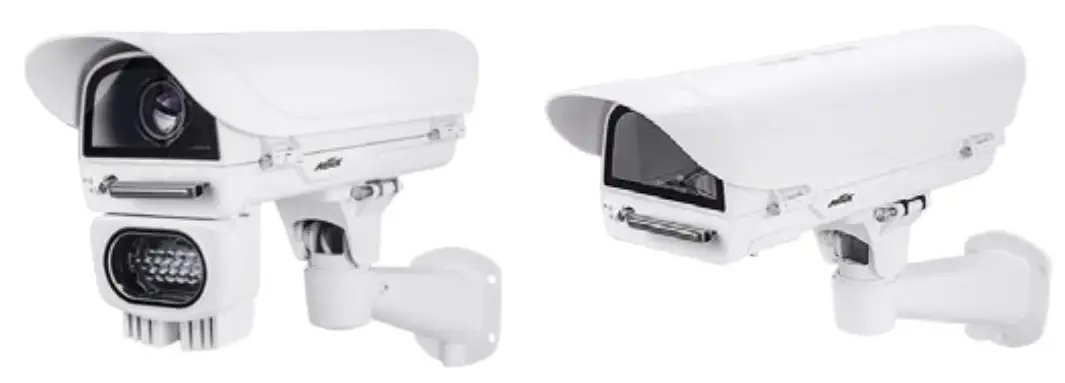
Specifications
| Model Number | / | HSG04 |
| Power Input | / | 24VAC (24VDC Optional) |
| Max. Output power budget | / | 80W, 100W (-AIW) |
| Power Consumption | / | Window heater: 10W; Blower: 2W; Camera: 6 ~ 8W; Cold start heater: 30W |
| Environmental Operation Temp. | / | -20°C ~ +65°C -50°C ~ +50°C (w/ IR) -40°C (Cold start) |
| Window heater ON/OFF | / | ≤ 20°C (68°F) ON; ≥ 30°C (86°F) OFF |
| Blower Control | / | ≥35°C (95°F) ON; ≤ 25°C (77°F) OFF |
| Protection Level | / | IP67, IK10 (IP66 w/ wiper) |
| Construction | / | Die-cast Aluminum Alloy |
| Coating | / | White epoxy powder coating |
| Dimensions | / | 502.8 (L) x 170 (W) x 135.5 (H) mm |
| Net Weight | / | 2,7kg (5.95 lb), 2,8kg (6.18 lb – wiper model) |
If you plan to install this camera enclosure into a tropical, sea coastal, or an environment where salt water or corrosive industrial waste water/moist are present, please seal each stainless steel screws and fittings with a silicon grease compounds. This will help prevent electrolysis to occur and extend the life span of the camera and housing.
IMPORTANT
- Disconnect devices: A readily accessible disconnect device in the building installation wiring should be incorporated.
- Electrical Connection: Only a qualified electrician is allowed to make electrical connections.
Mounting Configuration & Dimensions
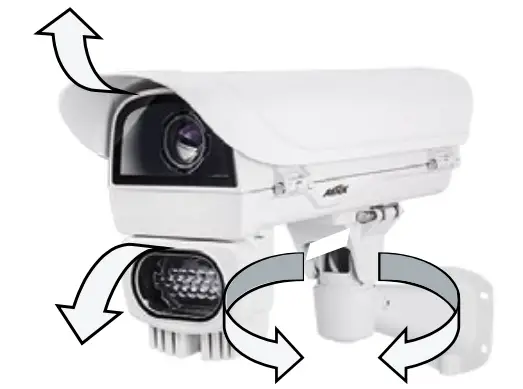
Swivel Positions and Directions
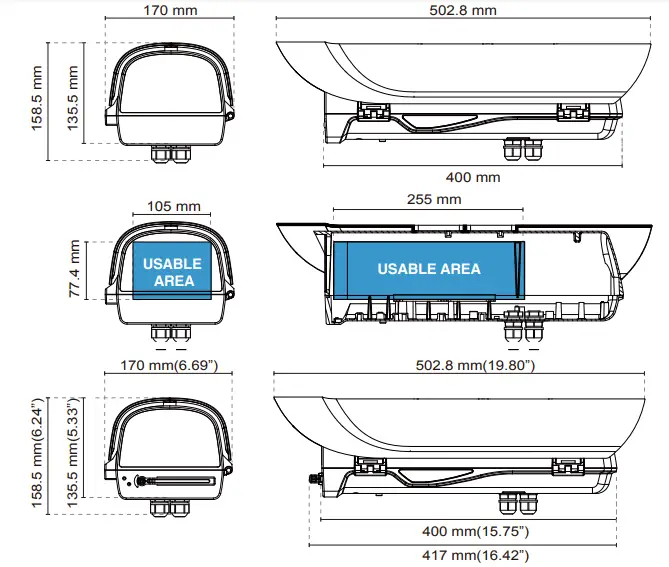
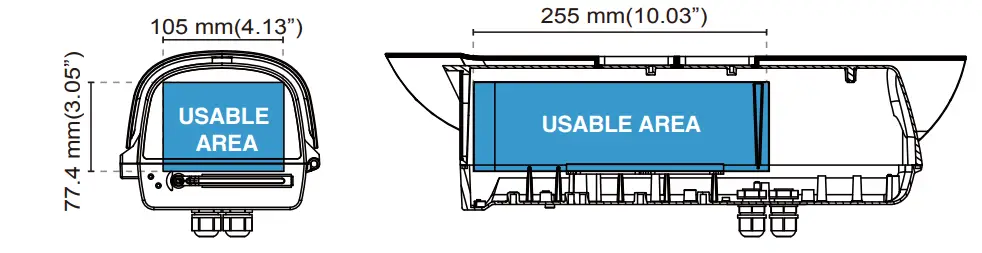
Dimensions with the IR unit and wiper
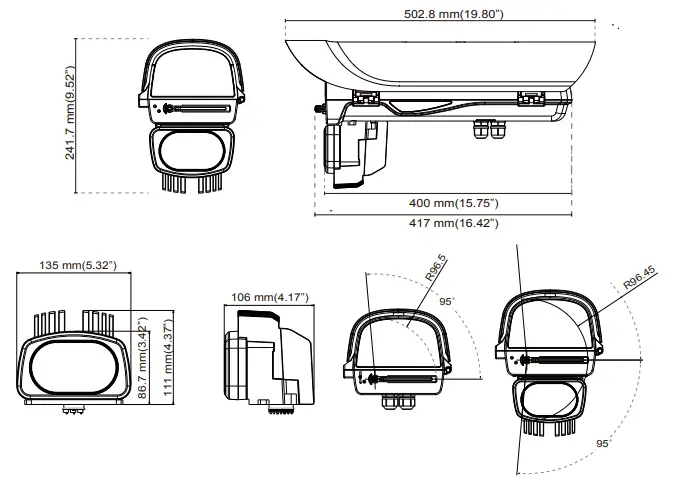
Component Description
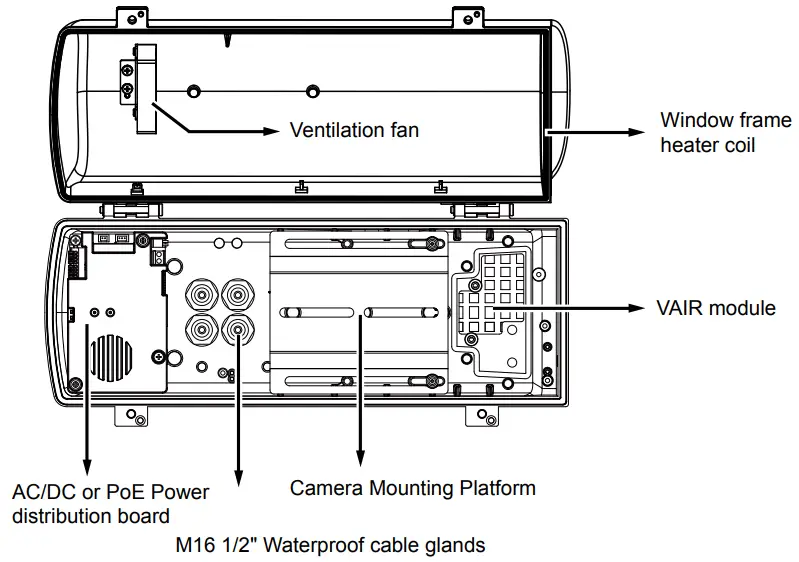
Installation Suggestions
WARNING
When install a housing with an IR illuminator:
Please avoid eye exposure or apply appropriate protection, such as wearing a pair of Infrared protection glasses, when working with the product. Always use camera live view to oberve IR lighting effects.
Installation
- Prepare power wires, a ground wire, and a CAT5e Ethernet cable. Pass them through the M16 waterproof connectors and its waterproof components.
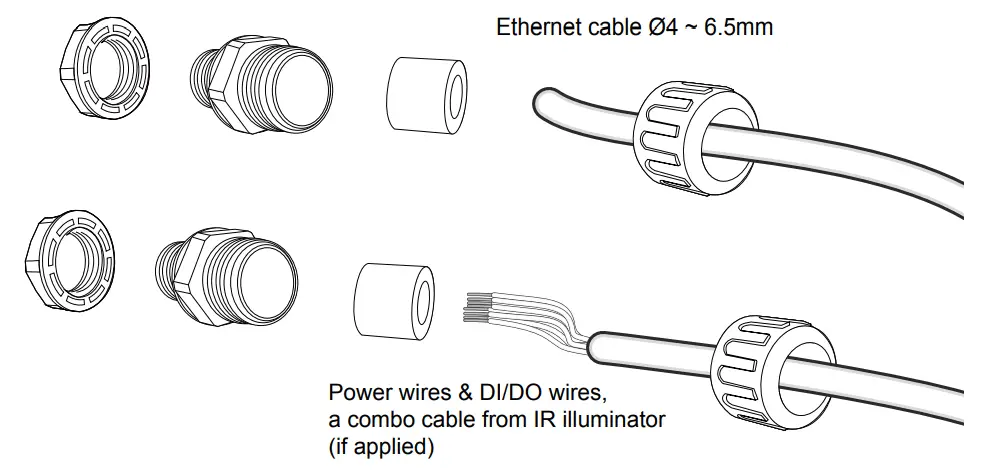
Note that some cables are connected when shipped. You do not need to connect heater, blower, and the front IR power wires.
You may need to remove the RJ45 connector, and use a crimping tool to connect the Ethernet wires to an RJ45 connector inside the enclosure. Use an Ethernet cable of the width of 5 ~ 6.5mm.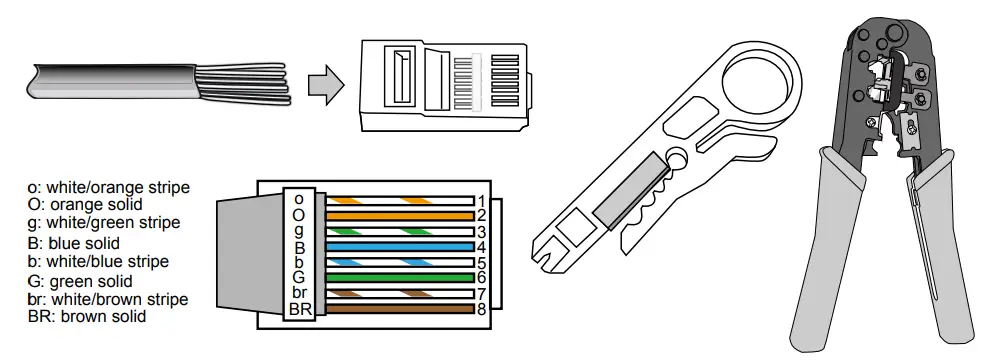
- When done, tighten up and install the waterproof connectors.
- Assemble the camera components, e.g., the CS ring and lens module. Secure the mounting plate to the bottom of the camera (the label side) using the included screw.
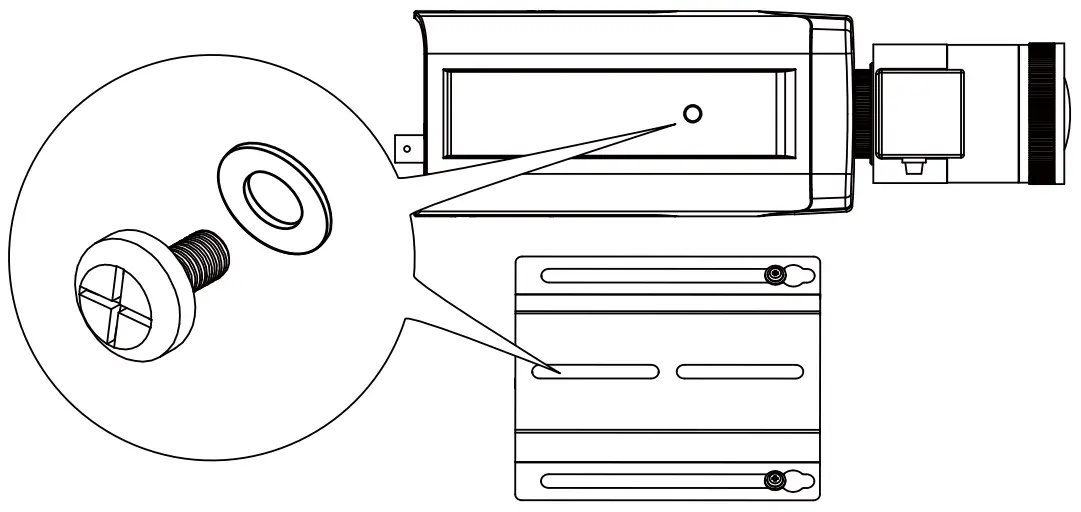
- Adjust the camera’s position so that the lens module can flush align with the tempered glass. Secure the camera using the screws and washers to the bottom of the housing.
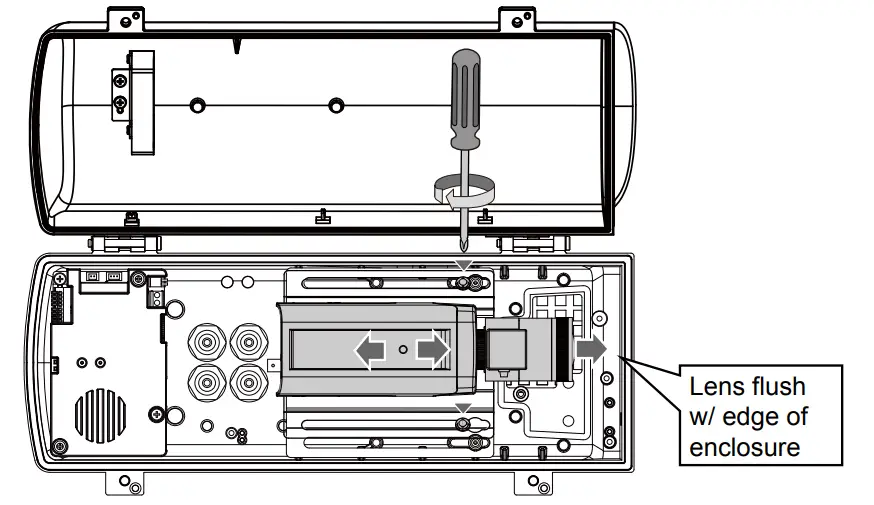
- Connect 24V power source to the power input terminal. Connect power wires from the DC 12V output to the camera. You may also connect the 24V power to drive an external IRs.
Below is the distribution board drawing power from 24VAC (24VDC Optional)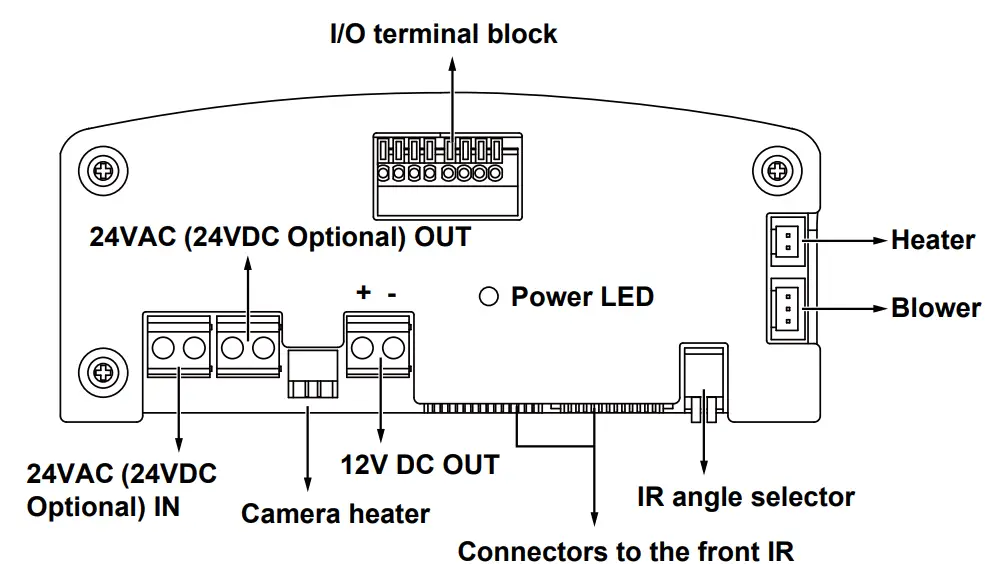
Below is the pinouts for the DI/DO terminal block:
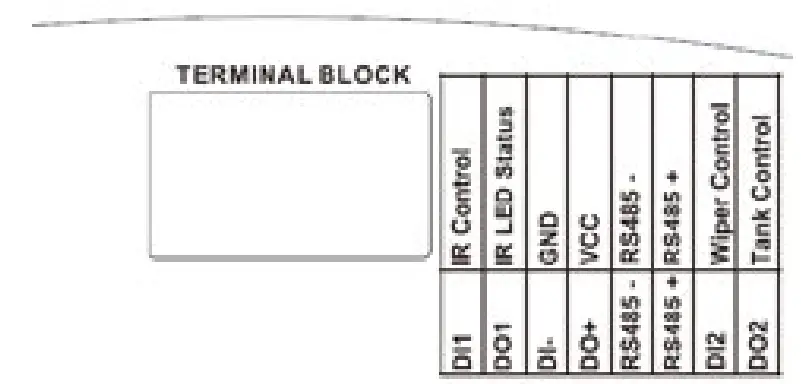
Facing the rear side of the housing, from left to right:
| DO2 | Connect to tank water pump. |
| DI2 | Wiper control, connects to IP camera’s DO for manually triggering washer. |
| RS485+ | RS485+, RS485 can be used to control IR illuminator beam angles, etc. |
| RS485- | RS485- |
| DO+ | +5V VCC |
| DI- | GND |
| DO1 | IR LED status |
| DI1 | IR control, synchronizes day/night mode switching for IP camera. It is related to IR cut filter. |
Configuring IR illuminator
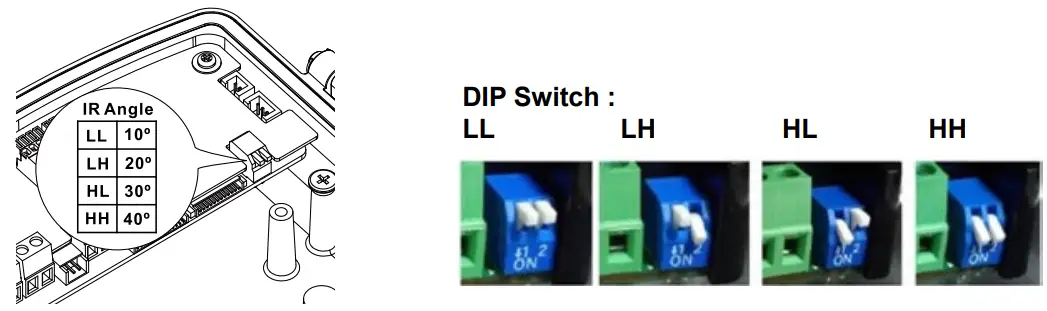
Below are the parameters of the IR illuminator. Use the onboard jumpers to configure the beam angle for different effective illumination range.
| VAIR | VR-481: 48W | VR-241: 24W | VR-120: 12W | |||||||||
| no. of LEDs | 18P | 18P | 2P | |||||||||
| Beam angle | 10° | 20° | 25° | 30° | 10° | 20° | 25° | 30° | 10° | 20° | 30° | 40° |
| Distance (meter) | 350m | 280m | 215m | 150m | 200m | 155m | 115m | 70m | 140m | 110m | 80m | 50m |
| VAIR | VR-060: 6W | |||
| no. of LEDs | 2P | |||
| Beam angle | 10° | 20° | 30° | 40° |
| Distance (meter) | 100m | 80m | 60m | 40m |
Connect the DI/DO signal lines from the distribution board, if applied, to the camera’s terminal block
The day/night mode DI connection enables the synchronization of IR light and the automated day/night switching mechanism on the camera.
A sample use RS485 connection diagram consisting of a housing with IR illuminators and camera is shown below. Please refer to your camera’s documentation if your camera comes with different pinouts.
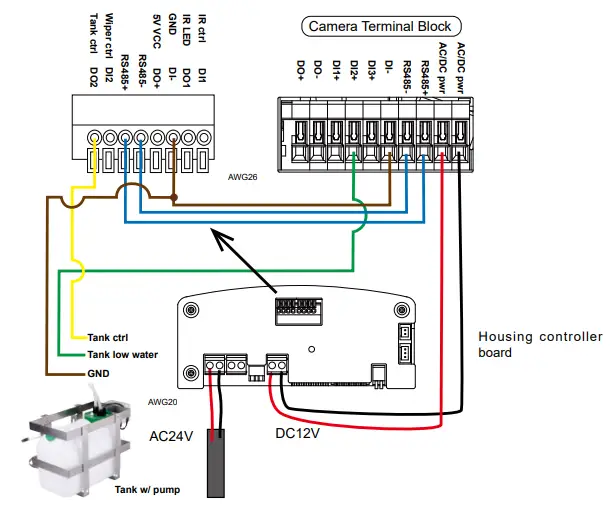
See drawing on the right for the washer kit control board pinouts.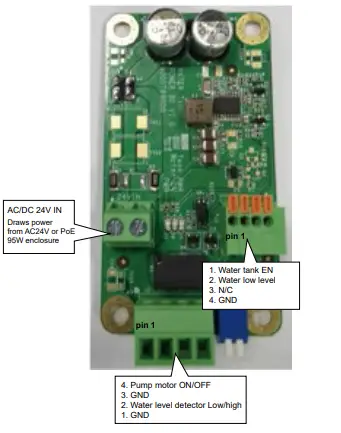
Below is a diagram using wiper control. The wiper can be started by manually triggering the Digital Output from the camera user interface.
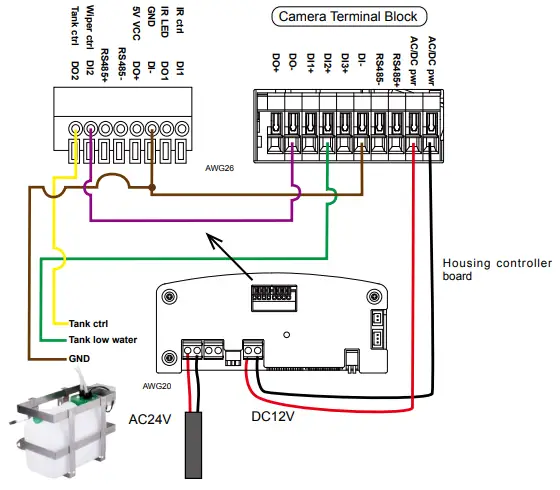
Note the wire gauge requirements for making the power connections. For 24VAC 24W load,
| Wire Gauge | 22 | 20 | 18 | 16 | 14 | 12 |
| Distance | 55 | 90 | 150 | 230 | 270 | 600 feet |
If using the HSG04-WALL wall-mount bracket, secure the intersection bracket to the bottom of the housing by driving two screws.
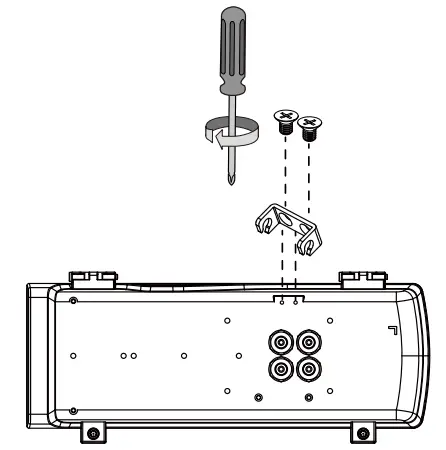
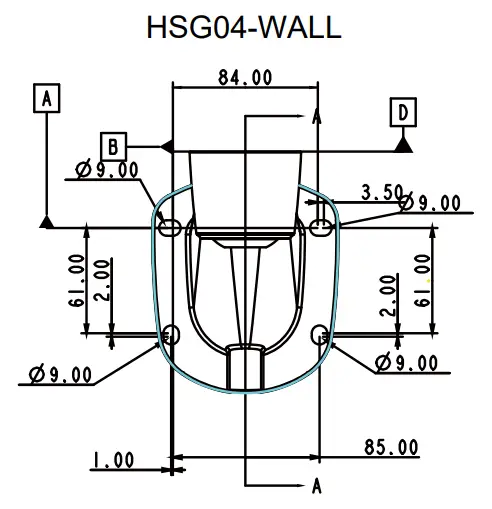
Below are the mounting hole dimensions for the mounting brackets. Chances are you may need to plan for the locations of the brackets.
Install the housing to the wall-mount bracket by aiming and pressing the spring mortise, and hook the bracket onto the groove in the spring mortise.
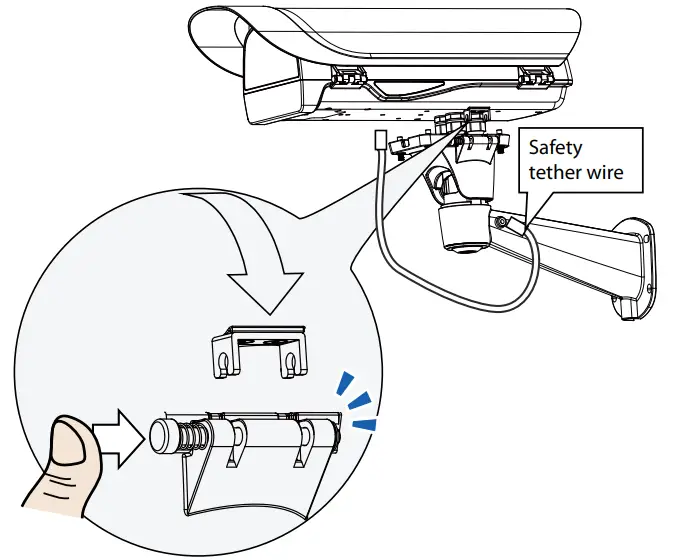
Secure the T30 anti-tamper screws on the other side using the included L-wrench.
Connect the included safety wire between enclosure and bracket.
Adjust zoom and focus and open a web console with the camera to tune for the best image. When zoom and focus is done, Close the top cover and fasten the top cover screws.
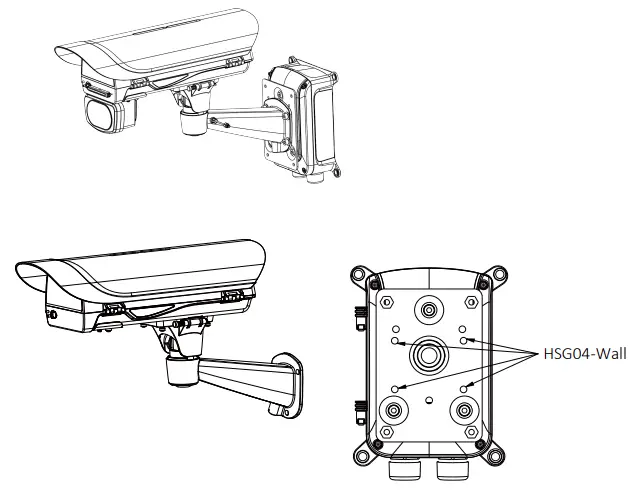
The housing can also be installed using the pole-mount HSG04-Pole option along with a power box (HSG04-Power Box).
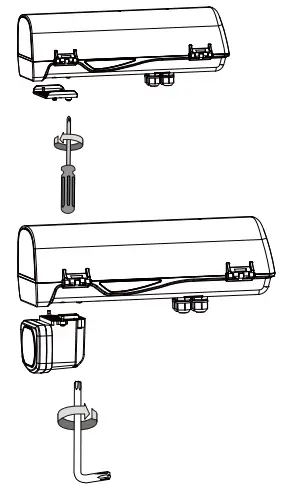
If an IR illuminator is preferred, remove the metal cover from underneath the housing. Install the IR unit (HSG04-IR) by fastening 4 T30 anti-tamper screws. Note that the bubber gasket should be in place when you install the unit.
Appendix: RS485 Commands
For housings that come with IR illuminators, wiper, and washer, commands can be delivered via the RS485 protocol. The RS485 connection uses the Pelco D protocol.
Configuration parameters:
| Baud rate | 2400 |
| Data bits | 8 |
| Parity | None |
| Stop bit | 1 |
Command format:
| Byte1 | Byte2 | Byte3 | Byte4 | Byte5 | Byte6 | Byte7 |
| Sync | Addr | CMND1 | CMND2 | DATA1 | DATA2 | CKSM |
Addr range: 0x00 ~ 0xFE. CKSM: check sum is the last 8 bits of the sum of Byte2 through Byte6.
Command Group 1:
| Command Description | Command (hexadecimal, “ox” is ommited) | Note |
| VaIR Lens Stop | FF 01 00 00 00 00 01 | Pelco D – Zoom Stop |
| VAIR Lens Wide | FF 01 00 40 00 00 41 | Pelco D – Zoom Wide |
| VaIR Lens Tele | FF 01 00 20 00 00 21 | Pelco D – Zoom Tele |
| Wiper On | FF 01 00 09 00 01 0B | Pelco D – Aux 1 On |
| Wiper Off | FF 01 00 0B 00 01 0D | Pelco D – Aux 1 Off |
| Wiper and Washer On | FF 01 00 09 00 02 0C | Pelco D – Aux 2 On |
| Wiper and Washer Off | FF 01 00 0B 00 02 0E | Pelco D – Aux 2 Off |
| IR Led Force On | FF 01 00 09 00 03 0D | Pelco D – Aux 3 On |
| IR Led Force Off | FF 01 00 0B 00 03 0F | Pelco D – Aux 3 Off |
Command Group 2:
| Command Name | Command (hexadecimal, ox is ommited) | Note |
| Addr configuration | FF 01 00 18 01 dd CKSM | dd: 0x00 ~ 0xFE; for example, when addr is 2, the command looks like FF 01 00 18 01 02 1C |
| IRMode | FF 01 00 18 02 mm CKSM | mm: IR mode mm=0x02: Light Sensor Auto (Default) mm=0x03: DI Trigger mm=0x04: via RS485 Command (When receiving IR Led Force On / IR Led Force Off command, will switch to using the IR Mode -RS485 Command) |
| For example, IRmode_Auto FF 01 00 18 02 02 1D IRmode_DI FF 01 00 18 02 03 1E IRmode_CMD FF 01 00 18 02 04 1F | ||
| LightSensorGate | FF 01 00 18 03 LL CKSM | When the IR Mode Light Sensor Auto, the Lux value to turn IR LED can be configured. LL: Lux, changes is made by every10Lux For example: LightSensorGate = 100 FF 01 00 18 03 0A 26 LightSensorGate = 200 FF 01 00 18 03 14 30 |
VaIR: The VAIR control include those on the IR Led and VaIR Lens.
There are 3 IR mode commands
IRMode = Light Sensor Auto (Default)
sensor lux reading < LightSensorGate – LED On
sensor lux reading >= (LightSensorGate + 10 Lux ) – LED Off
IRMode = DI_1 Trigger (IR triggered on by DI
DI _1 shorted DI –(Low) – LED On
DI_1 open (High) – LED Off
IRMode = controlled by RS485 Command (Pelco D – Aux 3 On/Off)
IR Led Force On – LED On
IR Led Force Off – LED Off
DO_1 as IR Status Feedback
LED On, DO_1 is grounded via MOSFET (DI- connected)
LED Off, DO_1 no input
VaIR Lens Zoom control
Dip Switch 4 configurations using the Dip Switch on the distribution board
When Lens stops, its last position will be memoried, and when powered on again, lens will move to the previous position. When powered on for the first time, Lens will follow the DIP switch configuration.
Wiper & Wahser control)
DI_2 Trigger:
When DI_2 connected to DI- (Low), wiper and washer operate for 3 times and then stop.
Using RS485 Command –Wiper Only (Pelco D – Aux 1 On/Off)
Wiper On, wiper takes action
Wiper Off, wiper starts one operation and then stops.
RS485 Command –Wiper & Washer (Pelco D – Aux2 On/Off)
Wiper and Washer On, pumps and spray water with wiper action.
Wiper and Washer Off, spraying and wiping starts one operation and then stops.
DO2 used for spraying control
DO_2 connected to DI- via MOSFET – starts spraying.
Spraying stops, and the LED turns Off when DO_2 is not triggered.