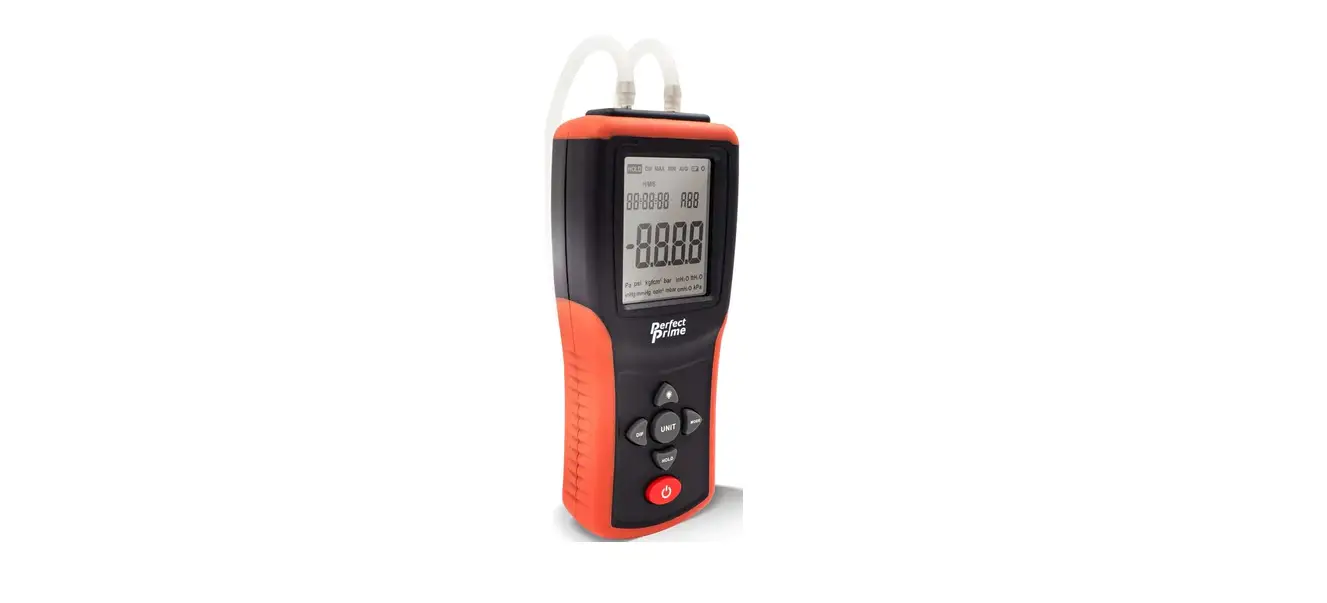

PerfectPrime AR1890 Digital Pressure Gauge
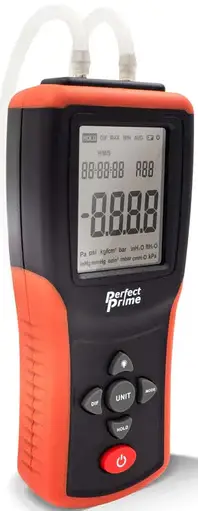
INTENDED USE AND FEATURES
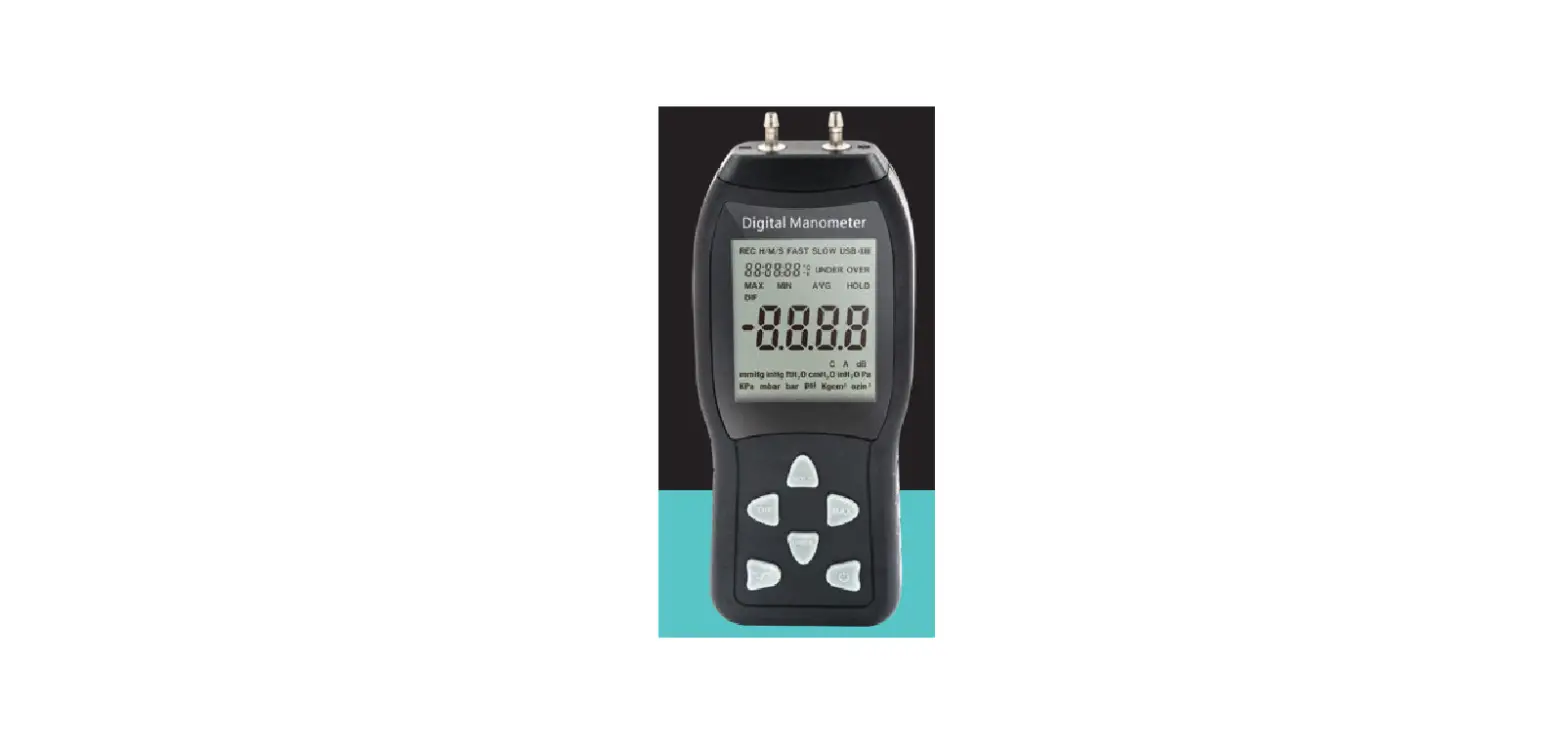
This instrument can measure the air pressure of the single pipe or the pressure difference between two detection ports. It offers 12 units of measurement and advanced features like DATA HOLD, MIN-MAX- AVG mode, ZERO, DATA RECORD, and AUTO POWER OFF. It is widely used in natural gas pipelines, air-conditioning refrigeration, and ventilation systems, mechanical hydraulics, plastic molding, biopharmaceutical molding, mining area pressure detection, gas, liquid, and production industrial equipment pressure detection.
Thank you for purchasing this digital manometer. We recommend that you read and follow the manual care fully before use.
FEATURES
- 12 selectable units of Measurement
- Pressure difference measurement
- Maximum / minimum / average data mode
- Data hold function
- Data storage function with a time stamp
- Zero function
- Low battery alarm
- Automatic power off function
- Over range indicator: Hi, Lo
- USB for power supply
SPECIFICATIONS
- Pressure Range :±2 .000 Psi
- Unit of Measure : Pa , psi , kgfcm2 , bar, inH2O, ftH2O, inHg, mmHg , ozin2 , mbar , cmH2O, and kPa
- Accuracy : ±0.3% FSO (a t 25°C )
- Repeatability : ±0.2% (Max±0.5%FSO)
- Linearity/Hystersis :±0.29% FSO
- Data Storage : 99 groups
- Response Time : 0.5s
- Out of Range Indicator : Hi or Lo
- Automatic Power Off Conditions : No operation for 10 mins
- Operating Conditions : O to 50°C (32 to 122°F)
- Storage Conditions : -10 to 60°C ( 14 to 140°F)
- Power Supply : 1.5V x 3pcs AAA batteries
- Dimensions : 165 X 70 X 33mm
- Weight : 150g (without batteries)
RANGE SPECIFICATIONS
| Function | Range | Resolution |
| Pa | ±9999 | 1 |
| psi | ±2.000 | 0.001 |
| kgfcm² | ±0.140 | 0.001 |
| bar | ±0.137 | 0.001 |
| inH2O | ±55.40 | 0.01 |
| ftH2O | ±4.613 | 0.001 |
| inHg | ±4.070 | 0.001 |
| mmHg | ±103.4 | 0.1 |
| ozin2 | ±32.00 | 0.01 |
| mbar | ±137.8 | 0.1 |
| cmH2O | ±140.6 | 0.1 |
| kPa | ±13.78 | 0.01 |
DISPLAY
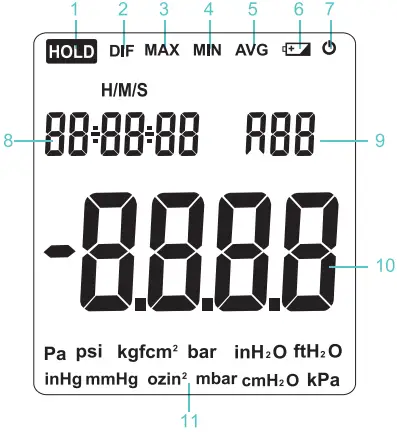
- Data Hold Function
- Differential Pressure Mode
- Max Indicator
- Min Indicator
- Avg Indicator
- Low Battery Indicator
- Auto power off disable Indicator
- Elapsed Time
- Total number of records
- Reading Display
- Pressure Units
METER DESCRIPTION
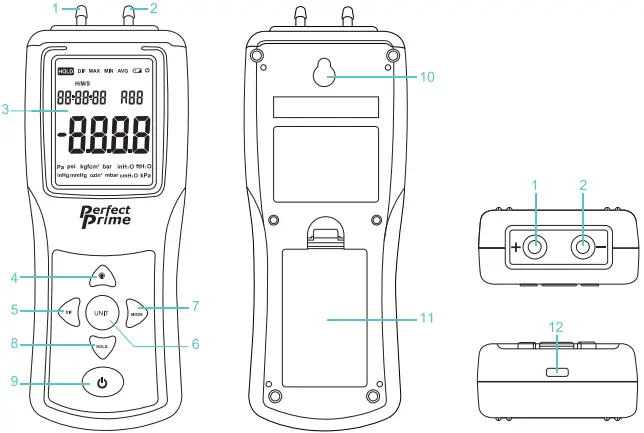
- P1 Tube Connector (+)
- P2 Tube Connector (-)
- LCD Display
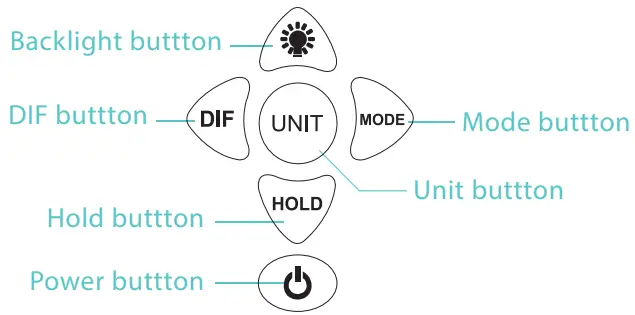
- BACKLIGHT Button
- DIF Button
- UN T Button
- MODE Button
- HOLD Button
- Power on/off Button
- Hanging Hole
- Battery Cover
- USB Socket (for power supply only)
KEY OPERATION
- Power on/off Button
- When the power r is off, short press the
 button to turn the meter on.
 - When the powe is on,
- Short press the button to disable and enable the automatic power off function.
- Press and hold the button to turn off the meter.
In order to conserve battery life, the meter has an automatic power off function (without operation after 10 minutes). The auto power off disable indicator will appear on the display when the auto power off function is disabled. The meter will now remain on until the user turns it off or until the battery runs out.
Note that the Auto Power OFF function will be reactivated the next time the meter is turned off and then on.
- Short press the
- When the power r is off, short press the
- BACKLIGHT BUTTON
- Short press the
 button to store the current measured pressure value with a time stamp (can store up to 99 groups).
 - Press and hold the button to open/close the backlight.
- Short press the
- HOLD BUTTON
- Short press the
 button to freeze/release the displayed reading.
 - Press and hold the button to clear the stored data.
- Short press the
- MODE BUTTON
- Short press the
 button to enter the MAX, MIN, and AVG mode.
- MAX MODE – When in this mode, only the highest (MAX) reading recorded since the button was first pressed will appear on the reading display.
- MIN MODE – When in this mode, only the lowest (MIN) reading recorded since the button was first pressed will appear on the reading display
- AVG MODE – When in this mode, only the average (AVG) reading recorded since the button was first pressed will appear on the reading display
- MAX MODE – When in this mode, only the highest (MAX) reading recorded since the
- Press and hold the button to view the stored data, the no. indicator will appear on the right-hand comer of the LCD display, to indicate that it is in the data review mode. Press the
 or button to view the data one by one.
 - Press and hold the button again to exit the data review mode
- Short press the
- DIF BUTTON
- Short press the
 button to enter P1 and P2 dual channel differential pressure mode. DIF icon will appear on the display.
 - Short press the button again to exit differential pressure mode.
- Press and hold the button to clear the drift zero. (The data before measurement does not return to zero and without fittings attached to the meter) .
- Short press the
- UNIT BUTTON
- Short press the
 button to select the desired measurement unit.
This meter offers up to 12 pressure units. - Press and hold the button to enter the time setting mode.
- While on the time setting mode, short press on the button to exit the time setting mode or save the setting.
- Short press the
- OVER RANGE
 will appear on the display when the pressure reading is over the Maximum range.
 will appear on the display when the pressure reading is below the Minimum range
 will appear on the display when the auto power off function is disabled. The meter will now remain on until the user turns it off or until the battery runs out.
 button to store the current measured pressure value with a time stamp (can store up to 99 groups).
 button to freeze/release the displayed reading.
 button to enter the MAX, MIN, and AVG mode.
 or
or  button to enter P1 and P2 dual channel differential pressure mode. DIF icon will appear on the display.
 button to select the desired measurement unit.
 will appear on the display when the pressure reading is over the Maximum range.
 will appear on the display when the pressure reading is below the Minimum range
BASIC OPERATION
- Short press the button to turn on the meter and select the desired measurement unit by pressing the button.
- The reading before measurement and without fittings attached to the meter should return to zero. If not, need to ZERO the meter by pressing and holding the button for 3 seconds or until the display shows all zeros.
- Press and hold the button to enter the time setting if needed. The current setting value will be blinking on the LCD, press the or button to increase or decrease the value. Once the current setting value is done press the or button to move forward or backward to the next value setting. Short press the button to save the setting when all are done.
- Connect the tubing to the P1, P2 (or both ) input port(s). If both inputs are used (D IF mode ), the meter displays a positive pressure reading if the P1 pressure is greater than P2 and a negative reading if P2 is greater than P1.
- Short press the button to store the current measured pressure value with a time stamp (can store up to 99 groups ).
Note that once the stored data reached the 99 groups, it will start to record from scratch (the first group R0 1) if you still press the button to record. The previous records will be cleared up. - Press and hold the button to view the stored data, the no. indicator will appear on the right-hand corner of the LCD display, to indicate that it is in the data review mode. Press the or button to view the data one by one.
- To clear up the stored data, press and hold the button for 3 seconds
BATTERY REPLACEMENT
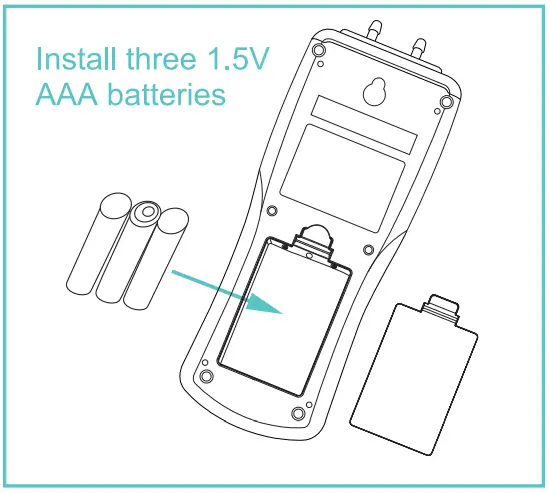
If the meter is not turning on even when the  button is pressed or if the display shows
  replace the batteries with 3 pieces of AAA 1.5V battery
Dispose of the battery in an environmentally safe recycling point. DO NOT DISPOSE IN YOUR BIN
TROUBLESHOOTING
- Power on but no display or the display disappears
- Check the batteries if they are in place (in proper contact with the pins) and incorrect polarity.
- Remove the battery for one minute and re-install.
- Replace the batteries.
- For all other issues please contact your supplier.
CONVERSIONS
Useful conversion Factors
| From | To | Multiplier |
| in of H2O | in of Hg | 0.07355 |
| in of H2O | cm of H2O | 2.54 |
| mm of Hg | in of H2O | 0.03937 |
CUSTOMER SERVICE INQUIRIES
- Your emails are important to us so we strive to reply all inquiries and emails within 24 hours. In exceptional cases, we may require more time to respond.
Thank you for your understanding. - For more information about our products and services, please send us an email: [email protected]
- For B2B or project-based application, please send an email: [email protected]
- FOR MORE INFORMATION ABOUT PERFECTPRIME PLEASE VISIT OUR ABOUT US PAGE AND FEEL FREE TO BROWSE.
- Scan QR Code for the Youtube channel for video manual

- Scan QR Code for the Product Manual page (Multi-Language available for certain products)

- Scan QR Code to register the product for 1 year warranty

- Retailer: HORMES LIMITED
- Email: [email protected]
- Address: G/F UNIT 3, 61 GLENTHORNE ROAD, LONDON W6 0LJ UNITED KINGDOM
- Telephone: +44 203 7695377